Secure Downloads

Secure Downloads
Description
Secure Downloads plugin generate secure download links for protected files and can send emails to your clients for downloading.
Links can expire after a predefined time, and you can set IP lock for specific download. Download links does not show real location of files at your server.
You can track every download of files by receiving email about file download with detailed info about download.
FEATURES
- Securely distribute your files and track every download.
- Upload your files via familiar WP interface.
- Define Title, Description and Version Number at “Attachment details” for your protected files
- Plugin upload files into secure, protected folder. Website visitors will not have direct access to such files.
- Generate secure links to your protected files, which does not show real location of file.
- Links can expire after specific time.
- Links can be locked to specific IP or IP mask (network).
- Configure email template with different parameters.
- Send emails to your customers with secure links for download your protected files.
- Monitor downloading of each file, by receiving email notification about file download with detailed info about download.
- Fast configure your protected files via CSV form. Useful for saving or editing list of files in one form.
- Easy reorder list of files via drag and drop interface.
- Configure URLs for pages with warning, like “link expired notice”.
- Mobile friendly.
SECURE DOWNLOADS IS GREAT FOR
- Distribute you files after purchase
- Delivery updates of your products to your customers
Installation
Automatic installation
To do an automatic install, log in to your WordPress admin panel, navigate to the Plugins menu and click Add New.
In the search field type “Secure Downloads” and click Search Plugins.
Once you’ve found the plugin you can view details about it such as the the point release, rating and description.
Now, you can install it by clicking “Install Now”.
Manual installation via WordPress admin panel
- Download plugin zip file to your computer
- In your WordPress admin panel, navigate to the Plugins menu and click Add New.
- Click “Upload Plugin” button and hit “Choose File” button
- When the popup appears select your downloaded zip file of plugin
- Follow the on-screen instructions and wait as the upload completes.
- When it’s finished, activate the plugin via the prompt. A message will show confirming activation was successful.
Manual installation via FTP
- Download plugin zip file to your computer and unzip it
- Using an FTP application, or your hosting control panel, upload the unzipped plugin folder to your WordPress installation’s
wp-content/plugins/directory. - In your WordPress admin panel, navigate to the Plugins menu and find your uploaded plugin
- Click on Activate link under the plugin. A message will show confirming activation was successful.
That’s it!
Screenshots
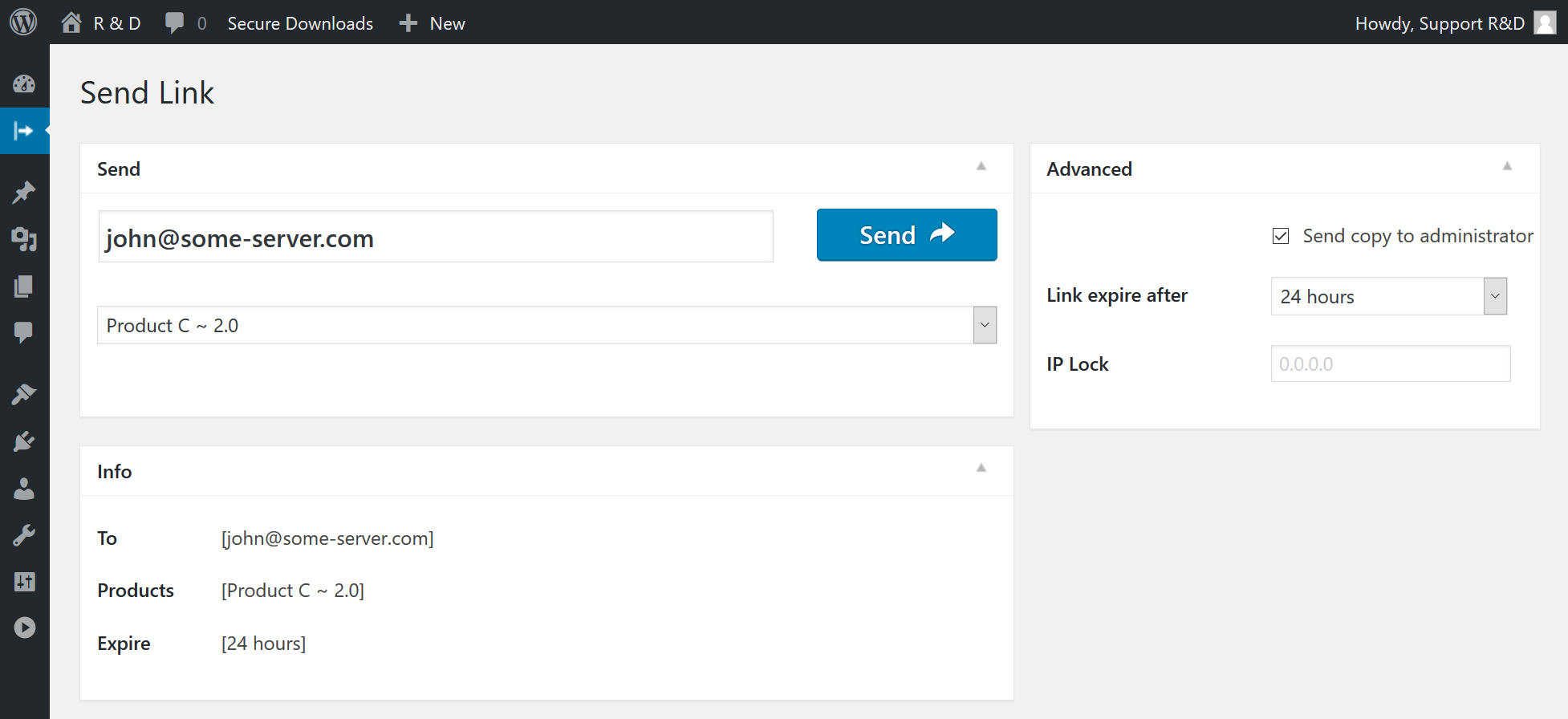
Send or simply generate secure download links to your protected files.

Sortable List of your files - edit and sort (drag and drop) list of your protected files.

CSV List of your files - upload files to protected folder, edit file title, description, and version number.

Settings - configure different options.

Emails - activate and configure email template for sending to your customers and download notification email.

Email Delivery - confirmation of email sending.
Faq
- Open Secure Downloads > Files menu page in WordPress admin panel
- Click on “Add New” button and upload your files. Please note, you must to upload new files via menu of plugin, for saving these files secure. Do not use previously uploaded files via standard media/pages/posts uploader.
- Enter Title, Version Number and Description at “Attachment details” section.
- Select one or multiple files, click insert button and Save changes.
- Open Secure Downloads > Settings menu page in WordPress admin panel
- Configure different settings, like secret key for hash generating, warning URLs, default options, etc…
- At Secure Downloads > Settings > Emails menu page you can configure email templates that are sending to your customers and administrator
- Open Secure Downloads menu page in WordPress admin panel
- Select specific file in selectbox
- Optionally enter email, if you need to send protected link to your customer
- Configure link expire time, optionally configure IP loc for file download, and activate option to send copy of email to administrator
- Click on Generate or Send button for generation or sending email with secure link to your protected file
- Check status of action
Plugin supports following languages:
- English
- PHP 5.2.4 or newer,
- MySQL version 5.0 or newer,
- WordPress 4.0 or newer,
- jQuery 1.7.1 or newer
Reviews
Fantastic Secure Way To Deliver Huge Digital Downloads On Marketplaces
By 
Selling big digital downloads that exceed Etsy, eBay or other marketplace file size limitation can be solved by using this plugin on your WP/woo site to quickly generate secure link for customers. I create a PDF info file for the marketplace product download that states for the customer to email me their order number along with email address to receive the file download link.
Nice if option to limit number of times that download link can be used such as 1, 3, etc… Time limit of 24 hours by default is used which is good. There are many choices from a drop down menu. Great that you can edit your email template.
THIS IS NOT A SUPPORT REQUEST, just stating a fact that may help other users evaluate using this plugin!
Works as should, however my tested emails ended up in spam. It would cause problems if customers notification emails all went to spam. It would waste my time to tell them to check junk/spam. Settings says my email address. Otherwise, I highly recommend this plugin for creating on the fly links that email to customers who purchased from marketplaces where your file is too large. This wil lbe fantastic plugin if customers receive the email to their inbox!
**You can generate a secure link without entering an email. Then you can use the marketplace communication or direct email of your choice to send the copied link.
Does not seem to work for filetypes I attempted.
By 
Perhaps this plugin is only for text and HTML but I decided to try it as no specific filetypes were specified. I performed a test using the default text file and it worked fine.
Later I attempted to send .fbx, .mp3, .wav, and .zip files. None of these filetypes seemed to work. Each email showed the file was 0 bytes in size upon receiving, and the download links redirected to the 404 error page.
I gave 3 stars as this likely works for some users use cases, just didn't work out for what I tried.
Doesn't work for files over 100M
By 
I spent an afternoon setting it all up with multiple emails and working with my hosting company trying to get it to work with some 300M zip files, only to find out it is not working with files of more "than about 100M". A big waste of my time for a specification that should be stated in the plugin description and documentation.
Poor/non-existent documentation, confusing GUI, grammatical errors on website
By 
Totaly messed with my site
By 
Great plugin!
By 
EXACTLY what I needed
By 
I am getting fatal error
By 
Amazing plugin for Digital Download Management
By 
Great plugin
By 
Changelog
1.2.5
- Fix Notice: Function _load_textdomain_just_in_time was called incorrectly.
1.2.4
- Fixed Fatal error: Uncaught Error: Call to undefined function oper_plugin_url() in opsd-css.php
1.2.3
- Fixed a vulnerability that could occur if a WordPress user had access to the plugins menu (in the WordPress admin panel) and that user saved links that were not what they expected. The file link must contain a secret folder and no longer supports “up-leveling”.
- Updated UI of settings tabs with a modern design. (2.0.3.1)
- Removed premium addon links in admin panel.
1.2.2
- Added never expire products option (1.2.2.2)
- Load some CSS files only at admin panel (1.2.2.1)
1.2.1
- New. Icon for WordPress side menu. (2.0.1.2)
1.2
- Compatibility. Support WordPress 5.7 – update of admin panel styles. (1.2.1)
- Fix Warning Deprecated: The each() function is deprecated. (1.2.2)
- Fix Deprecated: Function get_magic_quotes_runtime() is deprecated(1.2.3)
1.1.5
- Compatibility. Support WordPress 5.5 – update of admin panel styles. (1.1.5.1)
1.1.4
- Compatibility. Support WordPress 5.3 – update of admin panel styles. (2.0.13.1)
- Under Hub Added hook: ” add_filter( ‘opsd_define_ip_mask’, ‘my_opsd_define_ip_mask’, 10, 1 ); function my_opsd_define_ip_mask ( $ip_mask ){ return $ip_mask } ” for ability to override mask for IP (1.1.4.2)
- Fix Checking of saving closing window state (nonce of window) in Ajax request only for current plugin (1.1.4.1)
1.1.3
- Fix Notice: Array to string conversion in ..\secure-downloads\core\any\api-emails.php (1.1.3.1)
- Under Hub Ability to use action for programmatically send secure email. (1.1.3.2) Example: do_action( ‘opsd_send_secure_download_email_to_user’, array( ‘opsd_email_to’ => ’email@server.com’, ‘send_copy_to_admin’ => ‘Off’, ‘opsd_product_selection’ => 1, ‘opsd_product_expire’ => ‘+ 24 hours’, ‘continue_without_product’ => false ) );
1.1.2
- Fix conflict issue with Booking Calendar plugin (1.1.2.1)
- Fix Fatal error: Uncaught ArgumentCountError: Too few arguments to function opsd_recheck_plugin_locale()… in PHP 7.2 (1.1.2.2)
- Fix Notice: A non well formed numeric value encountered in … in PHP 7.2 (1.1.2.3)
- Fix Possible Fatal error: Cannot redeclare debuge_log(), if used with some other new plugins. (1.1.2.4)
- Fix Error “404 Not found” “../assets/libs/chosen/chosen.css” (1.1.2.5)
- Fix Notice: A non well formed numeric value encountered in ../opsd-class-notices.php in PHP 7.2 (1.1.2.6)
1.1.1
- Fix issue of checkboxes and radio buttons height in new Firefox updates in admin panel, otherwise sometimes, there exist weird artefact (1.1.1.1)
1.1
- Add additional warning text about ngnix servers. (1.1.1)
- Load JavaScript variables only for admin panel (1.1.2)
- Fix. Issue Fatal error: Uncaught Error: [] operator not supported for strings in ..\wp-content\plugins\secure-downloads\core\admin\api-settings.php:552 (1.1.3)
- Fix. Issue ( ! ) Notice: Array to string conversion in …\class-admin-settings-api.php:929 (1.1.4)
- Improvement Updated all links from http to https of plugin website.
- Improvement Auto select product based on ‘product_name’ parameter in URL (1.1.5)
- Improvement Auto select product based on ‘product_id’ parameter in URL (1.1.5)
- Improvement Auto insert email based on ’email’ parameter in URL Example: www.server.com?page=opsd&email=someemail%40server.com&product_name=text_file (1.1.5)