Secure Passkeys
Secure Passkeys
Description
Secure Passkeys is a powerful WordPress plugin that enables seamless passwordless authentication using WebAuthn technology. By eliminating the need for traditional passwords, it enhances security and improves the user login experience. With support for biometric authentication, security keys, and device-bound credentials, Secure Passkey provides a robust and user-friendly solution for modern authentication.
Unlike traditional password-based authentication, Secure Passkey leverages cryptographic key pairs to ensure secure logins. The private key remains securely stored on the user’s device, while the public key is registered with the WordPress site. This method protects against phishing attacks and password breaches, ensuring that only authorized users can gain access.
Secure Passkeys integrates effortlessly into WordPress, allowing users to register and manage their passkeys from their profile settings. Once registered, users can log in using their fingerprint, face recognition, or a hardware security key without the need to remember or enter a password.
Features
- Passwordless Login: Secure authentication via WebAuthn with biometric devices, security keys, Touch ID, Face ID, and more.
- Enhanced User Experience: Password-free login for a smoother user journey.
- Integration Support:
- WordPress default login form
- WooCommerce login page
- MemberPress login form
- Easy Digital Downloads login form
- Ultimate Member login form
- Admin Management: Administrators can delete, activate, or deactivate users directly from plugin settings or user profiles.
- Passkeys Reminder Notice: New option to enable or disable the passkeys reminder notice in the WordPress admin area for users who have not yet enabled passkeys.
- Activity Logging: Monitor activity logs and track last login/registration of passkeys.
- Multiple Passkeys: Supports multiple passkey registrations per user, with the option to set a registration limit or allow unlimited registrations.
- Role Restrictions: Restrict and exclude specific user roles from using passkey authentication.
- Customizable Settings: Adjust timeout settings for passkey registration and login.
- User Verification: Enforce user verification for enhanced security.
- Frontend Customization: Easily customize frontend themes or add your own with basic frontend skills.
- Theme Support: Supports pre-built themes like YOOtheme (UIkit) for frontend shortcodes.
- Shortcodes: Embed passkey login and registration forms on custom frontend pages.
- Passkey Display: Show passkey details in admin user lists and profiles.
- Multisite: Supports WordPress Multisite and single-site installations.
- Database Optimization: Option to allow or disallow automatic deletion of old challenge records and activity logs (configurable schedule).
Requirements
- WordPress 6.0 or newer.
- PHP version 7.4 or newer.
License
Secure Passkeys is licensed under the GNU General Public License v2 or later.
Installation
Minimum Requirements
- PHP 7.4 or greater is recommended
- MySQL 5.6 or greater is recommended
Automatic installation
Automatic installation is the easiest option — WordPress will handles the file transfer, and you won’t need to leave your web browser. To do an automatic install of Secure Passkeys, log in to your WordPress dashboard, navigate to the Plugins menu, and click “Add New.”
In the search field type “Secure Passkeys” then click “Search Plugins.” Once you’ve found us, you can view details about it such as the point release, rating, and description. Most importantly of course, you can install it by! Click “Install Now,” and WordPress will take it from there.
Manual installation
Manual installation method requires downloading the Secure Passkeys plugin and uploading it to your web server via your favorite FTP application. The WordPress codex contains instructions on how to do this here.
Screenshots
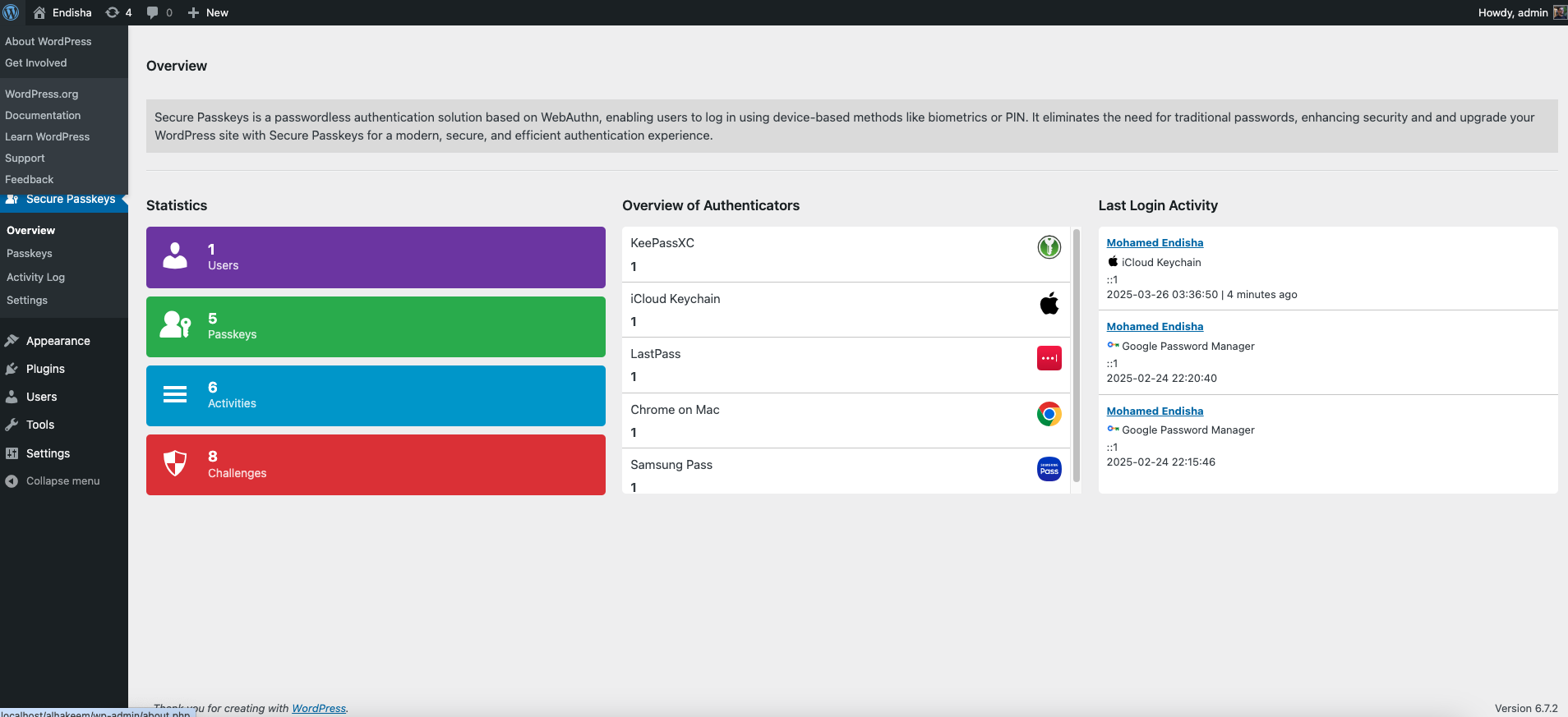
Overview
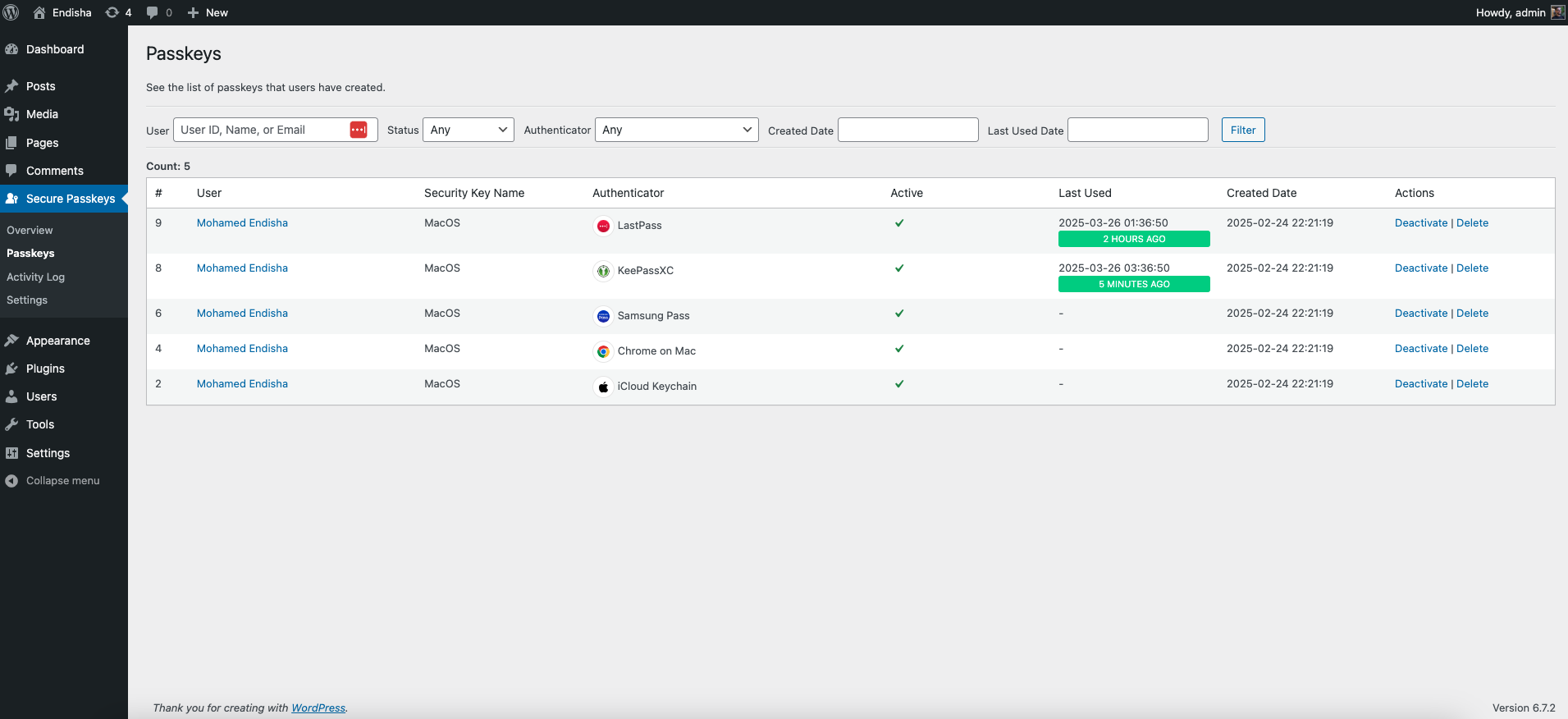
Passkeys
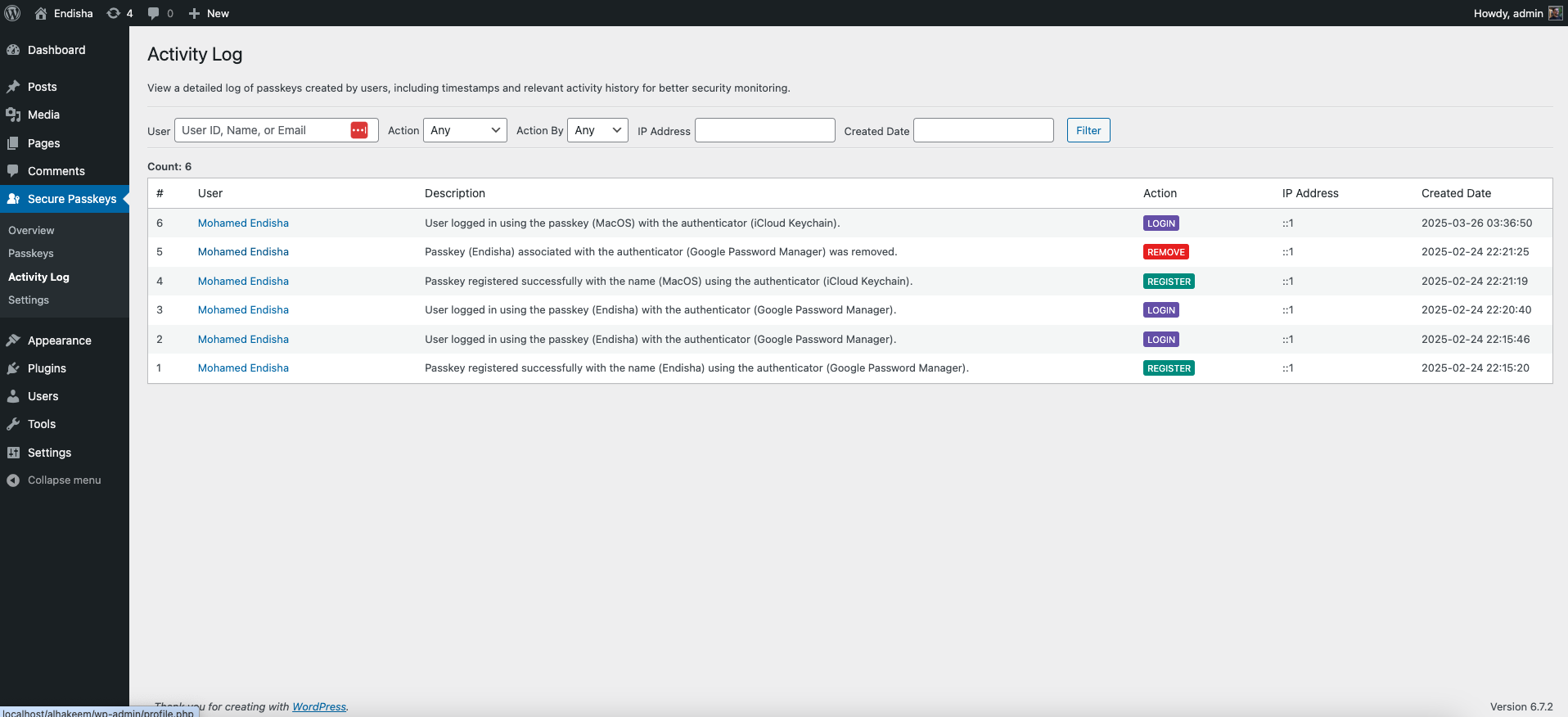
Activity Log
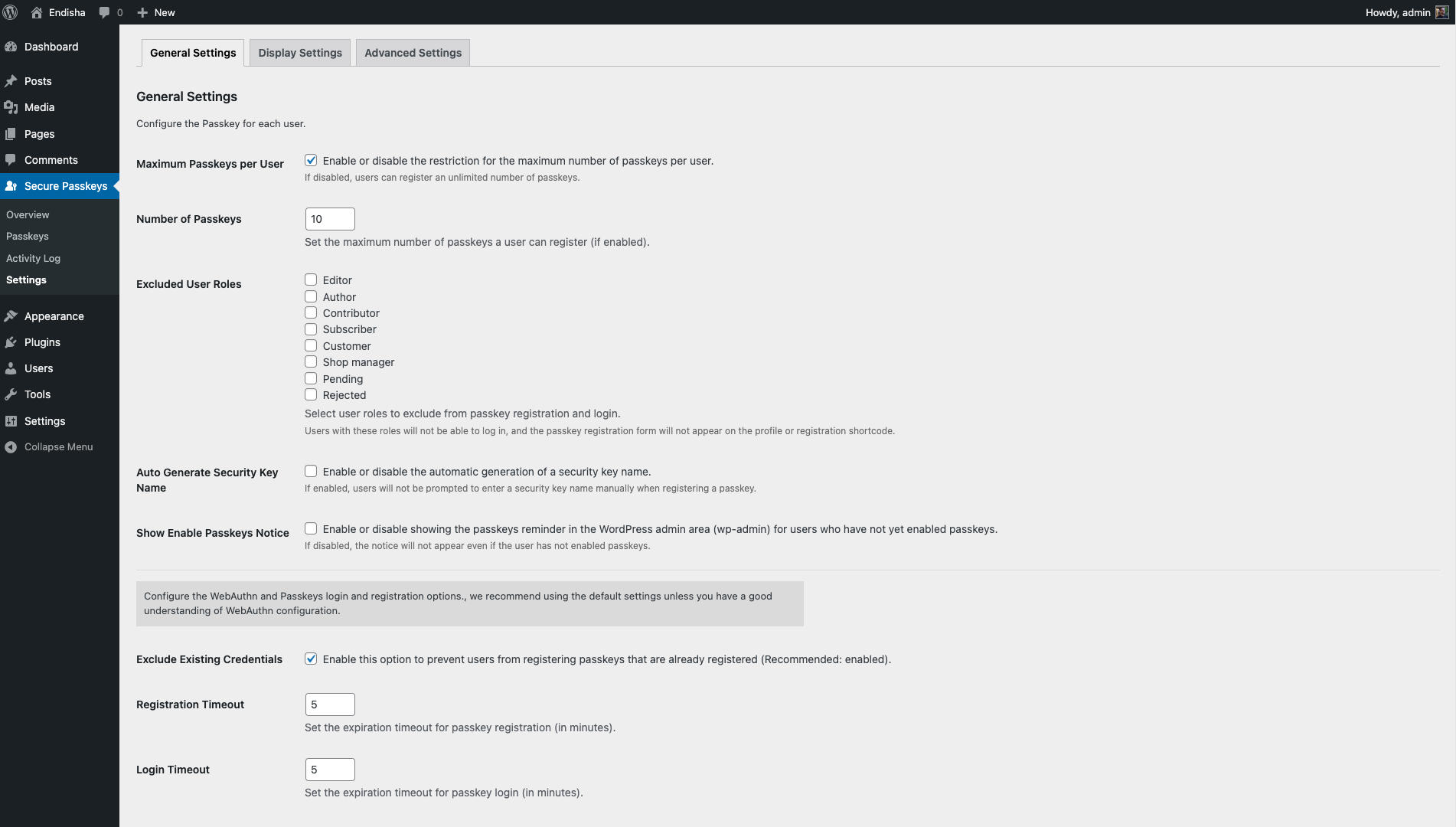
General Settings
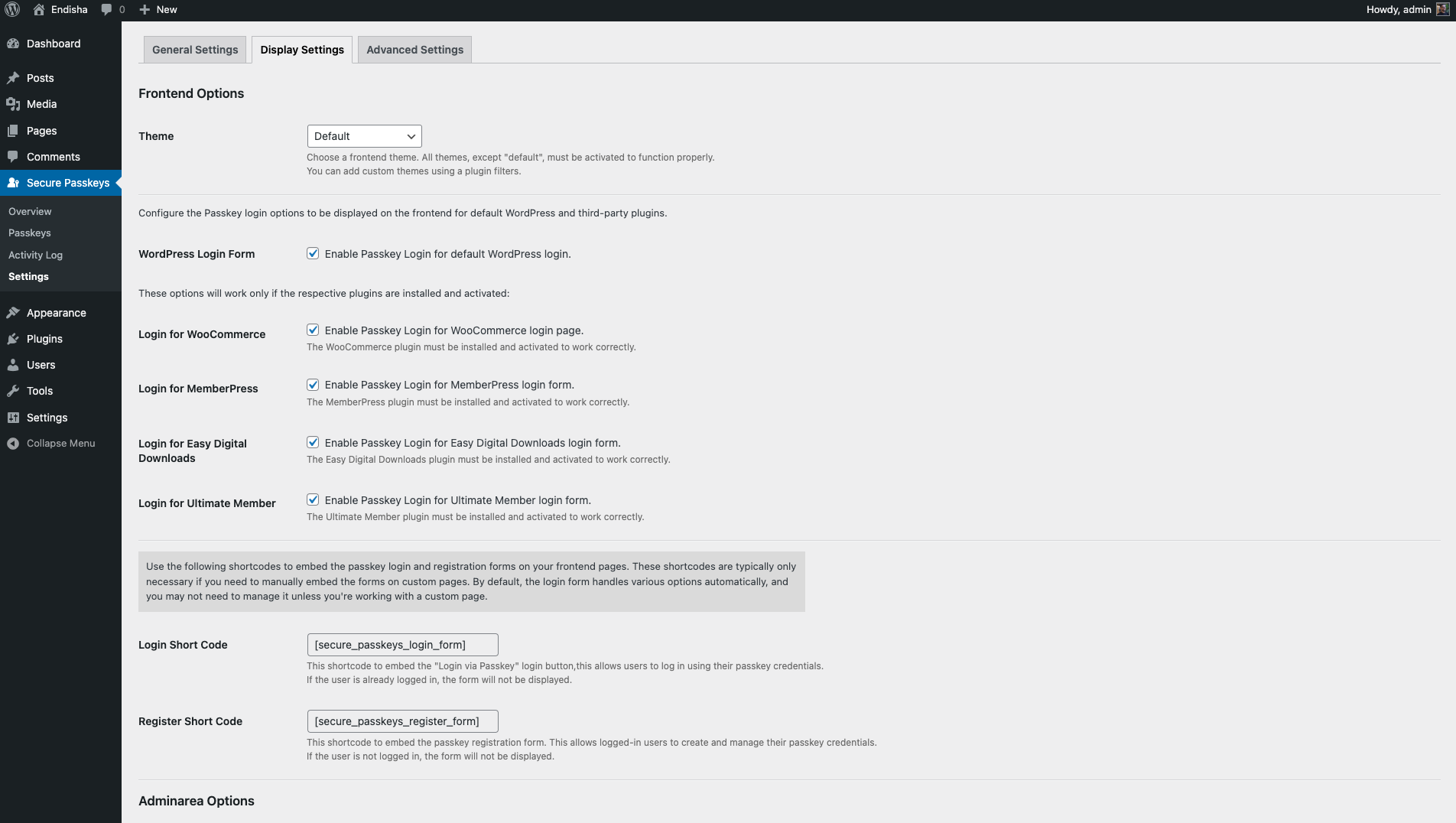
Display Settings
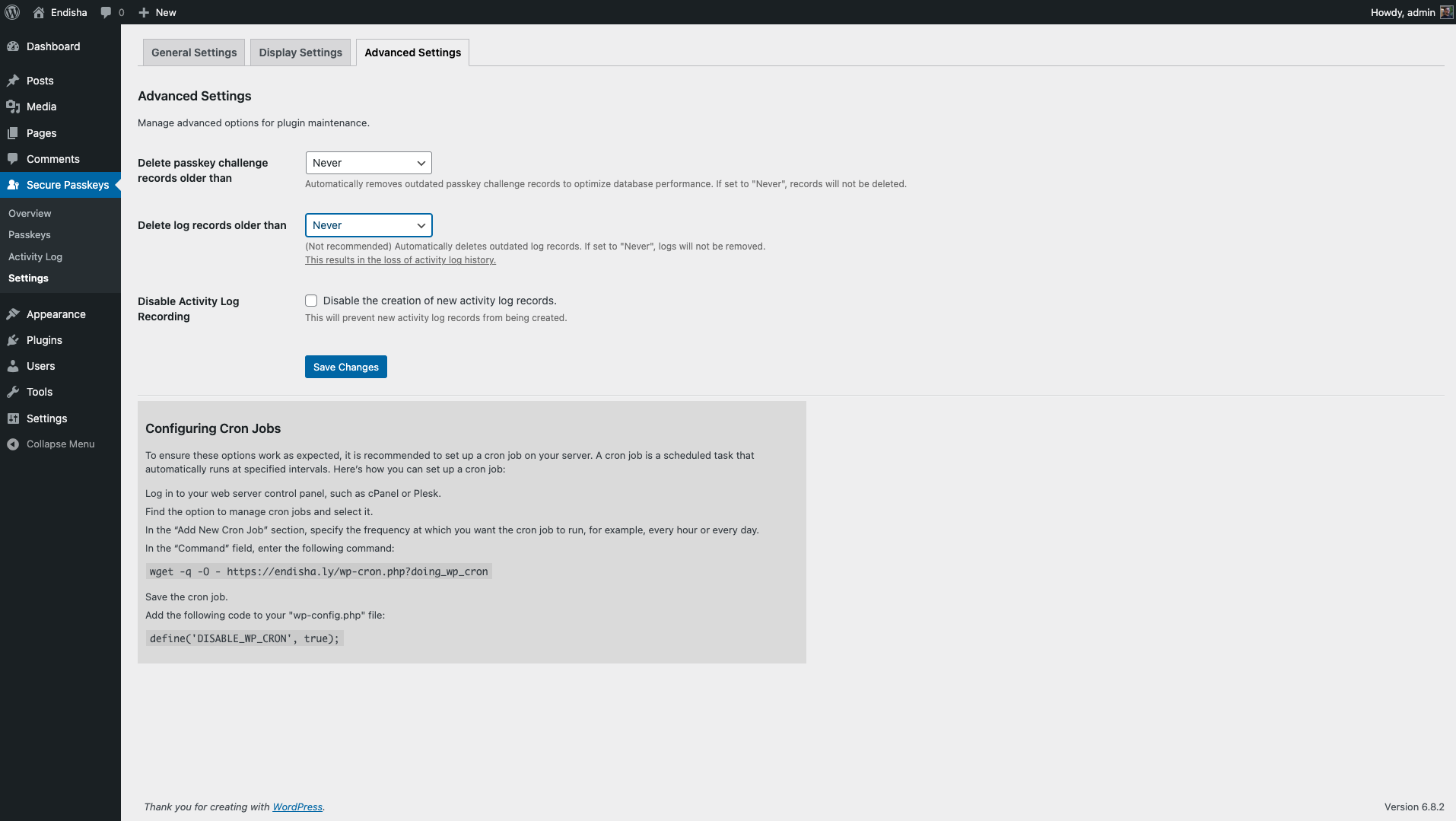
Advanced Settings
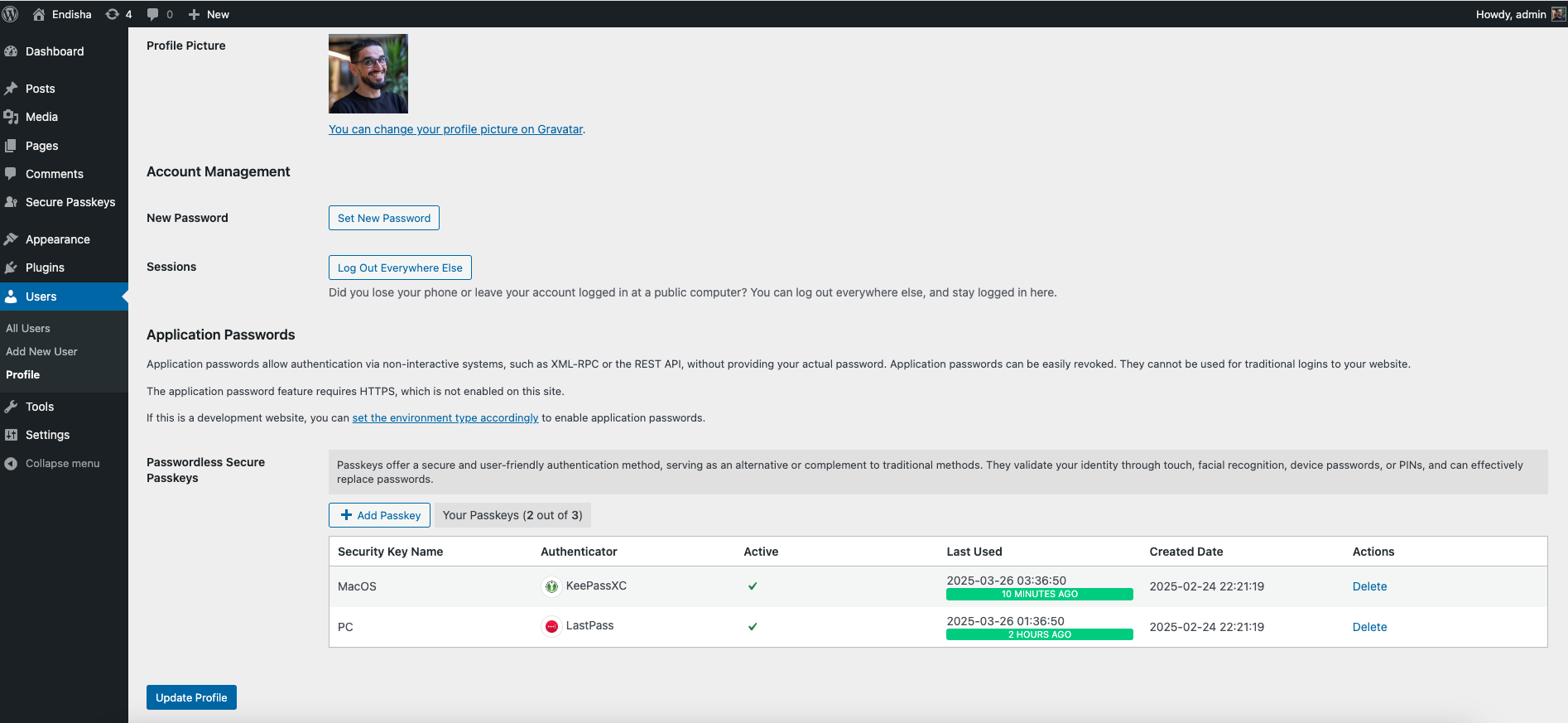
Admin Edit Profile and User Page
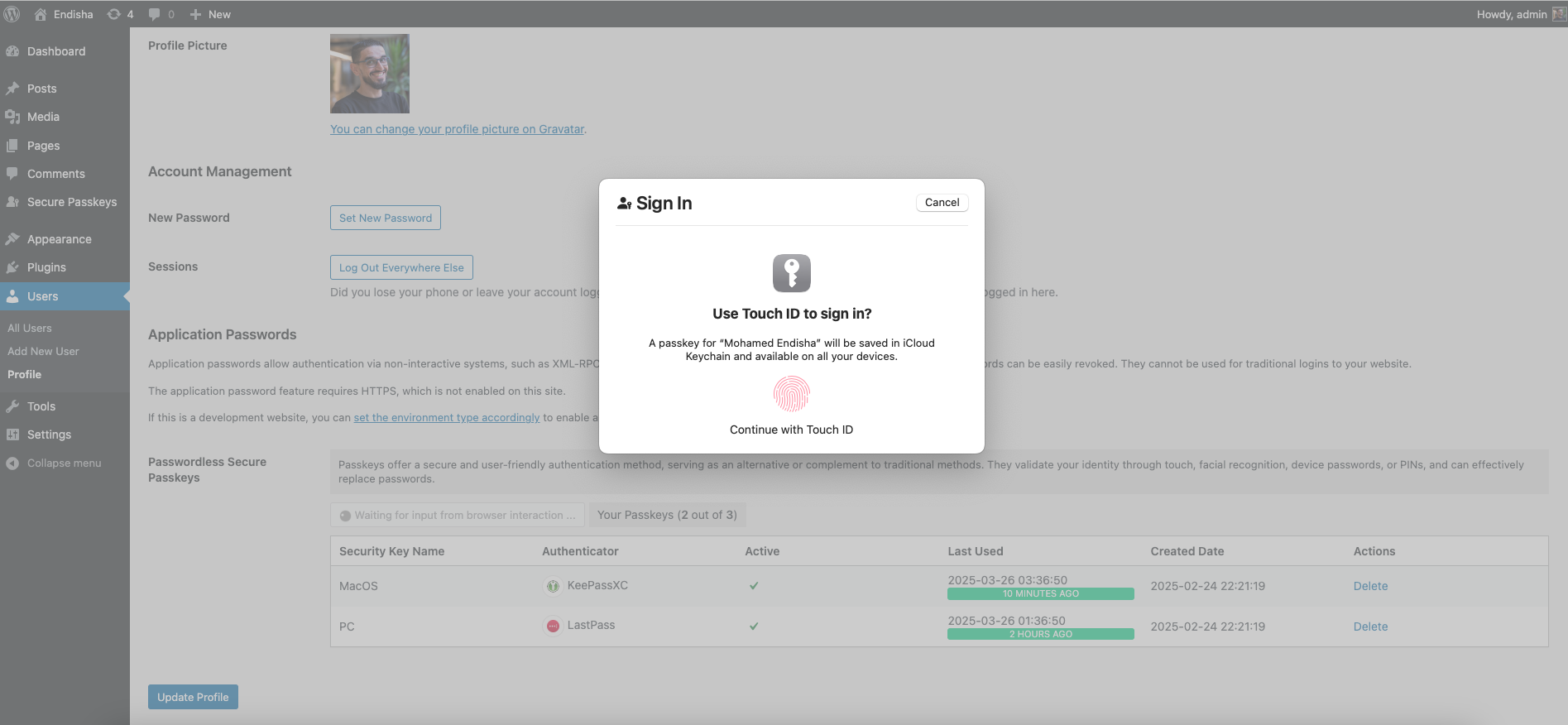
Admin Add New Passkey
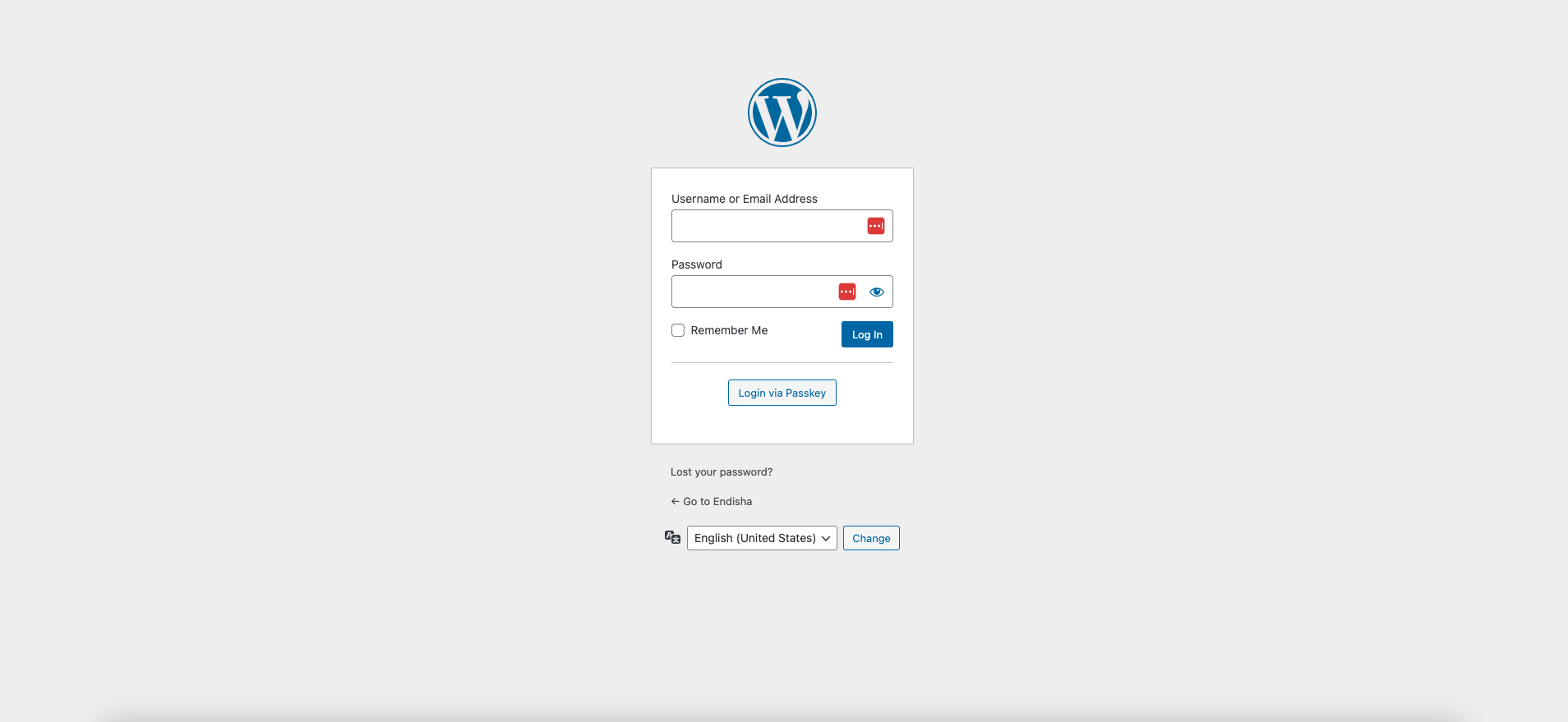
Login
Faq
After activating the plugin, a “Secure Passkeys” menu item will appear in your WordPress admin dashboard’s sidebar.
You can add a custom theme for frontend shortcodes using the secure_passkeys_themes and secure_passkeys_themes_paths filters.
Register the Theme: Use the secure_passkeys_themes filter to register your new theme and make it available in the plugin settings.
<?php

add_filter('secure_passkeys_themes', function ($themes)
{
    $themes['new_theme'] = 'New Theme';
    return $themes;
}, 10, 1);
Specify the Theme Path: Use the secure_passkeys_themes_paths filter to define the file path to your custom theme’s directory.
<?php

add_filter('secure_passkeys_themes_paths', function ($themes)
{
    $themes['new_theme'] = 'your/path/new/theme/folder';
    return $themes;
}, 10, 1);
Override Template Files: Copy the template files you wish to customize from secure-passkeys/src/views/frontend/default/ to your custom theme’s folder (your/path/to/new/theme/folder). Any files not copied to your custom theme folder will be loaded from the plugin’s default theme, providing a fallback mechanism. This allows you to customize only the files you need to change.
Yes, you can redirect users after a passkey login by using the secure_passkeys_login_redirect_url filter. You can add the following code snippets to your theme’s functions.php file.
Example – Redirect to a Specific URL:
This example redirects all users to a specific URL after they log in.
<?php

add_filter('secure_passkeys_login_redirect_url', function ($redirect_to) {
    // Redirect users to a custom URL after logging in with a passkey
    return 'https://your-domain.com/your-custom-path';
});
Example – Redirect Based on User Role:
This example redirects users based on their assigned role.
<?php

add_filter('secure_passkeys_login_redirect_url', function ($redirect_to) {
    $user = wp_get_current_user();

    // Redirect administrators to the WP admin dashboard
    if (in_array('administrator', $user->roles)) {
        return admin_url();
    }

    // Redirect subscribers to a custom dashboard page
    if (in_array('subscriber', $user->roles)) {
        return home_url('/dashboard');
    }

    // Default fallback URL
    return $redirect_to;
});
Yes! The plugin offers a variety of filters and actions that allow developers to customize and extend its functionality. If you’re a developer, we encourage you to explore these hooks and tailor the plugin to meet your specific needs.
For a complete list of available hooks and examples, refer to the plugin’s codebase.
Reviews
Solid 5 even with minor issues
By 
Just what I needed when I wanted to create my own plugin. However, it has a few bugs and minor good-to-haves:
- If I only activate it on one of the sites in a MultiSite, it does not work because it relies on the base prefix to be accessed.
- If I activate notifications for users, it does not notify on each subdomain in a MultiSite. Since passkeys are unique for each domain/subdomain this should be fixed.
- The error, notice and button in the login form should be formated as native WP tags.
- I would have prefered to hide the settings under Settings in the menu. That is where it belongs.
Still, I will have this as one of the few default external plugins to use for now.
Amazing Plugin!
By 
This plugin is amazing and I have nothing but thanks for you! My only concern is if i install and use this long term, how long do you plan on supporting this plugin? This plugin is amazing I'm just scared that if I install it and a year down the road you decide to drop it, i have to remove the feature from the site and users that will by then use it.
Perfect solution
By 
Big THANKS!
Perfect - lightweight, simple and free
By 
What more could you possibly ask for!?
Perfect
By 
It has exactly the features you need. Great support too.
Fantastic plugin
By 
This is a fantastic plugin. Easy to configure. Works great with Woocommerce. The plugin has many filters and hooks to customize. It was easy to use the filter 'secure_passkeys_login_redirect_url' so after logging in with a Passkey, I can send admin users to the admin backend and keep regular users on the Woocommerce My-Account page to show them their personalized content.
The short code [secure_passkeys_register_form] let me put the passkey creation form where I wanted it, on the Woocommerce Account details page.
Great job. Well thought out and written plugin.
Outstanding! Does exactly what it promises.
By 
Like others are saying, the plugin does exactly as promised and does it very well. So incredibly helpful without being a heavy lift. It is polished and has caused zero issues. Fantastic!
Excellent
By 
This plugin does everything it says it does. Easy to setup and it works.
Absolutely Awesome
By 
I recently installed Secure Passkeys by Mohamed Endisha, and it’s been an absolute game-changer. Setting up seamless, password-free authentication using biometric devices and security keys was incredibly smooth—it integrated flawlessly with my WordPress/WooCommerce login forms
The admin interface for managing multiple passkeys, detailed activity logs, and role-based restrictions is thoughtfully designed and intuitive
Secure Passkeys delivers top-tier security and elegant usability—highly recommended!
Excellent
By 
En plus d'une traduction dans un francais superbe, une efficacité réelle, même pour un débutant comme moi.
Changelog
1.2.3 2025-12-03
- Add – Added support for
AliasVaultauthenticator with its AAGUID. - Tweak – Updated
iCloud Keychainentry toApple Passwordswith new icon.
1.2.2 2025-09-17
- Security – Enhanced permission checks for administrative functions to prevent potential unauthorized access.
- Add – Added support for
initialauthenticator with its AAGUID. - Fix – Resolved multiple PHP notices by correcting the improper use of
wpdb::prepare()on static database queries. - Tweak – Corrected a typo in the plugin description for proper grammar.
1.2.1 2025-08-21
- Add – Updated Microsoft Password Manager AAGUID icon.
- Add – Added Chromium Browser AAGUID icon (previously had no icon).
- Fix – Fixed “You are not authorized to make this request” error caused by missing or empty
HTTP_REFERER.
1.2.0 2025-08-10
- Add – Added option to enable/disable passkeys reminder notice in WordPress admin for users without passkeys enabled.
- Add – Added support for Microsoft Password Manager authenticator with its AAGUID.
- Tweak – Changed excluded roles selection from multiple select dropdown to individual checkboxes for better usability.
- Fix – Improved autoloader class file path handling for better compatibility across different operating systems and environments.
1.1.0 2025-08-04
- Add – Added support for the Ultimate Member plugin.
- Add – Added an option to automatically generate security key name for new passkeys, so users are no longer required to enter one manually.
- Add – Added an option to disable the logging of user activity.
- Tweak – Added
extra_wrapper_classesandextra_button_classesattributes to the[secure_passkeys_login_form]shortcode for easier CSS customization. - Fix – Corrected an issue where the
used_attimestamp for a challenge was not being updated correctly in the database. - Fix – Removed the
Accept-Encodingheader from the fingerprint calculation to prevent potential validation errors. - Fix – Improved localization by removing HTML from translatable strings, ensuring they can be translated properly.
- Fix – Resolved a PHP warning on the “Activity Log” caused by an attempt to process a non-existent
is_activeproperty on log records.
1.0.0 2025-03-05
- Initial release.