Shortcode for MobilizeAmerica API

Shortcode for MobilizeAmerica API
Description
The Mobilize America Events shortcode / widget will display a list of events from Mobilize America.
There are 2 layouts – Card & Default (List).
The elementor widget allows you to override the default styles.
External Services
This plugin connects to MobilizeAmerica’s API to pull in events for a specific organization.
The shortcode / elementor widget passes a specificed organization id, a start date and a variable about virtual events.
This service is provided by MobilizeAmerica – https://api.mobilize.us
* API Documentation
* Mobilize Terms of Use
* MobilizePrivacy Policy
Instructions for Shortcode for MobilizeAmerica API
This shortcode allows you to display events from Mobilize America on your WordPress site.
The Element widget outputs the code for the shortcode so you do not have to build it manually
Shortcode: [mobilize_america_events]
Attributes
The shortcode accepts the following attributes:
* organization_id (required): The ID of the organization whose events you want to display. You can find this ID on Mobilize America. https://www.mobilize.us/dashboard/YOUR-ORGANIZATION/settings/
* organization_only: (optional): yes/no – if set to yes then only the organzation events will be shown without promoted events
* timeslot_start: (optional): Suggested: gte_now which is greater than now – Unix timestamp to filter events. Only shows events withtimeslots starting after this date.
* timeslot_end: (optional): Unix timestamp to filter events. Only shows events with timeslots starting before this date.
Note: For timeslot please use comparison text – The comparison operators are ≥ gte, > gt, ≤ lte, < lt
* event_types: (optional): Filters events by event type.
* zipcode: (optional): Filters events by zipcode.
* radius: (optional): Filters events by a radius around the zipcode.
* limit: (optional): The maximum number of events to display. Default is 10.
* template: (optional): The template to use for displaying events. Available options are:
* default: Displays events in a list format.
* card: Displays events in a card format.
* show_description: (optional): Show or hide the event description. Default is true. Options are:
* true: Show the description.
* false: Hide the description.
* is_virtual: (optional): Filters events by their virtual status. Options are:
* “”: Show all events (default).
* “true”: Show only virtual events.
* “false”: Show only in-person events.
* columns: (optional, only applies to the card template): The number of columns to use for the card layout. Options are 1, 2, 3, or 4. Default is 3.
* tag_id: (optional): comma separated list of tag ids to filter by
Planed Features
- Truncate Description
- Fix Elementor Widget Style settings
- Map Link for Address
- Remove Default & Card Layout for single layout – future feature of custom layout
Future Feature Ideas
- Block to output shortcode content
- Single Event Display
- Custom Layout in uploads directory
- UI for custom layout inside wordpress
- Map Layout of events
- Events stored locally in database to allow for better search / filtering
Examples
Display 10 events for organization ID 1234:
[mobilize_america_events organization_id="1234"]
Display 5 card formatted events for organization 1234, starting after 2024-01-01:
[mobilize_america_events organization_id="1234" template="card" timeslot_start="gte_1704137620" limit="5"]
Display virtual events in 2 columns:
[mobilize_america_events organization_id="1234" template="card" is_virtual="true" columns="2"]
Screenshots
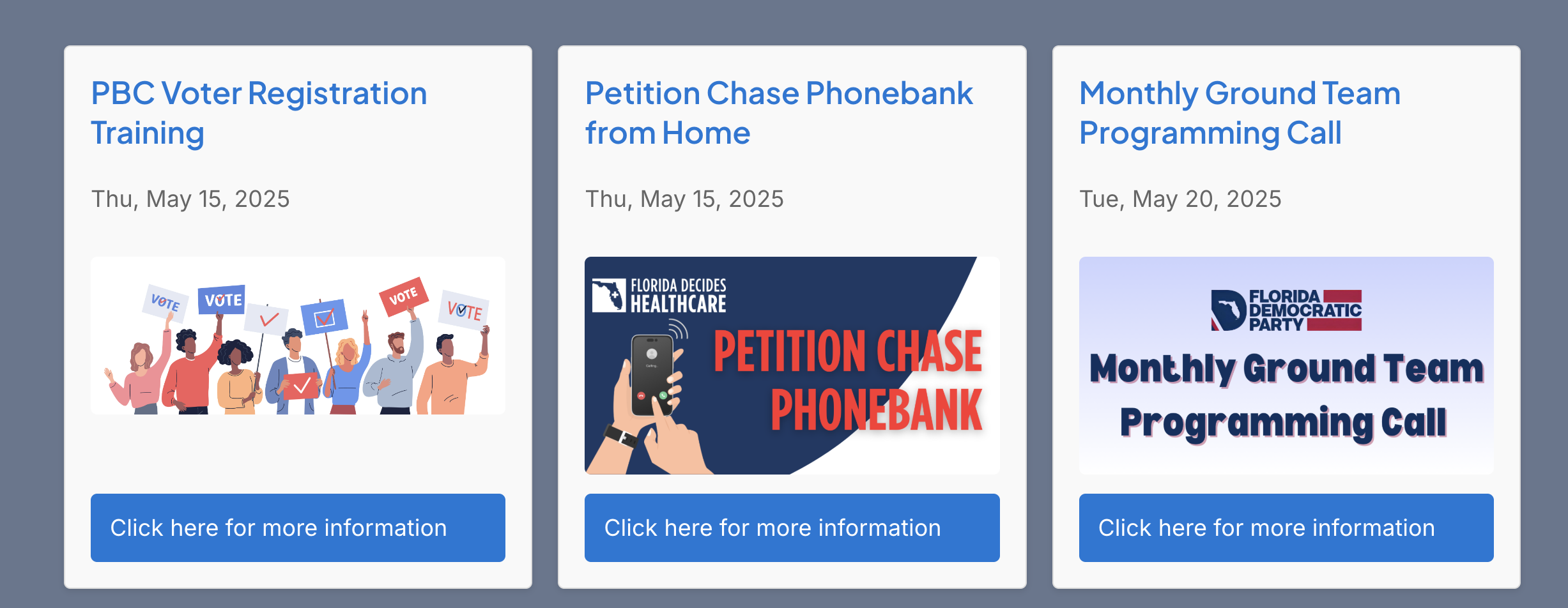
Sample Output of 3 Column Card Template without Descriptions
Reviews
Perfect for the need; terrific support
By 
Just what we needed to put our Mobilize entries on our Indivisible group's home page. Effortless! And the support is terrific. I asked to have them sorted by date with the soonest first, et voilá -- there it was. Thank you very much!
Easily added, works great, big thank you!
By 
We list all events on Mobilize, and I'm very grateful for this plugin. No more duplicating events manually on our WordPress site, and I can also get rid of other, bloated calendar plugins. Placing it on the site also means users click the event and get taken directly to Mobilize to sign up.
The creator responded within just a couple weeks to two of my group's queries, to filter out promoted events and to put events in date order (regardless of when they were created in Mobilize). I'm an evangelist now with other groups who need this plugin!
Changelog
2025-11-17 v1.0.15
* Fixed Single Event Filtering
* Updated Using Plugin Notice – Option vs Transient
* Cleanup WordPress Coding Standards / Debug Code
2025-10-22 v1.0.14
* Fixed Sort to be in date order regardless of how it is in the API results
* Fixed event_types – added “s” – use INTEREST_FORM to show Interest forms – must be displayed separate from other events
2025-09-19 v1.0.13
* Fixed Timezone issue for time display – uses WP Timezone vs GMT offset – this was only an issue when a future event was after the Daylight Savings Time Switch
2025-08-06 v1.0.12
* Added Let us know you’ve installed plugin alert
2025-07-20 v1.0.11
* Added support for tag_id for filtering based on tags
* Added support for organization only which will filter to not included promoted events
2025-05-29 v1.0.10
* Added default timeslot_start as gte_now so that the shortcode will show future event by default
2025-05-19 v1.0.9
* Added Location to output
* Added time to output – adjusted output to local time based on WordPress timezone
* Added Sponsor Name / Link
2025-05-11 v1.0.8
* Added API Information to Readme
* Adjusted prefix per WordPress standards
2025-05-10 v1.0.7
* UPDATE Slug / Name based on WordPress Requirements
* FIX PHP Warning on Card Template
2025-05-04 v1.0.6
* FIX: PHP Function issue in Template
2025-05-03 v1.0.5
* Moved Template Code to separate file
* Added column feature to card template
* Checked Plugin to WordPress Standards
2025-05-03 v1.0.4
* Added Elementor Widget
2025-05-01 v1.0.3
* WordPress Plugin Header Standards
2025-05-01 v1.0.2
* Update name & files to match WordPress Standards
2025-05-01 v1.0.1
* Added “is_virutal” to Shortcode
2025-04-28 – v1.0.0 – Initial Release