Shoutcast Icecast HTML5 Radio Player

Shoutcast Icecast HTML5 Radio Player
Description
HTML5 MP3 Radio FM MP3 Stream Player use Radio streams directly from Shoutcast and Icecast Server and play in HTML5 <audio> element.
Please make sure use latest versions of radio server like Shoutcast V2 and Icecast V2
Free Shoutcast Icecast HTML5 Radio Player…
- MP3 Podcast support added to HTML5 MP3 Radio FM MP3 Stream Player
- HTML5 MP3 Radio FM MP3 Stream Player supports custom background color
- HTML5 MP3 Radio FM MP3 Stream Player allows Player Default Artwork Image
- HTML5 MP3 Radio FM MP3 Stream Player have custom Stream Title & Artist Info
- HTML5 MP3 Radio FM MP3 Stream Player have Social Profile Link
Only HTTPS / SSL Radio Streams will play in Google Chrome 80+
As per Google Chrome 80+, mixed content is no longer supported. If the radio stream is without SSL and the website is with SSL, the radio stream will no longer be played. The solution is to set the stream to SSL.
Read Here: https://blog.chromium.org/2019/10/no-more-mixed-messages-about-https.html
Please make sure Protocols of Radio Live Stream and Website must be same. If your website running in Https (Secure) and your radio stream is Http (Unsecure) then browsers will not play that stream and throw Mixed Content Error in browser console log.
HTTPS Secure Radio Streams
- Are you using HTTP Radio Stream providers?
- Do you need SSL/HTTPS Radio Stream for Icecast and Shoutcast?
Subscribe Now and get your HTTPS Secure Radio Stream URL
Pro Shoutcast Icecast HTML5 Radio Player…
- Self Hosted Plugin Files
- Customize Skin, Color & Size of player using CSS
- Current playing song info for Shoutcast / Icecast Server
- Customize social share (Twitter, Facebook, Google+)
- Radiosolution Player Autoplay Option
Try Free HTML5 MP3 Radio FM MP3 Stream Player
Create HTML5 Radio Player Non WordPress
Buy HTML5 MP3 Radio MP3 Stream Player
Features
- Setup and Configure Radio server and then stream it directly onto your wordpress website.
- Custom Artwork Image
- Volume Control
- Social Links
Support
For support please visit https://www.svnlabs.com/store/contact/
Installation
Unzip “shoutcast-icecast-html5-radio-player.zip” and copy folder “shoutcast-icecast-html5-radio-player” into your wordpress plugins folder, normally located in /wp-content/plugins/
Enter your Radio Server information then use shortcode.
How to add Radio Stream URL
Please use Radio MP3 Stream URL like https://your-radio-server-ip:port/
i.e. http://174.127.x.y:8013/
**Note: Make sure you have valid MP3 Radio Stream, Don’t include listen.pls in URL ** https://yp.shoutcast.com/sbin/tunein-station.pls
Shoutcast V1 (https://shoutcast-server-ip:port/)
Shoutcast V2 (https://shoutcast-server-ip:port/streamname)
Icecast (https://icecast-server-ip:port/streamname)
Any MP3 Link (https://shoutcast-server-ip:port/file.mp3)
Shortcode for Page or Post
[html5radio player=”shoutcast” stream=”https://your-server-ip:port” banner=”http://your-domain.com/radio.jpg”]
Screenshots
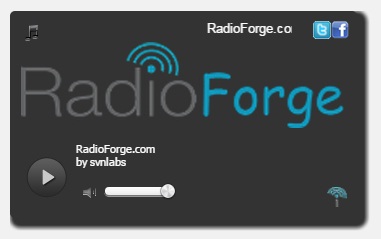
HTML5 MP3 Radio FM MP3 Stream Player
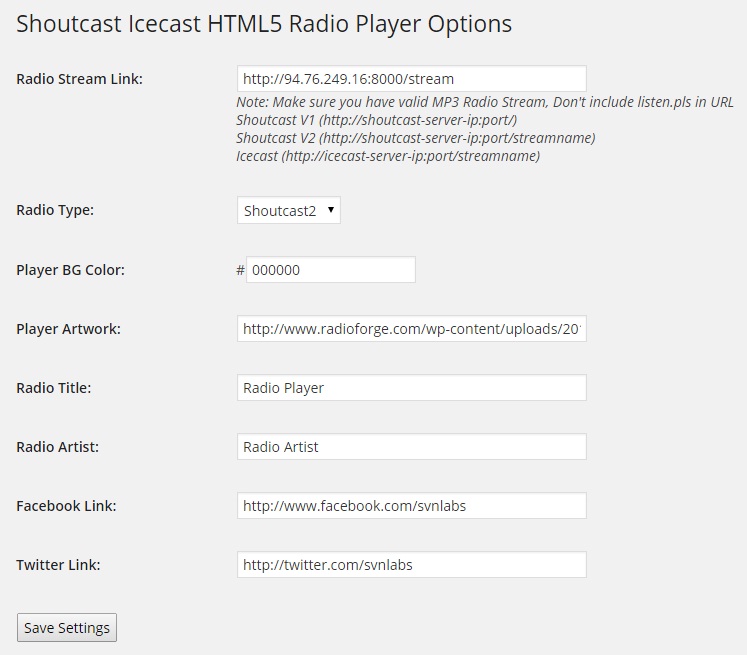
HTML5 MP3 Radio FM MP3 Stream Player Settings
Faq
https://www.radioforge.com/faq/
Reviews
Radio Stream Encoded URLs are working Fine
By 
Works great for all my needs!
By 
Works fine as of Jan 2018
By 
Stay away
By 
Works great
By 
see radiosolution.info for help search Radiosolution they can help I have this on all my music websites
Installed, and it doesn't work
By 
Setup and configured it, player displays but does not play. Just sits there and the play button doesn't seem to work.
Simply does not work
By 
The plugin simply does not function. After entering the settings in the settings page and then clicking "save settings", the fields blank out and you are left to start from scratch.
Changelog
- Fix for WP 4.8
- jscolor.js fixed
- podcast support added