Sidebar for WPBakery Page Builder
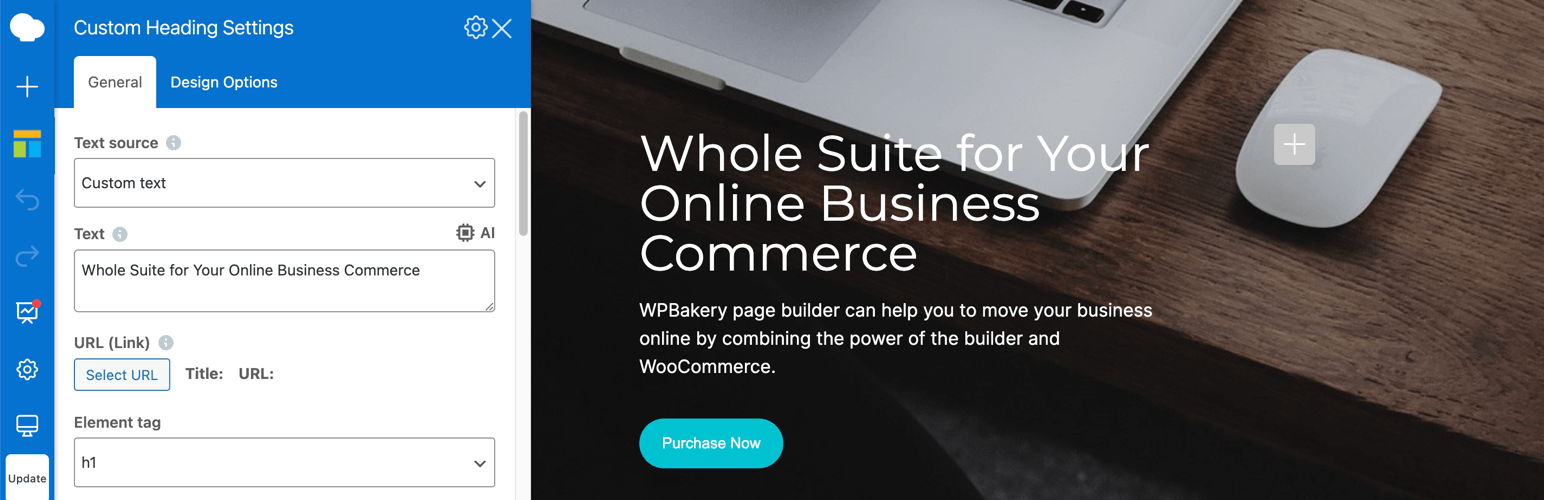
Sidebar for WPBakery Page Builder
Description
Take your WPBakery Page Builder workflow to the next level with a modern, customizable sidebar designed for faster navigation and smoother editing.
This lightweight plugin adds a persistent sidebar with navigation and panels, giving you instant access to WPBakery elements, settings, and page structure—without blocking your content or cluttering the editor. No more dragging, resizing, or hunting for options—everything you need stays neatly organized in one place.
With simple controls and flexible settings, you can tailor the sidebar to match your workflow. Whether you want a compact layout, resizable panels, or a cleaner editor interface, this plugin makes WPBakery easier and more efficient to use.
Perfect for designers, developers, and content creators who want to boost productivity and enjoy a cleaner WPBakery editing experience.
Features
- Persistent sidebar navigation bar for quick access to WPBakery panels
- Panels displayed as a sidebar for easy access to settings and tools
- Resizable sidebar width for a personalized layout
- Dismissible notifications for a distraction-free interface
- Scroll directly to selected elements in the Edit Form panel
- Customizable settings page to adjust sidebar appearance and behavior:
- Hide element descriptions in the Add Element panel
- Reduce spacing between elements for a compact view
- Optimize field size and spacing in the Edit Form/Settings panel
- Choose whether the page view area shrinks when the sidebar is open
- Option to position the sidebar on the right side
- Page Structure panel for a clear overview of your page layout
- Option to set theme for the Frontend editor interface (light/dark)
Requirements
- WPBakery Page Builder 8.0 or later
- PHP 7.0 or later
- WordPress 6.4 or later
Contribute
This plugin is open-source! You can contribute, report issues, or suggest improvements on GitHub:
GitHub Repository
Installation
- Upload the plugin folder to your /wp-content/plugins/ folder.
- Go to the Plugins page and activate the plugin.
Screenshots

Enhanced Sidebar UI

Editor Navigation Bar

Add Element Panel

Edit Form Panel

Page Settings Panel

Page Structure Panel

Sidebar on the Right

Plugin Settings Page
Faq
Simply activate the plugin and edit any post/page using WPBakery Page Builder’s Frontend Editor.
By default, the sidebar appears on the left side of the WPBakery Page Builder interface. You can change it to the right in the settings.
Yes! The settings page allows you to tweak sidebar positioning, spacing, and visibility preferences.
Navigate to Settings > Sidebar for WPBakery Page Builder in your WordPress dashboard.
Deactivate the plugin via the WordPress Plugins page.
Reviews
Great UI Improvement
By 
Looks a great improvement for WPBakery UI 👏
Provides a good option
By 
Simple and effective. The sidebar is a great addition, making it easier to see options and work more efficiently.
Nice solution
By 
Working fine and quite usufull.
Changelog
2.4
- Update: Added option to set theme for the Frontend editor interface (light/dark).
2.3.1
- Fix: Fixed issue with the sidebar opening on edit control hover.
- Fix: Fixed issue with the opened sidebar panel and iframe resize on page load.
- Fix: Fixed Grid container appearance in the Page Structure panel.
- Fix: Fixed Flexbox container appearance in the Page Structure panel.
- Fix: Fixed issue with sidebar structure item expand state.
- Fix: Fixed issue with panel resize on smaller screen widths.
2.3
- Update: Added the ability to close notification messages.
- Update: Added button in Edit Form to scroll to element.
2.2.1
- Fix: Updated Custom CSS/JS icon position.
- Fix: Updated navbar collapse point on vertical resize.
- Fix: Fixed issue with panels size for mobile view on window resize.
2.2
- Update: Added the ability to resize the sidebar width in the editor.
2.1
- Update: Added the ability to reduce fields size and spacing in the Edit Form/Settings panel for a more compact view.
- Update: Added Page Structure panel to the sidebar, to view the page’s structure.
- Update: Added option to set sidebar position to the right.
- Fix: Fixed an issue with navbar icons when resizing the screen vertically.
2.0
- Update: Added the ability to hide the description under elements in the Add Element panel.
- Update: Added the ability to reduces spacing between elements in the Add Element panel for a more compact view.
- Update: Added the option to make the page view area shrink or stay the same width when the sidebar is opened.
- Fix: Fixed the issue with template preview in the Templates panel
1.1
- Update: Added active state for the icons in the navigation bar.
- Fix: Fixed the issue with editable area view when Page Settings panel being initially opened.
1.0
- Plugin released.