Simple Code Block

Simple Code Block
Description
A simple block to the new WordPress editor Gutenberg to insert and show code with Ace Editor.
Now is very easy to share code in your own web with Gutenberg and this simple code block with the power of Ace: the successor of the Mozilla Skywriter (Bespin) project.
Ace is an embeddable code editor written in JavaScript with the features and performance of native editors such as Sublime, Vim and TextMate.
For each block you can choose many languages and styles:
- Lot of languages avalaibles: html, php, css, javascript, python,…
- Syntax highlighting with more than 20 themes to choose.
- Other options to select the font size of the code and lines to show without scroll.
What You See in the backend with Gutenberg editor Is What You Get! and the plugin only enqueue the selected assets to highlighting your code with your own selected options.
1.1.0
- Add option: show copy button
- Add option: show or hide lines numbers
- Improve Safari Browser compatibility
- Add Bash/Shell language
1.2.0
- Allow working without use of <?php tag
- Improve WPO with better enqueue
Feedback and support
I would be happy to receive your feedback to improve this plugin.
Please let me know through support forums if you like it and please be sure to leave a review..
Also you can contact me on my personal page Pablo Cianes or even visit Github of Simple Code Block where you can find all the development code of this plugin.
I hope it is useful for you and look forward to reading your reviews! 😉 Thanks!
Installation
- Upload
simple-code-block.phpto the/wp-content/plugins/directory - Activate the plugin through the ‘Plugins’ menu in WordPress
- Search into post the blue block
ACE Code EditorintoFormattingcategory.
Screenshots
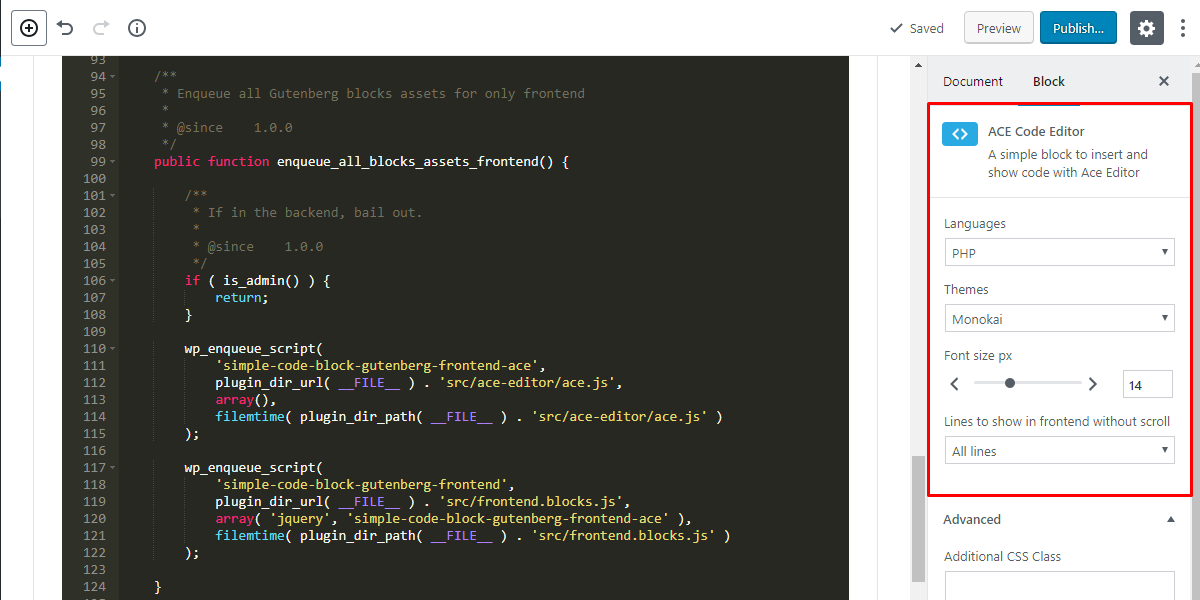
Backend configuration view.

Frontend view.
Faq
What can I do with this plugin?
You can create very easily a dynamic block into Gutenberg to write your own code to share in your web.
How do I setup this plugin?
Just insert it like others blocks this blue block ACE Code Editor into Formatting category.
You can change the language of your code and also the styles very easly and dynamic.
Reviews
Excellent Plugin
By 
Much needed plugin
By 
Perfect
By 
Works as advised
By 
Works as intended
By 
Fantastic!!
By 
Really work in blocks!
By 
Instant Problem Solved
By 
Very Useful
By 
Changelog
1.2.2
- Fix bug on previous minor version
1.2.1
- Allow enqueue assets on archive pages
1.2.0
- Allow working without use of <?php tag
- Improve WPO with better enqueue
1.1.0
- Add option: show copy button
- Add option: show or hide lines numbers
- Improve Safari Browser compatibility
- Add Bash/Shell language
1.0.3
- Add C languages
- Compatible with WP5.2
1.0.2
- Add Lua language
- Compatible with WP5.1
1.0.1
- Compatible with WP5.0
1.0.0
- First publicly available version.