Simple Code Highlighter
Simple Code Highlighter
Description
Simple Code Highlighter
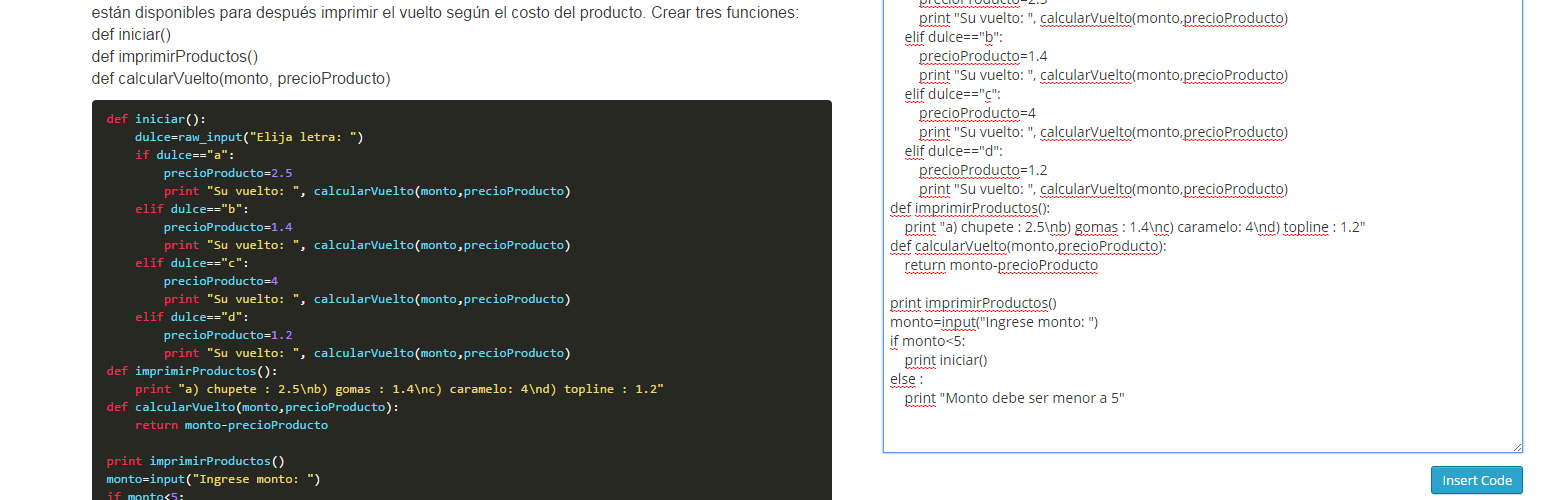
The Code Highlighter Plugin uses Google Code Prettify Script to highlight your code. You don’t need programming skills to use’it. Simply press the button on editor toolbar and paste your code. The plugin does all the rest.
See more details and usages guide here http://www.comoprogramar.org
Installation
How to install the plugin and get it working.
- Plugins > Add New. Search for “Simple Code Highlighter” then Install Now from the list and Activate
- Plugins > Add New > Upload. Choose File “Simple Code Highlighter.zip” then Install Now and Activate
- If you have direct access to the installation path, copy the zip file and extract to Plugin folder (usually wp-content/plugins). Then goto Plugins and Activate the plugin.
Screenshots

screenshot-1.png

screenshot-2.png

screenshot-3.png
Faq
Installation Instructions
How to install the plugin and get it working.
- Plugins > Add New. Search for “Simple Code Highlighter” then Install Now from the list and Activate
- Plugins > Add New > Upload. Choose File “Simple Code Highlighter.zip” then Install Now and Activate
- If you have direct access to the installation path, copy the zip file and extract to Plugin folder (usually wp-content/plugins). Then goto Plugins and Activate the plugin.
Why this plugin?
I needed a simple copy/paste for the code, no shortcodes, no writing a lot, just copy/paste.
Reviews
Doesn't work anymore
By 
I liked this plugin very much, but it stopped working after the latest WordPress update. It's not possible to click on the '<>' button anymore. Now I have to go to 'code' and click on "Code highlighter". Can you please fix this?
codes inserted in article don't show up after upgrade wordpress
By 
After upgrade wordpress to the latest version, the codes just inserted to article can not be displayed even you still could see the code insert button. But no result after you edit the codes.
Unable to use the updated version
By 
After updating WordPress, the article page can be displayed normally and highlighted, but it cannot be added normally in the background. After clicking on the insertion code, the edit box will not add new code content.
Excellent Code Plugin
By 
Worked really well, thanks! The code formatting looks great.
Would be nice to easily change the background from black to grey to help mobile users.
My only problem is that it does not integrate within Yada Wiki Editor, which is shame as I cannot just add code to Wiki pages.
A work around is to go to page source and add
CODE, which is a pain.
Great Work
By 
Easily use in the backend and clean on front-end. Kiss you.
Thank you so much
Changelog
1.0
- Initial release. Just a simple button on the text editor