Simple Disable XML-RPC | Reduce Brute Force & DDOS Attacks

Simple Disable XML-RPC | Reduce Brute Force & DDOS Attacks
Description
Simple Disable XML-RPC is a lightweight, powerful WordPress plugin that gives you complete control over your site’s XML-RPC functionality. Protect your WordPress site from brute force attacks, DDoS attempts, and other XML-RPC security vulnerabilities with just one click.
🔒 Why Disable XML-RPC?
XML-RPC is a remote communication protocol that allows external applications to interact with your WordPress site. While useful for some services, it’s frequently exploited by attackers for:
- Brute Force Attacks – Automated password guessing attempts
- DDoS Attacks – Overwhelming your server with requests
- Resource Exhaustion – Slowing down your website
- Pingback Vulnerabilities – Exploiting pingback features
✨ Key Features
- 🎯 One-Click Control – Modern toggle switch interface (NEW in v1.4.0)
- 🔐 Enhanced Security – Block XML-RPC attacks instantly
- ⚡ Improved Performance – Reduce server load and resource usage
- 🎨 Beautiful Admin Interface – Clean, modern card-based design (NEW in v1.4.0)
- 🌐 Translation Ready – Fully internationalized and translation-ready
- 📱 Mobile Responsive – Settings page works perfectly on all devices
- 🧹 Clean Uninstall – Removes all data when uninstalled
- ⚙️ Developer Friendly – Well-coded, follows WordPress standards
- 🔄 Regular Updates – Actively maintained and tested with latest WordPress versions
- 💯 Lightweight – No bloat, minimal impact on your site
🆕 What’s New in Version 1.4.0
- ✅ Modern toggle switch replaces old checkbox
- ✅ Beautiful card-based admin interface
- ✅ Enhanced security with proper sanitization
- ✅ Better code organization (OOP approach)
- ✅ Improved accessibility and UX
- ✅ Removes X-Pingback header when disabled
- ✅ Fixed activation redirect for bulk installations
- ✅ Better mobile responsive design
🎯 Perfect For
- Security-focused website owners
- Sites that don’t use mobile apps or remote publishing
- Sites experiencing XML-RPC attacks
- Performance-conscious administrators
- Anyone wanting better control over WordPress features
🔧 How It Works
This plugin uses the native WordPress xmlrpc_enabled filter to safely disable XML-RPC without modifying core files. Simply activate the plugin, toggle the switch on the settings page, and you’re protected!
⚠️ Important Note
Disabling XML-RPC may affect:
* WordPress mobile apps
* Jetpack (some features)
* Remote publishing tools
* Pingbacks and trackbacks
* Third-party services that rely on XML-RPC
Only disable XML-RPC if you don’t use these features.
🤝 Contributing & Bug Reports
Bug reports and pull requests are welcome on GitHub. Help us make this plugin better!
💝 Support the Development
If you find this plugin helpful, please consider:
* ⭐ Rating it 5 stars
* 🐛 Reporting bugs
* 💬 Suggesting features
* ☕ Buying us a coffee
Privacy Policy
Simple Disable XML-RPC does not:
- Collect any user data
- Store any personal information
- Make external API calls
- Use cookies or tracking
- Send data to third parties
The plugin only stores one setting in your WordPress database: whether XML-RPC is enabled or disabled.
Support
Need help? We’re here for you!
Credits
Developed with ❤️ by WordPress Satkhira Community
Contributors:
* wpdelower
* monarchwp23
Special thanks to all our users and contributors who help make this plugin better!
Installation
Automatic Installation (Recommended)
- Log in to your WordPress admin panel
- Navigate to Plugins > Add New
- Search for “Simple Disable XML-RPC”
- Click “Install Now” button
- Click “Activate” button
- You’ll be redirected to Settings > Disable XML-RPC
- Toggle the switch to enable/disable XML-RPC
Manual Installation
- Download the plugin zip file
- Log in to your WordPress admin panel
- Navigate to Plugins > Add New > Upload Plugin
- Choose the downloaded zip file and click “Install Now”
- Click “Activate Plugin”
- Go to Settings > Disable XML-RPC
- Toggle the switch to your preference
FTP Installation
- Download and extract the plugin zip file
- Upload the
simple-disable-xml-rpcfolder to/wp-content/plugins/directory - Activate the plugin through the Plugins menu in WordPress
- Configure settings at Settings > Disable XML-RPC
Screenshots

Modern Settings Page - Beautiful card-based interface with toggle switch
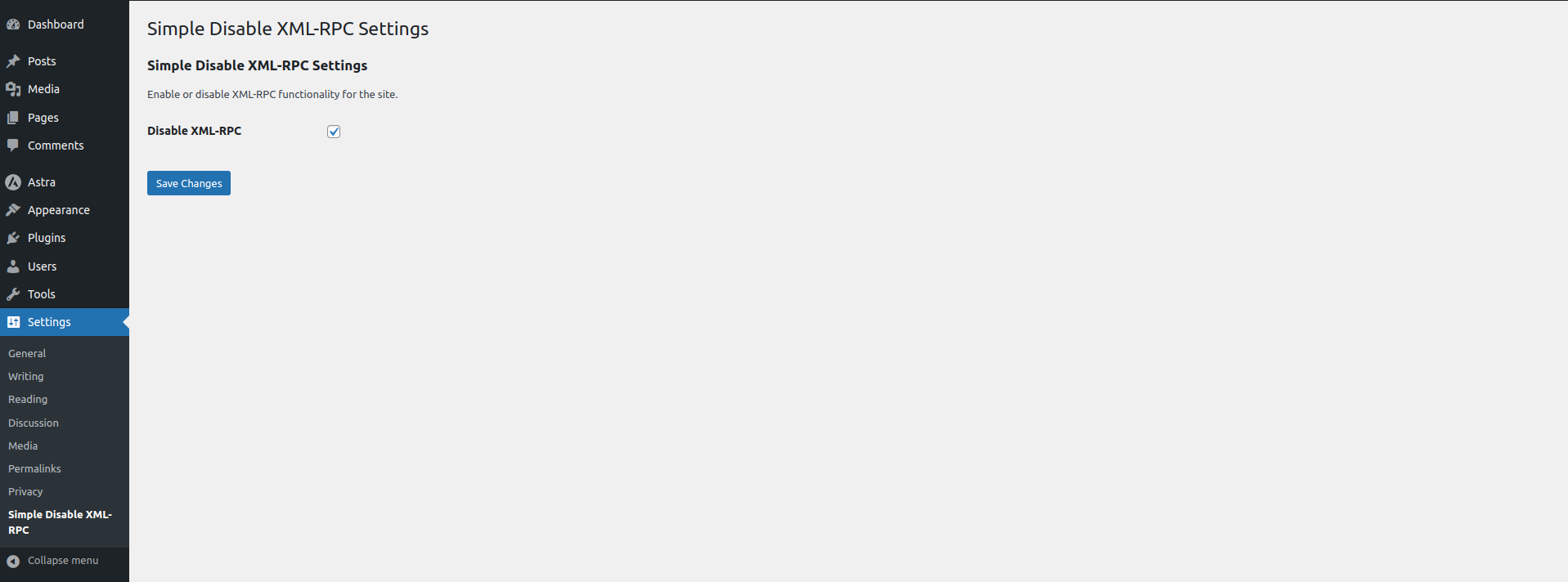
Toggle Switch in Action - Easy one-click enable/disable control
Faq
XML-RPC is a remote procedure call protocol that allows external applications to communicate with your WordPress site. While it enables features like mobile apps and remote publishing, it’s also a common target for:
- Brute force attacks
- DDoS attacks
- Server resource exhaustion
- Security vulnerabilities
If you don’t use WordPress mobile apps, Jetpack, or remote publishing tools, it’s recommended to disable XML-RPC for better security.
No, this plugin safely disables XML-RPC using WordPress’s native filter. However, it may affect:
- WordPress mobile apps
- Jetpack functionality
- Pingbacks and trackbacks
- Third-party services using XML-RPC API
Test after activation to ensure your required features still work.
There are several ways to verify:
Method 1: WordPress Mobile App
Try connecting with the official WordPress mobile app. You should see: “XML-RPC services are disabled on this site”
Method 2: Online Validator
Use the XML-RPC Validator tool. When properly disabled, it will show an error message.
You should receive a response indicating XML-RPC is disabled.
Yes! When XML-RPC is disabled, your server doesn’t need to process XML-RPC requests, which can:
- Reduce server load
- Prevent resource exhaustion
- Speed up response times
- Save bandwidth
Yes! Simple Disable XML-RPC works seamlessly with other security plugins like:
- Wordfence Security
- Sucuri Security
- iThemes Security
- All In One WP Security
- And more!
Plugin Method (Recommended):
* Uses WordPress native filters
* Easier to manage
* No server configuration needed
* Can be toggled on/off easily
* Won’t cause server errors
.htaccess Method:
* Requires manual file editing
* Can break if edited incorrectly
* Harder to reverse
* May cause conflicts
Absolutely! Just go to Settings > Disable XML-RPC and toggle the switch off. Changes take effect immediately.
Yes, the plugin works on both single WordPress installations and multisite networks. On multisite, it must be configured per-site.
Yes! We actively maintain this plugin and test it with every new WordPress release. Updates are pushed regularly to ensure compatibility and security.
We welcome contributions! You can:
- Submit bug reports on GitHub
- Create pull requests with improvements
- Translate the plugin into your language
- Leave a review and rating
- Suggest new features
Reviews
Simple, Lightweight & Effective
By 
I always recommend this plugin for quickly disabling XML-RPC and boosting WordPress security. No config needed—just activate and done. Appreciate the effort!
Very easy and ready to use
By 
It's one of my go to plugin to make extra security layer. Thanks for this great plugin buddy.
Beautiful and easy plugin
By 
Beautiful and easy plugin
Plugin results
By 
I have install the plugin and it works fine. I highly recommend for try it out this must needed plugin. to disable XML-RPC and it’s very easy to us.
Excellent Solution
By 
Simple is certainly appropriate for this very straightforward plugin "Simple Disable" - To improve our security I now have it installed on all my client websites hosted on Hostinger - (Jim, Neat Websites)
Simple yet must needed
By 
A must needed plugin to disable XML-RPC and it's working fine right after enabling it.
Changelog
1.4.0 (2025-11-09)
Major Update – UI Overhaul & Security Enhancements
- 🎨 NEW: Modern toggle switch interface replacing checkboxes
- 🎨 NEW: Beautiful card-based admin design
- 🔒 IMPROVED: Enhanced security with proper sanitization callbacks
- 🔒 IMPROVED: Added X-Pingback header removal
- ⚡ IMPROVED: Better code organization with OOP structure
- ⚡ IMPROVED: Separated files for better maintainability
- 🐛 FIXED: Activation redirect issue with bulk plugin activation
- 🐛 FIXED: Consistent function prefixing
- ♿ IMPROVED: Better accessibility and mobile responsive design
- 🧹 NEW: Proper uninstall cleanup script
- 📚 IMPROVED: Better documentation and inline comments
- 🌐 IMPROVED: Enhanced translation support
1.3.5 (2025-04-20)
- 🐛 Bug fixes
- ⚡ Performance improvements
- ✅ WordPress 6.8 compatibility tested
1.3.4 (2024-11-17)
- 🐛 Bug fixes
- ⚡ Performance improvements
- ✅ WordPress 6.7 compatibility tested
1.3.3 (2024-07-17)
- 🐛 Bug fixes
- ⚡ Performance improvements
- ✅ WordPress 6.6 compatibility tested
1.3.2 (2024-04-02)
- 🐛 Bug fixes
- ⚡ Performance improvements
- ✅ WordPress 6.5 compatibility tested
1.3.1 (2024-03-23)
- 🔒 Important security update
- 🐛 Bug fixes
- 🎨 Plugin live preview added
1.3.0 (2024-03-12)
- ⚡ Performance improvements
- 🔒 Security enhancements
1.2.5 (2024-03-12)
- 🔧 Plugin compatibility fixes
1.2.4 (2024-03-12)
- 🐛 Bug fixes and improvements
1.2.3 (2024-03-11)
- 🐛 Bug fixes and improvements
1.2.2 (2024-02-21)
- 🐛 Bug fixes and improvements
1.2.1 (2024-01-31)
- 📝 Settings description updated
1.2.0 (2024-01-31)
- ✅ WordPress 6.4.3 compatibility
- 🐛 Bug fixes
- 📚 New FAQs added
1.1.0
- 🎯 Auto-redirect to settings after activation
- 🐛 Bug fixes
1.0.0
- 🎉 Initial release