Simple Entry Booking for WooCommerce

Simple Entry Booking for WooCommerce
Description
Simple Entry Booking for WooCommerce adds a booking date field, and an optional time field, to your WooCommerce product pages. You set your weekly hours, closed days, daily booking limits and weekday discounts on one settings page.
It works inside the normal WooCommerce cart, checkout and orders. Customers pick a date, add the product to the cart and pay as usual. The booking date and time are saved with the order, so you see them in the admin and in order emails.
Who Is This Plugin For?
Equipment & Vehicle Rentals
Set a daily booking limit, block weekends or other days off, and let customers pick the date they need the gear. When a day is full, it can’t be booked.
Appointment-Based Services
Set a start and end time for each day of the week. Customers pick a time within your hours, and fully booked dates are greyed out in the calendar.
Tour Operators & Event Bookings
Limit how many bookings each day of the week can hold, block days you’re closed, and offer weekday discounts to fill slow days. (Blocking exact holiday dates is a Pro feature.)
Freelancers & Consultants
A clean booking date field on your service products lets clients choose their preferred date without leaving WooCommerce.
Free Version Features
Booking Date & Time Fields
* A jQuery UI date picker on your WooCommerce product pages
* Past dates can’t be picked
* Optional time field (turn on Enable Booking Time)
* Change the labels of the date and time fields to match your store
Weekly Schedule & Limits
* One simple table with a row for each day of the week
* Block Day: turn off any day of the week (for example Saturdays and Sundays)
* Start Time and End Time: the booking time must be within the day’s hours
* Max Bookings: when a day of the week reaches its limit, that date is greyed out in the calendar
* If a date doesn’t have enough spots left, the product can’t be added to the cart and the customer sees a “not enough spots” message
* Booking counts include orders that are pending, on hold, processing or completed, plus the bookings already in the customer’s own cart
Weekday Discounts
* A percentage or fixed-amount discount for each day of the week (for example 10% off on Mondays)
Category Control
* With no category selected, the booking field shows on all products
* Select categories to show the booking field only on those products
* Child categories are included when you select a parent category
WooCommerce Integration & HPOS
* The booking date and time are saved to the cart, checkout and order details
* Customers see them in their order emails; you see them on the WooCommerce order screen
* Compatible with WooCommerce High-Performance Order Storage (HPOS)
Why Choose Simple Entry Booking?
- Free forever — core booking functionality with no forced upgrades
- Lightweight — no page-builder dependencies, no bloated scripts
- No subscription fees — unlike most WooCommerce booking plugins
- Native WooCommerce — works inside the standard cart/checkout/orders flow
- HPOS-ready — future-proof for modern WooCommerce performance
- Easy to configure — one settings page, sensible defaults, ready in minutes
Pro Version: Built for Tours, Rentals and Appointments
Running several tours, rooms or services with different schedules? Pro gives each product its own rules.
New in Pro 1.0.9
- Per-product booking rules — A new Booking tab on the product edit screen lets each product use its own Availability, Schedule & Time, Limits & Capacity and Discounts settings. You customize only the sections you need; the rest keep using the global settings. Products with their own rules are labelled Booking: Custom in the products list.
- Capacity counting per product — Choose whether booking limits are shared across all bookable products or counted separately for each product.
- Checkout re-check — Dates and remaining spots are checked again in the cart and at checkout. If a date fills up or gets blocked while an item sits in the cart, it can’t be overbooked.
- Built-in user guide — Open it from the User Guide button in the plugin. Available in English, French and Spanish.
Everything else in Pro
- Break times — Set breaks for each day of the week (for example lunch 12:00–13:00) that customers can’t book
- Minimum Days Ahead — Customers must book at least a set number of days in advance
- Block Holiday Dates — Block exact dates for holidays, closures or vacations
- Booking limits for specific dates — Override the weekday limit for a date; a limit of 0 blocks the date completely
- Discounts for specific dates — Percentage or fixed discounts for exact dates, overriding the weekday discount
- Enable booking on individual products — Choose single products as well as categories
- Priority developer support
Pro is a separate plugin. When you install Pro, deactivate the free plugin. Pro keeps its own settings, so you set it up again in Pro (it takes a few minutes).
Free vs Pro at a Glance
Free includes
- Booking date field and optional time field on product pages
- Weekly schedule: blocked days, start and end times
- Max bookings for each day of the week
- Discounts for each day of the week
- Booking field on all products, or only on selected categories
- Booking details in the cart, checkout, orders and emails
- HPOS compatible
Pro adds
- Per-product booking rules (New in 1.0.9)
- Capacity counting shared or per product (New in 1.0.9)
- Re-check of dates and spots in the cart and at checkout (New in 1.0.9)
- Built-in user guide in English, French and Spanish (New in 1.0.9)
- Break times, Minimum Days Ahead and holiday dates
- Booking limits and discounts for specific dates
- Booking on individual products
- Priority support
Installation
- In your WordPress dashboard, go to Plugins > Add New and search for “Simple Entry Booking for WooCommerce”
- Click Install Now, then Activate
- Go to Settings > Booking Date Picker to configure the plugin
- The booking date (and optional time) field will automatically appear on your WooCommerce product pages
Manual Installation:
Upload the plugin folder to /wp-content/plugins/simple-entry-booking-for-woocommerce and activate it from the Plugins screen.
Using Pro? Deactivate the free plugin first, then install and activate Pro.
Screenshots

Product Page (Frontend): The booking date and optional time fields as they appear to customers on a single product page.

Admin Settings — General: Configure the booking label, enable time selection, and set the time field label.

Admin Settings — Weekly Schedule & Booking Rules: Set available hours, daily booking limits, blocked weekdays, and weekday discounts — all in one table.

Admin Settings — Product Categories: Restrict the booking field to specific product categories, with search and select all/none controls.
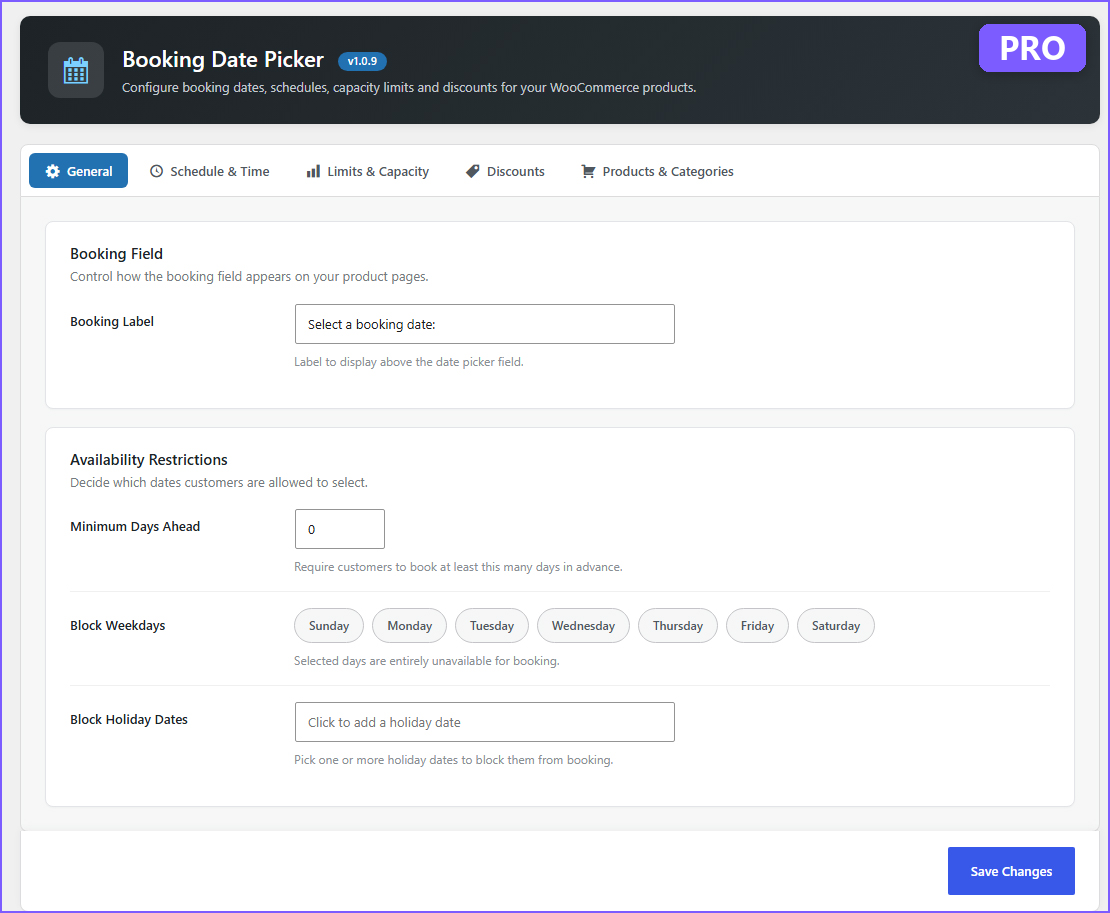
(Pro) General settings: minimum days ahead and holiday dates.
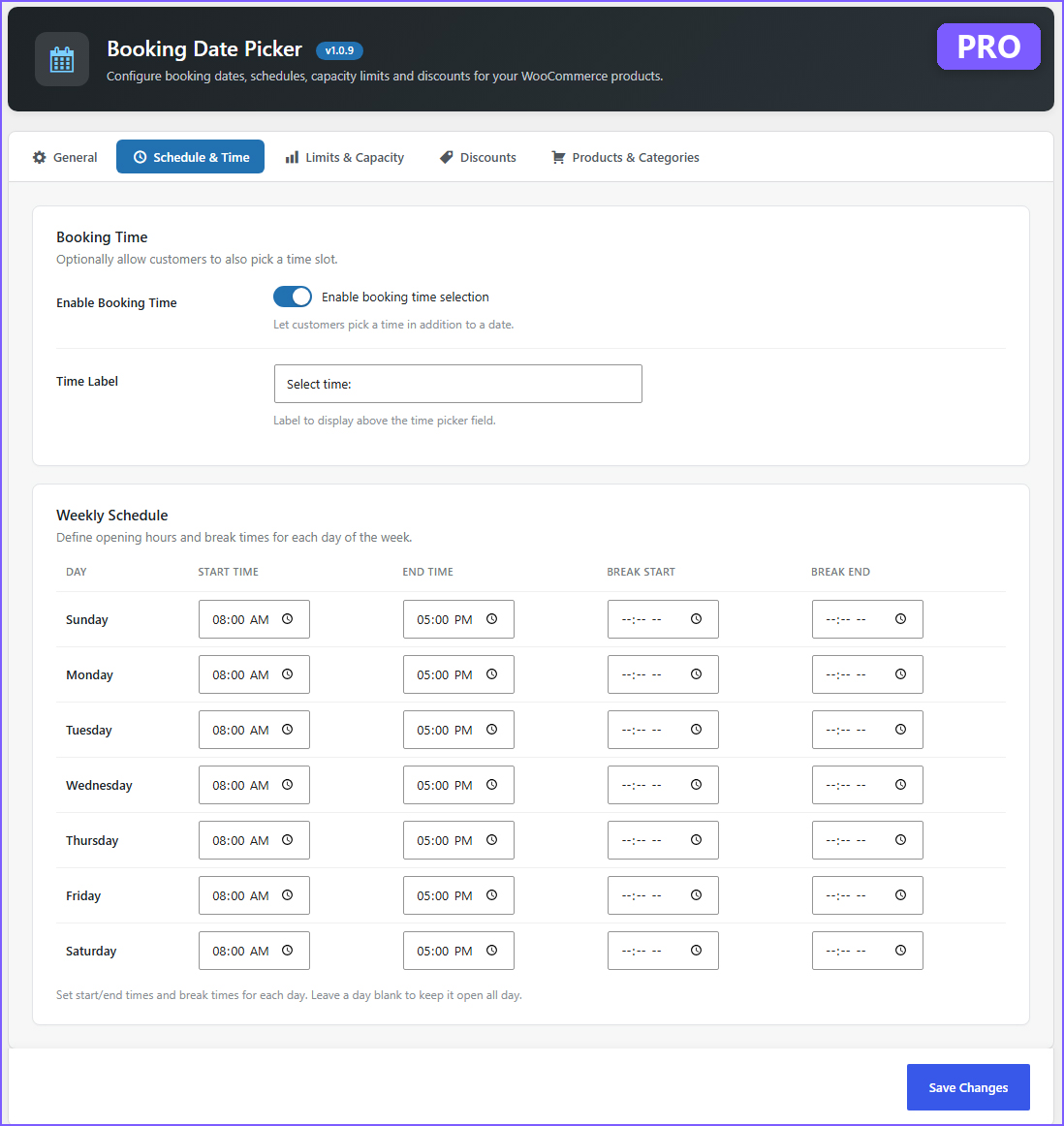
(Pro) Weekly schedule with break times for each day.

(Pro) Capacity counting and booking limits for specific dates.
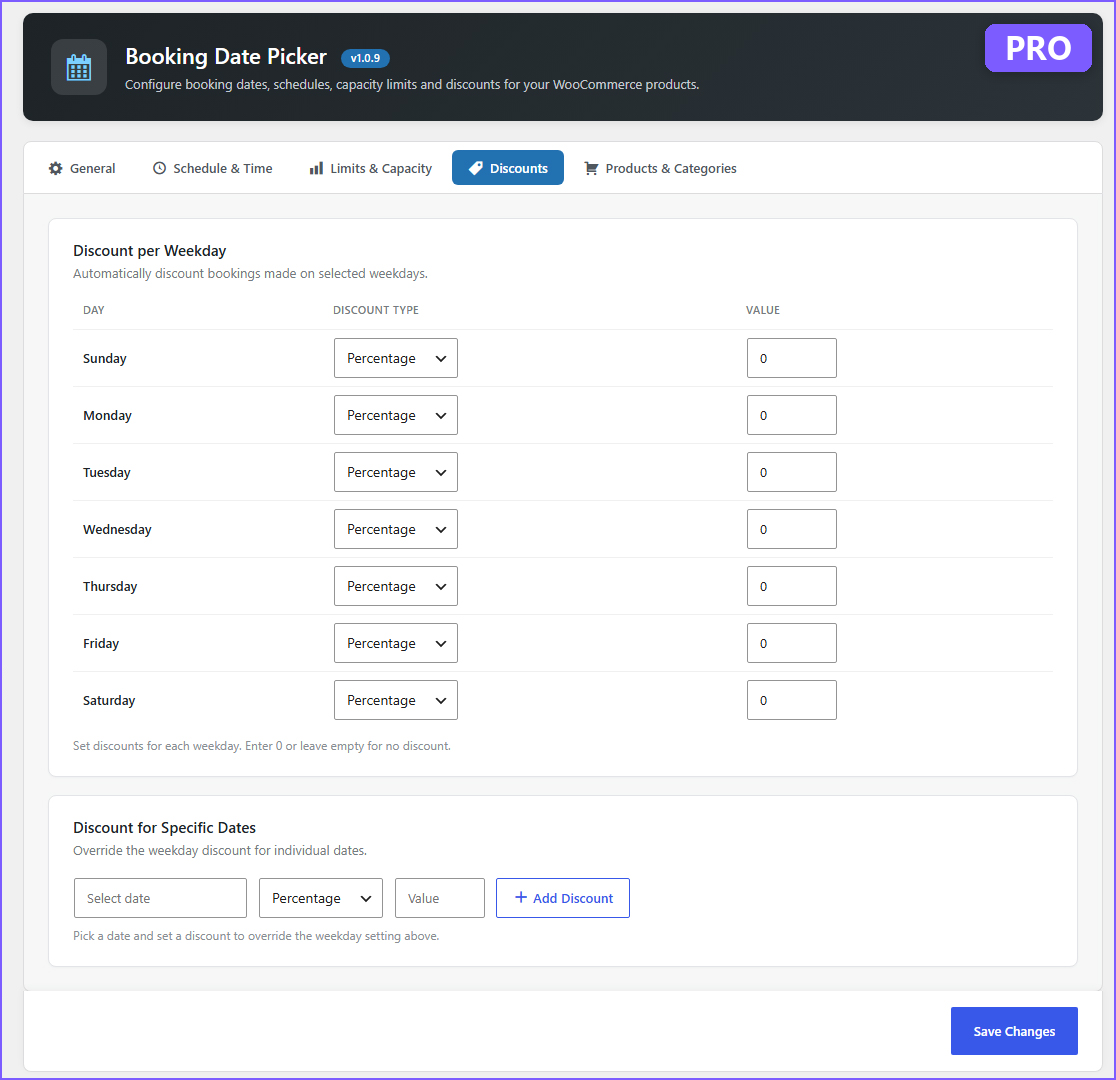
(Pro) Discounts for specific dates, on top of weekday discounts.
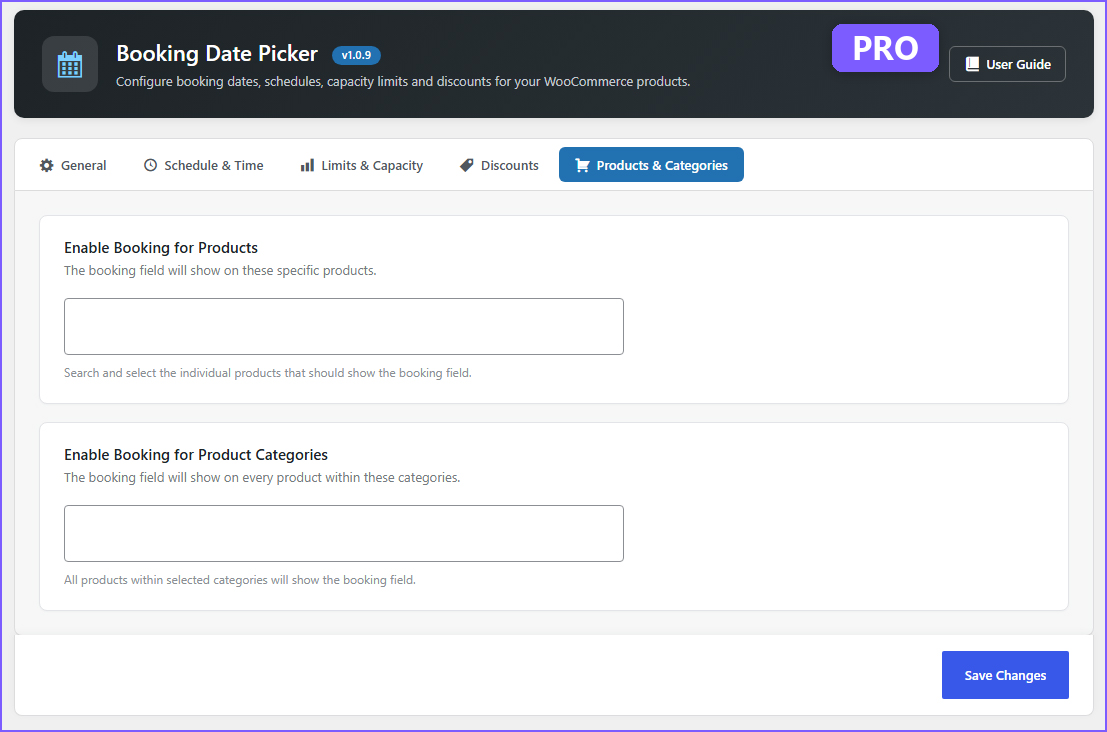
(Pro) Enable booking on individual products or categories, with the built-in User Guide.
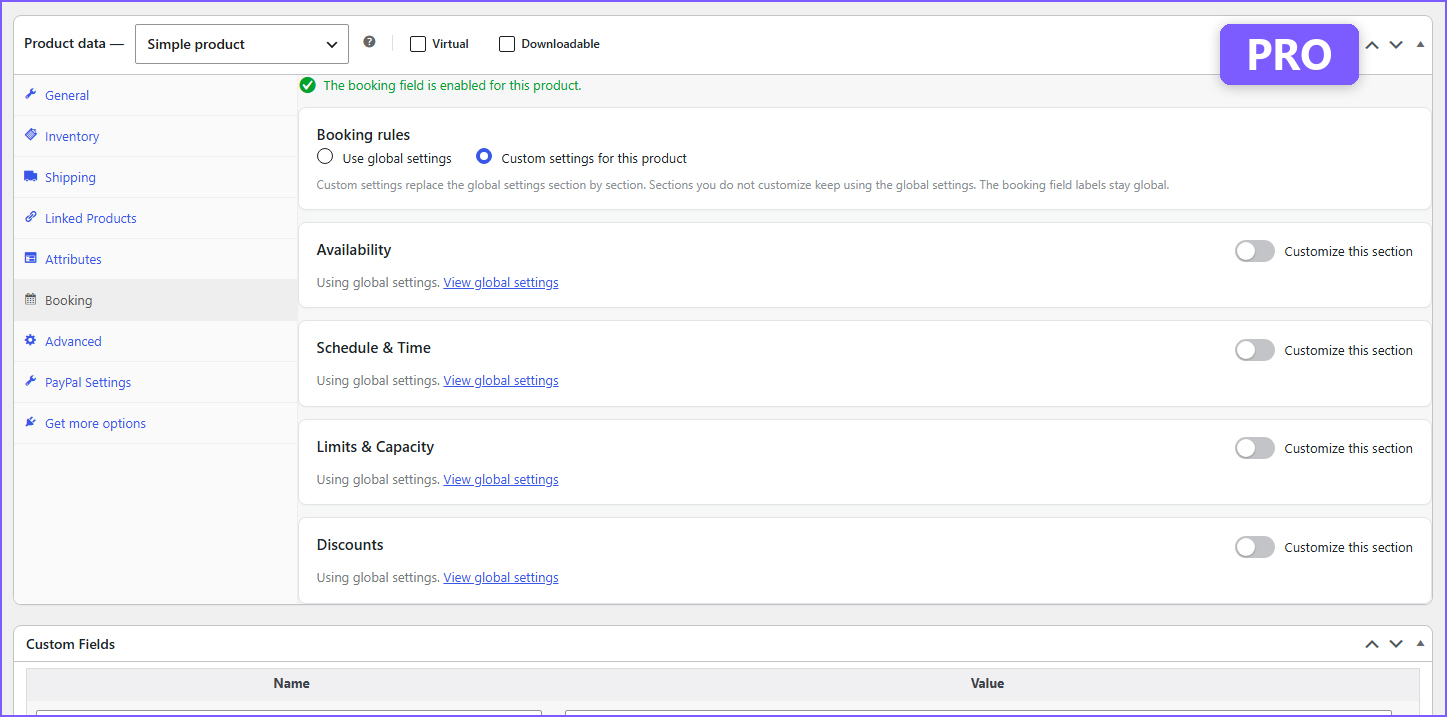
(Pro) New Booking tab: give any product its own booking rules.
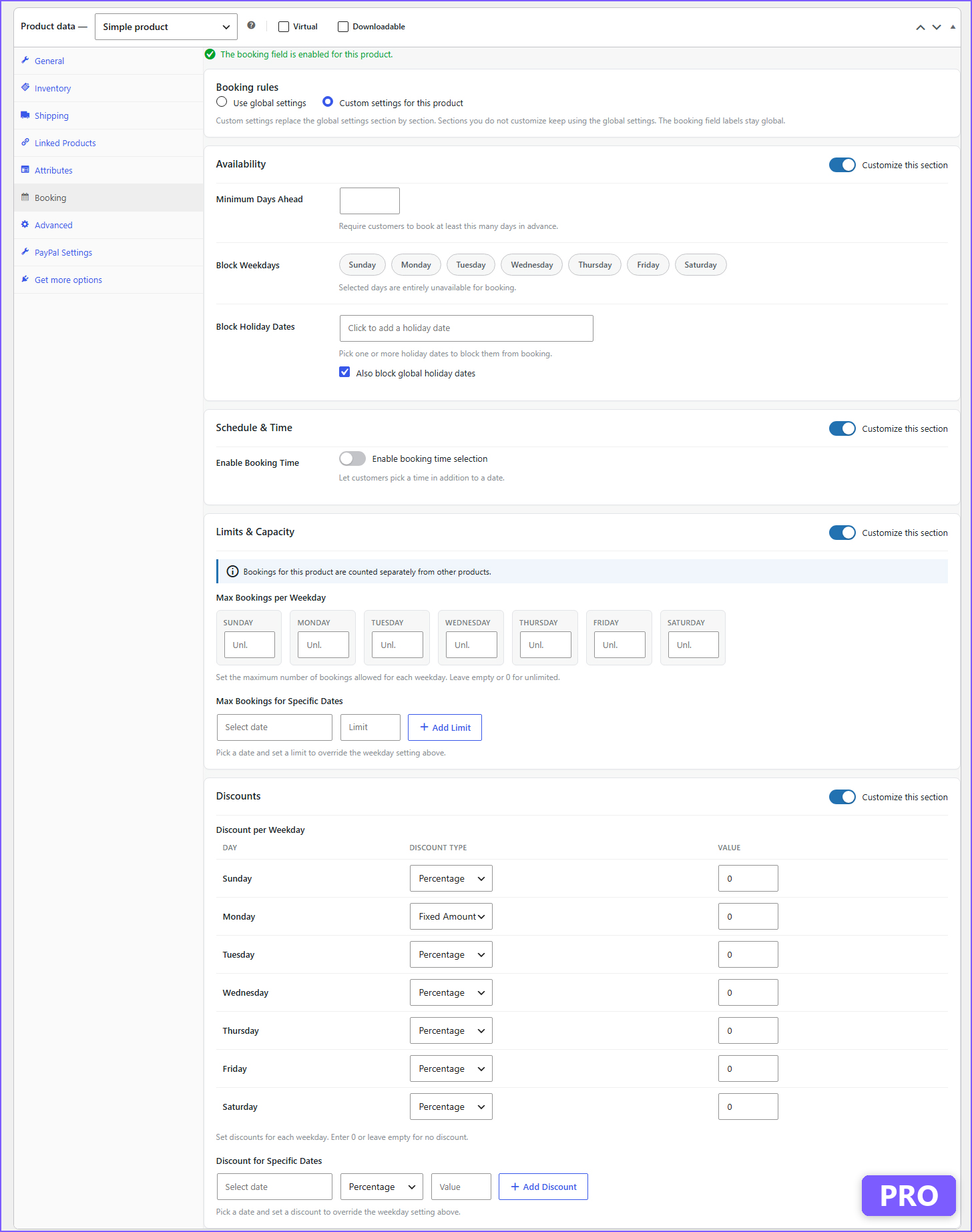
(Pro) Per-product availability, schedule, capacity and discounts.
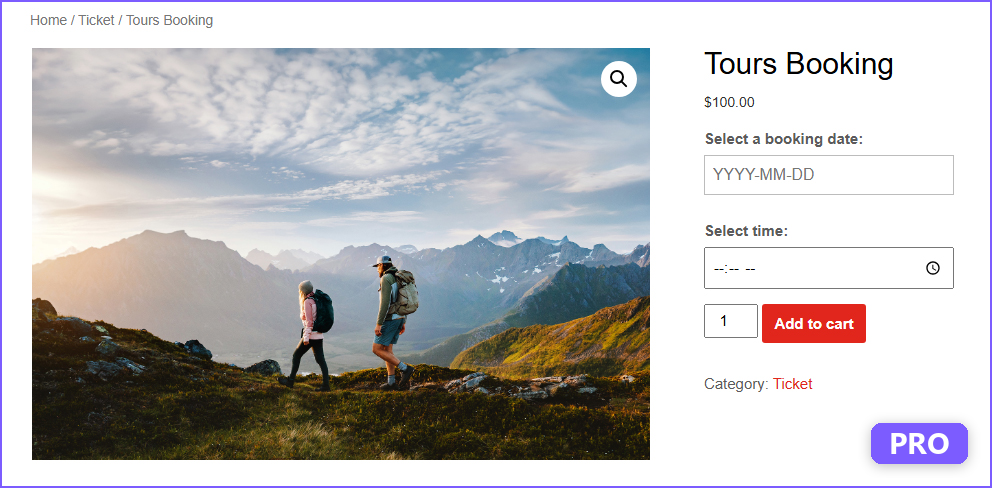
(Pro) Booking date and time on the product page.
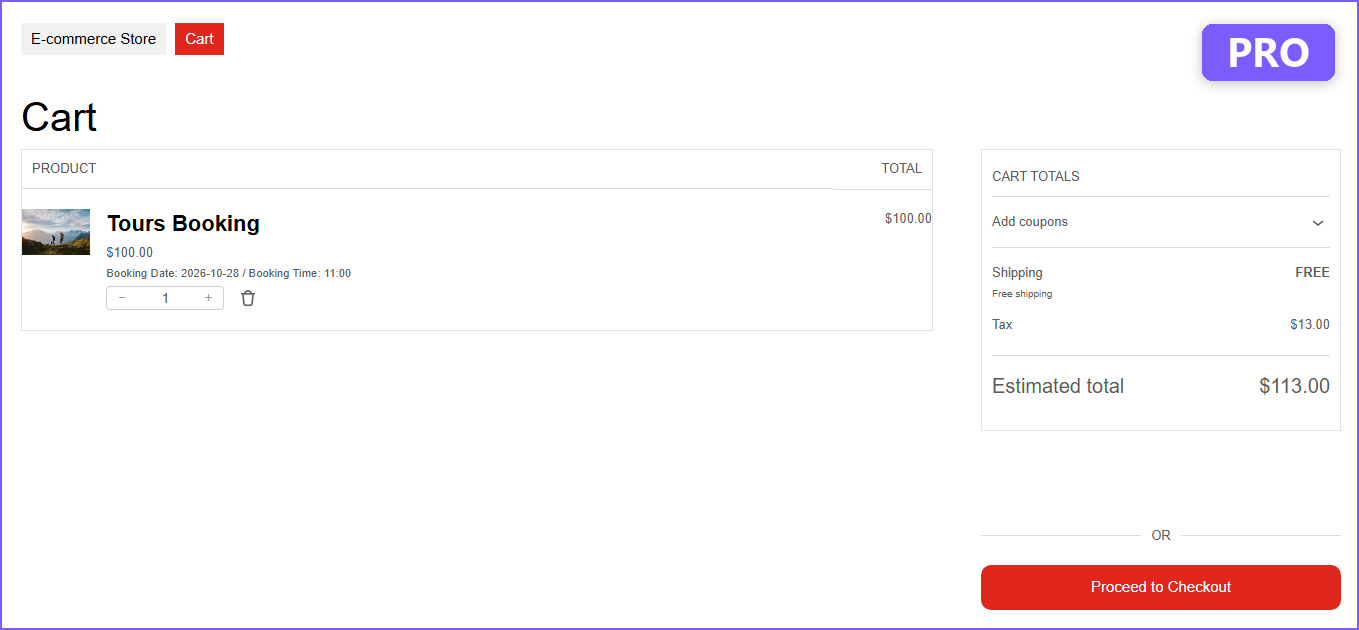
(Pro) Booking details in the cart, re-checked at checkout.
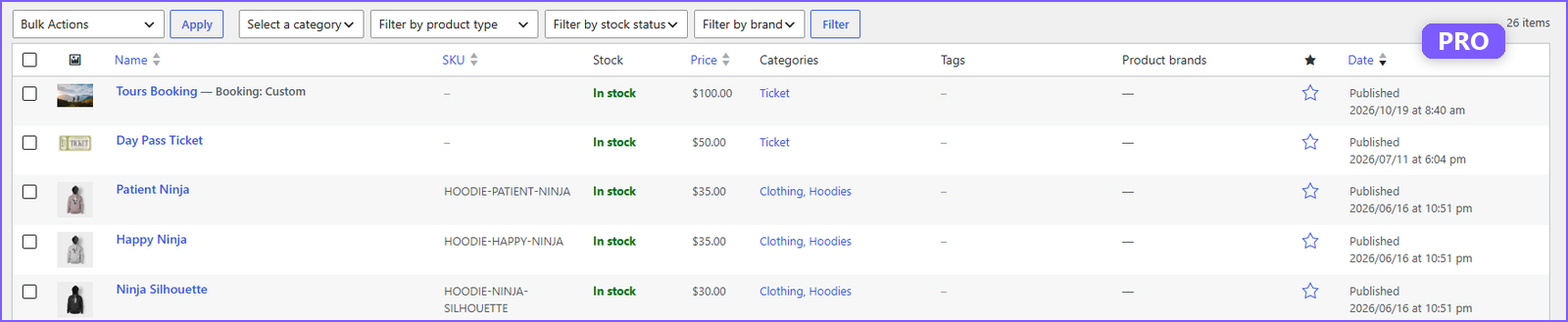
(Pro) Products with their own rules are labelled "Booking: Custom".
Faq
Reviews
Easy & Lightweight for Woo
By 
Highly recommended! Speedy support.
Brilliant plugin – Exactly what I was looking for!
By 
I love how easy it is to manage schedules and block out specific weekdays right from the settings. The fact that it counts real-time availability from active carts prevents any double-booking issues. Plus, it’s fully HPOS-compatible, keeping my site running fast. Highly recommended for rentals or appointments!
Amazing plugin!
By 
Excellent lightweight booking plugin for WooCommerce. Easy to set up, user-friendly, and works exactly as expected. Perfect for simple booking needs without all the unnecessary complexity. Highly recommended!
Great plugin!
By 
Thank you for your plugin! It’s been really helpful and solved my issue perfectly.
Changelog
1.0.9
- Tested with WordPress 7.1 and WooCommerce 11.2.1.
- Updated the plugin description, FAQ and screenshots, including Pro features such as per-product booking rules.
- Corrected the description of how booking limits are counted.
1.0.8
- Explicitly declared compatibility with WooCommerce High-Performance Order Storage (HPOS) so the plugin is no longer flagged as incompatible under WooCommerce > Settings > Advanced > Features.
1.0.7
- Fixed a bug where, after Category Control was configured, adding a product that is not eligible for booking to the cart could be blocked by a “Please select a booking date” error even though that product never shows the booking field.
- Confirmed compatibility with WordPress 7.0.4 and WooCommerce 11.0.1.
1.0.6
- Redesigned the Booking Date Picker settings page with a cleaner, card-based layout.
- Combined the Weekly Schedule, Daily Booking Limits, Block Weekdays, and Discount per Weekday settings into a single unified table (one row per weekday).
- Added toggle switches for Enable Booking Time and Block Day for a more intuitive on/off experience.
- Added search and Select All / Select None controls to the Product Categories picker.
- Improved responsive layout for smaller screens.
1.0.5
- Added Category Control feature: Enable booking field only for specific product categories.
- Supports hierarchical categories (child categories included when parent is selected).
- Improved settings page organization.
1.0.4
- Implemented robust quantity-based counting for booking limits.
- Added support for multi-quantity bookings.
- Enhanced HPOS compatibility with optimized SQL queries.
- Added hidden meta key (_booking_date) for improved query performance.
- Improved visual blocking with real-time availability checking.
- Updated promotional content with comprehensive feature list.
1.0.3
- Refactored plugin prefixes to be unique (sebfw_).
- Added nonce verification for security.
- Updated contributors list.
1.0.2
- Fixed WordPress coding standards issues (I18n, escaping, date functions).
- Updated readme tags.
1.0.1
- Fixed syntax error in settings page HTML output.
- Added class existence check to prevent redeclaration errors.
- Improved settings saving logic for checkboxes.
- Fixed missing datepicker navigation icons (prev/next arrows).
- Created languages directory for translation support.
1.0.0
- Initial release.
- Added Booking Date and Time fields.
- Added Weekly Schedule and Blocked Weekdays settings.
- Implemented Cart and Order data saving.
- Disabled past dates in booking date picker.
- Added PRO Upsell box.