Simple Events List

Simple Events List
Description
This is a very simple event plugin. Some websites that use WordPress as a CMS display information about future events. But keeping the list of events current is a pain. So this plugin simple displays a list of all future events.
To be listed, an event must have its own post or page. To tell the plugin that the page is an event, you add a custom field (if you can’t see custom fields and you’re using WordPress 2.7+, you may need to add it by selecting screen options). Add a custom field with the name event_date and the value YYYY-MM-DD (e.g. 2009-02-03 for 3rd February 2009). Then save the page.
To ouput the list of events add the text [events_list] to any post or page. You can see a demo at the Evangelical Movement of Wales.
As I said, it’s very simple. There are no options to tweak, no settings to change. But if it’s what you need, you won’t want to change anything!
Installation
- Download the plugin, and unzip it.
- Place the simple-events-list folder in your wp-content/plugins folder and upload it to your website.
- Activate the plugin from the plugins tab of your WordPress admin.
- Create a WordPress post or page with the text [events_list]. The plugin will display your events on this page.
Screenshots
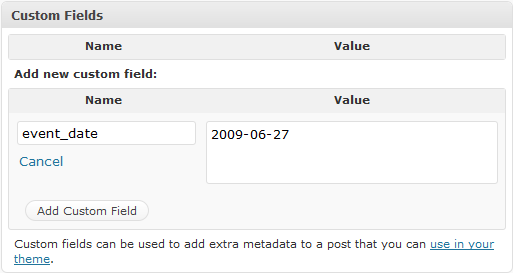
Adding the custom field:
Reviews
Boo
By 
This sucks