Simple Points and Rewards for WooCommerce – Create a Loyalty Program
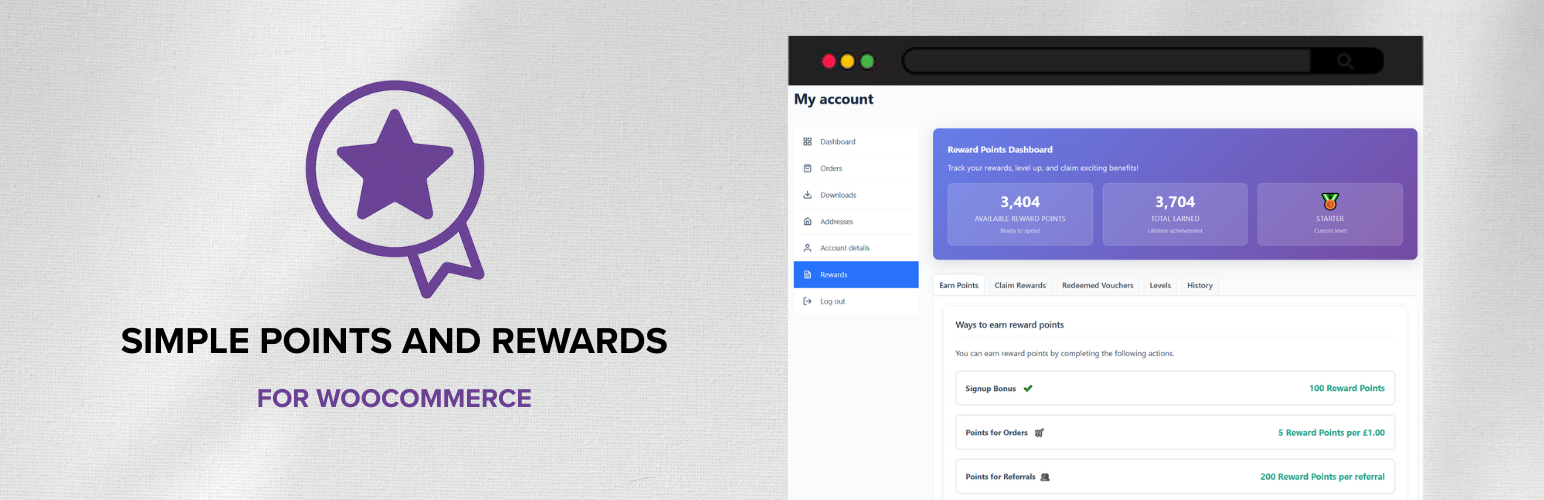
Simple Points and Rewards for WooCommerce – Create a Loyalty Program
Description
Simple Points and Rewards for WooCommerce helps you launch a lightweight, no‑bloat points and rewards loyalty program without complexity.
Customers earn points for actions (signup, orders, referrals) and redeem them for rewards like WooCommerce coupon vouchers, specific products, or checkout discounts – a complete Points and Rewards experience for WooCommerce.
A dedicated “Rewards” tab appears under My Account with points, history, ways to earn and redeem, and redeemed vouchers.
Admins get a clear settings area and tools to manage points, logs, and vouchers in your loyalty program.
Points and Rewards – Free Features
- My Account “Rewards” page (or shortcode) for customers to view and manage their points and rewards
- Levels and Badges System (Some limits apply in free version)
- WooCommerce Subscriptions support: award points on subscription renewals
- Deduct points when orders are refunded/cancelled/failed
- Customisable email notifications (points earned, rewards claimed)
- Admin tools: Settings, Points Activity Log, Customer Points manager, Reward Vouchers
- Order meta box showing awarded/deducted points context
- Plugin customisations (points labels, rewards labels, headings, colors, etc)
Why choose this Loyalty Points and Rewards plugin?
- Built specifically for WooCommerce
- Fast and lightweight
- Simple UX: one Rewards dashboard with points, levels, ways to earn and redeem
- Easy to setup and configure
- Works alongside WooCommerce coupon discounts and sales
- Flexible reward types: vouchers, products, or checkout discounts
- Levels and multipliers to incentivise more spending
- Comprehensive admin tools for managing your loyalty program
Ways to Earn Points
There are several ways for customers to earn points, including:
- Signing up for an account
- Placing new orders
- Referring friends via referral links
- Subscription renewals (WooCommerce Subscriptions)
The Pro version adds points for first order, after X orders, writing reviews, birthdays, social shares, and daily logins.
Types of Rewards
Reward points can be redeemed for various rewards vouchers including:
- WooCommerce coupon vouchers for discounts
- Free shipping on their next order
- Claim a specific free product
Alternatively, you can enable the “Points Discount on Checkout” option. This is a more simple and traditional method, that allows customers to convert points into an immediate order discount at checkout without generating a coupon.
Redeeming Points
Customers can redeem their points via the Rewards dashboard or at checkout (if enabled):
- My Account > Rewards: Customers view available points, total earned, level progress, ways to earn, ways to redeem, redeemed vouchers, and a paginated points history.
- Redeeming rewards:
- Voucher reward: creates a WooCommerce coupon tied to the customer that they can use on their next order.
- Product reward: creates a WooCommerce coupon and directs to checkout with the product added to the cart for free.
- Product bundle reward (Pro): creates a WooCommerce coupon and directs to checkout with all products in the bundle added to the cart for free.
- Points discount on checkout: lets customers apply their points as an instant discount on the current order from the checkout rewards box.
Pro Features
- Unlimited access to all features
- Referral coupons and offers (gift coupons, attribution rules)
- Conditional Rules for Earning Methods
- Scheduled Points Campaigns (e.g. Double Points Weekend) with Promo Banners and Countdown
- Product Bundle Rewards
- Floating Rewards Widget
- Floating Gift widget
- Reward points with a Prize Wheel
- Reward points on First Order
- Reward points after X Orders
- Reward points for keeping an Order Streak
- Reward points for Writing Reviews
- Reward points on Birthdays
- Reward points for Social Shares
- Reward points for Daily Logins
- Reward points for Product Offers & Bonuses
- Custom Ways to Earn points via developer API
- Custom renewal earning rates for WooCommerce Subscriptions (percentage or fixed points per renewal)
- Multi-currency support for points earning
- Points inactivity expiry
- Reward expiry and automatic cleanup
- Min and max points redemption limits
- Additional settings and UX enhancements
Settings Overview
- Rewards: Create and configure reward items (voucher or product), costs, and limits.
- Ways to Earn: Signup points; order earning rate; award timing; refund/cancel deductions; referral earning (PRO supports fixed or percent-based with attribution).
- Levels & Badges: Enable levels, multipliers, progression, and display options.
- General: Labels (Points/Rewards), headings, display toggles.
- Email: Subjects/bodies for “points earned” and “reward claimed”, with placeholders available.
- PRO tabs: Conditional Rules, Referral Offers, Gift Widget, Rewards Widget.
Tip: You can also embed the Rewards dashboard anywhere with the shortcode: [spar_points_rewards]. This lets you place your Points and Rewards experience on any page.
Migrations
You can easily migrate your existing customer points data from other popular WooCommerce Points and Rewards plugins including:
- WooCommerce Points and Rewards (by WooCommerce)
- MyRewards (by Long Watch Studio)
- WPLoyalty (by flycart)
- Points and Rewards for WooCommerce (by WP Swings)
- YITH WooCommerce Points and Rewards (by YITH)
Why do I need a Points and Rewards program?
A Points and Rewards program incentivizes customer loyalty by rewarding repeat purchases and engagement. It encourages customers to return to your store, increasing lifetime value and fostering a sense of community around your brand. By offering points for actions like signing up, making purchases, and referring friends, you create a positive feedback loop that benefits both your business and your customers.
Why choose Simple Points and Rewards for WooCommerce?
Simple Points and Rewards for WooCommerce is designed to be a lightweight, easy-to-use solution that integrates seamlessly with your WooCommerce store. It offers a comprehensive set of features without the complexity and bloat of larger WooCommerce loyalty programs. With a focus on user experience, both for customers and administrators, it provides a straightforward way to implement a loyalty program that drives engagement and sales.
Installation
- Install and activate the plugin.
- Ensure WooCommerce is active.
- In the admin area, open the “Points & Rewards” top-level menu, then Settings, to configure.
- Customers will see “Rewards” under My Account automatically.
- Optionally add the shortcode [spar_points_rewards] to any page or post to display the rewards interface.
Screenshots
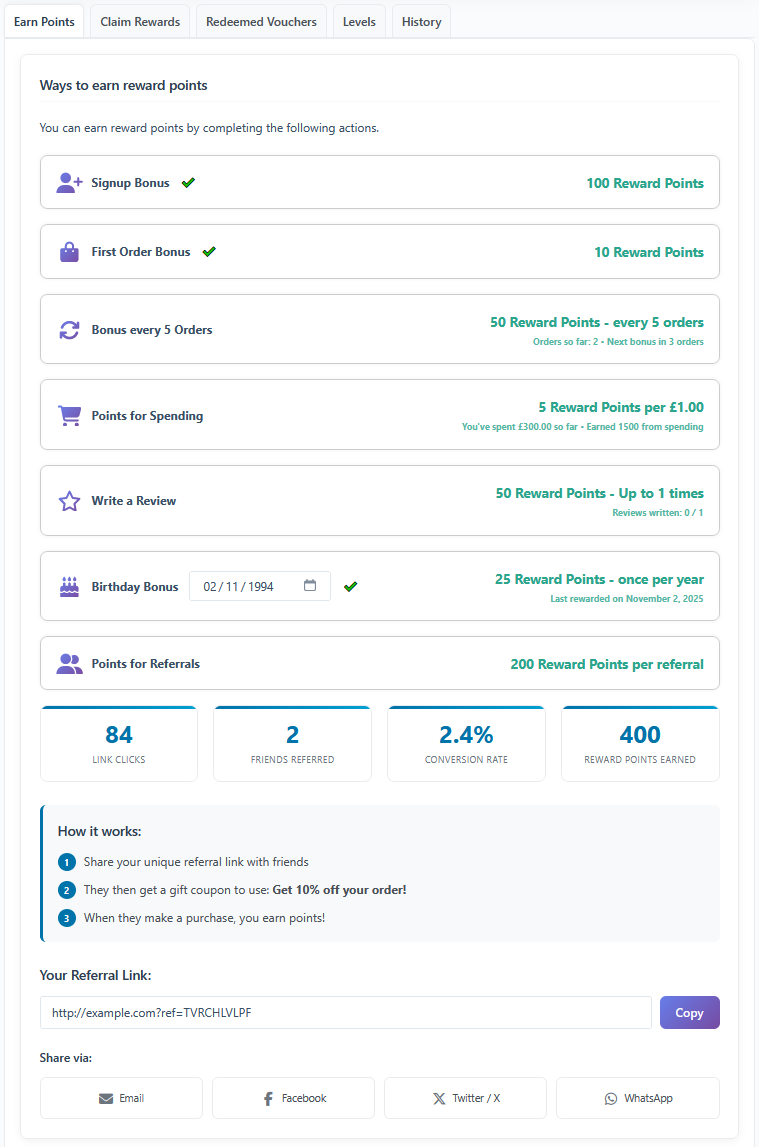
Customer Rewards dashboard: Ways to Earn
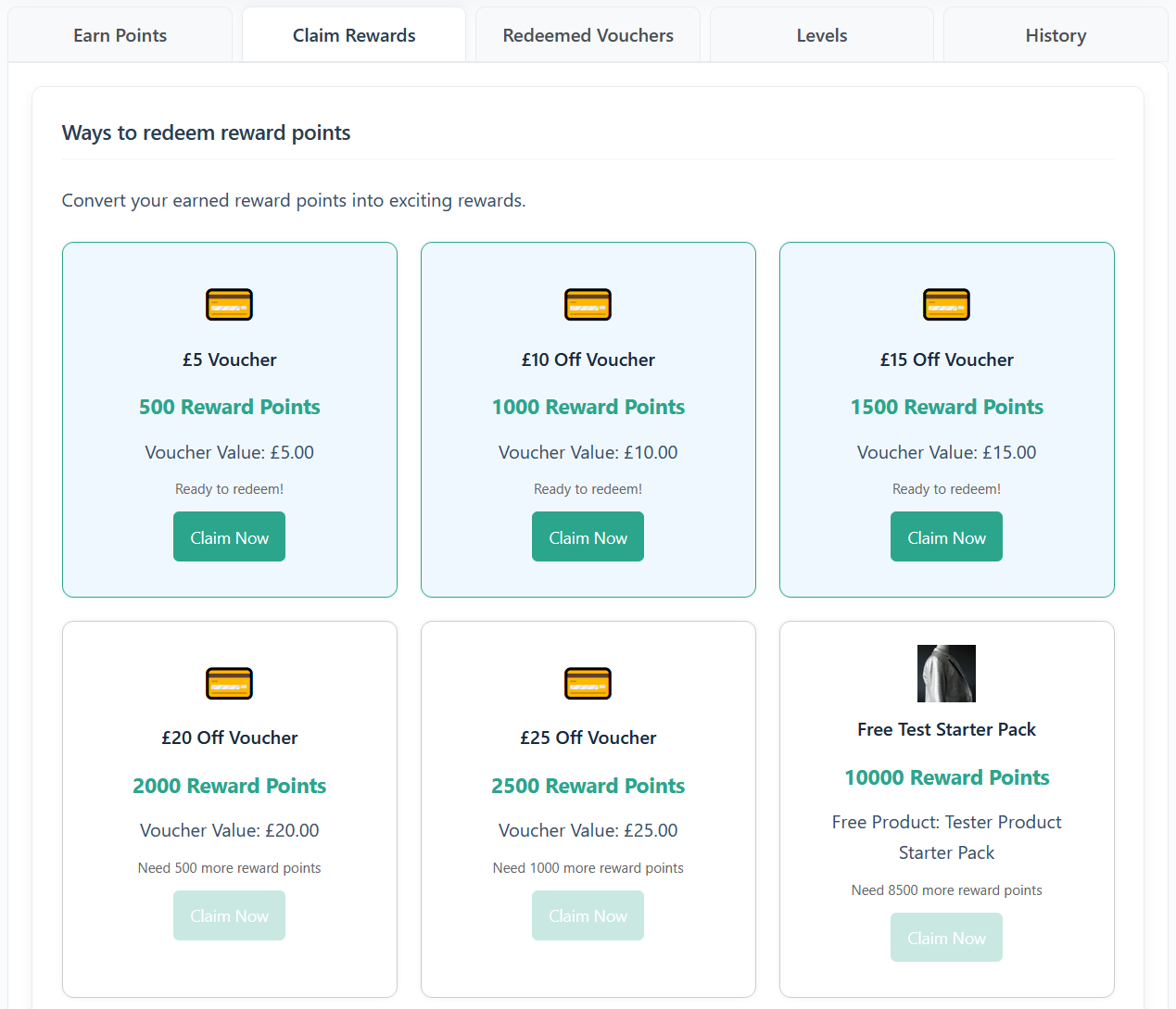
Customer Rewards dashboard: Ways to Redeem
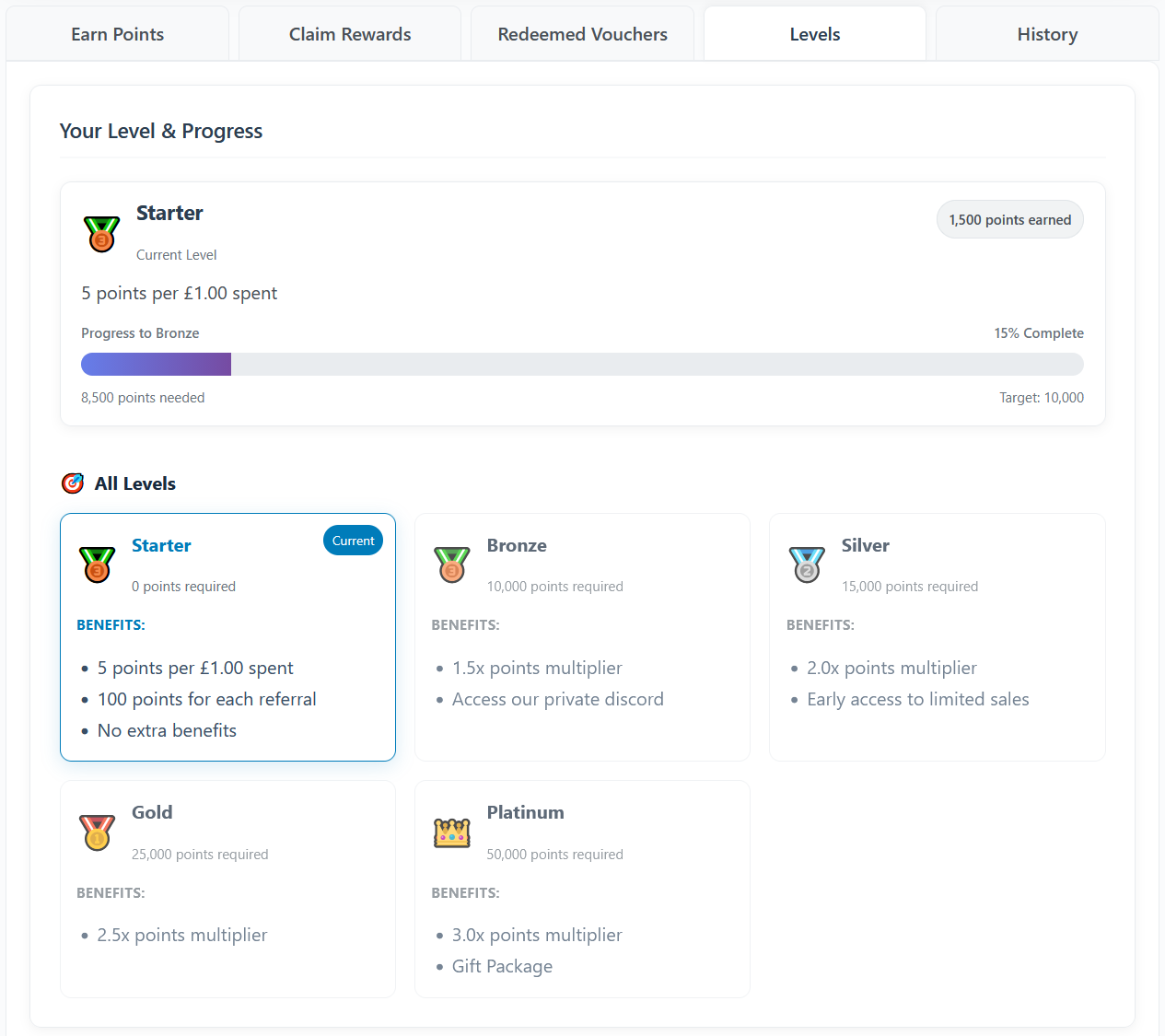
Customer Rewards dashboard: Levels and Badges
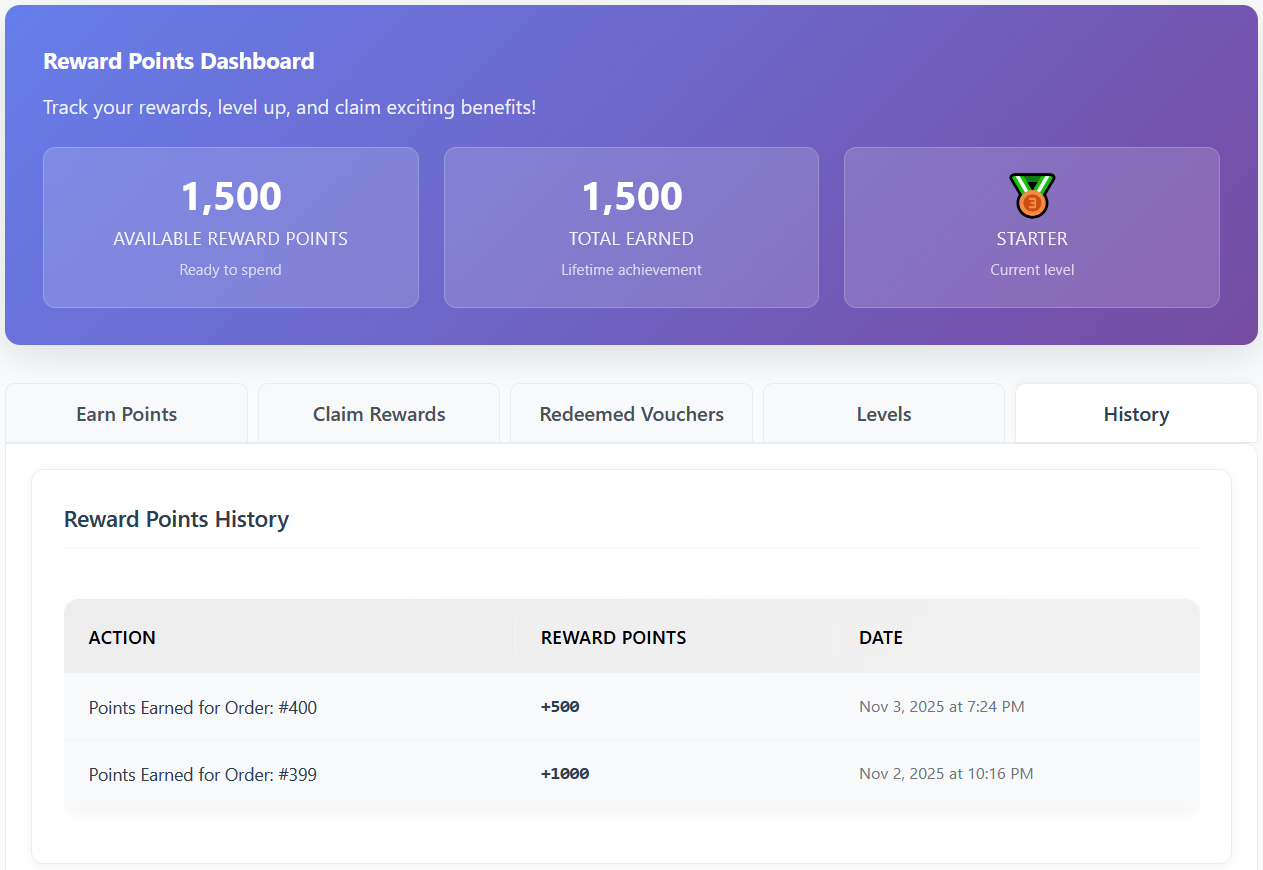
Customer Rewards dashboard: Points Log History
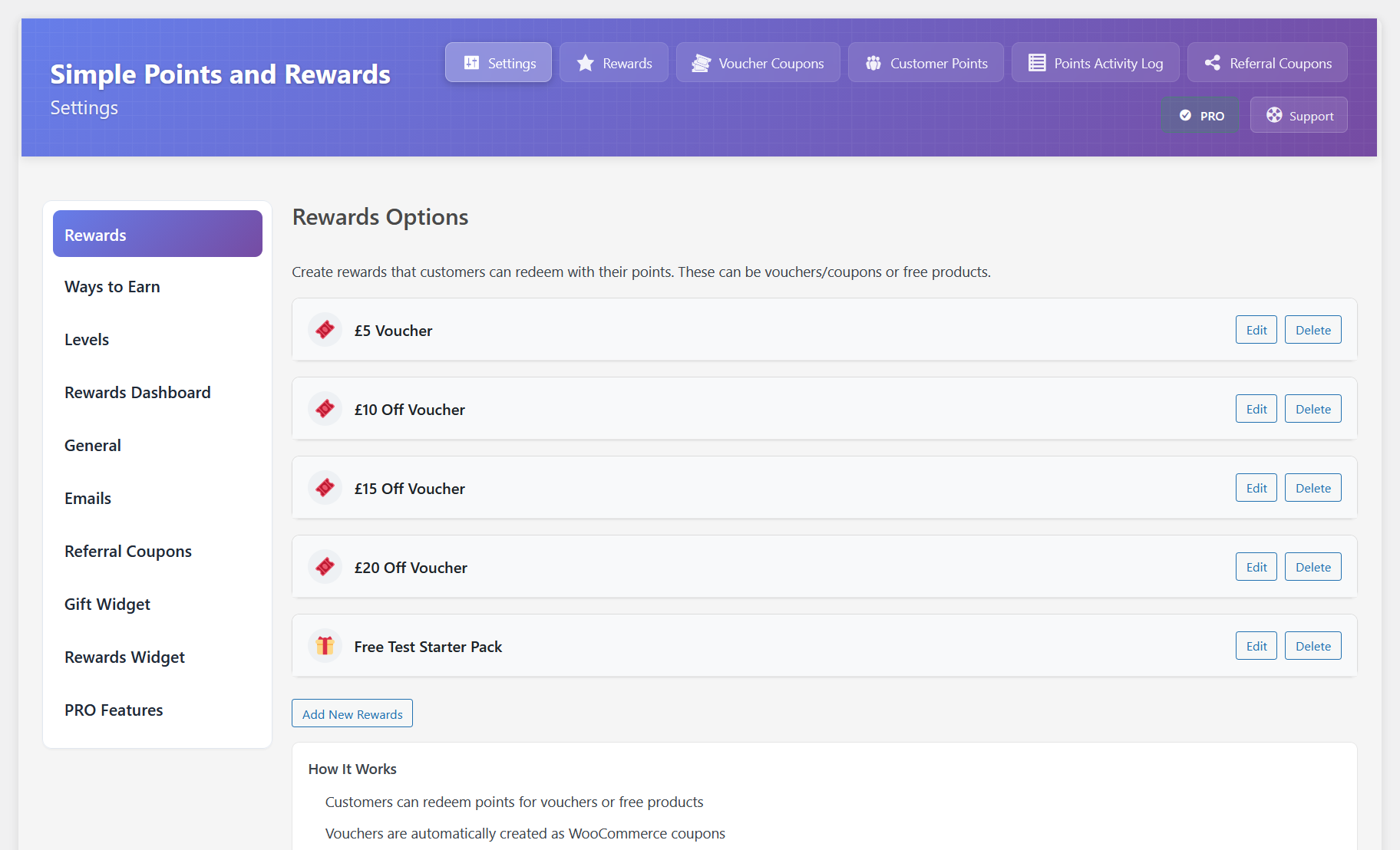
Admin settings example: Rewards tab
Faq
They can view their points, history, ways to earn and redeem, and redeemed vouchers in the “Rewards” tab under the “My Account” page in WooCommerce.
You can also use the shortcode [spar_points_rewards] to display the rewards interface on any page.
They can also use the checkout rewards box (if enabled) to redeem points for rewards or discounts at checkout.
In the Pro version, you can also enable a floating rewards widget for easy access to points and rewards anywhere on the site.
There are several ways to award points:
- Signing up for an account
Customers can earn points when they register a new account on your WooCommerce store.
- Placing new orders
By default, points are awarded when an order is created and they are taken to the “thank you” page.
You can change this behavior in Settings to award points when the order is marked “processing” or “completed”.
- Referrals
If the referral features are enabled, customers can earn points by referring friends via referral links or gift coupons.
Pro Version Only:
- First Order
Customers earn points when they place their first order.
- After X Orders
Customers earn points after completing a set number of orders.
- Writing Reviews
Customers earn points for writing product reviews.
- Birthdays
Customers earn points on their birthday.
- Social Shares
Customers earn points for sharing your store or products on social media platforms.
- Daily Logins
Customers earn points for logging into their account daily, with bonus points for consecutive logins.
- Order Streaks
Customers earn a bonus for ordering to a regular schedule, such as once a week or twice a month, and keeping it up for a number of periods in a row. Set a minimum order value if only real orders should count. Missing a period ends the streak, a progress bar on the rewards dashboard shows how it is going, and optional reminder emails nudge customers before they lose one.
- Wheel Spins
Customers can earn points by spinning a prize wheel for a chance to win various rewards.
- Product Offers & Bonuses
Customers earn bonus points for purchasing certain amounts of specific products, product bundles, or product categories.
- Custom Ways to Earn
You can create your own ways to earn points entirely from code with the developer API.
Yes.
Referral features allow tracking via a cookie and (optionally) via referral gift coupon (PRO version) with attribution modes and self-referral blocking.
Yes, in Settings you can change labels and several display texts.
A Points and Rewards program lets customers earn reward points for actions (like placing orders or referring friends) and redeem those points for rewards such as discount vouchers or free products. This plugin provides a simple, flexible Points and Rewards system for WooCommerce.
Yes. When WooCommerce Subscriptions is active, a “Subscriptions” tab appears in the plugin settings.
You can award points on subscription renewal orders, choose when renewal points are awarded, include or exclude sign-up fees from points calculations, exclude subscription products from earning entirely, and control whether renewals count toward the “Bonus after X Orders” milestone.
In the PRO version, you can also change the renewal earning rate: award renewals a percentage of the regular points (e.g. 50%) or a fixed number of points per renewal, instead of the full regular rate.
Yes, the plugin is designed to work with most custom checkout plugins.
It has specificly been tested and integrated with these checkout plugins:
– FunnelKit (Checkout and Side Cart)
– CheckoutWC
– Flux Checkout
You can create a reward of type “Custom (Developer Hook)” in the Rewards settings tab. A custom reward lets you deduct points and then run your own logic when the customer claims it.
Fields:
– Short Description – shown to customers in the Ways to Redeem list.
– Developer Reward ID – lowercase unique identifier (letters, numbers, hyphens, underscores) you can use to distinguish multiple custom rewards.
Hook fired after successful claim and points deduction:
spar_custom_reward_claimed( $user_id, $developer_id, $reward_array, $points_spent )
If your logic fails and you need to refund points, call:
spar_update_user_points( $user_id, $points_spent, ‘add’, ‘Refund: custom reward failed’, ‘redeem_refund’ );
This keeps the plugin flexible for bespoke reward types (subscriptions, access passes, digital downloads, etc).
This plugin stores points in user meta and logs points activity in a custom database table to enable efficient history pagination.
Referral features (if enabled) use cookies to attribute referrals:
– spar_referrer: stores referral code (up to ~30 days) for attribution
– spar_referral_coupon: temporary helper cookie cleared on order completion
As site owner, include these cookies and data uses in your site’s privacy policy as applicable.
Freemius: The plugin uses the Freemius SDK for licensing of PRO features; see Freemius privacy and terms for details.
Font Awesome: The plugin uses Font Awesome (free) for icons; see Font Awesome privacy and terms for details.
Yes. If you need any help setting up the Points and Rewards plugin, please feel free to get in touch and we’ll be happy to help!
You can report feature bugs by creating a support ticket. Please provide as much information as possible to make it easier for us to find a solution for you.
Please report security bugs found in the source code of the Simple Points and Rewards plugin through the Patchstack Vulnerability Disclosure Program. The Patchstack team will assist you with verification, CVE assignment, and notify the developers of this plugin.
Reviews
Great plugin and outstanding support
By 
Compared to other loyalty plugins, this one has all the features we need while remaining very lightweight. The interface is clean and easy to use.
What really stands out is the support from Elliot. He’s been incredibly helpful and quick to respond, often adding requested features and releasing fixes almost immediately. It’s been a great experience working with a developer who listens to feedback and acts on it so quickly.
Highly recommended, both for the plugin itself and the excellent service behind it!
Just the best loyalty plugin on wordpress
By 
If you need a loyalty points plugin - this plugin is all you need! After seeing how a very well-known loyalty plugin was impacting my site's speed, even before the site was fully operational, I decided to look for a new, similar plugin. I stumbled across this one quite by chance and thought: great reviews, but it's still very new, should I give it a try? I'm so glad I did. This plugin does exactly what a loyalty points plugin should do, with a very simple setup, many features in the free version, and most importantly, it has absolutely no impact on website speed and requires almost no entries in the database. Is it magic? All I can say is – this is absolutely the best loyalty points plugin for WordPress!
Gets the job done without any problem
By 
One of the best plugins out there for loyalty programs. UI is clean, modern and adopts to the theme. Plugin support is impressive. Had a couple of bugs initially and the fixes are implemented soon. Knowing the author whose is behind another great plugin, I hope that the standard will maintained throughout.
Amazing plugin - Even more amazing support
By 
This plugin did exactly what we needed. What is even more impressive is that we had some glitches, and the service we received was beyond spectacular. I have nothing but positive things to say about the plugin and service. Highly recommended!
Great Plugin
By 
This is the kind of plugin I was looking for rewards, easy to configure and good UI.
Bought lifetime pro license instantly
By 
We've been looking for a replacement for the over-bloated rewards points premium plugin we've been using for a few years. When I saw that Elliot was releasing a new plugin for this purpose I had high hopes and high expectations because his affiliate program plugin has been amazing for many years now, with both excellent support when issues arose and also regular, excellent updates. As soon as I started using the free version of Simple Points and Rewards I could see that it was another winner and I immediately purchased a lifetime license for the Pro version.
Beautiful UI for both users and admin
By 
This plugin is FABULOUS. I've probably used about 3-4 different points and rewards plugins for WooCommerce over the years (including premium ones), and this one has absolutely the best interface for both end users and admins. I had high expectations based on the plugin author's good work on the Cloudflare Turnstile plugin, but I'm seriously blown away by how good this is. It is easily the best points plugin I've used. The free version is so feature-rich that I don't think I even need the PRO version (but I will probably buy it anyways, just to support the developers and reward them for making such an awesome plugin!). If you're looking for the best points and rewards plugin for WooCommerce, you found it.
Changelog
Version 3.0.0 – 15th October 2026
- New: Dashboard page, now the first page of the Points & Rewards menu, showing your program’s stats, recent activity, top customers, a setup checklist and quick links.
- New: Setup wizard that walks you through the main settings step by step, with a live preview of your store. It opens after first install and from the Settings page.
- New: “Tools” page (Points & Rewards > Tools) that brings the import, export, migration and bulk points tools together. Import / Export Settings has moved here.
- New: “Award Points for Past Orders” tool, to give customers points for orders placed before points were switched on.
- New: “Repair Lifetime Points” tool, to check and fix customers’ lifetime “Total Earned” points against the points activity log.
- New: Import customer points from a CSV file (Points & Rewards > Tools), or with WP-CLI using “wp spar import-points”.
- New: (PRO) Scheduled points campaigns: a “Date: Schedule (Campaign)” condition in Conditional Rules for time-limited offers such as a “Double Points Weekend”.
- New: (PRO) Campaign banners with a countdown, shown on your store while a scheduled campaign is running.
- New: “Points discount includes tax” option (Settings > Rewards > Points Discount on Checkout), so the order total drops by exactly the value of the points.
- New: “Also deduct points when part of an order is refunded” option (Settings > Earn > Place an Order).
- New: “Also deduct referral points when part of the referred order is refunded” option (Settings > Earn > Referral).
- New: “Use custom background and text colors” option for the checkout rewards box (Settings > Checkout Box > Theme Settings).
- New: “Adjust points” button on the order edit screen, to change the points an order earned after they were awarded.
- New: “Hide the ‘You will earn’ points message on the checkout page” option (Settings > Checkout Box > Display Settings).
- New: “Hide points from logged-out visitors” option for product pages and shop listings (Settings > Product Pages).
- New: “Let the balance go below zero when points taken back were already spent” option (Settings > Earn > Place an Order).
- New: “Enable Rewards Program” switch at the top of the Settings page, so you can set up the program before launching it.
- New: “Dashboard Customisation” section in Settings > Rewards Dashboard, with a sub-tab for each part of the dashboard.
- New: More rewards dashboard options: rename or hide the header cards, change the headings and button text, choose the opening tab, and hide parts of each tab.
- New: Add your own content to the rewards dashboard, including two custom tabs such as “How It Works” and “FAQs”.
- New: New card design for the Earn Points, Claim Rewards and Your Vouchers tabs of the rewards dashboard. The previous design can still be chosen under Dashboard Customisation > Earn Points > Layout.
- Tweak: Refreshed the design of every admin page (customers, vouchers, activity logs, reports, tools and more) to match the new Dashboard.
- Tweak: Variable products now show an “Earn up to X points” message before an option is chosen.
- Tweak: (PRO) Prize Wheel prize chances are no longer sent to the browser when the probabilities tooltip is turned off.
- Tweak: The “Potential Points” figure on the order edit screen now updates as the order is changed, without saving first.
- Tweak: Removed the “Quick Setup Guide” box (replaced by the setup wizard) and the help boxes from the Settings page.
- Tweak: Rewards dashboard tabs you switch off or reorder now apply to logged-out visitors too.
- Tweak: (PRO) The floating rewards widget’s Earn tab now uses the same icons as the rewards dashboard instead of emojis.
- Tweak: (PRO) Restyled the floating rewards widget to match the rewards dashboard.
- Tweak: The referral stats on the Earn Points tab are now shown as cards.
- Tweak: Removed the small text under the points summary card labels on the rewards dashboard. You can add your own under Dashboard Customisation > Header.
- Tweak: Redesigned the PRO feature, Simple Store Credit and PRO Features tabs in the settings to match the other tabs.
- Tweak: Simpler “Upgrade to PRO” box beside the settings, with one trial button and the feature list collapsed.
- Tweak: (PRO) Tidier Prize Wheel settings, with the options grouped into cards and a clearer prizes table.
- Fix: Points discount at checkout: only the points the discount actually uses are taken when the cart shrinks or more points are applied than the cart is worth, retrying a declined payment keeps the discount, and an order that is cancelled or fails and is then paid takes its points again.
- Fix: Points spent on an order are now returned correctly when it is cancelled or refunded: never twice, also when an order paid entirely with points is marked Refunded, not for a shipping-only refund, and taken back again if the refund is deleted.
- Fix: The points discount is now rounded to the nearest cent (or your currency’s smallest unit, such as whole yen) instead of always down. Developers can change this with the “spar_redemption_amount_rounding” filter.
- Fix: (PRO) The “Maximum percentage of the cart” and “Minimum cart total” limits for points discounts are now enforced when the points are applied, and the minimum includes tax on stores that show prices with tax.
- Fix: The “Show points discount on” setting had no effect, the points discount “Remove” link was hard to read on dark themes, and on the classic cart and checkout the points discount in the order totals disappeared after the first update.
- Fix: Rewards could be claimed when they should not be: switched off or unfinished rewards, while reward vouchers or WooCommerce coupons were switched off, and by banned customers (who could also spend points at checkout). A “Free Product” reward that could not be added to the cart also still took the points.
- Fix: (PRO) “Free Product Bundle” rewards did not add the bundle to the cart, could be claimed without an active licence, and could make a product the customer had already added free instead of the bundle’s own.
- Fix: Cancelling or refunding an order now takes back exactly the points it gave, from the customer who received them, even if the order’s customer was changed. This includes (PRO) level multipliers and Conditional Rules bonuses, first order and “bonus after X orders” bonuses, and guest orders after the guest creates an account.
- Fix: An order whose payment failed, or that was cancelled or refunded, could earn points on the order received page, and cancelling an order paid with points could leave extra points when the points it earned had already been spent.
- Fix: (PRO) Referral bonuses: a referrer could lose points for a delayed bonus they never received, and a percentage bonus ignored refunds made before it was paid.
- Fix: (PRO) Points delay: Conditional Rules were applied twice to delayed bonus points, guest order points skipped the delay when the guest created an account, and delayed Order Streak or Product Offers bonuses stayed pending after their order was cancelled.
- Fix: Lifetime “Total Earned” points could be wrong: first points were counted twice when levels use the available balance, guest points twice on sign-up (PRO), points given back after a cancellation or failed claim counted as earned, and migrations in “override” mode or totals rebuilt from the points history ignored refunds. Run Tools > Repair Lifetime Points to correct existing customers.
- Fix: (PRO) Guest points: other guests’ order history could be added to a new account’s points history, and guest orders did not get the campaign and Conditional Rules points shown in the cart.
- Fix: (PRO) Conditional Rules using the “Customer: Store Credit Balance”, “Customer: Total Points” or “Customer: Available Points” conditions were not applied, or not to every way to earn and to product page points.
- Fix: Order screen: “Grant points now” could leave out the first order bonus (PRO) or its level multiplier and worked on cancelled, failed or refunded orders, and the points panel said earning was off on stores that only use “Points for Orders” tiers.
- Fix: Points earned: variable product points included tax when “Include taxes in calculation total” was off, “Points for Orders” tiers earned spending points on top while “Points for Spending” was off, multi-currency stores could use the wrong currency, totals such as 19.99 + 1.61 earned one point too few, and the checkout box’s points summary counted the first order bonus as product points and left out its level multiplier.
- Fix: WooCommerce Subscriptions: points discounts are no longer copied to renewal orders or taken off every renewal, and paying an older renewal with points now takes the points.
- Fix: On stores not using WooCommerce’s High-Performance Order Storage, the customer page’s “Referral Revenue” was always 0 and the classic Earn Points list counted none of the customer’s orders.
- Fix: Rewards dashboard: several Claim Rewards settings had no effect (rewards now show a progress bar and the points still needed), the heading could be empty, a renamed tab lost its name when switched off, and amounts of 1,000 or more showed wrongly with a level multiplier.
- Fix: “1 points” now shows as “1 point”, voucher values such as “10% Off” are translated as one phrase, and dates, times and prices (including the floating widget’s referral line) follow your store’s settings.
- Fix: Styling: themes such as Hello Elementor could override the rewards dashboard and checkout rewards box, the plugin’s Font Awesome could break Font Awesome 4 icons, long checkout box buttons could overflow on phones, and (PRO) floating widget level badges did not match the dashboard. The checkout box also no longer reloads twice on every classic checkout update.
- Fix: Settings: “Save All Settings” showed on PRO feature tabs with nothing to save, the Product Pages settings now only show when “Points for Spending” is on, saving without an active licence switched off the Referral Coupons and Gift Widget settings, and (PRO) the “Referral Gift Coupons” page could fail to load on stores with lots of coupons.
- Fix: Emails: placeholder links such as {rewards_url} broke after editing with the Visual editor’s link button, and the default “points earned” subject showed “You’ve” instead of “You’ve”.
- Fix: (PRO) Social sharing set to reward once in total paid for each network, a share whose points were refused (for example for a banned customer) was still counted as rewarded, and custom ways to earn registered from code were switched off unless told otherwise.
- Fix: (PRO) A birthday bonus refused while the rewards program was switched off was still counted as given for the year, and the daily prize wheel spin used the UTC date instead of your store’s date.
- Fix: Customer Points: sorting by referrals left the table empty, “Set” counted towards lifetime “Total Earned” points, adding points to a banned customer reported success, and on sites with an object cache a search could show an earlier search’s customers.
- Fix: (PRO) “Grant Now (Pending)” on the Points Activity Log could not select any pending points.
- Fix: Order links on the Referrals and customer pages did not open the order on stores using High-Performance Order Storage.
- Other: Updated translations.
Version 2.3.0 – 21st September 2026
- New: Simple Store Credit integration. When our Simple Store Credit plugin (free or PRO) is installed, a “Simple Store Credit” tab appears in the settings with everything switched on by default. Customers can redeem points for store credit in two ways: a new “Store Credit” reward type in the Rewards tab (a fixed amount of credit for a fixed number of points, delivered to the account balance or as a credit voucher), and a “Convert points” tool on the rewards dashboard (also available as the [spar_points_to_store_credit] shortcode) where the customer chooses how many points to convert, at the points discount rate or a custom rate. Points and store credit no longer double up: store credit spent on an order (redemption tool, credit vouchers, or the Store Credit payment method) and purchases of store credit itself (top-ups and gift cards) are kept out of the points earning base and the cart/checkout preview, points discounts and reward vouchers are kept out of the cashback base, and an earning mode can make an order earn points or cashback but not both. Levels gain a cashback multiplier, so higher levels earn more Shop & Earn cashback. The store credit redemption tool can sit inside the checkout rewards box as its own tab instead of a second box, the checkout box header, the rewards dashboard and the floating rewards widget show the available store credit balance, and the store credit account page lists “Redeem points” as a way to get credit. Store credit can also be a referral bonus (in addition to, or instead of, the referral points) and a Prize Wheel prize. A dedicated “store credit claimed” email is sent for points redemptions (with the store credit plugin’s generic email kept quiet so customers are not emailed twice), every points email can use a {store_credit_balance} placeholder, the admin customer page shows the store credit balance, the order edit screen shows store credit used on the order, and (PRO) Conditional Rules gain a “Customer: Store Credit Balance” condition. Without the plugin installed, the “Simple Store Credit” tab is still there and describes what the integration does, so you can see what it offers before deciding to install it.
- Tweak: (PRO) The “Product Offers & Bonuses” section on the rewards dashboard now keeps its offer boxes inside the section card, beneath the heading, rather than listing them as separate boxes underneath it, so the offers read as one section in the same way as the other ways to earn.
- Tweak: Improved some styling for the rewards dashboard on mobile devices.
- Tweak: The rewards dashboard shortcode under Account > Display on Custom Page is now a field with a “Copy” button next to it, rather than text to select by hand.
- Fix: Redeeming points for a cart discount could apply one cent less than the preview showed for certain point amounts (for example 29 points at 100 points per 1.00 applied 0.28). The discount is now worked out in whole cents, and the cart, checkout, dashboard and admin order previews use the same rounding.
- Fix: Saving the Rewards settings raised an “undefined variable” warning in the debug log for every reward, because the icon colour mode was never read from the form. It is now saved correctly.
- Fix: The “Voucher Amount”, discount type and free shipping fields no longer appear on rewards that are not vouchers. On a saved Free Product, Free Product Bundle or Custom reward they were shown alongside the fields that do apply, suggesting a voucher value that was never used. They now appear only on voucher rewards, as they already did on a reward being added.
- Fix: (PRO) The “Product Offers & Bonuses” section on the rewards dashboard now follows the dashboard’s dark mode. It was the only section left with light backgrounds and dark text when dark mode was on, so the offer boxes, product images, descriptions and progress bars stood out against everything around them.
- Fix: (PRO) The “Product Offers & Bonuses” section on the rewards dashboard no longer appears as an empty box once every product rule is outside its start and end dates. A rule whose end date had passed, or whose start date was still to come, was correctly kept off the dashboard, but the section heading was still drawn above the empty space. The section is now left out until at least one rule is live. In the settings, each product rule now shows an “Expired” or “Scheduled” tag in its header when its dates are keeping it off the dashboard, so it is clear why an offer is not showing.
- Fix: (PRO) The floating rewards widget could pick up styling from the theme and end up looking wrong – the wrong font, oversized or uppercase text, stray bullet points and link arrows, mis-sized buttons and inputs, or labels pushed out of line. It now shields itself from theme and page builder styling, including rules marked !important, so it renders the same on every store, and its own layout has been tightened up: the tabs along the top stay on one line however many of them are on show (opening History or Terms could previously squash or clip them), the header and tabs keep their size at every Widget Size setting, and the “Regular” size is now 20px wider and taller. The points discount panel inside the widget still uses your store’s own button styling, as before.
- Fix: The “Current level” card in the rewards dashboard header now lines up with the cards beside it. The level badge made its row taller than the number rows on the other cards, so the level name and “Current level” text sat a few pixels lower than the neighbouring labels. A custom badge image in that card is also now sized to match the built-in badge icons instead of showing at its full size.
- Fix: The “Earn Points” tab of the rewards dashboard was cut off on phones. The ways-to-earn list was being sized to its widest content (the birthday date field, the Product Offers boxes), so every card ran past the right edge of the tab and was clipped. The list now always fits the screen, and the tab has been tidied up for small screens: less nested padding so the cards get more of the width, the “View Products” and “Spin Wheel” buttons drop onto their own line under the card title instead of overflowing, the birthday date field fills its column, referral stats show two per row rather than four stacked cards, the “How it works” box is rounded to match the cards around it, the referral link and coupon code fields take the full width with the Copy button beneath them, share buttons stay two per row (three on tablets) instead of stacking into one tall column, each row of the referral “Link Clicks” log now shows its column names beside the values (the table header is hidden on phones, which left bare dashes and “No” with nothing to explain them), and (PRO) each Product Offers & Bonuses box is laid out for phones and tablets – the product image sits beside the offer name and points, the description and requirement run the full width beneath, the progress bar and its “x / y purchased” label share a row with the Add to cart button, and on phones the button spans the box – instead of squeezing the name, points and button into a one-word-per-line column, which happened at any width under about 700px.
- Fix: The dashboard’s dark mode toggle now lines up with the first line of the heading on phones, and the heading keeps clear of it, so a long dashboard title no longer runs underneath the button.
Version 2.2.0 – 10th September 2026
- New: (PRO) Added an “Order Streak” way to earn, for rewarding customers who keep ordering to a regular schedule. Set the schedule under Earn > Order Streak – for example one order every week, or two orders every month – along with how many periods in a row a customer must keep it up before the bonus is awarded. Periods run from the order that started the streak rather than from the calendar, so a customer who starts on the 10th always has until the 10th of the next period. Miss a period and the streak ends, and their next order starts a new one. A minimum order value can be set so token orders cannot keep a streak alive, measured the same way as your “Points for Spending” earning rate. The bonus can be awarded once per customer, or paid out again every time an unbroken streak reaches the length you set. Reminder emails can be turned on to warn customers before a streak runs out: choose how many days before the period ends to send them, and the minimum streak a customer must have built up to be worth reminding, so first-time customers are not chased. A customer is emailed at most once per period, and never once they have already placed the orders that period needs. The reminder email is edited from the Email Notifications tab, and the streak works with level multipliers, conditional rules, points delay, and the reports breakdown like every other way to earn. On the rewards dashboard and in the floating rewards widget, customers get a progress bar showing how many periods they have banked, which one they are working on and what it still needs, which turns amber when the period is about to run out.
- New: Added a [spar_product_points] shortcode for placing the product points message by hand, for stores that want it somewhere the automatic placement does not reach. Drop it into any page builder shortcode widget or block on a product template. It uses the product being viewed, or a specific one with [spar_product_points product_id=”123″]. A matching “Manual placement” choice has been added to the “Product points display location” dropdown, which turns the automatic placement off so the shortcode is the only thing that renders the message.
- New: The “Reward Points” panel on the order edit screen now explains why an order has not earned points, instead of showing “Points not yet awarded” for every case. It names the actual reason: the order has no customer account assigned (the most common cause on orders created by hand in the admin, where the Customer field is left as Guest and there is nobody to credit the points to), the customer is banned from earning points, points were redeemed on the order, the order earns no points, or the order is simply waiting to reach the status that points are awarded on, which is now named in the panel. Each reason comes with a short note on what to do about it, and the “Grant points now” button reports the same reasons when it cannot award, rather than a generic failure message.
- New: Added a “Redeem a Reward” panel to the admin customer page (Points & Rewards > Customer Points > View Customer), for redeeming a reward on behalf of a customer, for example when taking an order over the phone. It runs exactly the same redemption the customer would run themselves: their points are deducted immediately, the voucher coupon is created and restricted to their email address, and the reward claimed email is sent, so the code can then be applied to a manually created order with the WooCommerce “Apply coupon” button. Rewards that add a product to the cart can still only be redeemed by the customer, because an admin request has no cart, so only voucher and custom rewards are offered here.
- New: Added an “Apply Points for Discount” section to the “Reward Points” panel on the WooCommerce order edit screen, for spending a customer’s points against an order you are building for them, for example one taken over the phone. It stays collapsed to its heading until you open it, and only appears when there is actually something to redeem: the order has to still be editable, and the customer has to have enough points for the order to be worth discounting. Entering an amount shows what it is worth as you type it, and applying it deducts the points and adds the discount to the order as the same discount line the checkout produces. The section refreshes as soon as you change the Customer field, so you are always looking at the balance of the customer the order is actually for. Removing the discount returns the points. Because the discount is the same line the checkout creates, refunding or cancelling the order returns the points exactly as it does for a redemption the customer made themselves, and the “Do not award ANY points on orders where points were redeemed at checkout” setting recognises it too.
- New: (PRO) An order whose points are being held back by the “Points Delay” feature now says so on the order edit screen. The “Reward Points” panel shows how many points are waiting and the date they reach the customer’s balance, so a delayed award is no longer indistinguishable from one that failed: the order records the points as earned while the balance deliberately stays unchanged until the delay is up. Orders with more than one pending release show the combined total and how many parts it arrives in.
- Tweak: Redesigned the “Reward Points” panel on the order edit screen. The customer the order belongs to is now shown with their avatar, name, email address and current balance, so it is obvious whose points any action on the panel affects. The potential, awarded and deducted totals are laid out as figures rather than run-on text, and the status message now takes its colour from what it means — red when something needs attention, green when points have been awarded, amber while an order is still waiting to reach the status that awards them — where previously every state, including outright failures, was shown in the same amber box.
- Fix: The product points message now appears on product pages built with a page builder or a block theme. Elementor, Divi, Bricks, Oxygen, Royal Elementor Addons and WordPress block themes build the product page out of their own widgets and blocks, and never run the WooCommerce hooks the message was attached to, so “Show points on product pages” appeared to do nothing on those stores. The message is now placed next to the add to cart button on such templates, respecting whether the chosen display location sits before or after it. Themes that use the standard WooCommerce product template are unaffected and keep using the exact display location chosen in the settings.
- Fix: Points redeemed at checkout are no longer lost on WooCommerce Subscriptions renewal orders. When a customer paid for a renewal manually, WooCommerce Subscriptions removed the points discount from the renewal cart before the order was created, but the points were still deducted — leaving the customer paying full price with their points spent. The discount is now kept on renewal checkouts and the points are deducted against it as normal.
- Fix: Points are never deducted unless the discount actually reaches the order. If anything removes the points discount before an order is created, the points now stay on the customer’s balance and a note is added to the order explaining what happened, instead of silently charging them.
- Fix: A points discount applied when buying a subscription product is no longer included in the subscription’s recurring total, so it only ever comes off the order it was redeemed on rather than every future renewal.
- Fix: The points discount is now correctly recognised on stores using a translation of the plugin, where the discount line was previously not matched by name.
- Fix: Points redemption is now captured on the WooCommerce Checkout block at the point the order is placed, rather than relying on the customer reaching the order confirmation page.
- Fix: The settings page no longer triggers a fatal error (“Uncaught ValueError: Unknown format specifier”) on stores running the plugin in a translated language. Some of the bundled translations had lost the “%s” placeholder from their text — for example the Italian translation of “%s appear on the customer account page and rewards widget” — which made PHP fail as soon as the string was displayed and took the whole page down with it. The affected strings in the French, Italian, Japanese, Dutch, Polish, Brazilian Portuguese and Russian translations have been corrected, and a handful that could not be recovered now fall back to English.
- Fix: Added a safeguard so a faulty translation can no longer break a page. Every translated string is checked before it is used, and if its placeholders do not match the original text the English original is shown for that string instead. This also protects stores that use their own translations from WordPress.org, Loco Translate, WPML or similar tools.
- Fix: The discount value shown next to the points slider now always matches the discount applied to the cart. On stores that display prices including tax, the announced value and the cart line were worked out by two different calculations and could disagree by a cent — for example, redeeming 500 points at a rate of 120 points per 1.00 announced “5.00” but took 4.99 off the cart. The preview now follows the same steps WooCommerce takes when it taxes a discount, including on carts that mix more than one tax rate, so the value a customer is quoted is always the value they receive.
- Fix: The points discount preview in the FunnelKit side cart now includes tax on stores that display prices including tax, where it previously showed the value before tax was applied.
- Fix: An order is no longer recorded as having awarded points when the points were actually refused. If the points could not be credited, for example because the customer is banned from earning, the order was still stamped with the awarded amount, so the order edit screen reported “Points Awarded” while the balance had not changed, and the order could never be put right because both the automatic award and the “Grant points now” button treat that stamp as proof the points were given. The order is now only marked as awarded when the balance actually changed, so affected orders can be granted afterwards once the cause …