Simple Self-Styleable Pop Up

Simple Self-Styleable Pop Up
Description
This plugin is designed to give it’s user full styling possibilities while offering a easy-to-use framework at the same time. With a limited amount of HTML and CSS knowledge, the Popup can be fully styled and customized by the user.
Installation
This section describes how to install the plugin and get it working.
- Upload ‘plugin-name.php’ to the ‘/wp-content/plugins/’ directory
- Activate the plugin through the ‘Plugins’ menu in WordPress
- You may access and modify the settings in the WordPress backend via Settings -> sIMPLE Self-Stylable PopUp
Screenshots
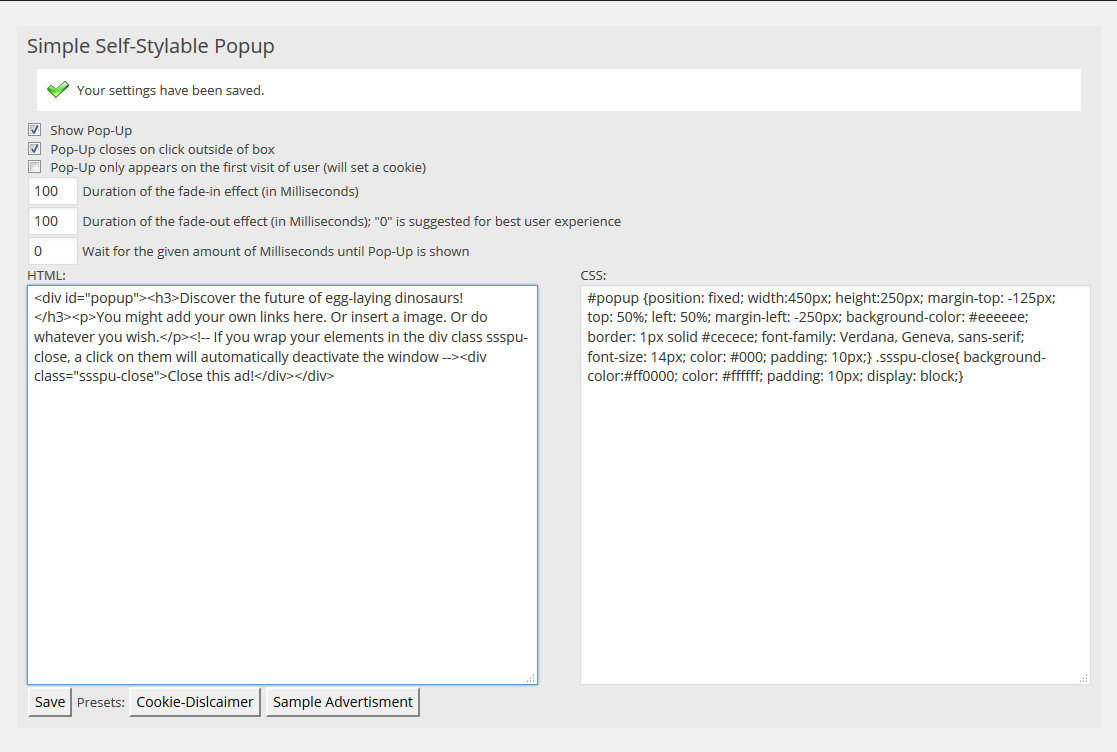
SSSPU provides a clean and easy-to-use backend for customizing. Default presets allow you to style your own pop-up within minutes.
Faq
How can I create a button that closes the Pop-Up?
Simply wrap the text or element into </div>-tags (remove the underscores). You can also style these tags in the CSS-section of the plugin. By default, .ssspu-close does not contain any styles.
My Pop-Up does not appear
Please ensure that your theme calls the wp_footer(); hook. This hook is usually called in a file called “footer.php”.
The pop-up is displayed as a post / page on the front page of my website
This was a bug as of Version 0.5. Please update to the newest version.
Reviews
Just what I was looking for!
By 
Easily customizable and perfect to inform your visitors about whatever you want using self-written HTML and CSS. Maybe a few more templates would help - thanks!
Changelog
0.6
- Plugin is no longer called utilizing “the_content”-hook, but instead uses the “wp_footer”-hook now. This fixes a bug that made the plugin appear as additional post on the home/start-page. In return, the theme running the plugin must use the wp_footer(); call.
0.5
- First stable and tested version.