SiteFort Security – Malware Scanner, Firewall, Login Security & Hardening

SiteFort Security – Malware Scanner, Firewall, Login Security & Hardening
Description
SiteFort is a prevention-first WordPress security plugin that combines security hardening, firewall and bot protection, login security and 2FA, vulnerability scanning, and malware detection in one protection layer. It blocks common attack paths early, before they turn into compromises, while supported firewall rules can sync to Cloudflare for enforcement at the edge.
SiteFort’s cloud-assisted malware scanner verifies trusted files by hash and sends only unknown or suspicious files for deep threat analysis, keeping scans reliable even on shared and lower-resource hosting.
Security hardening, firewall protection, login security, 2FA, and vulnerability scanning are free forever.
Try the Live Demo | Features | Try Online Scanner
Core WordPress Security Features
- WordPress Security Hardening: Reduces common exposure through XML-RPC, user enumeration, sensitive files, direct PHP execution, REST access, security headers, and other WordPress security controls.
- Firewall & Bot Protection: Blocks known malicious IPs using network threat intelligence, filters vulnerability probes and abusive bots, and limits excessive requests. Includes configurable firewall rules and optional Cloudflare edge protection.
- Login Security & 2FA: Protects WordPress login, WooCommerce customer accounts, and membership account access with two-factor authentication, CAPTCHA, brute-force lockouts, a custom login URL, breached-password checks, and password policies.
- Vulnerability Scanner: Checks WordPress core, plugins, and themes for known vulnerabilities, affected versions, severity, CVE references where available, and remediation guidance.
- Cloud-Assisted Malware Scanner: Detects backdoors, web shells, injected code, malicious redirects, SEO spam, and suspicious file changes, with deep threat analysis in the cloud to reduce server load.
- Compromise & Reputation Checks: Detects suspicious administrator accounts, injected content, unsafe URLs, exposed sensitive files, malicious redirects, and domain or server reputation issues.
WordPress Security Hardening
SiteFort provides simple, toggle-based WordPress hardening controls to reduce common security exposure and shrink the attack surface.
- Sensitive File Protection: Blocks public access to WordPress configuration backups, database dumps, debug logs, backup files, installer files, and other sensitive resources, including exposed
.envor.gitdata when present. - PHP Execution Protection: Blocks PHP execution in uploads and restricts direct access to PHP files in plugin and theme directories.
- XML-RPC Controls: Disable XML-RPC, restrict authentication, or block pingback abuse.
- User Enumeration Blocking: Reduces username exposure through author archives, REST endpoints, and common discovery paths.
- REST & Application Password Controls: Restricts REST API access and controls WordPress Application Passwords based on site requirements.
- File Editor Protection: Disables the built-in WordPress theme and plugin file editor.
- Directory Browsing Protection: Disables directory listing to reduce file discovery and unintended information exposure.
- Security Headers: Analyze and manage CSP, HSTS, X-Frame-Options, X-Content-Type-Options, Referrer-Policy, Permissions-Policy, and disclosure headers.
- Version & Metadata Cleanup: Reduces exposed WordPress version, generator, and header information.
- Protection Verification: Confirms supported hardening protections are active and identifies items that require manual hosting or server configuration.
WordPress Malware Scanner
SiteFort combines hash-first file verification with cloud-assisted deep threat analysis to detect malware while reducing scan workload on the WordPress server.
- Hash-First File Verification: Known WordPress core, plugin, and theme files are verified against trusted hashes.
- Deep Threat Analysis: Files that cannot be verified by hash or show suspicious indicators are sent to the SiteFort cloud for deep threat analysis, including backdoors, web shells, injected PHP or JavaScript, malicious redirects, SEO spam, and obfuscated code.
- File Integrity: Detects modified WordPress core, plugin, and theme files, along with unexpected files that do not belong in trusted packages.
- Account & Content Checks: Checks administrator accounts, WordPress content, options, URLs, and redirects for suspicious changes and indicators of compromise.
- Sensitive File Exposure: Identifies publicly accessible backups, logs, configuration files, debug files, and other sensitive files commonly targeted by attackers.
- Domain & IP Reputation: Checks the site domain and server IP against supported blocklists and abuse intelligence.
Database and content checks run locally. External link reputation checks use hashed data rather than uploading plaintext URLs or database content.
Login Security & 2FA
SiteFort protects WordPress login and account access against brute-force attacks, credential abuse, and unauthorized access.
- Brute-Force & CAPTCHA Protection: Limits repeated login attempts and adds CAPTCHA protection to WordPress, WooCommerce, and supported custom login and registration forms.
- Two-Factor Authentication: Adds role-based 2FA with authenticator apps, email codes, recovery codes, grace periods, and trusted devices.
- WooCommerce & Membership 2FA: Lets customers and members manage 2FA from WooCommerce My Account or supported custom account pages.
- Custom Login URL: Move the WordPress login page to a private URL and control requests to the default
wp-login.phpaddress. - Password Security: Detects weak and breached passwords, enforces password strength, prevents reuse, and supports optional expiration policies.
WordPress Firewall
SiteFort filters malicious and abusive traffic early, with clear controls for IPs, countries, rate limits, sensitive paths, bots, and optional Cloudflare edge enforcement.
- IP, CIDR & Country Rules: Block or allow individual IP addresses, CIDR ranges, and countries, including an allow-only mode.
- Sensitive Path Probe Protection: Blocks requests probing for commonly targeted sensitive paths, including WordPress configuration backups, database dumps, debug logs, installer files,
.env, and.git. - Rate Limiting & 404 Controls: Reduces abusive request bursts, repeated missing-page requests, and automated scanning activity.
- Bot & User-Agent Controls: Block or allow selected bots, crawlers, scanners, and user agents with configurable firewall rules.
- Network Threat Protection: Automatically blocks known malicious IPs using threat intelligence shared across the SiteFort network, including threats identified on other protected websites.
- Vulnerability Probe Protection: Blocks automated requests searching for vulnerable plugins, themes, backup files, and configuration leaks.
- Cloudflare Sync: Synchronizes supported IP, country, and user-agent rules to Cloudflare, with temporary edge blocks for repeat attackers where supported.
- Traffic Log: Review firewall traffic, blocked requests, bot activity, rate-limit events, and rule matches from the firewall dashboard.
Bot Protection Policy
SiteFort provides three bot protection presets for straightforward setup, with the option to allow or block specific bots and crawlers individually.
- Basic: Blocks known hacking tools and bots probing for vulnerable files and common attack paths.
- Balanced: Adds protection against scraping bots and automated scripts. Recommended for most WordPress sites.
- Maximum: Extends filtering to unrecognized bot traffic for sites that require stricter automation controls.
- AI Training Crawlers: Optionally block training-focused crawlers such as GPTBot, ClaudeBot, CCBot, and Bytespider while supported AI assistants and AI search crawlers remain allowed.
Supported search crawlers are verified using reverse DNS and published IP ranges and are allowed through bot protection, while bots impersonating known search engines are detected and blocked.
Vulnerability Scanner
SiteFort checks installed WordPress core, plugins, and themes against vulnerability intelligence and identifies affected versions, severity, and available remediation.
- Affected Components: Identifies vulnerable WordPress core, plugins, and themes with installed versions, severity, and CVE references where available.
- Fix Guidance: Shows fixed versions and recommended actions when remediation information is available.
- Vulnerability Probe Protection: Firewall controls block automated discovery attempts targeting vulnerable plugins, themes, and known component paths while affected software is being updated, replaced, or removed.
SiteFort does not virtually patch vulnerable code. Vulnerable components should be updated, replaced, or removed using the available remediation guidance.
Malware Repair & Quarantine
- Delete or Quarantine (Free): Remove malicious or unwanted files from scan results, with optional quarantine for recovery when needed.
- One-Click Repair (Pro): Repairs malicious or modified files directly from scan results when a trusted clean source is available.
- Clean-File Restore (Pro): Restores supported WordPress core, plugin, and theme files, including selected commercial plugins and themes when verified clean sources are available.
For active WordPress compromises requiring hands-on investigation, Securewp expert cleanup is available for malware removal, root-cause remediation, blocklist assistance, and post-cleanup review.
WordPress Security Audit Log
SiteFort records important security and administrative activity, providing a clear history for review and investigation.
- Login Activity: Successful and failed logins, lockouts, 2FA events, and account-related activity.
- User Changes: User creation, updates, role changes, and other account actions.
- Plugin & Theme Activity: Installations, activations, deactivations, updates, and other recorded changes.
- Security & Settings Changes: Hardening, login security, firewall configuration, and other sensitive administrative changes.
SiteFort Console
SiteFort Console provides a central panel for managing security across multiple WordPress sites. No separate add-on is required; Console connectivity can be enabled or disabled directly from the SiteFort plugin.
- Run security scans and review findings across sites.
- Monitor vulnerabilities and update hardening settings remotely.
- Review security status, scan history, uptime, and SSL expiry.
- Route alerts and download reports for individual sites or clients.
- Manage team access and support workflows from one place.
All site-level security features remain available directly in WordPress; Console adds centralized management for multiple sites.
Hosting Compatibility
SiteFort supports shared hosting, managed WordPress hosting, VPS, and dedicated servers across Apache, Nginx, and LiteSpeed.
- Cloudflare: Works with Cloudflare-proxied sites and supports optional firewall rule sync for edge enforcement.
- Lower-Resource Hosting: Hash-first file verification and cloud-assisted deep analysis reduce scan workload on the hosting server.
- Flexible Server Support: Does not require a specific web server stack or managed hosting environment.
Free vs Pro
SiteFort Free includes security hardening, firewall and bot protection, network threat protection, login security and 2FA, vulnerability scanning, activity logging, and 10,000 monthly cloud file-analysis credits. Pro removes the cloud analysis limit and adds automation, repair, monitoring, alerts, and reporting.
SiteFort Pro adds:
- Unlimited deep threat analysis
- Scheduled malware scans and automated vulnerability alerts
- One-click malware repair and clean-file restore
- Uptime and SSL expiry monitoring
- Slack, Discord, email, and webhook alerts
- Remote scan history and detailed security reports
- White-label options for agencies
Managed adds hands-on monitoring, incident response workflows, and expert cleanup coverage from the Securewp team.
See the WordPress Security Plugin Comparison for a feature-by-feature comparison with other WordPress security plugins.
External services
SiteFort uses external services only for features that require them, including license activation, cloud-assisted malware analysis, vulnerability and firewall intelligence, reputation checks, optional Console sync, CAPTCHA, GeoIP, Cloudflare Sync, and administrator-configured notifications.
Optional integrations are not contacted unless they are enabled or used.
SiteFort Cloud
- Servers: securewp.net, intel.securewp.net, console.securewp.net
- Used for: Account activation, cloud malware analysis, vulnerability and reputation checks, Network Threat Protection, file repair, and optional Console sync.
- Data sent: Depending on the features used, SiteFort may send account email, license credentials, site URL, WordPress and plugin versions, installed components and versions, file hashes, scan findings, vulnerability and reputation results, attacker IP addresses, security events, and relevant configuration metadata.
- Malware scanning: File hashes are checked first. Only unknown or suspicious files may be uploaded for cloud analysis and are deleted after processing. Database checks run locally. Sensitive configuration values are removed before uploading
wp-config.php. - Reputation checks: External URLs and domains are hashed locally. SiteFort checks four-byte SHA-256 prefixes and sends full hashes only for possible matches. Plaintext URLs, database content, credentials, and query strings are not uploaded for this check. Temporary lookup data is cleared after scanning.
- Firewall IP verification: Works without an account. SiteFort uses a signed test request through intel.securewp.net to identify the correct visitor IP header, including when the site operates behind a proxy or CDN.
- Network Threat Protection: Requires a connected SiteFort account. SiteFort receives signed threat lists of known malicious IPs and ranges and shares detected attacking IPs with relevant security event details to improve protection across the network. Reports do not include request contents, passwords, cookies, or form data. Submitted reports are evaluated before contributing to network-wide blocking.
- Temporary storage: SiteFort Cloud may provide temporary
*.amazonaws.comURLs for malware analysis and clean-file restoration. - Privacy: https://securewp.net/privacy-policy/
- Terms: https://securewp.net/terms-and-conditions/
- Storage provider policies: AWS: https://aws.amazon.com/privacy/ and https://aws.amazon.com/service-terms/; Cloudflare: https://www.cloudflare.com/privacypolicy/ and https://www.cloudflare.com/website-terms/
Optional integrations
-
MaxMind GeoLite2 (download.maxmind.com): Used only when an administrator downloads or updates the local GeoIP database. The configured MaxMind account ID and license key are sent to MaxMind. Visitor IP addresses are resolved locally and are not sent to MaxMind during normal requests. Privacy: https://www.maxmind.com/en/privacy-policy Terms: https://www.maxmind.com/en/geolite2/eula
-
Have I Been Pwned Passwords (api.pwnedpasswords.com): Used for breached-password checks when enabled. SiteFort sends only the first 5 characters of the SHA-1 password hash. Full passwords and full hashes are not sent. Privacy: https://haveibeenpwned.com/Privacy Terms: https://haveibeenpwned.com/TermsOfUse
-
Google reCAPTCHA (www.google.com) and Cloudflare Turnstile (challenges.cloudflare.com): Used only when selected and configured for CAPTCHA protection. The selected provider receives the challenge token, site key, and visitor or browser data required to process the challenge. Policies: https://policies.google.com/privacy https://policies.google.com/terms https://www.cloudflare.com/turnstile-privacy-policy/ https://www.cloudflare.com/website-terms/
-
Cloudflare API (api.cloudflare.com): Used only when Cloudflare Sync is enabled. SiteFort sends the Zone ID, API token or credentials, zone details, blocked IP addresses, country rules, selected user-agent rules, and firewall rule data required for synchronization. Privacy: https://www.cloudflare.com/privacypolicy/ Terms: https://www.cloudflare.com/website-terms/
-
Notification webhooks: Security alerts may be sent to Slack (hooks.slack.com), Discord (discord.com, discordapp.com), or a custom HTTPS webhook configured by the administrator. Payloads may include site name, site URL, event type, severity, scan counts, vulnerability names, CVE identifiers, firewall counts, usernames, IP addresses, browser names, action URLs, timestamps, and event details. Slack policies: https://slack.com/trust/privacy/privacy-policy https://slack.com/terms-of-service/user Discord policies: https://discord.com/privacy https://discord.com/terms
Local site checks
Some SiteFort checks send loopback requests to the protected site’s own public URL, including security-header and public-file exposure checks. These requests contact the protected site itself, not a third-party service.
Installation
- Install and activate SiteFort from Plugins > Add New, or upload the plugin ZIP file.
- Open SiteFort in wp-admin and complete the setup wizard.
- Optional: activate a free SiteFort account to enable cloud-assisted scanning, vulnerability checks, and network threat protection.
- Review the recommended hardening, firewall, bot protection, login security, and 2FA settings.
- Run the first security scan and review the findings.
- Optional: configure Cloudflare protection under SiteFort > Firewall > Protection to extend supported firewall rules and repeat-offender blocking to the edge.
For manual installation, upload the extracted sitefort folder to /wp-content/plugins/ and activate SiteFort from the Plugins screen.
SiteFort requires outbound HTTPS for license activation, cloud-assisted scanning, threat intelligence updates, and optional Console sync.
Screenshots

WordPress Malware Scanner: Scan progress and findings across files, malware, accounts, content, reputation, vulnerabilities, and remediation actions.

Firewall & Bot Protection: Bot policy presets, rate limiting, Network Threat Protection, and Cloudflare Sync.

Firewall Rule Builder: IP and CIDR rules, country blocking, bot controls, and user-agent rules.

Login Security: Custom login URL, brute-force protection, CAPTCHA, and password security controls.
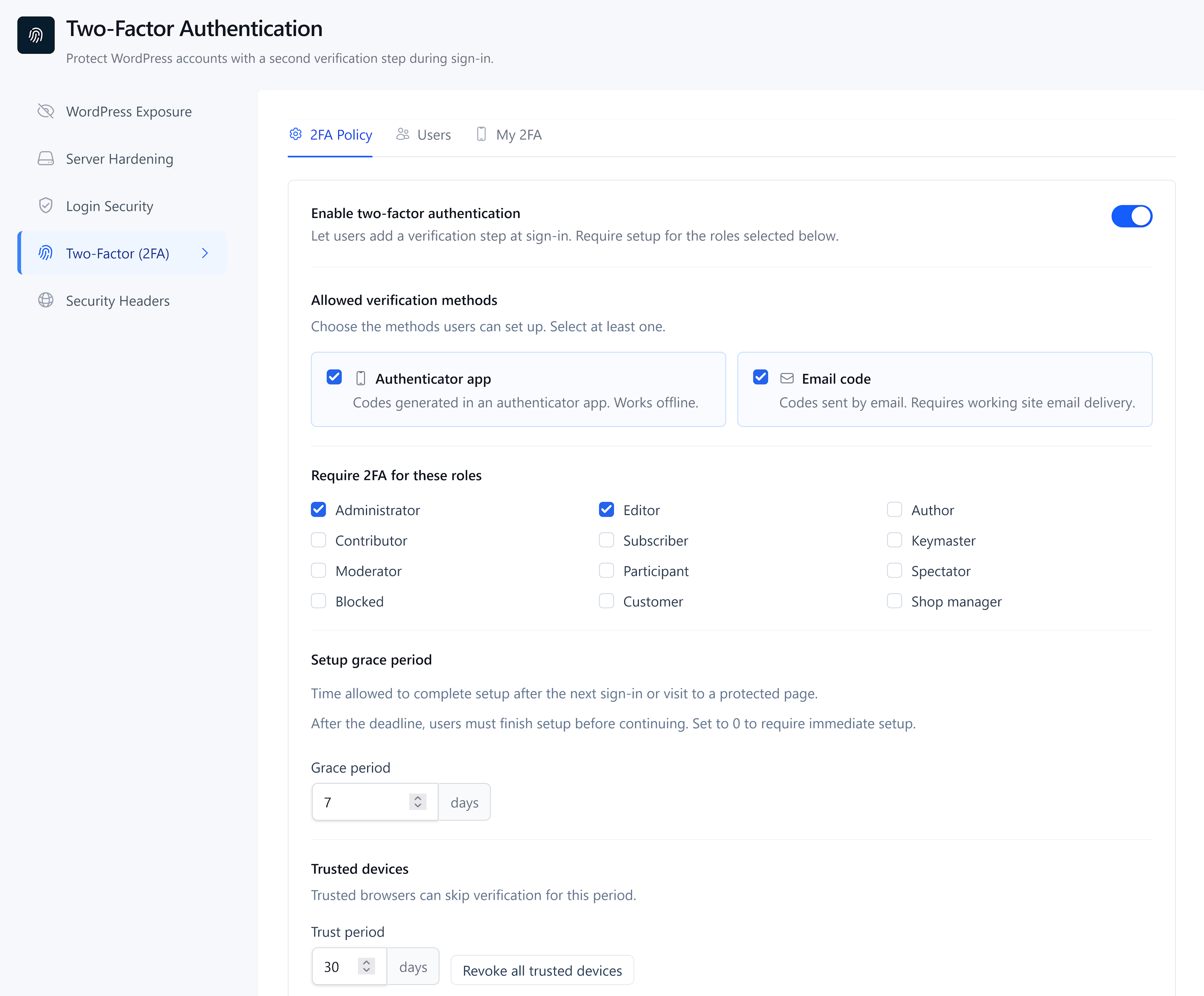
Two-Factor Authentication: Role-based 2FA, authenticator app setup, email codes, and recovery codes.

Server-Side Hardening: Sensitive file protection, PHP execution controls, XML-RPC controls, and server-side security settings.

WordPress Hardening: REST API controls, user enumeration protection, Application Password controls, and file editor protection.

Vulnerability Scanner: Vulnerable WordPress core, plugins, and themes with severity, CVE references, and remediation guidance.

Security Headers: Analysis and configuration of supported HTTP security headers.

Security Audit Log: Login activity, administrative changes, firewall events, scan results, and security findings.
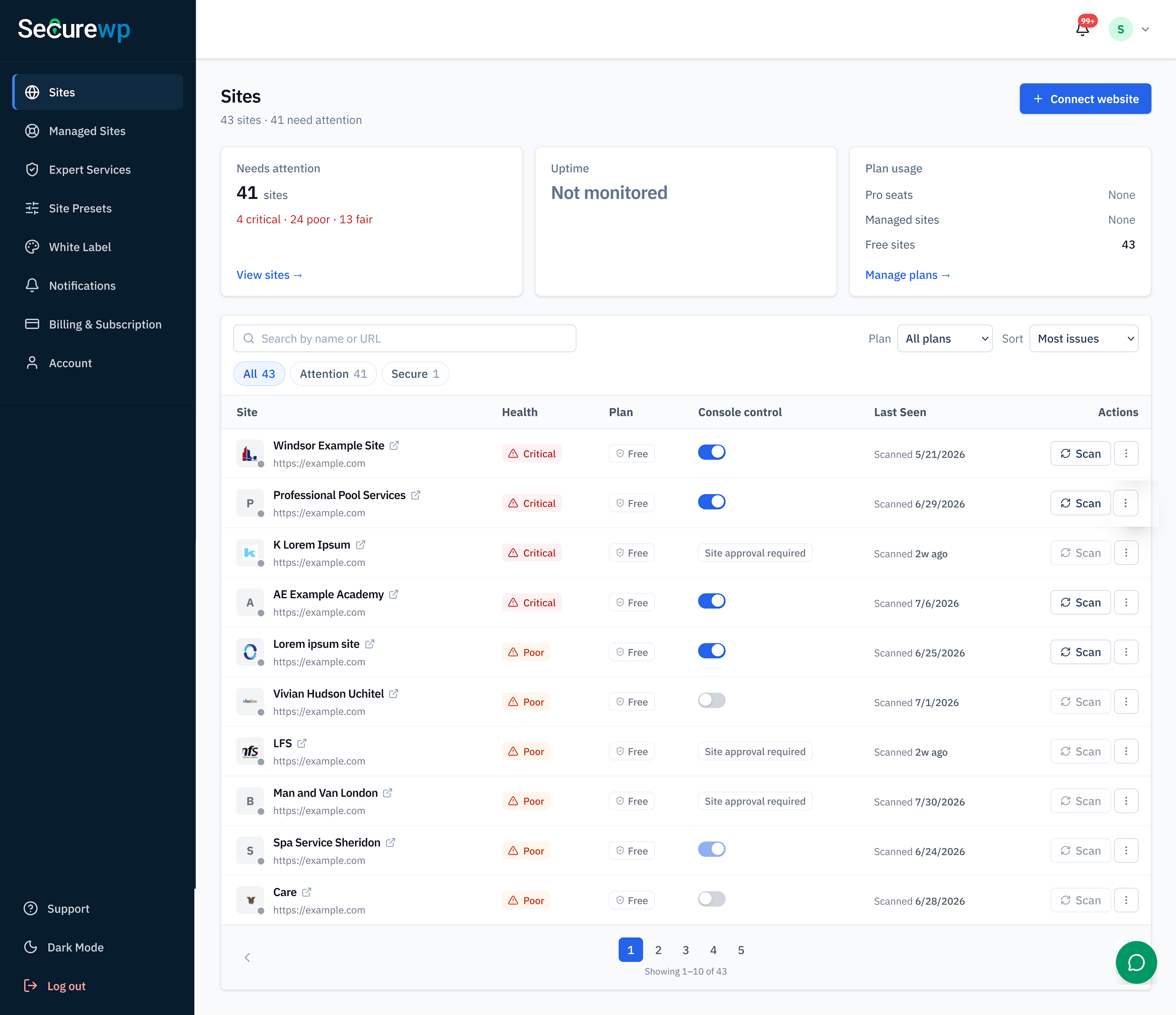
SiteFort Console: Multi-site security status, scans, vulnerabilities, alerts, reports, uptime, SSL monitoring, and team workflows.
Faq
Yes. A disposable WordPress demo with SiteFort preinstalled is available at https://demo.securewp.net/. No signup or installation is required, and the demo resets when the session ends.
Network-activate SiteFort and manage it from Network Admin. The installation shares one security policy, cloud connection, file scanner, IP-ban store and account 2FA enrollment. Subsites inherit protection automatically; they do not need separate manual activation. Existing plan limits and shared scan credits still apply.
Database-content checks traverse active sites in resumable batches and keep each finding tied to its source site. Site administrators cannot change the shared policy; account owners can still manage their personal 2FA. Cloudflare synchronization applies to its configured zone, which may not include every mapped domain.
For multiple WordPress networks sharing one installation, activate the primary network first and deactivate it last. Shared early-firewall and server rules affect the shared installation. Fresh multisite setup is supported; automatic consolidation of old per-site connections and conversion of an already connected standalone site require a separate reviewed workflow.
Yes. When SiteFort 2FA and WooCommerce are enabled, customers can manage two-factor authentication from My Account Account security. SiteFort can also add 2FA management to membership sites, LMS dashboards, client portals, and other custom account pages. CAPTCHA protection supports WooCommerce login and registration and can also be added to supported custom login and registration forms. See the SiteFort hardening documentation for custom integration details.
SiteFort verifies known files by hash and sends only unknown or suspicious files for deeper cloud analysis. This reduces scan workload on the hosting server while still providing deep threat analysis for files that require it. Database and content checks remain on the protected site.
No. Database and content checks run on the protected site. File hashes are sent first, and only files that cannot be verified by hash may be uploaded for deeper analysis. If wp-config.php requires analysis, sensitive configuration values are removed before upload.
SiteFort can verify supported search crawlers using reverse DNS and published IP information where available. This helps distinguish legitimate crawlers from requests impersonating known search engines.
Yes. SiteFort supports Cloudflare-proxied WordPress sites and can synchronize supported IP, country, and user-agent firewall rules using a scoped API token.
Yes. Country rules support both block-selected and allow-only modes. Country detection can use Cloudflare country information on proxied sites or a locally installed MaxMind GeoLite2 database.
No. SiteFort identifies known vulnerabilities and provides affected-version, severity, CVE, and remediation information where available. Firewall controls can reduce automated discovery attempts while vulnerable software is updated, replaced, or removed.
Yes. SiteFort can identify malware, suspicious administrator accounts, injected content, exposed files, and other indicators of compromise. Free includes file quarantine, while Pro adds one-click repair and clean-file restore for supported files. Securewp expert cleanup is also available for incidents requiring hands-on investigation.
Yes. SiteFort supports shared hosting, managed WordPress hosting, VPS, dedicated servers, Apache, Nginx, LiteSpeed, and Cloudflare-proxied environments. Hash-first verification and cloud-assisted deep analysis help reduce scan workload on the hosting server.
No. Site-level security features are available directly from the WordPress dashboard. SiteFort Console is optional for centralized multi-site visibility, reporting, alert routing, uptime and SSL monitoring, and team workflows.
No account is required for local security hardening, firewall controls, login protection, or 2FA.
A free SiteFort account is required for cloud-assisted scanning, vulnerability checks, and network threat protection. No paid subscription is required.
Open SiteFort > Settings > License and Plan and activate using the email address associated with the purchase or a license key. An existing free license associated with the same email upgrades in place.
Reviews
An essential plugin
By 
A very essential plugin with very fast and professional support.
This plugin solved a big headache at a low cost
By 
Many accounts, especially old Godaddy hosting accounts, have major security problems for which Godaddy charges you a lot. We fixed all of that by using this plugin - and rolled it out for many client sites and legacy accounts as an update. It helped to secure the websites fast at scale at a very low cost.
Excellent Security Plugin
By 
It’s a lightweight option that packs in malware scanning, a web application firewall, and solid hardening features.
Overall, I’d say it’s a great choice if you want strong security that doesn’t drag your site down. Definitely worth trying if you’re looking for a modern, efficient alternative.
My experience on SiteFort.
By 
This is too good! Highly recommended!
Finally a full package security plugin
By 
For years, my workflow for WordPress security was frustrating. I would install one plugin to scan for malware, remove it after cleanup, then install and configure another plugin just for security hardening because the one I used for malware scanner were too heavy to keep running all the time.
SiteFort is the first plugin I’ve used that combines both in a clean and lightweight way. Fast malware scanning, practical hardening features, and an easy-to-use interface without slowing down the website.
Good luck to the SiteFort team 🤞
Changelog
2.0.1 – 2026-10-24
- Fixed an issue where scans could remain in progress indefinitely. Scans that exceed the maximum run time now stop while preserving any results found so far.
2.0.0 – 2026-10-24
- Added WordPress Multisite support. Manage security settings for the network from Network Admin and connect the network to SiteFort Console with a single account. New sites inherit the network’s protection settings.
- Extended database scans to all sites in a multisite network. Interrupted scans resume from their last saved progress.
- Renamed Community IP Blocklist to Network Threat Protection. Connect your site to a SiteFort account to receive threat intelligence updates. The threat list is downloaded only when it changes.
- Added support for updating plugins and deactivating them across a network from SiteFort Console. Plugin activation and theme changes remain under local control in Network Admin.
- Standardized settings screens and added warnings when leaving a page with unsaved changes.
- Fixed scan exclusions such as wp-content/cache/* being ignored when entered without a leading slash.
- Updated the Audit Log to identify events from deleted user accounts rather than attribute them to “System”.
- Improved security-key recovery after an interrupted update and strengthened verification of incoming requests.
1.8.9 – 2026-10-21
- Fixed scan caching to reduce repeat checks for unchanged files and reject outdated or mismatched results.
- Fixed duplicate Console sync requests and improved retry handling during outages and rate limits.
- Cloudflare Sync now sets IP limits from your Cloudflare plan. When it’s full, the oldest automatic blocks make room first.
- Automatic IP blocking is now part of Cloudflare Sync, so there’s one switch instead of two.
1.8.8 – 2026-10-19
- Simplified setup with clearer steps and an easier path to the first scan.
- Refreshed blocked-access and unlock pages with clearer messages and a simpler layout.
- Updated email templates with clearer messages and site branding where appropriate.
- Made the Firewall Traffic Log easier to dig through: click any IP, path, type, or status to filter by it.
- Repeated requests now group into one row with a count, so attack bursts no longer flood the log.
- Added an overview of top sources, event types, and paths, with a chart of when blocks happened.
- Added allow, block, or unblock an IP straight from a log entry.
- Refreshed the 2FA sign-in screen with clearer instructions and easier code entry.
- Reworked 2FA settings and user management, with clearer setup status, reminders, and deadlines.
- Added password and email recovery for users who lose access to their authenticator app.
- Made it easier to switch verification methods and manage recovery codes.
1.8.7 – 2026-10-15
- Made the dashboard’s security status and next steps clearer.
- Added date filters and activity comparisons.
- Made it easier to review blocked traffic and block IPs from the dashboard.
- Dashboard loads with fewer, cheaper queries, and admin pages run 18 fewer queries each.
- The Two-Factor settings now load faster and match the rest of the Hardening screens.
- Made scan findings, progress, and quarantine actions easier to review.
- The Vulnerabilities page now lists the most serious issues first, with tidier tables and severity filters.
1.8.6 – 2026-10-11
- Fixed false core file alerts when the WordPress package locale differs from the site language.
- Made scan failure messages clearer and updated the German and Brazilian Portuguese translations.
- Improved external link reputation checks with stronger privacy and URL-level accuracy.
- Blacklisted link findings now show the threat type, where the link was found, and recommended next steps.
1.8.5 – 2026-10-08
- Added translation support for admin screens, setup steps, emails, and notifications.
- Added German and Brazilian Portuguese translations.
- Improved output escaping for scanner error messages and email notifications.
1.8.4 – 2026-10-04
- Improved file integrity checks for known WordPress core, plugin, and theme files while keeping local hash caching for files without component details.
- Fixed high sensitivity scans flagging valid WordPress images as unknown files, and updated integrity cards to show the affected file path.
- Fixed IP detection sometimes running the same check more than once.
- Made scheduled scans more reliable when a scan is already running or the service is temporarily busy.
- Cloudflare Sync now only shows warnings when something needs your attention.