WP Post's to Social Media

WP Post's to Social Media
Description
WordPress post’s to social media(Whatsapp,Facebook,Instagram) share story image generator Plugin. It is a lightweight WordPress plugin that helps you create personalized inbuilt post’s into “Social Share Story Image” in seconds. The admin sets a custom “Social Share Story Image” background, and users can add their name and photo on it, along with it will also merge the post’s featured image, title and description into the final design.
All generated Images are mobile responsive, ensuring they look great on every device. Users can preview their story image and download it instantly.
✨ Key Features
📷 Merge Post’s Featured Image + Title + Description into a banner
👤 User Personalization – add name & upload photo
🎨 Admin Control – set global/custom banner backgrounds
🖼️ Live Preview before download
📱 Responsive Design – works perfectly on mobile
⬇️ Downloadable Image in one click
⚡ Simple & Lightweight – easy setup, no bloat
✅ Use Cases
📲 Social Media Use Cases
-
Instagram 📸
Users can upload the generated image as a Story.
It can be used in Reels as a cover image.
Works for both personal and business pages. -
Facebook 📘
Shareable as a Story.
Perfect for event promotions, festive greetings, or campaigns. -
WhatsApp 💬
The generated image can be directly shared as a Status.
Also can be sent in personal chats or groups to promote events. -
LinkedIn 💼
Users can upload it as a Story.
Businesses can encourage employees to share the branded banner for marketing campaigns. -
Twitter (X)
The image can be uploaded as a Tweet.
Useful for spreading awareness or community participation. -
Snapchat 👻
Users can post the banner as a Snap Story.
Engages friends and promotes events/festivals quickly. -
YouTube ▶️
The image can be used as a thumbnail for YouTube Shorts. -
Telegram 📢
Can be shared in channels or groups as a promotional post.
Works well for large communities.
🔹 Why This Is Useful
In today’s time, Stories are the fastest way to reach people, since they appear on top of every app.
The plugin ensures that any user can create a professional, branded image in seconds from WordPress posts.
These images are not just downloadable but also instantly shareable across all major social platforms.
Admin Features:
– Upload or Set a global default banner “Social Share Story Images” Background templates.
Frontend Features:
– Simple form for users to input their name and upload a photo.
– Live preview.
– Download the final image.
License
This plugin is licensed under the GPLv2 or later.
Installation
-
To get started, go to your WordPress dashboard. Navigate to Plugins, click Add New, Find Plugin using tags like custom banner, post banner by ved or upload the downloaded plugin zip file. Once installed, activate the plugin.
-
As the site admin, you can upload and set the default “Social Share Story Image” background from the admin menu under social poster section. You will find the section that will show upload option you have to click on that and upload the “Social Share Story Image” background according to the size which is given on the top and save changes.
-
When the admin clicks on Add New Post or edits an existing post, they will see an option to quickly insert the shortcode directly into the post editor. After inserting the shortcode, the admin can continue adding the regular Post Title, Featured Image, and Post Description. These details will automatically connect with the plugin to generate the customized “Social Share Story Image” on the frontend.
-
On the User side, when visiting a post that has the shortcode inserted, the “Social Share Story Image” generator will appear. Here, the user can see the banner background set by the admin along with the post details (Title, Featured Image and description) into it. Users can enter their name, upload a photo, and download a personalized “Social Share Story Image” in one click.
Screenshots
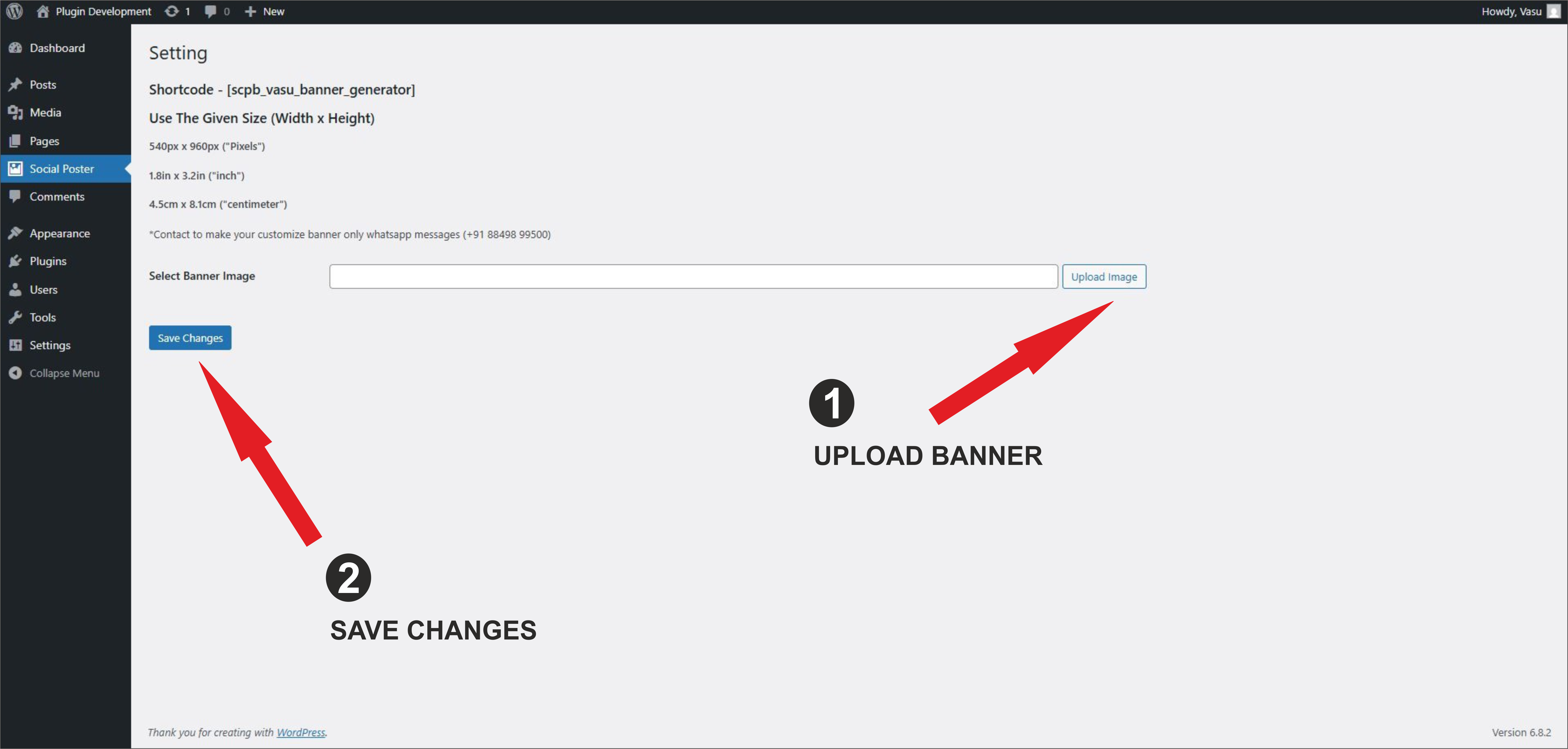
Admin panel to upload banner templates.

Use post page to open add new post.
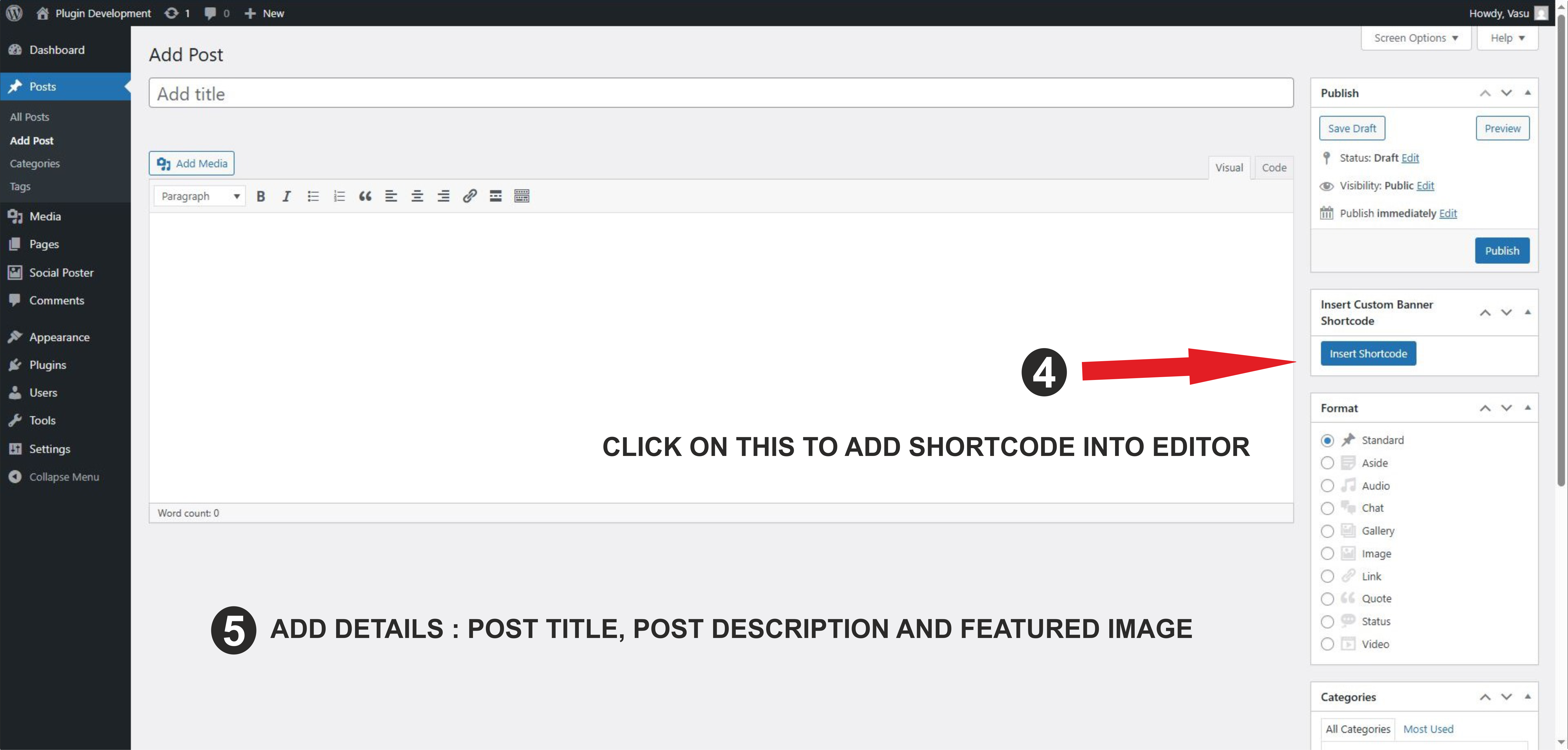
Insert Shortcode into Editor.

Add Details and click on publish and then preview.

Frontend side add details and download image.

This is the format of the image.
Faq
Yes, upload banner images via the admin panel under specific categories.
Yes, modify style.css and main.js inside the plugin folder or enqueue your own styles.
Yes, the plugin is built with Bootstrap and supports responsive layouts.
Reviews
Exactly What I Needed
By 
Runs smoothly, no bloat, and looks great on mobile. Highly recommended.
Changelog
1.0
- Initial release with full banner customization and download support.