Social Engine

Social Engine
Description
Social Engine is the self-hosted social media scheduler for WordPress. Connect directly to X (Twitter), Facebook, Instagram, LinkedIn, Pinterest, and Mastodon—no middleman, no monthly fees, complete control.
Unlike Buffer, Hootsuite, or Later, Social Engine runs entirely on your WordPress site. Your data stays yours, your connections are permanent, and there’s no monthly subscription. Set it up once (15-30 minutes per platform), then enjoy unlimited scheduling forever.
Stop paying for features you already own! 🚀
Social Engine implements full MCP support for AI-powered social media automation. Visit our official site and check out the docs to get started.
Core Modules
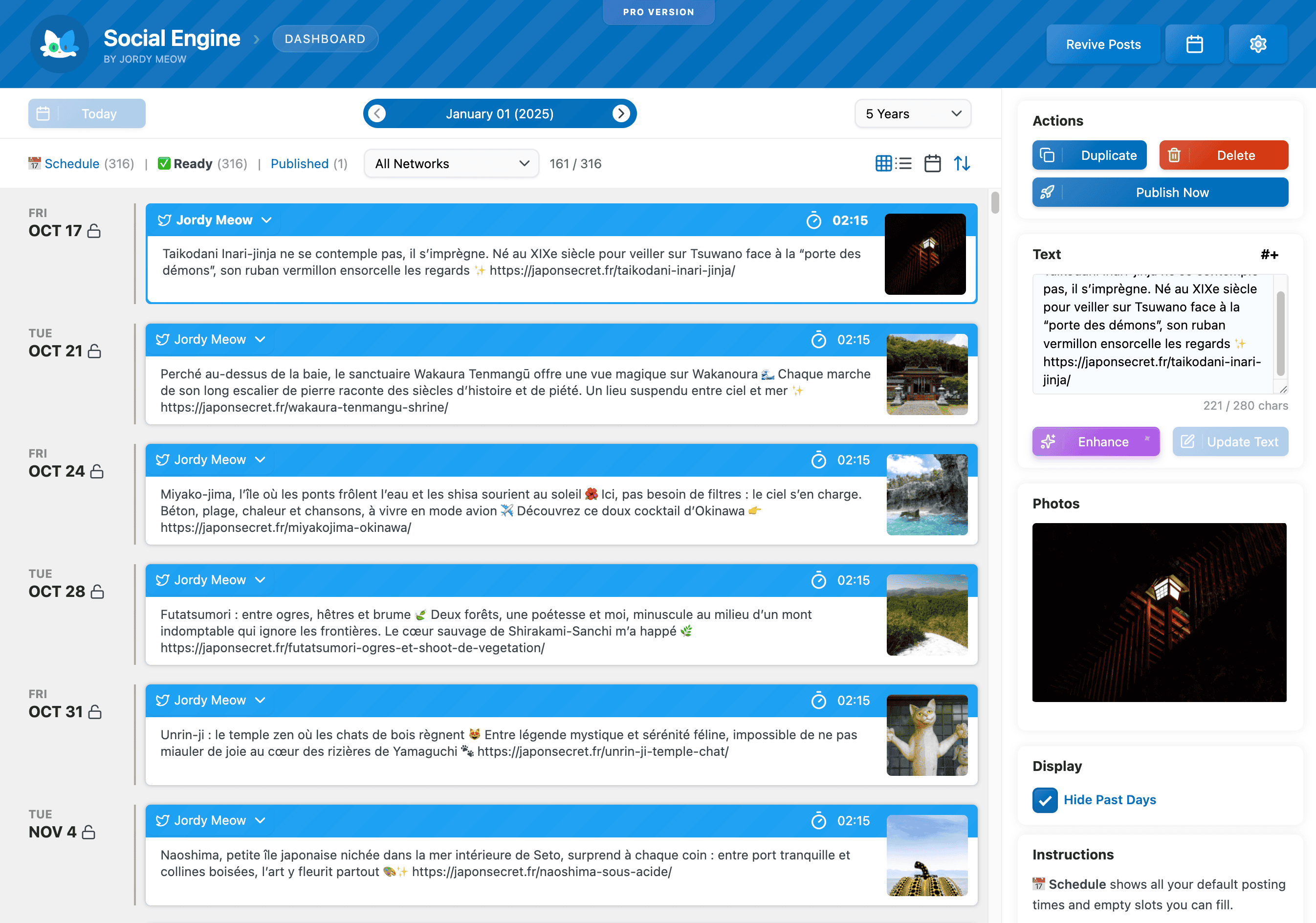
📅 Smart Scheduling
Visual calendar with drag-and-drop, per-account posting times, and intelligent queue management. Schedule weeks ahead or let AI handle it.
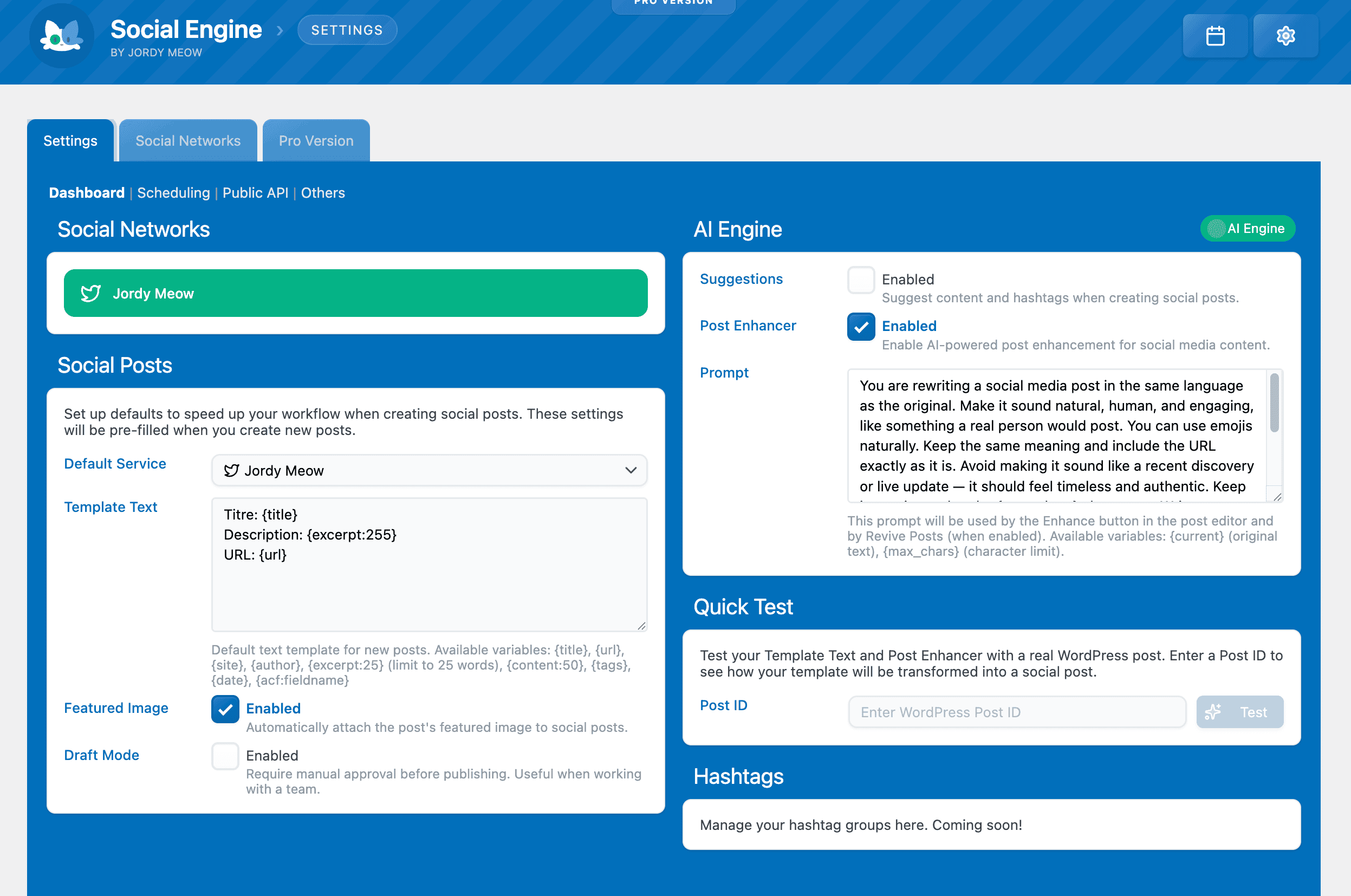
🤖 AI-Powered Enhancement
Built-in AI Post Enhancer rewrites content naturally, suggests hashtags, and maintains your brand voice. Works with AI Engine for advanced features.
🌍 Multi-Language Support
Full Polylang and WPML integration. Filter by language, auto-schedule per locale, maintain tone across translations.
🧠 Intelligence Features
Full MCP support means AI assistants like ChatGPT or Claude can schedule posts, manage your queue, and create content—all through conversation.
📅 Smart Scheduling
Control when and how your content reaches social networks.
Calendar View:
- Beautiful drag-and-drop interface
- Month, week, or list view
- Color-coded by platform
- Quick post editing
- Bulk operations
Auto-Scheduling:
- Automatically post new WordPress content
- Filter by post type, tag, or language
- Customizable templates with variables
- Featured image support
- Smart timing based on your schedule
Queue Management:
- Per-account default posting times
- Multiple time slots per day
- Smart slot detection (avoids conflicts)
- Draft workflow for review
- Locked dates to prevent scheduling
🤖 AI-Powered Enhancement
Let AI perfect your social content before it goes live.
Post Enhancer:
- Rewrites content naturally for each platform
- Suggests relevant hashtags
- Maintains your brand voice and language
- Quick Test mode to preview changes
- Works with all supported languages
AI Vision (requires AI Engine):
- Analyzes images and suggests captions
- Describes product photos automatically
- Creates alt text for accessibility
- Multi-image gallery support
🌍 Multi-Language Support
Perfect for multilingual sites using Polylang or WPML.
Features:
- Filter posts by language in calendar
- Auto-schedule only specific languages
- AI Enhancer respects original language
- Template variables work per locale
- Separate queues per language
🧠 Intelligence Features
Social Engine has full MCP (Model Context Protocol) support, so AI assistants can manage your entire social media workflow through conversation.
What AI Can Do:
- “Schedule my latest post to Twitter tomorrow at 3pm”
- “Show me what’s in the queue for next week”
- “Rewrite this post for Instagram and add hashtags”
- “Delete all draft posts older than 30 days”
- “Publish this content to all my accounts now”
- “Create 5 posts from my recent articles”
Setup Guide:
Check the MCP documentation to connect ChatGPT or Claude to your WordPress site. Social Engine’s tools will appear automatically alongside AI Engine’s core features.
Automation Examples:
- Daily content generation from blog posts
- Automated hashtag research
- Bulk post creation from content calendar
- Smart scheduling based on engagement patterns
- Multi-platform content adaptation
🔌 Platform Support
Direct connections to major social networks.
Supported Platforms:
- X (Twitter): Text, images, polls (via API v2)
- Facebook: Posts, images, links with previews
- Instagram: Images, galleries, captions
- LinkedIn: Professional content, images
- Pinterest: Pins with images and descriptions
- Mastodon: Federated network support
Connection Method:
Unlike third-party schedulers, Social Engine uses your own app credentials. This means:
- No data sharing with intermediaries
- No rate limits from scheduling services
- Permanent access (not subject to service changes)
- Full API feature support
- Complete privacy
Setup takes 15-30 minutes per platform (one-time), then you’re independent forever.
Pro Features
- Instagram Support
- Pinterest Support
- LinkedIn Support
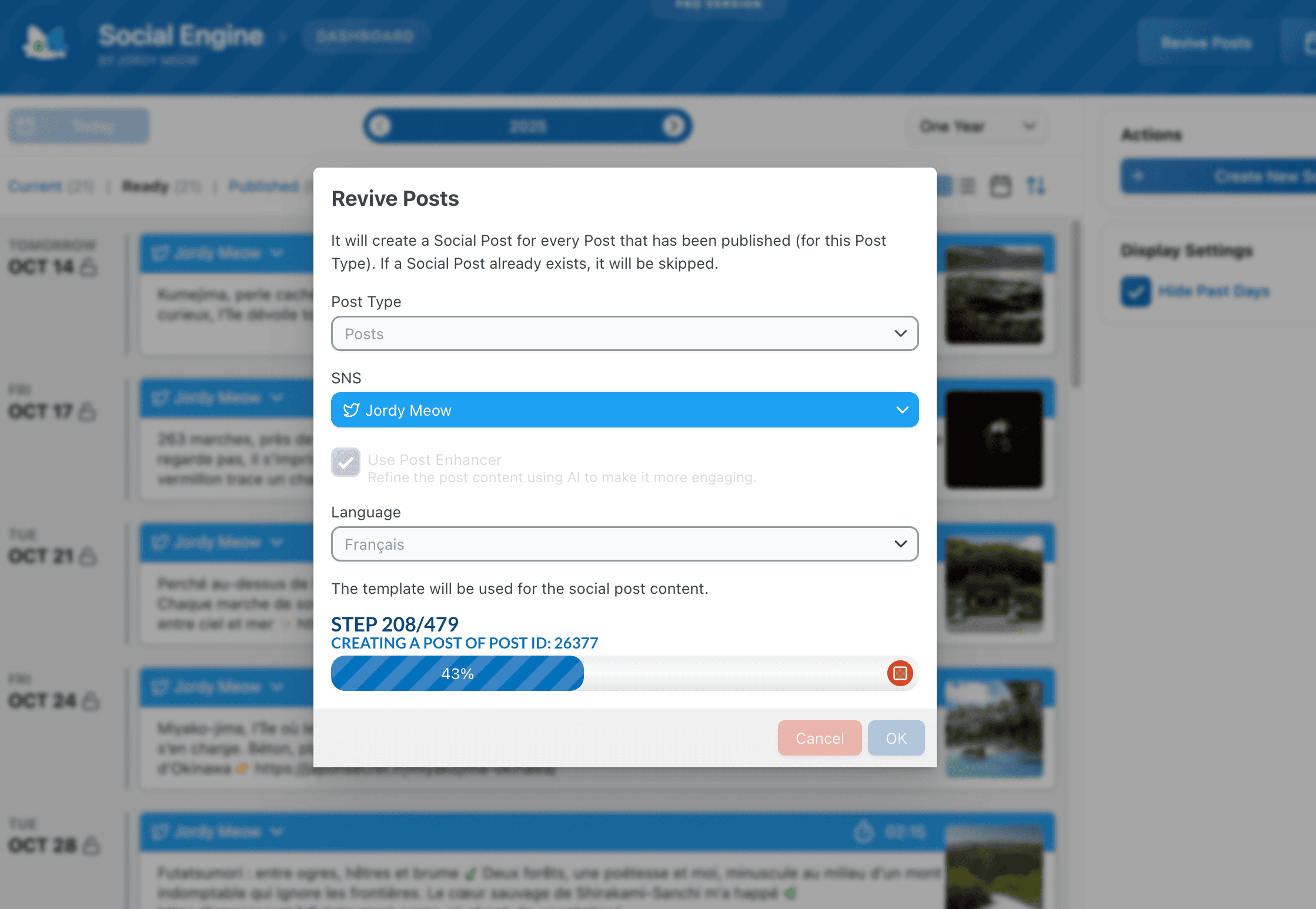
- Revive Posts (auto-repost old content)
- Draft Workflow
- Priority Support
Installation
- Upload
social-engineto/wp-content/plugins/ - Activate through the ‘Plugins’ menu
- Visit Social Engine in your admin menu
- Connect your first social network (follow the setup wizard)
- Start scheduling! 🚀
For AI features, install AI Engine.
For MCP support, follow the MCP setup guide.
Screenshots
Faq
Social Engine runs on YOUR WordPress site, not on external servers. You connect directly to social networks using your own app credentials. This means:
- No monthly subscription fees
- Your data stays private on your server
- No rate limits from third-party services
- Permanent access (not subject to service shutdowns or price changes)
The tradeoff: initial setup takes 15-30 minutes per platform. After that, you’re completely independent.
The setup is detailed but straightforward. You’ll need to:
- Create a developer account on each platform (free)
- Register an “app” (just filling out forms)
- Copy API credentials into Social Engine
- Authenticate once
We provide step-by-step tutorials with screenshots for each platform.
Yes! Connect multiple Twitter accounts, Facebook pages, Instagram profiles, etc. Each gets its own queue and posting times.
The AI Enhancer (requires AI Engine) rewrites your content to be more engaging while maintaining your voice. It:
- Adapts tone for each platform
- Suggests relevant hashtags
- Keeps your original language
- Works with images (vision AI)
- Provides Quick Test mode to preview changes
Yes! Social Engine has full multilingual support:
- Filter calendar by language
- Auto-schedule only specific languages
- AI respects original language in enhancements
- Separate queues per language
MCP (Model Context Protocol) lets AI assistants like ChatGPT or Claude manage your social media through conversation. Instead of clicking through the UI, you can say:
“Schedule my latest 5 posts to Twitter, one per day at 2pm”
“Show me what’s queued for next week”
“Rewrite this for Instagram with hashtags”
It’s like having a social media manager you can talk to naturally.
Not directly, but you can:
- Export your scheduled posts from the other service
- Use Social Engine’s template system to recreate them
- Or use AI Engine with MCP to bulk-create posts from your content
Yes. Everything runs on your WordPress server:
- API credentials stored in your database
- No data sent to external scheduling services
- Direct connections to social networks
- You control backups and security
Your social media accounts remain connected through your app credentials. You can:
- Use those same credentials with other tools
- Keep scheduling manually through each platform
- Export your content before migrating
The connections are yours, permanently.
Reviews
Must have
By 
Love all of Jordy's plugins. Have been using the free version for a few weeks but will be upgrading to the Pro version as the potential for the Social Engine plugin is huge. Early days in development but looking good!
A Better Choice....
By 
I had looked at some of the platforms that enable social posting and for a small/micro-based business the pricing was absurd. Enter "Social Engine." It's simple to use and the app itself is simple to set up. It does exactly what it purports to do, and I liked it enough to invest in the PRO version.
Crazy Good
By 
I can't believe how valuable this plugin has become to me. The scheduling and ease of use is excellent .. like all their plugins. Seriously go get the Neko Pass for all their plugins. They offer tremendous value.
I'm so glad I discovered Social Engine!
By 
This plugin has completely transformed the way I manage social media for my clients. Being able to schedule posts in advance and track analytics has allowed me to create a more strategic and effective social media strategy. The customer support has also been top-notch, with the team quickly resolving any concerns I've had. If you're looking for a comprehensive social media management solution, I highly recommend giving Social Engine a try.
really simple!
By 
great plugin!
Superlative, full of many features, great support and works perfectly.
By 
There is really little to add to the title of this review other than to congratulate the Developer Mr. Jordy Meow.
As mentioned in the title of this review, the Social Engine: Schedule Social Media Posts WordPress plugin is really well designed and coded, it also turns out to be very streamlined, lightweight and packed with lots of features and most importantly it works perfectly (mind you, do not confuse the errors that can be caused by an incompatibility with obsolete versions of PHP, because using the updated versions of PHP and supported by this plugin, although I have been using this plugin for a long time, I have not yet encountered any errors in this plugin).
Basically, with Social Engine: Schedule Social Media Posts, this simple but very powerful WordPress plugin, you can automate and schedule on all your favorite social channels and more, the publication of your content, photos and media, with many features all very useful and all to be discovered.
Oh I forgot… it is virtually completely free but there is also a paid Professional version available (optionally) that adds, for those who need it, support for:
- LinkedIn, Pinterest
- Draft Mode / Review Validation workflow, which is ideal when you need to approve the posts before they are published.
- Revive Posts Automatically plan all the articles! Ideal to revive your website in a few clicks.
To finish I still give my compliments to the Developer Mr. Jordy Meow and I can only recommend you to try it because it is really an Excellent plugin for WordPress and I am very proud to have completely translated it into Italian!
Greetings and have a nice day.
Social engine makes us visible
By 
Very useful plugin to save time
By 
I've been using Social Engine on my website for several weeks and have been very pleased with the results. The plugin is easy to use and configure, and offers all the features I need to make my social networks more active and engaging.
One of the features I liked the most about Social Engine is the ability to schedule social media posts. This has saved me time and effort, as I can create my posts in advance and schedule them to be published for a time that best suits me.
Social Engine is a must-have plugin for any website that wants to add social media features. It is an easy-to-use tool and offers a wide range of features that can help improve user engagement.
Brilliant Plugin!
By 
It's already saving me so much money vs. Buffer. And I love the control of having my social posts on WordPress instead of yet another 3rd party service.
Great Plugin
By 
I've been using this for a few weeks and its a great plugin. I may upgrade soon to the extras if it carries on being this awsome
Changelog
0.8.3 (2025/12/03)
- Update: Moved the dashboard from the Media menu to the Posts menu.
- Update: Refreshed and improved various labels.
- Update: Integrated the latest MeowKit.
- 🎵 Discuss with others about Social Engine on the Discord.
- 🌴 Keep us motivated with a little review here. Thank you!
- 🥰 If you want to help us, check our Patreon. Thank you!
0.8.2 (2025/11/13)
- Add: MCP support, now everything is possible! 🥳
0.8.0 (2025/10/14)
- Fix: Hotfix for language filtering issue in the Revive Posts feature
- Add: Post Enhancer to refine posts with AI (Enhance button in editor and Revive Posts).
- Add: Quick Test feature to facilitate easy template and Post Enhancer testing.
- Add: Language filtering support for Polylang and WPML in Auto-Schedule and Revive Posts.
- Update: Redesigned Settings and Dashboard UIs with improved social network cards.
- Fix: Template Text saving bug that prevented custom templates from being stored.
- Fix: Hotfix for “Everyday” Posting Times by moving logic to server-side.
- Fix: HTML entities issue in template variables.
- Fix: Revive feature now correctly associates SNS accounts, selects appropriate scheduling times, and excludes Nav Items as Post Types.
- Fix: Resolved issue where Template Text was not saving correctly.
0.7.9 (2025/09/29)
- Update: Replaced facebook/graph_sdk with nickdnk/graph_sdk to improve SSL certificate validation.
- Fix: Various stability improvements and bug fixes.
0.7.7 (2025/08/27)
- Fix: Resolved overlapping modals issue.
- Fix: Ensured at least one service is selected before allowing a post to be published.
- Fix: Display actual AI Engine errors for easier troubleshooting.
- Update: Refactored Instagram image count handling for improved accuracy.
- Update: Instagram upload now checks image dimensions and automatically crops images if necessary.
- Update: Reworked AI Suggestions feature to support both vision and text.
- Fix: Improved error handling by displaying errors in the dashboard.
0.7.6 (2025/07/23)
- Update: Refactored Dashboard and Context to fetch social posts per page with no fixed limit.
- Fix: Resolved issue where schedule time modal appeared behind the post modal.
- Add: Introduced a global $mwse object for the Public API.
- Update: Refreshed common code for better performance.
0.7.5 (2025/05/01)
- Fix: Improved the display of the Create Social Posts modal for a better user experience.
- Add: Added support for post tags in the Auto Schedule settings.
- Fix: Refactored CreateSocialPostLink to prevent undefined errors and handle JSON parsing issues.
0.7.4 (2025/03/12)
- Fix: Resolved an issue with the “Revive” feature.
- Update: Improved styles and messages for better visualization of deleted accounts.
- Add: Introduced a Post Type selection option for Auto Schedule.
- Fix: Implemented a fallback to URL for thumbnail retrieval when the path is unavailable.
- Add: Added support for logging to enhance debugging and monitoring.
0.7.3 (2024/12/22)
- Add: Immediate post checks to ensure drafts are enabled and option labels update based on settings.
- Add: Remove All Posting Times button in PostTimeSelect.
- Fix: Improved error handling in Settings by refactoring optionError state.
- Fix: Formatting issues in the NekoButton component within CreatePostModal.
- Fix: Resolved code error for Pinterest posts.
- Add: Option to delete all drafts when a draft update error occurs.
0.7.2 (2024/11/04)
- Add: Placeholders for templates.
- Fix: Minor UI improvements and bug fixes.
0.7.1 (2024/10/17)
- Fix: Avoid missing the Featured Image when adding posts automatically.
- Fix: Publish immediately if there aren’t any defaults in auto-schedule.
- Update: Various minor enhancements and fixes.
0.7.0 (2024/09/18)
- Update: Schedule Posts for today if no defaults.
- Fix: Multiple fixes to avoid re-renders and request conflicts.
- Fix: Fixed empty template handling.
0.6.9 (2024/08/01)
- Update: Template now works with Auto Schedule.
- Fix: Minor UI issues resolved.
0.6.8 (2024/07/07)
- Add: Templates for Social Posts with variable support.
0.6.7 (2024/06/28)
- Fix: Fixed the Create Social Post button.
- Fix: Fixed empty times for Default Schedules.
- Fix: Various other minor fixes.
0.6.6 (2024/06/21)
- Fix: Minor stability improvements.
0.6.5 (2024/06/15)
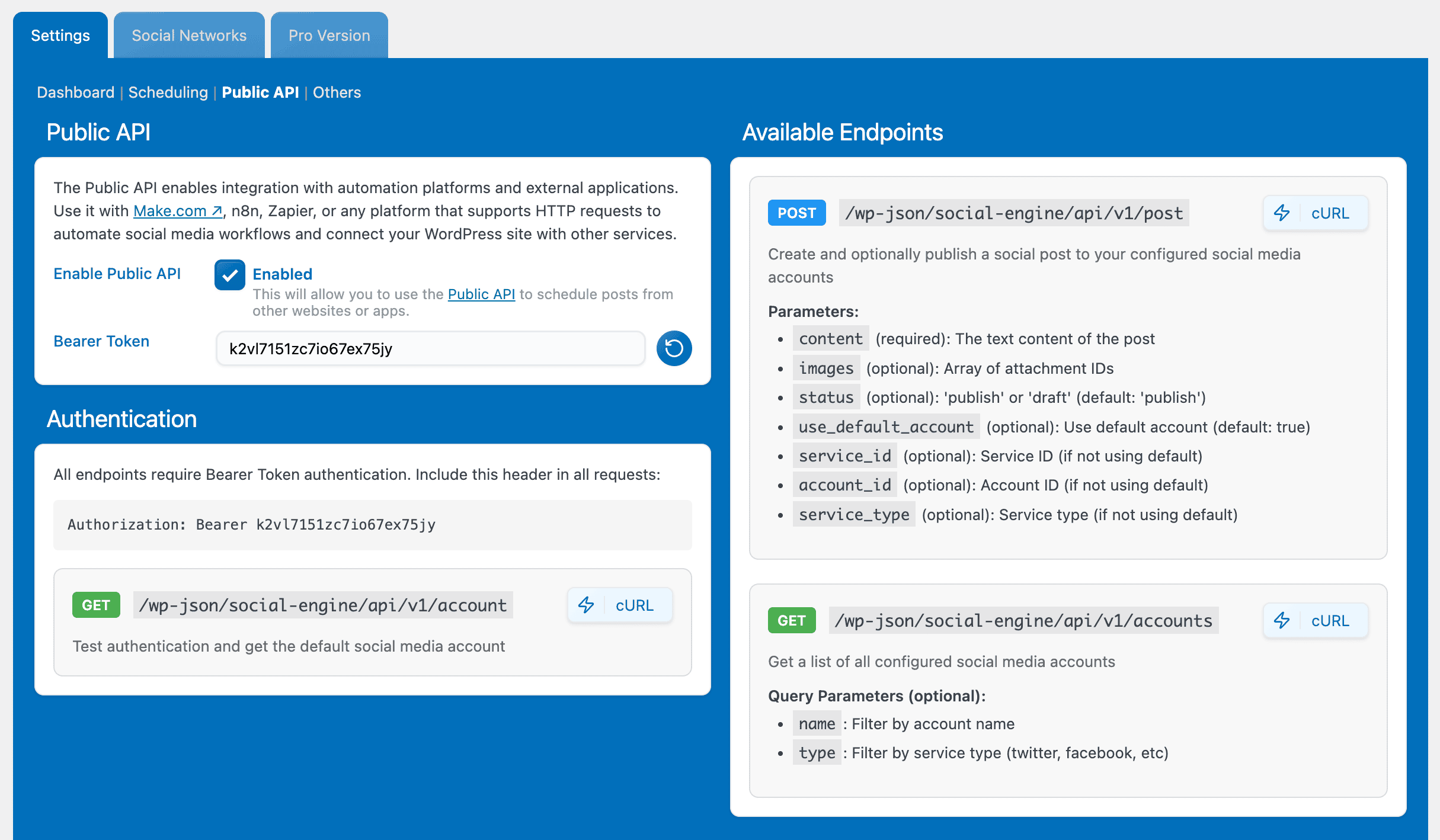
- Add: Bearer Token for API.
- Update: Code cleanup, UI enhancements, minor fixes.
0.6.4 (2024/05/24)
- Fix: Removed PHP warnings.
0.6.3 (2024/02/02)
- Add: Current file extension detail in Instagram post exceptions.
- Update: Modified Facebook embedded link handling.
- Fix: Improved error handling for LinkedIn user info.
0.6.2 (2024/01/20)
- Fix: Handle AI Engine errors properly.
- Add: Public REST API (same pattern as AI Engine).
- Update: Enhancements for LinkedIn and UI.
0.6.1 (2024/01/03)
- Fix: Undefined post_content warning resolved.
0.6.0 (2023/12/25)
- Add: Support for Facebook preview link integration.
- Fix: Issue with content exceeding limits in social post creation modal.
0.5.9 (2023/11/29)
- Add: “Create Social Post” for Custom Post Types.
- Fix: MediaSelector in “Create Social Post”.
- Update: Link handling in posts with empty excerpts.
0.5.8 (2023/11/20)
- Add: AI Vision support (requires AI Engine).
- Update: Enhanced the UI.
0.5.7 (2023/10/23)
- Fix: Updated and corrected outdated modals’ buttons.
- Add: Links to documentation for better user guidance.
0.5.6 (2023/10/10)
- Fix: Fixed modals overlapping.
- Fix: LinkedIn stability improvements.
- Update: Various enhancements and tiny fixes.
0.5.5 (2023/09/12)
- Add: New filter sclegn_post_data for extensibility.
- Fix: Calendar display and draggable functionality.
- Fix: LinkedIn Auth and Post handling.
0.5.4 (2023/04/30)
- Fix: Twitter API v2 support.
- Update: Better handling of Twitter errors.
- Info: PHP 8.1.9 minimum is now required.
0.5.3 (2023/04/30)
- Add: Blue badge support for Twitter.
- Add: Warnings when the content is too long.
0.5.2 (2023/03/28)
- Add: Link to the URL for the Revive function.
- Add: New UI framework, lighter and better.
0.5.1 (2023/02/21)
- Add: Create posts for multiple accounts simultaneously.
0.5.0 (2023/02/09)
- Add: Support for Mastodon! First post on Mastodon made through Social Engine 🥳
0.4.9 (2023/02/08)
- Add: Lighter version with optimized file structure.
0.4.8 (2023/02/04)
- Add: Create Social Post directly from Posts/Pages list.
0.4.7 (2023/01/27)
- Fix: Revive function gives better instructions and warnings.
- Fix: UI element z-index conflicts resolved.
0.4.6 (2023/01/14)
- Fix: Long text overflow in placeholders.
- Fix: Character counter behavior.
- Fix: Common dashboard display issues.
0.4.5 (2022/12/26)
- Fix: Calendar view for current day when hiding previous days.
- Fix: Various JavaScript fixes.
0.4.4 (2022/12/09)
- Fix: Revive function now uses correct date from settings.
0.4.3 (2022/11/30)
- Add: Find unused or unpublished images feature.
0.4.2 (2022/11/26)
- Add: Support for WordPress 6.1.
- Update: Latest packages and dependencies.
0.4.1 (2022/09/27)
- Add: Better error handling from social services.
- Update: Bigger lightbox for image preview.
- Add: Revive feature to auto-create posts from existing content.
0.4.0 (2022/09/06)
- Update: Statistics data storage improved.
0.3.9 (2022/08/31)
- Fix: Facebook statistics tracking.
0.3.8 (2022/08/22)
- Add: Better logging, especially for Twitter.
- Fix: Editing similar content simultaneously.
0.3.7 (2022/08/04)
- Fix: Better refresh of Published Social Posts.
- Update: More UI enhancements.
0.3.6 (2022/08/01)
- Fix: Statistics display restored.
- Update: Many UI enhancements.
0.3.5 (2022/07/25)
- Update: Significant UI improvements.
0.3.4 (2022/07/11)
- Add: Auto-schedule option for blog posts.
0.3.3 (2022/07/04)
- Add: Calendar view for scheduling.
- Update: Enhanced user interface.
0.3.2 (2022/06/23)
- Update: Multiple UI fixes and improvements.
0.3.1 (2022/06/17)
- Update: Removed + button, added “New Post” button in sidebar.
- Add: Modal for social post creation.
0.3.0 (2022/06/14)
- Info: Major stability improvements and UI refinements.
0.2.9 (2022/05/17)
- Add: Gallery Post support for Instagram.
- Add: Settings for Posting Times.
- Update: Improved post loading performance.
- Fix: Image upload and uploader issues.
- Add: Draft option (disabled by default).
0.2.8 (2022/05/03)
- Fix: LinkedIn posting improvements.
- Fix: Character count per service accuracy.
0.2.7 (2022/04/21)
- Fix: LinkedIn connection issues resolved.
0.2.6 (2022/02/21)
- Add: More admin icons for clarity.
0.2.5 (2022/01/25)
- Fix: Fresh builds with enhanced Neko UI framework.
0.2.4 (2022/01/25)
- Add: UI improvements.
- Add: Sort posts ASC or DESC.
0.2.3 (2022/01/21)
- Add: Many UI improvements.
- Add: Instagram support.
0.2.2 (2021/12/07)
- Add: Locked dates feature.
0.2.1 (2021/12/03)
- Update: Better icons and buttons.
- Add: Show content preview when posts are minimized.
0.2.0 (2021/11/22)
- Info: Pro Version released.
0.1.9 (2021/11/02)
- Fix: Numerous fixes and enhancements.
0.1.8 (2021/10/12)
- Fix: Major bug fixes.
- Add: LinkedIn platform support.
0.1.7 (2021/09/14)
- Info: First release.