Softminal B2B Suite for WooCommerce – Wholesale Prices, B2B Store & Bulk Orders

Softminal B2B Suite for WooCommerce – Wholesale Prices, B2B Store & Bulk Orders
Description
Features | Documentation | Blog | Get Support
🎬 See Softminal B2B Suite in action
The all-in-one WooCommerce wholesale plugin and B2B plugin. Set wholesale pricing for each customer group, hide prices until buyers sign up, approve trade accounts, enforce a minimum order quantity (MOQ) and pack sizes, take quote requests, and give buyers a fast bulk order form — all from one plugin, with no scattered add-ons.
Softminal B2B Suite is built around a single pricing pipeline, so every discount, hidden price and quantity rule is resolved one way. That means your B2B pricing is correct everywhere — the shop, the product page, the cart and the block checkout — with no surprise prices at checkout.
Run one store for both B2B and B2C. Retail shoppers keep their normal prices while approved trade customers see wholesale rates, net terms and quotes. B2B rules only ever apply to buyers in a group, so a retail shopper can never be shown a wholesale price by accident — or switch it into a login-only wholesale store whenever you want.
Requires WooCommerce 8.0 or newer. Softminal B2B Suite extends your existing WooCommerce store; it does not work on its own.
🎯 Why store owners choose Softminal B2B Suite
- 🛍️ One store for B2B and B2C — sell to retail customers at your normal prices and to approved trade customers at wholesale rates, from the same catalogue. Because B2B rules only apply to buyers in a group, retail shoppers never see a wholesale price by mistake — and you can flip on “hide prices for guests” to run a login-only, B2B-only store instead.
- ⚙️ One pricing engine, always correct — every price flows through a single resolver, so wholesale and B2B prices match on the shop, product page, cart and block checkout. No conflicting filters, no checkout surprises.
- 🧩 Everything in one plugin — one WooCommerce wholesale plugin and B2B plugin that covers pricing, hidden prices, trade registration, company accounts, net terms, quotes, quantity rules and a bulk order form, instead of stitching five plugins together.
- 🔄 Switch without breaking your catalogue — move your groups, customers and price rules over from B2BKing, Wholesale Suite or WholesaleX. Every import previews first, so you see exactly what will change before a single row is written.
- 💬 Free buyer messaging — talk to trade customers from a unified Inbox in your admin, included at no cost.
- 🕑 24/7 priority support — a real support team, available around the clock, with priority help so you’re never stuck.
- ⚡ Modern & compatible — HPOS-ready, works with the WooCommerce Cart & Checkout Blocks, and plays nicely with multilingual (WPML, Polylang) and multi-currency stores.
- 🛠️ Developer-friendly — a clean REST API, signed webhooks and a documented hook surface for ERP, CRM and automation.
🚀 Key features
- 💲 Customer group pricing — put buyers into groups and set percentage, amount-off or fixed prices per group, product, category, tag or quantity band.
- 🔒 Hidden prices / login to see prices — hide prices and the add-to-cart button from guests, or require an approved trade account before wholesale pricing appears.
- 📝 Trade registration & approval — a registration form with your own business fields (company, VAT/tax ID, phone, address), spam-guarded, with an approval queue and email notifications.
- 🏢 Company accounts — give a business one shared account: several colleagues, roles for who can buy and who approves, and per-account spend limits.
- 💳 Net terms & credit — offer pay-on-account at checkout, set a credit limit per company, and send statements and overdue reminders automatically.
- 🧾 Request a quote (RFQ) — let buyers build a quote basket and negotiate; an accepted quote converts straight to an order.
- 📬 Buyer messaging — customers message you from their account and you reply from one unified Inbox where general questions and quote negotiations live together, each thread flagged when it needs you. Basic buyermerchant messaging is free.
- 📦 Minimum order quantity (MOQ), maximum & pack quantities — enforce a minimum order quantity per product, per category or order-wide, plus maximum and pack (step) sizes, shown clearly at the shop, cart and checkout.
- ⚡ Bulk order form — a fast order pad your buyers can use to add many products at once, plus quick order by SKU or CSV.
- 🎁 Buy X, get Y — reward bulk orders with free or discounted units, from a product or a category, as the same item, a different gift or the cheapest in the cart.
- 🔁 Reorder — one-click “order again” from a past order.
- 🧮 Purchase order numbers and an ex/inc VAT price toggle at checkout.
- 📄 PDF invoices — generate clean PDF invoices, choose from ready-made and premium designs (with your own watermark and fonts), download from the order screen or My Account, and attach them to order emails automatically.
- 🇪🇺 Tax exemption & EU VAT (VIES) — mark customers or groups tax-exempt and validate EU VAT numbers against VIES.
- 🚚 Role-gated payment & shipping — show or hide payment gateways and shipping methods per group (for example, wholesale = pay on account only).
- 👁️ Private catalogue — hide categories from selected groups across the shop, search and direct links for a members-only or hybrid store.
- 🧭 Safe-Preview migration — import your customer groups, users and price rules from B2BKing, Wholesale Suite or WholesaleX. Every import runs as a preview first, nothing changes until you choose Import, the source plugin can stay switched off, and it’s safe to run again.
- 🏪 Multivendor (Dokan) — run B2B on a Dokan marketplace: vendor-scoped wholesale pricing, per-vendor invoices, marketplace trade registration and cross-vendor bulk ordering, with a “B2B Pricing” tab in each vendor’s dashboard. Via the free Softminal B2B for Dokan add-on (requires Pro).
- 📇 FluentCRM integration — sync trade customers into FluentCRM tagged with their group and application status, start automations when an application arrives or is approved or a customer changes tier, segment campaigns by B2B group, and use B2B merge tags in emails. With Pro, B2B companies become FluentCRM companies, and quotes, overdue invoices, held orders and credit limits trigger automations too. Optional, off until you switch it on.
- 🔌 Developer-ready — a REST API and signed outbound webhooks for ERP, CRM and automation.
Every price change flows through one resolver, so B2B pricing is correct on the shop, the product page, the cart and the block checkout alike. The plugin is HPOS-compatible and works with WooCommerce Cart & Checkout Blocks.
🏪 Multivendor marketplaces (Dokan)
Running a Dokan marketplace? The free Softminal B2B for Dokan bridge makes the whole suite vendor-aware: the marketplace owner sets wholesale pricing scoped to a vendor’s catalogue, every multi-vendor order produces one invoice per vendor, the bulk order form shows which vendor sells each product, and each vendor gets a “B2B Pricing” tab in their Dokan dashboard to manage their own wholesale prices. The bridge is a free download unlocked by your Pro licence (it needs B2B Suite Pro and Dokan active).
🌍 Works with multilingual & multi-currency stores
Price, quantity and buy-X-get-Y rules apply across translations (WPML and Polylang). Softminal B2B Suite always works in your store’s base currency and leaves conversion to your currency switcher, so prices stay correct when one is active.
⭐ Free vs Pro
The free plugin already gives you customer-group wholesale pricing, hidden prices, trade registration and approval, quantity rules, a bulk order form, buy-X-get-Y, reorder, PO numbers, the ex/inc VAT toggle and basic buyer messaging.
Advanced modules — company accounts, net terms & credit, request-a-quote, category-level quantity rules, VIES VAT validation, private catalogue, role-gated methods, premium invoice designs and the webhooks API — are part of the Pro add-on.
🕑 24/7 priority support. Questions never wait for business hours — our team is available around the clock, and Pro customers get priority responses. Get support any time.
WooCommerce is a trademark of Automattic Inc. Softminal B2B Suite for WooCommerce is an independent plugin developed by Softminal and is not affiliated with, endorsed by, or sponsored by Automattic or WooCommerce. The name is used only to indicate compatibility.
Video
A guided tour of Softminal B2B Suite, shown in a real WooCommerce store — from putting buyers into priced groups through to quotes, net terms and a bulk order pad.
Watch it at the top of this page, or on YouTube.
What the tour covers:
- Customer group pricing — Wholesale, Distributor, VIP, each priced its own way: percentage off, amount off or a fixed trade price, by product, category, tag or quantity band.
- Hidden prices & trade sign-up — prices stay hidden from the public until a buyer applies on a form you build by dragging fields, and you approve them.
- Company accounts & net terms — one shared account for a business, with colleagues, roles, a spend limit, pay-on-account against a credit limit and automatic overdue reminders.
- Request a quote — a buyer asks to negotiate, you counter line by line, they accept, and it becomes an order.
- Bulk order form — an order pad with forty SKUs on one screen, or pasted straight from a CSV.
- One pricing engine — why the price you promised is the price at checkout, on the shop, the cart and the block checkout alike, HPOS-ready and cached.
- Migration — importing from B2BKing or WholesaleX with a full preview before a single row changes.
More walkthroughs live on the blog and in the documentation.
Advanced use
Softminal B2B Suite is built to be extended, so developers can wire it into other systems and change its behaviour without editing the plugin.
REST API. Read customer groups, resolved prices and customers over the WordPress REST API, authenticated with application passwords. The Pro add-on adds endpoints for companies, credit, quotes and tax/VIES, all under the smb2b/v1 namespace with proper capability checks.
Webhooks. Signed outbound webhooks (HMAC-SHA256, sent as an X-SMB2B-Signature header) fire on key events — a new trade registration, a submitted quote, an order awaiting approval, and an overdue invoice — so you can push data into an ERP, CRM or automation tool. Every delivery is logged and can be re-tested. (Webhooks are part of the Pro add-on.)
Action & filter hooks. A documented, stable hook surface lets you change behaviour cleanly. For example:
smb2b_resolved_price— override the final resolved price for any product and buyer.smb2b_registration_fields— add, remove or reorder the business fields on the registration form.smb2b_registration_approved/smb2b_registration_submitted— run your own code when an application is approved or received.smb2b_hide_prices/smb2b_hidden_price_message— control when prices are hidden and what guests see.smb2b_invoice_data/smb2b_invoice_templates— customise invoice content or register your own PDF designs.
Core hooks use the smb2b_ prefix; Pro hooks use smb2bpro_. The full hook reference, REST API details and setup guides are in the developer documentation.
External services
Softminal B2B Suite works entirely on your own site by default and does not connect to any third-party service. The only exceptions are optional CAPTCHA providers on the trade registration form, which are off unless you turn them on and enter your own API keys (the built-in spam protection is a privacy-first honeypot plus a minimum fill-time that use no external service).
If you choose to enable one for a form:
- Google reCAPTCHA — when enabled, the registration page loads reCAPTCHA’s script from google.com and, on submit, your server sends the CAPTCHA response token and the visitor’s IP address to Google to verify the challenge. Used only to tell humans from bots. See Google’s Terms of Service and Privacy Policy.
- Cloudflare Turnstile — when enabled, the registration page loads Turnstile’s script from challenges.cloudflare.com and, on submit, your server sends the response token and the visitor’s IP address to Cloudflare to verify the challenge. Used only to tell humans from bots. See Cloudflare’s Terms of Service and Privacy Policy.
These provider scripts are loaded from Google’s and Cloudflare’s own domains because reCAPTCHA and Turnstile require it — the widget is served and updated by the provider and cannot be self-hosted or bundled with the plugin. They load only on the registration page, and only when a site owner has enabled that provider and entered their own keys; a site that does not use CAPTCHA loads no third-party script at all.
No data is sent to either provider unless you enable it and add its keys.
Installation
- Make sure WooCommerce 8.0 or newer is installed and active.
- Upload the plugin to
/wp-content/plugins/, or install it from the Plugins screen. - Activate Softminal B2B Suite for WooCommerce.
- Follow the setup wizard to create your first customer group, pricing and registration page.
Screenshots

B2B dashboard — 30-day sales, top buyers, customers by group and one-click quick actions.

Customer groups — organise trade buyers into groups such as Wholesale, Distributor or VIP.

Price rules — percentage, amount-off or fixed prices per group, product, category, tag or quantity band.

Check a price — see exactly which rule applies to any customer and product, and why.

Order quantity rules — minimum, maximum and pack quantities enforced across shop, cart and checkout.

Buy X, get Y — reward bulk orders with free or discounted units, added to the cart automatically.

Customers — assign buyers to groups and review their orders and total spend.
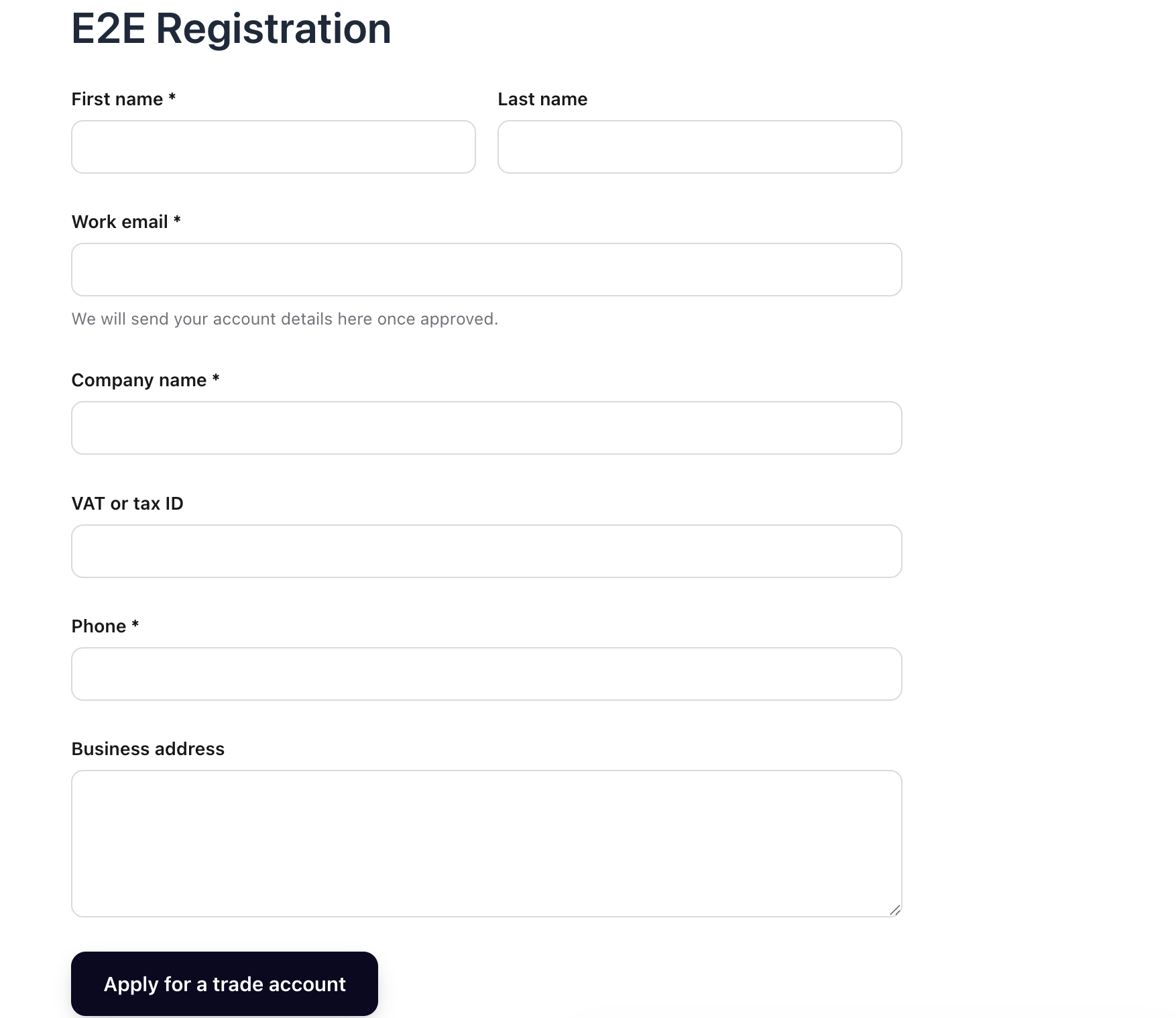
Trade registration form — a signup form with your own business fields: company, VAT/tax ID, phone and address.

Approval queue — new trade applications wait here until you approve or reject them; nobody gets B2B pricing until approved.
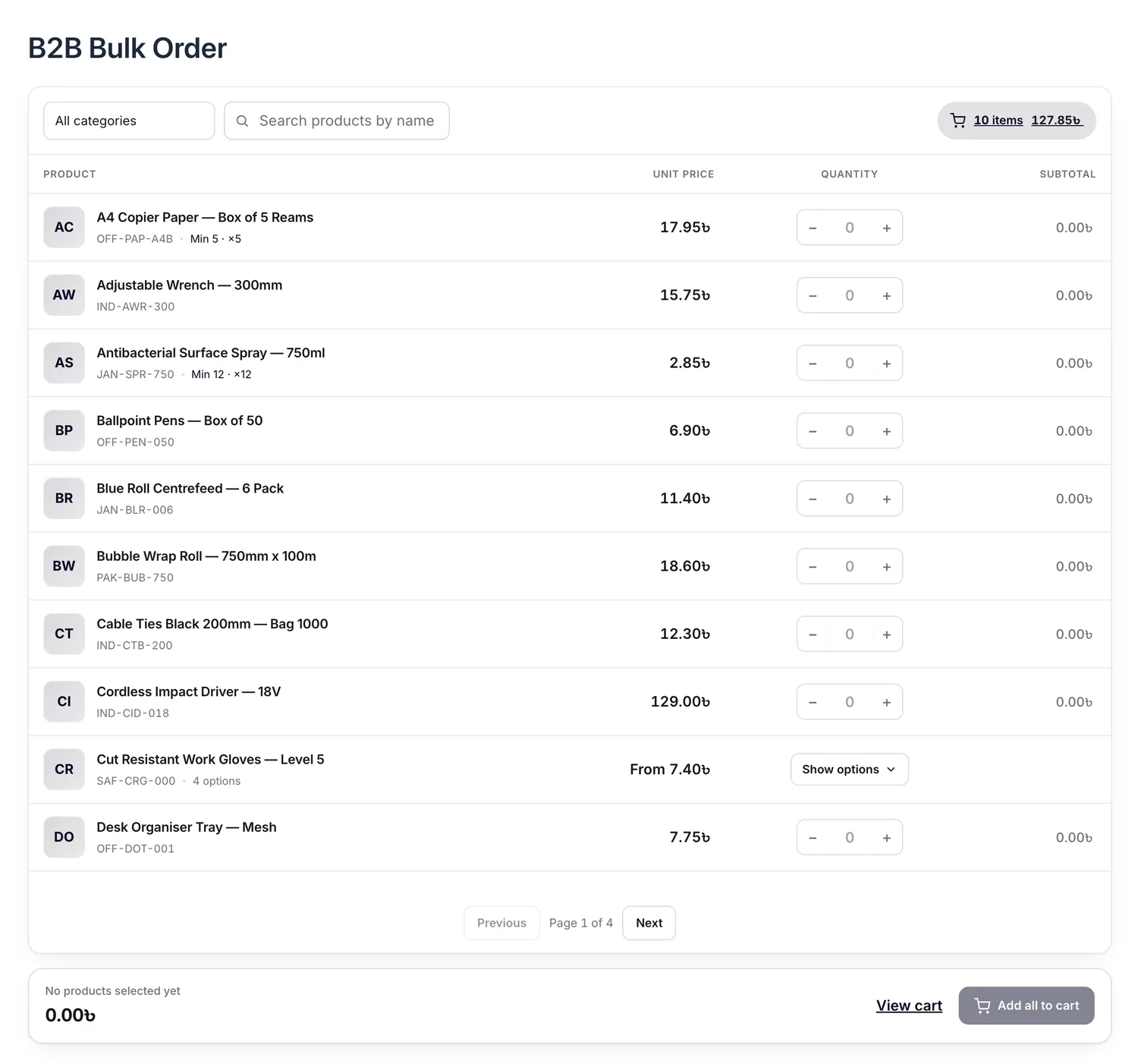
Bulk order form — a fast order pad for buyers, plus quick order by SKU or CSV.

PDF invoices — choose from ready-made invoice designs and attach them to order emails.
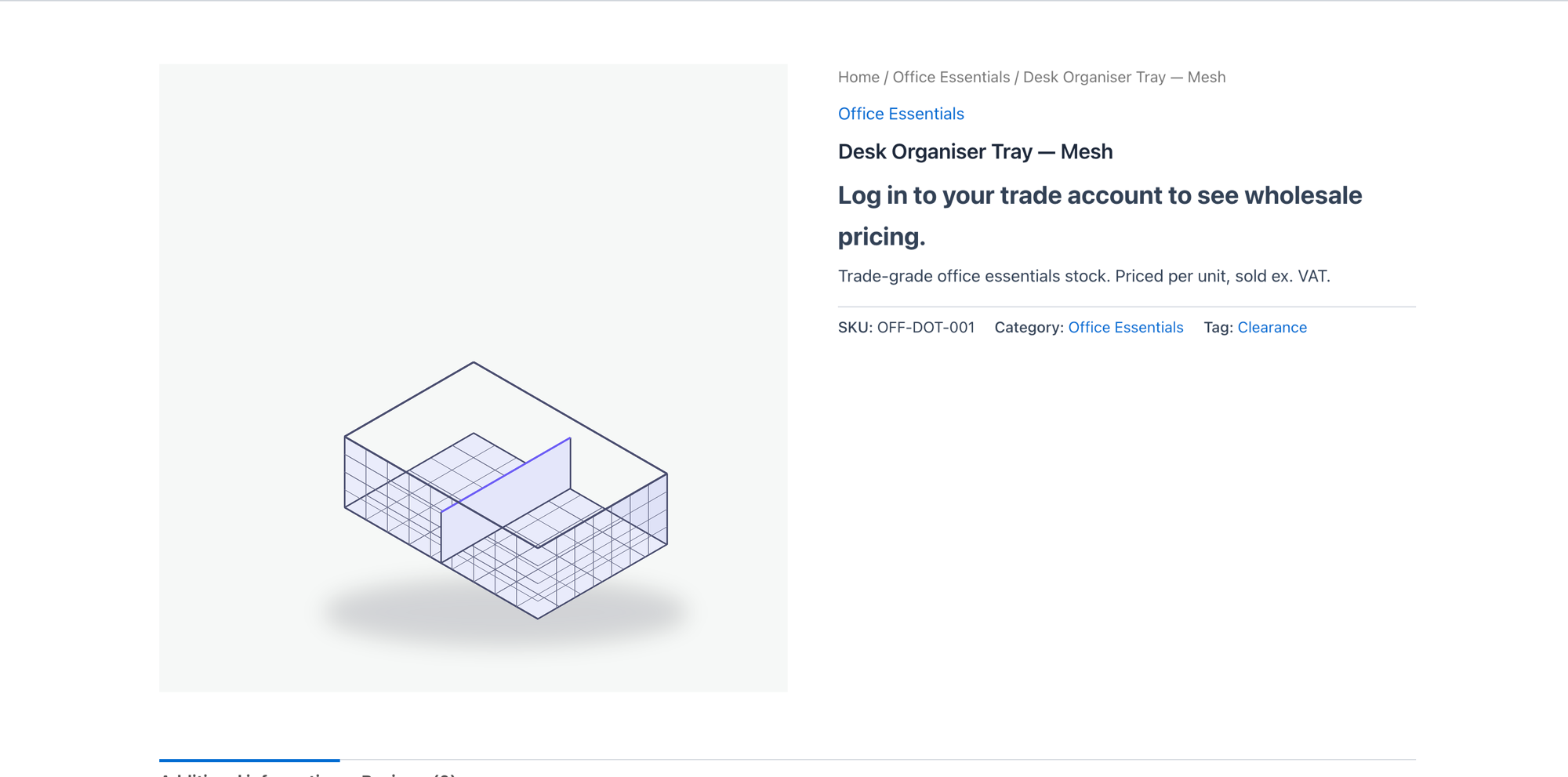
Hidden prices — require an approved trade account before prices and add-to-cart appear.

Buyer messaging — answer customers from one unified Inbox; unread conversations are flagged in the menu and in the thread list, so nothing waiting on you is missed.

Request a quote — review a buyer's request, send line-price offers with an expiry, and negotiate in the attached conversation; new requests are badged "New".

Registration form builder — drag fields onto the form, arrange them in columns, set each field's options and rules, and preview the real form. No code, all free.
Faq
Yes. The free plugin covers customer-group wholesale pricing, hidden prices, trade registration and approval, quantity rules, a bulk order form, buy-X-get-Y, reorder and basic buyer messaging. Advanced B2B features (company accounts, net terms, quotes, VIES VAT, webhooks and more) are in the Pro add-on.
Yes. Create as many customer groups as you need (Wholesale, Distributor, VIP…) and set percentage, amount-off or fixed prices per group, product, category, tag or quantity band.
Yes. You can hide prices and the add-to-cart button from guests, and require an approved registration before a buyer sees trade pricing.
Yes. Enforce a minimum order quantity (MOQ), plus maximum and pack (step) quantities per product, per category or order-wide, with clear messages at the shop, cart and checkout.
Yes. B2B pricing and quantity rules are enforced in both the classic checkout and the Cart & Checkout Blocks, through the Store API.
Yes. All order access uses the WooCommerce order API, so the plugin is HPOS-compatible.
Yes. The Safe-Preview importer moves your customer groups, users and price rules across, and shows you a full preview before anything is written — so you can switch with confidence.
Yes, with free FluentCRM. Turn it on under B2B Suite Settings Integrations, then run the first sync from FluentCRM Settings Integrations B2B Suite. Trade customers become contacts tagged with their customer group and application status, a “B2B Suite” category of automation triggers appears (application submitted, approved, rejected, customer group changed), campaigns can be segmented by group and status, and {{smb2b.*}} merge tags fill in group and company details. A “B2B” tab on each contact shows their account at a glance. With Pro you also get company sync, quote, overdue-invoice, held-order and credit-limit triggers, credit and quote merge tags, credit-based segments, and automation steps that can approve applications, change groups, add customers to companies or set credit terms — those steps stay off until you explicitly allow them.
Yes. Rules apply across WPML and Polylang translations. Softminal B2B Suite uses your store’s base currency and lets your currency-switcher plugin convert prices for display.
Reviews
Changelog
1.3.6 (11 Oct, 2026)
- New: FluentCRM integration — works with the free FluentCRM and stays off until you switch it on under B2B Suite Settings Integrations. Trade customers sync as FluentCRM contacts tagged with their customer group and application status, and stay in sync as applications are approved and groups change.
- New: “B2B Suite” automation triggers in FluentCRM — application submitted, approved or rejected, and customer group changed.
- New: segment FluentCRM campaigns by customer group and application status, and use {{smb2b.*}} merge tags (group, company, account and price-list links) in your emails.
- New: a B2B tab and a sidebar card on every FluentCRM contact showing their group, application, company, credit and quotes.
- New: optional automation steps that approve B2B applications and change customer groups. They stay off until you allow write-back, and never act on staff accounts or on contacts without a customer account.
- New: developer hooks for the integration and for tier changes — smb2b_group_assigned, smb2b_crm_register, smb2b_crm_payload, smb2b_crm_{event}, smb2b_crm_smart_codes, smb2b_crm_segment_options, smb2b_crm_writeback and more, all in the developer hooks reference.
- Improved: uninstalling with “remove data” also clears the integration’s data inside FluentCRM — never your contacts or tags.
- Fixed: searching the Inbox now treats “%” and “_” in your search term as ordinary characters instead of wildcards, so a subject containing them is found.
1.3.5 (22 Sep, 2026)
- Improved: the “PDF documents” settings screen is now simply “Invoices” — your invoice business details and design live together in one place.
- Improved: reorder rows in the registration form builder by dragging them.
- Improved: a short “how it works” hint on the Pack size field in Quantity Rules.
- Fixed: message times in the Inbox and quote threads no longer show “0000-00-00” — new messages record the correct date and time, and existing threads are repaired automatically on update.
- Fixed: a fatal error on PHP 8.1 when opening the Price or Quantity Rules screens (an internal trait used a PHP 8.2-only feature) — now fully compatible with PHP 8.1 again.
1.3.4 (14 Sep, 2026)
- Improved: cleaner reply composer in the admin Inbox — the message box and Send button are now one tidy control, with a little more breathing room around quote cards.
- Housekeeping: clearer disclosure of the optional CAPTCHA services, and tidier database queries so the plugin passes automated code checks cleanly.
1.3.3 (30 Aug, 2026)
- New: Drag-and-drop registration form builder — design your B2B signup form, build several forms, set a default, and add one to any page with its shortcode or the new block.
- New: A real “B2B registration form” block for the editor — pick which form to show — plus a one-click preview that opens the live form in a new tab.
- New: File uploads on the registration form (resale certificates, tax documents) — stored privately, never as public media, and downloadable only by your team from the approval screen.
- New: Optional CAPTCHA on the registration form — Google reCAPTCHA v2 or Cloudflare Turnstile — off by default; the built-in honeypot and minimum fill-time need no third-party service.
- Improved: the approval screen now shows uploaded files as secure download links and multi-choice answers clearly, with field labels drawn from your forms.
- Improved: refreshed the plugin’s brand logo and admin menu icon.
- Security: a new Site Health check warns if uploaded files could be reachable directly on nginx or IIS servers, and shows the exact rule to add.
1.3.2 (23 Aug, 2026)
- New: Multivendor support for Dokan marketplaces via the free Softminal B2B for Dokan add-on (requires Pro) — vendor-scoped wholesale pricing, per-vendor invoices, marketplace trade registration, cross-vendor bulk ordering, and a “B2B Pricing” tab in each vendor’s dashboard.
- New: a “Vendor” scope in the Price Rules and Quantity Rules screens when the Dokan add-on is active, so you can price a whole vendor’s catalogue at once.
- New: Site Health check for email deliverability — flags when no SMTP service is configured so your invoices, approvals and quotes actually reach buyers.
- Improved: PDF invoices now render non-Latin currency symbols (for example the Bengali Taka) correctly instead of a “?”.
- Improved: the invoice PDF is now attached to the “order received” (processing) email by default, not only the completed-order email — useful for buyers paying on account.
- Improved: the “which price wins” guide on the Price Rules screen is now a compact info tooltip, plus dark-mode polish across the rule screens.
- Developer: new hooks for vendor-aware pricing and rule scopes; a small database update (rule-ownership columns), applied automatically.
1.3.1 (20 Aug, 2026)
- New: Search box on the Applications screen — find a pending registration by name or email.
- Fixed: the “auto-approve new registrations” setting now works — matching applicants are approved automatically and sent their set-password email.
- Fixed: editing a company member’s role no longer clears their spending limits.
- Improved: editing a company no longer drops saved billing details such as address, city, postcode and phone.
- Improved: customer search now matches names and emails containing “%” or “_” literally.
1.3.0 (12 Aug, 2026)
- New: Buyer messaging — customers can message you from their account, and you answer from a new Inbox in the admin. Basic buyermerchant messaging is free.
- New: One Inbox for everything — general questions and quote negotiations now live together, each thread flagged when it needs your reply.
- New: Turn a conversation into a quote (Pro) — one click converts a buyer’s question into a draft quote, carrying the whole chat across.
- New: Pages settings tab — copy every storefront shortcode ([smb2b_registration], [smb2b_bulk_order], [smb2b_messages], [smb2b_quotes]) from one place.
- New: Storefront accent colour now matches your theme automatically (Settings Bulk order form), or set your own.
- Improved: the bulk order form uses numbered pagination.
- Improved: the messages Inbox loads more conversations as you scroll, and you can delete a thread.
- Improved: quote requests waiting on you show a “New” badge; draft, declined and expired quotes can be deleted.
- Fixed: several storefront and admin polish issues — message-centre button visibility, the quote centre for shop managers, the import results table, and dark-mode readability in dropdown menus and notifications.
1.2.0 (9 Aug, 2026)
- New: Shared purchase lists (Pro) — share a saved list with your company so colleagues can load and reorder it; only the owner can edit it.
- New: View shop as… — preview your storefront as any customer, a customer group, or a logged-out guest straight from the admin bar. The preview follows you from page to page and shows exactly their prices, catalogue and payment options.
- New: Quantity-discount progress bar (Pro) — “Add N more to pay X each” on product pages, based on what is already in the cart.
- New: You can now turn the Ex/Inc VAT price switch off (Settings General).
- Improved: your quote history is paginated.
- Fixed: bulk ordering grids and discount tables now follow your tax display setting, so prices always match the product price shown beside them.
- Fixed: privately hidden variations no longer appear in the bulk ordering grid.
- Fixed: clearer reasons when a grid line cannot be added because of quantity limits.
1.1.0 (9 Aug, 2026)
- New: A simple table to order multiple sizes and colors at once. Copy-paste directly from Excel and add everything to your cart in one click.
- New: Quantity discount tables now update automatically when customers select different options.
- New: Order Approvals — easily review, approve, or reject orders held by spending limits right from your dashboard.
- New: Quote Notifications — email alerts now send automatically when new quote messages arrive, and pending quotes are clearly flagged for your reply.
- Fixed: Pending-quotes counter always displayed zero.
1.0.1 (7 Aug, 2026)
- Fixed: registration setup text referred to a non-existent editor block — the registration form is added with the
[smb2b_registration]shortcode. - Fixed: minor paragraph spacing in the admin screens.
1.0.0
- Initial release: customer-group pricing, hidden prices, trade registration and approval, quantity rules, bulk order form, buy-X-get-Y, reorder, PO numbers and an ex/inc VAT toggle.