spWeather

spWeather
Description
This Plugin is very easy to handle. Just install with a few clicks and set it up in your configs.
Then include it in your sidebar e.g. with the following code:
< ?php spWeatherShow(); ? > (without spaces)
Installation
- Upload spWeather to the /wp-content/plugins/ directory
- Activate the plugin through the ‘Plugins’ menu in WordPress
- Adjust the options
Screenshots
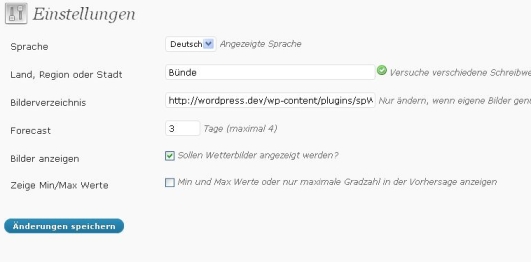
Configs menu

View on blog
Reviews
Changelog
- v1.7.2 03.09.2009 added alt tags to images
- v1.7.1 03.09.2009 added language da_DK Thanks to Kristian
- v1.7 28.07.2009 widget Thanks to summtrulle.de
- v1.6.1 17.07.2009 added language fi_FI Thanks to Jaska
- v1.6 16.07.2009 speed optimization
- v1.5 14.07.2009 now you can choose between 2 templates or make them yourself
- v1.4 13.07.2009 possibility for own weather-images given
- v1.3 13.07.2009 readme.txt fixes and screenshots
- v1.2 13.07.2009 initial release