Sticky Banner

Sticky Banner
Description
Boost conversions and grab visitor attention with a customizable sticky banner!
Sticky Banner is the easiest way to display important announcements, promotions, or calls-to-action on your WordPress website. Whether you’re running a sale, announcing an event, or collecting email signups, this lightweight plugin helps you get noticed without slowing down your site.
Why Choose Sticky Banner?
- Lightning Fast – Optimized code that won’t slow down your website
- Super Easy Setup – Configure your banner in minutes, no coding required
- Live Preview – See exactly how your banner looks before publishing
- Fully Customizable – Match your brand with custom colors and messaging
- Mobile Responsive – Looks perfect on all devices and screen sizes
- User-Friendly – Visitors can dismiss the banner, and it won’t show again for a set number of days
- Smart Display Controls – Hide the banner on specific pages
- SEO Friendly – Semantic HTML and accessibility features built-in
- Translation Ready – Fully internationalized and ready for translation
Perfect For
- Product launches and special offers
- Holiday sales and promotions
- Event announcements
- Newsletter signups
- Cookie notices and GDPR compliance
- Important site-wide announcements
- Limited-time deals
- Lead generation campaigns
Key Features
- Easy enable/disable toggle – Show or hide banner without losing your settings
- Position banner at top or bottom of your site
- Custom colors for background, text, and buttons
- Add a call-to-action button with custom text and link
- Set cookie expiration (control how long banner stays hidden after dismissal)
- Hide close button for critical announcements that must be seen
- Exclude specific pages by ID
- Clean, modern design that works with any theme
- Fully responsive and mobile-optimized
- No jQuery conflicts
- Clean uninstall (removes all data when deleted)
Premium Support
While this plugin is completely free, we offer premium support and custom development services. Visit Hidden Depth for more information.
Installation
Automatic Installation (Recommended)
- Log in to your WordPress dashboard
- Navigate to Plugins > Add New
- Search for “Sticky Banner”
- Click “Install Now” and then “Activate”
- Go to Sticky Banner in your admin sidebar
- Check the “Show sticky banner on site” box to enable the banner
- Configure your banner settings and click “Save Changes”
Manual Installation
- Download the plugin ZIP file from WordPress.org
- Log in to your WordPress dashboard
- Navigate to Plugins > Add New > Upload Plugin
- Choose the downloaded ZIP file and click “Install Now”
- Click “Activate Plugin”
- Go to Sticky Banner in your admin sidebar
- Check the “Show sticky banner on site” box and configure your settings
FTP Installation
- Download and extract the plugin ZIP file
- Upload the
hdsb-stickybannerfolder to your/wp-content/plugins/directory via FTP - Activate the plugin through the Plugins menu in WordPress
- Go to Sticky Banner in your admin sidebar
- Check the “Show sticky banner on site” box and configure your settings
Screenshots
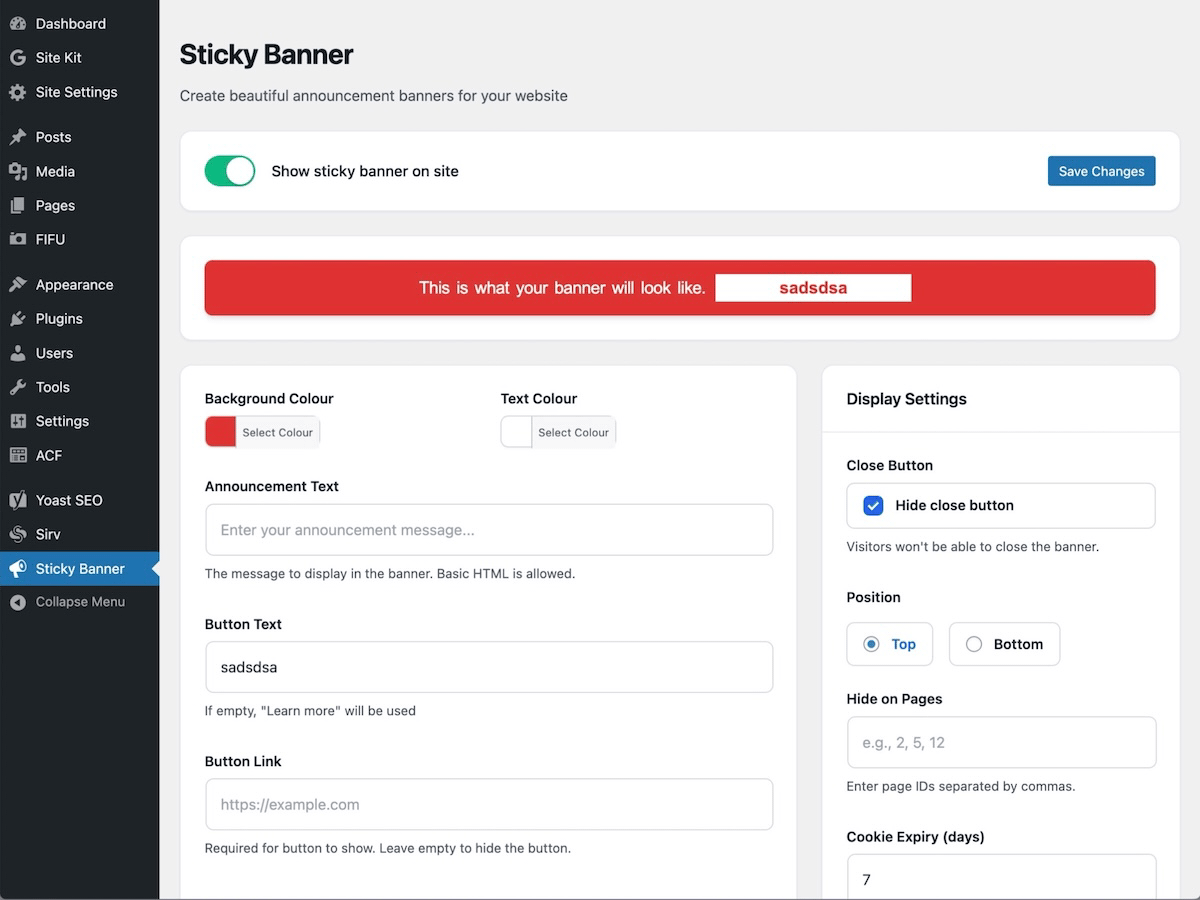
Admin settings page with live preview
Faq
After activating the plugin, go to Sticky Banner in your WordPress admin sidebar. Check the “Show sticky banner on site” box to enable it, enter your announcement text, choose your colors, add an optional call-to-action button, and click Save Changes. You’ll see a live preview as you configure!
Yes! You can choose to display the banner at either the top or bottom of your website. Simply select your preferred position in the plugin settings.
In the Sticky Banner settings, enter your button text in the “Button Text” field and add your destination URL in the “Button Link” field. The button will automatically appear on your banner.
Simply uncheck the “Show sticky banner on site” box at the top of the settings page and click Save Changes. This will hide the banner from your website while preserving all your configuration (text, colors, button settings, etc.). Check the box again whenever you want to show it.
Yes! The banner includes a close button (×) that visitors can click. Once closed, the banner won’t show again for the number of days you specify in the “Cookie Expiry” setting (default is 7 days).
You can exclude specific pages by entering their page IDs (separated by commas) in the “Hide on Pages” field. To find a page ID, edit the page in WordPress and look for post= in the URL bar.
No! Sticky Banner is optimized for performance. It only loads minimal CSS and JavaScript, and only on pages where the banner is displayed. Scripts are deferred and cached properly.
Absolutely! The banner is fully responsive and looks great on all devices, from desktop computers to mobile phones.
Yes, basic HTML is allowed in the announcement text field, so you can add formatting like bold text, links, etc.
Yes! Sticky Banner is designed to work with any well-coded WordPress theme. The banner uses semantic HTML and doesn’t interfere with theme styles.
Yes! Sticky Banner is fully internationalized and ready for translation into any language.
Use the color pickers in the plugin settings to customize both the background color and text color. You’ll see a live preview of your changes.
If you deactivate the plugin, your settings are preserved. If you delete the plugin entirely, all settings are automatically removed from your database to keep it clean.
While you can use Sticky Banner to display cookie notices, please note that it doesn’t include specific GDPR compliance features. For full GDPR compliance, consider using a dedicated cookie consent plugin.
For support questions, please use the WordPress.org support forums. For premium support and custom development, visit Hidden Depth.
Reviews
Loving this but Would love the option to disable the X
By 
This plugin looks amazing and works flawlessly. I would love an option to remove the X that allows user to close the bar.
Simple and does the job
By 
Changelog
1.4.0 – 2025-11-11
- NEW: Hide close button option for critical announcements
- NEW: Modernized admin UI with iOS-style toggle and live preview
- Integrated all improvements from versions 1.3.0 and 1.3.1
- Fixed multiple XSS (Cross-Site Scripting) vulnerabilities
- Added proper input sanitization for all user inputs
- Added output escaping for all displayed content
- Implemented CSRF protection with nonce verification
- Added capability checks using ‘manage_options’
- Prevented direct file access to all PHP files
- Optimized script loading – only loads on pages where banner is displayed
- Converted inline JavaScript/CSS for better caching
- Full WordPress 6.7+ compatibility
- Complete internationalization support (i18n)
- Improved accessibility with ARIA labels
- Added uninstall.php for clean plugin removal
- PHP 7.4-8.4 compatibility verified
1.3.1 – 2024-XX-XX
- Edit: Align text and button on mobile/small screens
- Improved responsive design for better mobile experience
1.3.0 – 2024-XX-XX
- Add: Enhanced security with sanitization callbacks
- Add: Nonce field verification for form submissions
- Add: Capability checks with manage_options
- Edit: Modular JavaScript approach for better maintainability
- Edit: Simplified file structure
- Tested up to WordPress 6.5.2
1.2.0 – 2024-XX-XX
- Tested up to WordPress 6.5.2
- Made button style more button-like
- Resolved admin button hover text issue
1.1.0 – 2020-02-15
The plugin has been coded from the ground up to be cleaner and make future updates easier.
- New setting: Cookie expiry days option added to settings
- New setting: Hide on pages option added (add page IDs with commas)
- New: Adds an active class to the body for styling (hdsb-t-active or hdsb-b-active)
- New: Users can now close banner with X on right hand side (adds cookie for 7 days)
- Update: Button will not show without a URL added to settings
1.0.0 – 2020-01-10
- Initial release