Sticky Header by ThematoSoup

Sticky Header by ThematoSoup
Description
For support requests please use our dedicated support forums.
The Sticky Header WordPress plugin makes your header visible at all times. It’s a great feature that allows people to browse faster and consume more of your content.
Sticky Header by ThematoSoup is part of your brand building, improves user experience by saving people time and makes your WordPress website more aesthetically pleasing.
Your branding (logo) is something you want visitors to subconsciously keep in mind while browsing your website and navigation is one of the most important aspects of every website. Make them visible at all times.
Settings
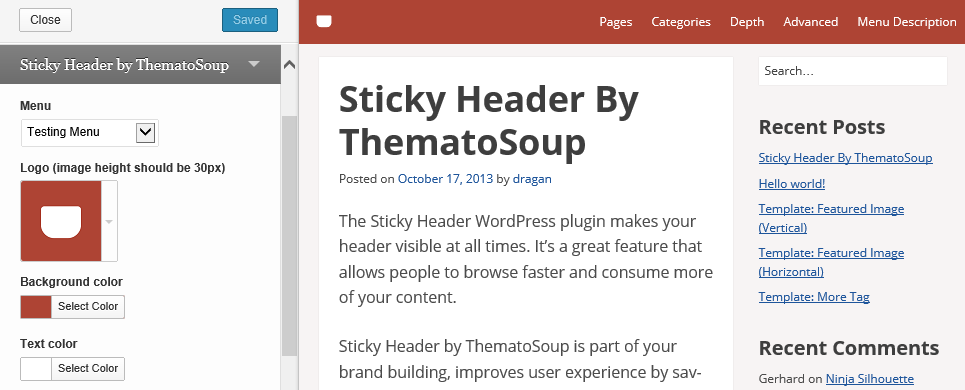
Sticky Header by ThematoSoup has just few options, which you can find in your Theme Customizer. This makes it incredibly easy to configure and use.
- Menu – You need to create at least one navigation menu before you can add it to Sticky Header. The menu in Sticky Header shows only first level items, so no submenu items will be shown.
- Logo – You can upload your sticky header logo by clicking on “Upload new” > “Select a file”. Ideally, this logo should be 30px tall or it will be resized. If a logo image is not uploaded, site title will be used.
- Background color – You can choose your custom sticky header background color.
- Text color – Choose your sticky header text color so it provides enough contrast with regards to the background color.
- Sticky Header max width – This option allows you to match interior Sticky Header width to your content area width.
- Make visible when scrolled to – This is the distance from the top of the page at which sticky header will show, in pixels.
- Hide if screen is narrower than – Sticky header will not be shown on screens narrower than this value, in pixels. When people use mobile devices, they’re used to vertical scrolling so it’s not necessary to have sticky headers.
Installation
- Download the plugin from this page and extract it
- Copy the sticky-header folder to the “/wp-content/plugins/” directory
- Activate the plugin through the “Plugins” menu in WordPress dashboard
- Setup your sticky header from Appearance > Customize
Screenshots
Sticky header in action

Sticky Header Customizer options
Faq
Installation Instructions
- Download the plugin from this page and extract it
- Copy the sticky-header folder to the “/wp-content/plugins/” directory
- Activate the plugin through the “Plugins” menu in WordPress dashboard
- Setup your sticky header from Appearance > Customize
Where’s the plugin’s settings page
It’s located in Appearance > Customize > Sticky Header by ThematoSoup.
Reviews
Great plugin.
By 
Great plugin
By 
Funciona muy bien
By 
very cool, but no submenu 🙁
By 
Does the trick. Lightweight & Easy to use.
By 
Life saving Plugin
By 
It save my life. ha ha ha... I eagerly needed a sticky menu that I can control as I want at avada theme.
Nice One
By 
How dose it work in responsive and sub-menu? Please help me Thanks!
Grrrrrrrrrreat
By 
Working great!
Better if animated during the transition. Anyway, that can be the sixth star!
Better than I expected !
By 
I needed two sticky elements, the header and the primary menu
I installed this plugin to stick the header and another plugin to stick the second menu.
they worked perfectly.
Thank you!
Great plugin
By 
Works perfectly. Just what I was looking for. Thanks.
Changelog
1.2.2
- Uses wp_parse_args to ensure array keys are set. Props github.com/Shelob9.
1.2.1
- Adds compressed JS and CSS files.
1.2
- Fixes a PHP notice.
1.1
- Added Sticky Header max interior width.
1.0.1
- Fixed header’s z-index.
1.0
- First version.