Combine Social Photos | Still BE
Combine Social Photos | Still BE
Description
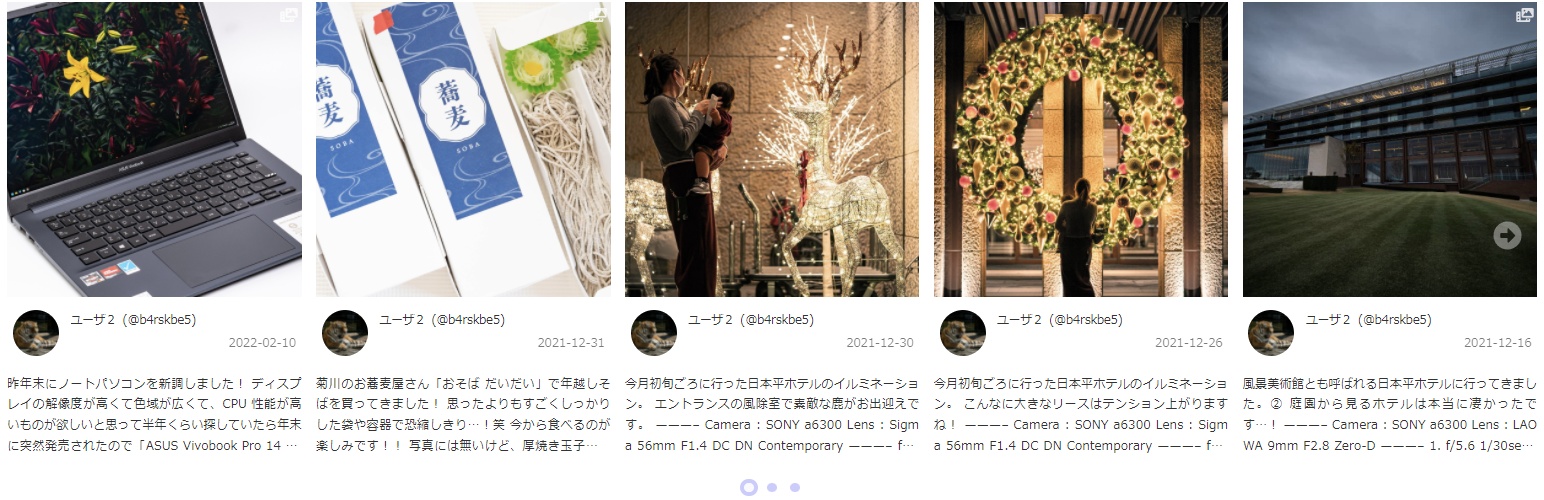
Add blocks where you can embed instagram feed. Provides embedding optimized for Block Editor.
Multiple accounts can be managed at a site.
You can be done on the block editor for all visual editing, making it possible to achieve the desired layout more comfortably, flexibility and speedy.
You can embed your own feeds, other Pro accounts’ feeds and posts related to hashtags.
Getting feeds from other Pro accounts (Business Discovery) or posts related to hashtags requires authentication with the Instagram Graph API.
Data got from Instagram is cached for faster display.
When the cache expires, it is automatically got data in the background and updated when the reacquisition is complete. This ensures that a valid cache is always available.
Blocks ; Common Options
All blocks have the following options.
- Advanced Getting Posts
- Type of Getting Posts
- Other User’s Username
- Hashtag
- Video Option
- Displaying Video
- Instagram Post Where to Open
- Post Caption
- Show / Hidden
- Lines
- Post Author
- Show / Hidden
- Post Time
- Show / Hidden
- Hover Effect
- Frosted Glass Effect
- Tilt Effect
- Footer
- Show / Hidden
- Position (Left / Center / Right)
- Like / Comments Count
- Show / Hidden
- Position (hover on image / below the image)
Block; Simple Grid
A block of posts placed on a grid.
The following customizations are available.
- Outline Gap (PC / Tablet / SP)
- Layout (PC / Tablet / SP)
- Columns
- Rows
- Aspect Ratio
- Gap
- Highlight
- Size
- Position (Left / Top)
- Header
- Show / Hidden
- Position (Left / Center / Right)
- Follows Count
- Show / Hidden
- Followers Count
- Show / Hidden
Block; Simple Slider
A block can slide horizontally.
The following customizations are available.
- Layout
- Base Width
- Min Width
- Min Columns
- Columns
- Rows
- Aspect Ratio
- Gap (between columns / rows)
- Scrolling
- Duration Time
- Easing Function (Linear / InOutSine / InOutQuad / InOutCubic / OutBounce / Cubic-bezier)
- Exclude Navigation Buttons
Block; Masonry Grid (Beta)
A block of posts placed on a masonry layout.
The following customizations are available.
- Outline Gap (PC / Tablet / SP)
- Layout
- Media Count
- Column Max Width
- Gap
- Loading Effect
- Header
- Show / Hidden
- Position (Left / Center / Right)
- Follows Count
- Show / Hidden
- Followers Count
- Show / Hidden
Modal Window
Selecting a modal window allows user to view the details of Instagram posts without leaving your website.
You can also put a CTA (Call to Action) within the modal window.
Link with Instagram Account
Easily link to your Instagram accounts.
Multiple accounts can be managed, and the account to be used can be selected individually when put a block.
3rd party resources
Font Awesome
WebSite: https://fontawesome.com/
License: https://fontawesome.com/license/free
Installation
- Enter “Combine Social Photos” in the plugin search field in your admin screen.
- Once you find this plugin, click “Install Now” to install.
(Alternative) Upload “still-be-combine-social-photos.zip” directly to your Plugins -> Add New in your admin screen.
(Alternative) Upload an unzipped “stillbe-image-quality-control” directory under the “/wp-content/plugins” directory. - Activate the plugin through the Plugins menu in WordPress.
Screenshots
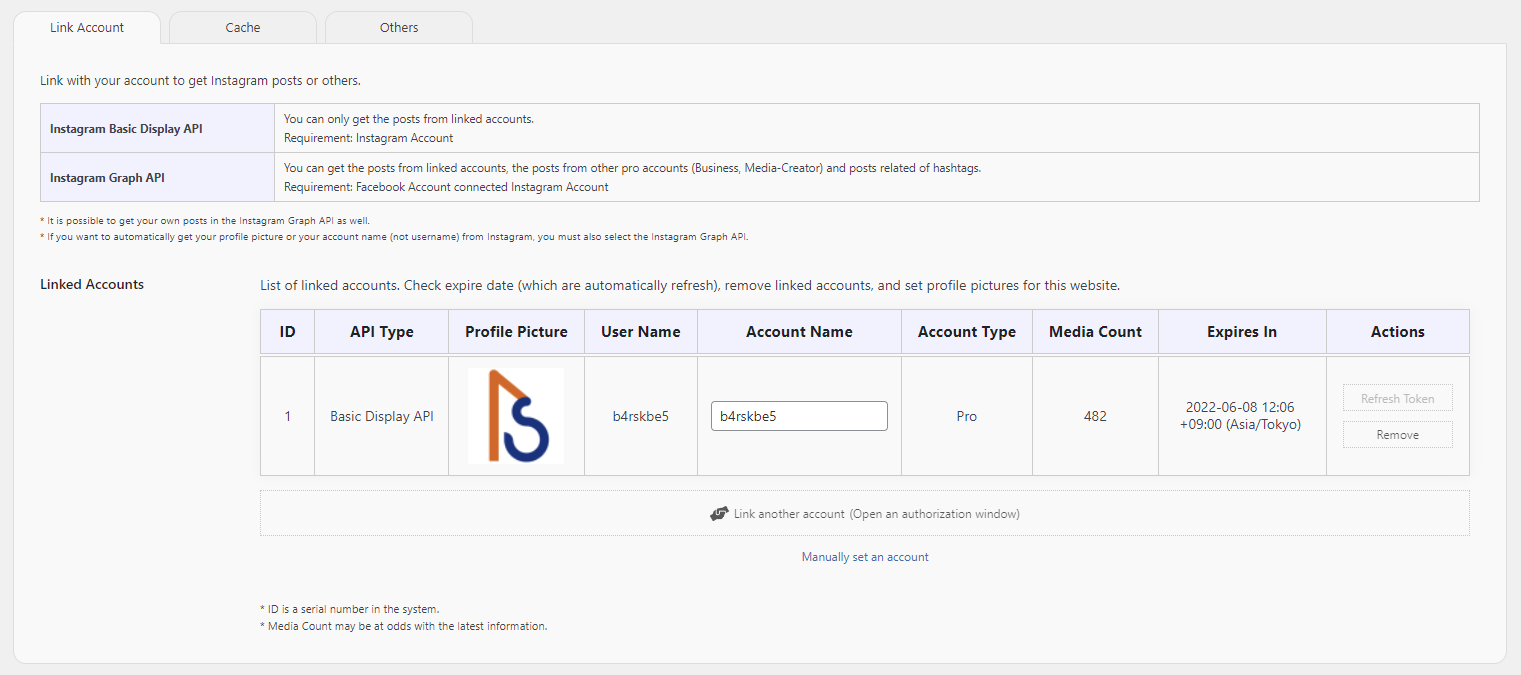
Admin Screen of Manage Instagram Accounts

Token Generator Screen

Manually Set an Account

Block; Simple Grid

Block; Simple Slider

Grid Layout Samples & Block Settings

Slider Samples & Block Settings
Faq
The plugin retrieves Instagram data via your account. Therefore, we need your permission to access Instagram on your behalf.
To revoke these permissions, please check your Instagram or Facebook app settings.
The Basic Display API is designed for displaying posts from your own account. It does not require connecting your Instagram account to a Facebook page (authorization is done via your Instagram account). While it is easy to set up, it does not provide detailed information such as profile images, like counts, or comment counts.
The Graph API provides a wider range of information but requires an Instagram Professional account (Business or Creator) connected to a Facebook page (authorization is done via your Facebook account). Although it requires this setup, it allows you to display profile images, like/comment counts, posts from other professional accounts, and hashtag-related posts.
Please wait until the cache lifetime (default: 3,600 seconds) expires, as post data is cached for a specific duration. If you want the feed to update faster, shorten the cache lifetime in the settings screen.
Also, if you have disabled WP-Cron, please re-enable it for automatic cache updates. When WP-Cron is disabled, cache updates only trigger when media cannot be loaded from the Instagram CDN. In such cases, users may see an expired cache notification and will need to reload the page.
No, it is not supported. This plugin is exclusively designed for the Block Editor (Gutenberg).
Hashtags must be converted to IDs, and this process is limited by Instagram to 30 requests every 7 days. If you are converting many hashtags, please wait a few days and try again.
Due to Instagram’s API limitations, only posts from the last 24 hours can be retrieved for the latest hashtag feeds.
However, once a post is successfully fetched, the plugin will continue to display it because it stores cached data older than 24 hours. In other words, the feed will accumulate posts starting from 24 hours before you initially set up the block.
This is a limitation of the Instagram API. Author information cannot be retrieved for hashtag-related posts.
This is due to Instagram’s API limitations.
In version 0.8 or later, you can choose to either hide the video or enable autoplay as an alternative.
No, this is the expected behavior of the plugin.
The plugin needs to load the images first to calculate the correct height for each element. The timing of when each image finishes loading can slightly affect the final layout.
No. Microsoft ended support for Internet Explorer on June 15, 2022. This plugin only guarantees operation on modern web browsers.
Since the navigation elements are placed outside the Simple Slider block, they will not be visible if overflow: hidden; is applied to the block’s parent element (such as a content container).
Please check your theme settings, or wrap the Simple Slider block inside a Group block and add enough left and right margin for the navigation.
Reviews
Instagram の表示がめっちゃキレイ!
By 
Instagram の表示が安定しなかったので代替できるプラグインを探していたのですが、思った以上のことができて大満足です!!ブロックで設定を簡単に変更できるので、導入もしやすかったです。
完全な日本語対応なのも、日本人にとってはありがたい限りです。
わずかですが寄付もしました。もっとみんなに知ってほしい!応援しています!!
使いやすいです
By 
SmashBalloonも使いましたが、こちらのほうが簡潔でずっと使いやすいです。なぜレビューがないのか不思議。
Changelog
0.21.0
2026-07-26
Fixed an issue where data could not be retrieved stabilly for when some Instagram posts contained very long captions or many images.
0.20.3
2026-06-10
Fixed an error that occurred while fetching cached post data in chunks. This ensures stable cache data updates.
0.20.2
2026-04-06
Improved Slider Class initialization by clarifying dependencies due to unstable load order.
0.20.1
2026-04-06
Fixed the display position of additional modal content that was set in versions earlier than 0.20.
0.20.0
2026-04-04
Feature changes and additions
- Block API v3; block.json editor assets for blocks
- Inner blocks on Simple Grid, Simple Slider, Masonry Grid: follow-buttons + modal-slot
- Block Bindings source
sb-csp/ig-profile-url(follow button URL from account / Business Discovery / hashtag) - Inner blocks auto-synced with follow position and “open in modal” setting
- Parent
providesContextfor account fields and follow button position - Editor: modal CTA block pinned at bottom; layout/CSS for follow vs feed
- Editor SSR preview re-renders when account, follow position, or link target changes
Other improvements and testing
- Requires WordPress 6.7+ and PHP 8.0+
- Tested up to WordPress 7.0
- More reliable cache updates
- Removed unused editor localization; cleaned up dead JS imports
0.17.6
2025-12-05
Checked that it works with WordPress 6.9.
0.17.5
2025-11-17
Fixed video bleeding into other slides.
0.17.4
2025-11-17
Adjusted the CSS.
0.17.3
2025-11-17
Fixed a bug where images would overflow/protrude from the modal when the screen width was somewhat narrow in modal view.
Fixed a bug where the shadow settings would be reset when editing a page containing blocks.
0.17.2
2025-08-08
Added get_block_wrapper_attributes() function to container element (<aside>).
Delete margin-top/-bottom from container element.
0.17.1
2025-05-09
Added regular updates to keep Instagram user data current, especially for hashtag-only views and rarely accessed pages.
Fixed a bug that prevented loading subsequent posts on the same page after viewing another business user’s post through Business Discovery.
0.17.0
2025-05-07
Checked that it works with WordPress 6.8.
Updated Graph API version to v22.0.
Disabled dark mode by default.
Changed to adapt style for dark mode only when enabled in settings.
0.16.0
2024-07-10
Checked that it works with WordPress 6.6.
Updated Graph API version to v20.0.
Changed Masonry Grid layout method. Improved stability.
0.15.3
2024-04-05
Fixed a bug that sometimes prevented easing from working on Masonry Grid loading effect.
Changed the process of cache holding for notifications on the admin screen.
0.15.2
2024-03-27
Improved stability of Masonry Grid layout behavior.
Principally that is noticeable when resizing or scrolling on a smartphone.
0.15.1
2024-03-26
Fixed a bug that Simple Grid & Simple Slider blocks feeds were not displayed.
0.15.0
2024-03-26
Added a new block; Masonry Grid.
This is a beta feature.
0.14.2
2024-03-20
Changed the method of displaying notifications for the admin screen.
0.14.0
2024-03-20
Added update process since user tokens are now required to show hashtag posts.
Fixed minor features and bugs.
0.13.5
2024-03-13
Shortened the description.
0.13.4
2024-03-13
Checked that it works with WordPress 6.5.
Updated Graph API version to v19.0.
Fixed some bugs.
0.13.3
2023-11-20
Checked that it works with WordPress 6.4.1.
Use 6.4.1 or higher because cURL errors occur in 6.4. (WordPress core bug)
0.13.2
2023-09-03
Enabled access tokens’ validity check by WP-Cron.
0.13.1
2023-09-01
Added a function to re-authenticate Graph API access token.
0.13.0
2023-08-16
Fixed a bug that the responsive setting of the Block; Simple Grid was not reflected.
Checked that it works with WordPress 6.3.
0.12.1
2023-06-21
Updated Graph API version to v17.0.
0.12.0
2023-03-26
Added an option to the Simple Grid block, which allows you to choose the position of post information (caption, author, post datetime, and impressions) display.
Updated Graph API version to v16.0.
Checked that it works with WordPress 6.2.
0.11.3
2022-12-21
Fixed a bug where posts could not be retrieved when using the Basic Display API.
0.11.2
2022-12-01
Improved stability by fixing a problem that sometimes prevented data from being got from the API.
(When the API response time is slow)
Changed so that the edit screen does not check the cache, but always gets the fresh data.
0.11.1
2022-11-21
Fixed a problem in which the ability to manually link Graph API did not work correctly.
Fixed some bugs. Improved stability.
0.11.0
2022-11-11
Checked that it works with WordPress 6.1.
Changed the default value for opening Instagram posts to “Open in a New Tab.”
Fixed some bugs. Improved stability.
0.10.0
2022-10-12
Improved the basic behavior of the modal window.
Added buttons to go directly to the next or previous post when a modal window is opened.
Added the ability to add a CTA to the modal window.
* Cases occur where repair is required on the block editor screen, but block recovery will repair them without worrying.
0.9.1
2022-10-09
Dark mode supported.
0.9.0
2022-10-09
Added option to specify the window in which to open Instagram posts. (Self / New / Modal)
In line with this, the Javascript loading process was reorganized.
Updated Graph API version to v15.0.
Fixed some bugs.
0.8.1
2022-08-20
Added easing function for slider.
Changed the behavior where the number of posts was not updated until the access token refresh in the Basic Display API so that it is updated once a day.
Added a process to access the latest hashtag posts once a day to prevent the CDN cache from expiring. (Beta version)
0.8.0
2022-08-03
Added options for displaying videos. You can choose to show or hide thumbnails and autoplay.
Changed from cached data for the recent post with hashtag to keep for the past 24 hours or earlier too.
Fixed some bugs.
0.7.1
2022-07-26
Removed test code for cache update process triggered by expired images.
Set global variables to URLs appropriate for each site.
0.7.0
2022-07-26
Added option to display posts related to hashtags.
Added a process to refresh the cache when there are expired images.
Improved behavior when scrolling halfway.
0.6.1
2022-07-12
Adjusted the behavior of the easing function to be interrupted when scrolling is halfway.
0.6.0
2022-07-10
Added the following functions;
- Gap outside of Simple Grid block
- Scrolling behavior of Simple Slider block (transition time, easing)
Corrected the path of the CSS for the editor of the Simple Grid block.
Updated Facebook Graph API version to v14.0.
0.5.0
2022-05-23
Fixed a bug that Instagram account linkage was not automatically set on the post screen.
Checked that it works with WordPress 6.0.
0.4.0
2022-05-08
App review for “Instagram Graph API” approved.
Fixed a bug in the Graph API approval process.
Supported dark mode.
0.3.1
2022-05-05
Implemented Business Discovery.
0.3.0
2022-04-28
Added Instagram Graph API to be able to process. (Only get own data has been mounted)
Added more detailed settings to each block.
Changed the data structure of the cache so that other data will not be lost if the key (hash value of the conditions) to store the cache data collides.
Changed read timing of translation functions for JS.
Fixed other minor bugs.
0.2.4
2022-04-14
Supported Japanese language at the access token generator.
0.2.3
2022-04-11
Fixed a bug.
0.2.2
2022-04-11
Added responsive settings to the Block; Simple Grid.
0.2.1
2022-04-11
Changed all admin screens to load admin Javascript for Full Site Editing.
Changed initialization to call wp_set_script_translations() function so that Javascript translation functions work.
0.2.0
2022-04-10
App review for “Instagram Basic Display API” approved.
0.1.1
2022-04-09
Up to WordPress plugin directory
0.1.0
2022-04-07
Initial release