Stock Locations for WooCommerce

Stock Locations for WooCommerce
Description
Stock Locations for WooCommerce will help you manage your products stock across multiple locations easily. If you have multiple physical stores or storage locations, like warehouses, this plugin may help you.
You can print the locations inside a product page on the frontend, with this shortcodes:
Product pages
[slw_product_locations show_qty="yes" show_stock_status="no" show_empty_stock="yes" collapsed="no" stock_location_status="enabled"]
[slw_product_variations_locations show_qty="yes" show_stock_status="no" show_empty_stock="yes" collapsed="yes" stock_location_status="all|disabled|enabled"]
[slw_product_message is_available="yes" only_location_available="no" location="location-slug"]Your custom product message/HTML here[/slw_product_message]
Cart page
[slw_cart_message qty_from_location="location-slug" only_location_available="no"]Your custom cart message/HTML here[/slw_cart_message]
REST API
REST API endpoints (both accept GET and PUT requests):
/wp-json/wc/v3/products/id
/wp-json/wc/v3/products/id/variations/id (first ID is for parent product, the second one for the variation ID)
/wp-json/wp/v2/location/
/wp-json/wp/v2/location/id
This plugin requires at least WooCommerce 3.4.
Features
- New taxonomy for stock locations
- Works on both, simple and variable products
- Easy management of stock with multiple locations, both in product and orders
- Get and update product stock locations from the REST API
- Allow customers to select locations when purchasing
- Auto order allocation for locations stock reduction
- Send email notifications when stock is allocated for a product in a location
- Send WooCommerce New Order email copy to item location
- Compatible with WPML
Compatibility
- PHP 7.2+
Installation
- Upload “stock-locations-for-woocommerce” to the “/wp-content/plugins/” directory.
- Check if you have WooCommerce 3.4+ plugin activated
- Activate SLW plugin through the “Plugins” menu in WordPress.
Simple Products
- Assign Stock Locations to the product > Update Post
- Under Inventory Tab > Activate Manage Stock
- Under Stock Locations Tab > Manage the stock for the locations
Variable Products
- Assign Stock Locations to the product > Update Post
- Under Inventory Tab > Deativate Manage Stock
- Under Attributes Tab > Create attributes
- Under Variations Tab > Create variations based on attributes
- In each variation > Activate Manage Stock & Add Price > Update Post
- Under Stock Locations Tab > Manage the stock for the locations for each variation
Screenshots
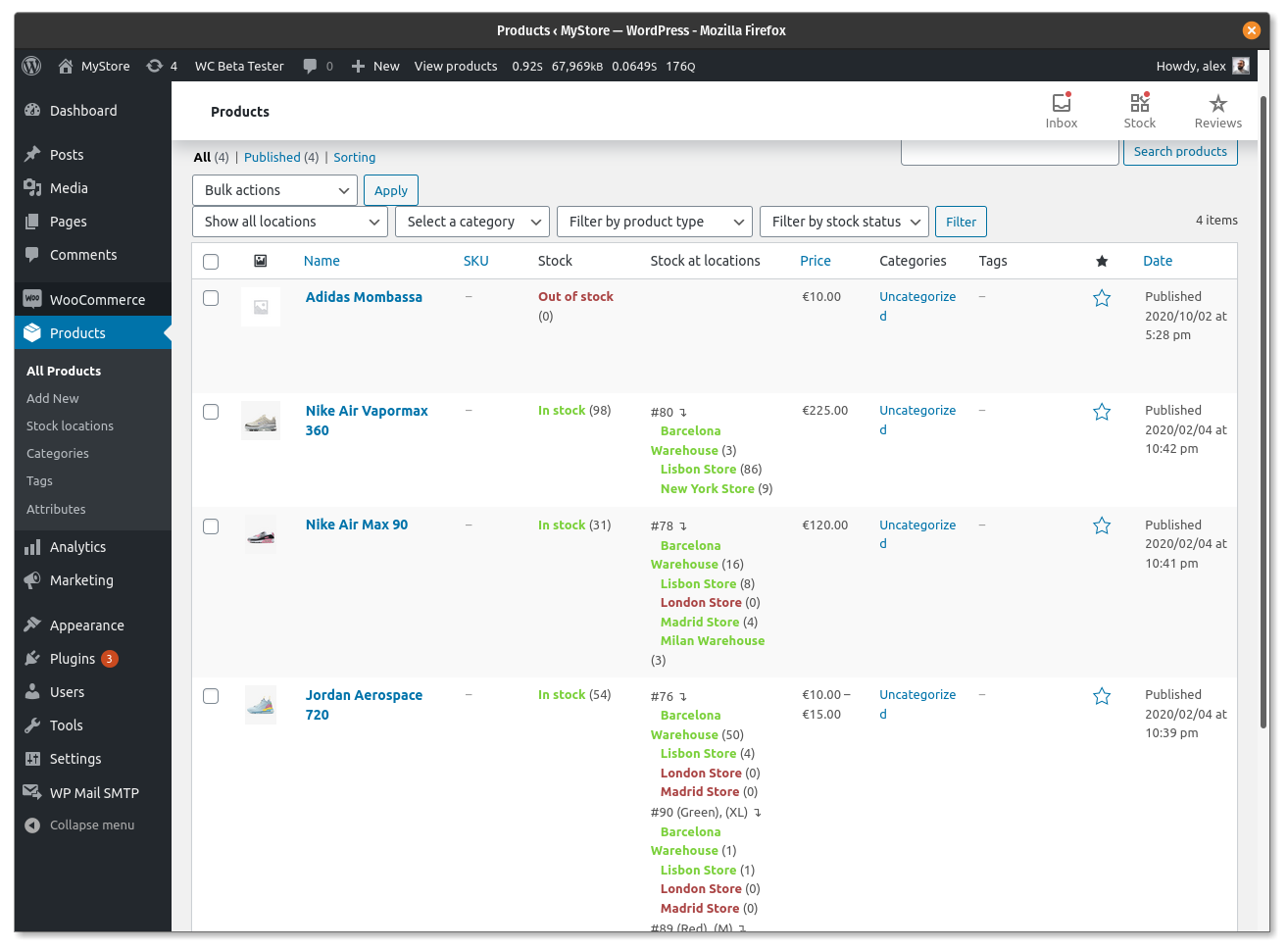
Product list filter and stock locations column
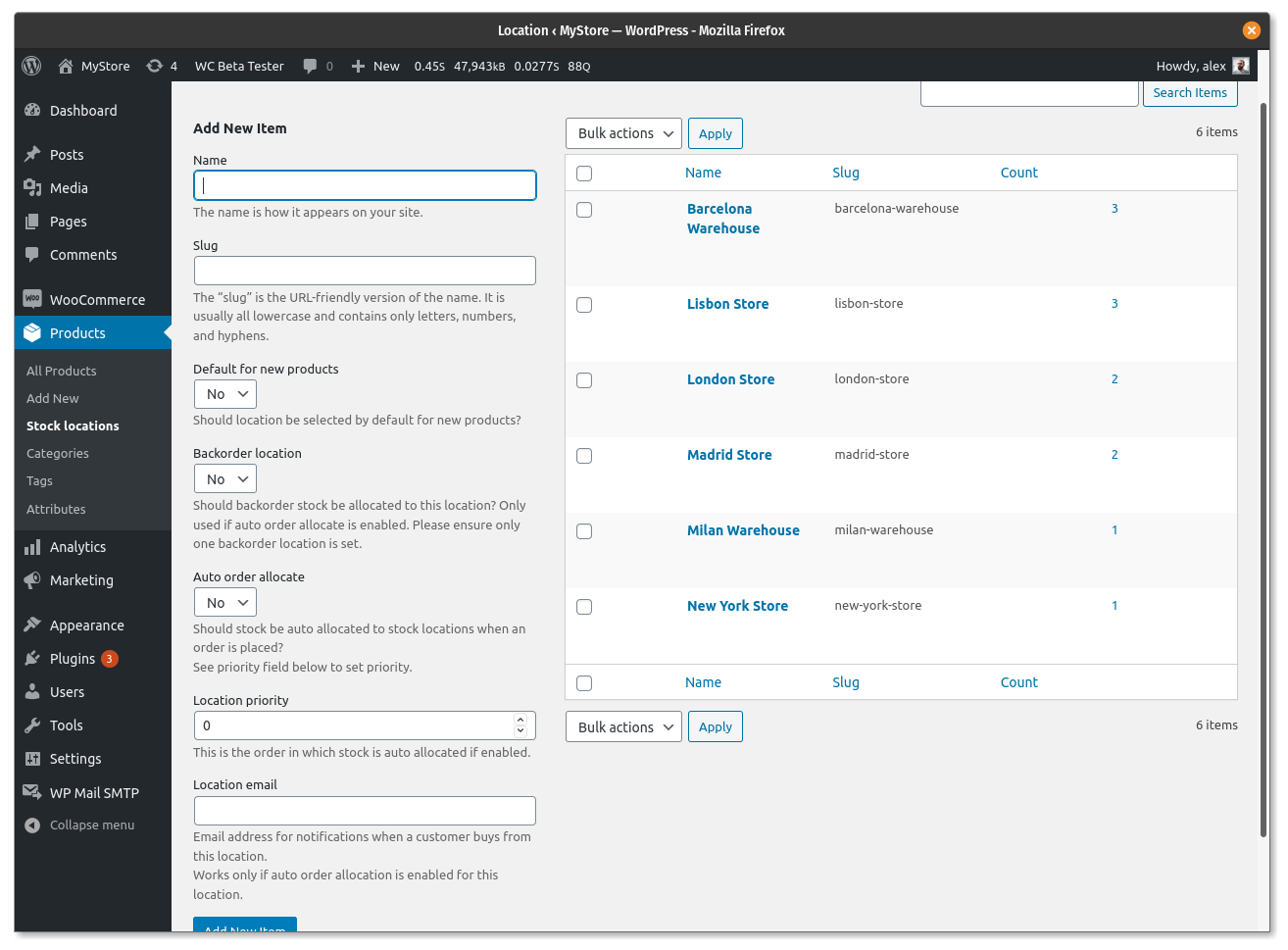
Stock locations taxonomy
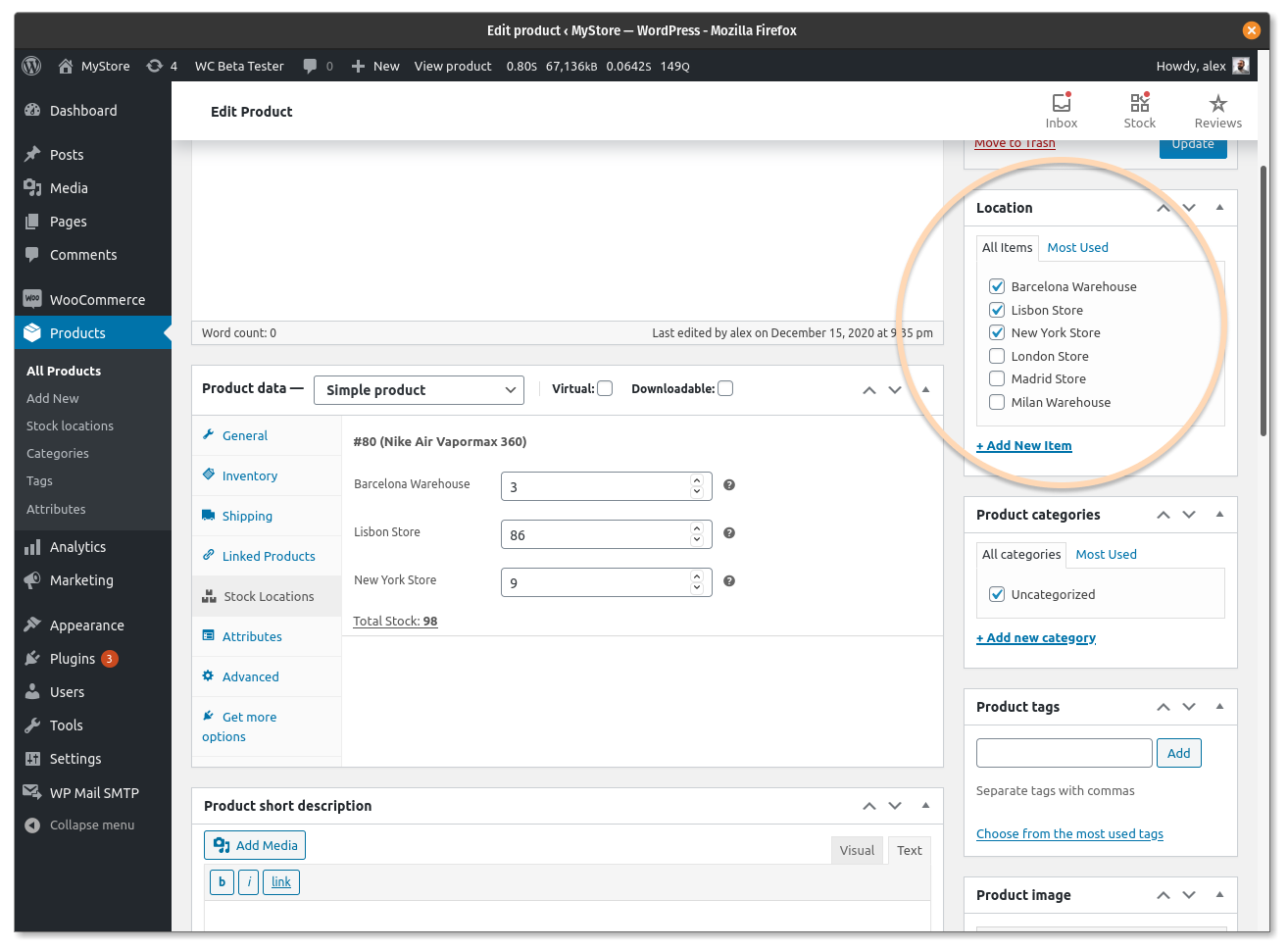
Manage stock locations in simple products
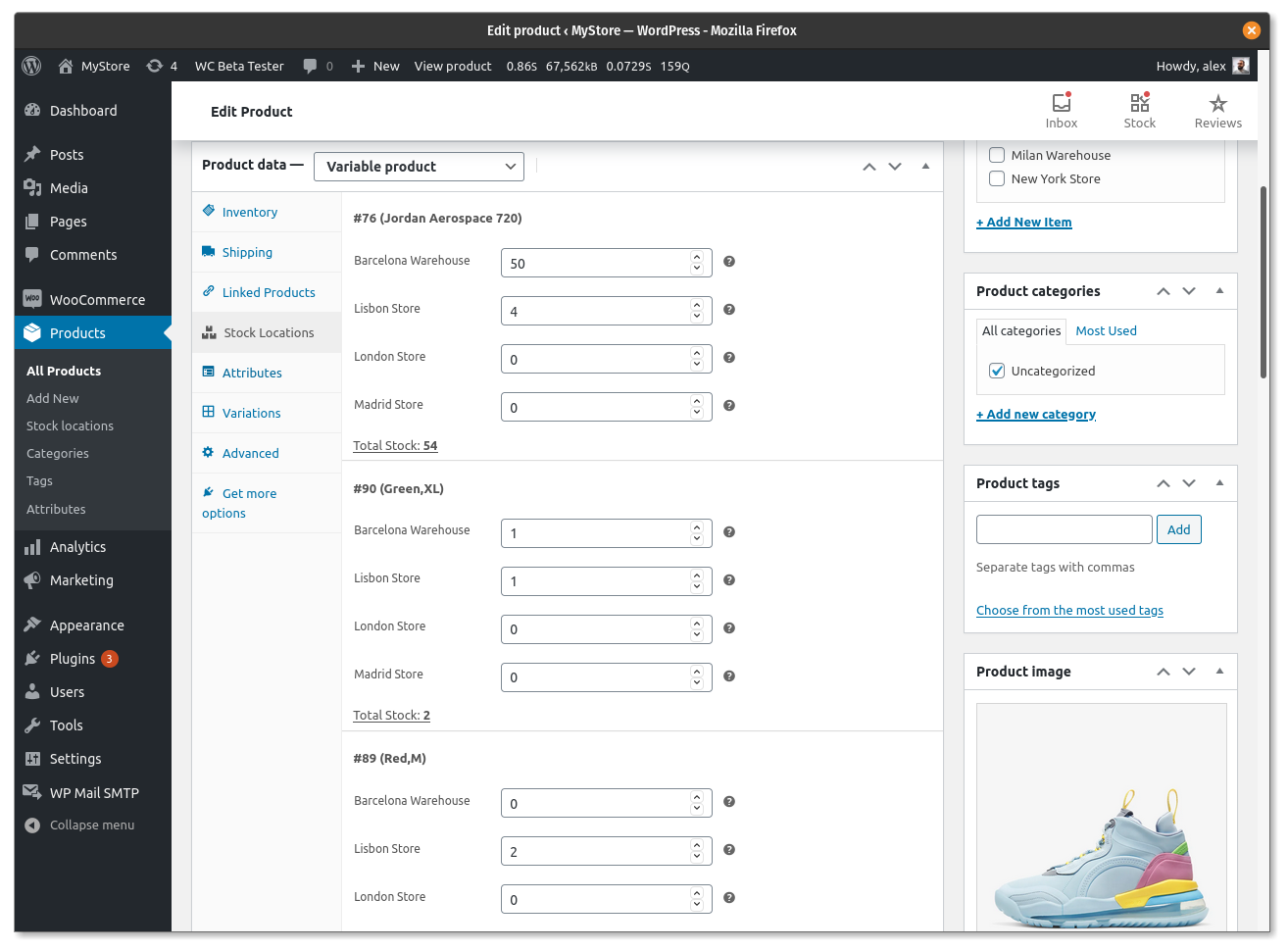
Manage stock locations in variable products
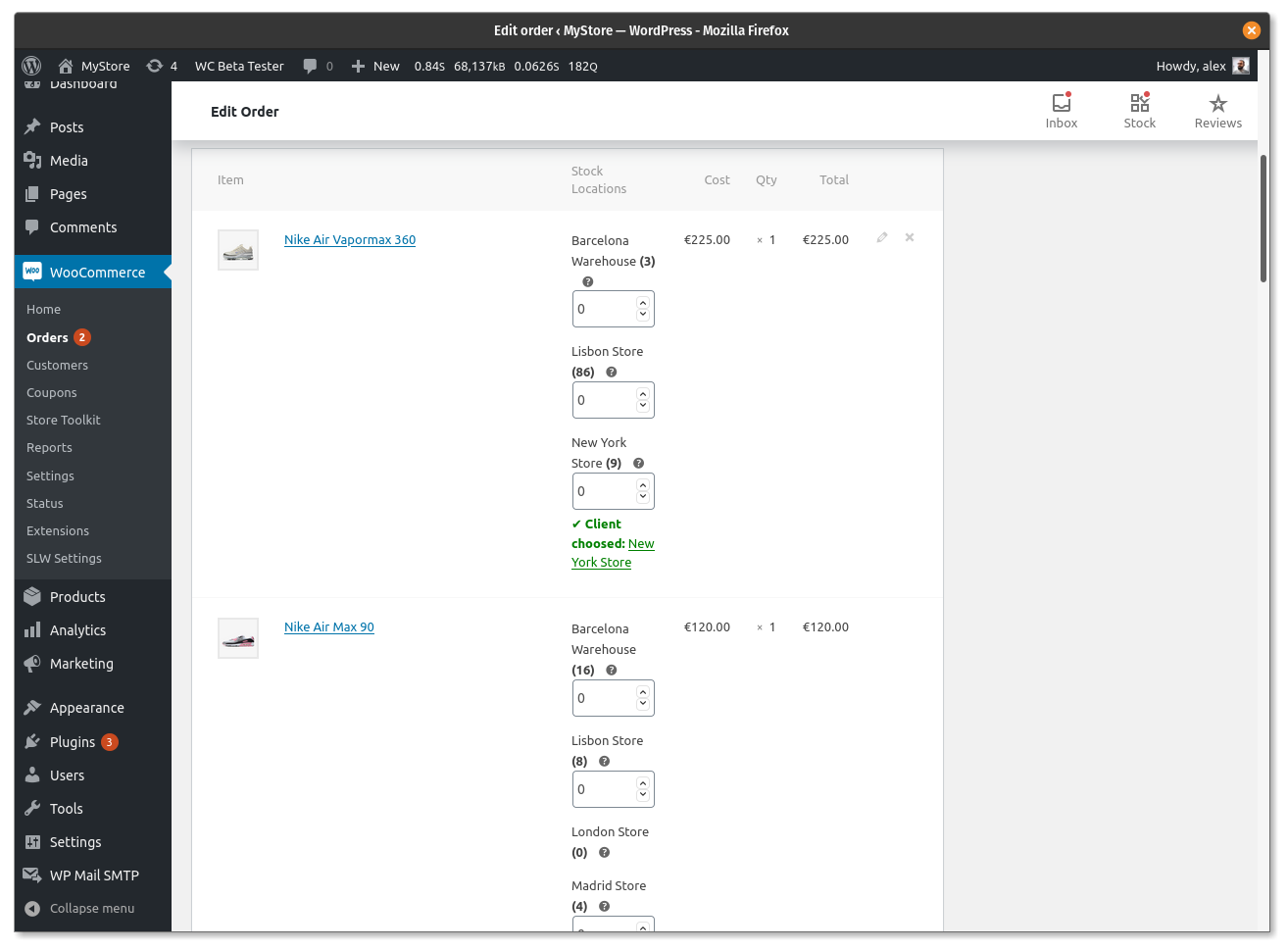
Deduct stock from locations manually
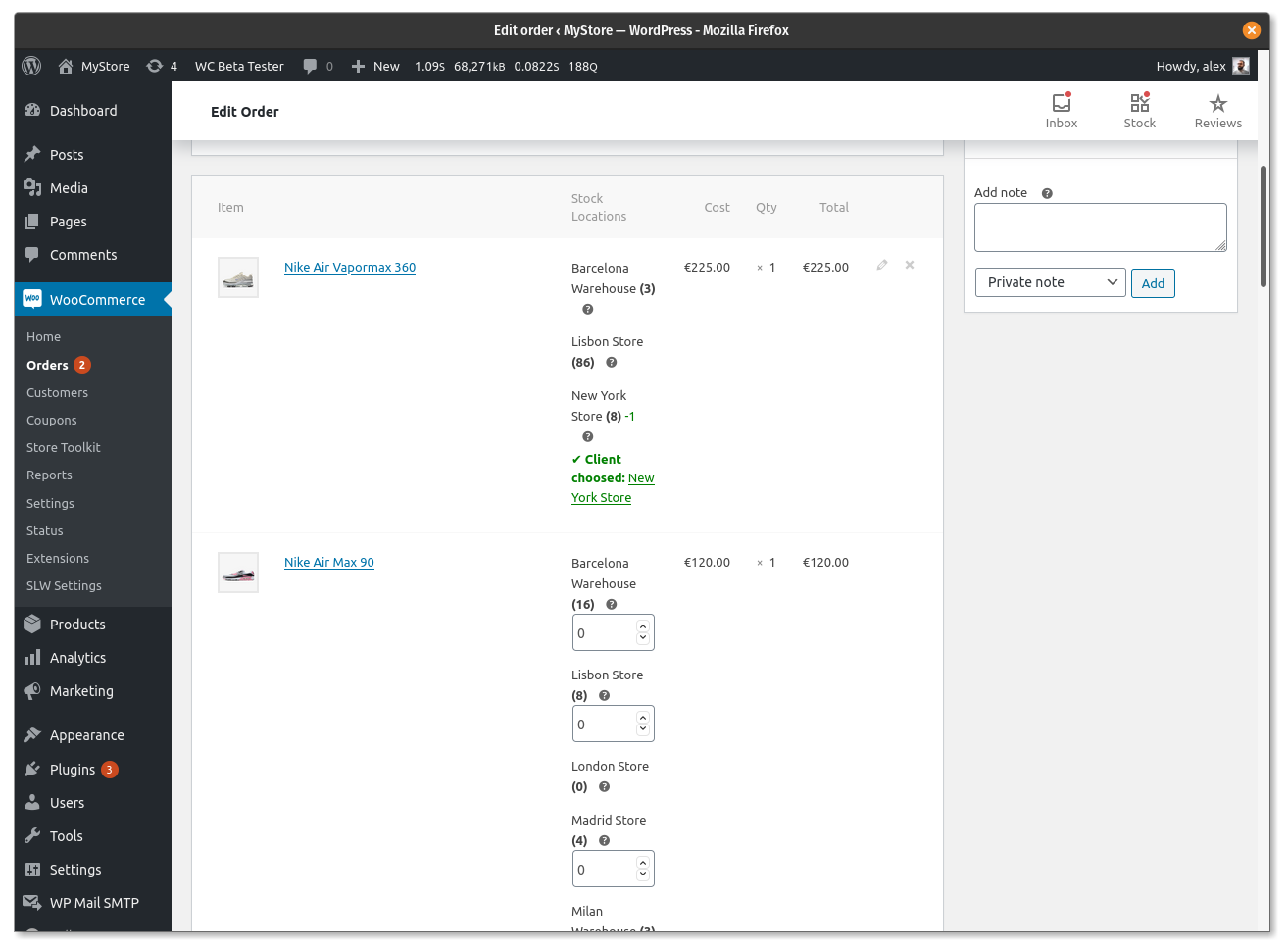
Deduct stock from location automatically
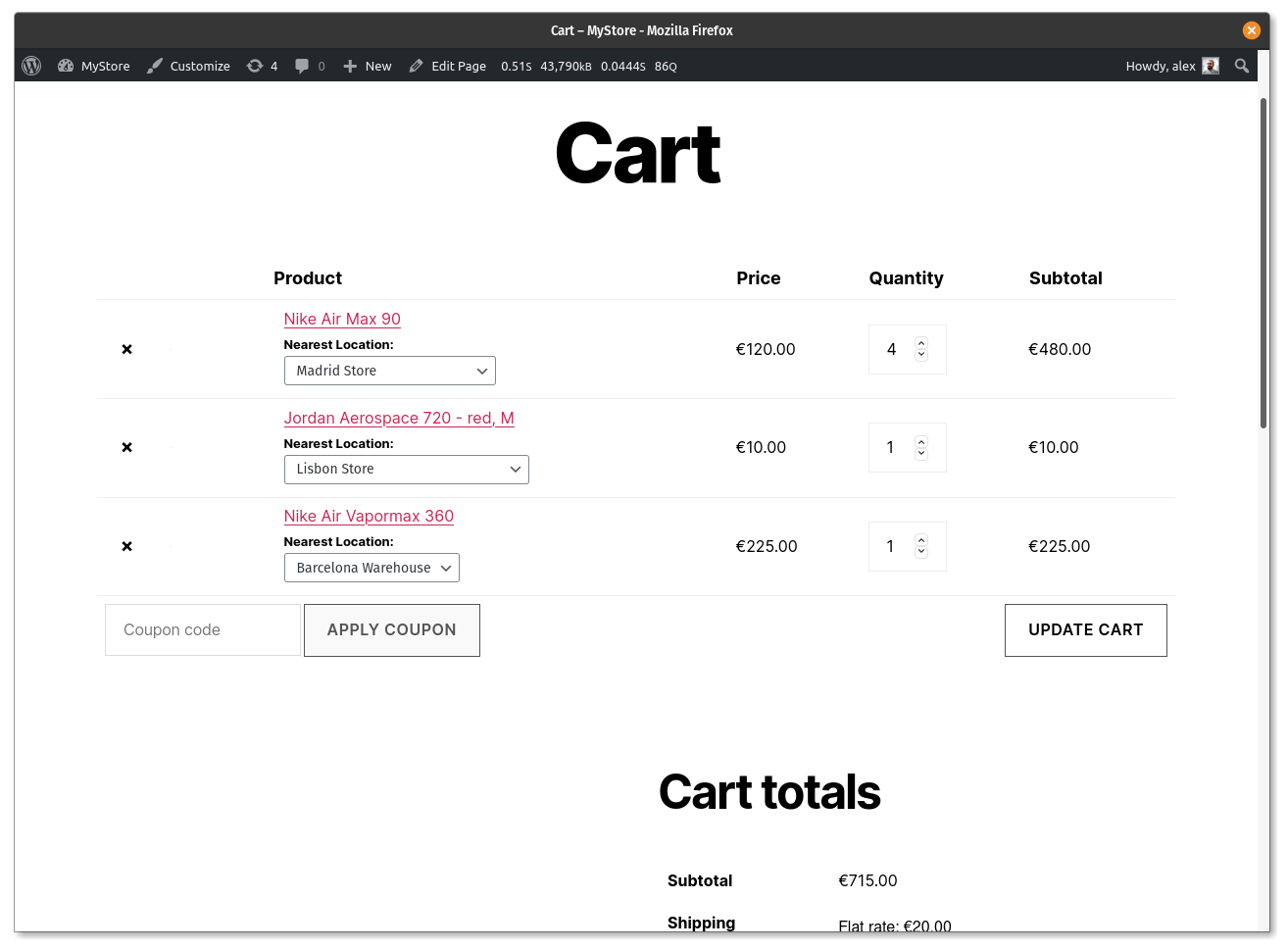
Allow customers to select locations in cart page
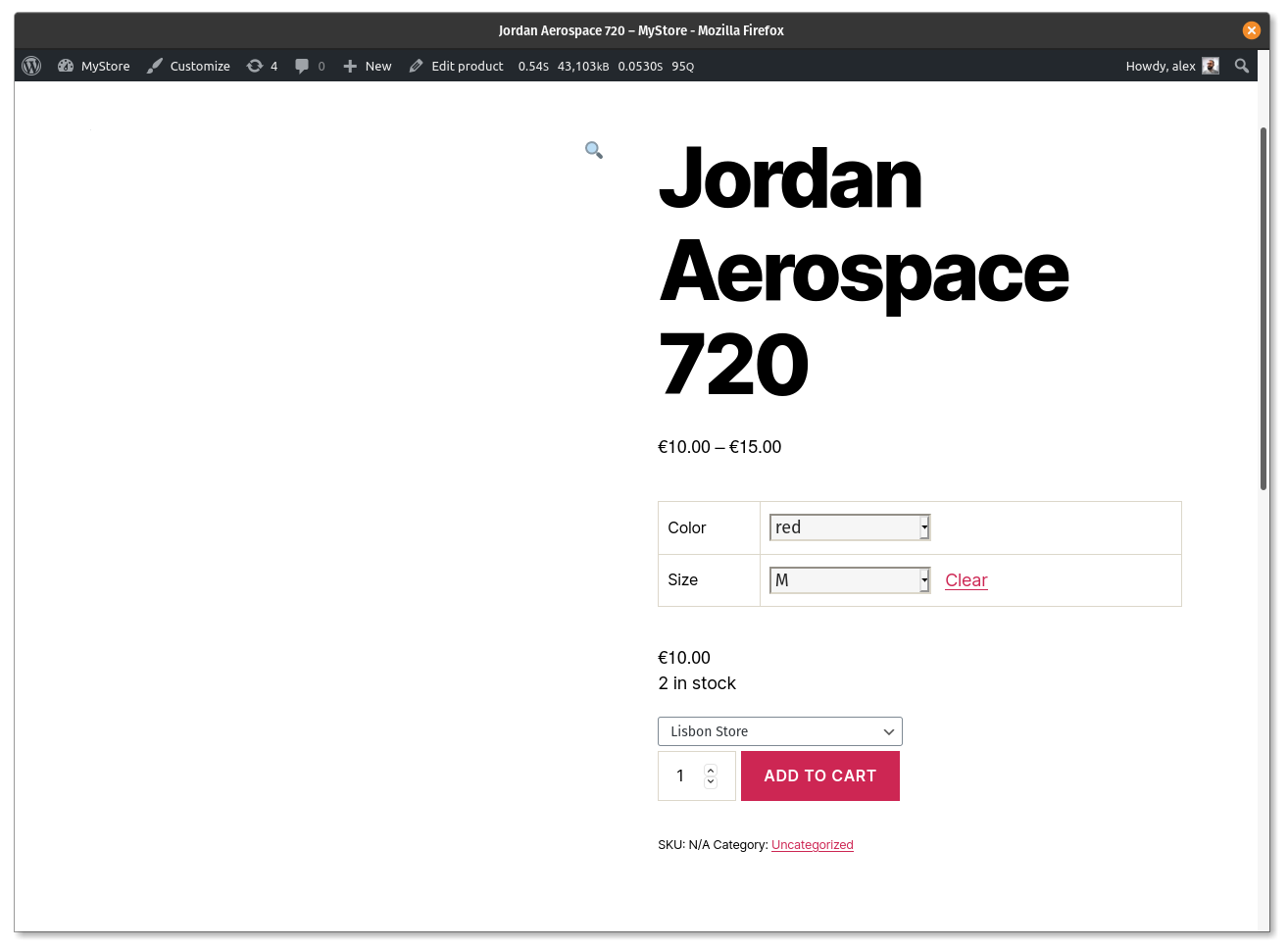
Allow customers to select location in variable products
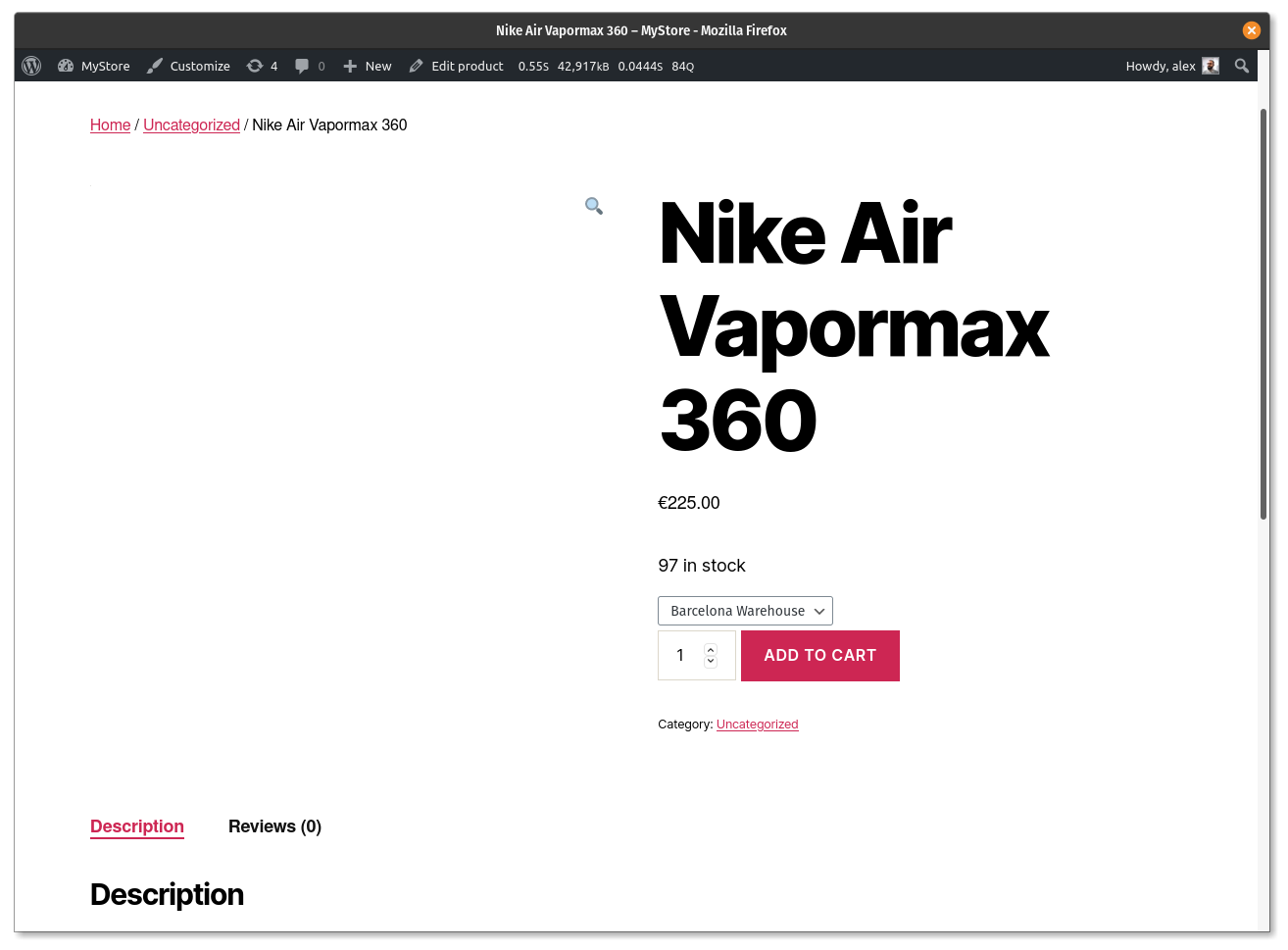
Allow customers to select location in simple products
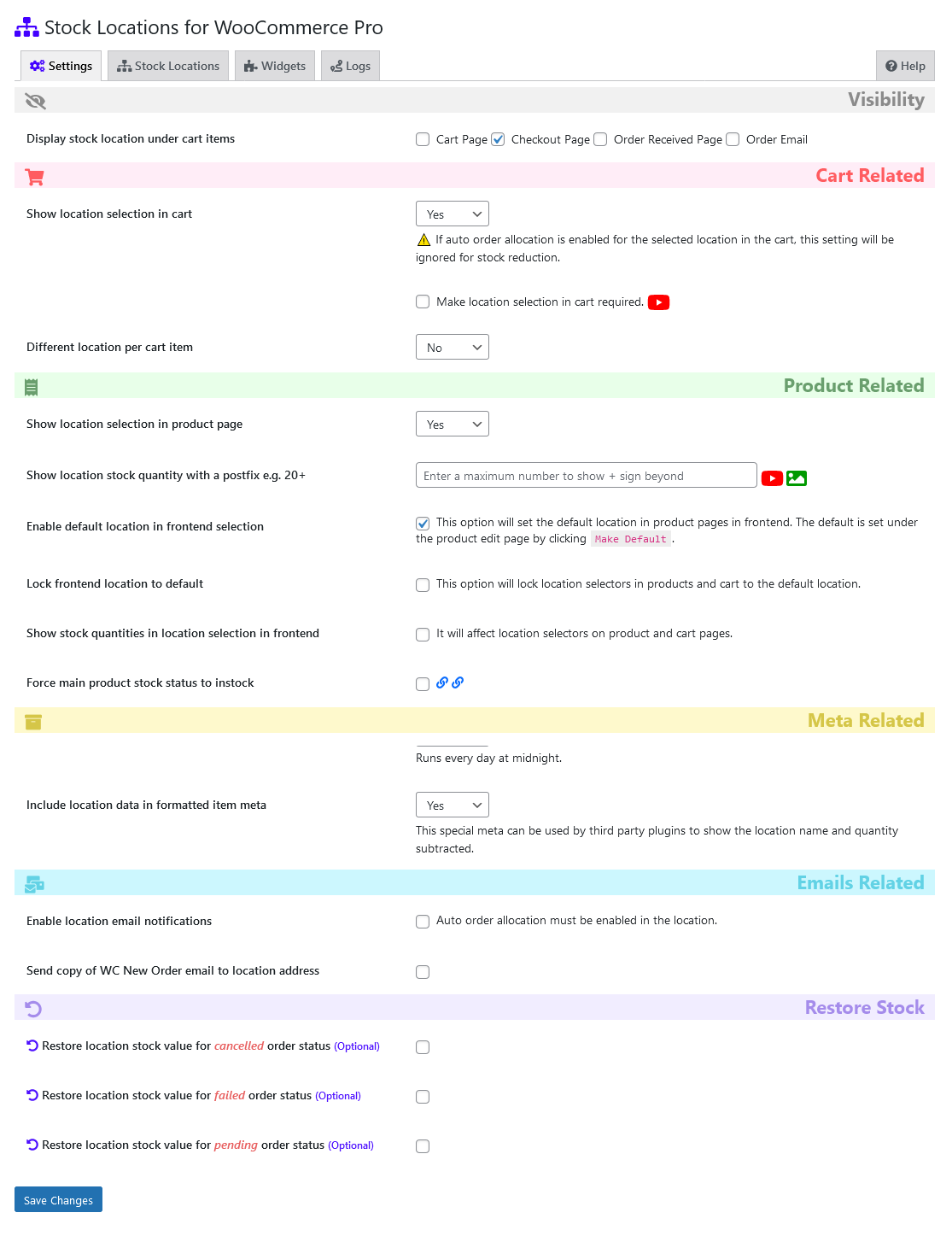
Plugin settings
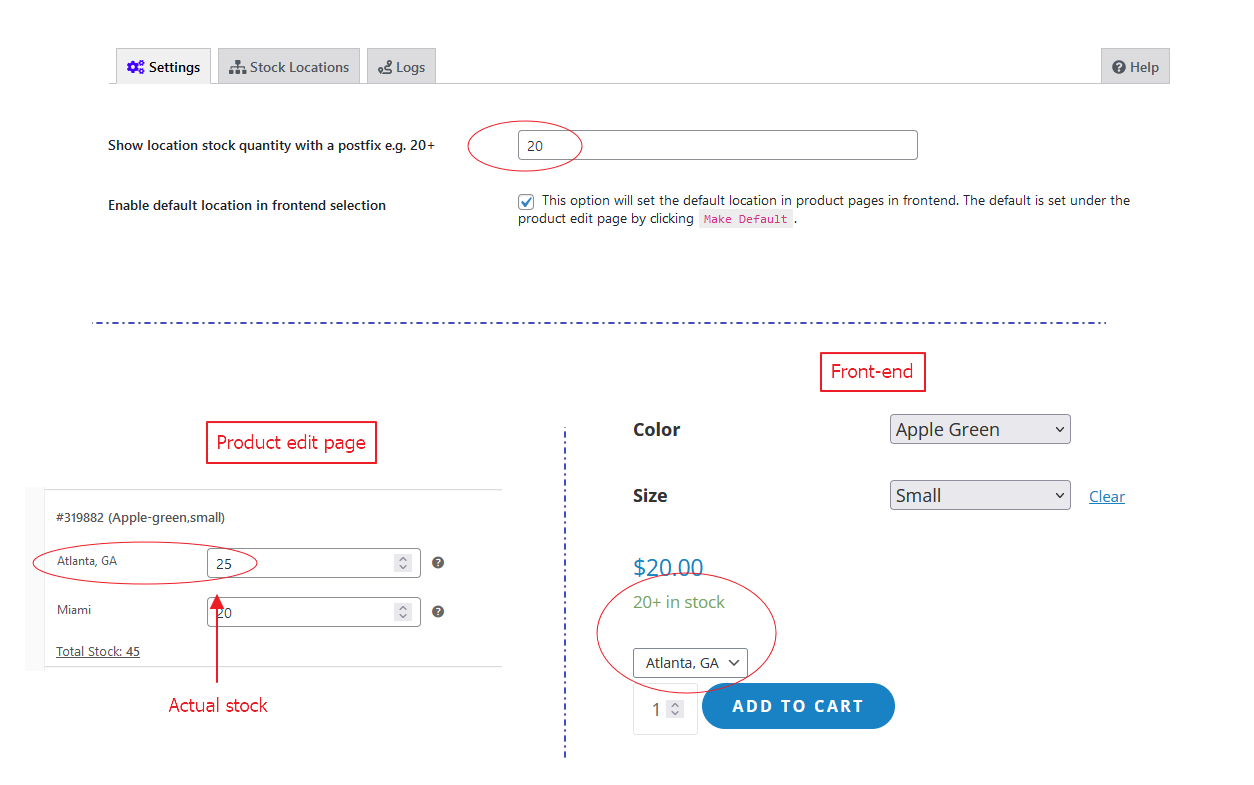
Show location stock quantity with a postfix e.g. 20+
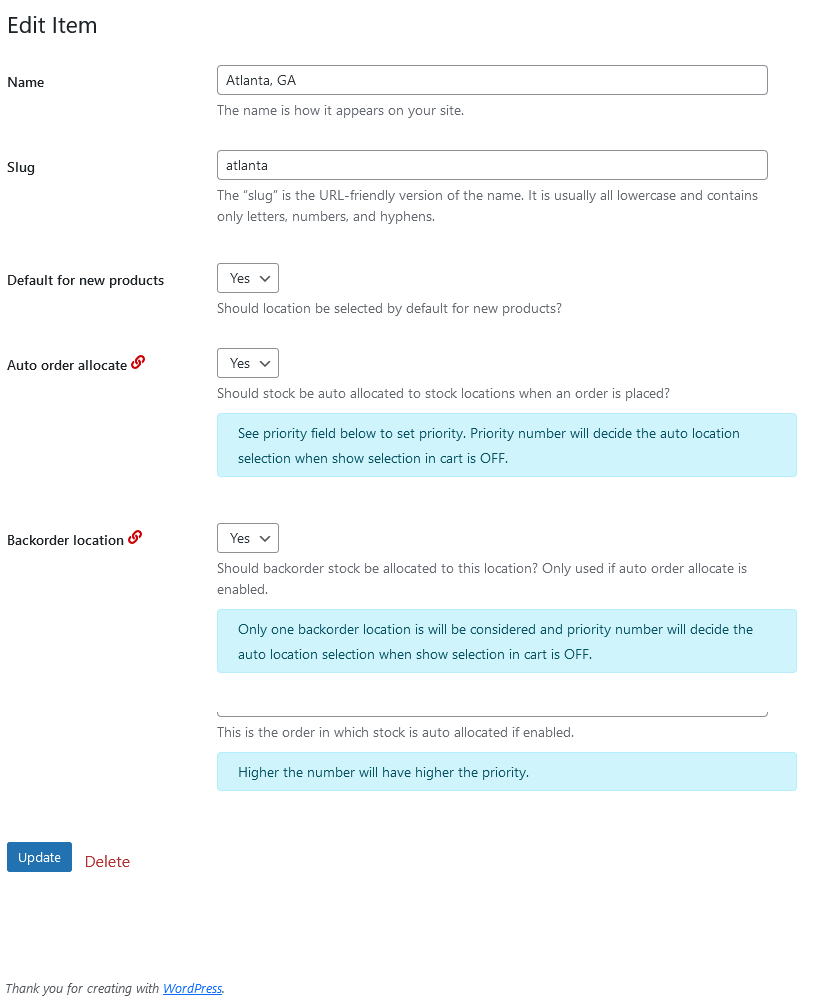
Edit Stock locations taxonomy
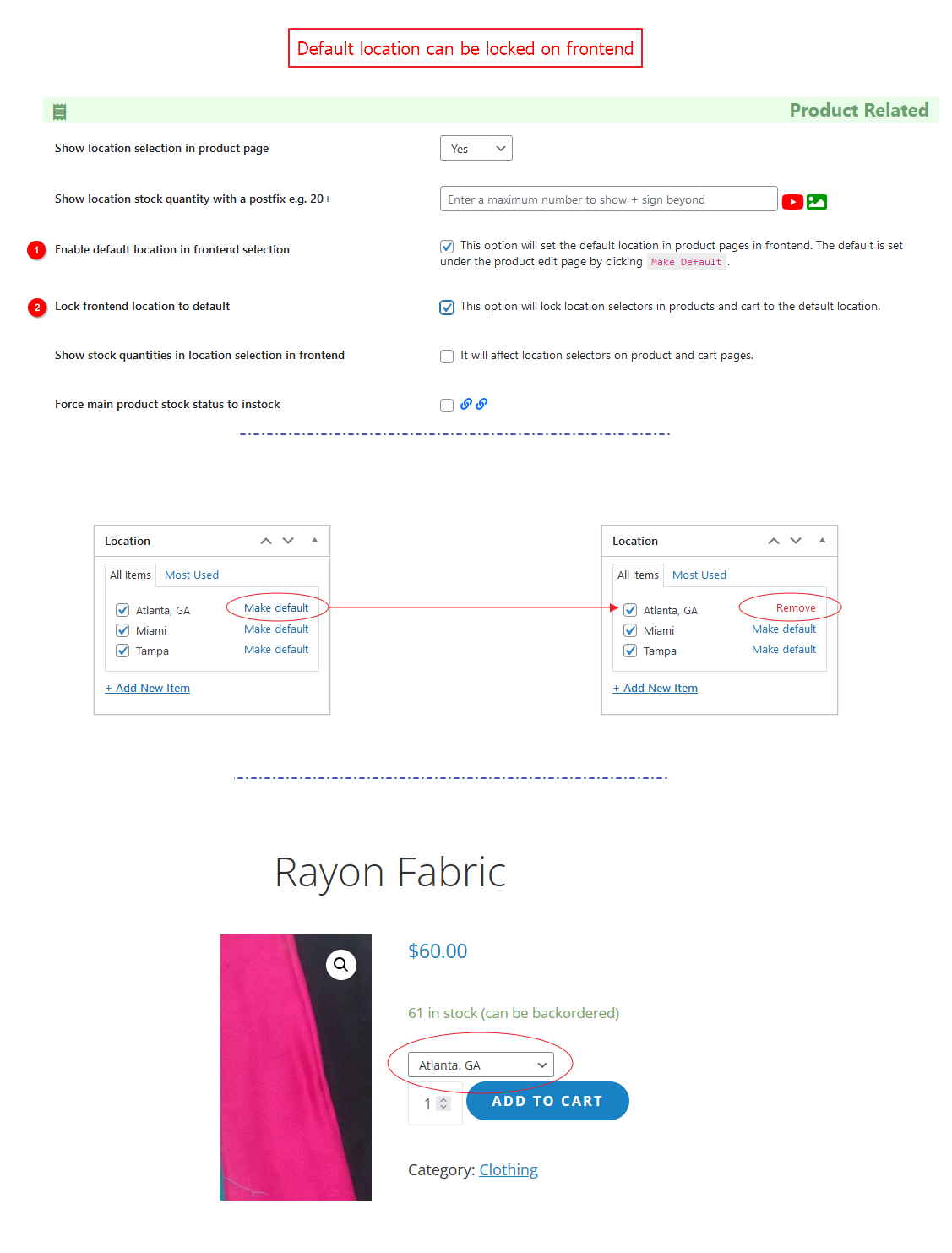
Lock default location on frontend.
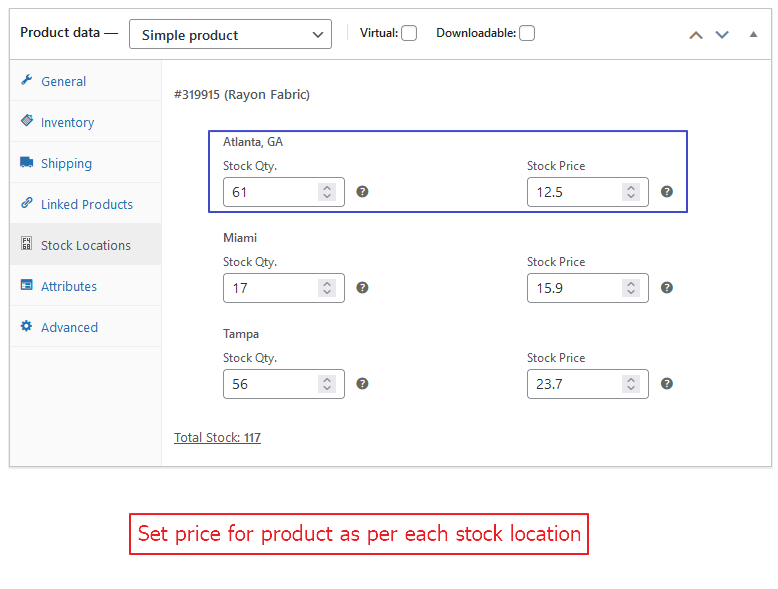
Set price for product as per each stock location.
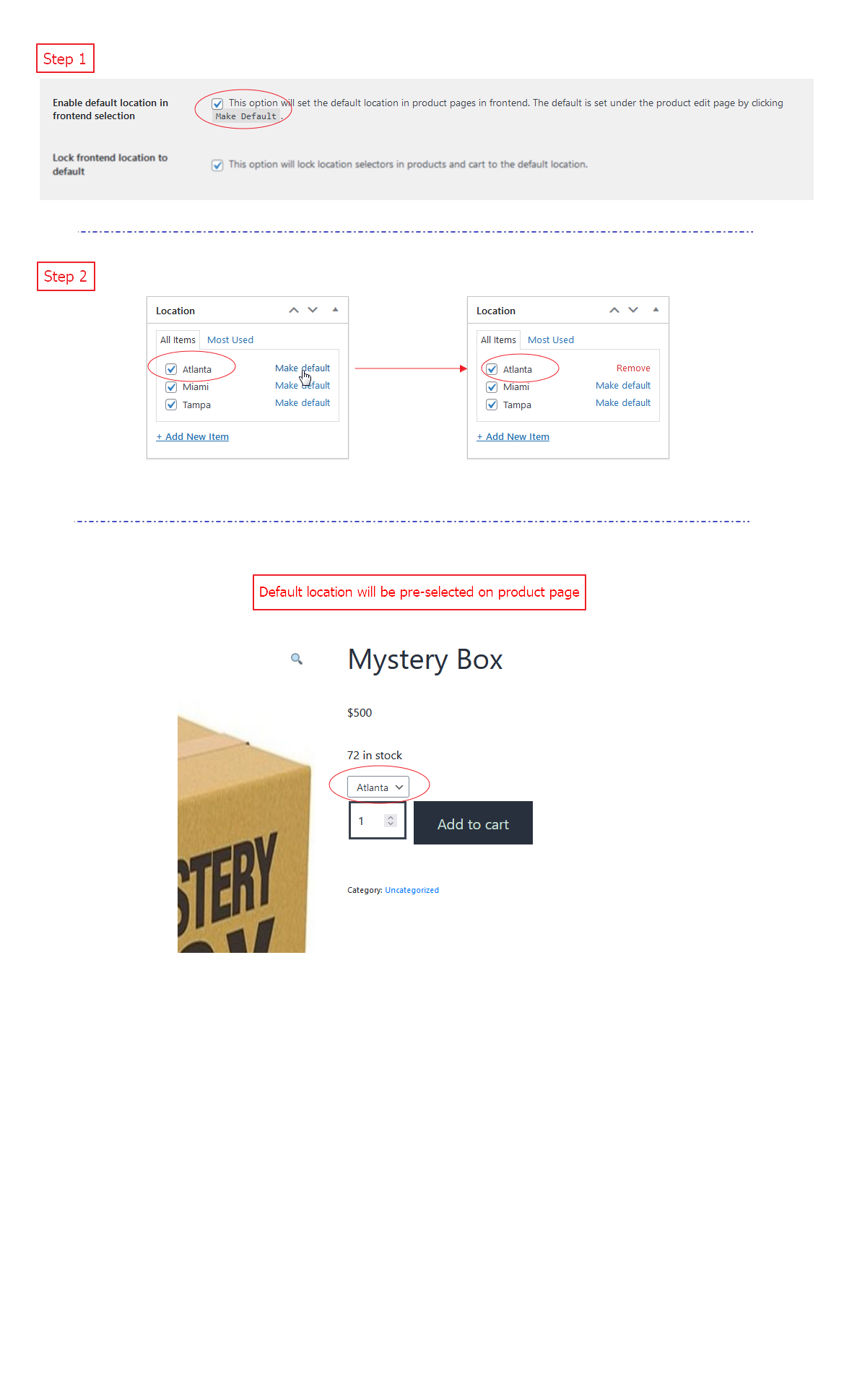
Pre-select default location on product page (frontend).
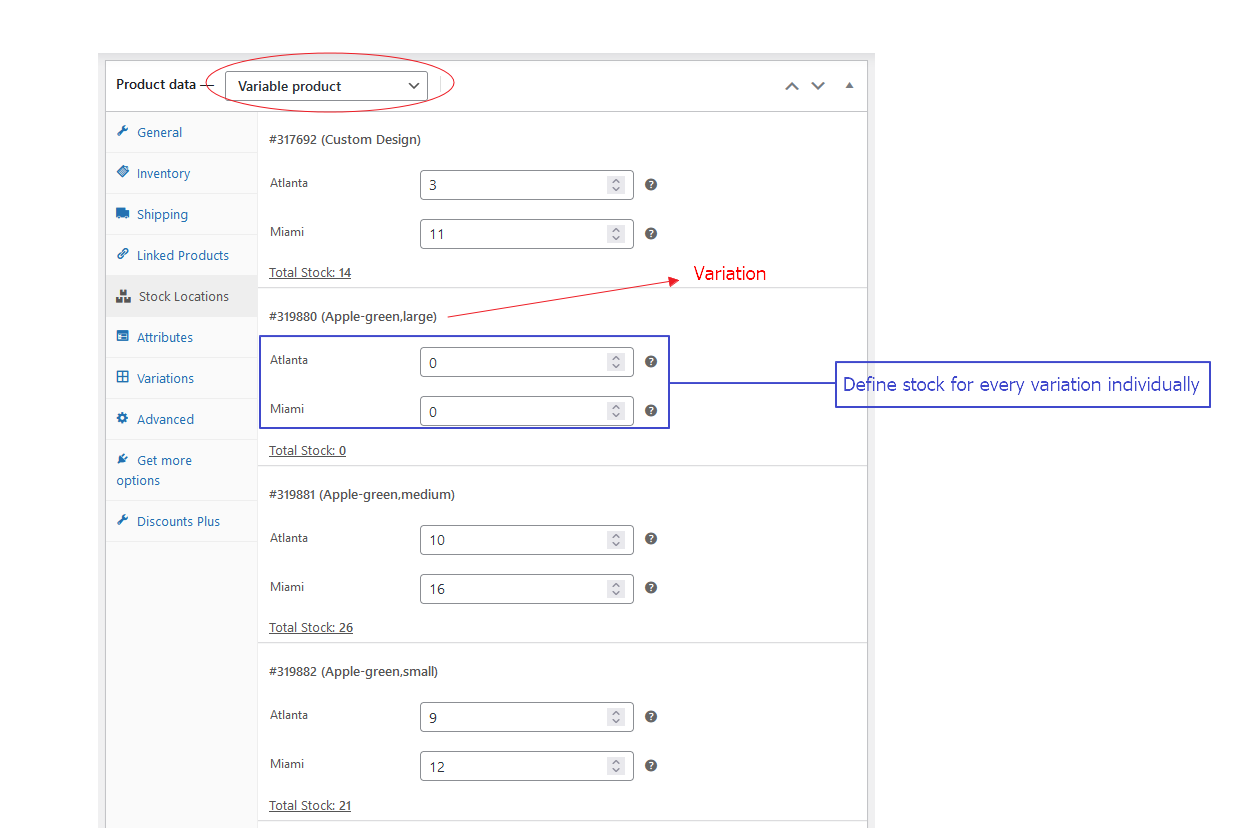
Stock locations for each variation.
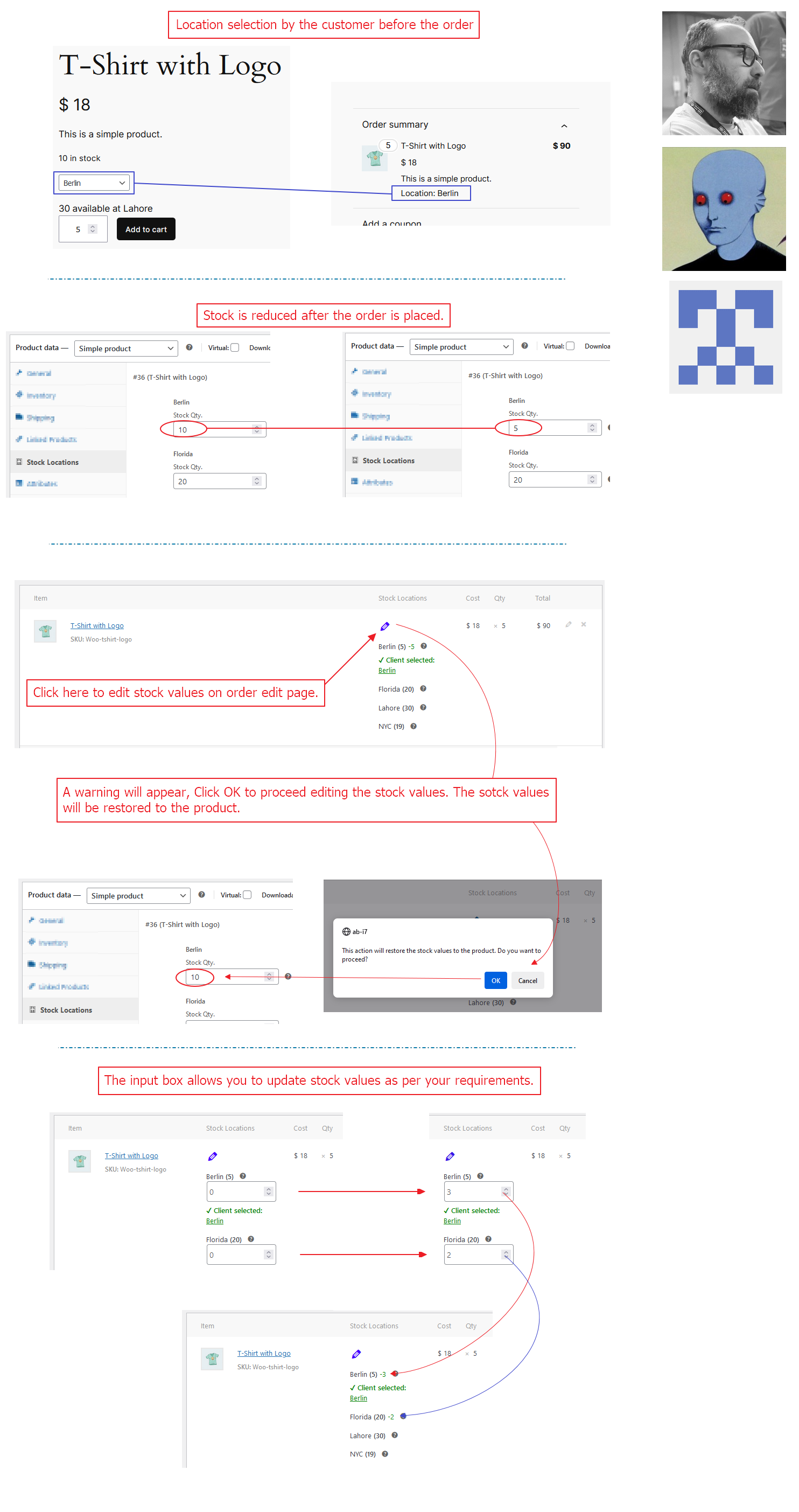
How to allow editing location values on orders after being reduced?
Faq
👉 1. How can we make them activate automatically during the import process?
If you want to make them active, in Import settings check “Taxonomies (incl. Categories and Tags)”,
under this chose “Update only these taxonomies, leave the rest alone” and type “location”
Use this with “custom fields: _stock_at_xxx” as warehouse number and import works perfectly.
👉 1. How auto order allocation work with multiple stock locations?
👉 2. How location priority work with auto order stock allocation?
👉 3. What if all of my locations don’t have the sufficient stock ordered?
If order quantity is within the summation of all stock locations available stock quantity, it will be simply served. If not, auto allocation will not work so admin can decide if he want to deliver the order partially or wait for stock comes in.
👉 4. How location email works?
👉 5. Do you want to sell products from only one stock location?
👉 6. How to make location selection required on cart page?
👉 7. How does it manage the maximum qty. to order according to the stock in a location?
👉 8. How to allow editing location values on orders after being reduced?
https://github.com/fahadmahmood8/stock-locations-for-woocommerce/issues/90
Turn ON “Enable default location in frontend selection” from WooCommerce > Stock Locations for WC. This option will allow you to select default location for a product on Product Edit page. Now turn ON “Lock frontend location to default” and it will lock frontend location which is selected as default.
I prefer you to use the Github issues. You can submit a new one here GitHub
On settings page you can define a number. If location stock value will be less than the given number, it will display the stock value else will not show the exact number but a plus sign “+” just after the maximum number given.
Reviews
Very quick and very effective
By 
Thank you Fahad, your plugin works perfectly and you help was very quick and just what I needed! All recommendations!
How to edit price in woocommerce stock location with rest api
By 
Very good, but i have a question. how to edit price value in woocommerce stock location ?
Sprinkles Ads into WC
By 
It does hide some features in premium, and it adds advertisements for his other plugins around the site
Exceptional support and great plugin
By 
Had a couple of issues, contacted the developer. Fahad could not have been more helpful and got me up and running in no time.
Highly recommend this plugin for multiple stock locations.
Thanks again!
Top-Notch support ( fast & quality coding )
By 
I encountered plugin adaptation issues and reached out to the developer, Fahad. His prompt and professional assistance were highly appreciated. Despite the task's complexity, he worked diligently, debugging and customizing my website even at 4 AM! Now, everything functions flawlessly, and I am grateful for Fahad's exceptional help!
I recommend reaching out to him for any issues or new ideas; the man certainly knows what he's doing 😉
Worthy of 10 Stars
By 
I first tried this plugin a month ago and was struggling with the stock numbers adding up. I tried again after seeing that the developers updated the plugin and it works absolutely perfect! There is nothing else on the market like this and it does precisely what we need. Great work and highly recommend! Thank you!
Storage is incorrect
By 
I'm in Skype for month with the dev, but the stock location is wrong. It gets manually corrected and some weeks later again wrong. Dev cant fix it and doesn't answer anymore.
Some Bugs in the code and long no update, but I hope that will change. Dev had it seams no time... The reason is unclear
Highly Useful Plugin & Excellent Support
By 
The plugin is easy to use and simplifies locations pretty well. The support team is also quite active and they respond to queries rather fast. Would recommend.
Great plugin
By 
Works very well and it is compatible with WP all import
Good plugin
By 
Changelog
3.1.7
- Fix: Variable products showing out of stock even when inventory exists – resolved stock status handling for variations without manual location stock entry [Thanks to Ben Croft][28/05/2026]
3.1.4
- Fix: Bug with variation stock status querying (PR #171). Variations were getting their is_in_stock queried, and reporting incorrectly they were out of stock. [Thanks to kennydude / Joe Simpson][30/04/2026]
3.1.1
- Fix: Corrected stock status calculation when all locations have zero stock to prevent false “in stock” state. [Thanks to @armanuniverse][06/04/2026]
- Fix: Ensured proper handling and saving of _stock_status (instock/outofstock) in database.
- Improvement: Replaced unreliable stock status checks with aggregated per-location stock calculation.
- Improvement: Standardized return values to boolean for accurate WooCommerce compatibility.
- Props: Thanks to armanuniverse for identifying and sharing the fix.
3.1.0
- Resolved ‘get_variation_default_attribute’ fatal error and out-of-stock display issue caused by Stock Locations plugin update, ensuring variable and simple products now show correct stock status. [Thanks to Renzo Westenbroek | Webreturn][12/03/2026]
3.0.9
- Fixed: Including API response and optimized approach to DB writes, backorder related status and a few more improvements suggested in support threads since October 2025. [07/03/2026]
3.0.8
- Fixed: Compatibility issue with Woodmart theme where early returns in slw_wp_head() prevented closing of tag, causing invalid HTML and breaking mobile viewport (meta viewport ignored, pages rendering in desktop mode on mobile). Refactored dynamic CSS output to collect rules first and only inject block when content exists; bumped hook priority to 20 for safer execution after theme styles. [Thanks to Spikee] [22/02/2026]
3.0.7
- Added: JSON payload-based API for bulk updating stock and price per location for products and variations. [Thanks to Mark Boorman][12/01/2026]
3.0.6
- Added: WooCommerce variation availability now respects location stock for swatch-based themes like Woodmart. [Thanks to Renzo Westenbroek][05/01/2026]
3.0.4
- Tested: WooCommerce variation availability now respects location stock for swatch-based themes like Woodmart. [Thanks to Renzo Westenbroek][05/01/2026]
3.0.2
- Fixed: Only enabled/active stock locations will contribute in total stock value but it would still be editable. [Thanks to @josephkallinit][21/10/2025]
- Fixed: Prevented potential PHP error when
$slw_api_valid_keysis null during API validation. [Thanks to Tushar Tajane][21/10/2025] - New: Order notes can be turned off from the settings. [Thanks to Rob Wood][21/10/2025]
- Fixed: Incorrect price range display for variable products when location-based stock prices are higher than variation base prices. The location price now overrides confusing WooCommerce default range formatting.
- Improved: Sale price logic now fully respects location-based pricing — ensuring both range and sale indicators are hidden when local price is higher. [21/10/2025]
3.0.1
- Added: Conditional CSS injection for WooCommerce Blocks to hide sale and del elements when location price exceeds the base or sale price.
- Improved: Price hiding logic refactored for better compatibility across all product types (simple, variable, grouped). [20/10/2025]