StockPack – Stock photos and AI images from Unsplash, Adobe Stock, Freepik and more
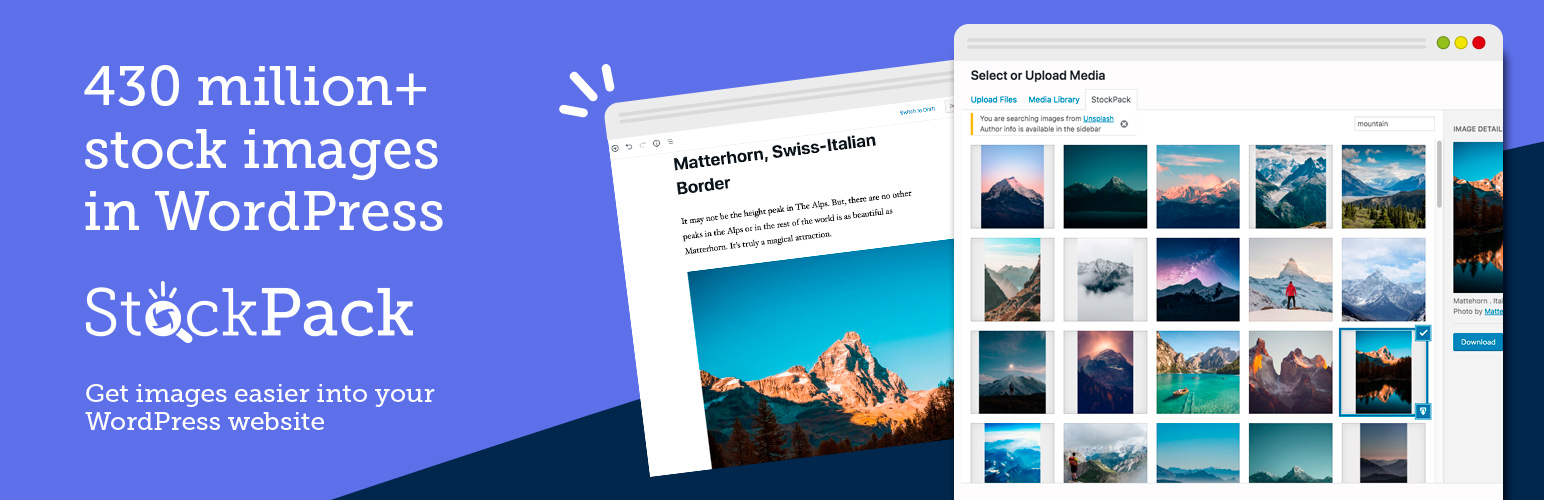
StockPack – Stock photos and AI images from Unsplash, Adobe Stock, Freepik and more
Description
Optimized image search in WordPress for Unsplash, Adobe Stock, Getty Images, iStock, Pixabay, Pexels, Depositphotos and Freepik. You can switch between providers to compare the images, or generate one from a prompt with Magnific AI.
This plugin adds a media library tab for instant image search. It streamlines the process of finding and inserting stock images in WordPress.
430 million+ images available via StockPack. Direct download to save at least 50% on time and bandwidth!
With this WordPress plugin, you will get access to a 430 million+ images from your favorite stock image providers, currently including:
- Adobe Stock
- Deposit Photos
- Freepik (Magnific)
- Getty Images
- iStock
- Pexels
- Pixabay
- Unsplash
More providers will follow.
Watermarked assets can also be used for testing as demo images.
Freepik is now Magnific
Freepik renamed itself to Magnific in 2026. If you have a Magnific account, connect it in your StockPack dashboard and the Freepik library becomes searchable right inside your media library. Downloads use your own Magnific plan, at their prices, so StockPack never marks anything up.
Magnific does not offer watermarked previews, so a Freepik download is always the full image and always uses one download from your plan. StockPack tells you that before you commit, and re-inserting an image already in your library costs nothing.
AI image generation and upscaling
Pick Magnific AI in the provider dropdown and you get a prompt box instead of a search box. Describe the image, choose a model, and the result lands in your media library like any other image.
- Choose your own models. Enable the ones you want in Settings > StockPack, from a fast model at a fraction of a cent per image up to Mystic 2.5 for final artwork. The price per image is shown next to the button, and it follows the model you pick. On StockPack credits the choice is Mystic 2.5, because Magnific only lets us resell the models they build themselves; the rest stay available on your own key.
- Refine instead of starting over. Select an image you generated and tick “refine the selected image” to send it along with your next prompt.
- Upscale from the media library. Hover any image and use Upscale 2x or 4x. It asks first, because upscales are priced by the size of the result. Magnific caps the result at 10060×10060 pixels, so 4x needs a source under about 2500px wide and refuses larger ones before anything is charged. The upscaled file is kept at full size rather than scaled down, so a large one can be tens of megabytes.
- Your generations stay on screen so you can compare a prompt against what it came from, and a Clear action empties them when you are done. They are listed for as long as Magnific keeps hosting them: some models hand back short lived image links, so download anything you want to keep rather than treating the list as a gallery.
It works two ways. Connect your own Magnific API key in the StockPack dashboard and everything you generate or upscale is charged to your Magnific account at their prices, with nothing added on top. Or skip the key and pay from StockPack credits: prepaid packs start at $5, one credit is one US cent, the price per image in credits is shown next to the button and your balance beside it. There is no free tier or trial for generation. Credits buy Mystic 2.5, and prices are listed at https://stockpack.co/credits. Note that generating through an API always consumes credits, even on a Magnific plan that shows unlimited generation in their own app.
Features
- Search 430 million+ of images from stock providers
- Generate images from a prompt with Magnific AI, and upscale existing ones (with your own API key or StockPack credits)
- The cost per image is shown before you spend anything
- Seamless WordPress integration with the media library
- Direct download to your server
- Automatic caption fill in to be in line with licensing requirements
- Set custom filename prior to the upload
- Compatible with Gutenberg, Elementor,Bricks, Divi, Beaver Builder, Visual Composer, Avada Fusion Builder, Oxygen Builder, WPBakery, Thrive Themes, Breakdance
- Compatible with WPML
- Featured image caption
- Source citation option for all images
SUPPORT
We provide year-round priority email support. You can reach us anytime at support@stockpack.co, or you can create a ticket on the WordPress support portal here.
Account
A free account is only required after a certain limit. You will be able to register from the WordPress admin or at stockpack.co.
Provider details
-
Unsplash
All images on Unsplash are available for search and download directly in the plugin. You don’t need to register on Unsplash prior to using the plugin. Captions are automatically created for attribution as Unsplash recommends. An api key from Unsplash is not required. The last count provided by Unsplash is 1.5M+ images -
Adobe Stock
Images from Adobe Stock can be searched, downloaded, as well as licensed. You can download watermarked images from Adobe Stock for testing purposes. You do not need an api key from Adobe Stock. To license images you will need to connect your Adobe Stock account. The last count provided by Adobe Stock is 90M+ media assets. -
Getty Images
You can search and download all images on Getty Images instantly with the plugin. You can download watermarked images for testing purposes for up to 30 days. An api key from Getty Images is not required. To license images you need to connect to your Getty Images account. The last count we managed to find was 200M+ assets combined with iStock. -
iStock
You can search and download all images from iStock directly with the plugin. You can download watermarked images for testing purposes. You do not need an api key from iStock. Licensing images is only possible if you connect your iStock account. The total number of assets available on iStock is not publicly available, but the company suggests that Getty and iStock provide access to 200M+ combined. -
Pixabay
You can search and download all images on Pixabay instantly with the plugin. No account is needed to use Pixabay. As Pixabay recommends the attribution is already generated for you. You do not need an api key from Pixabay. The last count we could find for the number of assets from Pixabay is 1.7M+. -
Pexels
All images on Pexels can be searched and downloaded directly with the plugin. You do not need an account to use Pexels. The Pexels attribution is automatically generated for you. The Pexels api key is not required. The last count we could estimate for the number of assets from Pexels is 3.5M+. -
Depositphotos
Every asset on Deposit Photos is available within the plugin search. You do not need a Deposit Photos account to search or download images. Licensing from Deposit Photos is available, you will need to connect your account to use it. You do not need an api key from Deposit Photos. The last count from Deposit Photos is 130M+ media assets. -
Freepik, now part of Magnific
Searching and downloading the Freepik photo library requires your own Magnific API key, which you create in your Magnific account and connect in the StockPack dashboard. There is no watermarked tier, so every download is the full image and uses one of the stock downloads included in your Magnific plan. Search is restricted to photos, because Freepik delivers vectors and PSDs as archives that WordPress cannot attach as images. -
Magnific AI (generate)
Generation and upscaling run on your Magnific API key when you have connected one, or on StockPack credits when you have not; the balance is shown next to the price and on the settings page. Models and their per-image prices are listed in Settings > StockPack, where you choose which ones appear in the dropdown. On credits that list is limited to the models Magnific allows us to resell. Upscaling runs on your own key for now and is priced by the size of the result; on credits it will follow once that size-based pricing is settled, and until then the plugin says so before anything is sent. Magnific will not produce anything larger than 10060×10060 pixels. This is a beta.
External services
This plugin talks to one external service: the StockPack API. Nothing is sent until you search, download, generate or upscale.
StockPack API (api.stockpack.co)
Every search, download, license check, generation and upscale goes to the StockPack API, which contacts the stock providers on your behalf. Your site never calls a provider’s API directly. Each request sends your StockPack API token, your search terms or prompt or the id of the image you selected, and the address of your site, used as the referral so downloads can be attributed to your account. Provider accounts you connect, including Magnific, are stored on the StockPack API and not in your WordPress site. Buying credits happens on stockpack.co in your browser; the plugin only links there and never talks to a payment provider.
Terms of service: https://stockpack.co/terms
Privacy policy: https://stockpack.co/privacy
When you insert an image your server fetches the file itself from the address the StockPack API returns, which is the provider’s own CDN. Your browser loads result thumbnails from there as you browse.
Installation
- Upload the plugin files to the
/wp-content/plugins/stockpackdirectory, or install the plugin through the WordPress plugins screen directly. - Activate the plugin through the ‘Plugins’ screen in WordPress.
- Open media library and go to the StockPack tab as highlighted in the first screenshot
Screenshots
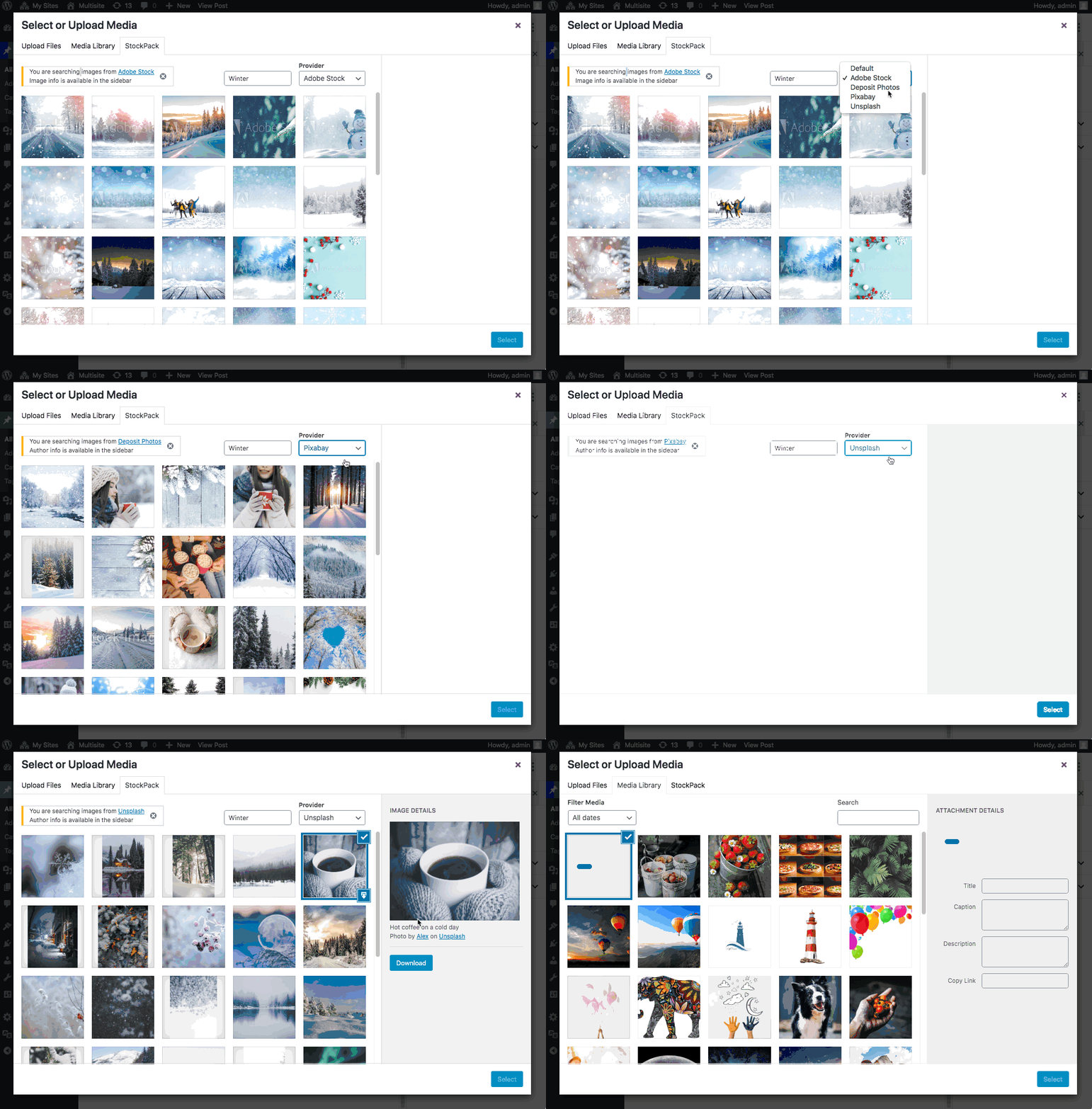
Searching images
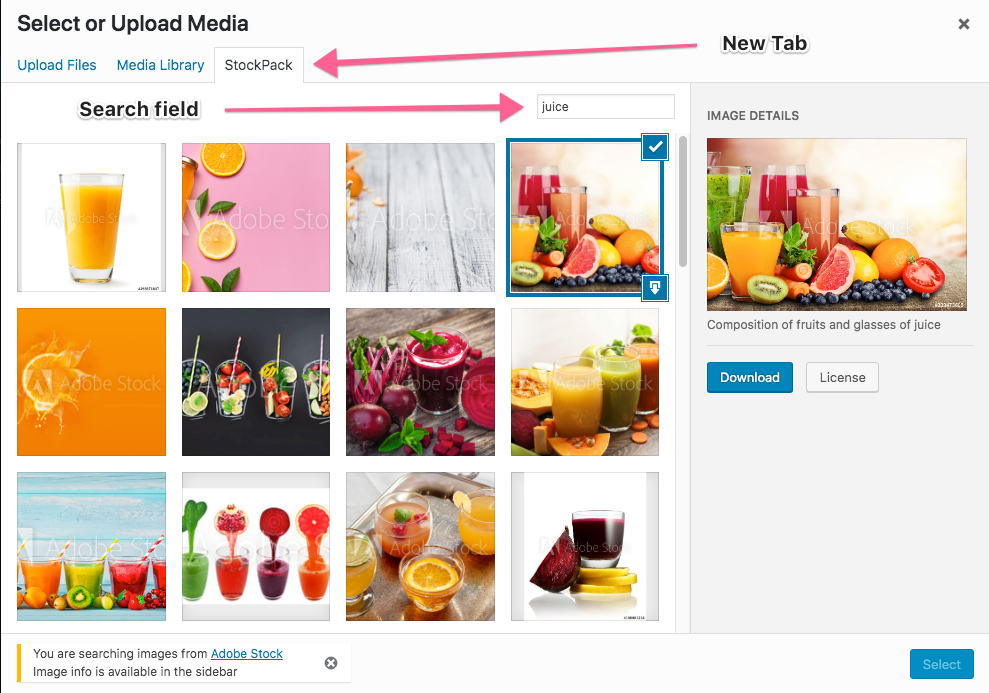
Inserting images
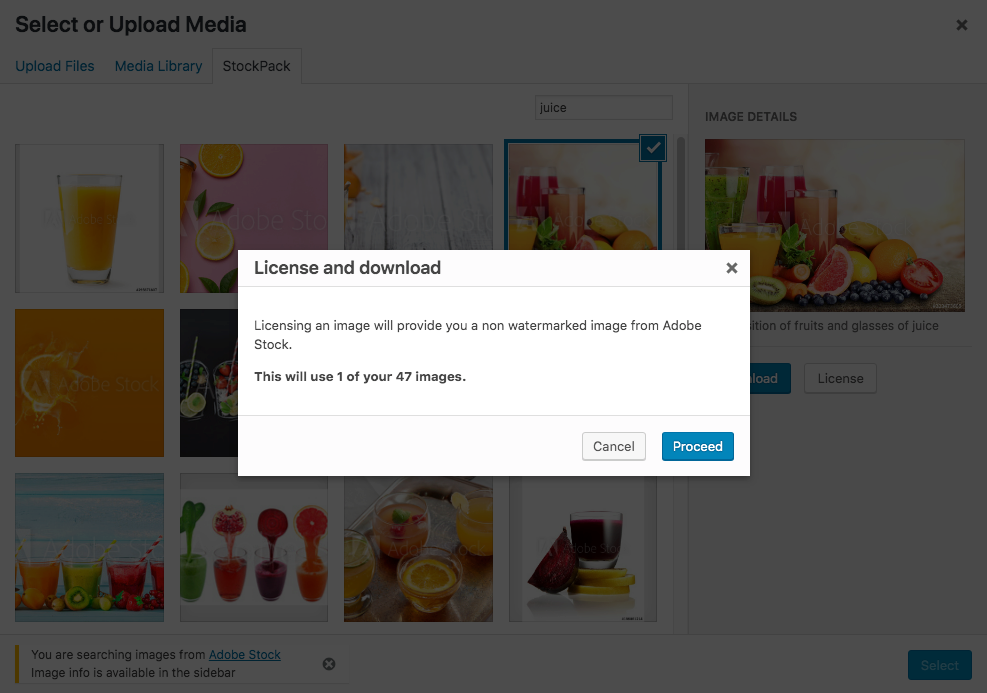
Licensing images
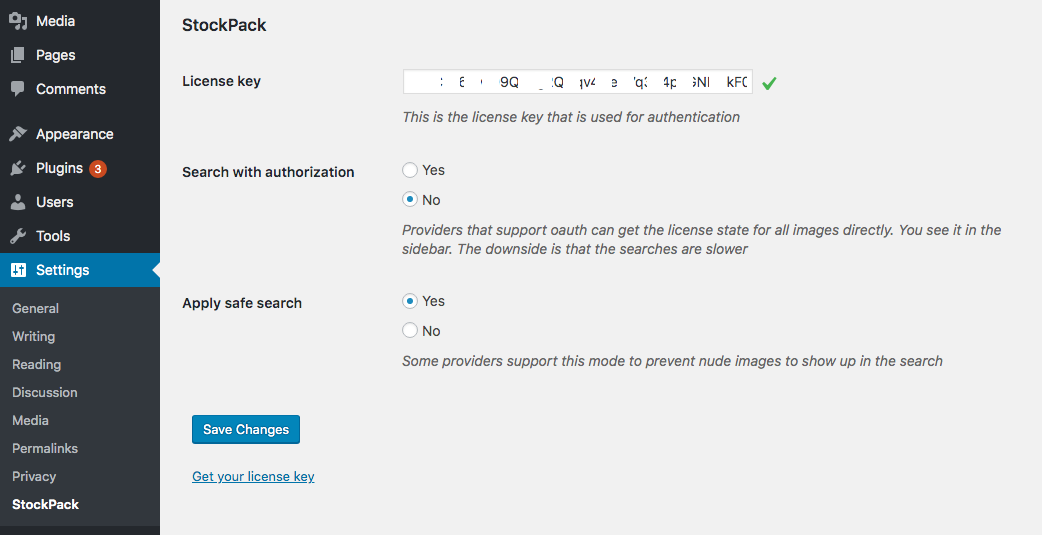
Settings page
Faq
Yes, the stockpack account has a free plan and the plugin is free.
We are aiming to support all providers that give us api access. However that takes time and we prioritize based on request. Open a support ticket for your provider if one doesn’t exist and we will take that into account. If a ticket exists already, add a comment there so that it gets more priority.
We are considering adding Google Photos, Dropbox as well as Amazon S3. Please create a support forum request so that we can see how much demand there is. If you already find a thread for that, please comment on it.
There is a step by step guide available at https://stockpack.co/about
Yes, you are allowed to change the provider you want to use at any time. You can do that from the stockpack dashboard or from the select inside the plugin.
Yes, you can remove some of the providers using the stockpack_providers filter. You can read more about it at https://stockpack.co/blog/how-to-filter-the-visible-stock-image-providers-select/
Yes, enable this setting from the settings page and you will be able to overwrite file names
When you select an image you will see that in the bottom right corner there is a small download button. If you use that, you won’t get redirected to the Media Library tab, and you can use that for all the images you want to download. If you are inserting a gallery, all the downloaded images will be added to the selection.
There are some providers like unsplash and pixabay which allow you to use the images for free, but certain conditions apply. Some providers like Adobe Stock or Deposit Photos will require you to create a subscription to get access to the images.
You can read more about free images licensing at https://stockpack.co/blog/free-images-licensing-explained/
The available filters actions and cli commands for stockpack are documented at StockPack Documentation . You can also contact us if you have a request for a filter or action and we will consider it.
Yes, you can enable fields that generate the caption and also display the caption for featured images. You can read more at: How to provide image credit in WordPress
Yes, you can define a global token using the STOCKPACK_TOKEN constant in your wp-config.php file like so:
define( ‘STOCKPACK_TOKEN’, ‘your-token-will-go-here’ );
This will allow sites to set their own tokens via settings page, but if they don’t add one they can use the global token.
Reviews
Great plugin and good support
By 
Great plugin with a generous free plan. Good communication with support.
Thank you !
Useful but...
By 
Useful plugin, works well, but although I have a Depositpohotos account images show up with a filigrane... What the heck?
Great and useful plugin
By 
StockPack is very easy to use and set up and has a lot of customization options for developers. I also appreciate the responsiveness of their support (and their willingness to take suggestions for new features).
Doesn't work
By 
Tried using this but it does absolutely nothing. Doesn't work at all. I added the token, I connected the services and absolutely nothing changes. No upload/search feature when adding images.
Requires an account
By 
Requires an account after a few photo downloads.
Amazing developers, great service
By 
Trialware
By 
Best stock photo plugin
By 
Good plugin, but free version almost useless
By 
Exactly what I was looking for
By 
Changelog
3.7.3
- License history links in the attachment details now open the record for that image.
- The limit dialog shows when the request limit resets again, and has an Upgrade button.
3.7.2
- Images inserted with StockPack show a License history link in the attachment details.
3.7.1
- Magnific AI is no longer marked beta.
3.7.0
- Generate, refine and upscale without a Magnific key: sites that have not connected one pay from prepaid StockPack credits, with the price per image and your balance shown next to the button.
- On credits the model list is limited to what Magnific allows us to resell; connect your own key for the full list.
- A generation you cannot afford is refused before anything is charged, with a link to top up.
- Upscaling stays on your own Magnific key for now; on credits it is refused up front with a clear message until its pricing is settled.
- Sites with their own Magnific key keep paying Magnific directly at Magnific’s prices.
- Fixed: an upload failure showed its internal code instead of the message.
- Tags trimmed to five so the listing indexes them all.
3.6.1
- Fixed: with the provider filter on Default, a search could use a provider you had turned off in Settings > StockPack. The default now stays within the providers you enabled; picking which enabled provider is the default still happens on the stockpack.co providers page.
- Upscales keep their full size. WordPress was scaling the result back down to its big image threshold, so an upscale you paid for was served smaller than it came back.
- Upscales report the provider’s own reason when one is refused, instead of a generic failure, and progress stays on screen until the image is saved.
- Translations: the language template now includes the strings added in 3.6.0.
3.6.0
Add the Freepik library, now part of Magnific, as a provider, plus Magnific AI image generation and upscaling. Both are a beta and run on your own Magnific API key, which you connect in the StockPack dashboard.
- Freepik stock search and download. Search is limited to photos, because vectors and PSDs arrive as archives that cannot be attached as images.
- Generate images from a prompt in the media modal. Choose which models to offer in Settings > StockPack; the price per image is shown next to the button and follows the model.
- Refine an image you generated by sending it along with your next prompt.
- Upscale 2x and 4x from the media library, with a confirmation first because upscales are priced by output size.
- Generated images stay on screen so you can follow the progression, and are cached per user with a Clear action.
- Freepik has no watermarked tier, so a download is always the full image. StockPack shows the cost before you commit, and re-inserting an image already in your library does not spend another download.
- Fixed: a download failure reported “can’t connect to StockPack server” instead of the actual reason.
- Fixed: search and the provider filter now match in size and line up in the media toolbar on WordPress 7.0.
- Fixed: with the provider filter on Default, a search could use a provider you had turned off in Settings > StockPack. The default now stays within the providers you enabled; picking which enabled provider is the default still happens on the stockpack.co providers page.
- Existing installs need to tick Freepik and Magnific AI in Settings > StockPack > Providers available.
3.5.2
Fix overlapping search and provider labels in the media modal on WordPress 7.0.
3.5.1
Surface the actual provider error message on download/license failures instead of showing a misleading “reconnect the account” notice.
3.5.0
Add big image threshold compatibility with download (only supported by Unsplash) to reduce image size.
3.4.7
Added BreakDance compatibility
3.4.6
Fixed a compatibility issue with Beaver builder
3.4.5
Fixed backwards compatibility issue with DIVI
3.4.4
Fe load bugfix
3.4.3
Updated WordPress compatibility
Add filename filter
3.4.2
Fixed tags
3.4.1
Removed loading templates on pages that did not use them
3.4.0
Removed enqueue of scripts and styles from admin pages that do not load the media scripts
3.3.9
Removed extra loaded scripts and wp query from admin settings thanks to @mathieu discovering it here https://wordpress.org/support/topic/is-there-an-utility-for-admin_enqueue_scripts-in-class-settings-api-php/#post-17809387
Updated WordPress compatibility
3.3.8
Add Url debugging support
Updated WordPress compatibility
3.3.7
Add Bricks builder compatibility
Updated WordPress compatibility
3.3.6
Hack to fix vendor package for php 8.1 compatibility
3.3.5
Regenerated composer with -oa flag
3.3.4
Add providers checkbox to settings page
3.3.3
Fix deprecated error related to parameters order
Update WordPress compatibility
3.3.2
Add thrive themes compatibility
3.3.1
Update WordPress compatibility
3.3.0
Fix extension being added to the attachment title
3.2.9
Fix CSS compatibility issue with Elementor Update
3.2.8
Fix CSS compatibility issue with Media Library Organizer
3.2.7
Add wp config token overwrite
3.2.6
Fix ACF Extended classic editor compatibility
3.2.5
Updated WordPress Compatibility
3.2.4
Updated templates enque to fix customizer issue
3.2.3
Updated Caption checkbox
3.2.2
Add attribution support
3.2.1
Updated WordPress Compatibility
3.2.0
Updated Divi compatibility with classic editor
3.1.9
Add Brizy Support and Fusion builder support
3.1.8
Add wpml support
3.1.7
Add Beaver Builder Support
3.1.6
Add debug info
Add download timeout increase option
Store image, author and provider info on the attachment
3.1.5
Fix elementor jquery ui issue
3.1.4
Improve Classic Editor support
3.1.3
Update quick download to not change tab to allow multiple downloads easily
Add support for the Oxygen Builder
3.1.2
Fix Composer issues
3.1.1
Fix Autoload
3.1.0
Removed guzzle dependency in favor of default wordpress HTTP api for better compatibility
Updated error messages
Cleanup
Add cli command
Added Astra Pro Sites compatibility
Update overall compatibility
3.0.6
Add Divi compatibility
3.0.5
Remove Envato Elements Compatibility warning
3.0.4
Remove Stencil Compatibility warning
3.0.3
Add compatibility warning
3.0.2
Remove git file
3.0.1
Update language file
3.0.0
- Add Getty Images
- Add iStock
- Add labels to Adobe Stock, Getty and iStock
- Update wp compatibility
- Update guzzle
- Update wording changed License key to token for consistency
2.6.1
- Add notice for incompatible plugin
2.6.0
- Added Pexels
2.5.7
- Updated settings page capability and added the filter
2.5.6
- Add load_stockpack filter to allow soft disable of the plugin
- Add stockpack_providers filter to allow filtering the providers
- Updated description
2.5.5
- Added Elementor support
2.5.4
- Fix design bugs on wp<5.3
- Updated description
2.5.3
- Add caption support for premium providers
2.5.2
- Minor text and language update
2.5.1
- Add filename overwrite option
- Minor description update
2.5.0
- Add Provider dropdown
- Minor description update
2.4.3
- Added Deposit photos
2.4.2
- Assets update
2.4.1
- Added FAQ
2.4
- Tags update
2.3
- Assets and text update
2.2
- Tagline update
2.1
- Readme update
2.0
- Plugin rename to StockPack
- Major update – changed slug
- Removed Shutterstock (free api closed)
- Added Adobe Stock, Unsplash and Pixabay
- Temporarily removed advanced search
1.2
- Add pause notice
1.1
- Update image names to include search query
- Update error message regarding shutterstock issues
1.0
- Initial release