Storebird AI Chat for WooCommerce
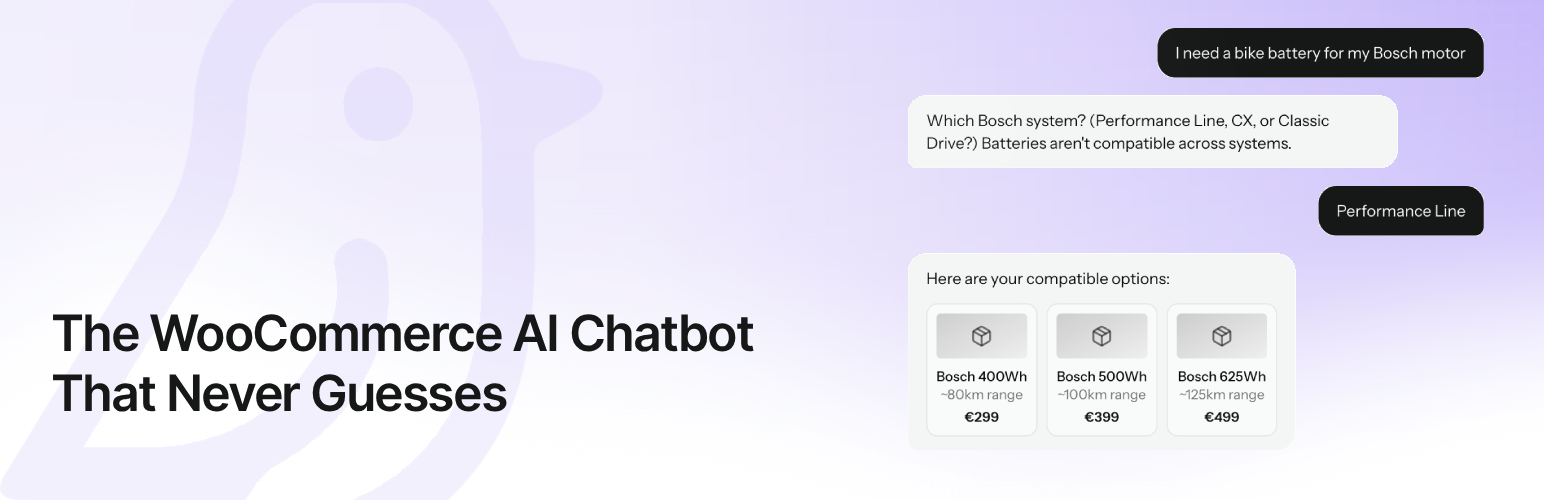
Storebird AI Chat for WooCommerce
Description
Questions cost sales before checkout—and time after it. Storebird answers both.
A shopper is ready to buy, but has one last question. Is it the right size? Is it in stock? Will it arrive in time?
Another customer just wants to know where their order is.
If nobody answers, the first shopper may leave. The second question lands in your inbox.
Storebird is the AI chatbot that knows your WooCommerce store. It turns live products, stock, variations, orders and store information into useful answers. Before the sale, it helps shoppers find the right product and move forward. After the sale, it answers order, delivery and policy questions—without making you type the same reply again.
Less chasing. Less hesitation. More customers who know what to do next.
Real Questions. Real Store. Real Results.
On one real WooCommerce store, Storebird handled 534 customer chats and captured 72 leads. 82% of those conversations were freely typed product questions—not preset buttons.
That is the job Storebird is built for: being there at the exact moment a customer needs an answer.
Not Another Chatbot That Guesses
Generic chatbots read a few pages and hope for the best. Storebird connects directly to WooCommerce, so it can work with the data your store already runs on:
- Products and variations — help shoppers compare options, sizes, colours and specifications
- Live prices and stock — show what is available now
- Product recommendations — turn natural-language questions into matching products with direct links
- Orders and tracking — let customers securely check order status and delivery information
- Coupons and policies — explain discounts, shipping, returns and the store information you add
When you update a product in WooCommerce, Storebird syncs the change automatically. No scripts to maintain. No chatbot flowcharts to rebuild. No OpenAI API key required.
Train Storebird on What Makes Your Store Different
Your store is more than product titles and prices. The best answers often live in your shipping rules, return policy, sizing advice, buying guides and the details your team knows by heart.
Storebird gives your AI its own knowledge base. You can:
- Import pages from your website and turn existing store content into answers
- Add and edit knowledge manually for FAQs, policies, product advice or anything unique to your business
- Teach product-specific details with notes and corrections attached to individual products
- Control what the AI uses by activating, updating or removing knowledge whenever you want
- See which knowledge gets used in customer answers
Storebird automatically enriches and reprocesses the knowledge you add. Update a page, correct a product or change your WooCommerce data, and future answers can use the latest version.
The more useful knowledge you give Storebird, the more useful Storebird becomes—without rebuilding scripts or chatbot flows.
Custom knowledge-base training is available on Pro and Scale plans.
One WooCommerce Brain, Before and After the Sale
Storebird does more than answer FAQs. It understands where the customer is in the buying journey.
Before checkout, Storebird can answer questions such as:
- “Which of these products fits what I need?”
- “Do you have this in my size?”
- “What is the difference between these two?”
- “Can this arrive before Saturday?”
After checkout, the same assistant can help with:
- “Where is my order?”
- “Has my package shipped?”
- “Can I return this?”
- “How do I use the product I bought?”
Your customer gets a clear next step. You get fewer repetitive questions competing for your attention.
AI When It Can. You When It Should.
Some conversations need a person. Storebird can hand over the full conversation history and notify you, so the customer does not have to start again.
When you are ready to bring more customer communication together, Storebird also supports AI email drafts using live WooCommerce data, two-way WhatsApp conversations, lead capture and one inbox across connected stores and channels.
You stay in control of the assistant’s tone, instructions, welcome message and knowledge. Match the widget to your brand, review conversations in the dashboard and let Storebird respond in your customer’s language, with WPML support for multilingual catalogs.
See It Answer Before Your Customers Do
Do not take our word for it. Install Storebird, connect your store and ask it the hardest product question you received this week.
Private test mode keeps the widget visible only to logged-in store administrators until you decide it is ready for shoppers:
- Install and connect Storebird
- Let your WooCommerce products sync
- Ask real customer questions
- Check the answers yourself
- Go live when you are ready
The plugin is free to install. A Storebird account and paid plan are required to make the assistant available to shoppers. The Pro plan includes a 14-day trial.
Your customers already have questions. Give them a reason to keep shopping.
Install Storebird and see what it knows
External Services
This plugin connects to the Storebird API service to provide AI-powered chat functionality.
Storebird API
This plugin sends data to and receives data from the Storebird API (https://storebird.ai/api) for the following purposes:
Data sent:
* Product information (names, prices, descriptions, images) – when syncing products
* Chat messages from customers – when customers use the chat widget
* Visitor information (page URL, session ID) – for chat context
* WordPress and WooCommerce version info – during connection setup
When data is sent:
* On initial plugin connection (automatic or manual)
* On product sync (manual trigger in admin)
* When products are created/updated in WooCommerce
* When customers send messages through the chat widget
Service links:
* Service website: https://storebird.ai
* Terms of Service: https://storebird.ai/terms
* Privacy Policy: https://storebird.ai/privacy
Installation
- Go to Plugins > Add New in your WordPress admin
- Search for “Storebird”
- Click Install Now and then Activate
- If you created your website on storebird.ai first, the plugin connects automatically — no extra steps needed!
- Otherwise, click “Connect to Storebird” in the plugin settings to link your store
- Your store is connected — sync your products and you’re live!
Alternative: Connect from the Storebird dashboard
Already have a Storebird account? Go to your dashboard, click “Connect Plugin”, and the plugin will connect automatically.
Screenshots
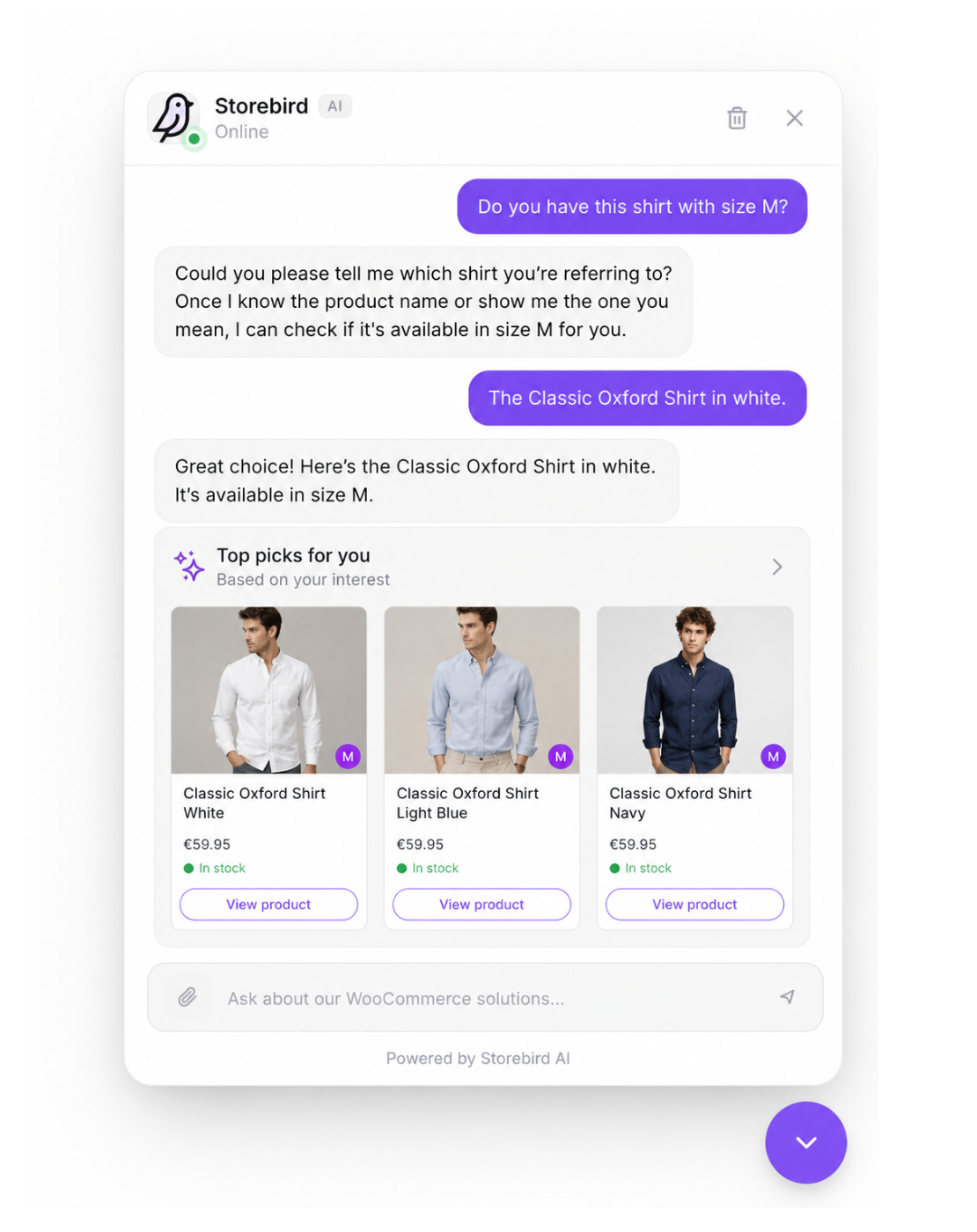
Instant AI product recommendations -- Storebird answers product questions straight from your live WooCommerce catalog, with prices and direct links.

Order tracking inside the chat -- customers check their order status and tracking right in the conversation, no more "where is my order?" emails.

Your Storebird dashboard -- conversations, AI-attributed revenue, time saved, and plan usage at a glance.

Customize your chatbot -- set branding, tone of voice, welcome message, and proactive greeting, with a live preview.
Faq
Yes. The plugin is free to install, but you need a Storebird account to power the WooCommerce AI chatbot. The Pro plan includes a 14-day free trial so you can test it on your store.
Plans start at $39/month (Essential). The Pro plan at $89/month includes a 14-day free trial and unlocks AI email replies, custom branding, lead capture, and human handoff. The Scale plan at $199/month supports up to 3 websites. See all plans at storebird.ai.
Yes! Storebird syncs your entire WooCommerce product catalog — including names, descriptions, prices, images, stock status, categories, and variations. It uses this data to give accurate, product-specific answers.
Yes. Storebird automatically detects and responds in your customer’s language. You can also set a preferred language in the dashboard.
Yes. Customers can ask about their order status using their order number or email address, and Storebird will show them real-time tracking information from WooCommerce. This is a WooCommerce order tracking chatbot that eliminates repetitive “where is my order?” support emails.
Yes (Pro plan and above). When the AI can’t fully resolve an issue, it can hand off to you or your team. You’ll get a push notification and can respond in real-time from the Storebird dashboard. This gives you the best of both worlds: an AI customer support plugin with woocommerce live chat when you need it.
Yes. Storebird connects your store to WhatsApp so the AI works across both your website and WhatsApp. Customers can message your assistant directly in WhatsApp, you can hand off a website conversation to WhatsApp for personal follow-up (the history comes along), and you can send order confirmations, status updates, and tracking to customers on WhatsApp. You enable and configure WhatsApp from your Storebird dashboard.
Yes (Pro plan and above). Forward your store’s support inbox to Storebird with a single forwarding rule (Gmail, Outlook, or cPanel — no DNS changes needed). When a customer emails, the AI drafts a reply using your live WooCommerce data: order status, tracking, stock, and product recommendations. You review the draft and send it with one click, and the reply is delivered in the same email thread. Conversations from chat and email — across all your stores — appear in one inbox.
Yes (Pro plan and above). You can customize header colors, message colors, button colors, logos, widget position, and more from the Storebird dashboard to match your brand.
No. The chat widget loads asynchronously and weighs under 15KB. It has zero impact on your Core Web Vitals or page load speed.
Storebird is built specifically for WooCommerce. Unlike generic live chat plugins, Storebird syncs your product catalog and understands products, prices, categories, variations, and stock levels. When a customer asks a product question, Storebird answers from your WooCommerce data instead of relying on scripted responses. It also includes WooCommerce order tracking, revenue attribution, and category-aware product recommendations out of the box. And unlike live chat tools, Storebird answers your customer email as well: the AI drafts replies with live order data in them, so your inbox gets the same WooCommerce brain as your chat widget.
Yes. Storebird has full WPML compatibility. It syncs all language versions of your products and pages, detects the current language on the frontend, and responds to customers in their language. The AI automatically handles multi-language conversations without any additional configuration.
When you connect Storebird to your WooCommerce store, it automatically syncs your entire product catalog — including product names, descriptions, prices, images, stock status, categories, and variations. The sync happens automatically when you add or update products.
Yes (Pro and Scale plans). Storebird gives your store its own knowledge base. Import pages from your website, add or edit knowledge manually, and attach notes or corrections to specific products. Use it for store policies, shipping, returns, sizing advice, product expertise, FAQs or any other information your customers need. When you change that content, Storebird automatically reprocesses it so future answers can use the latest version.
Yes. Storebird proactively engages customers who may have questions blocking their purchase. By providing instant answers about products, shipping, returns, and availability, the WooCommerce AI chatbot removes friction from the buying process. The lead capture feature also lets you collect email addresses so you can follow up with customers who don’t complete their purchase.
Storebird works with all major WooCommerce shipping and tracking plugins, including WooCommerce Shipment Tracking, Advanced Shipment Tracking (AST), YITH Order Tracking, AfterShip, SendCloud, PostNL, MyParcel, DHL for WooCommerce, and ShipStation. Customers can check their order status and tracking information directly in the chat.
Yes. Storebird supports Google Consent Mode v2 for compliant analytics tracking. Customer data is processed securely through the Storebird API. You can review our privacy policy at storebird.ai/privacy and our terms of service at storebird.ai/terms.
Reviews
Good product knowledge and reliable customer support
By 
We’ve been using Storebird for a while now, and it’s been a great addition to our store. It takes care of a large portion of customer questions about shipping, order updates, and product details, which has significantly reduced the number of support requests we have to handle manually.
The answers are surprisingly detailed and accurate, especially when it comes to product-related questions. Overall, it’s saved us a lot of time and helped improve the customer experience.
Finally an AI chatbot that actually understands my products
By 
I’ve tried all the other chatbots before, but they never really understood my WooCommerce store. The one felt like a generic chat widget, and other seemed outdated.
Storebird is different. It synced my entire product catalog (1,200+ products) within minutes. Now customers can ask things like “Do you have waterproof jackets under €80?” and actually get accurate product recommendations.
What stands out most:
• Order tracking works reliably — “Where is my order?” emails dropped by around 70%
• Revenue attribution — I can clearly see which chats lead to sales (last month: €2,400 attributed)
• No OpenAI API key required — just install and connect
• Smooth human handoff when needed
Setup took less than 5 minutes. Install, connect, and products sync automatically. I was live the same day.
One improvement I’d like to see: a permanent free tier for smaller stores. The 14-day Pro trial is good, but a free plan would lower the barrier to entry.
If you run a WooCommerce store and spend time answering repetitive questions, this is worth trying. It’s clearly built for WooCommerce, not a generic chatbot.
Eindelijk een chatbot die het écht begrijpt
By 
Wij werken inmiddels met deze chatbotplugin en wat een verschil maakt dit in onze dagelijkse werkzaamheden. Het is niet zomaar een chatbot, maar een goed getrainde assistent die écht meedenkt en actief helpt bij het oplossen van klantvragen.
Dankzij deze plugin kan ik mijn werk sneller en met meer focus uitvoeren, zonder continu tussendoor vragen te hoeven beantwoorden. Dat geeft rust én efficiëntie.
De chatbot is vriendelijk, intelligent en stelt gerichte vervolgvragen wanneer dat nodig is om tot het juiste advies te komen. En dat binnen een webshop met meer dan 15.000 artikelen – dat is echt indrukwekkend. Wanneer de chatbot ergens over twijfelt, wordt er automatisch een medewerker geïnformeerd. Klanten worden dus niet onnodig aan het lijntje gehouden, maar krijgen snel en passend antwoord.
Naast productadvies en toepassingsinformatie kan de chatbot ook de status van bestellingen en verzendingen opzoeken. Dat maakt het systeem compleet en enorm waardevol voor onze organisatie.
Kortom: een enorme aanwinst voor ons bedrijf. Automatisering op zijn best. Storebird mag absoluut blijven.
Changelog
1.7.0 – August 2026
- Security: The connect flow now sanitises the redirect and store-URL parameters it reads from the URL, and the redirect back to your Storebird dashboard goes through WordPress’s safe-redirect check with an explicit host allowlist. This closes an open-redirect risk in the connection step. / Beveiliging: de koppel-flow ontsmet nu de redirect- en winkel-URL uit de adresbalk en gebruikt WordPress’ veilige-redirectcontrole, waarmee een open-redirect-risico in de koppelstap is gedicht.
- Security: All widget attributes are now escaped through WordPress’s own script-tag helper before they reach your page markup.
- Fix: Product text is decoded identically on every supported PHP version. On PHP 8.1 and newer the decoding defaults had changed, which could make quotes and special characters in product descriptions come out differently than on older versions. / Fix: producttekst wordt nu op elke PHP-versie gelijk gedecodeerd — op PHP 8.1+ konden aanhalingstekens en speciale tekens anders uitvallen.
- Improvement: Diagnostic logging only writes to the error log when WP_DEBUG is enabled, so production installs stay quiet.
- Improvement: Declared compatibility with WooCommerce 11.
1.6.9 – August 2026
- Improvement: Storebird now declares official compatibility with WooCommerce High-Performance Order Storage (HPOS), so WooCommerce no longer flags the plugin as incompatible on the Plugins screen. / Verbetering: Storebird is nu officieel compatibel met HPOS, de moderne WooCommerce-orderopslag — WooCommerce markeert de plugin niet langer als incompatibel.
- Fix: On stores using HPOS, the estimated delivery date attached to an order was never passed to the assistant, so it could not tell customers when their parcel was expected. It is now read through the WooCommerce order API and works on both storage types. / Fix: op webshops met HPOS werd de verwachte leverdatum nooit doorgegeven, waardoor de assistent die vraag niet kon beantwoorden.
1.6.8 – July 2026
- Improvement: Revenue attribution is far more accurate. Your store now reports the WooCommerce order ID, the order key and the real order date/payment time alongside the order number, so a chat conversation is matched to the exact order the shopper completed instead of being guessed from the e-mail address. Stores with a sequential-order-number plugin (where the order number differs from the WooCommerce ID) are matched correctly for the first time. / Verbetering: omzet-attributie is veel nauwkeuriger — de bestelling wordt nu exact gekoppeld in plaats van geraden op e-mailadres, ook op webshops met een eigen bestelnummer-plugin.
- Improvement: Order lookup can verify an order with the WooCommerce order key as well as the e-mail address or postcode. This is a server-to-server check that only ever validates the one order the key belongs to; a wrong key is always rejected and the key is never shown to a visitor. / Verbetering: een bestelling kan nu ook geverifieerd worden met de WooCommerce order-key, naast e-mailadres of postcode.
1.6.7 – July 2026
- Fix (important): On stores that still use the classic WooCommerce order storage (not HPOS), order lookup returned the store’s most recent order for every order number instead of the one the customer asked about. The assistant then compared that stranger’s order against the customer’s e-mail/postcode and told genuine customers their details “don’t match” — so order tracking failed for all of them. The order number is now always verified against the order before it is used. Stores on HPOS were not affected. / Fix: op webshops met de klassieke orderopslag gaf het opzoeken van een bestelling altijd de nieuwste bestelling terug in plaats van de gevraagde, waardoor echte klanten onterecht “komt niet overeen” te zien kregen. Het bestelnummer wordt nu altijd gecontroleerd.
1.6.6 – July 2026
- Fix: Order verification is more forgiving so genuine customers are no longer wrongly told their details “don’t match”. The e-mail is trimmed and matched case-insensitively, the postcode ignores all spacing, and for orders placed while logged in, the customer’s account e-mail is accepted in addition to the billing e-mail. / Fix: orderverificatie accepteert nu ook het account-e-mailadres en negeert hoofdletters/spaties, zodat echte klanten niet onterecht “komt niet overeen” te zien krijgen.
1.6.5 – July 2026
- Fix: On multilingual stores using WPML, translated products were synced with the default-language product link, so the assistant sent (for example) a German shopper to the Dutch page. Product and variation links are now resolved in the language the product itself belongs to. Single-language stores and Polylang stores are unaffected. / Fix: op WPML-webshops kregen vertaalde producten de link van de standaardtaal; productlinks volgen nu de taal van het product zelf.
1.6.4 – July 2026
- Improvement: Revenue attribution now triggers when an order is paid (payment complete / processing), not only when it is marked completed — so shops that leave paid orders on “processing” still see chat-attributed revenue in their dashboard. Each order is reported once. / Omzet-attributie telt nu al bij betaling (processing), niet pas bij “completed”.
1.6.3 – July 2026
- Improvement: Better extraction of rental terms — free/included kilometres and per-kilometre pricing are now recognised (for example “100 vrije kilometers” or “inclusief 100 km”), so the assistant can answer rental questions more accurately. / Betere extractie van huur-/rental-voorwaarden.
- Fix: An odometer reading (for example “150.000 km”) could be misread as a free-kilometre allowance; a qualifier such as free/included/gratis/vrije is now required. / Fix: een kilometerstand werd onterecht als ‘vrije km’ herkend.
1.6.2 – July 2026
- Improvement: Order tracking now also reads tracking numbers from plain order notes (for example a note like “Tracking: 123456789”), for ERP and fulfilment setups that add tracking as a note instead of a custom meta field. Existing tracking plugins still take priority; only the number (and a link if one is present in the note) is used — the carrier is never guessed.
1.6.1 – July 2026
- Fix: Order lookup could fail with a server error on stores that use custom or sequential order numbers, or that have recent refunds. The assistant can now reliably look up orders and share order status and tracking again.
1.6.0 – June 2026
- New: Discount code & voucher lookup. Storebird can now read your WooCommerce coupons — the discount, which categories or products they apply to or exclude, minimum spend, expiry, and customer-specific restrictions (email-locked vouchers and per-customer usage limits). The assistant explains accurately why a code does or doesn’t work instead of guessing.
1.5.9 – June 2026
- Maintenance: Updated the plugin tags and listing details so store owners searching for a WhatsApp or live chat solution find Storebird more easily. No functional changes.
1.5.8 – June 2026
- New: WhatsApp integration. Storebird now works across WhatsApp as well as your website — customers can chat with your AI assistant directly in WhatsApp, you can hand off a website conversation to WhatsApp for personal follow-up, and order confirmations, status updates, and tracking can be sent to customers on WhatsApp. Enable and configure it from your Storebird dashboard.
1.5.7 – June 2026
- New: Test mode before going live. You can now install the plugin, connect your store and try the chatbot on your live site for free — the widget shows only to logged-in store admins with a “test mode” notice, so visitors never see it until you go live. Going live (a paid plan with a 14-day free trial) flips it on for everyone.
1.5.6 – June 2026
- Fix: Trash icon now actually deletes the conversation — messages, agent, lead capture state and the saved session ID are all wiped and the widget returns to the welcome screen.
- Improvement: Removed the back arrow in the chat header. Once you’re in conversation you stay there — exit is the X, reset is the trash. Less clutter, clearer mental model.
1.5.5 – June 2026
- Fix: The “share your details” lead capture form no longer pops up immediately after the bot’s first reply. It now waits for at least two visitor turns or an explicit handoff so the conversation can warm up first.
- Fix: Chat header trash and close buttons are now the same size, aligned and balanced on the right of the header.
- Improvement: Redesigned proactive bubble — it now looks like a speech bubble coming directly from the chat trigger (rounded card with a tail pointing down to the button) rather than a separate floating box. The avatar/name row was dropped to keep the message punchy.
1.5.4 – June 2026
- Fix: Markdown rendering of AI replies — now handles italics, headings, numbered lists, fenced code blocks, and strips internal
[PRODUCT:…]markers that the bot occasionally leaks. Bold, links, bullet lists and inline code already worked. - Improvement: Tighter spacing around in-message headings, lists and code blocks so streaming responses look like a polished chat reply, not a wall of plain text.
1.5.3 – June 2026
- Fix: Brand logo is now visible in the chat header (previously only on the welcome screen). During agent handoff the logo swaps for the agent avatar.
- Fix: Mobile responsiveness overhaul — full-screen panel honours iOS safe-area insets at top and bottom, composer buttons grow to 40px tap targets on phones, chat header is single-line with truncated brand name, and message bubbles use 94% width on small screens.
- Fix: Layout cleanup of the chat header — back arrow, brand mark, brand name + status, and the close/end-chat actions are now in a stable horizontal layout that never overflows.
1.5.2 – June 2026
- Fix: Removed every hardcoded quick action from the welcome screen. The chat widget is unique to each store, so default actions are no longer shipped at all. Stores that want quick action cards configure them via the Storebird dashboard; until then, the widget shows only the greeting and the input field — no risk of advertising features the store doesn’t actually offer.
1.5.1 – June 2026
- Fix: Removed the hardcoded “10% off + early access” quick action from the welcome screen. Default actions are now strictly store-agnostic: Discover products, Track my order, Talk to a human. Stores that want to advertise a discount or signup must configure it via their Storebird dashboard (coming soon) — no more wrong promises on the widget.
- Fix: Quick action labels respect the visitor language when the backend doesn’t override them.
1.5.0 – June 2026
- Major: Brand-new React-based chat widget — redesigned UI with quick action cards on a welcome screen, team avatars, animated proactive greeting bubble, native lead capture form, agent takeover header, end-chat flow, and a horizontal product carousel.
- Major: Multi-language UI out of the box (English, Dutch, German, French, Spanish) with WPML and Polylang detection on the host site.
- New: Notification chime when a bot or agent reply arrives while the widget is closed, plus a pulsing unread indicator on the trigger button.
- New: Shadow DOM isolation so host-site CSS can never leak into the widget (or vice versa).
- Note: Sites that need to roll back temporarily can set the
storebird_widget_versionoption to2, or addadd_filter('storebird_widget_version', fn() => '2');in a snippet.
1.4.0 – June 2026
- Compatibility: Tested and verified against WordPress 7.0.
1.3.9 – May 2026
- Fix: Product attribute specifications (capacity, dimensions, material, etc.) now sync with their readable values instead of internal WooCommerce IDs, so the AI answers specification questions accurately.
1.3.8 – April 2026
- Feature: File attachments in chat — visitors and support agents can now share images and documents directly inside the conversation
- Improvement: Refreshed widget asset versioning so UI updates load reliably for all visitors
1.3.7 – March 2026
- Performance: Reduced memory usage by 40% during product sync
- Fix: Resolved memory exhaustion errors on sites with 128MB PHP memory limits
- Improvement: More efficient handling of product variations during sync
- Improvement: Added explicit memory cleanup after processing each product
1.3.6 – March 2026
- Fix: WPML product sync now correctly syncs only default language products
- Fix: Resolved issue where all language variants were being synced instead of default language only
1.3.5 – March 2026
- Improvement: Minor update to verify plugin update system is working
1.3.4 – February 2026
- Fix: WPML product sync — all default language products now sync correctly instead of only the current admin language
- Improvement: Added language filtering to prevent translated duplicates from syncing
- Improvement: Language detection for each product during bulk sync
1.3.3 – February 2026
- Feature: Automatic revenue attribution — completed WooCommerce orders are matched to recent chat conversations
- Feature: Reports order total, billing email, and line items to Storebird for analytics
1.3.2 – February 2026
- Feature: WPML multi-language support — syncs all language versions of products and pages
- Feature: Sends language code with product and page sync for language-aware chatbot responses
- Feature: Widget detects current WPML language and passes it to the chat API
- Feature: Google Consent Mode v2 integration for compliant analytics tracking
1.3.1 – February 2026
- Fix: Improved auto-sync reliability — clears stale sync locks before starting
- Fix: Resolved “Connect first” message showing when already connected
- Improvement: Improved auto-sync timing after plugin connection
1.3.0 – February 2026
- Feature: Automatic product sync after plugin connection — products sync immediately without manual trigger
- Improvement: Improved connection reliability and error handling
1.2.0 – February 2026
- Feature: One-click connect flow — plugin redirects back to Storebird dashboard after automatic connection
- Improvement: Faster auto-connect after activation (30-second retry instead of 5-minute cooldown)
- Improvement: Improved onboarding: single “Connect” button on dashboard detects plugin status automatically
1.1.1 – February 2026
- Fix: Improved auto-connect reliability — plugin now retries connection periodically while unconnected
- Fix: Resolved issue where auto-connect only triggered once after activation
1.1.0 – February 2026
- Feature: Auto-connect — plugin automatically connects to Storebird after activation when a website is set up on the dashboard
- Improvement: Improved onboarding flow for faster setup
1.0.3 – February 2026
- Fix: Fixed “Go to Dashboard” button not working in Help section
- Improvement: Expanded plugin description with detailed features and FAQ
- Improvement: Improved installation instructions
1.0.2 – February 2026
- Fix: Fixed sync modal styling (CSS variables now work correctly in modal overlay)
- Fix: Fixed spinner animation conflict between CSS and SVG spinners
1.0.1 – February 2026
- Fix: Fixed admin page styling (complete CSS overhaul)
- Improvement: Connect flow now redirects back to Storebird dashboard after successful connection
- Improvement: Improved login redirect token preservation for connect flow
1.0.0 – February 2026
- Feature: Initial release
- Feature: AI-powered chat functionality
- Feature: Product and order sync
- Feature: One-click connect from Storebird dashboard and from the plugin itself
- Feature: Connect flow preserves tokens through WordPress login redirects
- Feature: API credentials hidden behind Advanced toggle — no manual key copying needed
- Feature: Customizable branding
- Feature: Human handoff support