StreamWeasels Twitch Integration
StreamWeasels Twitch Integration
Description
Embed Twitch streams with our collection of Twitch Blocks and Shortcodes. Works with Block Editor, Classic Editor, and Page Builders.
The most advanced Twitch plugin for WordPress
For over 8 years, StreamWeasels have been helping thousands of WordPress websites display twitch streams in their WordPress websites.
StreamWeasels Twitch Integration is the latest and greatest plugin from StreamWeasels that takes Twitch Integration to the next level.
This plugin allows you to display twitch streams anywhere on your website in a variety of unique and professional-looking layouts.
Embed a Single Twitch Stream based on Channel
StreamWeasels Twitch Integration allows you to embed a single Twitch stream anywhere on your website with our easy-to-use Gutenberg block or shortcode.
- Embed a single stream with the following shortcode: [sw-embed channel=”lirik”]
- No Twitch API connection required for a single stream embed
- Customise your embed with the following options:
- Autoplay
- Start Muted
- Embed Chat
- Colour Theme
- Embed Width
- Embed Height
Display Twitch Streams by Game, Channel List, Team and more
StreamWeasels Twitch Integration allows you to display groups of streams from Twitch based on Games, Channels, Teams, Languages, Titles and more.
- Embed a group of streams with the following shortcode: [sw-twitch channels=”monstercat,lirik,sodapoppin”]
- Twitch API connection required for a group of streams embed
- Display upto 1000 streamers playing a specific Game.
- Display upto 1000 streamers from a specified List of Channels.
- Display upto 1000 streamers from a specific Twitch Team.
- Display only streams with a specific tag in the Stream Title.
- Display streams in a specific language only.
Advanced Combinations
You can combine our options for some very powerful Twitch Integrations.
- Display all streamers from a Twitch Team only if they are playing a specific Game.
- Display all streamers from a List of Channels only if they are playing a specific Game.
- Display all streamers playing a specific Game but only if they have a specific Tag in their Stream Title.
Examples
Here are some real examples from some of the many StreamWeasels Twitch Integration users.
- Display all users from a Twitch Team but only if they’re playing League of Legends.
- Display 100 GTA V Streamers but only if they have NoPixel in their Stream Title.
- Display all users from a Twitch Team but only if they have #LGBTQ+ in their Stream Title.
- Display all streamers playing Music but only if they have Requests in their Stream Title.
Layouts
The best part about StreamWeasels Twitch Integration is our library of Add-on Plugins. Our free Add-ons allow you to unlock a variety of different layouts for your Twitch streams.
Free Layouts
- [Layout] Twitch Wall. Display a large number of streams all on one page, just like Twitch.
- [Layout] Twitch Player. Display a any number of streams in a small space, with a scrolling sidebar and space for the embed.
- [Layout] Twitch Rail. Display a large number of streams in a tiny space, with the ability to swipe left and right.
- [Layout] Twitch Status. Simply display your Twitch live status on every page of your website.
- [Layout] Twitch Vods. The easiest way to display Twitch VODS on your website.
PRO Layouts
- [Layout] Twitch Feature. Slick, professional-style layout inspired by the Twitch homepage.
- [Layout] Twitch Nav. The easiest way to display Twitch status in your main navigation.
- [Layout] Twitch Showcase. Professional eSports-inspired layout.
Read More
If you want to learn more about StreamWeasels Twitch Integration, check out these links.
Screenshots

Twitch Wall (included)

Twitch Rail (included)
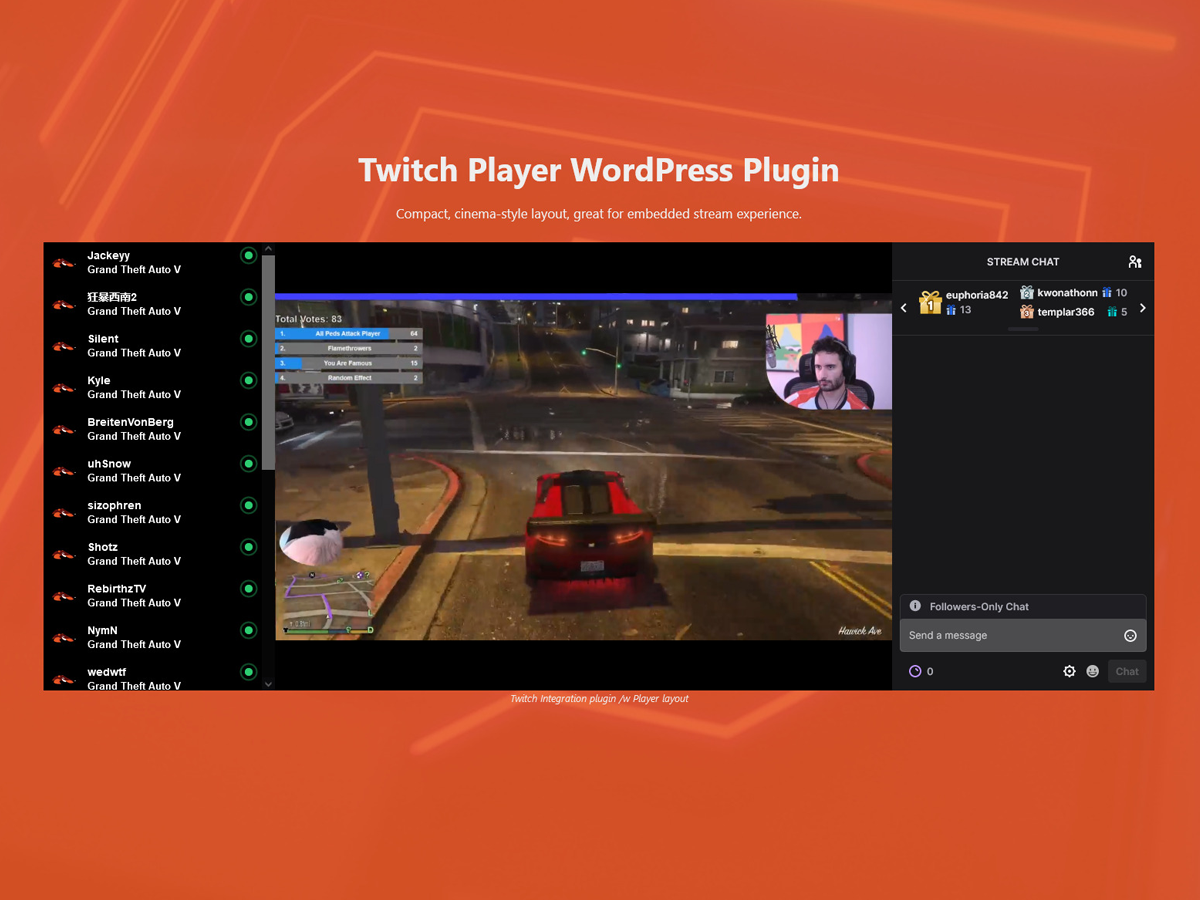
Twitch Player (included)

Twitch Status (included)

Twitch Feature (paid)

Twitch Showcase (paid)

Twitch Nav (paid)
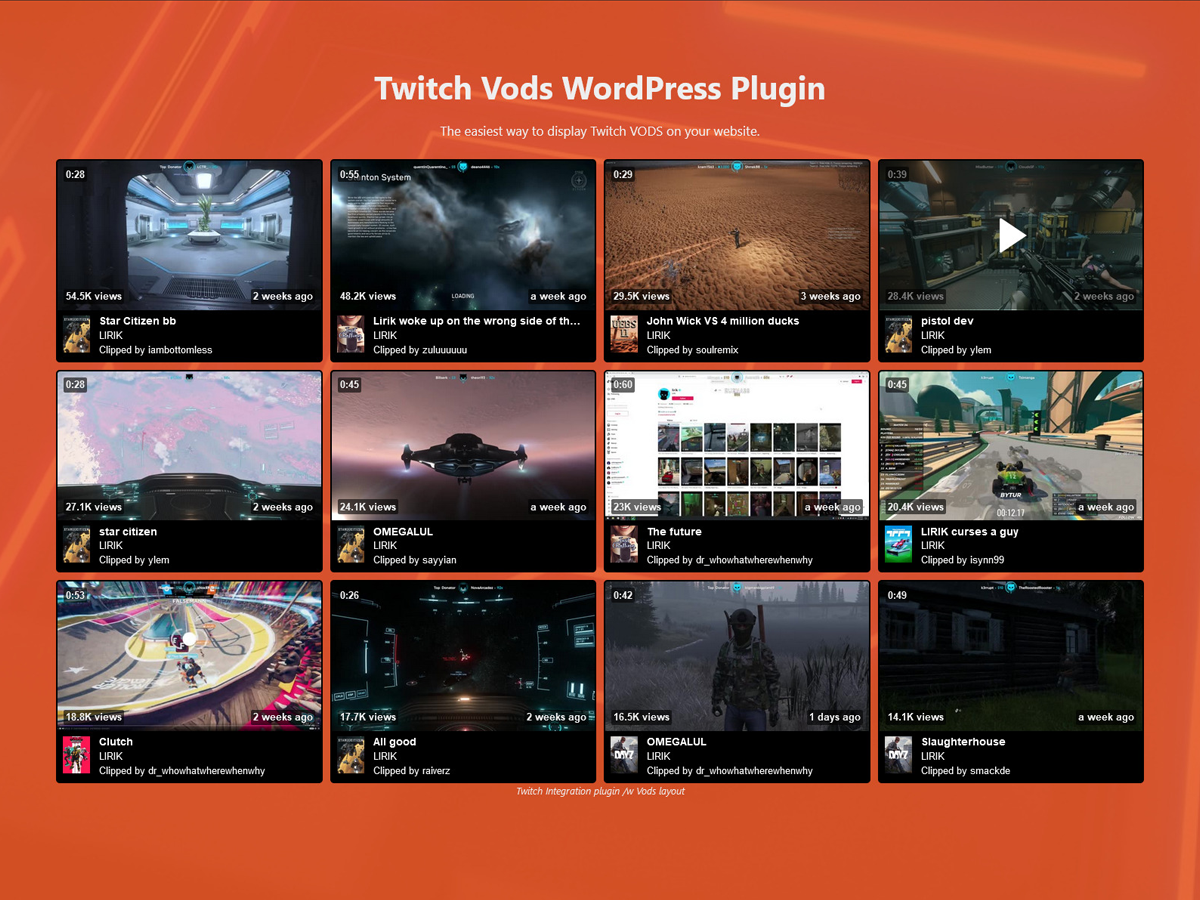
Twitch Vods (included)
Faq
[sw-twitch game=”GTA V”]
[sw-twitch game=”ths”]
[sw-twitch channels=”lirik,shroud,sodapoppin”]
[sw-twitch game=”GTA V” title-filter=”NoPixel”]
[sw-twitch game=”Hearthstone” language=”de”]
Reviews
Best Twitch Plugin for Your Site 10/10
By 
I've been using this plugin for a while now, and it has exceeded my expectations.
It's user-friendly, works flawlessly, and the support team is always responsive and helpful. Highly recommended for anyone looking to improve their WordPress site.
High security issue!
By 
The JS for reloading directly calls the api. Which would be no problem if it would be public with no auth. But the client-id AND the oauth token are readable in js... its easily doable via network tab in any browser with pausing the code. just do a call to a local php file which calls the api then without users can read credentials
Excellent support
By 
AAA+ plugin with amazing support. Jamie helped me to customize the plugin, added a new feature i asked for also tried to help with WP issues not related with plugin.
Amazing Support
By 
Amazing Support and apps he sorted out all the different problems i had
Great customer service
By 
Jamie from the team did a great job of making sure I was using the plugin properly by double checking everything was working as it should be. It wasn't before but it is now. Thank you
Sleek and Professional: My Experience with StreamWeasels' Ultima Gaming Theme
By 
I recently purchased the Ultima Gaming theme and Twitch Integration plugin from StreamWeasels, and I couldn't be happier with my experience. Jamie B, the developer behind these products, has provided exceptional support throughout the entire process.
Despite my limited knowledge of WordPress and plugins, Jamie's support has been nothing short of amazing. He has patiently guided me through any snags and hangups I encountered while using the Twitch Integration plugin, and always provided clear explanations that helped me better understand the product.
Additionally, the Ultima Gaming theme is exactly what I was looking for - it's sleek, professional, and perfect for my gaming website. The integration with the Twitch plugin has made it incredibly easy to share my content with my audience, and the overall design of the theme is top-notch.
Overall, I would highly recommend StreamWeasels and Jamie B to anyone looking for a reliable and professional WordPress theme and plugin developer. Their support is top-notch, and the Ultima Gaming theme and Twitch Integration plugin have exceeded my expectations. Thanks again to Jamie and the StreamWeasels team!
Grant Fukin Freimont of Hazard Pay Gaming
Exceptional customer service and awesome plugin
By 
Jamie was so easy to work with. Helped me out, and went above and beyond to make sure everything worked. Awesome product and support, 10 out of 10.
Amazing
By 
The template and plugins are fantastic and was incredibly easy to set up and customize. It's user-friendly, responsive, and has great integration with Twitch. However, what really sets this template apart is the amazing customer support. Jamie was incredibly helpful and responsive, making the entire experience even better. I highly recommend this template to any Twitch streamer looking to enhance their channel with something unique. Five stars all around!
Broken Code | quick fix
By 
I was having an issue getting Stream Weasels to work on my website and joined the discord to ask the developer what to do, the developer took the time out of his day to find a fix specifically for my website.
The man is a LEGEND he had it fixed within a couple of minutes and we were good to go!
Now my community streams are live on our website again, so anytime we're streaming visitors can see all of us joking in one place. This is the BEST plugin for Livestreaming on WordPress websites and I HIGHLY recommend it!
Great Plugin Supported by a Great Developer
By 
Changelog
1.9.4
- updated freemius
- security fix for invalid UUIDs
1.9.3
- updated freemius
1.9.2
- Updated freemius
- Fixed an issue with load_textdomain being called incorrectly
1.9.1
- Fixed an error with nonce generation
1.9.0
- updated freemius
1.8.9
- Nonce generation moved to server side to avoid caching issues
1.8.8
- Default iframe width and height if not provided
- Allow either true or 1 to be used for shortcode attributes
1.8.7
- Properly sanitize and escape all output from sw-twitch-embed shortcode
- iframes within Twitch embeds are now 100% width and height
1.8.6
- updated freemius
- added new option to bypass nonce checks for better compatibility with caching plugins
1.8.5
- Added new skew effect to Feature layout
- Fixed some styling issues with Feature layout
1.8.4
- Added alert for new Status Bar plugin
- updated freemius
1.8.3
- rest api endpoint now works with subpages
- updated freemius
1.8.2
- updating freemius
1.8.1
- API requests moved from client side to server side
- Added PHP 8.x support
1.8.0
- Fixed an issue with broken sw-twitch-embed shortcodes and blocks
1.7.9
- added some missing escaping and sanitisation
- added user and permissions check to endpoint
- cleaned up some older / unused code
1.7.8
- Added logged-in check to endpoint
1.7.7
- Display Twitch clips from multiple users on a single wall
1.7.6
- data sanitisation for shortcode attributes
1.7.5
- CSS fixes for the Feature layout on mobile devices (<530px)
1.7.4
- Added a new autoplay-offline option
1.7.3
- CSS variables shifted to kebab case to better support html minification
1.7.2
- Added a new banner for Kick plugin
- Debug log will now trim itself when it gets too big
- Debug log will now be emptied when the plugin is de-activated
1.7.1
- You can now disable auto-scroll on Wall layout with disable-scroll=”1″ on the shortcode
1.7.0
- Added new ‘refresh’ option to update Twitch Wall periodically
- Embedded iFrame will now only load if it doesn’t already exist
- Bug fix for feature layout when settings not saved
1.6.8
- updated freemius
- feature and showcase layouts now available via blocks
1.6.7
- Only include PRO files if they exist!
1.6.6
- Users with an active license for the add-on plugins can now continue to use them as normal
1.6.5
- Twitch Feature is now bundled with PRO.
- Twitch Showcase is now bundled with PRO.
- Twitch Nav is now bundled with PRO.
1.6.3
- Twitch Vods is now FREE and part of the main plugin, the Twitch Vods Add-on can safely be disabled
- Twitch Vods now available via Blocks!
- Twitch Vods channels can now be set on the shortcode as vods-channel=””, channels=”” or channel=””
1.6.2
- Twitch Status is now part of the main plugin, the Twitch Status Add-on can safely be disabled
- Twitch Status now available via Blocks!
- Twitch Status now has a placement option (absolute or static)
- Referances to Add-ons changes to Layouts
- Referances to the streamweasels shortcode changed to sw-twitch
- Channels can now be set on the shortcode as either channels=”” or channel=””
1.6.1
- Twitch Integration now available via Blocks!
- New Twitch Embed block added for simple single stream embeds!
- New Twitch Embed shortcode added [sw-twitch-embed]
- Existing Twitch Integration shortcode can now be shortened to [sw-twitch]
- Twitch Wall is now part of the main plugin, the Twitch Wall Add-on can safely be disabled
- Twitch Rail is now part of the main plugin, the Twitch Rail Add-on can safely be disabled
- Twitch Player is now part of the main plugin, the Twitch Player Add-on can safely be disabled
- Upgraded freemius to 2.5.9
1.5.9
- Added a permanent dismiss for the YouTube plugin notice
- Fixed the broken Twitch logo
- Upgraded freemius to 2.5.6
1.5.8
- Updated freemius to 2.5.3
- Added fix for uppercase language codes
- Added fix for featured-stream
- Added fix for feature layout and autoplay inside
1.5.7
- Now compatible with Block themes
1.5.6
- Upgraded licensing logic
- Upgraded freemius integration
1.5.5
- Added new messaging for YouTube plugin
1.5.4
- Added Discord messaging
- added channel names to HTML to allow for CSS selectors
1.5.3
- Added bundle and updated messaging
1.5.1
- Removed a transient check from Twitch Integration
- Fixed a bug with autoplay combined with link to Twitch
1.5.0
- default streams now pulled from Twitch ig game, team or channels left empty
1.4.9
- Twitch Showcase launch
- bumped tested to 6.0
- admin messaging tweaks
1.4.7
- Laying the groundwork for new Showcase add-on
- Made some improvements to Vods add-on
- Hotfix for showcase issue
1.4.2
- minor admin tweaks
1.4.1
- added fixes for Twitch Vods add-on
- changed the stream count to 15
1.4.0
- Fixed an issue related to game + channels combination
- Added new plan levels
- Added bundles
1.3.7
- Added support for Twitch Vods add-on
- Better handling of Game + Title filter
- Added dev variables
1.3.4
- Freemius SDK update
1.3.3
- Added Twitch Nav add-on to add-on section
1.3.2
- Added the foundation for Twitch Offline add-on
1.3.1
- Added the foundation for Twitch Nav add-on
1.3.0
- Fixed an issue with embed inside for Twitch Integration free users
- Fixed an issue with Twitch Feature PRO not initialising correctly
1.2.8
- Added the foundation for Twitch Live Status add-on
- Fixed shortcode links
- Fixed issue with free live info field
1.2.7
- Twitch Auth token won’t try and generate if client ID and Secret empty
- Updated Twitch Auth tokens to regenerate automatically
- Fixed broken Twitch icon in chrome
- Fixed issue blocking multiple integrations to be placed on one page.
- Fixed wrong Image dimensions listed on Offline Image.
- Fixed Chat option now forced as (int).
- Fixed conflict with two Offline Image fields.
- Fixed issue with embed-chat shortcode attr
- Added can_use_premium_code() checks
- Fixed issue with game and tile sorting = least
- Fixed an issue with game names including & and other special characters
- Added output buffering
- Added new hover state (play button)
- Added new Live Info option
- Added string translations
- Feattured Streamer now placed at the top of stream list if all users are Offline
- Colour Theme field added for free users
- Fixed dimensions of embed popup on large screens
- Updated support links
- Added Refresh Token button
- removed get_transient call
- improved the logic around getting auth Token
- added simple / advanced shortcode descriptions
- added support for Feature PRO inside embed