Structure Viewer – AI Context Builder, Code Search & MCP Tools

Structure Viewer – AI Context Builder, Code Search & MCP Tools
Description
Structure Viewer is the AI toolkit for WordPress code. Turn any installed plugin or theme into a single AI-ready context pack, search inside every file, let AI agents like Claude, Cursor and VS Code Copilot explore your site through MCP, and browse every file with syntax highlighting — all from your WordPress admin, with secrets redacted before anything leaves the server.
No FTP, no SSH, no copy-pasting one file at a time. Works with ChatGPT, Claude, Gemini, Cursor, Copilot, Windsurf and any other AI tool.
—
✨ AI Context Pack (new in 2.3)
The fastest way to give an AI your code.
- One click, one document — project facts, a compact file tree and the full source of the files that matter, in a single paste-ready pack
- Smart pick — automatically skips vendor libraries, minified assets, lock files, translations and binaries so your AI gets signal, not noise
- Token budget — live token estimate with presets for 32K, 128K, 200K, 400K and 1M context windows; files beyond the budget are skipped automatically
- Task templates — “Security audit”, “Code review & bugs”, “Write documentation”, “Add a feature”, “Write tests”, “Compatibility upgrade” — or write your own instructions
- Three formats — Markdown, XML (the
<documents>layout recommended for long-context models) or plain text - Copy or download — paste straight into a chat or attach the file
- Secrets always redacted for AI output (configurable)
- Add individual files from the file viewer with the + Add to Context Pack button
🤖 Built-in MCP Server for AI Agents (new in 2.3)
Structure Viewer is an MCP server — no MCP Adapter or any other plugin required, on any WordPress version from 5.8. Connect Claude Code, Claude Desktop, Cursor, VS Code (Copilot), Windsurf or any other MCP client and it can explore your plugins and themes on its own:
sv_list_items— list plugins, themes and mu-pluginssv_get_item_summary— metadata, file counts and token estimatesv_get_file_tree— the complete file treesv_read_file— read any source file (or a line range), secrets redactedsv_search_code— grep across one or all plugins/themessv_build_context_pack— a ready-made context pack sized to the agent’s budget- Pro:
sv_get_hooks_mapandsv_check_integrity - Plus ready-made prompts (security audit, code review, documentation…) for clients that support MCP prompts
Two-minute setup: open AI Agents, click Create token, pick your client and copy the generated config (Claude Code command, Claude Desktop, Cursor, VS Code, Windsurf or cURL). A self-test runs a real MCP handshake against your site. For local development there is also a stdio server: wp structure-viewer mcp --user=admin.
Standards-based: MCP Streamable HTTP transport (protocol 2024-11-05 2025-11-25), JSON-RPC 2.0, Origin validation, per-user revocable tokens (or WordPress Application Passwords). Every tool is read-only, requires an administrator and can be switched off in one click. On WordPress 6.9+ the same tools are also registered with the core Abilities API.
🔍 Code Search (new in 2.3)
- Search inside every file of a plugin, a theme, the mu-plugins folder — or across all plugins at once
- Match case, whole word and regular expressions, extension filters, optional vendor/minified files
- Results grouped by file with line numbers and context; click any line to open the file at that exact line
- One-click quick searches: hooks, AJAX handlers, REST routes, shortcodes, SQL queries, remote requests, risky functions (eval, base64_decode, shell_exec…) and TODO/FIXME
- Copy results for AI as Markdown
🗂️ File Explorer & Viewer
- Interactive tree for every plugin, theme and must-use plugin (new in 2.3)
- Live tree search, file type filters, file sizes and dates, recently viewed
- Built-in syntax highlighting with line numbers for PHP, JS, CSS, JSON, HTML/XML, SQL, Markdown and YAML (new in 2.3)
- Copy for AI — copies the file with its path in a fenced code block (new in 2.3)
- Fullscreen mode, one-click download, redaction badge
- Item sidebar with statistics, file breakdown and an estimated AI token count, plus shortcuts to build a context pack, search code, map hooks or verify integrity
📤 Export
TXT, JSON, XML, PDF and clipboard exports of any file tree — clean ASCII trees that fit nicely in AI prompts, tickets and documentation.
🔒 Secret Redaction
Masks API keys, tokens, passwords, AWS / Stripe / GitHub / Google / Slack / OpenAI / Anthropic / SendGrid / Mailchimp keys, JWTs, PEM private keys, wp-config credentials, credential constants, .env-style assignments and passwords in connection strings. Always on for AI output by default; optional for the file viewer and downloads.
💻 WP-CLI
wp structure-viewer pack plugin woocommerce --ext=php --max-tokens=150000 --output=wc.md
wp structure-viewer search plugin all "base64_decode\s*\(" --regex
wp structure-viewer export plugin <folder-name> --format=json
wp structure-viewer list plugins
wp structure-viewer mcp --user=admin (local stdio MCP server)
Pro: wp structure-viewer hooks plugin <slug> and wp structure-viewer integrity
—
🚀 Structure Viewer Pro
🪝 Hooks Map (new) — static analysis of every PHP file (nothing is executed): actions and filters hooked (with callback and priority), every do_action / apply_filters fired, AJAX handlers, REST routes, shortcodes, post types, taxonomies, blocks, cron events, admin pages, settings, WP-CLI commands, enqueued assets, classes and functions — each linked to its file and line. Export as Markdown or JSON, add it to Context Packs, or let AI agents call it.
🛡️ Integrity Check (new) — verify WordPress core and every WordPress.org plugin against the official checksums. Find modified, missing and suspicious (unexpected executable) files, and see a line-by-line diff against the original release. Ideal after a hack, before a site handover, or when someone “just edited the plugin”.
💾 Context Pack presets & compression (new) — save file selections, task prompts and options as reusable presets, strip comments and blank lines to save 20–40% tokens, and include the Hooks Map in any pack.
🔀 Comparator — colour-coded line-by-line diff between two plugin/theme ZIPs, an installed item and a ZIP, or two files. Handles large and minified files.
📦 FlatPack — extract only the PHP, CSS, JS, images or custom extensions from any ZIP into one flat, collision-safe download.
Upgrade from Structure Viewer Pro Tools Upgrade to Pro.
—
🔒 Security & Privacy
- Strictly read-only — Structure Viewer never modifies, deletes or uploads files on your site
manage_optionscapability (administrators) required for every screen, AJAX call and AI ability- Nonce verification on every request, path traversal prevention with
realpath()checks - AI agent tools can be disabled with one toggle; secrets are redacted for AI by default
- No external requests at runtime. The only outbound requests are the ones you start yourself in the Pro Integrity Check (to downloads.wordpress.org, plugins.svn.wordpress.org and api.wordpress.org for checksums and original files)
⚡ Performance
- Assets load only on the Structure Viewer screen — zero frontend impact
- Lazy tree loading, cached dashboard stats, cached Hooks Map and checksum results
- Code search has result and time limits so it never ties up your server
Installation
- Go to Plugins Add New in your WordPress admin.
- Search for Structure Viewer.
- Click Install Now, then Activate.
- Navigate to Tools Structure Viewer.
To connect AI agents (optional): open Structure Viewer AI Agents, click Create token and copy the generated configuration into your AI client. Nothing else to install.
Screenshots
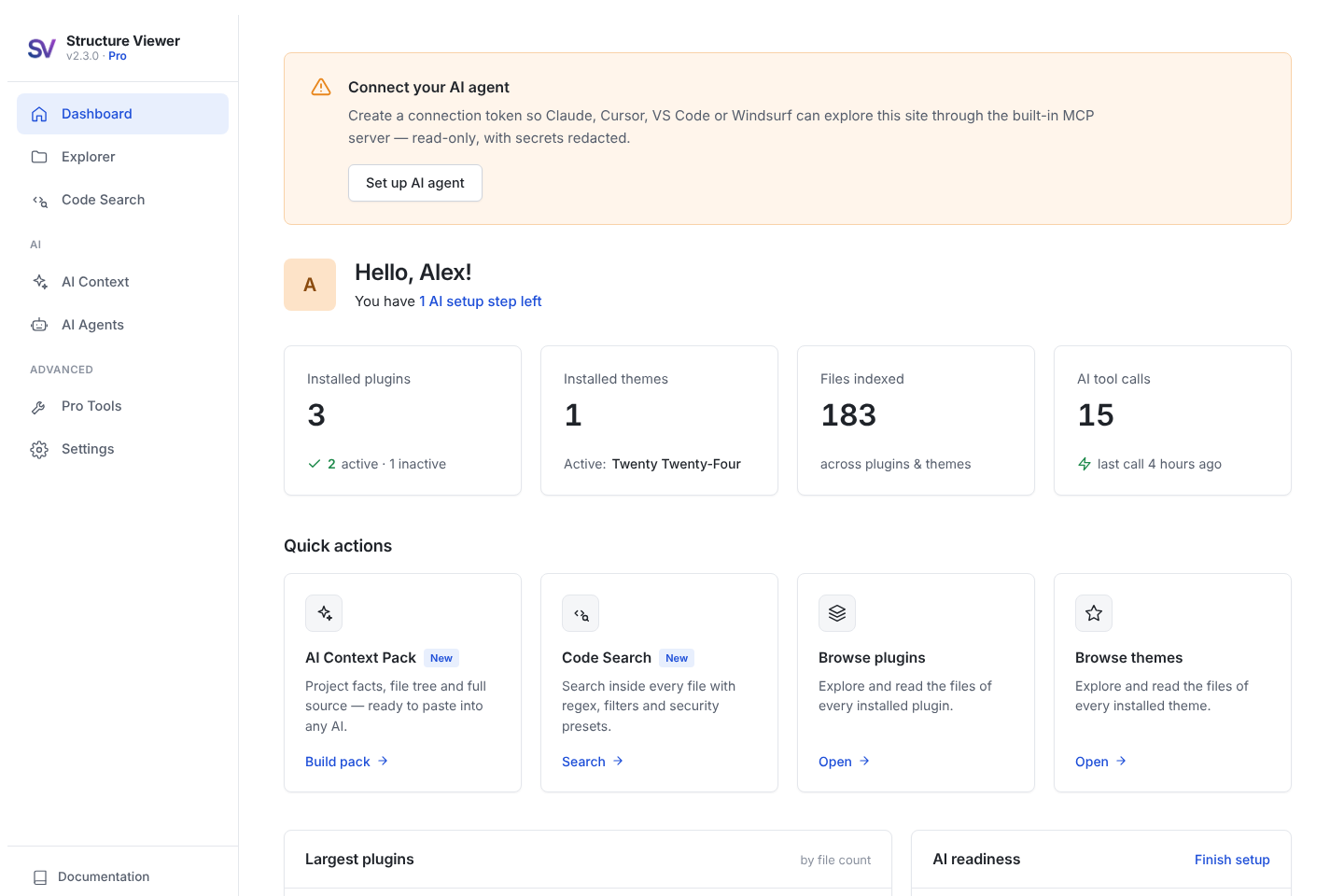
Dashboard — site stats, AI readiness, quick actions and Pro tools

AI Context Pack — smart file selection, task templates and token budget

AI Context Pack — the generated pack, ready to copy or download
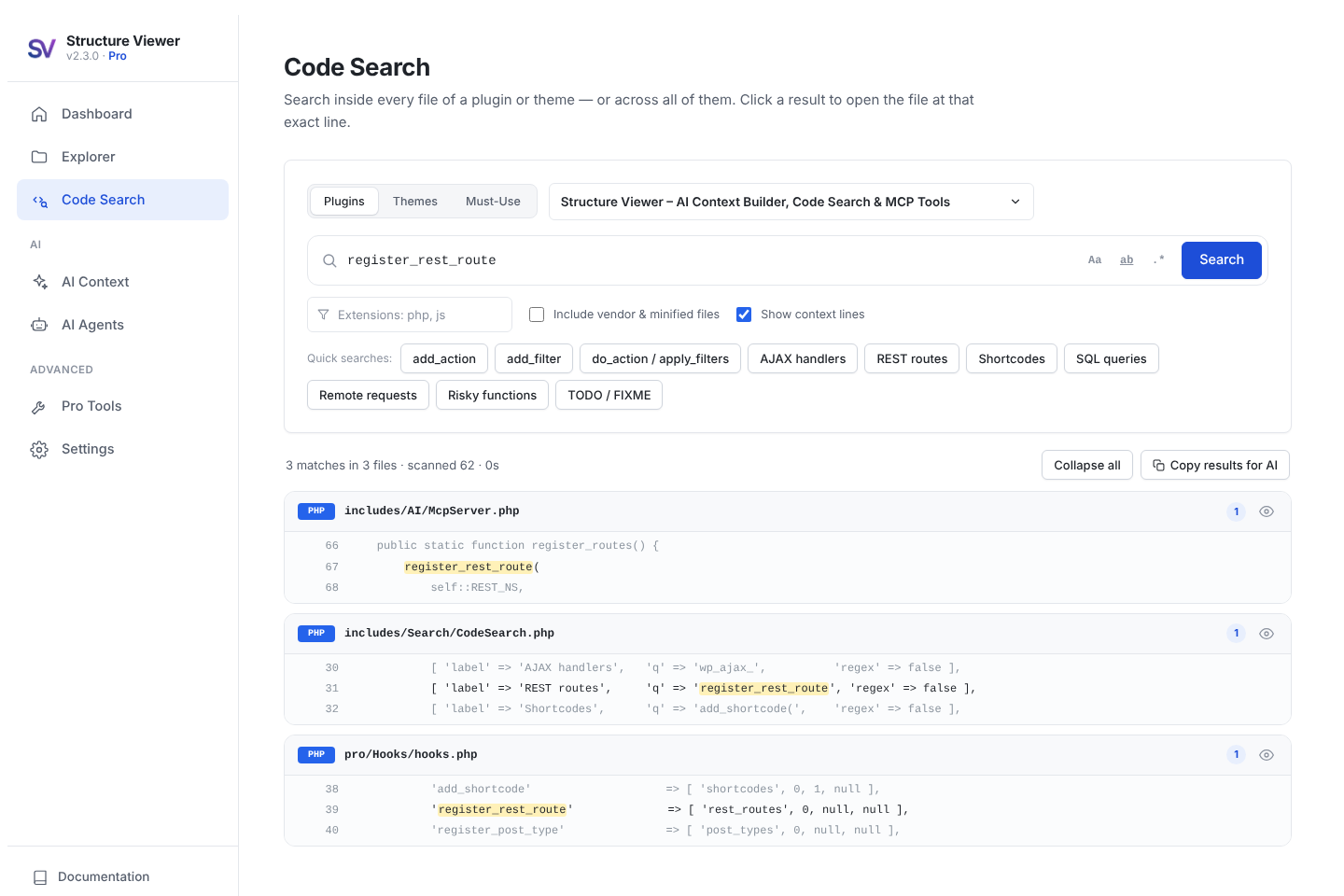
Code Search — results with line numbers and context

File viewer — syntax highlighting, line numbers and "Copy for AI"
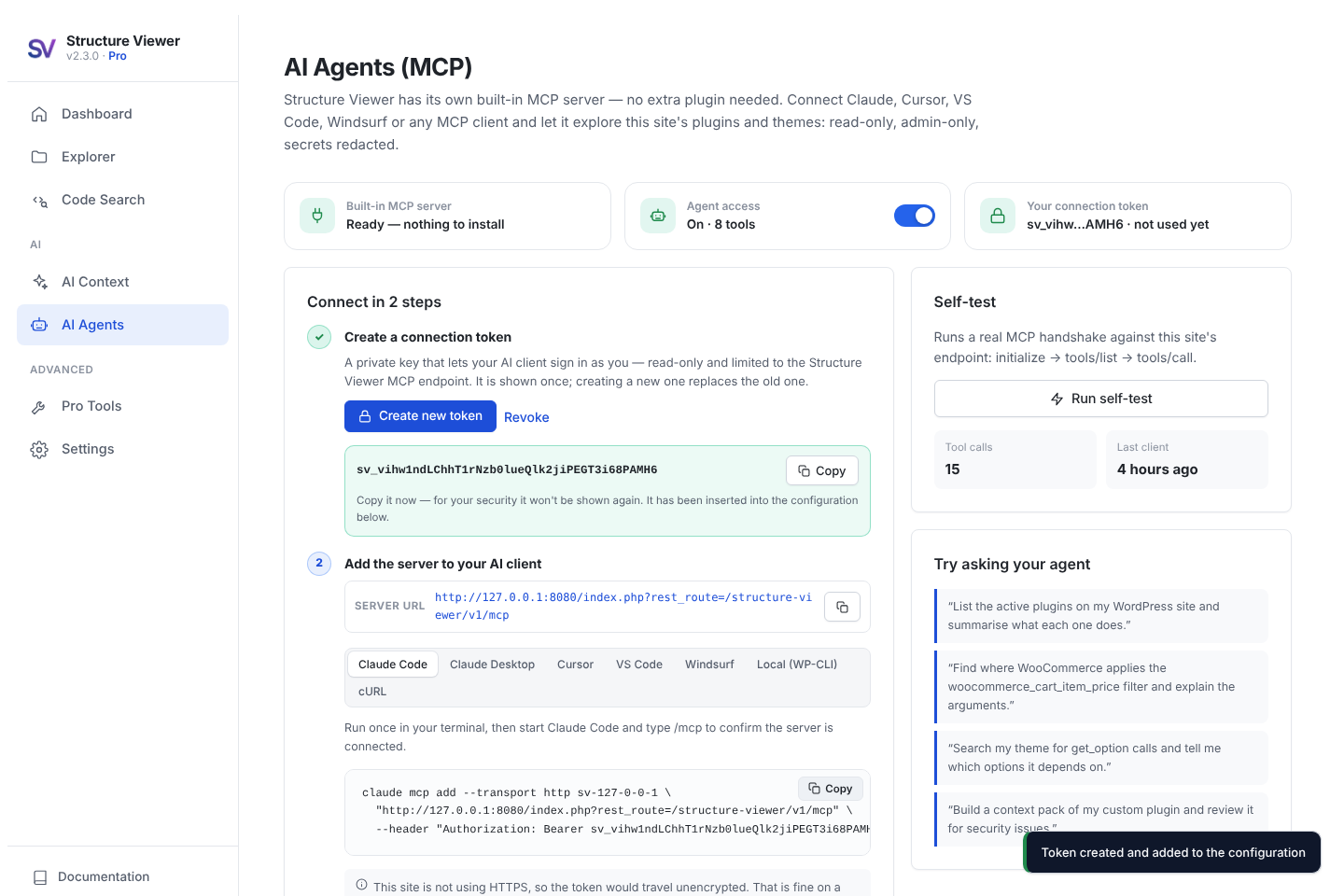
AI Agents — built-in MCP server, connection token and generated client configuration

Explorer — file tree, statistics and "Use with AI" shortcuts
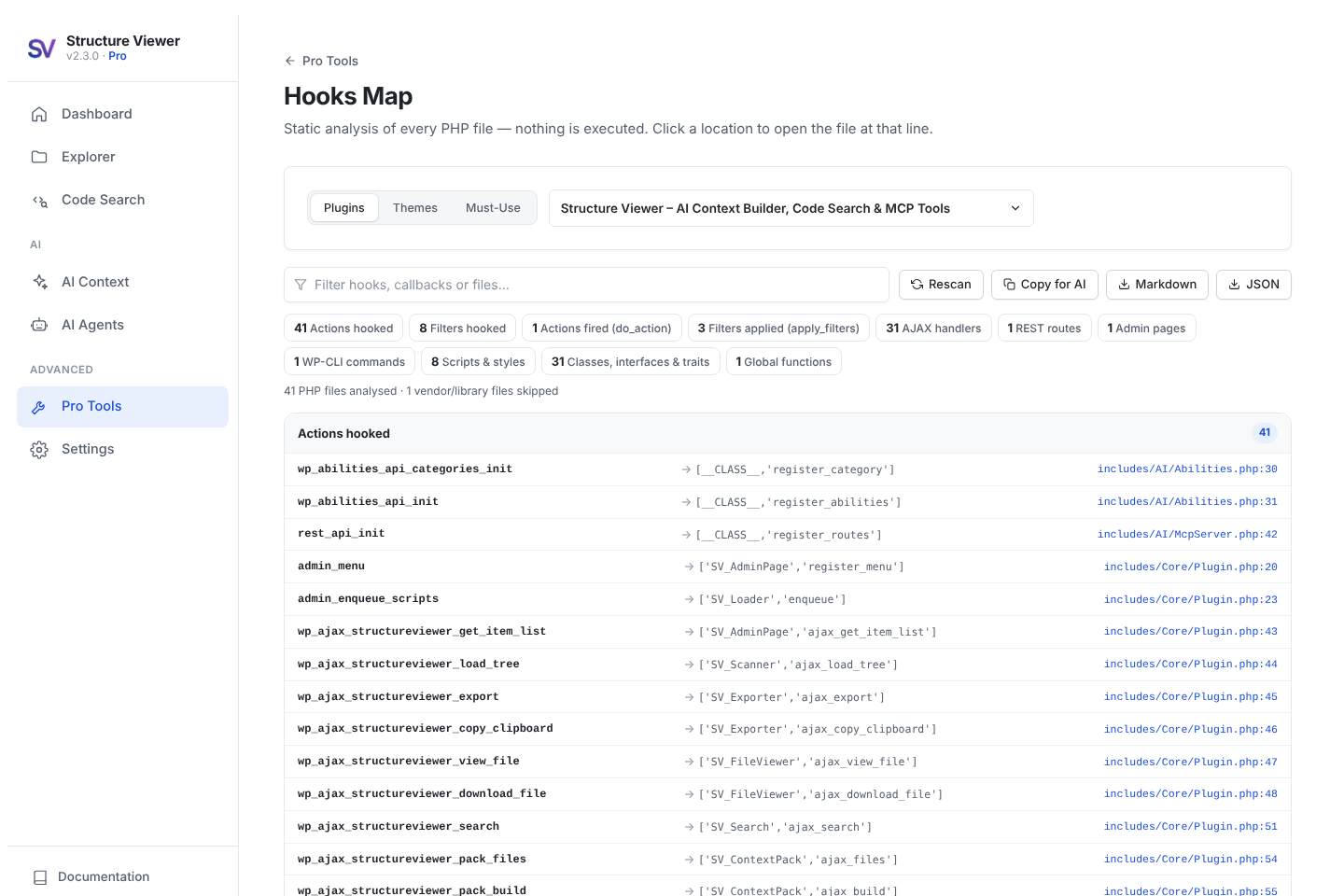
Pro: Hooks Map — every hook, route and shortcode with file and line
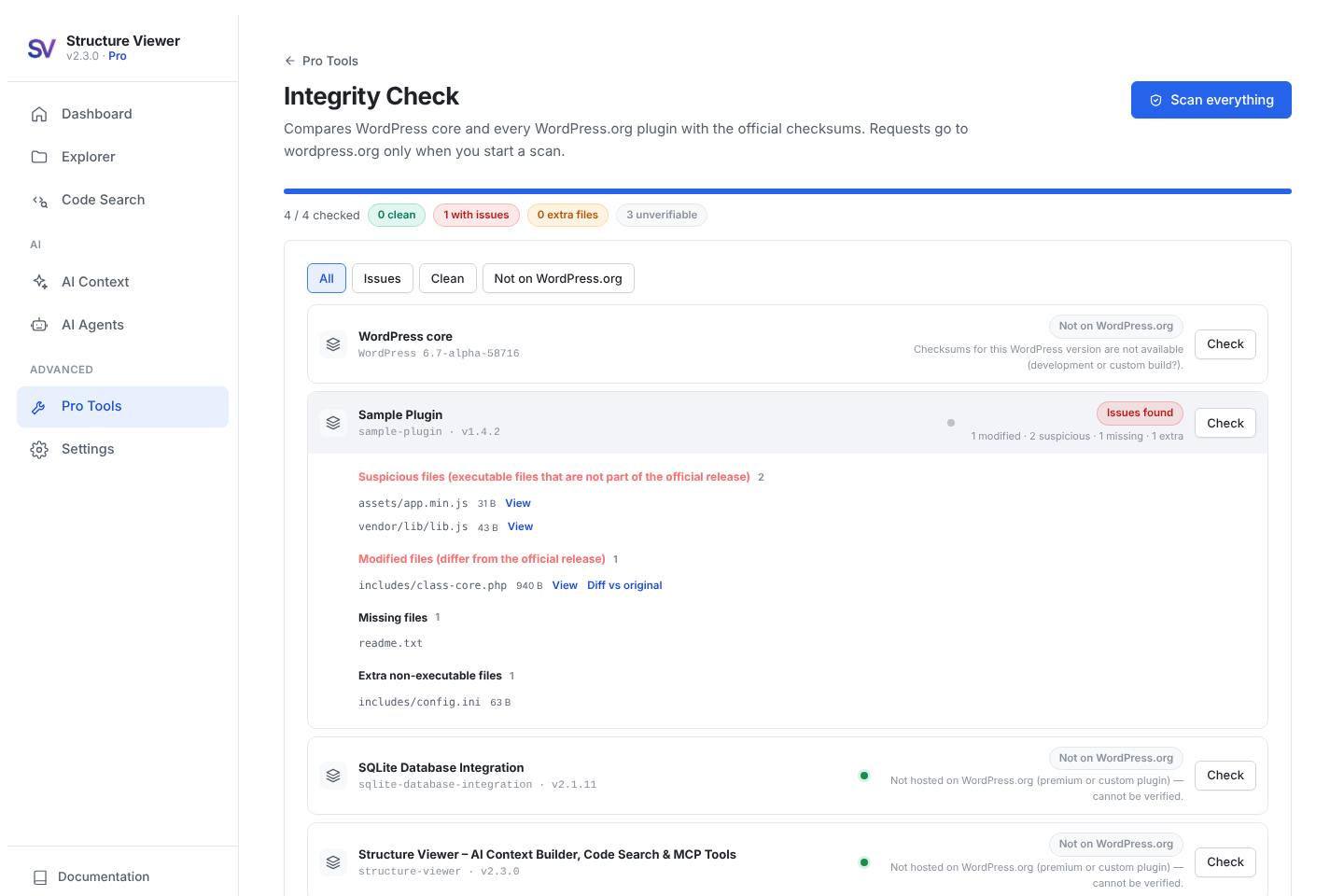
Pro: Integrity Check — modified and suspicious files with diff against the original
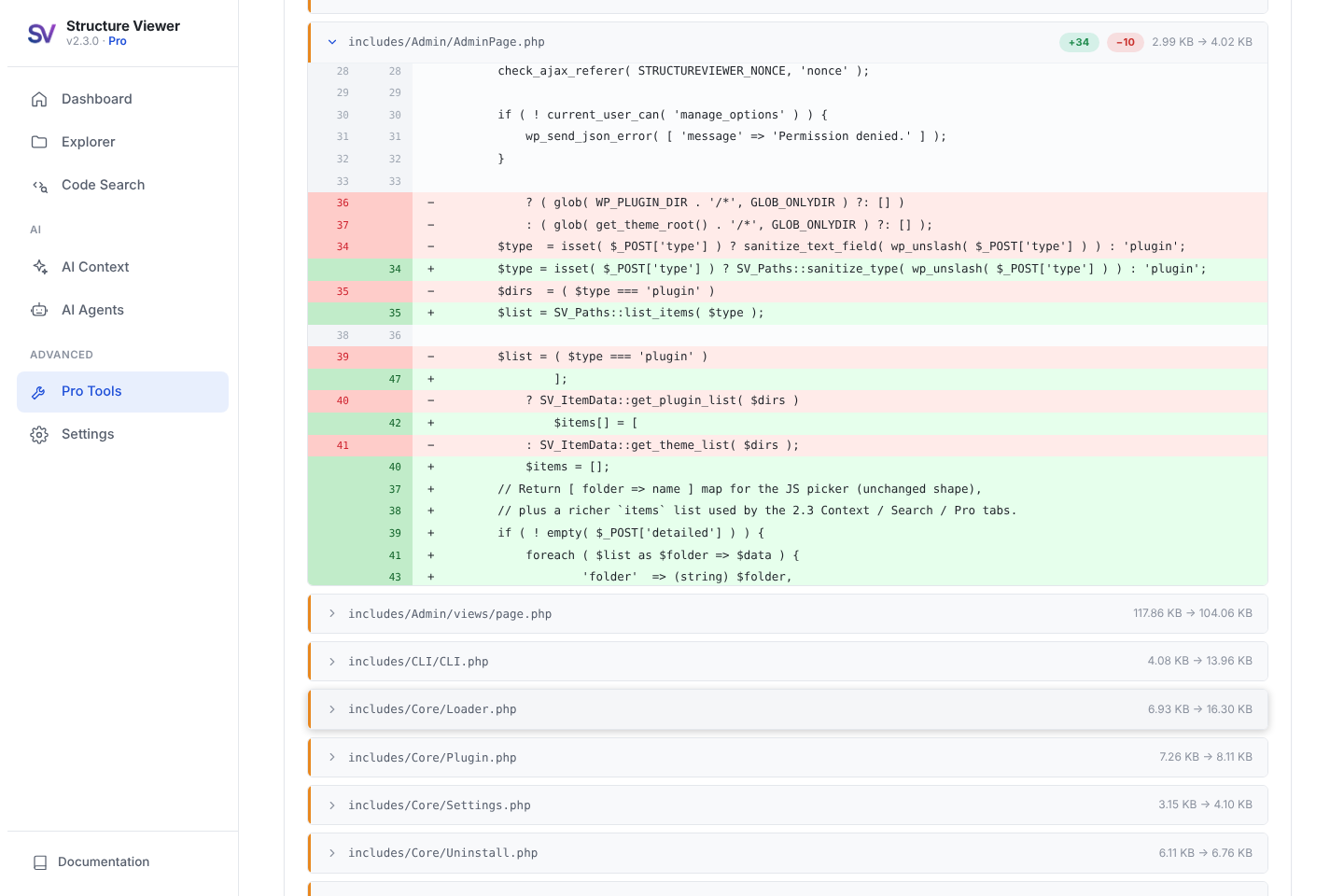
Pro: Comparator — colour-coded diff between two plugin versions
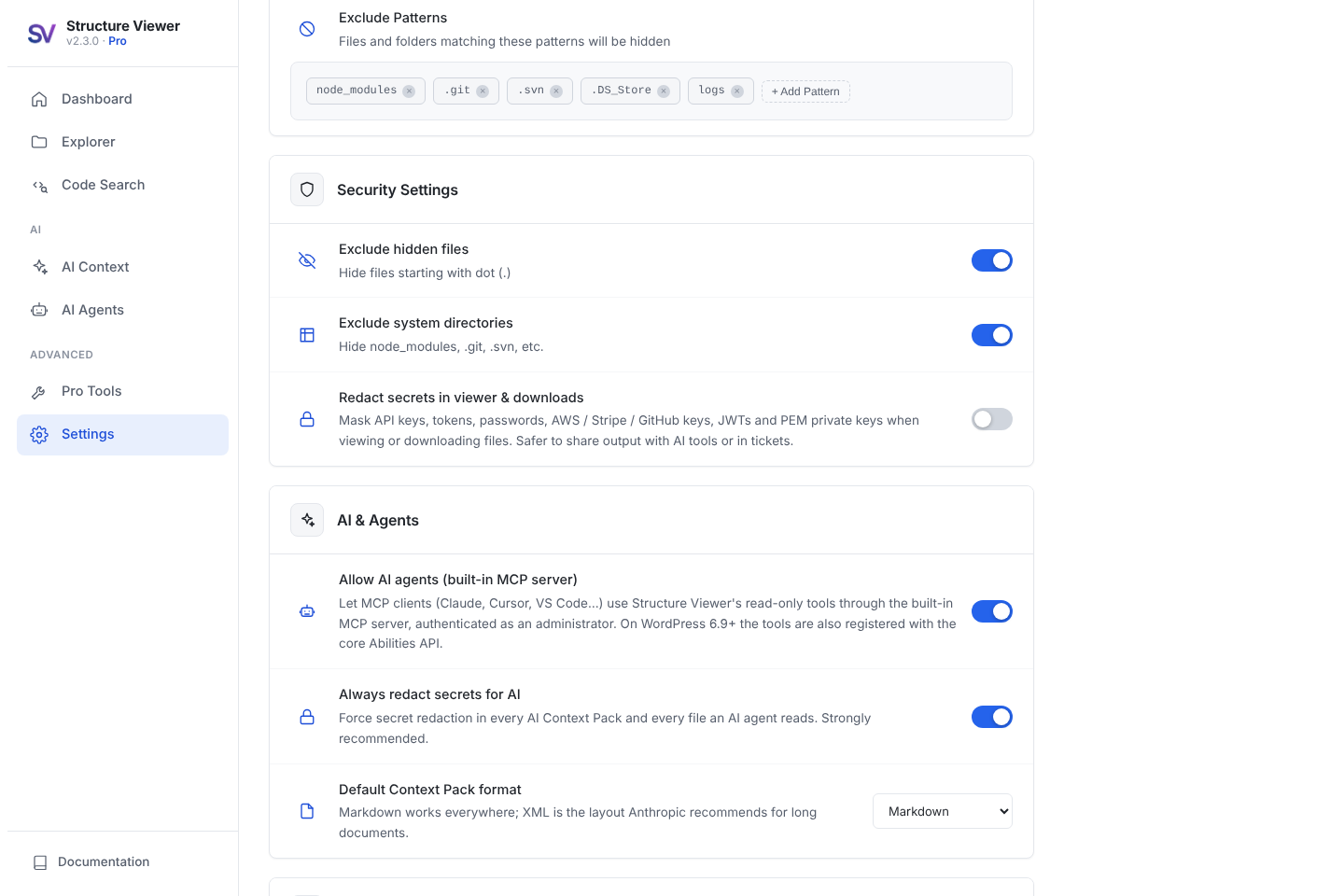
Settings — AI & agent controls, redaction and accent colour
Faq
A single document that contains everything an AI needs to understand a plugin or theme: its name, version and requirements, a file tree, and the full source of the relevant files — with secrets redacted. Paste it into ChatGPT, Claude, Gemini or any other assistant, or attach the downloaded file, then ask your question.
All of them. Context Packs are plain Markdown, XML or text, so they work with any chat assistant or IDE. AI agents that speak MCP (Claude Desktop, Claude Code, Cursor, VS Code with Copilot, Windsurf and many others) connect directly to Structure Viewer’s built-in MCP server.
Open Tools Structure Viewer AI Agents, click Create token, choose your client and copy the generated configuration. Click Run self-test to confirm everything works. No other plugin is needed.
Every Structure Viewer ability is read-only and requires an authenticated administrator (via Application Password). Secrets are redacted before content is returned, and you can turn agent access off at any time under Settings AI & Agents.
No. Structure Viewer ships its own MCP server, so it works on its own on WordPress 5.8 and newer. If your site runs WordPress 6.9+, the same tools are additionally registered with the core Abilities API for any other Abilities-aware tooling.
Each administrator can create a personal connection token (shown once, stored only as a hash, revocable any time). The token only works on the Structure Viewer MCP endpoint, every tool is read-only, secrets are redacted, and browser requests from other origins are rejected. Use HTTPS on live sites. WordPress Application Passwords are accepted as well.
The Explorer sidebar shows an estimate for every plugin and theme, and the Context Pack builder shows a live estimate for your selection against the context window you choose.
API keys and tokens from AWS, Stripe, GitHub, Google, Slack, OpenAI, Anthropic, SendGrid and Mailchimp, JWTs, PEM private keys, wp-config credentials, credential-looking constants, .env-style assignments, passwords in connection strings and generic password = "…" style assignments.
Yes — Code Search looks inside every file, with regex, case and whole-word options, extension filters and clickable line results. You can search one plugin or theme, or all of them at once.
No. Structure Viewer is a read-only code explorer for developers and AI workflows. It cannot edit, upload or delete files, which makes it safe to use on live sites.
Yes. It is read-only, admin-only and loads nothing on your frontend.
No. Everything works from the WordPress admin.
Yes. Everything that works for plugins works for themes, and the mu-plugins folder appears automatically when your site has one.
Yes: pack, search, mcp, export and list are free; hooks and integrity come with Pro. Run wp help structure-viewer for all options.
Hooks Map, Integrity Check, Context Pack presets and compression, Comparator and FlatPack. The free version includes the Explorer, file viewer, AI Context Packs, Code Search, AI agent tools, exports, WP-CLI and secret redaction.
It downloads the official checksums for the exact version of each WordPress.org plugin (and for WordPress core) and compares them with the files on your server. Premium and custom plugins can’t be verified because WordPress.org has no checksums for them; they are listed as “not on WordPress.org”.
Settings are stored in the structureviewer_settings option. A few per-user preferences (dismissed notices, Pro presets) are stored as user meta. No personal data is collected or sent anywhere.
It is designed for single sites and works on individual subsites, but network-level administration is not officially supported.
A review on WordPress.org helps a lot, and you can buy us a coffee at buymeacoffee.com/blincks.
Reviews
Saved lot of AI tokens
By 
It was painful seeing Claude always low in AI tokens, making me wait for couple of hours. SV is helping me a lot in providing context to Claude, instead of uploading a complete plugin when I only need one file to update for WordPress customization. Thus allow me to make my AI tool do more things for me before its tokens run out. Highly recommended ! ✨
A Must Have Plugin for Developers
By 
As a web developer who audits and customizes a lot of third-party plugins/themes, this plugin has become must have for me for AI assisted development. Helping me train the AI environment quickly and speeding up my development work significantly.
A suggestion: It would be great if I can search inside the file codes as well.
Big thanks to the team, really useful free tool! 👏🏻
A Simple and Handy Tool for Viewing Plugin and Theme Files
By 
Structure Viewer is a lightweight and straightforward plugin that lets you browse the full file and folder structure of your themes and plugins directly inside the WordPress dashboard. It’s read-only and safe to use, making it useful for developers, auditors, or anyone who needs to inspect code without FTP acces
Changelog
2.3.0
- New: AI Context Pack — package any plugin or theme into one AI-ready Markdown, XML or text document with project facts, file tree and full source. Smart file selection, live token estimate with model budgets, task templates, copy or download.
- New: Built-in MCP server — Structure Viewer is now an MCP server itself (Streamable HTTP +
wp structure-viewer mcpstdio), no other plugin required. Six read-only tools (eight with Pro), MCP prompts, per-user connection tokens, generated configs for Claude Code, Claude Desktop, Cursor, VS Code, Windsurf and cURL, plus a live self-test. On WordPress 6.9+ the tools are also registered with the core Abilities API. - New: Code Search — search inside files of one or all plugins/themes with regex, match case, whole word, extension filters, context lines, security quick-searches and click-to-open at the matching line.
- New: Built-in syntax highlighter with line numbers in the file viewer, plus “Copy for AI” and “Add to Context Pack” buttons.
- New: Must-use plugins can be browsed, searched and packed.
- New: WP-CLI commands
packandsearch(and Prohooksandintegrity). - New (Pro): Hooks Map — every action, filter, AJAX handler, REST route, shortcode, post type, taxonomy, block, cron event, admin page and WP-CLI command, with file and line. Markdown/JSON export.
- New (Pro): Integrity Check — verify WordPress core and WordPress.org plugins against official checksums, with a diff against the original file.
- New (Pro): Context Pack presets and token compression.
- Improved: Secret redaction now also detects OpenAI/Anthropic, SendGrid and Mailchimp keys, credential constants,
.env-style assignments and passwords in connection strings. - Improved: Completely redesigned interface — a clean, light design with sidebar navigation, a new dashboard (site stats, AI readiness, quick actions, Pro Tools hub), calmer alerts, light code blocks and a blue default accent. The dark mode option has been retired.
- Improved: Explorer sidebar shows an estimated AI token count and “Use with AI” shortcuts.
- Improved: excluded folders (node_modules, vendor, .git…) are now pruned while walking, which makes scans faster on large plugins.
- Improved: WordPress 7.1 compatibility, including the Abilities API
publicexposure flag introduced in 7.1. - Updated: Freemius SDK to 2.13.5.
2.2.3
- Improved: Dashboard redesign — a cleaner “Welcome to Structure Viewer” card and refreshed Quick Action and stat cards with consistent depth and hover motion in both dark and light mode.
- Improved: Tree view polish — connector guide lines on nested folders, animated expand/collapse chevrons, clearer hover states and tighter alignment for easier scanning of large structures.
- Improved: Comparator results — the Added / Removed / Modified / Unchanged stat boxes are now clickable and switch the file list shown below them, so you can jump straight to the change type you care about.
- Improved: Comparator now scrolls back to the top automatically when you start a comparison, hides the mode selector and upload panels while a result is on screen, and offers a one-click “New Comparison” action to start over.
- Improved: Comparator diff controls reworked for performance — removed the costly “Expand All” (which could try to expand thousands of files at once); a “Collapse All” button now appears only when you’ve expanded a file in the current tab.
- Improved: Comparator “Reset All” button is now centre-aligned, and the redundant line-count readout was removed from the results toolbar.
- Fixed: File vs File mode no longer accepts ZIP archives or image files — they are rejected on both the client and the server with a clear message (use ZIP vs ZIP mode for archives).
- Improved: Replaced the dated Courier New monospace font throughout the UI with a modern system monospace stack for crisper file paths, tags and metadata.
2.2.2
- New: Auto-redact secrets on export — opt-in toggle in Settings Security Settings that masks API keys, tokens, passwords, AWS / Stripe / GitHub / Google / Slack keys, JWTs, PEM private keys, and wp-config credential constants in viewed and downloaded file content. Safer to share output with AI tools, tickets, or screenshares.
- New: Redaction badge in the file viewer modal showing how many secrets were masked for the open file.
- New: Live search now works in All Plugins / All Themes mode — type to filter the plugin or theme list by name. The placeholder updates to reflect the current mode so the behaviour is obvious.
- New: Donate / support link on the Plugins list and in Settings Support development for users who want to fund continued development.
- Improved: Tab content no longer leaves an empty gradient strip below short tabs (Dashboard, Comparator / FlatPack tabs). The viewport background now lives on the body element so every tab feels consistent.
- Improved: Search result cap raised from 200 to 500, and the response now signals when the cap was hit so future UI can surface a “narrow your search” hint.
- Improved: Dashboard file-count cache key derived from the plugin version — every release now automatically invalidates the stale count instead of relying on a manually-bumped constant.
- Improved: Updated plugin name and short description for clarity — Structure Viewer is a file explorer and AI context builder.
2.2.1
- New: Quick dark/light mode toggle directly from the plugin header — no need to visit Settings
- Improved: Search results UI redesigned for better readability and faster scanning
- Improved: Tab navigation styling refined for a cleaner, more consistent look
- Improved: Dashboard layout adjustments for tighter spacing and visual alignment
2.2.0
- New: Pro Comparator — compare two plugin or theme versions with a color-coded line-by-line diff; supports ZIPs, installed plugins/themes, and individual files; works with large and minified files
- New: Pro FlatPack — extract and filter files from any plugin or theme ZIP by type (PHP, CSS, JS, images, custom); download as a single flat ZIP with smart collision-safe naming
- New: Dashboard redesign — stat tiles with combined plugin and theme file count; async largest-plugins table; recently viewed panel; WordPress environment strip
- New: Explorer improvements — searchable item picker; live tree search with next/prev navigation; file type tag strip; lazy loading for all-items mode; AJAX refresh button (no page reload)
- New: UI — dark/light mode with server-side class; accent color picker with 5 options (default: Emerald); branded logo
- New: Copy format setting — choose JSON, Text, or XML as the clipboard copy format in Settings
- New: Pro upsell placeholders — free users see feature descriptions and a direct upgrade button in the Comparator and FlatPack tabs
- Improved: Comparator diff engine — patience algorithm for large files; correct deletion-before-addition ordering; minified file tokenization; similar-change pairing; raised limits (5 MB / 20,000 lines)
- New: Accent color picker — customize the plugin with the color you want to see.
- Improved: FlatPack workflow — extract-all-then-filter-live; reset on new file selection; filter pills built from actual ZIP contents
- Improved: Settings — auto-save with debounce and toast; exclusion patterns UI
- Fixed: WordPress admin notices — scoped text color to plugin container only; no longer overrides WP notice colors
- Fixed: FlatPack — protection files no longer appear in extracted file list
- Fixed: Export / clipboard — “undefined” output caused by buffer pollution resolved
- Fixed: Bug Fixes — Several bug fixes and security improvements
2.1.1
- Fixed: Copy Structure button not working in Safari.
2.1
- New: Download any individual file directly from the file viewer modal (all file types including binary)
- New: PDF export with styled header, monospace tree, page numbers, and automatic page breaks
- Security: download handler with path traversal prevention, nonce verification, and MIME type detection
2.0
- Complete UI/UX overhaul — modernized interface, modal file viewer with syntax highlighting
- Multi-format export: JSON and XML added alongside TXT
- Real-time search with file type filtering, one-click clipboard copy, keyboard navigation, WP-CLI
1.2
- Settings link added to plugin listing.
1.1
- Added TXT export.
1.0
- Initial release.