Bulk Product Editor plugin allows you to create and edit your WooCommerce products and categories with Google Sheets.

Bulk Product Editor plugin allows you to create and edit your WooCommerce products and categories with Google Sheets.
Description
Managing products like creating, updating inventory and prices, or updating images, short descriptions, or titles for SEO across multiple products is very hectic and time-consuming. So, rather than focusing on marketing or sales strategy, most of your time is being eaten up by bulk product or category management. Bulk Product Editor is the ultimate solution. Our plugin provides the easiest and quickest way to manage your products and categories with Google Sheets. Google Sheets are amazing when it comes to managing tabular data in the cloud. We have built a Google Sheet Addon, approved and listed by the Google Marketplace. No complex or tricky setup, no need to generate API keys — just run our connection wizard, and your store will be connected in less than a minute. Now you can manage your products and categories with ease. Adding a new product or updating an existing product in Google Sheets is really easy and quick, and thousands of products can be pushed or fetched in one click.
Watch Video Guide
What is Sync Vs Fetch?
Sync means to push your products from Google Sheets to your connected store, and Fetch is the reverse, i.e., to pull products from your store to Google Sheets.
How to fetch products from my store?
- Just click BPS Menu > Fetch
- Click Fetch Products
- Make sure you set the chunk size as per your need
- Chunk means how many products will be pushed and pulled in one round. Recommended: 200–300
Can custom fields or taxonomies be attached?
- Yes, create a new column in the sheet and set the header name.
- E.g., if you want to add
seo_titleas a custom field, set the header name toseo_title - Note: this
seo_titlemust be set inside theManage Fieldsmenu first
Live Demo
- Check all features in the Live Demo
- This demo has already installed BPS Free and Pro versions.
- When the demo is ready, please follow the instructions as explained here
Features
- One-Click Import
- Sync All Your Products
- Sync All Your Categories
- Add/remove product fields
- Sync from Store to Google Sheet™
- Built using the latest Google App Script API
- Dynamic Custom Taxonomy Support
PRO Features
- Variable Products Supported
- Auto-Sync [hourly, twice daily, daily]
- Logging Auto Sync
- Export Existing Products into Google Sheet™
- Export Existing Categories into Google Sheet™
- Export Existing Variations into Google Sheet™
- Metadata columns
- Custom Taxonomy Support (product_brand, etc.)
Start managing your store with WooCommerce Bulk Products Editor
Use Cases
Opening a new store
Add all of your products to the Google Sheet, select Sync Products, and bask in the joy.
Managing an existing store
To manage any updates or new products, export all of your products from your store to Google Sheets™.
Managing the stock
If the present solution’s stock management is driving you crazy, use Bulk Product Sync to add manage_stock and quantity columns to the sheet, and you’ll be free of the problem.
Installation
This section describes how to install the plugin and get it working.
e.g.
- Upload
bulk-product-syncto the/wp-content/plugins/directory - Activate the plugin through the ‘Plugins’ menu in WordPress
- Go to WooCommerce > BulkProductSync to configure the plugin1. Download the plugin and activate it
- Go to WooCommerce > Settings > Google Products
- Enter your Google Credentials
- Enter WooCommerce API/Secret Keys
Screenshots

This screen shot description corresponds to screenshot-1.(png|jpg|jpeg|gif). Note that the screenshot is taken from the /assets directory or the directory that contains the stable readme.txt (tags or trunk). Screenshots in the /assets directory take precedence. For example,
/assets/screenshot-1.pngwould win over/tags/4.3/screenshot-1.png(or jpg, jpeg, gif).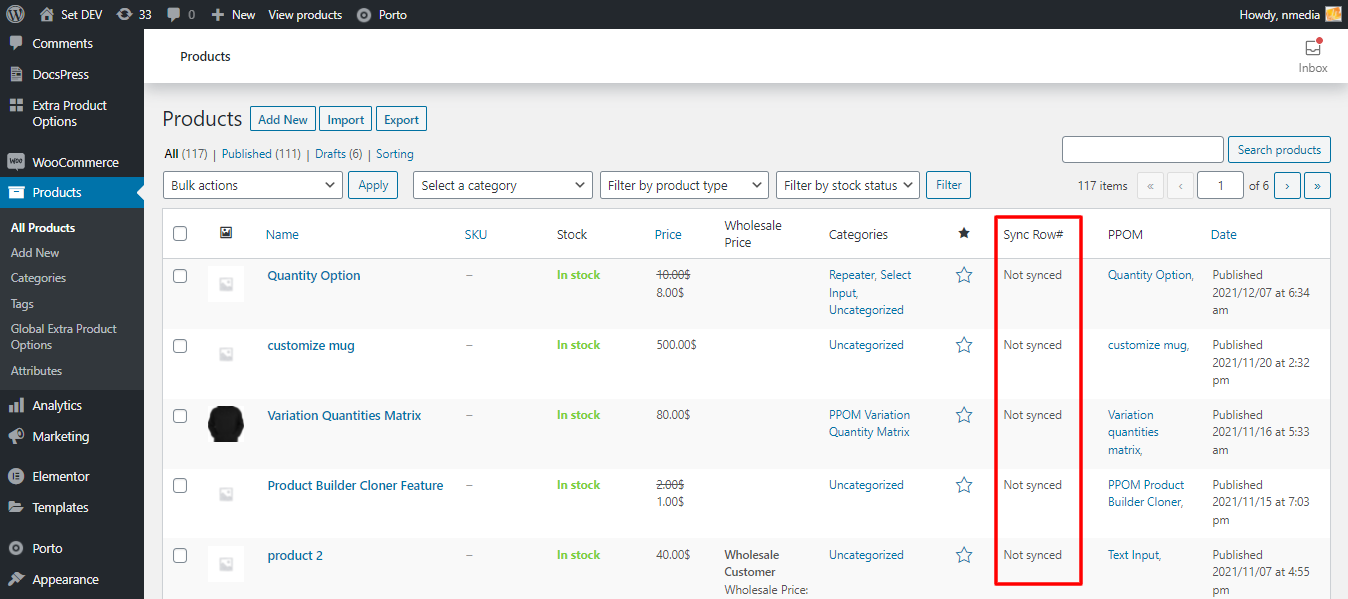
This is the second screen shot1. Import products from Google Sheet™ to store

Showing products sync status in admin

Google Sync™ columns
Faq
Yes! Version 9.0 introduces dynamic custom taxonomy support. Any custom taxonomy (like product_brand) defined in your sheet mapping will automatically work for both sync and fetch operations.
Yes! Product brands and any other custom taxonomies are now fully supported. Just add the taxonomy column to your Google Sheet and it will sync automatically.
For large catalogs, increase your server’s PHP memory limit and execution time. The plugin includes chunking to handle large datasets efficiently.= What is the difference between Pro and Free versions? =
The only import option in the free version is from a Google Sheet™ to the store, and some fields, such as images, and variable products, cannot be imported. As mentioned above in the PRO features list, you can export (from store to Google Sheet™) and do much more when using the Pro version.
Yes, in Pro version
Yes
- Check all features in Live Demo
- This demo has already installed BPS Free and Pro version.
- Make sure you follow the instructions as explained here
Yes
Reviews
Looks like its been abandoned
By 
Started off great and was quite useful, auto fetch and update never worked properly but recently the update by sku stopped working and the support forum gets no replies. Hasnt had an update in over 12 months so i dont think they are actively supporting this plugin anymore which is a real shame
Good potential but lack of support is shocking
By 
We've encountered an issue for months now, support is basically non-existent. no replies, account on their webpage for the pro version deleted. was forced to buy an extra year of support updates and still no reply. Very keen to change the review if someone ever replies to us. At this stage, we advise against purchasing the pro version.
The best syc plugin, and cool support!
By 
Thank you, perfect work!
Perfect!
By 
EVerything is working perfectly and support is great! i have 600 products so i can recommend this
Great support
By 
My experience with support has been amazing because they are very responsive and knowledgeable. I never do reviews but I had to with this because I want to let people know how much I like this plugin. It's worth every penny. It's so useful to be able to keep my product info consistent without having to switch between the cumbersome woocommerce UI pages.
The best script for direct price update
By 
For a long time, I was looking for a system that I can give to the sellers of my site so that they can directly update the products without entering the site and…
This plugin is really strong, even its free version can meet all the needs of a store with a small number of products.
I bought the pro version because there were many products on our site
Really great in every way
Refund Guarantee doesn't work
By 
The product didn't meet our expectations - it's frustrating, hard to operate, some functions make it even slower to do it than just do it 1 by 1 on the website, the tool lack video tutorials and support service is bad - the only thing they say is to watch 1 single tutorial they have.
The Refund Guarantee doesn't work - the seller didn't respond to our emails and didn't issue the refund.
Please be aware !
Great product
By 
The product is very useful, thanks to the creative programmer
Works great and customisable
By 
Very happy with this plugin, to be able to pull this info to a google sheet and run script on the data and return it to the website with extra help from the plugin developer has been great. Would recommend and if you want to keep a stock list in google sheets it’s definitely worth the premium version. Does what it says it will and additional customisation and help from N-Media is amazing!!
Don't buy the premium
By 
The plugin did not work for us, but the developer sent a refund so at least it's ok
Changelog
9.6 October 23, 2025
- SECURITY FIX: Fixed critical vulnerability that exposed all WooCommerce REST API endpoints
- Fixed: Permission bypass now only applies to wbps endpoints, not all WooCommerce APIs
- Improved: CORS headers restricted to wbps endpoints only
- Enhanced: Better security isolation for plugin-specific endpoints
9.5
- Added: Dynamic custom taxonomy support for all taxonomies
- Added: Automatic product_brand and custom taxonomy sync/fetch
- Fixed: Custom taxonomy fields not being fetched from store to sheet
- Improved: Dynamic filter registration for better extensibility
- Enhanced: Better handling of taxonomy data in both directions
9.3 April 26, 2025
Bug fixed: Images by ids were syncing, it is fixed now
9.2 April 26, 2025
- Bug fixed: CORS issue fixed while synced.
9.1 April 25, 2025
- Bug fixed: Sync issue fixed caused by last udpate
9.0 April 23, 2025
- Feature: Improved error handling for large POST body uploads during product sync
- Feature: Added validation to all REST endpoints with fallback for empty/missing params
- Feature: Optimized product/category linking using
prepare()safely (PHP 7.0+ support) - Bug Fix: Fixed positional argument unpacking in
wpdb->preparewhen deleting meta - Tweaks: Refined plugin admin UI for better clarity during setup
8.6 November 19, 2024
- Feature: Brands is now core part of WooCommerce, thus BPS now can handle brands just like categories
- Feature: Serialized meta now can be fetched and synced
8.5 October 28, 2024
- Feature: Some suggested improvements
- Feature: Taxonomies now can be added/updated via Google sheet.
8.4 October 5, 2024
- Bug fixed: Dimensions fields were not being fetched for variations, now it is fixed.
8.3 April 13, 2024
- Feature: Compatible with WordPress version 6.5.2
8.2 November 13, 2023
- Tweaks: AuthCode added in options
8.1 November 5, 2023
- Feature: Product attributes now can be fetched
8.0 October 30, 2023
- Feature: Setup wizard now is super easy in less than 10 secconds.
7.15 October 18, 2023
- Bug fixed: Fetch failed when pro version deactivated, not it has message
7.14 October 16, 2023
- Bug fixed: AutoSync issue fixed, stop sending Fetch request on AutoSync
7.13 October 10, 2023
- Bug fixed: AutoFetch not working now it is fixed.
7.12.2 September 20, 2023
- Tweaks: Check with latest version of WordPress
7.12.1 August 24, 2023
- Tweaks: Demo link updated & some code optimized.
- Info: No Major bug found
7.12 July 27, 2023
- Bug fixed: When type column is not given it show warning
7.11 July 20, 2023
- Bug fixed: categories sync issue fixed
7.10.1 June 25, 2023
- Feature: Sync operation is more optimized for larger set of data
- Feature: Fetch now has option to Reset/Refresh.
7.8 June 20, 2023
- Bug fixed: Tags by names were not syncing, now these are fixed
7.7 June 17, 2023
- Bug fixed: Fetch error fixed when used few columns like cross_sell_ids, upsell_ids etc
7.6 June 6, 2023
- Feature: Settings page added inside plugin for connection status
- Feature: Pro activate process made easy
7.5.3 June 4, 2023
- Bug fixed: Debuggin removed which cause error in fetching.
7.5.2 June 3, 2023
- Bug fixed: Larger chunks for product issue is fixed.
7.5 May 24, 2023
- Bug fixed: Due to PHP version code is updated to work with all versions.
7.4 May 10, 2023
- Bug fixed: Sync operation slow issue fixed.
7.3.1 May 8, 2023
- Bug fixed: During sync operation old installations were stucked.
7.3 May 6, 2023
- Bug fixed: Due to last update, sync was not working. It is fixed now
- Bug fixed: Error on AutFetch enable fixed
7.2 May 2, 2023
- Feature: AutoFetch is optimized
- Feature: AutoSync feature is added
7.1 April 20, 2023
- Feature: AutoFetch is optimized with new way
7.0 April 5, 2023
- Feature: Bulk Product Sync is now released as Google Addon
- Feature: Removed Time-out issues for larger chunks of products
- Feature: Manage columns names
- Feature: Product attributes generator for variable and variations in one click
6.15 March 4, 2023
- Feature: Googleclient libraries updated
6.14 December 1, 2022
- Bug fixed:Data validations applied as per standards
- Due to some branding issues name changed from GoogleSync to Bulk Product Sync
6.13 December 1, 2022
- Bug fixed: Grouped products were not being synced and fetched, now it is fixed.
6.12 September 1, 2022
- Bug fixed: HTML entities were not decoding in short_description and title
6.11 August 22, 2022
- Bug fixed: All categories were being pulled, now it is fixed now
- Feature: Categories and Tags now can be set with Names also.
6.10.3 July 19, 2022
- Bug Fixed: Upsell Ids issue fixed
6.10.2- May 11, 2022
- Bug fixed: Variation image was not being fetched. Now it is fixed.
6.10.1 – May 11, 2022
- Feature: Fetch operation is optimized to make it more speedy.
- Bug fixed: A minor bug fixed due to the last update regarding the Reset function.
6.10 – May 11, 2022
- Bug fixed: Product fetch issue fixed
6.9 – April 28, 2022
- Bug fixed: Variations were not being fetched
6.8 – March 14, 2022
- Feature: Disconnect with current connect feature added.
6.7 – February 21, 2022
- Bug fixed: Dimensions update issue fixed
- Bug fixed: Fetch issue fixed when the dimensions are added
6.6 – February 1, 2022
- Bug fixed: Product fetch issue fixed in PRO version
6.5 – January 31, 2022
- Bug fixed: Meta data export issue fixed
6.4 – January 26, 2022
- Bug fixed: Synback issue fixed with some keys like variations, cross_sell etc
- Tweaks: set_transient replaced with udpate_option function to save chunks.
6.3 – December 20 2021
- Feature: Now product status can be set for syncback (exporting to sheet) as pro feature
6.2 – December 2 2021
- Tweaks: Some links added on the admin side
6.1 – November 17 2021
- Connection issue fixed
6.0, October 13, 2021
5.2.1, October 13, 2021
- Bug fixed: Fetch products issue fixed when some fields have NULL values
5.2, October 13, 2021
- Fetch products issue fixed in PRO version
5.1, October 13, 2021
- Tweaks: Some error messages optimized
- Tweaks: IDs not pull issue explain here
5.0, September 18, 2021
- Feature: Removed un-used Google Libraries, now plugin files reduced from 17Mb to 1.5Mb
- Feature: Large chunks of data can be exported
- Feature: QuickConnect – No need to create Google credentials, all will be done via Najeebmedia Google App
4.0, August 22, 2021
- Features: Now product meta can be added as a separate column
- Features: Sync operation is optimized to handle more products in less time.
3.1 – August 4, 2021
3.0 – June 14, 2021
- Features: Major update to manage sync from the Google Sheet menu
- Features: Google App script used to send products from Google Sheet™
2.6 – May 13, 2021
2.5 – April 18, 2021
- Bug fixed: Error occurred in last version
2.4 – April 18, 2021
- Bug fixed: Images import issue fixed
2.3 – March 26, 2021
- Tweaks: Unnecessary files removed
- Bug fixed: Sync Back chunk size not linked, it is linked now.
2.2 – March 11, 2021
- Feature: Now the Orders & Customers data can be synced with Add-on
- Bug fixed: Metadata syncing issue fixed
2.1 – March 3, 2021
- Bug fixed: Variations syncing-back issue fixed
- Tweaks: Warnings removed, performance increased.
2.0 – February 23, 2021
- Features: Chunked syncing – best approach for larger data sets
- Features: Calling WC API internally, no need for WC API key and secret key
1.5 – February 10, 2021
- Tweaks: Optimized the sync speed
- Bug fixed: PRO: Variations images issue fixed when import/sync
1.4 – February 8, 2021
- Features: Response message added for sync-back
- Bug fixed: REST API endpoint warning issue fixed
- Bug fixed: PRO: Sync-back products/categories limits removed
1.3 – February 1, 2021
- Features: Now existing products can be added to Google Sheet™
1.2 – December 11, 2020
- Features: Now images can be added via URL
1.1 – November 10, 2020
- Bug fixed: Product delete sync-back not working, fixed now
1.0.0
Initial Release