Tax Switch for WooCommerce
Tax Switch for WooCommerce
Description
Tax Switch for WooCommerce enhances your WooCommerce store by allowing users to toggle between displaying prices including or excluding VAT. This plugin adds a customizable switch component and provides a flexible way to display both price versions.
Key features
- Display customizable switches where you want
- Gutenberg block support
- Shortcode for easy integration (including shortcode generator)
- Flexible display options for prices with and without VAT
- Remembers the user’s preference for future visits
- Choose between a toggle switch or buttons
For more information about this plugin, please visit the plugin page.
Requirements
- WooCommerce plugin installed and activated
- WooCommerce tax calculations enabled and configured
Configuration
Configure the plugin settings below for proper functionality.
WooCommerce settings
Ensure these WooCommerce settings are configured first:
-
Configure tax calculations
- Go to: WooCommerce > Settings > General
- Verify your shop address is complete
- Enable “Enable tax rates and calculations”
- Set “Default customer location” to “Shop base address”
-
Set up tax rates
- Go to: WooCommerce > Settings > Tax > Standard Rates
- Add your regional tax rates
-
Recommended: tax calculation method
- Go to: WooCommerce > Settings > Tax
- Set “Calculate tax based on” to “Shop base address”
(This provides instant tax calculation. Other methods require customers to enter their address first.)
-
Individual product configuration
- Edit products at: Products > [Product]
- Under Product Data > Tax, set status to “Taxable”
Plugin settings
Configure these plugin-specific settings:
- Main settings
- Go to: WooCommerce > Settings > Tax Switch
- Set your preferred text values
- Optional: Restrict display locations
- Optional: Generate a shortcode via WooCommerce > Settings > Tax Switch > Shortcode
Usage
After installation and configuration, you can add the tax switch to your pages in two ways:
- Use the Gutenberg block “Tax Switch for WooCommerce” in your page or post editor.
- Use the shortcode
[wdevs_tax_switch]anywhere in your content.
Shortcode Usage
Switch/buttons
Basic usage:
[wdevs_tax_switch]
Displays a switch to toggle displaying prices including or excluding VAT.
The shortcode accepts several attributes to customize its appearance and behavior:
class-name: Adds custom CSS classes to the switch.- Default: is-style-default
- Options: is-style-default, is-style-inline, or custom classes
switch-type: Determines the style of the toggle.- Default:
switch - Options:
switch,buttons
- Default:
switch-color: Sets the color of the switch handle.switch-color-checked: Sets the color of the switch when it’s in the “on” position.switch-background-color: Sets the background color of the switch.switch-text-color: Sets the text color of the switch labels.switch-background-color-checked: Sets the background color of the switch when it’s in the “on” position.switch-label-incl: Sets the text for the “including VAT” label.- Default: Uses the text set in the plugin settings or “Incl. VAT” if not set.
switch-label-excl: Sets the text for the “excluding VAT” label.- Default: Uses the text set in the plugin settings or “Excl. VAT” if not set.
Example with custom attributes:
[wdevs_tax_switch class-name="is-style-inline" switch-type="switch" switch-color="#ffffff" switch-color-checked="#000000" switch-background-color="#000000" switch-background-color-checked="#4CAF50" switch-text-color="#FF0000" switch-label-incl="Incl. tax" switch-label-excl="Excl. tax"]
Label
Basic usage:
[wdevs_tax_switch_label]
Displays text indicating the currently selected tax setting. The text updates automatically when the tax switch is toggled.
The shortcode accepts several attributes to customize its appearance and behavior:
class-name: Adds custom CSS classes to the label.- Default: is-style-default
- Options: is-style-default or custom classes
label-text-incl: Sets the text to display when “including VAT” is selected.- Default: Uses the text set in the plugin settings or “Incl. VAT” if not set.
label-text-excl: Sets the text to display when “excluding VAT” is selected.- Default: Uses the text set in the plugin settings or “Excl. VAT” if not set.
label-text-color: Sets the “excluding VAT” text color.label-text-color-checked: Sets the “including VAT” text color.
Example with custom attributes:
[wdevs_tax_switch_label class-name="tax-indicator" label-text-incl="Prices include tax" label-text-excl="Prices exclude tax" label-text-color="#FF0000" label-text-color-checked="#4CAF50"]
PHP implementation
You can use these shortcodes with PHP with the do_shortcode() function:
<?php echo do_shortcode('[wdevs_tax_switch]'); ?>
<?php echo do_shortcode('[wdevs_tax_switch_label]'); ?>
JavaScript events
The switch fires a JavaScript event when the tax display is toggled. You can listen for this event to execute custom code when a user switches between inclusive and exclusive VAT display. This is useful for when you need to perform additional actions based on the tax display state.
document.addEventListener('wdevs-tax-switch-changed', function(event) {
   console.log(event.detail);
   // event.detail contains:
   // - isSwitched: boolean - the raw switch state
   // - displayIncludingVat: boolean - whether prices now display including VAT
 });
If you are loading the switch dynamically (via AJAX), dispatch this event after rendering to initialize the component:
document.dispatchEvent( new CustomEvent('wdevs-tax-switch-appeared') );
WPML
To translate the option texts via WPML:
- Save your options first in: WooCommerce -> Settings -> Tax Switch
- Then translate the texts in: WPML -> String Translations and search for your option values in the domain ‘tax-switch-for-woocommerce’
Compatibility
This plugin integrates with WooCommerce’s standard filters and actions for price display and calculation. While most plugins and themes work out of the box, some third-party code use custom price building methods that require specific compatibility integrations.
The following themes have been tested and confirmed compatible:
- GeneratePress
- Blocksy
- Thrive
- Flatsome
- Kapee
- Entr
- Woodmart
The following plugins have been tested and confirmed compatible:
- WooCommerce Product Table Lite (+ PRO)
- Tiered Pricing Table for WooCommerce (+ Premium)
- Measurement Price Calculator for WooCommerce
- Discount Rules for WooCommerce
- YITH WooCommerce Product Add-Ons (+ & Extra Options Premium)
- JetEngine Listing Grid (Elementor)
- Product Add-Ons for WooCommerce
- B2BKing – Ultimate WooCommerce Wholesale and B2B Solution (+ Premium)
- Advanced Product Fields Pro for WooCommerce
- WooCommerce Quantity Discounts, Rules & Swatches
- FacetWP
- Variation Swatches for WooCommerce (+ PRO)
- Variation Price Display Range for WooCommerce (+ PRO)
- WooCommerce Product Add-Ons Ultimate
- Advanced Woo Search (+ PRO)
- B2B Market
- FiboFilters
- Extra Product Options & Add-Ons for WooCommerce
- FiboSearch – Ajax Search for WooCommerce (+ Pro)
- YayMail – WooCommerce Email Customizer
- PDF Invoices & Packing Slips for WooCommerce
- WooCommerce Product Bundles
- LiteSpeed Cache
If you encounter any compatibility issues with other plugins or themes, please let us know. Your feedback helps us improve the plugin and extend compatibility to more third-party solutions.
Incompatibility
After multiple attempts to create compatibility functions, reaching out to the plugin developers several times, and still finding no viable solution, the following plugins remain incompatible:
- Unlimited Elements for Elementor (+ Pro): AJAX pagination and filtering issues
- Barn2: WooCommerce Product Options
Additional Information
This plugin is fully open source. You can find the source code on GitHub
For more information and other WordPress plugins, visit Wijnberg Developments.
Installation
- Install the plugin through the WordPress plugins screen directly or Upload the plugin files to the
/wp-content/plugins/tax-switch-for-woocommercedirectory. - Activate the plugin through the ‘Plugins’ screen in WordPress.
- Configure your settings as described in the ‘Configuration’ section.
Screenshots
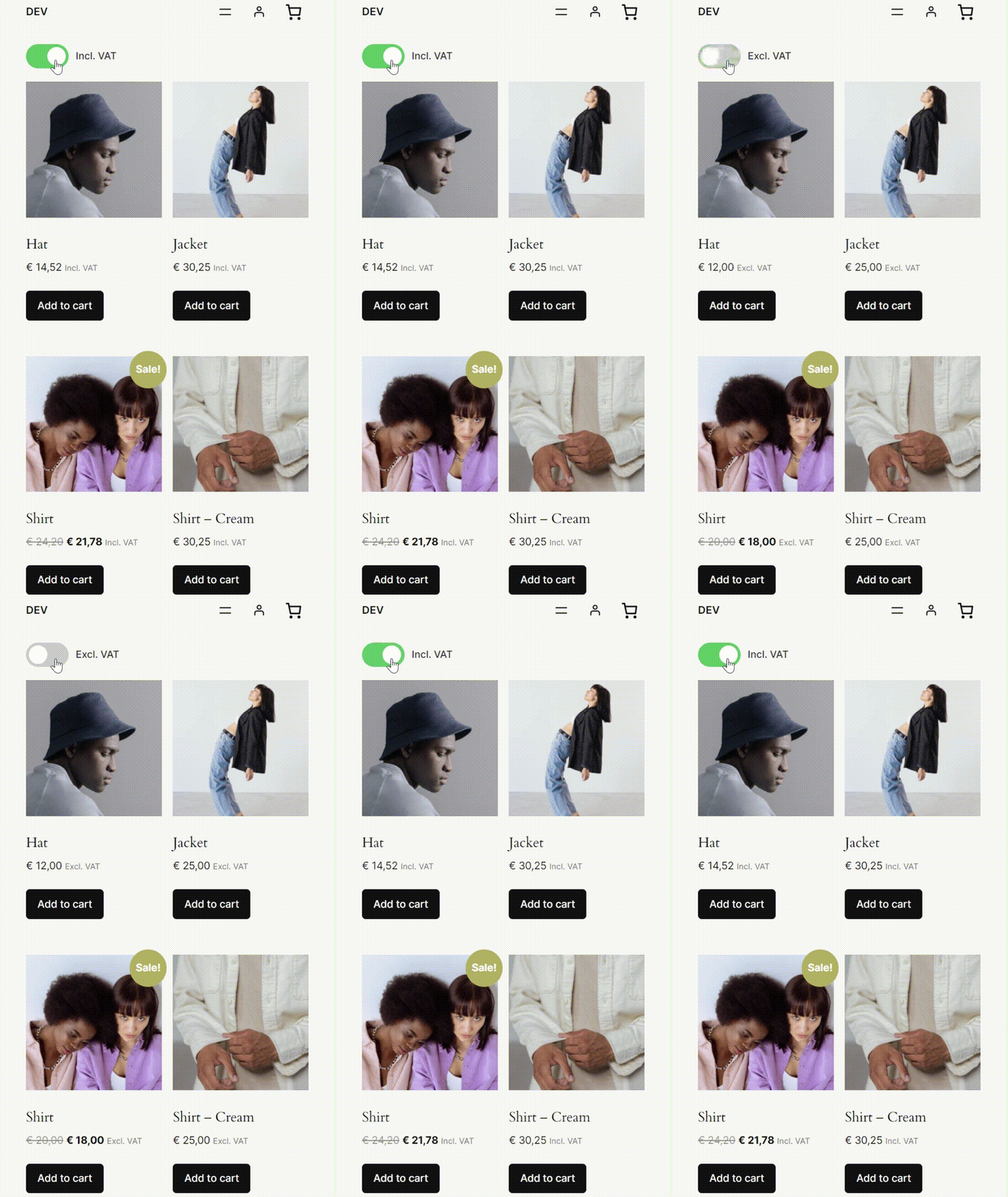
This GIF demonstrates the main functionality of the plugin.
Faq
Some WooCommerce Blocks are not fully compatible with this plugin as they do not use standard WooCommerce filters for price display. This is a known limitation of WooCommerce Blocks and not specific to this plugin. You can fix this by using WooCommerce shortcodes instead of the WooCommerce Blocks.
Sometimes prices may not appear to change when toggled. This is often related to WooCommerce tax settings. If possible, select ‘Shop based’ in WooCommerce Settings Tax “Calculate tax based on”. Otherwise, WooCommerce requires a billing/shipping address to calculate taxes, which is typically only available after login or during checkout.
The plugin is designed to keep prices consistent in the cart and checkout process. There are two main reasons for this:
- Customer clarity: This ensures visitors always see the exact final amount they’ll pay, without unexpected changes during checkout.
- Technical simplicity: While dynamic price switching could be implemented, it would require compatibility with various third-party cart/checkout plugins. The focus is, at the moment, on maintaining a lightweight and reliable solution rather than this specific feature.
Reviews
Great plugin
By 
Awesome easy to use and install plug-in as well as super fast support from the developer. Highly recommend.
Top-Notch
By 
Fantastic plugin, simple to use. Offers great flexibility
By 
Works really well straight out of the box, exactly as expected. Had a slight issue with it not working with WooCommerce Measurement Price Calculator, but contacted them and they had responded and fixed the issue within a matter of hours. Amazing service, even more so from a free plugin!
Fabulous - just need to type own excl inc text in
By 
Love this plugin!
You just need to type your own labels in for Incl VAT . Excl VAT in the input boxes on Tax Switcher tab (looks like they are there already but they are just place holders ...
and make sure you remove 'Price display suffix' in TAX settings input box if there is anything there.
Great Plugin - Even Better Support
By 
Amazing plugin, works beyond where you'd expect it to (updates pricing for third-party plugins). I had a very niche issue, and the support was amazing. Keep doing what you're doing!
Great Support & Works like a charm!
By 
Easy to set up and easy to customize.
Did run into a small issue with my theme where both the included and excluded VAT prices were being shown. This was fixed in less than a day by the developer.
I wish all plugins were like this one 😉
Simple and great support
By 
The plugin is simple to set up and it works perfectly on our site. The support went an extra mile for us to make it compatible with a third-party plugin, very quickly!
Good plugin with excellent support
By 
I have to agree with all the previous reviewers about the fantastic support provided by the plugin owner. I had some compatibility issues with another plugin - but it was resolved quickly, efficiently and better than I originally thought 🙂
This plugin owner is extraordinary
By 
The support we receive on this plugin is way above standard. Replies within minutes, intricate solutions that are tailored to our setup, plugins, host, cache and i could go on.
You are in safe hands here.
10/10 Support - Superb Plugin & Developers
By 
Great plugin that does exactly what it says on the tin, I had an idea of how it could be improved for users, the developer didn't only respond quickly to my forum comment, but then developed and included the idea within days . . . Really happy with how this works for me and strongly recommend to all.
Changelog
1.6.2
- Added new filter:
wdevs_tax_switch_current_productto allow third-parties to set the correct product context - Added compatibility for WooCommerce Product Bundles
- Hardened frontend init so switches/labels still render when scripts load after DOMContentLoaded (e.g. LiteSpeed Delay/Defer JS)
1.6.1
- Improved FacetWP compatibility
- Added compatibility for YayMail – WooCommerce Email Customizer
- Added compatibility for PDF Invoices & Packing Slips for WooCommerce
- Tested WooCommerce 10.3.5
1.6.0
- Added option to enable price switching in the mini cart
- Added compatibility for FiboSearch – AJAX Search for WooCommerce (+ Pro)
- Added new filter:
wdevs_tax_switch_should_hide_on_current_pagefor custom visibility control - Improved AJAX compatibility. Price switching should be included in AJAX-loaded content
- Improved compatibility for WoodMart theme
- Added FacetWP slider price switching
- Added ‘disabled’ state
1.5.19
- Added PJAX compatibility for themes using jquery-pjax (e.g. WoodMart theme)
1.5.18
- Fixed incorrect tax calculation for variation products loaded via AJAX
1.5.17
- Tested WooCommerce 10.2.2
- Improved compatibility for Measurement Price Calculator for WooCommerce
1.5.16
- Improved compatibility for Measurement Price Calculator for WooCommerce
1.5.15
- Ignore zero tax price check if customer is vat exempt
1.5.14
- Fixed price calculation if tax is zero for the current customer (zero tax rate country)
1.5.13
- Fixed tax calculation if product price is zero
1.5.12
- Added compatibility for Extra Product Options & Add-Ons for WooCommerce
- Tested WooCommerce 10.1.0
1.5.11
- Added wp_kses_allowed_html filter to allow spans in certain contexts for price displays
- Added compatibility for Entr theme. See this issue
- Improved compatibility with GeneratePress
1.5.10
- Added compatibility for FiboFilters
1.5.9
- Added compatibility for Kapee theme
- Added compatibility for B2B Market
- Removed load_plugin_textdomain() because it has been discouraged since WordPress version 4.6.
- Tested WooCommerce 10.0.2
1.5.8
- Added compatibility for Advanced Woo Search (+ PRO)
1.5.7
- Tested WooCommerce 9.9.4
- Improved translations
1.5.6
- Improved compatibility for Tiered Pricing Table for WooCommerce
1.5.5
- Added compatibility for WooCommerce Product Add-Ons Ultimate
1.5.4
- Introduced ‘tree shake’ for bundling all commonly shared JavaScript into a separate file as optimisation to prevent duplicated code
- Improved compatibility for Variation Price Display Range for WooCommerce
1.5.3
- Switched from ‘found_variation’ to ‘show_variation’ WooCommerce event for UI updates reliability in variations form
- Above change adds compatibility for Variation Swatches for WooCommerce
- Added preview in shortcode generator
- Added JavaScript ‘wdevs-tax-switch-appeared’ event listener
- Compatibility for Variation Price Display Range for WooCommerce (1.3.20 and up)
- Added settings link
1.5.2
- Fix for WooCommerce text tax labels
- Disable price changes in WooCommerce table total rows
- Added option to disable the components on WooCommerce pages or pages without prices
- Possible breaking change: always disable components on the cart and checkout pages. Undo previous (1.5.1) opt-in function.
1.5.1
- Added option to hide the components on the cart and checkout pages
1.5.0
- Gutenberg block/shortcode for showing text about the currently selected tax setting. See this topic
- Added compatibility for Flatsome theme
- Added compatibility for FacetWP
- Tested WooCommerce 9.8.2
- Possible breaking change: refactored the (block) code structure to support multiple blocks
1.4.3
- Tested WordPress 6.8.0
- Tested WooCommerce 9.8.1
- Security improvement: escaped dynamic class names in HTML output (reported by Peter Thaleikis).
1.4.2
- Added compatibility for WooCommerce Quantity Discounts, Rules & Swatches
1.4.1
- Added compatibility for Advanced Product Fields Pro for WooCommerce
1.4.0
- Added shortcode generator
1.3.2
- Translate shortcode switch labels. See this topic
1.3.1
- Tested with WooCommerce 9.7.1
1.3.0
- Added ‘buttons’ switch type
- Added Swedish language (special thanks to Martin Hult)
- Added color setting for label text
- Added JavaScript ‘wdevs-tax-switch-changed’ event
1.2.5
- Fixed tax calculation if customer is VAT exempt
1.2.4
- Always register the block/shortcode scripts and styles. Only enqueue them if the block or shortcode is executed
- Fixed price display issues in Tiered Pricing Table for WooCommerce when shop prices are set to display excluding VAT by default
1.2.3
- Added incompatibility list
- Updated incompatibility for Unlimited Elements for Elementor (+ Pro)
1.2.2
- Updated compatibility for WooCommerce Product Table Lite / PRO
1.2.1
- Added compatibility for WPML
1.2.0
- Disable the plugin in the WooCommerce mini cart widget
1.1.11
- Added compatibility for Product Add-Ons for WooCommerce
1.1.10
- Added compatibility for JetEngine Listing Grid ‘infinity scroll’
1.1.9
- Added extra check for filtering backend and frontend AJAX requests (which adds compatibility for PDF Invoices & Packing Slips for WooCommerce)
- Fixed a bug where the admin request checks failed when WordPress is installed in a subdirectory
1.1.8
- Added compatibility for YITH WooCommerce Product Add-ons & Extra Options Premium
1.1.7
- Added compatibility for YITH WooCommerce Product Add-Ons
1.1.6
- Removed applying ‘woocommerce_get_price_html’ filter a second time to prevent nested duplications
1.1.5
- Added extra checks for only executing the filters on the frontend
1.1.4
- Improved compatibility for Tiered Pricing Table for WooCommerce
1.1.3
- Migrated filters from only using ‘woocommerce_get_price_html’ to ‘woocommerce_get_price_html’ in combination with ‘wc_price’. This way, the plugin should be more compatible with other plugins.
- Added compatibility for Discount Rules for WooCommerce
- Added compatibility for Tiered Pricing Table for WooCommerce on catalog pages
1.1.2
- Added compatibility for Measurement Price Calculator for WooCommerce.
1.1.1
- Added compatibility for Tiered Pricing Table for WooCommerce Premium (single product page).
1.1.0
- Added compatibility for Tiered Pricing Table for WooCommerce (single product page).
- Added compatibility for WooCommerce Product Table
1.0.1
- Fixed bug where JS was not loaded when element was rendered by shortcode.
1.0.0
- Initial release of Tax Switch for WooCommerce.