Taxonomy Term Widget

Taxonomy Term Widget
Description
If you have already familiar with the Categories widget, then You are already familiar with it too.
It just lets you choose any taxonomy you have in your blog, for example, Tags, custom taxonomy ( Eg: Location, Product Categories, Product Tags etc… ).
Installation
- log in to admin panel, Go to Plugins => Add New.
- Search for “Taxonomy Term Widget” and install it.
- Once you install it, activate it
- Go to Appearance => Widgets, Taxonomy Term Widget is waiting for you
Or
- Put the plug-in folder into [wordpress_dir]/wp-content/plugins/
- Go into the WordPress admin interface and activate the plugin
- Go to widgets under Appearance Menu Taxonomy Term Widget is waiting for you
Have fun!!!
Screenshots
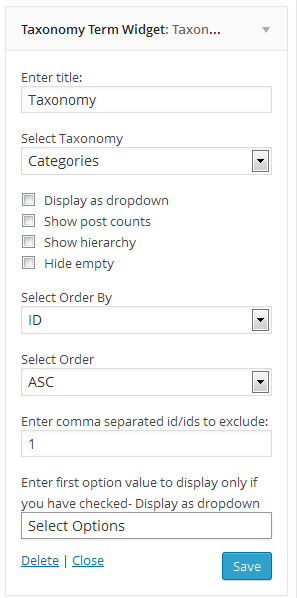
Taxonomy Term Widget Admin Panel.
Reviews
Perfect
By 
Thank you
Changelog
2.3.5 – 2024-11-12
- Updated : Latest version test
2.3.4 – 2024-04-07
- Updated : Latest version test
2.3.2 – 2022-01-05
- Updated : Latest version test
2.3.1 – 2020-05-03
- Updated : Latest version test
2.3 – 2020-05-03
- Updated : Latest version test
- Added : Contributor
2.2
- Bug fix
2.1
- Bug fix
2.0
- Bug fix major release
1.0
- Initial version