Tempora FAQPage Schema for Accordion
Tempora FAQPage Schema for Accordion
Description
Tempora FAQPage Schema for Accordion provides a lightweight, SEO-focused enhancement for the standard WordPress Core Accordion block.
When the “FAQ Schema Mode” style is applied to an Accordion block, the plugin automatically parses the toggle titles and panels to generate valid FAQPage JSON-LD schema in the footer.
This gives you granular control over your SEO. Instead of relying on a plugin to “guess” your FAQs, you can specifically mark the sections of your content that you want search engines to prioritize.
Key Features:
Block Integration: No custom blocks needed; works directly with the native Core Accordion.
Consolidation: Aggregates multiple accordion sections across a page into a single, valid JSON-LD script.
FSE Ready: Built specifically for the Full Site Editor, template parts, and synced patterns.
Lightweight: No settings pages or database entries.
Installation
Installation
- Upload the
tempora-faq-accordion-schemafolder to the/wp-content/plugins/directory. - Activate the plugin through the ‘Plugins’ menu in WordPress.
- In the Block Editor, select a Core Accordion block.
- In the Block Sidebar under ‘Styles’, select FAQ Schema Mode.
Screenshots
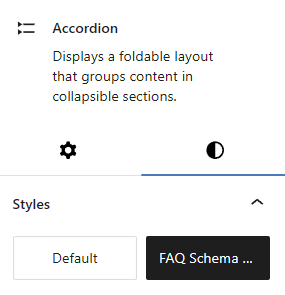
The 'FAQ Schema Mode' style option in the block sidebar.
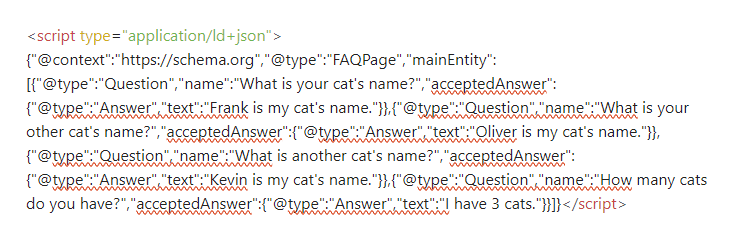
Example of the generated JSON-LD schema in the page source.
Faq
Yes. It is specifically designed to work within the Full Site Editor (FSE) and modern block themes.
Yes. This plugin is a specialized tool for Core Accordion blocks. It allows you to generate a specific FAQ schema that your primary SEO plugin might miss.
As many as you like! The plugin collects data from every accordion using the “FAQ Schema Mode” style and consolidates them into one schema object in the footer.
Reviews
Changelog
1.0
- Initial release.
- Added support for Core Accordion block with consolidated FAQ Schema.
- Implemented secure late-escaping and namespacing for repo compliance.