Terms and Conditions per Product for WooCommerce

Terms and Conditions per Product for WooCommerce
Description
WooCommerce gives you one Terms and Conditions checkbox for the whole store. Some products need their own: a non-refundable deposit, a digital download you cannot take back, an age-restricted item, a rental with a damage clause, a booking with a cancellation window.
This plugin adds a Terms URL to any product, variation, product category or product tag. When that item is in the cart, its own checkbox appears at checkout, and the customer cannot place the order until every box is ticked. Everything else about your checkout stays as it is.
Requires: WooCommerce 9.9 or newer.
Works with: the classic checkout, the WooCommerce Checkout block, and HPOS.
How it works
- Edit a product and open the Advanced tab. Paste the URL of your Terms page and, if you want, the link text.
- The checkbox appears at checkout for every customer with that product in the cart, once per product, however many times it appears in the order.
- The customer ticks it and the order goes through. With the Premium version, the acceptance is written against the order with a timestamp, the user and the exact Terms link that was shown.
Who it is for
🛍️ Shops selling both ordinary goods and items with their own conditions, where a single store-wide checkbox says nothing useful.
💾 Digital products and downloads with a no-refund policy.
🔞 Age-restricted goods, where you need the customer to confirm before checkout.
🔑 Rentals, hire and equipment, with a separate damage or return agreement.
🛠️ Deposits, made-to-order and custom work, where the cancellation terms differ per item.
📅 Services and bookings, where each service carries its own cancellation window.
Free features
✅ Terms and Conditions URL and link text on any product.
✅ Different Terms on each variation of a variable product.
✅ A checkbox per product at checkout, on both the classic checkout and the WooCommerce block checkout.
✅ Server-side validation. Acceptance is checked again on the server before payment is taken, so an order cannot get through without it.
✅ Optionally require the customer to open the Terms link before the checkbox unlocks.
✅ Optionally show the Terms on the single product page.
✅ A [tacpp_terms] shortcode to show a product’s Terms anywhere else.
✅ Optionally hide the default WooCommerce Terms checkbox when custom Terms apply.
✅ Filters and actions throughout, for developers. See the hooks reference.
✅ Translation ready.
Premium features
🗂️ Terms per product category and per product tag, so a whole range is covered by one setting.
📋 An acceptance log on the order screen: who accepted what, when, and which link they were shown. Useful the day a customer disputes a charge.
🪟 Open Terms in a modal instead of a new tab, for your Terms and for the default WooCommerce ones.
📦 WooCommerce Product Bundles support: let a bundle’s Terms replace the Terms of the products inside it, or let a product skip its own Terms when it is sold inside a bundle.
See Premium plans and pricing.
Built for current WooCommerce
Block checkout is supported in full since 1.4.0, on WooCommerce 9.9 and above. The checkboxes render inside the checkout block, they rebuild themselves when the cart changes mid-checkout, and the acceptance is verified again through the Store API before stock is reserved or payment is taken. HPOS (High-Performance Order Storage) is supported on the order screens.
What this plugin does not do
It does not write your Terms and it is not legal advice. You host your Terms on your own page or PDF. The plugin links to them, requires the tick, and records it.
Documentation and support
📖 Documentation: setup and a guide for every feature, from adding Terms to products to block checkout and the acceptance log.
🛟 Support forum: questions and bug reports. We answer every topic.
✉️ Contact us: Premium support, and anything that is not a support question.
Like it?
A 5-star review is the most useful thing you can do for a small plugin. It takes a minute and helps other store owners find it.
More from The WP Garden
Terms and Conditions per Product is made and maintained by The WP Garden, small focused plugins for WooCommerce, BuddyPress and WordPress.
- Checkout Guard: block fake and spam orders at checkout.
- SubPortal: a self-service portal for WooCommerce Subscriptions.
- Pinned Feed Notices: pinned announcements on the BuddyPress activity feed.
- Block Member Posting: stop chosen members posting on BuddyPress.
- Peter’s Post Notes: admin notes on posts and pages.
Installation
- In your WordPress admin, go to Plugins > Add New Plugin, search for “Terms and Conditions per Product”, then click Install Now and Activate.
- WooCommerce 9.9 or newer must be installed and active.
- Edit a product, open Product data > Advanced, and paste the URL of its Terms page. The checkout options live under Terms of Use in the admin menu.
The guide to adding Terms to products walks through the same steps in detail.
Screenshots
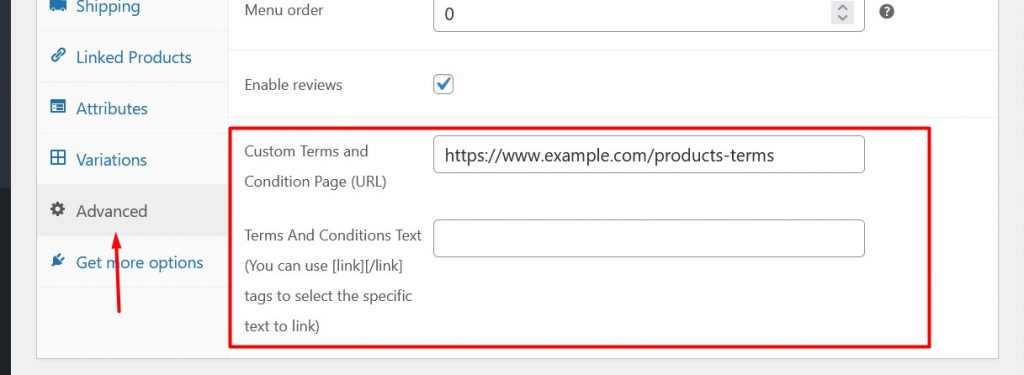
The Terms and Conditions URL field on the WooCommerce product edit screen, under Advanced.

The per-product Terms checkbox on the checkout, next to the default WooCommerce one.

The error shown when a customer tries to order without accepting the Terms.
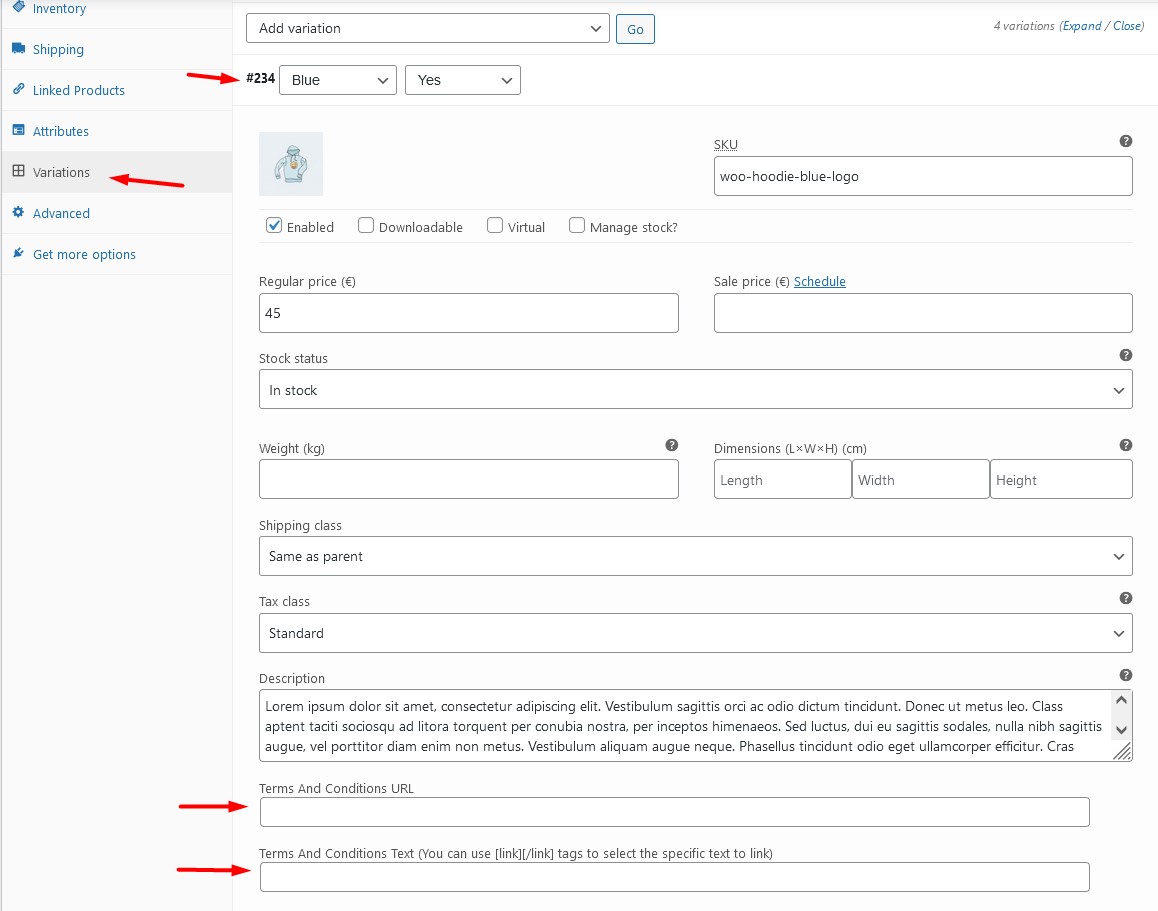
Separate Terms on each variation of a variable product.

Terms set on a product category, applied to every product in it.

The Terms opened in a modal, without leaving the checkout.

The acceptance log on the order screen: who accepted, when, and which link.
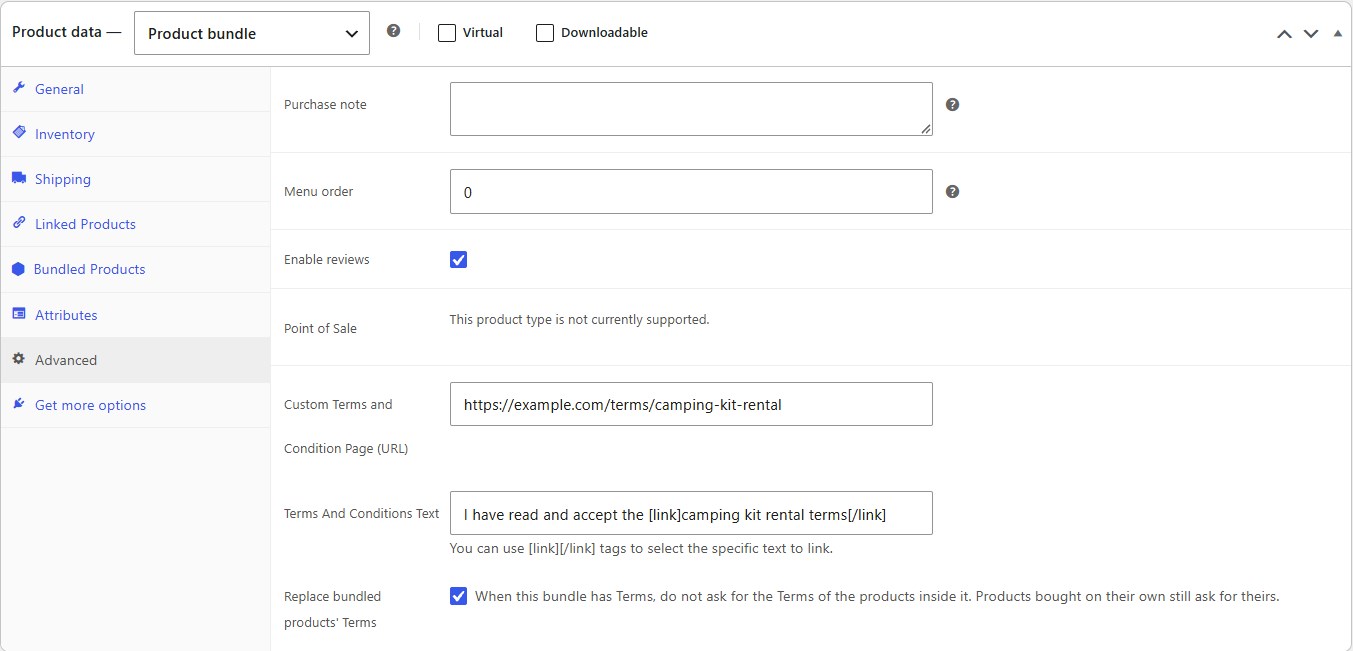
Product Bundles: the bundle's Terms can replace the Terms of every product inside it.
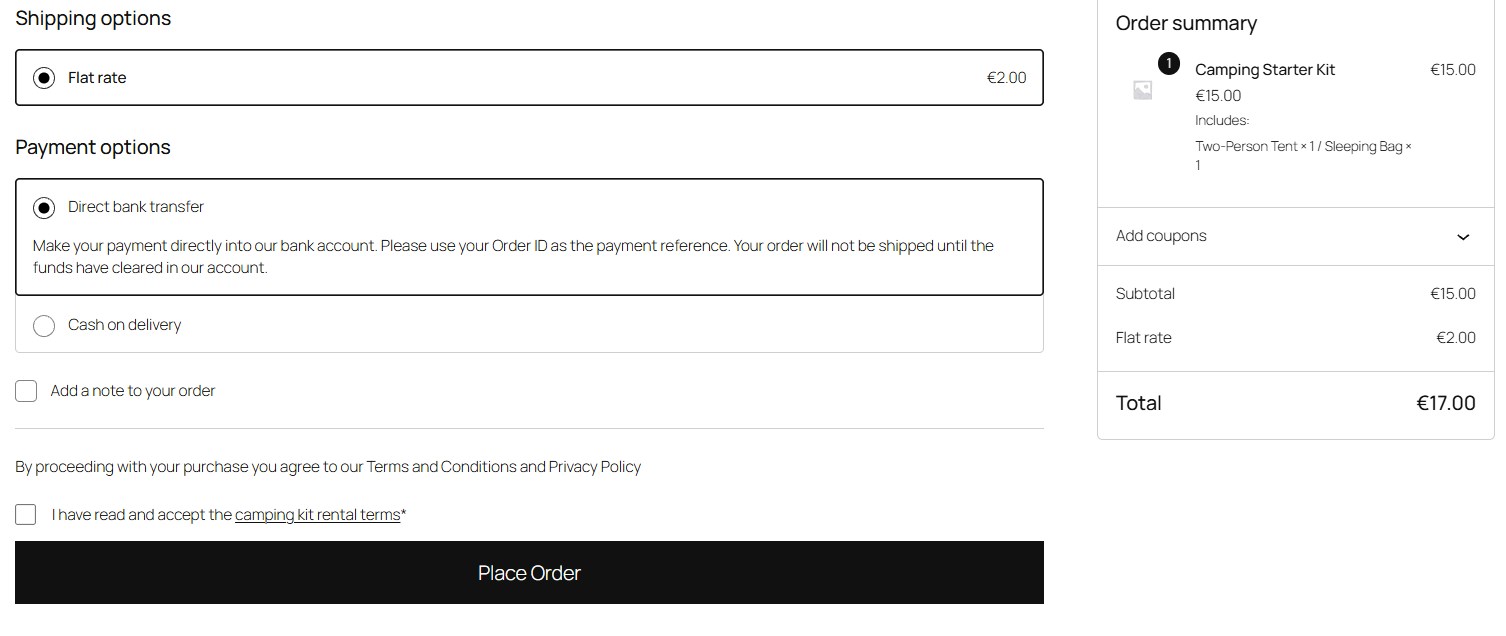
One Terms checkbox for the whole bundle at checkout, instead of one per bundled product.
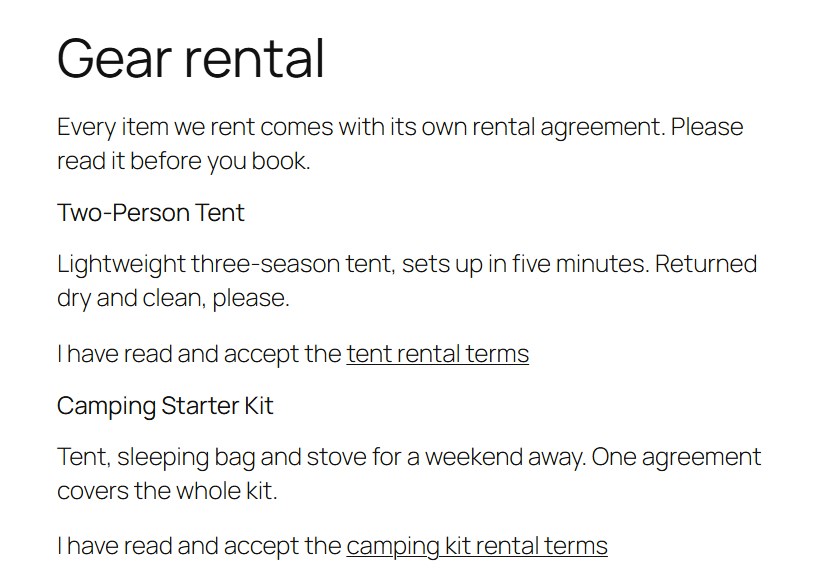
The [tacpp_terms] shortcode showing each product's Terms on an ordinary page.
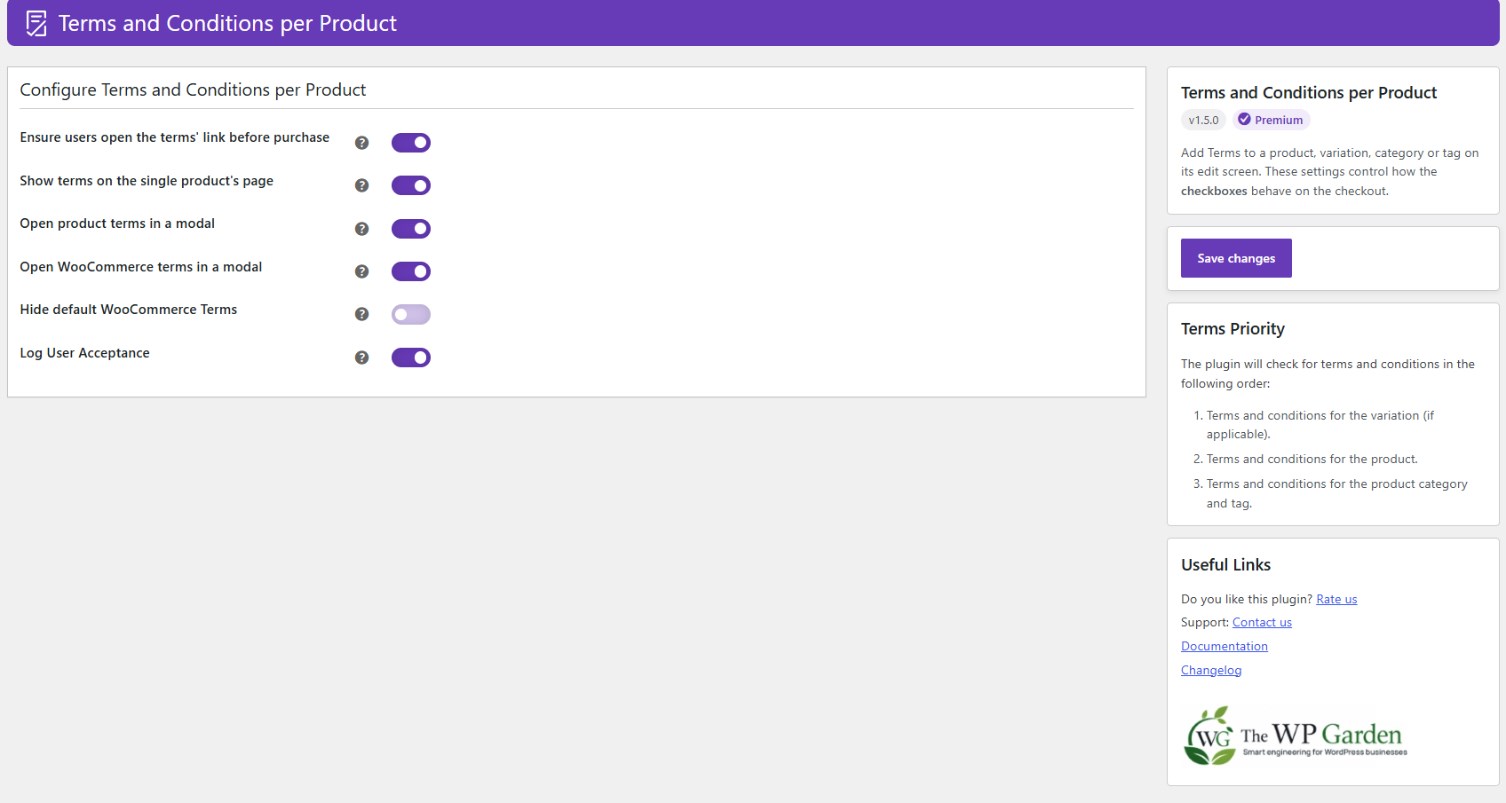
The settings page.
Faq
Edit the product, open the Advanced tab and paste the URL of the Terms page that applies to it. Repeat on the next product with a different URL. Each product carries its own, and a customer only ever sees the checkboxes for what is in their cart. On a variable product you can go a level deeper and set a different URL on each variation.
Yes, in the Premium version. Edit a product category or a product tag, set the Terms there, and every product in it is covered. A product with Terms of its own overrides the category. The plugin checks the variation first, then the product, then the category or tag, and the first level with a URL wins.
Yes. Each variation gets its own Terms and Conditions fields on the product edit screen. A variation with no Terms of its own falls back to the ones set on the parent product.
Yes, with the [tacpp_terms] shortcode. On a product page, or inside a product loop, it shows that product’s Terms. Anywhere else, give it the product: [tacpp_terms product_id="123"]. A variation ID shows that variation’s Terms. It only displays the link; the customer still accepts the Terms at checkout. Nothing is shown for a product without Terms.
Yes. By default every product inside a bundle asks for its own Terms, as well as the bundle. In the Premium version you can change that in two ways, both under Product data > Advanced. On the bundle, tick “Replace bundled products’ Terms” so the bundle’s Terms cover everything inside it. On a product, tick “Skip Terms inside a bundle” so it stops asking for its Terms whenever it is sold in a bundle. Either one only applies when the bundle has Terms of its own, and a product bought on its own always asks for its Terms.
Yes. The tacpp_order_terms_accepted action fires once per order, as soon as the order is created and before payment, with the Terms the customer ticked. It runs on the classic and the block checkout, in the free and the Premium version, whether or not the acceptance log is switched on. It does not fire for express payments, where no Terms are shown.
add_action( 'tacpp_order_terms_accepted', function ( $accepted_terms, $order, $checkout_type ) {
    foreach ( $accepted_terms as $term ) {
        // $term['url'], $term['text'], $term['type'], $term['product_id'], $term['variation_id'], $term['term_id']
        error_log( sprintf( 'Order %d accepted %s', $order->get_id(), $term['url'] ) );
    }
}, 10, 3 );


$checkout_type is `classic` or `block`.
In the Premium version, every acceptance is written against the order. Open the order in the admin and the “User Accepted Terms” box lists what was accepted, when, and the exact Terms link the customer was shown, so you are not relying on what that page says today. It works on the classic and the block checkout, and on both legacy and HPOS order storage. The free version enforces the checkbox but keeps no record.
No plugin does that on its own. What this one gives you is a record that a named customer accepted a specific document, at a specific time, on a specific order, which is the part most stores are missing. Whether your Terms themselves and the rest of your data handling meet GDPR is a question for your lawyer.
Yes, since version 1.4.0, on WooCommerce 9.9 or newer. The Block Checkout then works the same way as the classic checkout:
- Your custom Terms are displayed on the checkout.
- “Place Order” is blocked until every Terms checkbox has been ticked, and the customer is told which Terms are still missing.
- The check is repeated on the server before payment is taken, so an order cannot skip it.
- Acceptance is recorded against the order and shown on the order screen. [Premium]
The Terms also keep up with the cart. If the cart changes while the customer is on the checkout, the Terms checkboxes are rebuilt to match it.
On WooCommerce older than 9.9 the Block Checkout cannot be used. The checkboxes are still drawn, but the browser has no way to report what was ticked back to the store, so the order is refused when the customer tries to place it. The classic checkout is unaffected and keeps working as it always has.
One exception is described in the next question.
No. Express payment buttons, such as Apple Pay, Google Pay and the PayPal button, sit above the checkout form and place the order straight from the payment sheet. The customer never reaches the Terms step, so there is nothing to tick and nothing to record, and the plugin lets those orders through rather than blocking them at a point where the customer cannot do anything about it.
If you need consent recorded on every single order, turn off express payment buttons in your payment gateway’s settings, so that all customers go through the checkout form.
It stops the obvious case. The checkbox stays disabled until the Terms link has been opened, on both the classic and the Block Checkout.
This runs in the customer’s browser, because opening a link is not something a website can confirm from the server. Treat it as a prompt to read the Terms, not as proof that they were read. What is recorded in the acceptance log is that the checkbox was ticked.
The checkboxes render through WooCommerce’s own checkout hooks and inside the Checkout block, so any theme that uses the standard WooCommerce checkout should work. If yours does not, tell us in the support forum.
Yes. You can translate Terms and Conditions per Product into your language.
Open a topic in the WordPress.org support forum. Premium customers can also contact us directly.
At thewpgarden.com/docs/terms-and-conditions-per-product: setup, plus a guide for every feature.
Terms and Conditions are the rules and regulations that govern the use of a website or a service. They are also known as Terms of Service or Terms of Use.
Reviews
A wonderful plugin.
By 
A wonderful plugin.
Paid for upgrade but stuck with free
By 
I clicked the upgrade button in the free plugin, it took me to Freemius, I completed payment and it redirected to my dashboard and said it was processing then the plugin page says 'click the link in the email to opt in'. Never received an email and plugin still says free. No premium features available. I'm at a loss.
Exactly what I needed !
By 
Helped me a lot for products that needs addons conditions
Log User Acceptance in order details.
By 
Hi there, I don't see any screenshot or documentation on this important feature that we need. Please add it so we can get the premium version.
A simple plugin that works!
By 
Not much to say - it's simple and it works. Easy peasy.
Useful Plugin and Effective Support!
By 
I highly recommend this plugin! Its functionality is incredibly useful, and the developer's responsiveness in resolving an issue caused by a third-party theme was exceptional. They provided an effective solution promptly.
Thank you!
Handy Plugin!
By 
Great plugin, works fine!
Worked well for me
By 
I needed this to associate terms to downloadable products (fonts).
What impressed me the most is if your link and terms text is identical it won't duplicate the checkbox, instead it will only show the one checkbox even when 2 different downloadable products have been added to cart.
Thanks for the plugin.
Works well but...
By 
My client kept getting a nag message to update to premium, all the time, no cookie, you will have a permanent message on your dashboard. I guess a small price to pay. Also, he couldn't update from the update page, it just kept popping up the PREM message. He had to contact me, I had to figure it out and we wasted time. A bit irritating again, but for a free product, fine. Nags shouldn't be permanent and updates shouldn't be blocked anywhere. Add premium features that make it a no brainer, don't up the annoyance factor. That's just my 2 cents.
Great plugin. Does what it needs to do
By 
Changelog
1.5.0
- Feature: WooCommerce Product Bundles support. A bundle’s Terms can now replace the Terms of the products inside it, and a product can skip its own Terms when it is sold inside a bundle that has Terms. The same products bought on their own are not affected. [Premium]
- Feature: New
[tacpp_terms]shortcode shows a product’s Terms link anywhere on the site, for the current product or any product or variation by ID. - Feature: New
tacpp_order_terms_acceptedaction. It fires once per order with the Terms the customer accepted, on both checkouts and in the free version, so developers can record consent or sync it elsewhere. See the FAQ. - Fix: Block Checkout: with “Hide default WooCommerce Terms” on, the store’s own Terms were hidden on every order, even when nothing in the cart had custom Terms. They are now only hidden when custom Terms replace them, as on the classic checkout.
- Fix: Block Checkout: after pressing Place Order, ticking one Terms checkbox hid the error message on every other unticked one, and unticking a checkbox did not bring its message back.
- Fix: The settings page could show two identical “Rate us” banners at once.
- Fix: Quick Edit on a product category or tag, and term updates made through the REST API or an importer, no longer delete that category’s or tag’s Terms. Category and tag Terms are also kept when the Premium licence lapses. [Premium]
- Fix: The
tacpp_log_acceptance_enabledfilter now controls the acceptance log. Returning false turns logging and the order-screen box off; it cannot turn the log on in the free version. - Security: Updated the bundled Freemius SDK.
- Dev: The
taccp_get_custom_terms_cart_itemfilter is renamed totacpp_get_custom_terms_cart_item. The old, misspelled name still works but is deprecated and will be removed in a future version. - Tweak: Redesigned settings sidebar. Save now sits in a box that stays in view while you scroll, and confirms when the settings are saved. Premium status shows as a badge, and the free version lists what Premium adds.
- Tweak: The hint about the [link][/link] tags now sits under the Terms text field on products, variations, categories and tags, instead of stretching the field’s label.
1.4.0
- Feature: Full WooCommerce Block Checkout support. Terms acceptance is now validated on the server before payment is taken, instead of in the browser alone. Because of this WooCommerce 9.9 is now the minimum supported version.
- Feature: Terms acceptance is now fully recorded in the User Acceptance log for Block Checkout orders, the same as for the classic checkout. [Premium]
- Feature: The Terms checkboxes on the Block Checkout now follow the cart. If the cart changes while the customer is checking out, the checkboxes are rebuilt to match, keeping any boxes already ticked.
- Feature: Express payment buttons, such as Apple Pay and Google Pay, are exempt from the Terms step, because the customer never sees it. See the FAQ.
- Tweak: The Block Checkout now shows a message next to the Terms that were not accepted, instead of disabling the “Place Order” button with a tooltip.
- Fix: The Block Checkout assets are now loaded whenever the page contains the checkout block, including a block nested inside another block and a checkout page that is not the one set in WooCommerce settings.
- Fix: “Open terms in a modal” and the “Open WooCommerce terms in a modal” now works on the Block Checkout, which renders those links with different markup to the classic checkout. [Premium]
- Fix: Acceptance is recorded once per order, so retrying a failed payment no longer creates duplicate log records.
- Refactor: The checkout rows, the single product page and the Store API now share one Terms renderer.
1.3.2
- Fix: The Terms acceptance log no longer writes records when the log setting is switched off or the site is on the free version.
- Fix: Acceptance log records are now rebuilt from the order’s own items, so a product that sits in more than one category with Terms no longer produces duplicate records, and only products actually in the order can be recorded.
- Fix: Terms text saved on a product category or tag no longer keeps escape slashes, so apostrophes and quotes are stored as typed.
- Security: Saving Terms on a product category or tag now requires the manage_product_terms capability.
- Performance: The WooCommerce Checkout block check no longer parses page content on every front-end request, only on the checkout.
- Performance: Per-product Terms lookups are now reused within a request instead of being repeated for the checkout display, the validation pass and the default-terms check.
- Refactor: Checkout display, checkout validation, the single product page and the acceptance log now share one deduplicated Terms builder, exposed through a new tacpp_checkout_terms_items filter.
- Tweak: Restyle the “Rate us” admin notice to match the Checkout Guard promo banner and show it above that banner.
- Tweak: Redesign the Checkout Guard promo banner on the settings page and make it dismissible.
- Feature: Add a promotional banner for the Checkout Guard plugin on the settings page.
- Update: Freemius SDK to 2.13.4
1.3.1
- Fix: Move uninstall.php cleanup logic to the Freemius
after_uninstallaction so uninstall events and user feedback are reported correctly.
1.3
- Security: Hardened input sanitization, output escaping, AJAX nonces, and capability checks across admin and checkout flows.
- Security: Bundle Popper, Tippy, and jQuery Modal locally instead of loading from third-party CDNs.
- Security: Replace register_uninstall_hook() with uninstall.php so cleanup runs reliably on every removal.
- Performance: Cache the custom-terms post count behind the rate-me admin notice in a transient.
- Performance: Only enqueue admin scripts and styles on plugin-related screens.
- Fix: Rate-me admin notice no longer compounds threshold suffixes across iterations.
- Fix: Drop deprecated SQL_CALC_FOUND_ROWS from the acceptance log query.
- Fix: Activation now seeds default settings on fresh installs without overwriting existing values.
- Refactor: Extract variation Terms & Conditions handling into its own class.
- Translations: Move HTML out of translatable strings, add translator comments, regenerate POT.
1.2.18
- Check: WordPress 7.0.0 compatibility
- Check: WooCommerce 10.7.0 compatibility
- Update: Freemius SDK to 2.13.1
1.2.17
- Check: WordPress 6.8.1 compatibility
- Check: WooCommerce 9.8.5 compatibility
- Update: Freemius SDK to 2.10.1
1.2.16
- Security Fix: Add admin settings security fix
1.2.15
- Check: WooCommerce 9.6.0 compatibility
- Update: Freemius SDK to 2.11.0
1.2.14
- Feature: Add modal to product page terms (if setting is enabled)
- Fix: HTML and JS code
- Update: Freemius SDK to 2.10.1
1.2.13
- Update: Add links and restyle the User Accepted Terms in Orders
- Translations: Update translations and texts
- Update: Freemius SDK to 2.9.0
1.2.12
- Update: New POT file for translations
- Check: WordPress 6.6.1 compatibility
- Update: Freemius SDK to 2.7.4
1.2.11
- Fix: Remove the checkout enqueued JS and functionality from pages that do not contain the Gutenberg checkout block.
1.2.10
- Update: Enable Block Checkout functionality
- Update: Enable HPOS compatibility for admin edit order page.
- Remove: Information page
1.2.9
- Fix: Enable HPOS flag to avoid wrongfully flagging the plugin as HPOS incompatible
1.2.8
- Update: Styling changes
- Update: Freemius SDK to 2.6.0
- Fix: Remove duplicate Get premium version message.
- Declaration: WC Checkout blocks incompatibility
1.2.7
- Check: WordPress 6.4 compatibility
- Check: WooCommerce 8.2.1 compatibility
- Feature: Make single product terms function static so it can be removed using WP hooks
1.2.6
- Feature: Hide the default WooCommerce terms when there are custom ones.
- Update: Freemius SDK to 2.5.10
1.2.5
- Feature: Force users to open the term’s link before checking the terms.
- Feature Premium: Add user acceptance log
- Check: WordPress 6.2 compatibility
- Update: Freemius SDK to 2.5.6
1.2.3
- Check: WooCommerce 7.3.0 compatibility
- Update: Freemius SDK to 2.5.3
- Update: Texts
1.2.2
- Feature: Added option to show terms in the product page.
- Feature Premium: Add terms and conditions to product tags.
- Feature Premium: Open WooCommerce terms in a modal.
- Optimization: Load assets only on the required pages.
- Styling: Added switches instead of checkboxes on the admin page.
1.2.1
- Fix: PHP 7.3 backward compatibility.
1.2.0
- Feature: Added Premium Version
- Feature: Added custom text for simple product terms
- Feature Premium: Add terms and conditions to product categories
- Feature Premium: Show product terms in modal
- Update: WooCommerce 7.1 compatibility check
- Update: Added new filters to replace old ones starting with gkco_
- Add admin notifications
1.1.0
- Update: WordPress 6.1 compatibility check
1.0.15
- Update: Readme.txt and WordPress version
1.0.13
- Fix: PHP 8 compatibility issue
1.0.12
- Fix: Not reaching meta variable outside of class
1.0.11
- Fix: Hooked actions
1.0.9
- Feature: Added partial links to Terms’ text using [link][/link] tags
1.0.8
- Feature: Added extra terms and conditions input fields per variation (WC variable products).
- Styling: Remove float from checkout fields.
1.0.7
- Fixed duplicate Terms and Condition checkboxes when the same product appeared more than 1 time in a cart (different items).
1.0.6
- WP test
1.0.5
- Fixed an issue for variable products
- Moved the Custom terms and conditions field from “General” to the “Advanced” product tab.
1.0.4
- Add extra translation features and extra filters
1.0.3
- Remove custom fields from external product types
1.0.2
- Fix missing style
1.0.1
- Links updated
1.0.0
- First Edition release