Testomato Monitoring
Testomato Monitoring
Description
Testomato Monitoring connects your WordPress or WooCommerce site to Testomato — an external uptime and content-monitoring service that watches your site from multiple locations around the world.
This plugin is an interface to the Testomato service and requires a Testomato account. The monitoring itself runs on Testomato’s own servers, not on your site. Creating the account from the plugin is free and starts a 14-day trial; after the trial you need a paid plan for Testomato to keep checking your site. The plugin’s own code is never restricted — nothing in it is locked, gated or switched off at any point. When a Testomato account is inactive, the service simply stops returning results and the dashboard widget has nothing to show.
Why use it:
- Be the first to know about downtime. Testomato checks your site from independent locations — as often as every 15 seconds, depending on your plan — and emails you (or your team Slack channel, or any webhook) the moment something breaks.
- Catch silent failures. Plain ping monitors only see HTTP 200. Testomato verifies expected text on the page, the favicon, robots.txt, and HTTP headers — so a “successful” response that ships a blank PHP error gets caught.
- WooCommerce-aware. When WooCommerce is active, the cart and checkout URLs are seeded into the project automatically. You can fine-tune what is monitored from the Testomato dashboard.
- SSL expiry alerts. Stop discovering your certificate expired from a customer.
- No password to manage. Sign up with a one-time code from your inbox — no password to choose.
What this plugin does, technically:
- You enter your email on the plugin’s settings page.
- The plugin creates a Testomato account and a project for this site, then crawls your homepage to seed an initial set of monitored pages.
- A dashboard widget shows the current status — green / yellow / red — together with a 24-hour response-time trend and a 7-day uptime chart.
- Everything else is managed from your Testomato dashboard, which the plugin links to directly.
The dashboard charts are drawn with Chart.js v4.5.1 (MIT licensed), bundled with the plugin as js/chart.min.js — no external scripts or CDNs are loaded. Chart.js is used unmodified, exactly as published on npm; its human-readable source for this version is at github.com/chartjs/Chart.js/tree/v4.5.1 and the build is produced by that project’s own npm run build.
External services
This plugin connects your site to Testomato (https://testomato.com/), an external monitoring service operated by Testomato s.r.o. The plugin contacts the Testomato API at https://testomato.com/api.
What is sent and when:
- When you click Connect on the plugin’s settings page, the plugin sends the email address you entered to
https://testomato.com/api/user/send-codeso the service can email you a one-time sign-in code. - When you submit the code, the plugin sends the code, the email address, the WordPress administrator’s first/last name (sourced from your WordPress profile, falling back to the site name) and your WordPress and WooCommerce version numbers to
https://testomato.com/api/user/registerto create your Testomato account. The API token returned by that call is then exchanged for a short-lived access token athttps://testomato.com/api/authenticate. - The plugin asks the AI test generator at
https://testomato.com/api/ai/suggest-teststo suggest pages to monitor, sending only the public home URL of your site. - The project is created at
https://testomato.com/api/project/create, which receives the site name, the site’s home URL and the suggested pages. When no suggestions are available, the monitored URLs (the home URL, plus the WooCommerce cart and checkout URLs when WooCommerce is active) are sent tohttps://testomato.com/api/project/{id}/createTestsinstead. - While connected, the plugin periodically requests
https://testomato.com/api/project/{id}/simple-status,https://testomato.com/api/project/{id}/uptimeandhttps://testomato.com/api/project/{id}/responseTimesto draw the dashboard widget, andhttps://testomato.com/api/user/{id}/subscriptionto show how many days of the trial are left. These calls send only the project or user identifier.
No content of your posts, users, comments or media is ever sent to Testomato. Testomato then crawls only the public pages of your site from its own servers, the same way a search-engine bot would.
Service terms: https://testomato.com/terms-of-service/ — Privacy policy: https://testomato.com/privacy-policy/
Installation
- Upload the plugin to the
/wp-content/plugins/testomato-monitoringdirectory, or install it through the Plugins screen in WordPress. - Activate the plugin.
- Go to Settings Testomato Monitoring, confirm the email address and click Connect.
That’s it — within a minute the dashboard widget shows the first status.
Screenshots
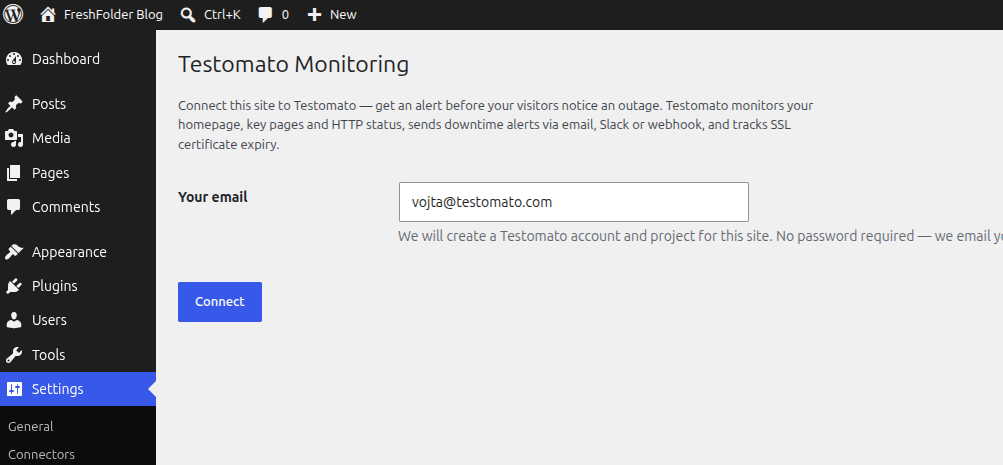
The connect form on first install.
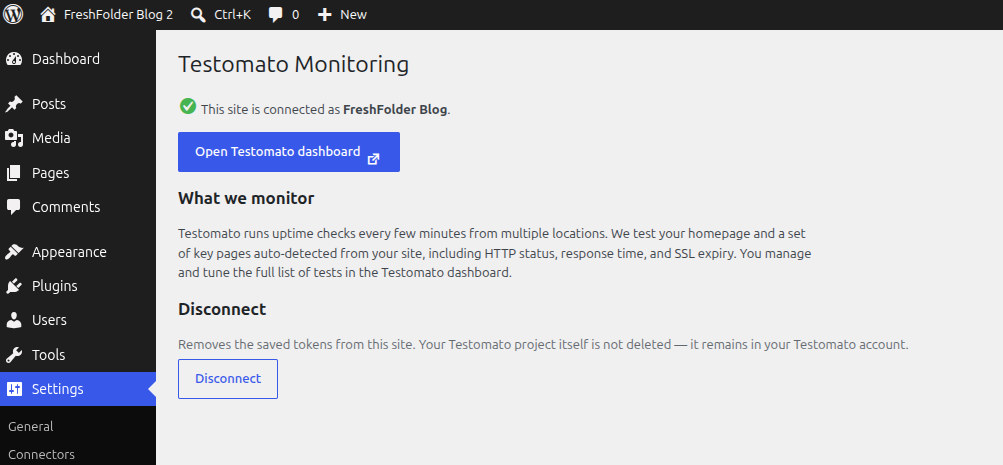
Settings page after connecting — link to dashboard, what is monitored, disconnect.
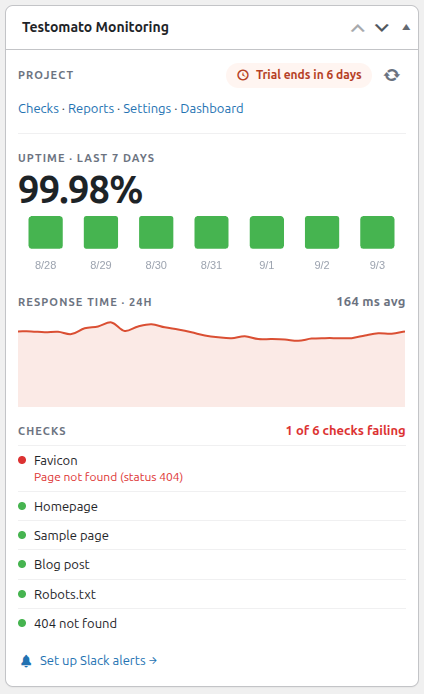
Dashboard widget — uptime, a 24-hour response-time trend and a 7-day status chart.
Faq
Yes — that is its purpose. When you click Connect, the plugin sends your email address, the WordPress administrator’s name, your WordPress and WooCommerce version numbers and your site’s home URL to the Testomato API, and stores the returned tokens in the WordPress options table. The External services section above lists every endpoint and what each call carries. No content of your site is sent. Testomato then crawls the public pages of your site from its own infrastructure, exactly as a search-engine bot would.
Yes — the monitoring runs on Testomato’s servers, so an account is required. You do not need to create it beforehand: clicking Connect creates one for you, with a free 14-day trial. The code we email you confirms your address while the account is created — there is no password to choose.
Yes. The emailed sign-in code can only create a new account, so for an existing one the connect form offers a second path: create a Testomato API token for this site in your Testomato account settings (Account settings API, preferably without an expiry) and paste it into Reconnect with API token. The site keeps using that token, so revoking it in Testomato disconnects the dashboard widget. If your account already monitors this site, the plugin connects to that existing project instead of creating a second one; otherwise the site is added as a new project.
Testomato stops checking your site until you pick a plan, and the dashboard widget has nothing left to display. The plugin itself is unaffected — no part of its code is disabled, restricted or gated at any point, before or after the trial. It is an interface to an external service, and the service is what the plan pays for.
Yes. After connecting, open the Testomato dashboard from the plugin page — you can add any URL, configure expected text, response time thresholds, and notification channels there.
Settings Testomato Monitoring Disconnect. This removes the tokens from this site only; your project remains in your Testomato account.
No. The plugin only runs in wp-admin. Front-end pages are not touched.
In the WordPress options table, under the testomato_monitoring_* prefix. Uninstalling the plugin removes everything via uninstall.php.
Reviews
Changelog
1.1.4
- Reconnecting an existing Testomato account works again: paste a personal access token from your Testomato account settings (API). The plugin stores that token and no longer replaces your account’s other API credentials.
1.1.3
- Reconnecting an existing Testomato account now accepts the API token shown in your Testomato account settings; connecting issues this site its own long-lived token, which replaces the account’s previous one.
- Reconnecting with a Testomato API token now finds the project your account already has for this site instead of trying to create a second one, which failed once your plan’s project limit was reached.
- Those reconnect problems now report what actually went wrong, like every other connection error.
1.1.2
- Connecting an email that already has a Testomato account no longer sends a verification code first. The plugin now recognises the existing account straight away and offers the API token field, instead of mailing a code that could never be used.
- That message is no longer shown as an error — having an account already is a normal case, not a failure.
- Connection problems now report what actually went wrong. Errors were being returned as HTTP 502, whose body some proxies and security layers replace, so every failure looked like a timeout no matter what caused it.
1.1.1
- Reconnecting an existing Testomato account now accepts the API token shown in your Testomato account settings; connecting issues this site its own long-lived token, which replaces the account’s previous one.
- Reconnecting with a Testomato API token now finds the project your account already has for this site instead of trying to create a second one, which failed once your plan’s project limit was reached.
- Renamed “API key” to “Testomato API token” everywhere, matching the name Testomato itself uses, and the help link now points straight at the token.
- The widget now uses the same colours as the Testomato dashboard — the response-time chart is green instead of orange, which read as a failure, and the orange wash behind it is gone.
- All admin JavaScript is now enqueued instead of printed inline, and the bundled Chart.js was updated to 4.5.1.
- Corrected the terms and privacy links in this readme.
1.1.0
- Dashboard widget charts: a 24-hour response-time trend and a colour-coded 7-day uptime bar chart, drawn with the bundled Chart.js (MIT) — no CDN.
- Replaced the inline status sparkline with the richer interactive charts (hover tooltips).
- The widget now shows how many days of the free trial are left, and links to the plans once it ends.
- Connect errors now show what actually went wrong instead of a generic network error.
- Signups report that they came from this plugin, together with the WordPress and WooCommerce versions.
- Uninstalling now removes every option and cached value the plugin ever stored, including those written by earlier versions.
1.0.0
- Initial release.
- Connect-via-email onboarding (no password to manage).
- Settings page with one-click dashboard link (auto-login token).
- Dashboard status widget with colored indicator and manual refresh.
- WooCommerce-aware URL seeding for cart and checkout.
- Plugins-page Settings shortcut and documentation links.