Text Domain Inspector

Text Domain Inspector
Description
Have you ever been frustrated when trying to find the text domain of translatable string you want to translate? This task can be challenging and it can take a lot of your time even if you have code reading skills.
This plugin aims to solve this problem by allowing website administrator to inspect text domains of translatable strings directly in the browser.
How to use:
* Press “Inspect Text Domains” button in admin menu bar;
* Red dots will appear next to translatable strings;
* Hover the red dot to view the text domain;
* Open source code in the browser to view text domains in HTML attributes (ctrl+u (Windows) / cmd+opt+u (Mac));
Works in:
* HTML documents;
* HTML fragments;
* HTML attributes;
* Plain text;
* Dynamically loaded content (through AJAX);
* JSON;
Installation
Upload this plugin to your website and activate it.
You’re done!
Screenshots
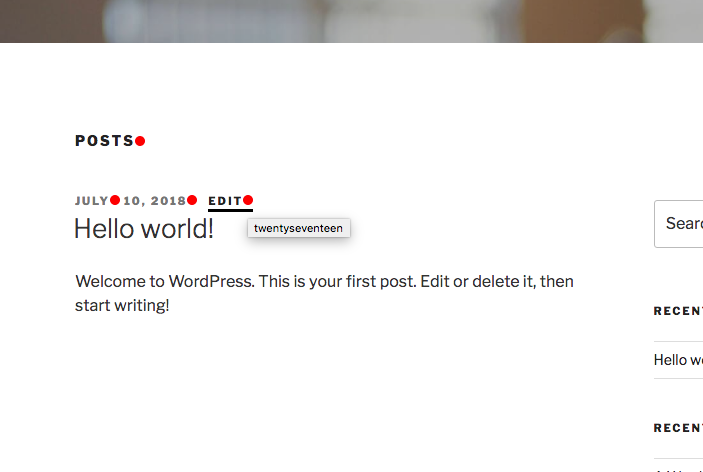
In the browser.

HTML attributes which are visible in the browser.

HTML attributes in the source code.

JSON AJAX response.
Reviews
Doesn't work, and ruined the website
By 
Installed this plugin to find some strings, the page that i did need the domain said 404, than i deactivated the plugin and eliminated and now have all my widgets in shortcodes instead the texts. Screwed everything up.
Time saver...
By 
Why did I find this plugin so late?
This is what I've been looking for a long time.
Thank you very much.
Kudos to the developer and congratulations.
The MUST-HAVE tool for WordPress localization
By 
This plugin can inspect the text domain that belongs to which plugin or theme, whatever front-end or back-end.
If you want to do complete or partial localization for the plugin or theme, Text Domain Inspector is the must-have tool.
Just what I was looking for!
By 
Changelog
1.1
- Added support for i18n
- Text domain is now appended as a query param if string is a URL (fixes the error for WP >= 5.9)
1.0
- Initial version.