Text to Speech – TTSWP
Text to Speech – TTSWP
Description
Text to Speech (TTS) plugin for WordPress with ElevenLabs AI voices, WCAG accessibility, SEO audio schema, and 10,000 free credits.
Add Text to Speech to WordPress in Seconds
Text to Speech – TTSWP turns your written content into natural, human-like audio. It makes your website accessible to everyone. Listeners, people with visual impairments, and those with learning differences all benefit.
The plugin is published and operated by Norse Digital Group LLC, a Wyoming-registered company (Sheridan, WY, USA). Engineering work is performed by Mementor Web Design & Digital Marketing Agency AS, our Norwegian development partner.
The plugin uses ElevenLabs to generate lifelike speech that sounds human, warm and clear. No setup, API key, or coding is needed. Install it and start converting your WordPress posts into audio right away.
Text to speech keeps visitors on your page longer and raises engagement. Both of these factors can improve your SEO. The plugin follows WCAG 2.1, WCAG 2.2, and ADA accessibility standards.
PRO and Agency adds Speech-to-Text (STT) features. These are useful for transcription, captions, or converting podcasts and video into readable text.
Key Benefits
- Instant setup with no API keys or external accounts needed. Install and start converting text to speech
- Natural voices powered by ElevenLabs that produce clear, professional narration
- Automatic, mobile-friendly audio player that fits any screen size
- Accessibility ready with ARIA labels and keyboard support for screen readers and assistive devices
- Better engagement and SEO signals as visitors spend more time on your pages
- 10,000 free text-to-speech characters on activation so you can try it at no cost
- Lightweight and built for performance with no impact on page speed or Core Web Vitals
- Speech-to-Text transcription (PRO) to create written transcripts from your audio content
Why Choose This Text to Speech Plugin
Simple and Fast
- No API keys, or coding needed. Install, activate, and your audio player is ready in seconds
- Works with default settings so you can start converting text to speech right away
Natural Voices
- Natural male, female, and multilingual voices that sound clear and professional
- Pick from a wide range of tones and styles to match your brand and audience
Accessibility and Compliance
- Fully compatible with WCAG 2.1 AA and ADA guidelines for web accessibility
- Helps your website meet legal requirements by offering audio versions of written content
Theme and Page Builder Compatibility
- Works with any theme or page builder, including Elementor, Gutenberg, Divi, Visual Composer, and all standard WordPress themes
- No conflicts with popular plugins. Designed to fit smoothly into your existing setup
SEO Optimized
Audio players raise dwell time and send positive accessibility signals. Text to Speech PRO includes AudioObject schema for better search visibility.
Features
Free Features
- 10,000 free characters to convert text to audio. Enough to get started without paying
- Natural male and female voices in multiple languages for a professional listening experience
- Automatic player for posts, pages, and WooCommerce products with no manual setup needed
- Flexible player placement – before title, after title, after content, before excerpt, or after excerpt
- RTL support for languages like Arabic, Hebrew, and Persian so the player displays correctly in right-to-left layouts
- Zero-click install. Activate the plugin and your audio player is ready
- Mobile-first player with speed control and download so visitors can listen anywhere
- Accessibility ready with ARIA labels and keyboard control for screen readers and assistive devices
- Audio auto-updates when post content changes. No need to regenerate manually
- My Content & Audio page, a single hub to generate, regenerate, download, and delete audio for any post, page, or WooCommerce product, one at a time or in bulk, with live credit balance and per-language support
- Statistics dashboard to track how many visitors listen to your content
- Shortcode and block support for custom player placement anywhere on your site
- Content filtering with CSS selectors or no-audio class to exclude specific sections from narration
- Built for caching and performance plugins like WP Rocket, LiteSpeed Cache, and W3 Total Cache
- Multisite support for managing text-to-speech across multiple WordPress sites from one network
- Sticky Footer Player. A persistent audio player bar pinned to the bottom of the page. Visitors can keep reading while listening. Includes play, pause, seek, volume, speed, and close controls
- Waveform Progress Bar. A visual waveform replaces the standard progress bar. Each post gets a unique pattern. Shows real-time playback progress with accent-colored bars
- Background Opacity. Adjust the sticky footer’s background transparency so page content shows through while the player stays accessible
PRO & Agency Features
- 600+ voices across 70+ languages to match your audience worldwide
- Premium 44.1 kHz (192 kbps) audio quality for studio-grade narration
- ElevenLabs v2 and Eleven v3 models for the latest and most natural-sounding voice technology
- Speech-to-Text transcription to create written transcripts from audio
- Bulk audio generation to convert multiple posts or pages at once
- WooCommerce product narration. Let customers listen to product descriptions
- Voice cloning with ElevenLabs Voice ID to create a custom brand voice
- Word replacement and pronunciation correction for names, abbreviations, and technical terms
- SSML support for fine-tuned control over speech output
- Custom pauses to add natural breaks between sections, headings, or paragraphs
- AudioObject schema for SEO. Structured data that helps search engines index your audio content
- Custom intro and outro to add branding or disclaimers to every audio file
- WPML, GTranslate, and Weglot multi-language voice mapping to assign different voices per language
- Amazon S3 media offload to reduce server load and speed up audio delivery
- Advanced analytics with detailed listening data per post, device, and location
- White-label mode (Agency plan) to remove plugin branding from the backend and the text-to-speech player
- White-label the player info tooltip with your own attribution text or agency branding
- Resell or share our Text-to-Speech plugin (Agency plan) under your own brand and pricing. Offer text-to-speech as a service to your clients and create a recurring revenue stream
- Credit Allocation per Site (Agency plan). Distribute credits across client sites from one account. Control usage per site to manage costs and ensure fair allocation
- Priority support with faster response times from the development team
- Custom audio files. Upload your own audio files.
- Player Visibility. Show the audio player to everyone, logged-in users only, or selected user roles. Works with membership plugins such as MemberPress, so you can offer audio as a members-only perk across your whole site with no per-post setup
- Auto-generate on first visit. Let your readers decide what is worth narrating. Once a post has been read a few times, its audio is queued in the background, so the posts nobody opens never cost you a credit. Ideal for large archives. You set the visit threshold and a daily credit cap, and pages stay fast because audio is never created while a visitor is waiting
- Generate on click. Show a “Listen to the content” button on posts without audio, so a reader never lands on a page with nothing to play. A click generates the audio on demand and the player appears when it is ready. The button follows your Player Visibility setting, which makes it perfect for paid audio subscriptions, and it shares the daily credit cap with Generate on first visit
How It Works
- Install and activate the plugin from your WordPress dashboard
- Publish or update a post or page. Audio is generated from your content automatically
- A text-to-speech audio player appears on the page with no extra configuration
- Visitors can play, pause, adjust speed, or download the audio file
Video Walkthrough
Features:
https://ttswp.com/features
Pricing:
https://ttswp.com/pricing
Documentation and setup guides:
https://ttswp.com/docs
Supported Languages
Compatible with WPML, Polylang, TranslatePress, GTranslate, Weglot and other translation plugins.
Text to Speech works in 70+ languages. Here are some of the most popular:
- English (US, UK, AU): Text to Speech
- Norwegian: Tekst til tale
- Finnish: Tekstistä puheeksi
- Spanish: Texto a voz
- French: Synthèse vocale
- German: Text-zu-Sprache
- Swedish: Text till tal
- Danish: Tekst til tale
- Italian: Sintesi vocale
- Portuguese (Brazil): Síntese de voz
- Dutch: Tekst naar spraak
- Polish: Zamiana tekstu na mowę
- Turkish: Metinden sese
- Russian: Преобразование текста в речь
- Japanese: テキスト読み上げ
- Chinese: 文字转语音
- Korean: 텍스트 음성 변환
- Arabic: تحويل النص إلى كلام
- Hindi: टेक्स्ट टू स्पीच
- Indonesian: Teks ke ucapan
- Bengali: টেক্সট টু স্পিচ
- Thai: แปลงข้อความเป็นเสียง
- Vietnamese: Chuyển văn bản thành giọng nói
Accessibility and SEO Advantages
- Meet WCAG 2.1 AA and ADA requirements by offering an audio version of written content
- Raise average session time as visitors stay longer when they can listen instead of read
- Help users with dyslexia, ADHD, or visual impairments with a hands-free listening option
- Improve SEO with rich media and structured data that search engines can index and display
- Create inclusive multilingual content that reaches audiences in their preferred language
Use Cases
- Accessibility and inclusion. Make your website usable for people with reading difficulties or disabilities
- Blogs and news. Let readers listen to articles while on the go
- E-commerce product descriptions. Give shoppers the option to hear product details before buying
- Education. Help students absorb course material through audio learning
- Long-form content. Turn guides, reports, and documentation into easy-to-consume audio
- Multitaskers. Serve visitors who prefer listening while commuting, exercising, or working
- Membership sites. Offer article audio as a members-only perk by showing the player only to logged-in members or selected roles (PRO)
- Content creators. Repurpose written content into audio format without extra recording effort
Other Tools and Plugins
- Broken Link Checker: WordPress Plugin Page – Check for Broken Links
- Text to Speech – TTS: Text to Speech – TTS
- BestPris.no: Best Pris
- SEO-Analyse.no: SEO Analyse
Standard Installation
- Go to Plugins Add New in your WordPress admin
- Search for “Text to Speech – TTSWP”
- Click Install Now and then Activate
- Click “Connect Site” on the Overview page to link your site to TTSWP
- You receive 10,000 free welcome credits instantly
- Optional: connect your ElevenLabs API key for 10,000 extra free monthly credits
- Optional: upgrade to Pro or Agency for more credits and features
Quick Start Guide
- Overview – see your plan, credits, and setup checklist at a glance
- Voices – pick a default voice and language for your audio
- Player – customize colors, size, position, and player label
- Content – choose which post types generate audio and set content rules
- Audio Library – browse, search, and manage all generated audio files
- Statistics – track play counts and listener engagement
- Shortcode Generator – create custom player embeds for any content
- Bulk Generation (Pro) – convert all existing posts to audio at once
External Services
ElevenLabs API
Purpose: Converts your text into natural-sounding speech
Data sent: Post text, voice ID, API key (if used)
When: On manual or automatic audio generation
Storage: MP3 files saved locally or on S3
Limits: Free plan includes 10,000 one-time welcome credits. PRO plans start at 50,000 credits per month.
Terms: https://elevenlabs.io/terms-of-use
Privacy: https://elevenlabs.io/privacy-policy
TTSWP Cloud Platform (Norse Digital Group LLC)
Handles checkout, subscriptions, and license validation for Pro and Agency plans.
Terms: https://ttswp.com/terms
Privacy: https://ttswp.com/docs/trust/privacy
Translations
We’re looking for contributors to help translate this plugin. If you can help, we’d love to hear from you. Contact us and we’ll guide you through the process.
Privacy
Data Collection
This plugin collects usage statistics only if you opt in through the consent dialog in Settings. You can opt out anytime in Settings Advanced.
If you opt in, we collect:
- Feature usage counts (generations, characters)
- Plugin, PHP, and WordPress versions
- Your site domain
We never collect:
- Personal information or user data
- Content of your posts or pages
- API keys or passwords
Other Privacy Information
- Content text sent for speech synthesis goes to ElevenLabs
- API keys are stored encrypted in your database
- Audio files remain on your server or configured S3 storage
- Full data removal runs on uninstall if enabled in Advanced settings
Credits
Natural voice synthesis by ElevenLabs
Published by Norse Digital Group LLC. Engineering by Mementor Webdesign & Digitalt Markedsføringsbyrå AS under contract with Norse Digital Group LLC.
Screenshots
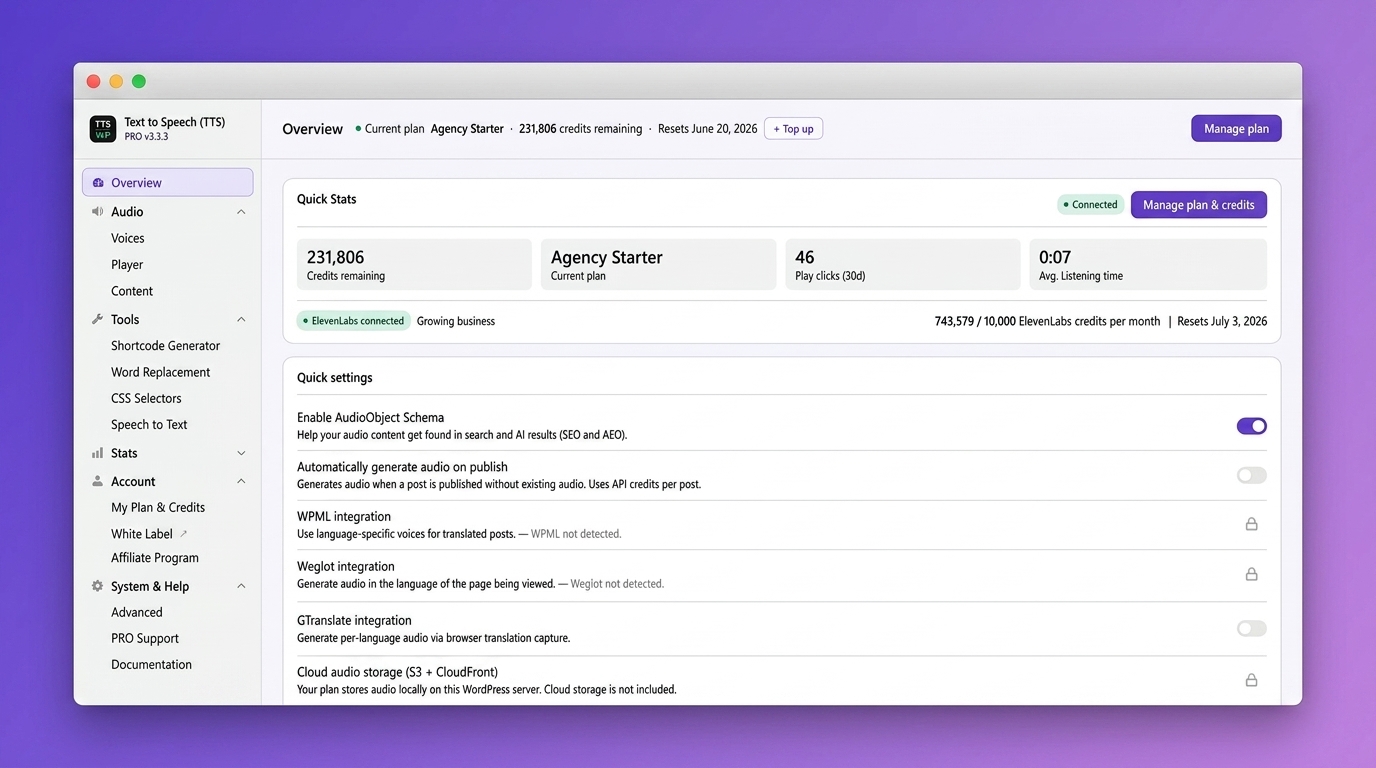
Dashboard overview with quick stats, credits, and one-click access to all key settings
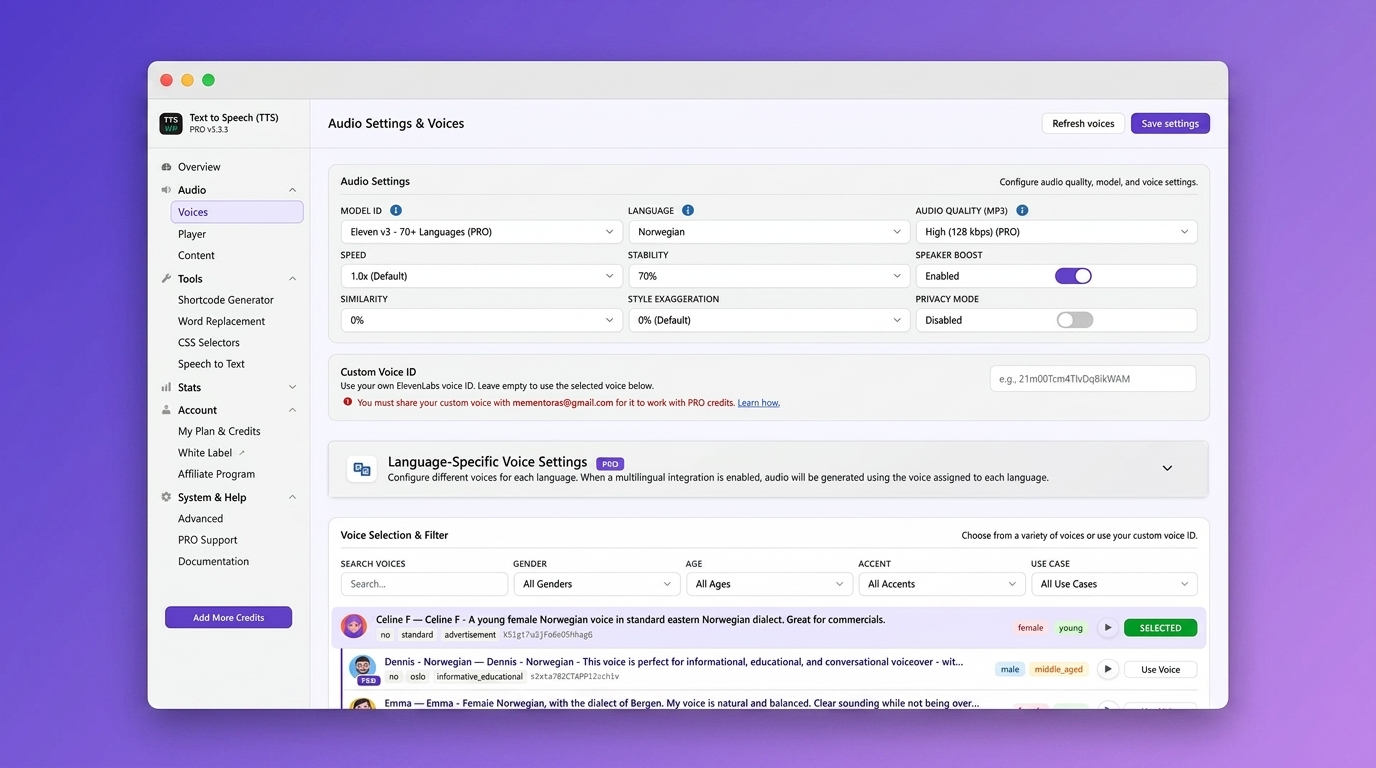
Audio settings. Choose model, language, audio quality, and fine-tune voice parameters
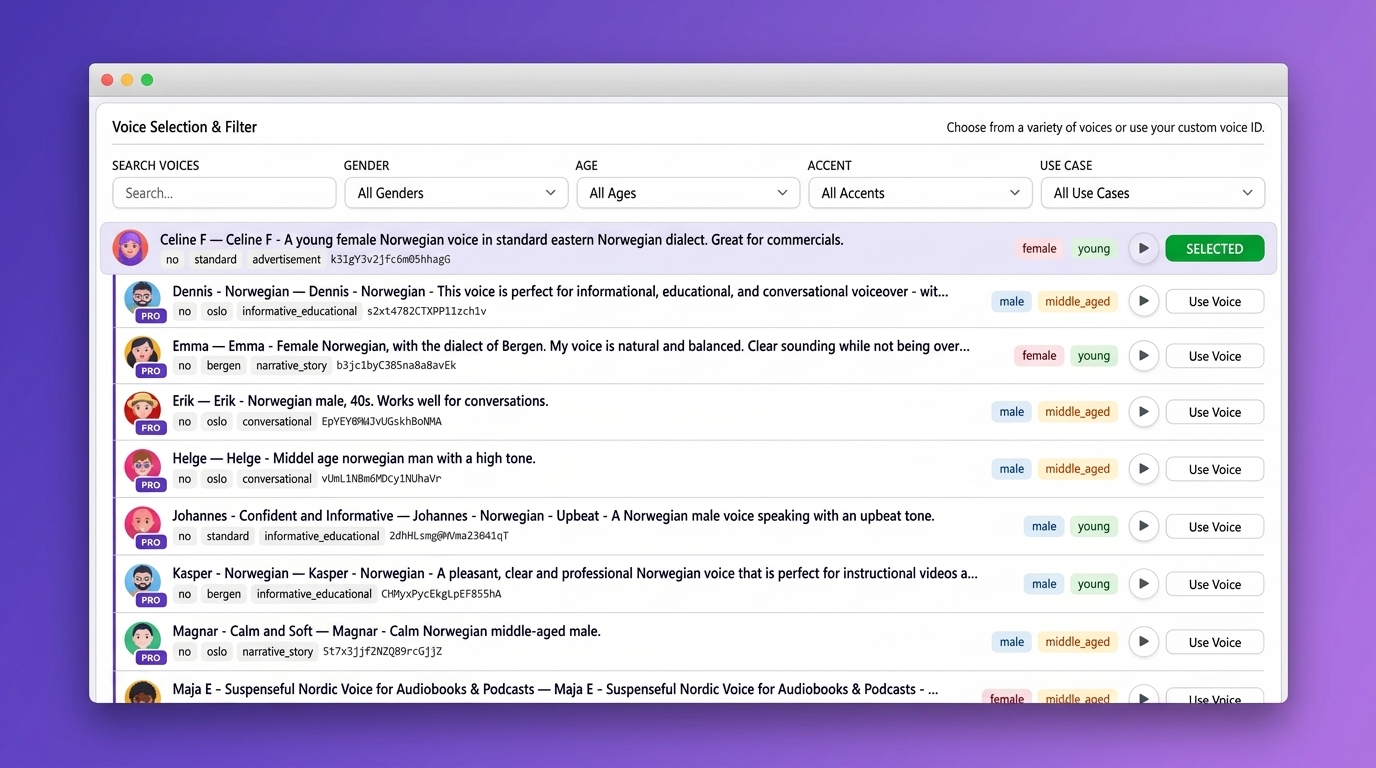
Voice selection with filters for gender, age, accent, and use case. Preview voices before you choose
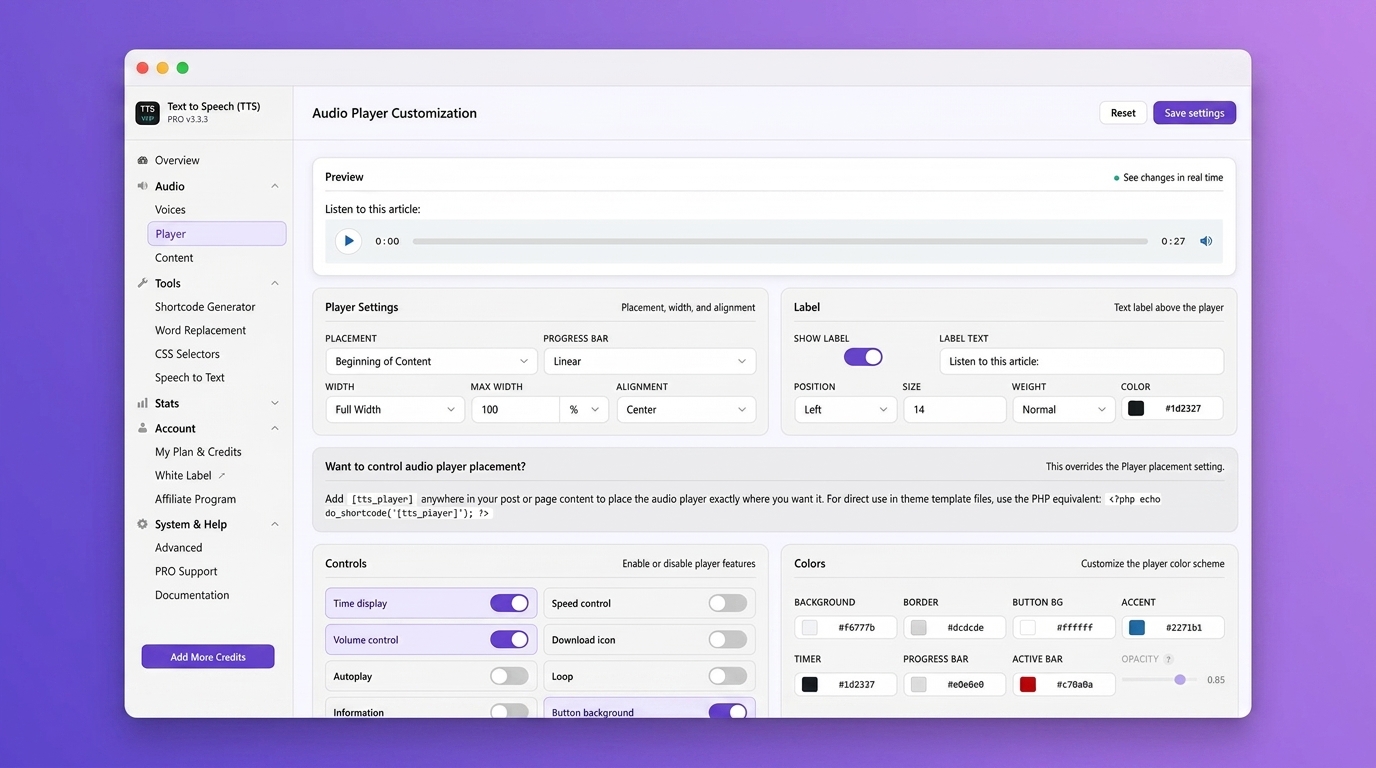
Audio player customization with live preview. Adjust colors, layout, controls, and placement
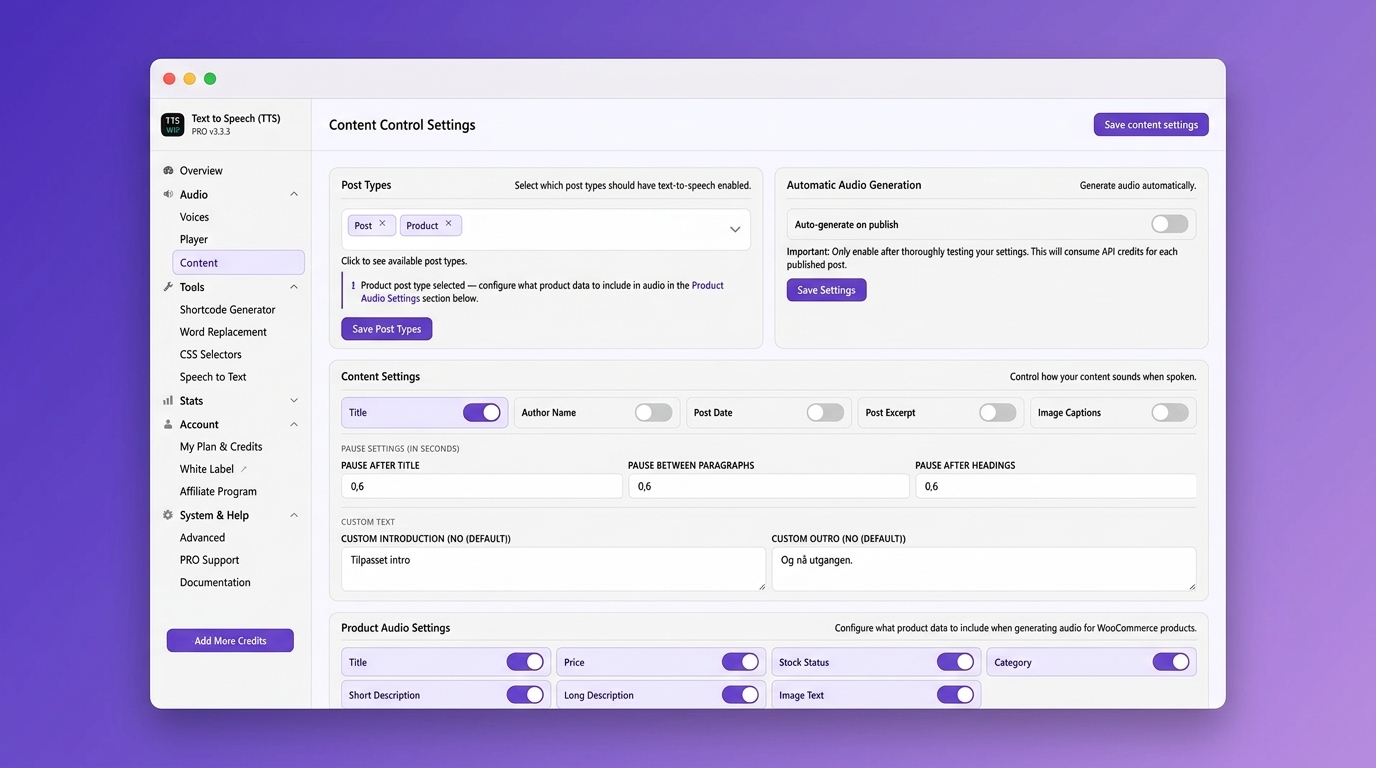
Content control settings. Choose post types, auto-generation, pauses, and WooCommerce product audio
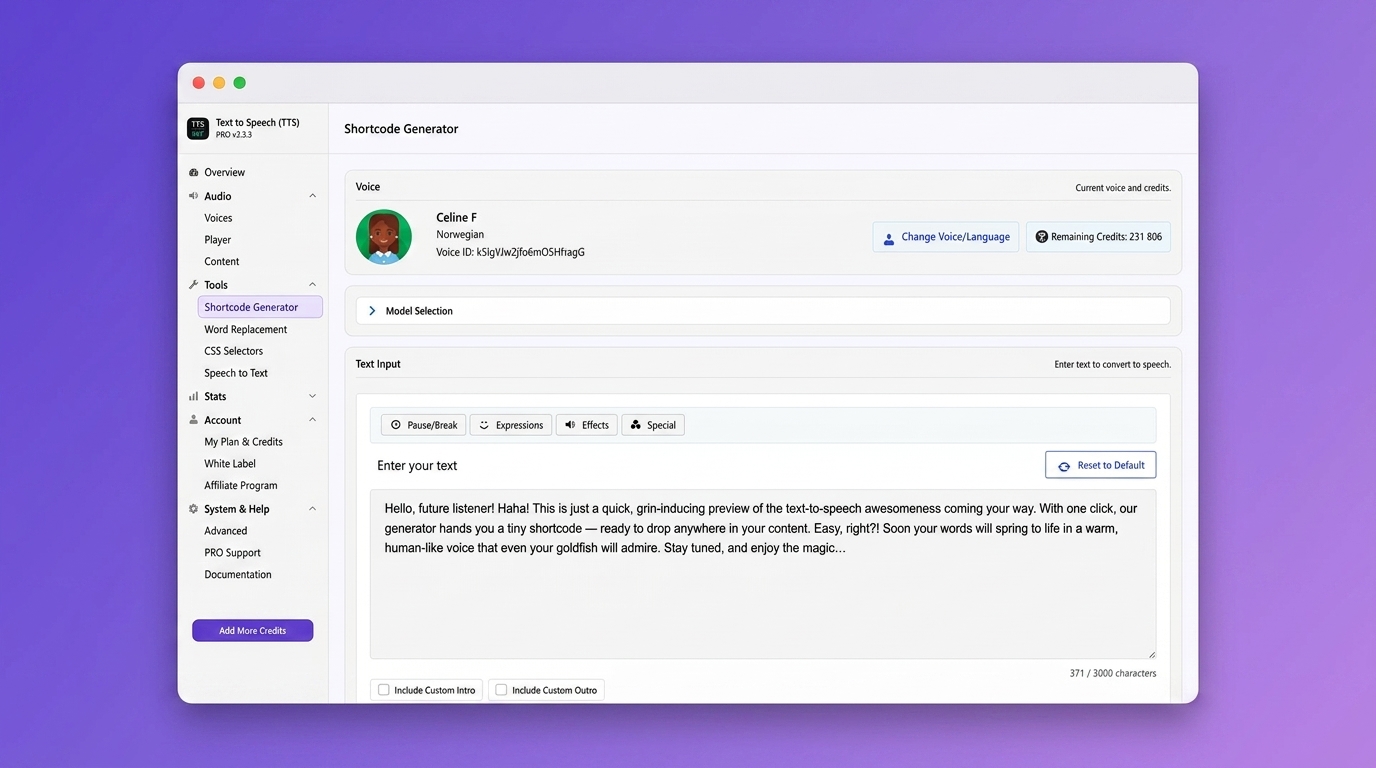
Shortcode generator. Convert any text to speech and place the player anywhere on your site
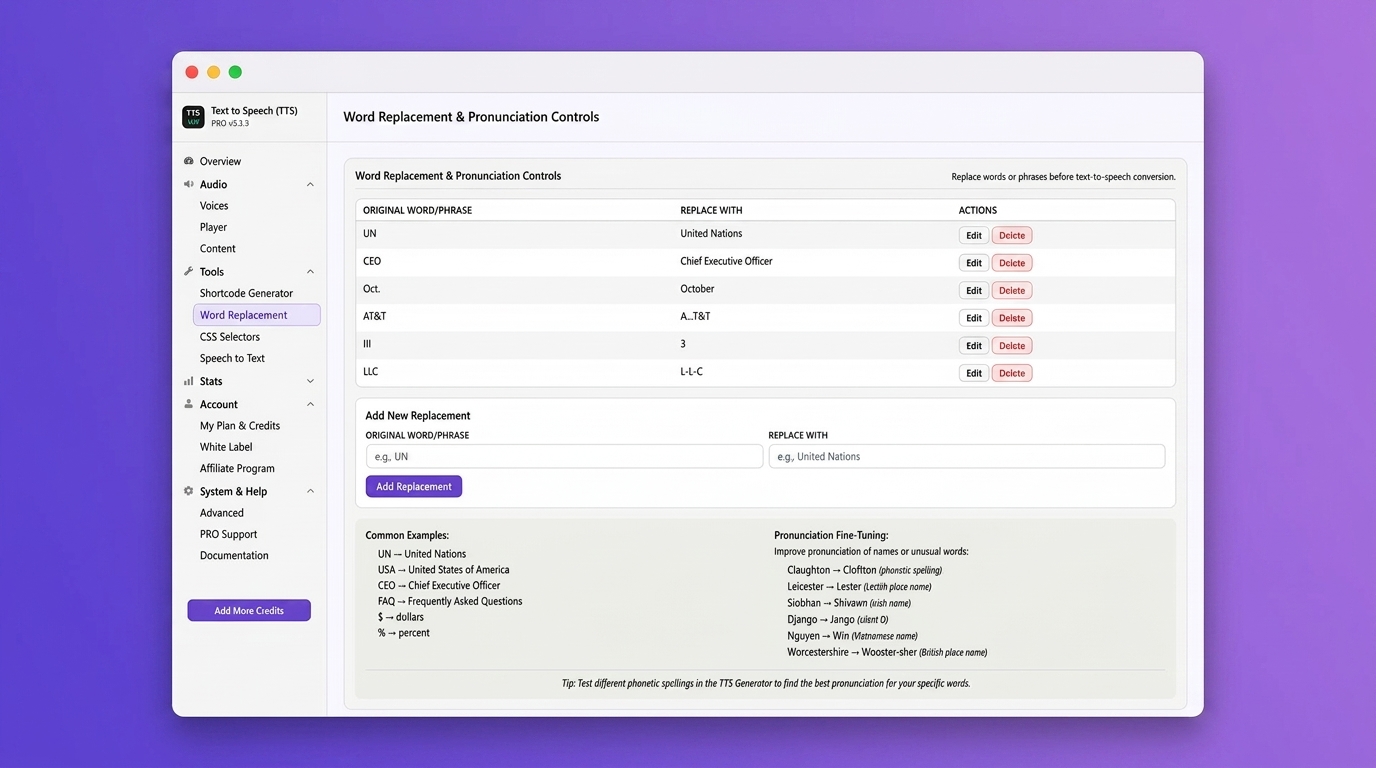
Word replacement and pronunciation controls for perfect audio output
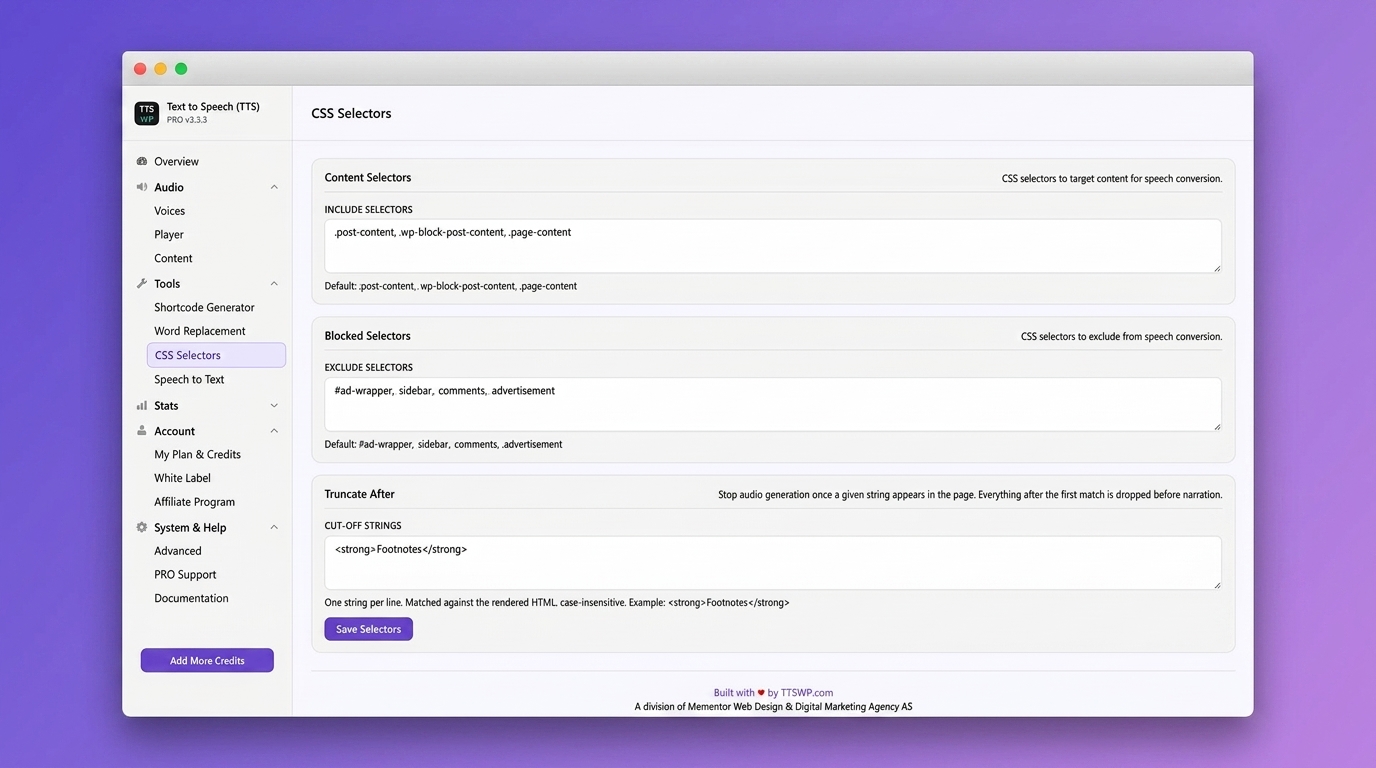
CSS selectors. Include or exclude specific page elements from speech conversion
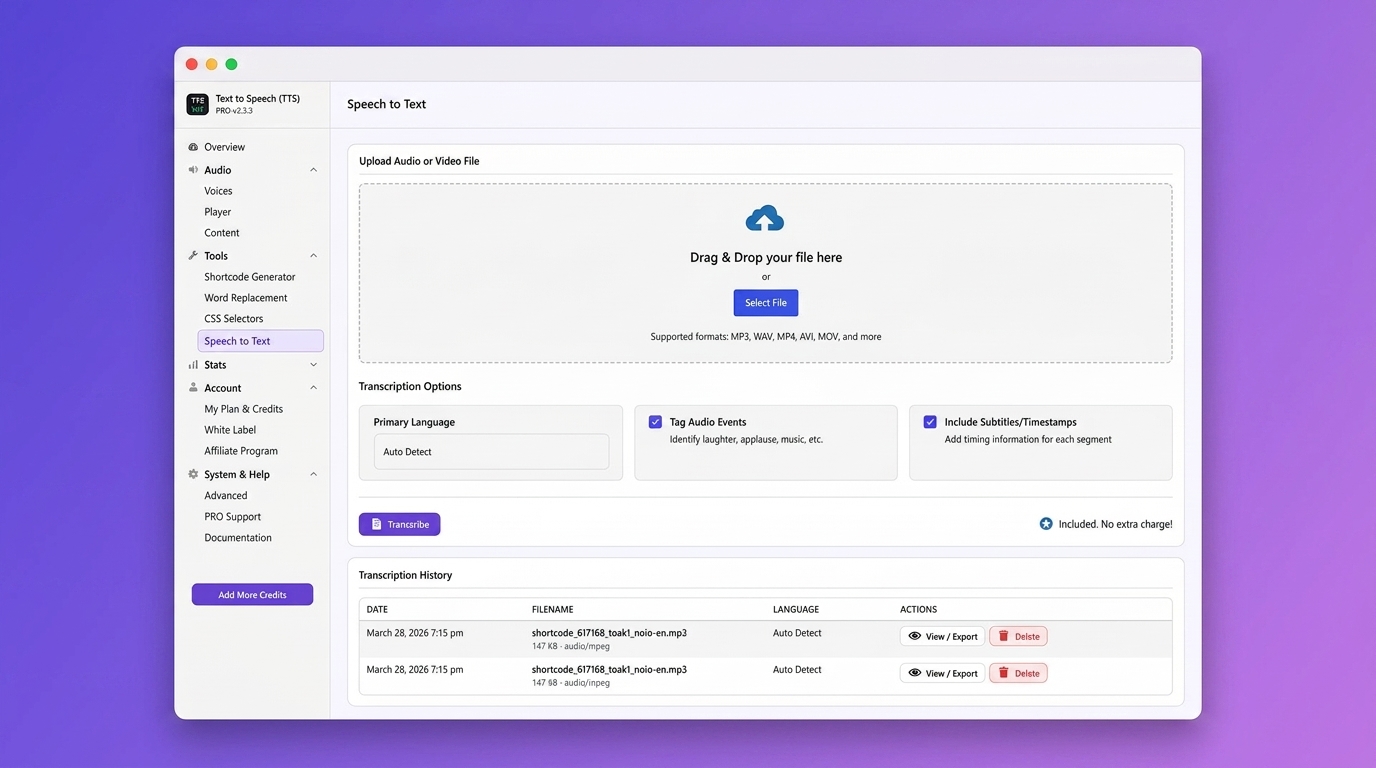
Speech-to-Text transcription. Create written transcripts from audio and video files
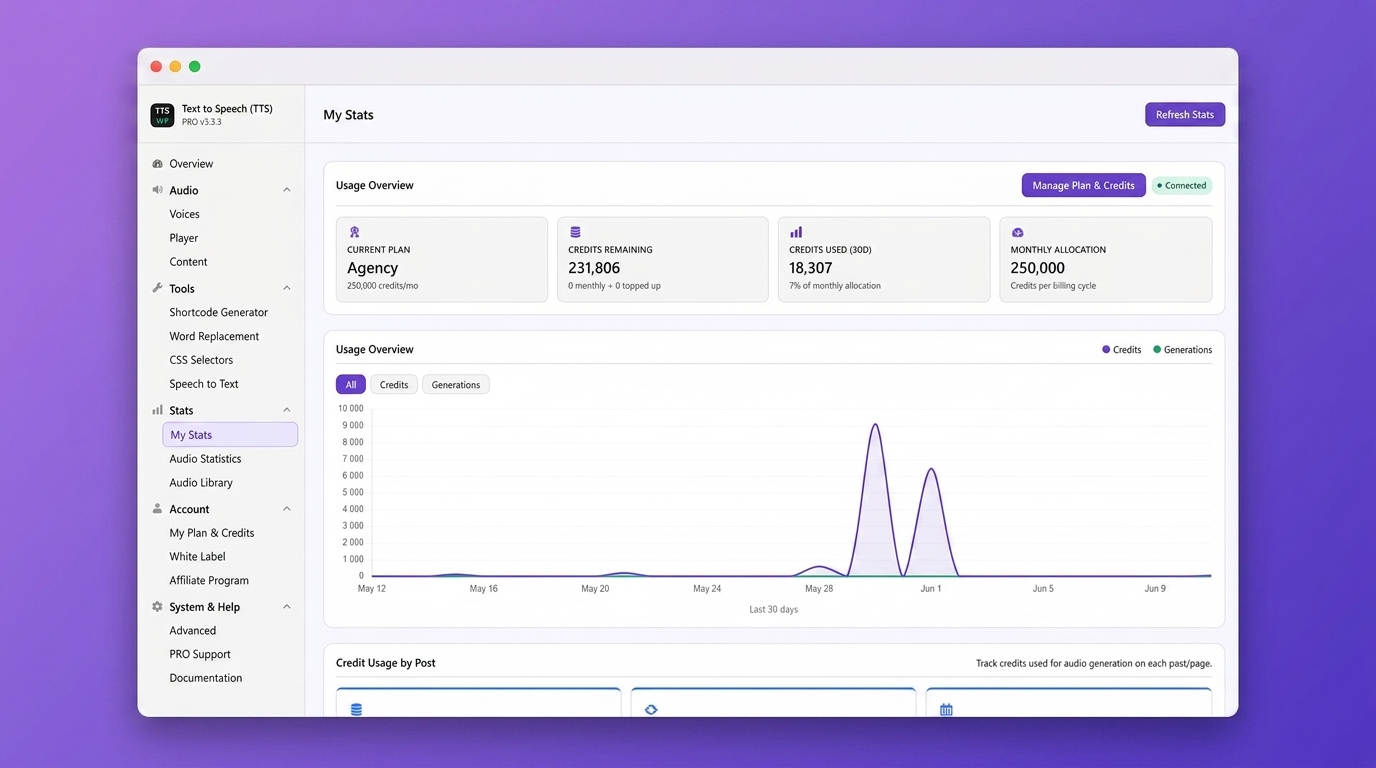
Usage statistics with credit consumption and generation trends over time
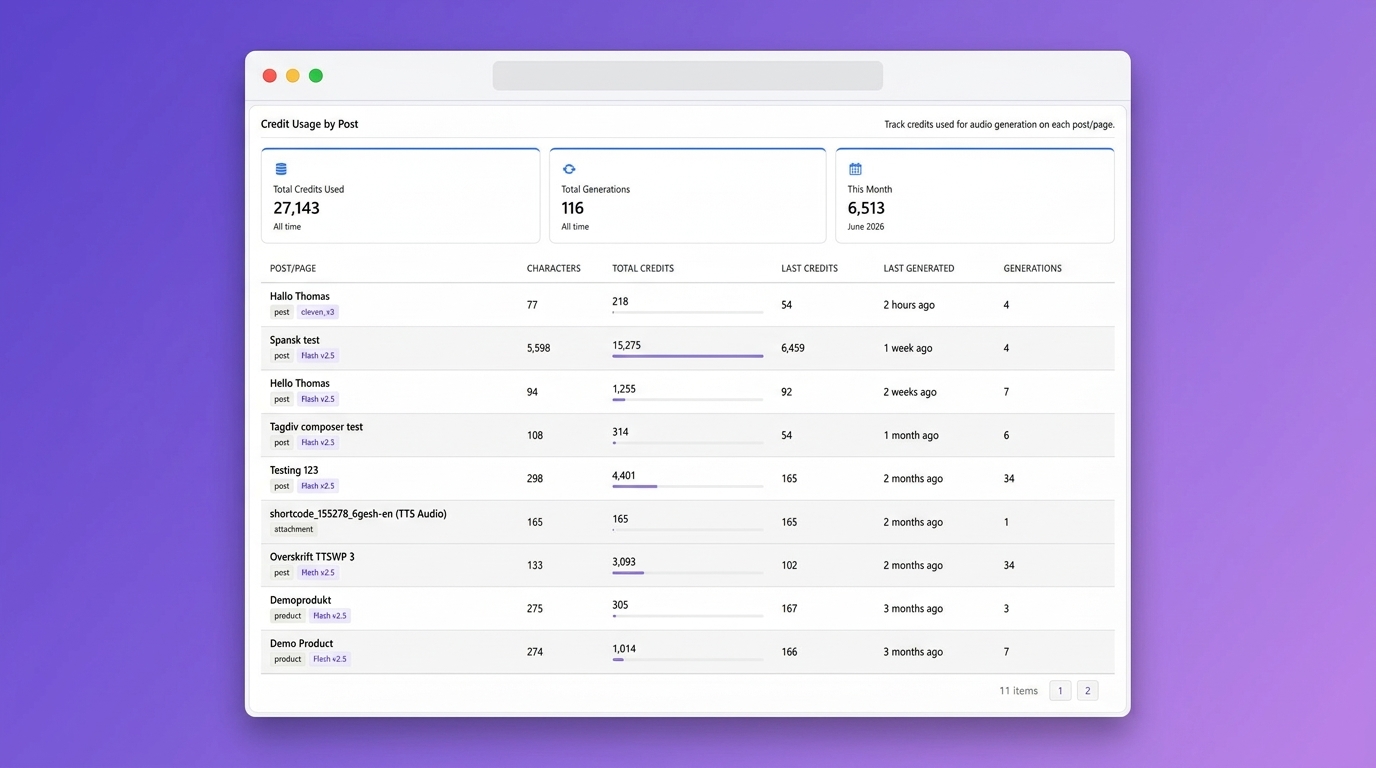
Credit usage by post. Track exactly how many credits each post or page consumes
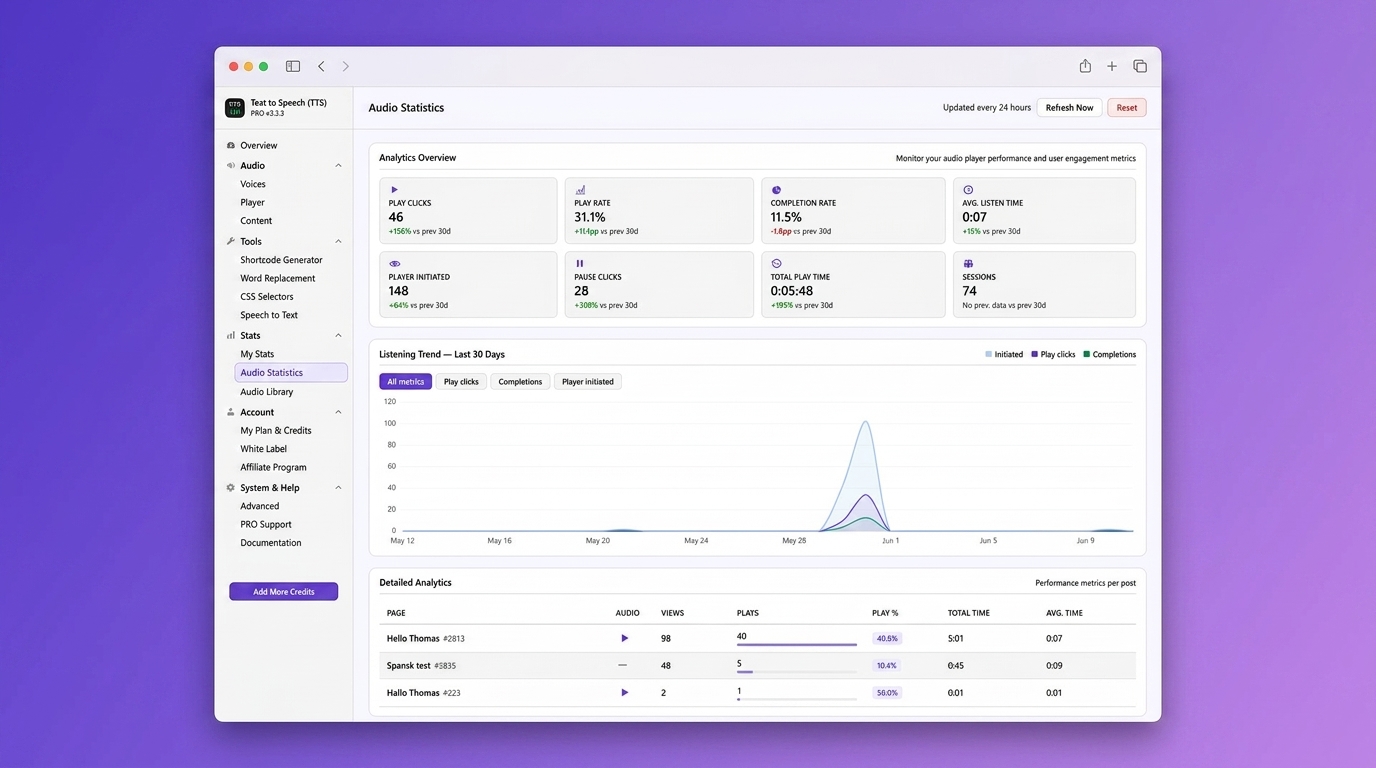
Audio statistics. Track play clicks, completion rate, listen time, and engagement per post
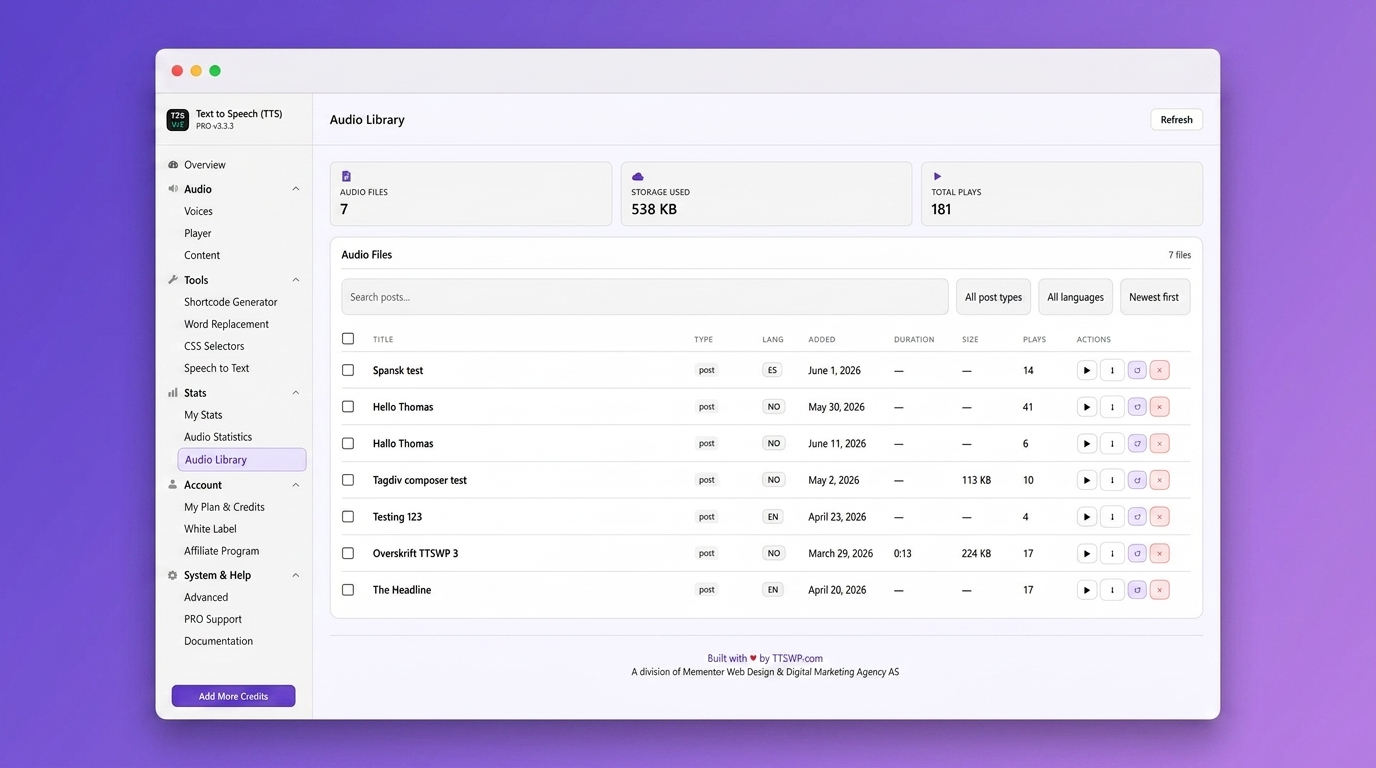
Audio library with all generated audio files, languages, and play counts in one place
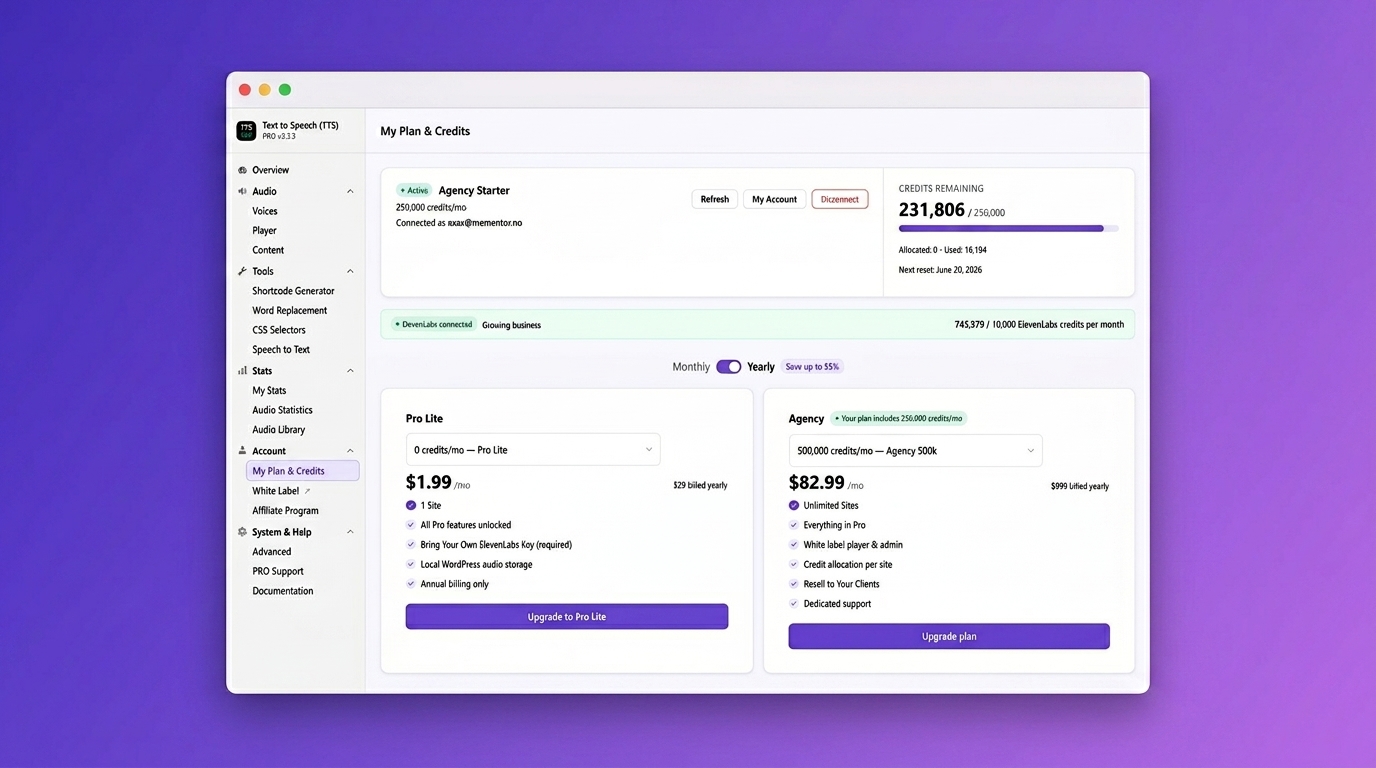
Plan and credits overview. Manage your subscription and see remaining credits at a glance
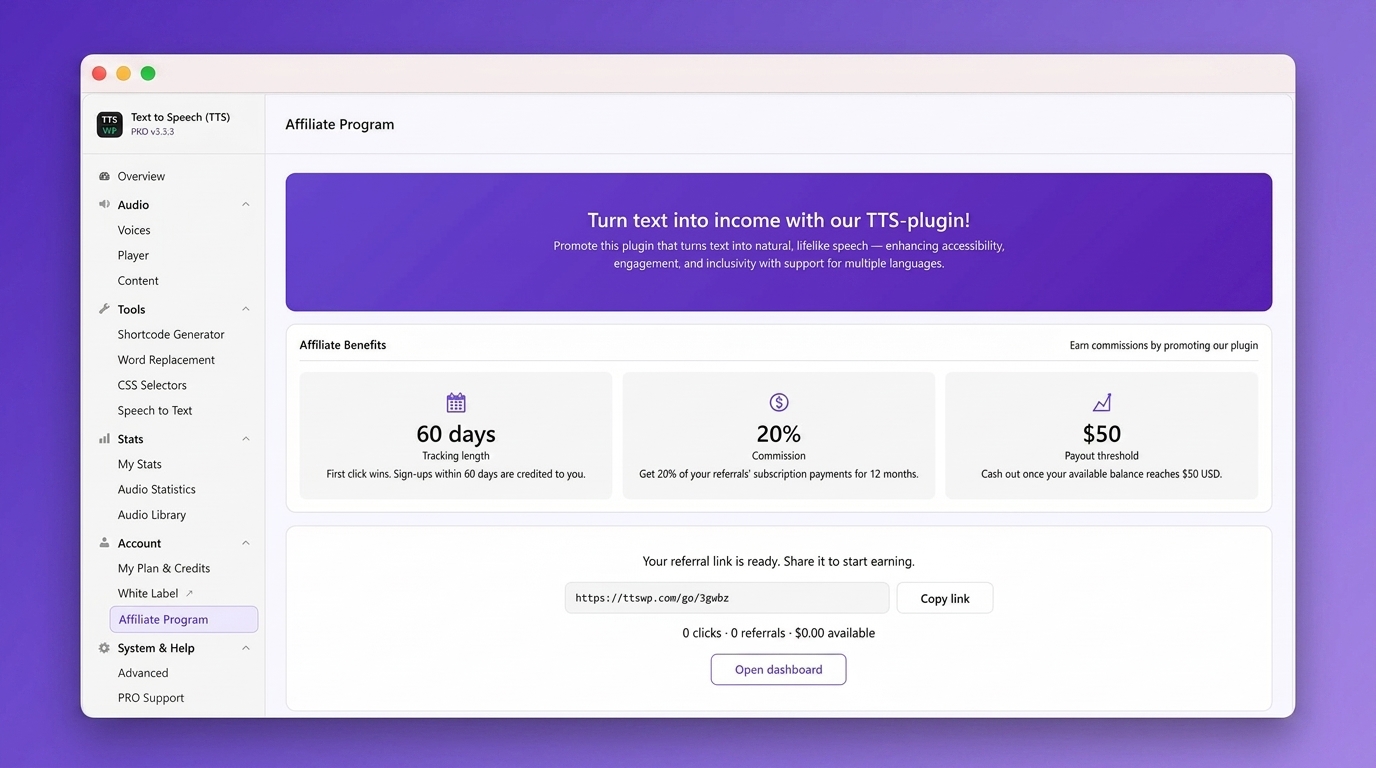
Affiliate program. Earn 20% commission by referring other site owners
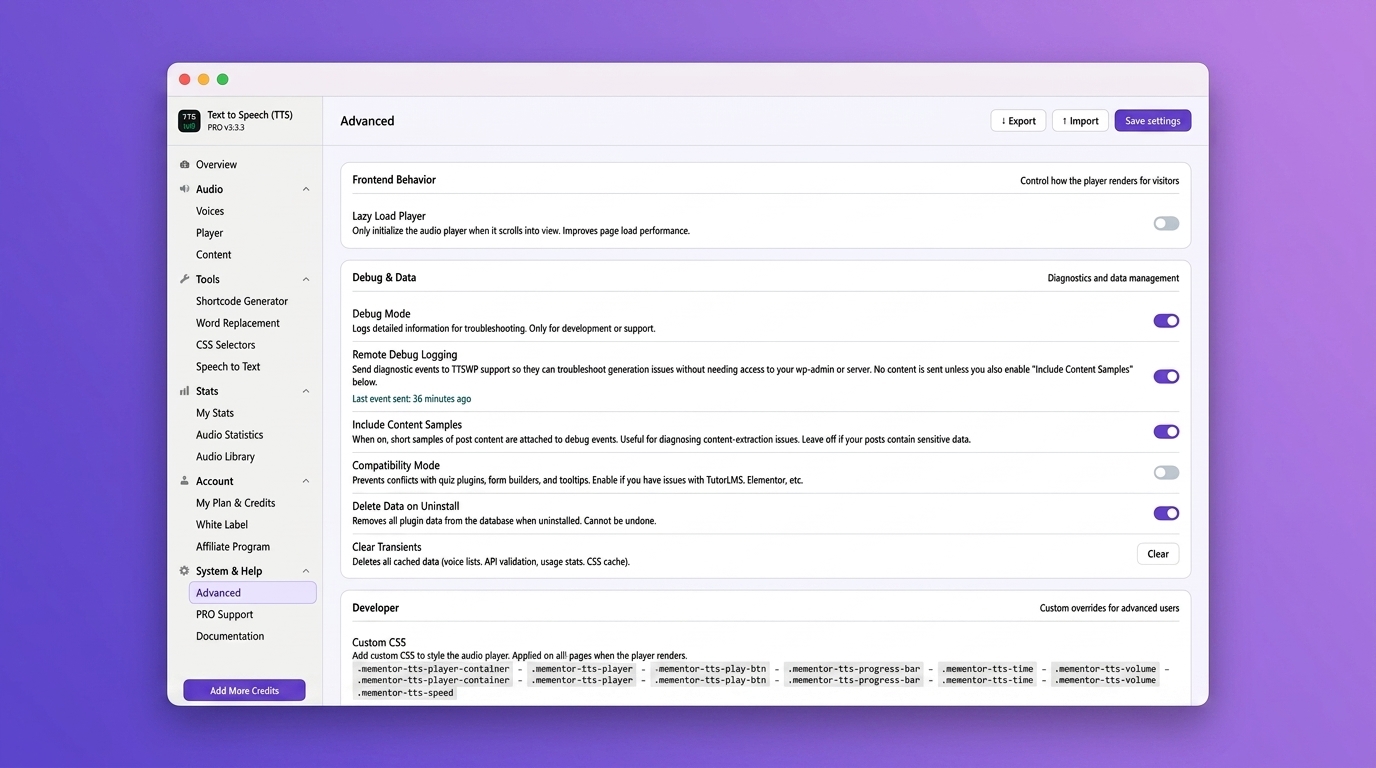
Advanced settings with debug tools, lazy loading, and custom CSS for developers
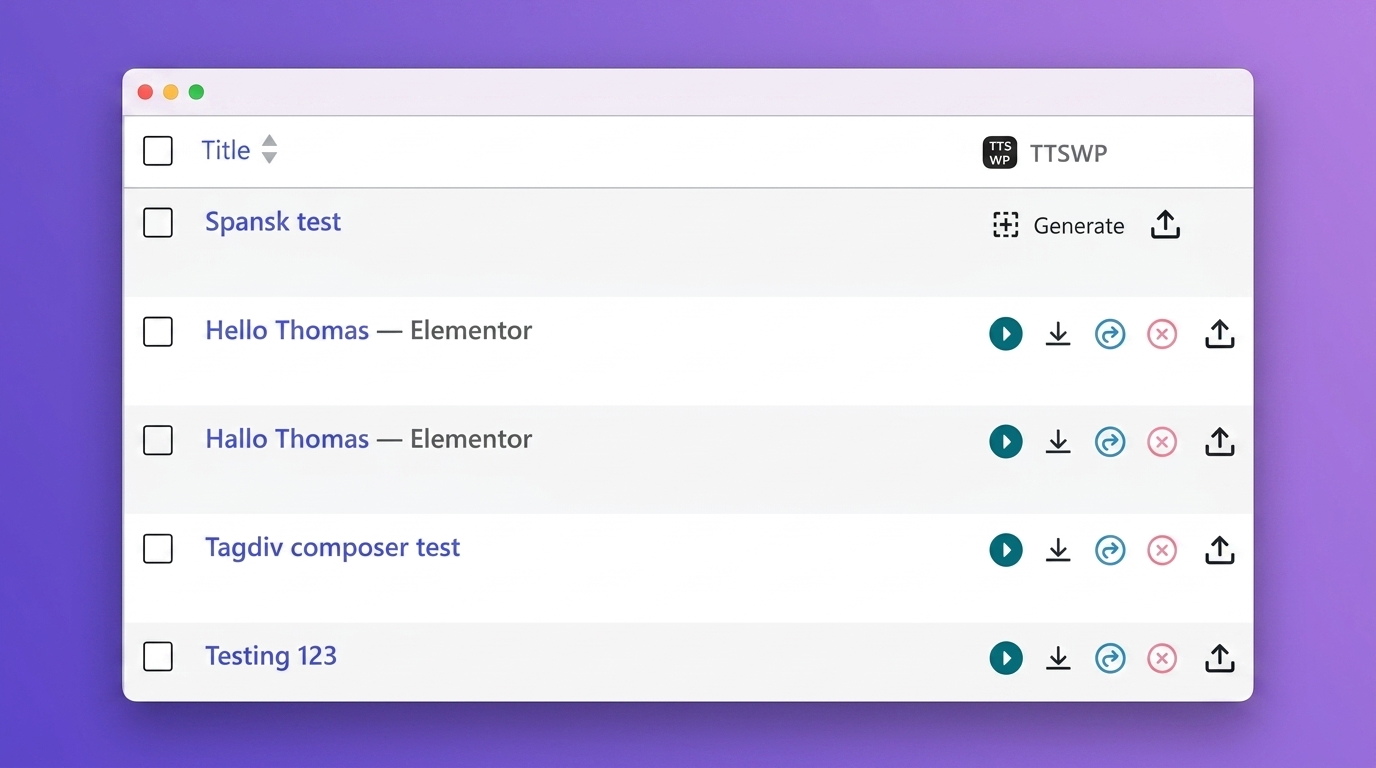
One-click audio generation directly from your WordPress post list
Faq
No. You get 10,000 free welcome credits when you connect your site. No ElevenLabs account is needed. If you want an extra 10,000 free monthly credits, you can optionally connect your own ElevenLabs API key as a fallback.
It is the TTSWP cloud dashboard where you manage your plan, credits, connected sites, and billing. Connect your WordPress site from the plugin’s Overview page with one click.
Free includes 10,000 welcome credits and standard voices in 30+ languages. Pro adds monthly credits, the full 600+ voice library across 70+ languages, Amazon S3 storage, and advanced features. Agency adds unlimited sites, white-label branding, credit allocation per site, and dedicated support.
Yes. All audio controls include ARIA labels, keyboard navigation, and color-contrast support.
Free includes standard voices in 30+ languages. Pro and Agency unlock 600+ premium voices across 70+ languages.
Yes. It works with all popular page builders and standard WordPress themes.
Yes. You can generate audio for product descriptions, including title, price, stock status, and category. Pro feature.
Yes. Upgrade to Pro and use the Bulk Generate tool.
No. The player is lazy-loaded and works with caching plugins like WP Rocket, LiteSpeed Cache, and W3 Total Cache.
Yes. Pro users can enter their custom ElevenLabs Voice ID for voice cloning.
Existing audio stays playable. New audio will not generate until you top up credits, your monthly credits renew, or your ElevenLabs API key fallback kicks in.
Yes. Connect multiple WordPress sites to your TTSWP account. Agency plans include unlimited sites with per-site credit allocation.
Reviews
Excellent
By 
Excellent
AMAZING SUPPORT
By 
Initially, I was sceptical, the number of different names, the lack of documentation etc. But I emailed support, and OMG Thomas was amazing. Fixed my initial support question overnight. I emailed back and suggested a few enhancements, and lo and behold the very next day 95% of them were implemented. You CANNOT get better support than that.
Great plugin, worldclass support
By 
I had some issues, the plugin did not support my builder, but it got fixed really quick. Plugin works great, does exactly what it supposed to.
Great and easy to use plugin
By 
Finally a good plugin for text-to-speech functionality.
Best text to speech plugin
By 
It's simple, very good, and audio quality is very good.
Impressed by the Simplicity and Voice Quality!
By 
I've been testing this plugin on my WordPress site, and I'm really impressed. The setup was incredibly easy, even for someone without a technical background. Within minutes, I had high-quality audio versions of my posts ready to go. Highly recommened!
Changelog
3.3.31 – 2026-09-14
- Performance: Frontend scripts and styles now ship minified. The player page payload drops from about 300 KB to about 140 KB of plugin JavaScript and CSS. Set SCRIPT_DEBUG to load the readable sources.
- Performance: The check that decides whether player assets are needed now runs once per page instead of around ten times, and theme compatibility no longer builds a fresh player object for every content filter call.
- Performance: The transcriptions table is verified with the other plugin tables once a day instead of on every admin page load, the Custom Voice ID lookup runs once per generation instead of once per setting read, and archive pages skip the excerpt detection work that only matters on single posts.
- Performance: The info popup script is only loaded when the Info control is enabled.
- Security: Player statistics now only accept events for published, non-protected posts, keep just the numeric fields the player sends, and cap each visitor at 120 events per minute.
- Security: The Generate on click status endpoint answers only for posts the button could be shown on, so it can no longer be used to probe drafts or private posts by id.
- Security: Settings export and import skip license keys, generated audio maps, diagnostics settings and database version stamps, using one shared list for both directions.
- Security: The audio structured data escapes angle brackets so a crafted title cannot break out of the script tag.
- Developer: Removed about 800 lines of unreachable code, including nine AJAX handlers that no screen called and the unused API key reveal handler.
3.3.30 – 2026-09-08
- Security: The shortcode audio generator now requires an editor account. It was reachable by logged-out visitors, who could have generated audio from any text on the site’s credits.
- Security (PRO): Generate on click and Generate on first visit now reserve each post’s estimated cost against the daily credit cap when the job is queued, and the worker checks the cap again before generating. Each visitor is also limited to ten triggered generations per hour. Previously a burst of requests could queue far more than the cap allowed.
- Security: Password-protected posts are no longer offered to visitors for generation, and their player, audio URL and structured data stay hidden until the password is entered.
- Security: Debug logging for a directly connected ElevenLabs key no longer writes the key itself. Credential values are masked in every log line.
- Performance: Frontend pages load all plugin settings in one query instead of one query per setting. On sites without an object cache this removes about 36 database queries per page view.
- Performance: Player statistics no longer run a cache-clearing query on the options table for every tracked event, and the 30-second playback progress events, which were never used in reports, are no longer sent.
- Performance: The plugin no longer tells WP Rocket to leave jQuery undeferred on every page of the site. Our own scripts wait for jQuery when a cache plugin delays it.
- Performance: The Overview page reuses the account data it already has instead of making two live requests to the TTSWP service on every view. Add ?refresh=1 to the URL to force a fresh fetch.
- Performance: Publishing from the classic editor now hands audio generation to the background queue, the same way the block editor already did, instead of holding the publish request until the audio is finished.
3.3.29 – 2026-08-31
- New (PRO): Generate on click. Posts without audio can now show a “Listen to the content” button, so a reader never lands on a page with nothing to play. Clicking it generates the audio on the spot: the button switches to a preparing state and the page refreshes into the ready player, usually within a minute. The button follows your Player Visibility setting, so if only logged-in users or selected roles can see the player, only they can see and use the button. This makes it a natural fit for paid audio subscriptions: publish your articles free to read, and let paying members generate and listen on demand. The button is deliberately theme-neutral: it inherits your theme’s font and text color and scales with your typography, so it looks native on any site, light or dark. It works in every player position, including the sticky footer, and shares the daily credit cap with Generate on first visit, so all visitor-driven generation draws from one budget you control. Turn it on under Content, “Generate on click (visitor button)”. If a generation fails, the button steps aside for a day instead of letting repeated clicks burn credits.
- Improvement: Generating audio now clears that post’s page cache in LiteSpeed Cache, WP Rocket, W3 Total Cache, WP Super Cache, and WP Fastest Cache. Cached sites previously kept serving the page without a player until the cache expired on its own, even though the audio was ready.
- Improvement: The Content page’s Automatic Audio Generation card was reorganized: publish and first-visit triggers side by side, the new on-click trigger below, and one shared daily credit cap for all visitor-driven generation.
3.3.28 – 2026-08-26
- New (PRO): Auto-generate on first visit. Let your readers decide what is worth narrating. Once a post has been read a few times, its audio is queued automatically in the background, so the posts nobody opens never cost you a credit. This is ideal for large archives, where generating everything up front would be expensive. Turn it on under Content, “Generate on first visit (queued)”. You choose how many visits a post needs first (3 by default) and a daily credit cap (20,000 by default, or 0 for no limit). Audio is never created while a visitor is waiting, so your pages stay exactly as fast, and crawlers and bots are ignored so a search engine crawl cannot trigger it. The first visitor to a post sees no player; everyone after does. If you remember the old “generate when an old post is opened” behaviour that was removed in 3.3.10 for using up credits unexpectedly, this is its careful replacement: nothing is queued until a post has passed both your visit threshold and your daily cap, and a post that fails to generate is not retried for 24 hours.
- Fix: The PRO support request form no longer clears what you typed when a required field is missing. Submitting with a field empty returned a completely blank form: the message you had written was gone, and the “Grant temporary support access” tick was silently cleared. Because the empty text fields were obvious but the cleared tick was not, requests reached our support team saying access had not been granted even though the sender had ticked the box. Everything you typed is now kept when the form comes back to you.
- Improvement: The PRO Support page now opens with a short “Before You Report a Bug” checklist that links straight to the debug settings, so the diagnostic log is already recording when you reproduce the problem. This gets most tickets answered in one reply instead of several.
- Improvement: Free users can now dismiss the PRO upgrade card on the Shortcode Generator page. Dismissing it hides the card for 60 days and gives the text box the full width of the page. The dismissal is remembered per user, so it does not hide the card for your colleagues.
- Improvement: Design refresh across the plugin admin. Consistent spacing and typography, a single icon set, clearer status colours and better text contrast throughout, for easier reading and improved accessibility.
- Improvement: The plugin is now shown as “Text to Speech – TTSWP” in the WordPress admin, matching its name on WordPress.org.
3.3.27 – 2026-08-18
- Fix: The spoken title could read HTML character codes aloud as numbers. If your post title contained a straight apostrophe (for example “you’ve”), WordPress converts it internally to a character code, and the narration spoke it as “and eight thousand two hundred and seventeen” instead of the apostrophe. The spoken title, excerpt and the title-only fallback now decode these character codes before synthesis, matching what the body text already did. If any of your audio reads numbers where an apostrophe, quote or ampersand should be, click Regenerate after updating and it will read correctly.
3.3.26 – 2026-08-15
- Fix: Audio generated with version 3.3.25 could speak a stray “h” sound with an extra pause at every heading. This was a regression in yesterday’s heading-pause improvement: an internal heading marker was split apart by a dash cleanup step before it could be converted into a pause. If you generated audio on 3.3.25, click Regenerate after updating and the narration will be clean again.
- Fix: Deleting audio from the post list or My Content & Audio now also removes cloud-hosted files from storage and the CDN. Previously only the reference on your site was removed, so the audio file itself stayed reachable at its old address. Two internal delete handlers were competing for the same button and the wrong one was answering; there is now a single delete handler that cleans up everything: the cloud file, local files, all saved references and playback statistics rows.
- Improvement: Large internal cleanup. Removed over 3,500 lines of dead legacy code, including old dashboard pages, an unused Dropbox integration, leftover screens from the removed in-WordPress API key setup, duplicate request handlers and two frontend scripts that no longer did anything. The plugin download is smaller and several unused admin endpoints no longer exist.
- Fix: Two internal database tables could be missing on some installs because the table creation statements were combined in a format the WordPress database upgrader does not support. They are now created correctly, and existing installs get the missing tables restored automatically the first time the new version loads.
3.3.25 – 2026-08-15
- Fix: The custom introduction and outro are no longer spoken twice on automatically generated audio. Auto-generate on publish added them once itself and the audio engine added them again, so every auto-generated post spoke the intro and outro twice and paid credits for the duplicate characters. If your auto-generated audio has a doubled intro, click Regenerate after updating.
- Fix: The bulk “Generate Audio” action on the post list now produces exactly the same audio as the per-post Generate button. It previously used its own simplified text assembly that ignored the Truncate After setting and your include and exclude selectors, produced no pauses between paragraphs and headings, and also duplicated the intro, outro and word replacements, charging credits twice for them.
- Fix: The Regenerate button now produces the same audio as Generate. Regenerated audio was missing the spoken title (and author, date and excerpt when enabled), WooCommerce products lost their price and description segments, and some Elementor posts regenerated from raw builder data instead of the real content.
- Fix: The “Pause after headings” setting (PRO) now actually works. Heading pauses previously always fell back to the paragraph pause duration. Headings are now tracked separately through the whole pipeline, so you can give them their own pause length.
- Fix: Posts whose text is found inside the theme’s main content container (the common case on most themes) now get natural pauses between paragraphs and headings. These posts were previously read as one continuous run of text with no pauses at all.
- Fix: Deleting audio on a post in a non-default language (WPML or Polylang) now clears the correct language reference, so the frontend no longer shows a player pointing at the deleted file. Deleting also removes older local audio copies left behind by earlier regenerations.
- Improvement: A temporary problem on app.ttswp.com can no longer disconnect your site. The plugin now only disconnects when the service explicitly reports the site token as invalid, and the unattended daily check additionally requires two consecutive rejections before disconnecting.
- Improvement: Elementor pages without audio no longer load the plugin’s player styles, saving about 106 KB on every such page.
- Fix: On pages with several audio players, dragging the progress bar of one player no longer leaves that player stuck in scrubbing mode afterwards.
- Fix: The player info popup no longer falls back to an outdated built-in text with wrong links; the popup is now handled by a single component.
- Security: The bulk ZIP download now strictly validates that requested files live inside the plugin’s audio folders, and the temporary download link uses an unguessable name.
- Security: Bulk audio generation now verifies edit permission for each selected post individually, matching the per-post buttons.
- Security: The ElevenLabs API key is now always stored encrypted, also when saved through the advanced settings endpoint.
- Security: On-demand shortcode audio generation by site visitors is now capped at 5,000 characters per request to protect your credit balance.
- Improvement: Uninstalling with “Delete all data” now also removes the site connection token, all remaining connection data, scheduled tasks and temporary values. Deactivating the plugin removes its scheduled background tasks and immediately revokes any temporary support access account.
- Fix: Removed two unused admin endpoints that could cause a server error if called, and fixed a PHP 7 compatibility issue on the Overview page checklist.
3.3.24 – 2026-08-12
- New (PRO): Player Visibility – choose who can see the audio player: everyone, logged-in users only, or selected user roles. Perfect for offering audio as a members-only perk across your whole site, with no per-post setup. Works automatically with roles created by membership plugins such as MemberPress. Find it on the Player page under Visibility.
3.3.23 – 2026-08-11
- Fix: In My Content & Audio, pages whose saved audio file no longer exists on the server (for example after a site migration or cleanup) are now labeled “Audio removed” instead of “Has audio”. Previously these rows showed a Play button that produced no sound, which was confusing; they now show a Generate button so it is clear the audio needs to be regenerated. The status check now verifies the audio file the same way the frontend player does, so the badge and your website always agree.
- Improvement: Audio found on disk without a saved reference (some legacy setups) now gets working Play and Download buttons in My Content & Audio instead of none.
- Improvement: The voice list on the Voices page now loads instantly on repeat visits, cached in your browser for one hour. The Refresh voices button still fetches a live list from the server.
3.3.22 – 2026-08-10
- New: PRO Support no longer asks for your WordPress username and password. Instead, an optional “Grant temporary support access” checkbox creates a dedicated administrator account (ttswp-support) with a random password that expires automatically after 48 hours. You can revoke the access from the PRO Support page at any time, and your own credentials are never sent anywhere.
- Fix: The License page no longer shows “Free Plan – 0 credits remaining” to paying customers when app.ttswp.com is temporarily unreachable. It now shows a clear “Unable to load plan data” message with a Retry button – your plan was never affected, only the display.
- Fix: When the voice list fails to load on the Voices page, the actual error message from the server is now shown together with a Retry button, instead of the generic “The response was invalid.”
- Improvement: In My Content & Audio, posts whose audio was deleted are now labeled “Audio removed” instead of “No audio”, so the play count and Last generated date next to them no longer look contradictory.
- Improvement: The shortcode attributes time_display, volume_control and speed_control now also accept “no” to hide a control on a specific player, and “yes” now works even when the corresponding global setting is turned off.
- Fix: The Custom Introduction and Custom Outro labels on the Content page now show the language name (for example “Norwegian (default)”) instead of the raw language code, and drop the suffix entirely on single-language sites.
- Fix: The support form’s version field is now labeled “TTS Version” instead of “TTS Free”.
3.3.21 – 2026-08-04
- Fix: Pullquote and Table blocks are no longer skipped in the generated audio. The content cleanup excluded every figure element when “Include image captions” was off, and Gutenberg wraps Pullquote and Table blocks in a figure tag, so their text (including the citation line) never reached the narration. The cleanup now excludes only actual image elements, so quotes and table content are read aloud while image captions still respect your setting. If your posts use pullquotes or tables, click Regenerate after updating to get the full narration.
3.3.20 – 2026-08-02
- Fix: Long audio generations no longer fail with “Audio generation failed” after about 100 seconds. Generations that took longer than that, typically long articles on the Eleven v3 model, were cut off by a proxy timeout on the way back to your site even though the audio itself was created successfully. The plugin now sends all API requests over a direct connection that allows the full 5 minute window, so long articles and Long Article Stitching complete reliably. If you use your own ElevenLabs key, this also stops retries of long articles from spending your ElevenLabs credits without delivering the audio.
- New: My Stats now has a custom date range filter. Pick a From and To date above the Credit Usage by Post table to see exactly which posts used credits in that period, along with total credits and generations for the range. Available on all plans.
- New: The Credit Usage by Post table can now show 10, 20, 50 or 100 posts per page.
- Fix: The pagination under the Credit Usage by Post table could show only the first and last page on some hosts, making the pages in between unreachable. Page numbers around the current page are now always shown and clickable.
3.3.19 – 2026-07-21
- Fix: Audio generation no longer skips most of the article text on some Fusion Builder (Avada) and other classic editor posts. An internal fallback intended only for Elementor could replace the fully rendered article with its raw shortcode text, so only headings and list items made it into the audio. The fallback now runs only on Elementor posts. If any of your articles produced shortened audio, click Regenerate after updating to get the full narration.
3.3.18 – 2026-07-21
- Fix: The License page no longer shows “PRO license management file not found. Please reinstall the PRO plugin.” for customers on a paid plan. That message was a leftover from the old separate PRO plugin and no reinstall was ever needed. Paid plans now see their current plan and credit balance on that page, with a button to manage the plan on the Account page.
- Improvement: Remote debug logging now captures the same detailed diagnostics for the Regenerate button as for a fresh Generate, including rendered content shape and text samples when “Include Content Samples” is enabled.
- Improvement: While “Include Content Samples” is enabled, debug events are now delivered reliably even on hosts that silently drop background requests.
3.3.17 – 2026-07-19
- New: My Favorite Voices (PRO). Star any voice to keep it in a dedicated list at the top of the Voices page, always visible no matter which language you are filtering by.
- Fix: The audio player no longer gets stuck on a loading indicator with Themify themes and Themify Builder. The player audio now opts out of Themify’s lazy audio loader so it plays normally.
- Improvement: If your site’s connection is interrupted, the connect screen now shows a clear “Reconnect your site” message instead of the new-user welcome, so you know to reconnect rather than start over.
- Fix: On the Voices page, voices that only “also support” the selected language are no longer offered as free to free plan users beyond the allowed limit. The free voice count (5 for English, 3 for other languages) is now shared across both native and supporting voices for the chosen language, and native voices are offered first.
3.3.16 – 2026-07-07
- Fix: When your own ElevenLabs key (BYOK) cannot use the selected voice, for example a library voice on a free ElevenLabs account, you now see the real reason with clear options: pick a standard voice, top up TTSWP credits, or upgrade your ElevenLabs plan. Previously this was shown as a misleading “Not enough credits” message.
- Improvement: Clearer guidance on the Voices page for using a custom voice with TTSWP credits. A new “Learn how” guide opens right on the page with a three step walkthrough and screenshot: share the voice in ElevenLabs, copy the sharing link, and send it to our support team via PRO Support.
- Improvement: My Content & Audio is now the first link in the Text to Speech admin bar menu, so your audio hub is always one click away.
- Improvement: The low credit banner now knows whether you have your own ElevenLabs API key connected. With a key, it reassures you that audio generation continues via your key. Without one, it suggests connecting a key as a third option next to topping up or upgrading.
3.3.15 – 2026-07-01
- New: Choose where your audio is stored (PRO and Agency). A switch on the Settings page lets you keep audio on the fast TTSWP cloud (S3 + CloudFront) or host it locally on your own server. On means cloud, off means local.
- Fix: Pro Lite plans now correctly store audio locally on your own server instead of on the cloud.
- Fix: GTranslate is now detected correctly. When the GTranslate plugin is turned off, the Settings page again shows “GTranslate not detected”, just like it does for WPML and Weglot.
- Improvement: When a translation plugin (WPML, Weglot or GTranslate) is included in your plan but not yet installed, the Settings page now shows a clearer “install to enable” icon instead of a padlock.
- Improvement: The Cloud audio storage setting is now a single, simple on/off switch. The extra storage-provider options were removed to keep things clear.
- Change: Anonymous usage tracking is now on by default on new installs. You can turn it off anytime under Settings, and no personal data is ever collected.
3.3.14 – 2026-06-30
- New: My Content & Audio page. A single place to manage audio for all your posts, pages, and WooCommerce products. Generate, regenerate, download, and delete audio one post at a time or in bulk, see your live credit balance, switch language on multilingual sites, and attach your own custom audio file. Find it at the top of the plugin menu, right under Overview.
- Improvement: The Voices page now shows an info tooltip for Long Stitching to free users, so you can see what the PRO feature does before upgrading.
- Improvement: Clarified the Multi-Language Voice Mapping hint to list all supported translation plugins: Weglot, WPML, GTranslate, TranslatePress and Polylang.
- Improvement: Clearer message when a voice needs a higher ElevenLabs plan on your own key (BYOK). Instead of a raw error, you now get actionable options: use TTSWP credits, upgrade your ElevenLabs plan to Creator or above, or pick a voice that works on your current plan.
- Improvement: The Getting Started step “Choose language and voice” is now marked done once you have selected a voice.
- Change: New installs now default the player placement to Before Excerpt and alignment to Center. Existing sites keep their current settings.
- Fix: Waveform progress bar now shrinks to fit when extra player controls are enabled, so control icons no longer get pushed onto a second row.
- Improvement: Waveform bars are now centered vertically for a cleaner, more balanced look.
3.3.13 – 2026-06-27
- New: Long Stitching (PRO). Generate audio for articles that are longer than your selected voice model normally allows in one request. The text is split, voiced with continuity so it still sounds like one take, and merged into a single seamless audio file, all within your plan’s character limit. This lets you use the newer, more expressive models such as Eleven v3 on full-length articles. Turn it on under Voices, Audio Settings.
- New: Voices now appear under every language they support, not just their main one. On the Voices page, choose a language to see its native voices first, followed by an “also supports” group of voices that ElevenLabs has verified for that language, giving you far more choice per language.
- New: Output language for a Custom Voice (PRO). You can now set the spoken language for your Custom Voice ID. This helps when a voice is tagged for one language but reads another one well, for example an English voice reading Slovak. Numbers, decimals and percentages are then pronounced in the language you pick, including in the shortcode generator.
3.3.12 – 2026-06-25
- Fix: Long posts on the higher-quality voice models no longer show a “Could not connect to TTSWP API” error. The plugin now waits long enough for large audio to finish generating, so it completes instead of timing out partway through.
- Fix: A generation timeout could quietly trigger a duplicate request in the background. Timeouts are no longer retried, preventing duplicate audio generation.
3.3.11 – 2026-06-23
- Improvement: Lighter and faster. Removed unused legacy files and dead code, stopped loading rarely-used settings, and now load custom player CSS only on pages that show the player.
- Improvement: Shortcode generator – refreshed the model descriptions, removed the retired Eleven Turbo v2.5 option, set Eleven v3 to a 5,000 character limit, and fixed the button icon alignment.
- Improvement: The player statistics report now loads faster on sites with many tracked posts.
- Improvement: Clearer wording and proper credit links in the player’s “Information” text.
- Improvement: A few admin labels are now translatable, and added a safeguard that ignores oversized requests to the statistics endpoint.
- Fix: “Delete all data on uninstall” now works. When enabled, plugin data is removed on uninstall as intended.
3.3.10 – 2026-06-21
- Fix: “Automatically generate audio on publish” now creates audio only when you publish a post, or when you use Bulk Generate. It no longer generates audio when older posts are simply opened or crawled, which could unexpectedly use up credits across a large site.
- Fix: Saving the Overview settings page no longer shows a blank page — your settings save and the page reloads as expected.
- Improvement: In the post list, the play button now switches to a pause icon while audio is playing, and its tooltip changes to “Pause audio”.
- Fix: On the Content page, the Post Types list is no longer cut off, so you can see and select every available post type.
- Improvement: On the Voices page, voices that need a paid ElevenLabs plan are now flagged when your connected ElevenLabs key is on the free plan, so you can tell at a glance which voices your key can use.
- Improvement: Clearer message when audio generation is blocked because a free ElevenLabs key cannot use a premium voice, with the options to switch voice, top up TTSWP credits, or upgrade.
3.3.9 – 2026-06-20
- Fix: Audio for pages built with the Divi builder no longer reads out raw layout code. On some Divi pages the audio would speak module settings (for example “et pb section builder version 4.16 background color gradient…”) mixed in with the text. Only the real page content is read now.
- Fix: When the player placement is set to “Before excerpt” or “After excerpt”, the player now appears on single posts and pages. Previously it only showed on layouts that display an excerpt, so on a normal single post or page no player was shown.
3.3.8 – 2026-06-17
- Fix: Audio for posts with non-Latin titles (Chinese, Japanese, Korean, Arabic, and similar) now downloads and plays correctly on paid plans. Previously these files could fail to load or download as 0 bytes.
- Fix: Player theme-compatibility CSS is no longer printed in the page head on pages where no audio player is shown, removing unused inline styles from non-player pages.
3.3.7 – 2026-06-15
- New: Player Settings now has a Right-to-Left (RTL) toggle that mirrors the audio player for RTL languages (Arabic, Hebrew, Farsi).
- New: PRO and Agency users can set their own Information tooltip text in the player (Player Settings, Information Text), replacing the default attribution.
- New: When a newer version is available, the plugin shows a dismissible notice on its own admin pages (one-click update, a What’s new changelog link, and a manual-download fallback), plus an update badge on its admin-bar item and sidebar menu.
- Improvement: The Sticky Footer Player, the Waveform Progress Bar, and the sticky bar Background Opacity are now free for everyone (previously PRO and Agency only).
- Improvement: Free users can now choose from 3 voices per language (English keeps 5), up from 1 per non-English language.
- Improvement: Clearer, white-label-friendly experience for sites connected under an agency. These sites now show their plan as “Agency Connected” with their own credit allowance. Owner-only controls are hidden from the client: plan upgrades, credit top-ups, the affiliate program, the Account/License/Add-credits menu items, the header Top up and Manage plan buttons, the connected account email, and the My Account and Disconnect buttons. The agency’s own master site is unchanged.
- Improvement: On agency-connected sites, the PRO Support form now goes to the agency that manages the site instead of to TTSWP.
- Improvement: The Sticky Footer opacity setting now keeps its tooltip readable when locked, so you can see …