Themesic Browser Agent Tools for WooCommerce

Themesic Browser Agent Tools for WooCommerce
Description
AI agents have started shopping for people. 🤖🛒
When an assistant like ChatGPT, Claude or an AI-powered browser lands on your store, it can do one of two things: scrape your pages and guess, or call tools you hand it and get the facts. This plugin hands it the tools.
Themesic Browser Agent Tools turns your WordPress site and WooCommerce store into a set of structured, permissioned WebMCP tools that AI agents discover and call directly. They can search your products, read prices and variations, check stock and browse your content. No scraping, no hallucinated prices, no guesswork.
It is built on WebMCP, the emerging web standard that lets a page offer AI agents a list of tools through the browser (document.modelContext). The same tools are also served over REST and OpenAPI for every other agent, including ChatGPT Custom GPT Actions, and they are described in the tool format of the Model Context Protocol (MCP) that agents already speak.
⚡ What agents can do on your store, out of the box
Ask an agent about your shop and it gets a real answer:
- “Do you have a merino scarf under $50?” – it calls
search_productsand gets the name, price, stock status and link. - “Is the leather weekender in stock?” –
check_product_stockreturns a straight answer. - “Which sizes does it come in?” –
get_product_variations. - “What do you sell?” –
list_categoriesandget_store_info. - “Find your article about returns.” –
searchacross your posts and pages.
14 tools, free, no account, no API key:
- 🛍️ WooCommerce catalog (when WooCommerce is active): get_store_info, search_products, get_product, list_products, get_product_variations, check_product_stock, list_categories.
- 📝 WordPress content: get_site_info, get_menu, search, get_post, list_posts, list_categories, list_tags.
Every one of them is a read tool. Nothing in this plugin changes your content, your catalog or an order.
🌐 One set of tools, every kind of agent
- In the browser (WebMCP) – your tools register with WebMCP-capable browsers and agents through
document.modelContext, with fallbacks for earlier previews of the API. - REST and OpenAPI –
/wp-json/themesic-agent/v1/manifest,/executeand/openapi, for any agent that can make an HTTP request. Import the OpenAPI URL into a Custom GPT as an Action and ChatGPT can query your catalog. - Discovery – RFC 8288
Linkheaders and a discovery endpoint, so an agent finds the tools without being told where they live.
🔒 Security-first by design
- Every authorization decision is made on the server. The browser is never trusted.
- Reads of public content are public. Write tools always require a same-session nonce, and tools that touch an account require a real login.
- Four access tiers: public, browser session, logged in, and a specific capability.
- Switch any tool, or a whole group of tools, off from the admin.
- Per-caller and global rate limiting, applied before the permission check, so failed guesses still cost the caller quota.
- Output is sanitized before it reaches an agent, as a defence against stored XSS and prompt injection.
- Denied calls are logged next to successful ones, so probing is visible to you.
- Never exposed: the admin email, usernames, private meta, secrets, and password-protected or non-public content.
📊 A proper admin, not a settings page
- Dashboard – status, your agent endpoints, usage stats, the most-called tools and a warning when the error rate climbs.
- Playground – run any tool exactly as an agent would and see the JSON it receives.
- Activity log – every call, successes and denials alike, exportable to CSV. No personal data is stored.
🧩 Built for developers
Register your own tools with the themesic_agent_register_tools hook – no core files to edit. Custom tools get the same security gate, schema validation, rate limiting and all three delivery surfaces as the built-in ones. Further hooks let you add REST routes, resolve a caller’s identity, narrow which tools are allowed and extend the admin screens.
🛡️ Privacy
This plugin makes no external calls at all. Every tool runs inside your WordPress install, nothing is sent anywhere on activation or afterwards, and the optional activity log stores recent tool calls with no personal data (and can be cleared or turned off). There is no account, no licence check and no telemetry.
🚀 Go further with Pro
The free plugin lets agents read your store. Pro lets them act on it, and gives you the controls to keep that safe.
- 🛒 Agentic commerce – add to cart, update and remove lines, view the cart, apply and remove coupons, and read checkout fields. Agents build a real WooCommerce cart that the shopper sees and pays for.
- 📦 Customer orders – a signed-in customer’s own orders (ownership-scoped and HPOS-safe), plus guest order tracking by order number and email.
- 💡 Recommendations and back-in-stock alerts for signed-in customers.
- 🔌 MCP server endpoint – a JSON-RPC 2.0 Model Context Protocol server, so Claude Desktop, ChatGPT and agent frameworks connect from the server side with no browser in the loop.
- 🔑 Per-agent API keys – stored hashed, scoped, and never able to reach an admin-only tool.
- ✋ Human-in-the-loop confirmation – a flagged tool returns a single-use token and only runs once the agent comes back with it.
- 🎛️ Per-tool permission overrides and an agent-facing description editor, to steer exactly how agents use each tool.
- 📚 Store knowledge – your shipping, returns and FAQ text, so agents answer policy questions accurately instead of inventing them.
- 🗂️ Custom post type tools for any post type you allow.
- 🤝 Integrations – ACF, BuddyPress and BuddyBoss, Gravity Forms, Contact Form 7, WPForms, Paid Memberships Pro, Restrict Content Pro, MemberPress, LearnDash, LifterLMS, Tutor LMS, WooCommerce Bookings, Amelia, Bookly and WooCommerce Subscriptions.
- 📡 Webhooks and an IP allowlist.
✨ See Pro plans and pricing | Everything Pro includes
Pro is a separate plugin, sold and delivered from themesic.com. Nothing in this free plugin is locked, time-limited or switched off: everything described above the Pro section works on its own, and always will.
Installation
- Install via Plugins > Add New by searching for “Themesic Browser Agent Tools”, or upload the ZIP under Plugins > Add New > Upload Plugin.
- Activate it. There is no build step, no Composer and no external setup.
- Open Themesic Agent Tools in the admin menu. Your agent endpoints are on the dashboard, ready to copy.
Connect a Custom GPT in two minutes
- Copy the OpenAPI URL from the plugin dashboard.
- In ChatGPT, create or edit a GPT, add an Action and import the schema from that URL.
- Ask it about your products.
Requirements
- WordPress 6.4 or higher
- PHP 8.1 or higher
- WooCommerce (optional; only needed for the store tools)
Screenshots
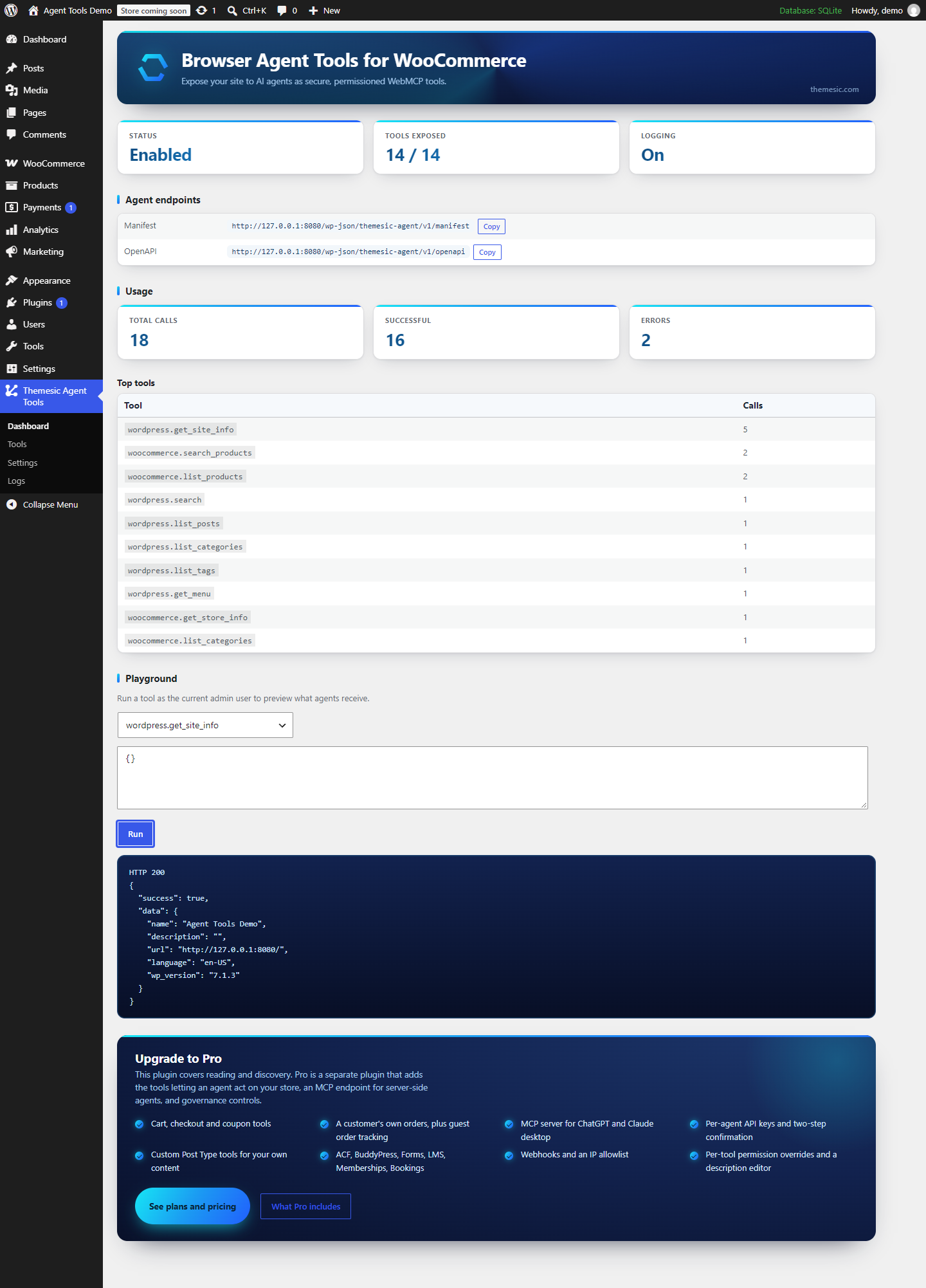
The dashboard - status, how many tools are exposed, the agent endpoints (manifest and OpenAPI), a usage summary, and the built-in playground for running any tool as an admin to see exactly the JSON an agent receives.
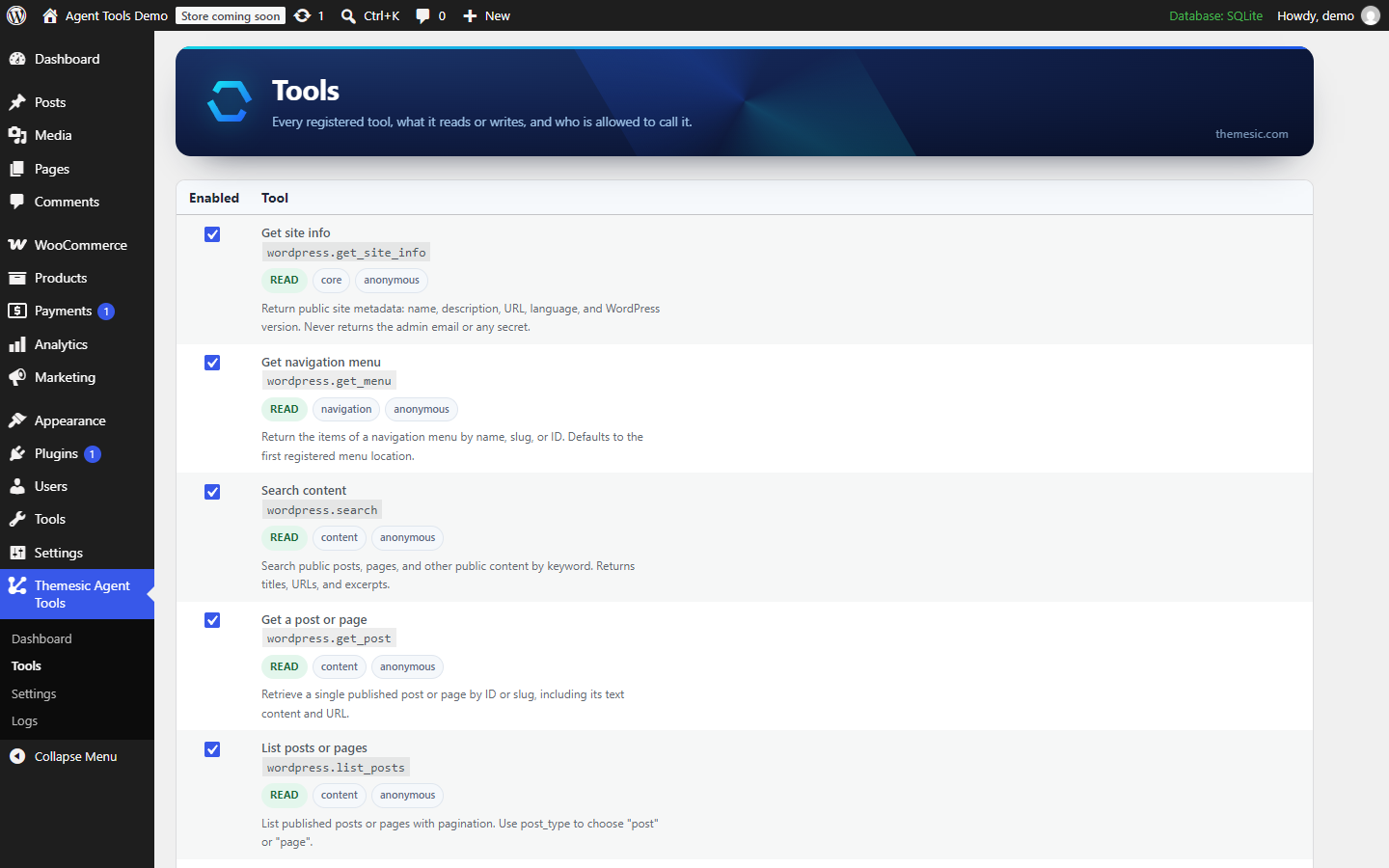
The Tools screen - every registered tool with what it reads, who may call it, and a switch to turn it off. The agent-facing description of each tool is shown as the agent will see it.
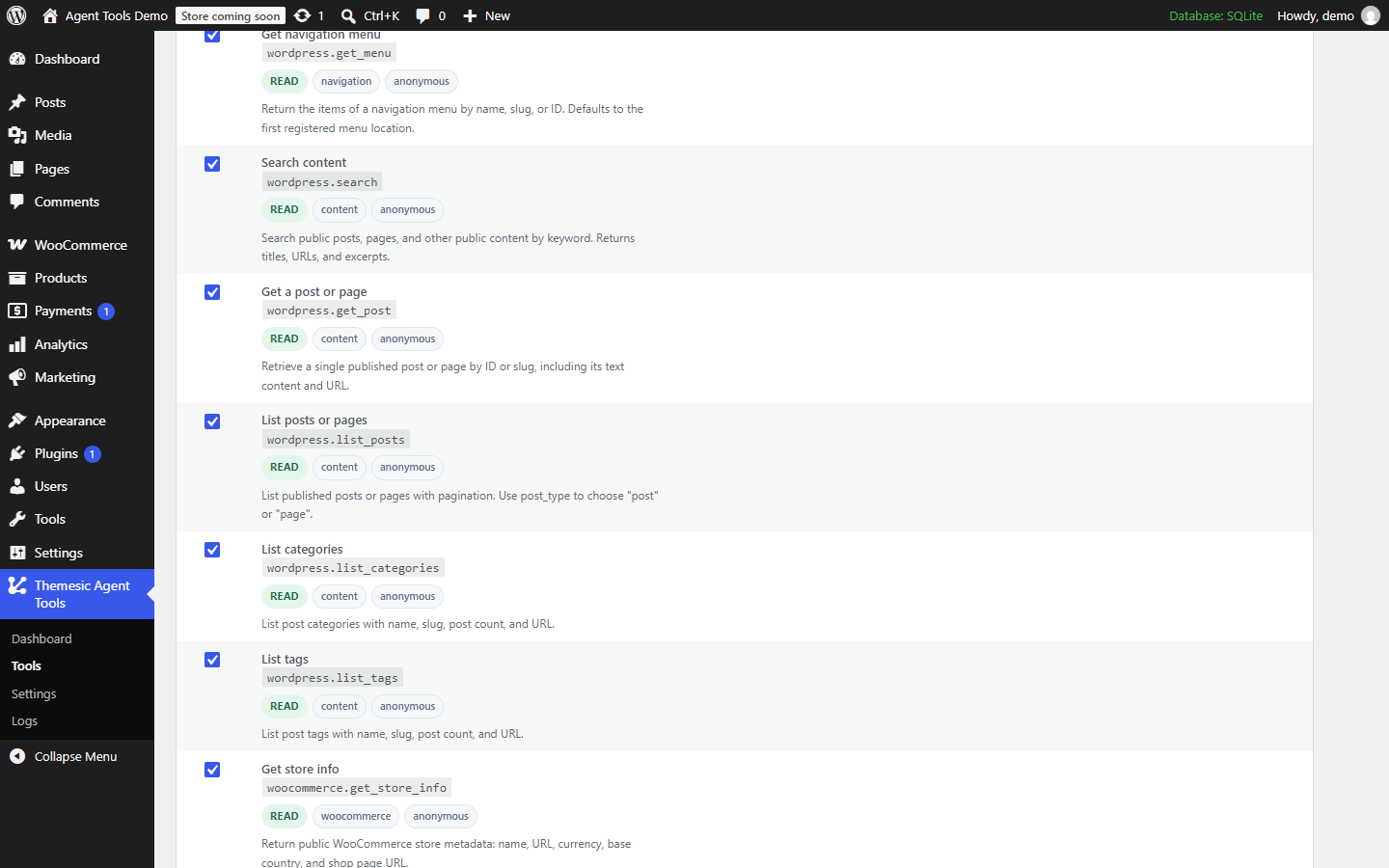
The WordPress content tools - search, single posts, listings, categories, tags, menus and site info.

The WooCommerce catalog tools, which appear only when WooCommerce is active - store info, product search, single products, listings, variations and stock.
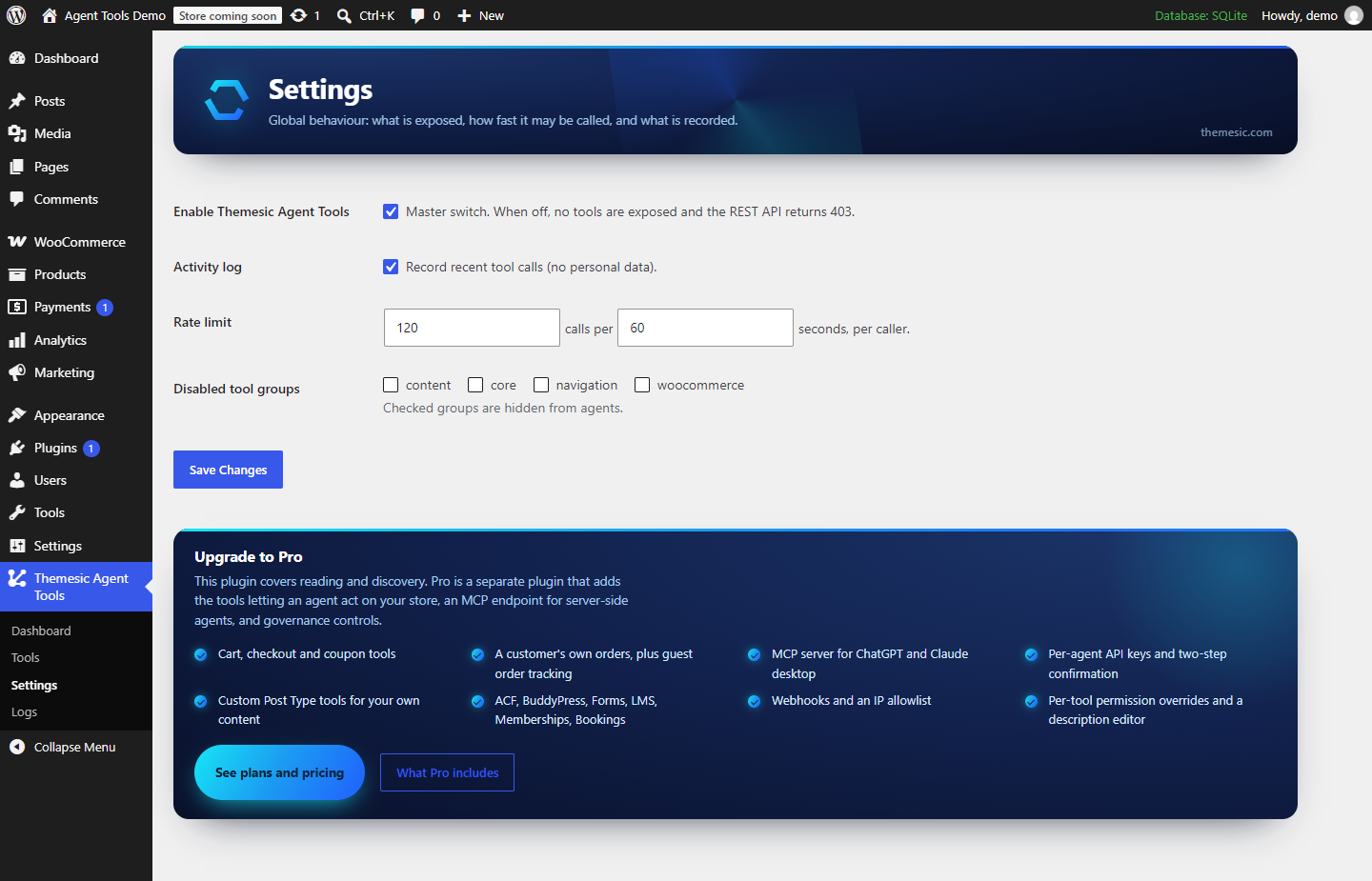
Settings - the master switch, activity logging, per-caller and global rate limits, and which tool groups are exposed.
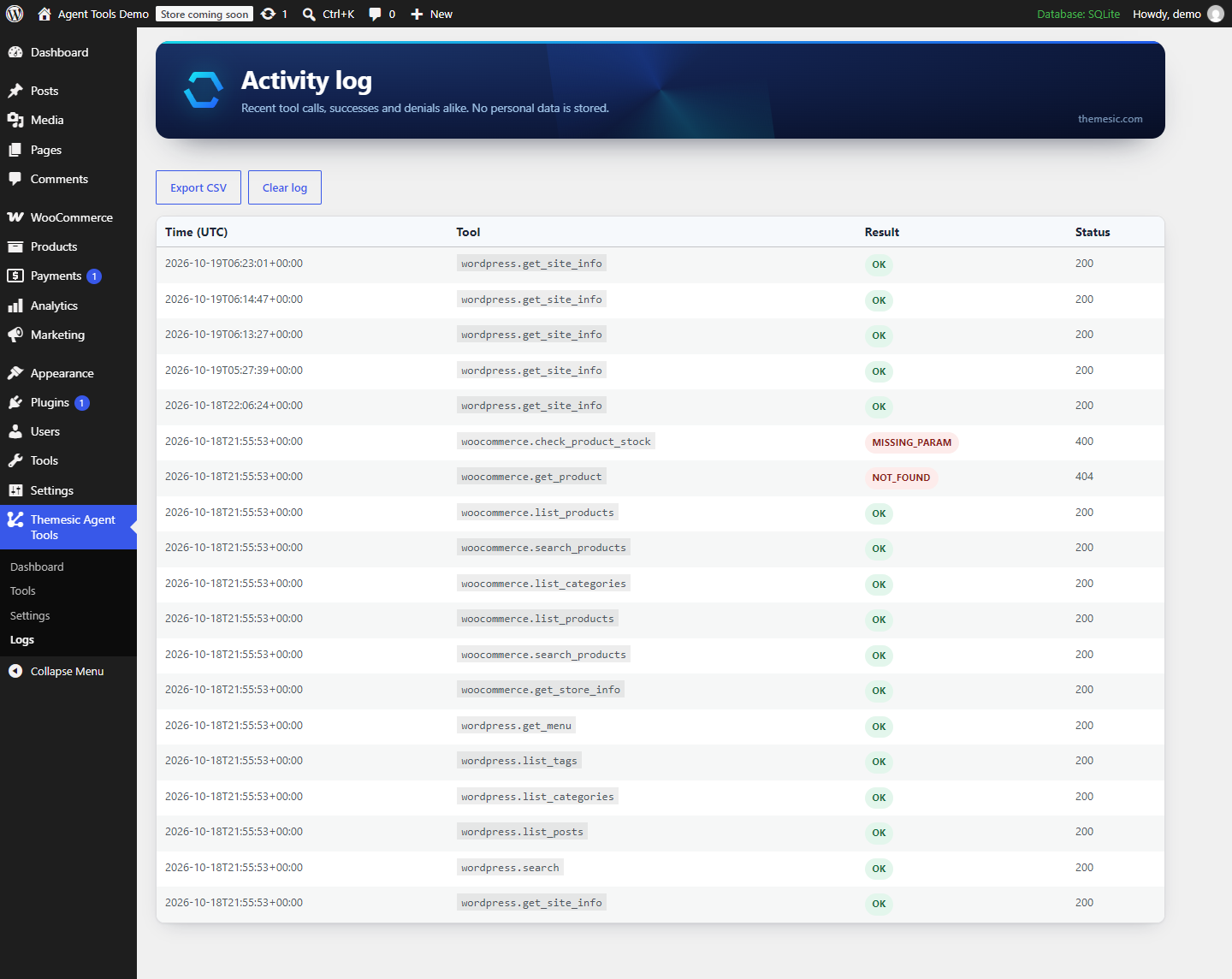
The activity log - recent tool calls, successes and denials alike, with no personal data stored. Exportable to CSV.
Faq
WebMCP is an emerging web standard that lets a web page offer tools to AI agents through the browser, via document.modelContext. Instead of reading your HTML and guessing, an agent sees a list of named tools with input schemas and calls the one it needs. This plugin registers your site’s tools with it automatically, and serves the same tools over REST for agents that are not running in a browser.
The Model Context Protocol (MCP) is the open protocol AI agents use to discover and call tools. The free plugin describes its tools in the same shape and serves them in the browser through WebMCP and over REST and OpenAPI. A full MCP server endpoint (JSON-RPC 2.0) for server-side clients such as Claude Desktop is part of Pro.
Yes. Import the plugin’s OpenAPI URL as an Action in a Custom GPT and it can search your catalog and your content. Server-side MCP connections are part of Pro.
Claude Desktop and other MCP clients connect through the MCP server endpoint in Pro. Any agent that can call an HTTP API can use the free REST endpoints.
Not through the free plugin: every tool it registers only reads public content. Pro adds cart, coupon and checkout-field tools. Those require a real browser session, and you can require a confirmation step before any of them runs.
Read tools for public content are public, in the same way WordPress’ own REST API is. Write tools require a same-session nonce, and tools that touch an account require a real login – a nonce alone is never treated as one. Customer data, private fields and admin details are never returned. Denied attempts are logged, and rate limiting is applied before the permission check so failed guesses still cost the caller quota.
No. The front-end script is about 5 KB, makes no external requests, and is not loaded on admin, AJAX or REST requests at all. Tools only run when an agent calls them.
No. The REST and OpenAPI endpoints work everywhere. The in-page WebMCP registration lights up automatically in browsers that support it; every other agent uses the REST API.
No. WooCommerce tools appear only when WooCommerce is active; on a plain WordPress site they are hidden entirely and the content tools still work.
No. This plugin contacts nothing. There is no telemetry, no licence check and no call home – not on activation, not later.
Yes, with the documented themesic_agent_register_tools hook – no core files need editing. Custom tools get the same security gate, validation, rate limiting and delivery surfaces as the built-in ones.
The free plugin gives agents read access to your catalog and content, in the browser and over REST, with the full security layer, dashboard, playground and activity log. Pro is a separate plugin that adds the tools that act (cart, coupons, checkout fields, orders), the MCP server endpoint, per-agent API keys, confirmation, permission overrides, store knowledge, custom post types and integrations with the plugins you already run. See Pro plans and pricing.
Reviews
Changelog
0.1.5
- The admin banner now leads with the plugin name, with the author’s site as a small link in the corner.
- Rewrote the plugin description, and corrected it: per-tool permission overrides and custom post type tools are part of Pro, not of this plugin.
- The upgrade card now lists per-tool permission overrides and the description editor.
- Removed an unused admin method and refreshed the translation template.
0.1.4
- The upgrade card now links to the plan and pricing page instead of the documentation, and says plainly that Pro is a separate plugin.
- Corrected the upgrade card, which advertised CSV export of the activity log as a paid feature. It is part of this plugin.
0.1.3
- This package now contains only the free plugin. The MCP endpoint, per-agent API keys, webhooks, the confirmation step and the write tools are not shipped here and are not switched off here – the code is absent, and the plugin reaches those features through hooks that nothing in this package answers.
- No licensing code and no external requests. The plugin contacts nothing, on activation or afterwards.
- CSV export of the activity log is part of this plugin.
- Rate-limit counters no longer have a check-then-create step, so simultaneous requests cannot undercount.
0.1.2
- Renamed. The plugin is now Themesic Browser Agent Tools for WooCommerce; the previous name was withdrawn at the WordPress.org review team’s request.
0.1.1
- Abilities registered through the WordPress Abilities API now carry a permission callback, so they apply the same access checks as the REST endpoints.
- Rate-limit counters are incremented atomically, so simultaneous requests can no longer slip past a limit.
0.1.0
- Initial release: the WebMCP engine; in-browser bridge, REST, OpenAPI and discovery; security gate with rate limiting and output sanitization; admin UI with tools manager, settings, usage dashboard, logs and playground.
- WordPress and WooCommerce read tools.