Broadcast

Broadcast
Description
Network Content Syndication Made Easy!
Single source content on a WordPress multisite network is now as easy as pie! Syndicate posts to other blogs in the network, update posts between blogs, sync posts, share content templates, etc. Broadcasted posts can be linked to their parents, which updates child posts when the parent post is updated. This includes all data: title, slug, content, custom fields, attachments, etc.
Broadcast is great for:
- Chain stores
- Content hubs
- Franchises
- News sites
- Schools
- Anything else with distributed content!
Here are some use cases for Broadcast:
- Broadcast in the school classroom
- Franchising with WordPress and Broadcast
- On-Demand Content Syndication with Broadcast Parent Pull
- Sharing forms on a WordPress network
- Wholesale with WooCommerce and Broadcast
Broadcast
- Posts, pages, custom post types
- Taxonomies (categories, tags, etc)
- Custom fields
- Attached images
- Featured images
- Galleries
- Custom field blacklist, whitelist, and protect list.
- User role access granularity
- CDN support (nominally tested Amazon S3)
- Many extra features in the add-on packs
SEO support
- Canonical URLs of child posts.
- Hreflang links (also see Hreflang add-on in the add-on packs)
- Permalinks of child posts (also see Permalinks add-on in the add-on packs)
- Yoast’s WordPress SEO plugin integration and support
Add-on Packs
There are several Broadcast add-on packs that expand the capabilities of Broadcast.
3rd party pack
The following add-ons add support for the plugin after which they are named:
- Activity Monitor
- Advanced Custom Fields
- All In One Calendar
- All In One SEO
- Aqua Page Builder
- Avia Layout Builder
- bbPress
- Beaver Builder
- Bricks Builder
- Caldera Forms
- Calendarize It
- Category Order and Taxonomy Terms Order
- CM Tooltip Glossary
- Code Snippets Pro
- Contact Form 7
- Create
- Dear Flipbook adds support for the Dear Flipbook PDF book plugin.
- Divi Builder
- Download Manager
- Download Monitor
- Elementor
- EventOn
- Event Organiser
- Events Manager
- Flip HTML5
- FooGallery
- Formidable Forms
- GeneratePress
- GEO my WordPress
- Geodirectory
- Global Blocks For Cornerstone
- Global Content Blocks
- GoodLayers
- Google Maps Pro
- Gravity Forms
- H5P
- Image Map Pro
- Imagify
- Inbound Now
- Intagrate
- JetEngine
- LearnDash
- LiteSpeed Cache
- Mailster
- Metaslider
- Modern Events
- Ninja Forms
- NS Cloner
- OneSignal
- Permalink Manager
- Pods
- Polylang
- Post Expirator
- Rank Math SEO
- Search And Filter
- Search Exclude
- Sensei
- Simple Custom Post Order
- SiteOrigin Page Builder
- Slider Revolution
- Smart Slider 3
- Soliloquy
- TablePress
- Tao Schedule Update
- The Events Calendar
- Toolset
- UberMenu
- Ultimate Member
- Unyson
- User Access Manager
- Vimeography
- WooCommerce
- WP All Import
- WPCustom Category Image
- WPForms
- WPLMS
- WPML
- WP Rocket
- WP Ultimate Recipe
- WP Ultimo
- Yoast SEO
If you don’t see your plugin in this list, it might not need a specialized add-on.
Control pack
These add-ons give you extra control of what you broadcast and how:
- All Blogs gives all users access to all of the blogs in the network.
- All Blogs Superadmin allows only superadmins to broadcast to all blogs in the network without having to be a user of the blog.
- All Images detects all referenced local images in post text fields and adds them to the broadcast.
- Back To Parent updates the parent post with the new child content.
- Comments adds support for broadcasting of comments.
- Custom Field Attachments allows post custom field containing attachment IDs to be broadcasted correctly.
- Custom Field Posts allows post custom field containing post IDs to be broadcasted correctly.
- Custom Field Terms allows post custom field containing taxonomy term IDs to be broadcasted correctly.
- Delete Before Broadcast deletes duplicate and similar child posts on each blog before broadcasting.
- Gutenberg Attachments: Modify attachment IDs found in Gutenberg blocks to match their equivalent attachments on each blog.
- Gutenberg Menus: Modify menu IDs found in Gutenberg blocks to match their equivalent attachments on each blog.
- Gutenberg Posts: Modify post IDs found in Gutenberg blocks to match their equivalent attachments on each blog.
- Gutenberg Protect: Protects specific Gutenberg blocks from being overwritten during broadcasting.
- Gutenberg Terms: Modify taxonomy term IDs found in Gutenberg blocks to match their equivalent attachments on each blog.
- Hreflang adds support for SEO-friendly hreflang html tags.
- Keep Child Status keeps the status of post children to private, pending, published, draft, no matter the status of the parent.
- Link Before Broadcast attempts to find unlinked children on each child blog during broadcast.
- Local Files automatically copies local files to each blog and updates the links in the content.
- Local Links automatically updates links to local posts on each child blog.
- No New Terms prevents taxonomy terms from being created on child blogs.
- Parent Pull allows content to be pulled from (parent) blogs.
- Per Blog Taxonomies allows individual control of specific taxonomies for each child post.
- Permalinks provides more precise control of permalinks for both parents and children.
- Protect Child Properties prevents various properties of child posts from being overwritten.
- Rebroadcaster: Periodically and automatically rebroadcast specific posts.
- <a href="https://broadcast.plainviewplugins.com/addon/rebroadcast-parent-here/"Rebroadcast Parent Here: Rebroadcast the parent to this linked child.
- Redirect All Children redirects single post views from visitors of child posts to the parent post.
- Redirect Parent redirect all views of a parent post to the first child post.
- Relink To Parent: Relink an unlinked child to the parent.
- Same post ID: Create a new post on several blogs with the same post ID.
- Search And Replace finds and replaces texts in posts during broadcast.
- Shortcode Attachments modifies attachment IDs found in shortcodes to match their equivalent attachments on each blog.
- Shortcode Menus modifies menu IDs found in shortcodes to match their equivalent menus on each blog.
- Shortcode Posts modifies post IDs found in shortcodes to match their equivalent posts on each blog.
- Shortcode Terms automatically translates taxonomy term IDs found in shortcodes when broadcasting.
- Term Meta Attachments: Allow taxonomy term meta containing attachment IDs to be broadcasted correctly.
- Thumbnail Sizes allows for different additional thumbnail sizes on a per-blog basis.
- Update Attachments updates existing attachments by copying over the files to the child blogs.
- Update Family updates the parent post and siblings when editing a child post.
- Unlink On Edit unlinks child posts when they are modified.
- User & Blog Settings (UBS) can hide the broadcast meta box and/or menu, modify the meta box to force/prevent broadcast to blogs, with separate settings for users / blogs / roles.
- User & Blog Settings Post uses the modifications from the UBS plugin to broadcast posts with one click.
Efficiency pack
These add-ons allow you to broadcast more efficiently, saving you even more time:
- Blog Groups 2 provides a means of groups blogs together, in order to be able to quickly select and unselect blogs from the Broadcast meta box.
- Blog Search: Search and filter the blog list in the editor meta box.
- Duplicate Attachments will duplicate the attachment and thumbnails, instead of letting WordPress regenerate them.
- Find Some Unlinked Children can selectively link orphans / unlinked posts to parents, instead of automatically linking all found children.
- New Blog Broadcast automatically broadcasts posts when creating a new blog.
- Purge Children removes children and their attached files from child blogs.
- Queue adds a broadcast queue which helps to broadcast posts to tens / hundreds / thousands of blogs.
- Rebroadcast updates selected parent posts by using a bulk action.
- Rebroadcaster: Periodically and automatically rebroadcast specific posts.
- Send To Many allows mass broadcast of several posts to blogs at once.
Utilities pack
These add-ons do things semi-related to broadcasting, but are good to have none-the-less:
- Bulk Cloner creates clones of existing blogs on the network.
- CDN Workaround works around faulty CDNs that do not report the correct URL for attachments.
- : Run code snippets on specific blogs.
- Copy options copies blog options / settings between blogs.
- : Runs WordPress cron periodically on all sites of the network.
- Custom Field Cleanup: Cleans up the custom fields of a post.
- Lock Post allows users to lock editing of posts / pages to only themselves and super admins.
- Manual Post Actions manually runs bulk post actions on posts.
- Media Cleanup: cleans up unused media by looking for unused items in the database and on disk.
- Menus copies menus between blogs (overwrite / update), with support for equivalent child posts on the child blogs and equivalent taxonomies.
- Page Content Shortcode provides a
[bc_page_content slug="pageslug"]shortcode to display the contents of a page. - PHP Code runs custom PHP code on selected blogs. Easily switch themes for all blogs, for example.
- Shortcodes provides arbitrary admin-defined global or local shortcodes.
- Sitemaps generates network-aware sitemaps and robots.txt.
- Sync Taxonomies synchronizes the taxonomies of target blogs with those from a source blog.
- User Role Sync copies user roles between blogs.
- Widgets copies widget and sidebar settings between blogs.
Documentation
Although Broadcast is relatively easy to understand by itself, for extra documentation see Broadcast’s online documentation, which covers:
- Attachments, images and media
- Custom fields
- Linking
- Post actions and the bulk action dropdown
- Taxonomy handling
Here are instructions for merging existing single installs into a WordPress network.
For developers: the code should be well-commented and easily legible for the most part. Extra developer documentation covers:
Misc
The git repository can be found at: https://bitbucket.org/edward_electric/broadcast
Installation
- Activate the plugin sitewide.
Screenshots
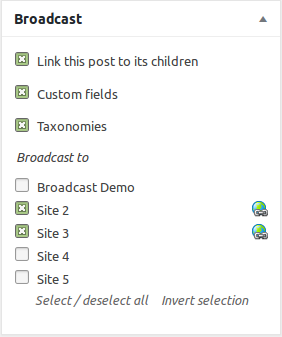
Broadcast meta box when editing posts
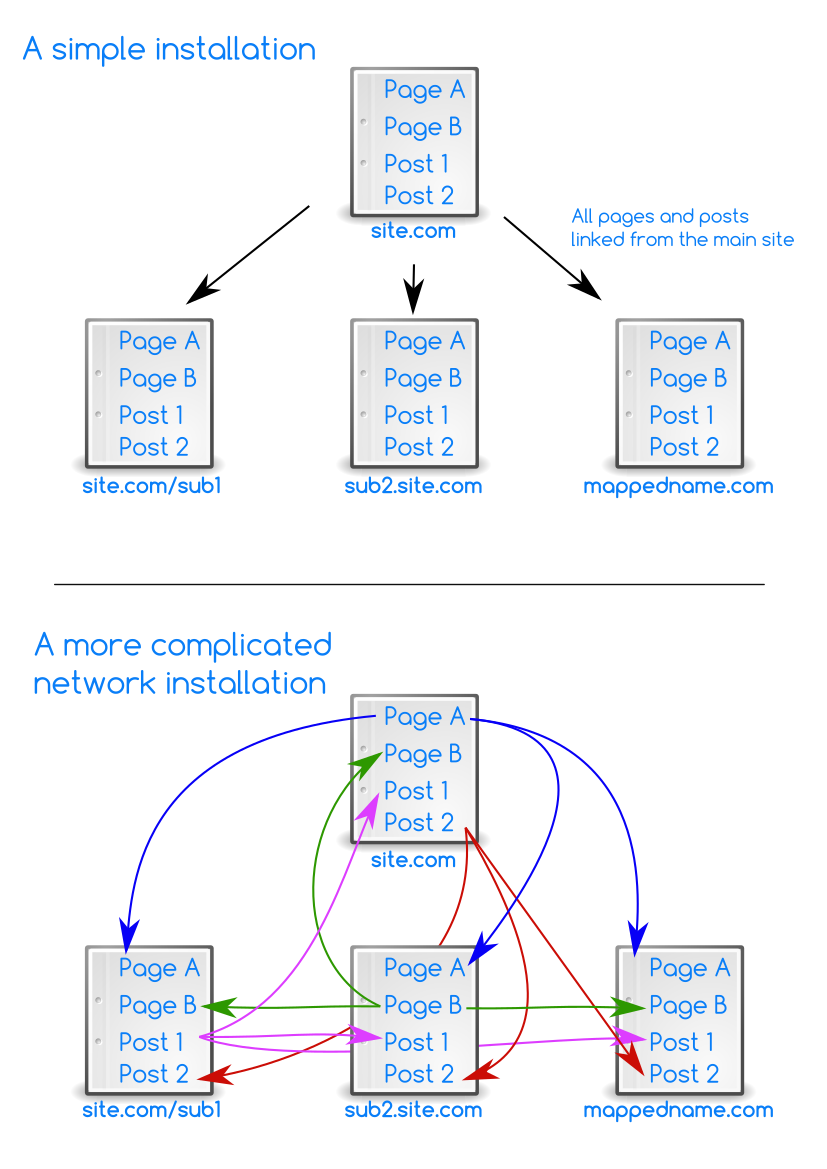
How posts and pages can be broadcasted
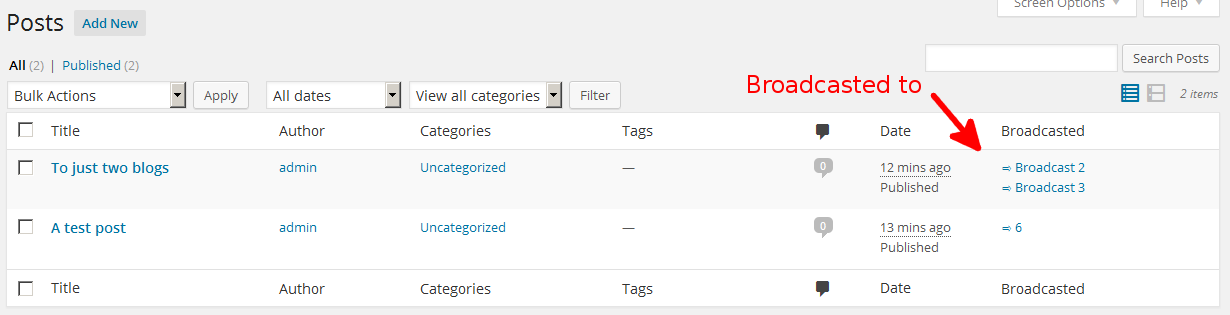
Post overview showing linked children
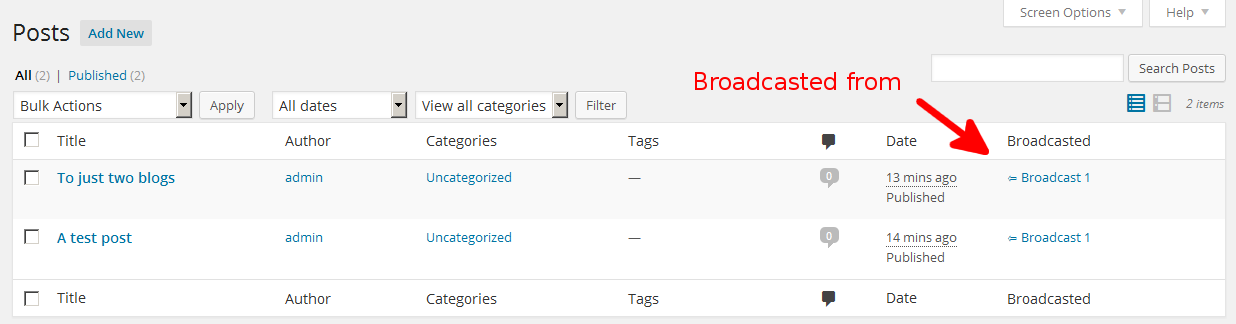
Post overview showing linked parents
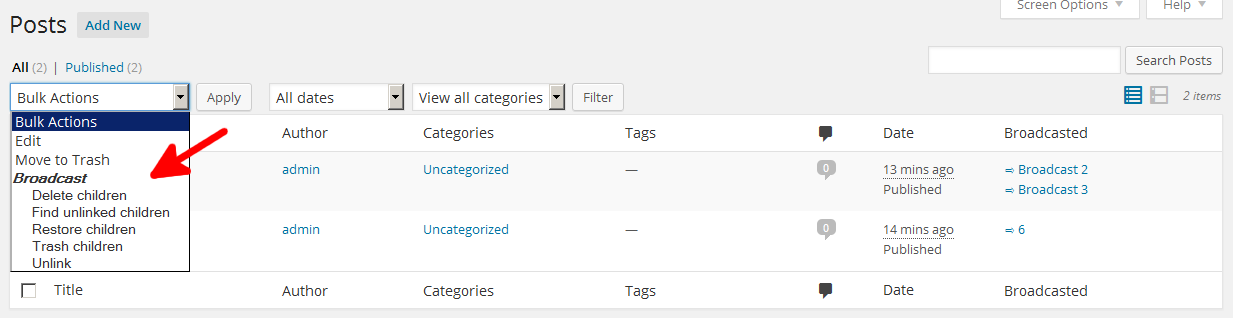
Bulk actions that can be applied to several marked posts at once

Post actions for parent posts

Post actions for child posts
The Broadcast menu
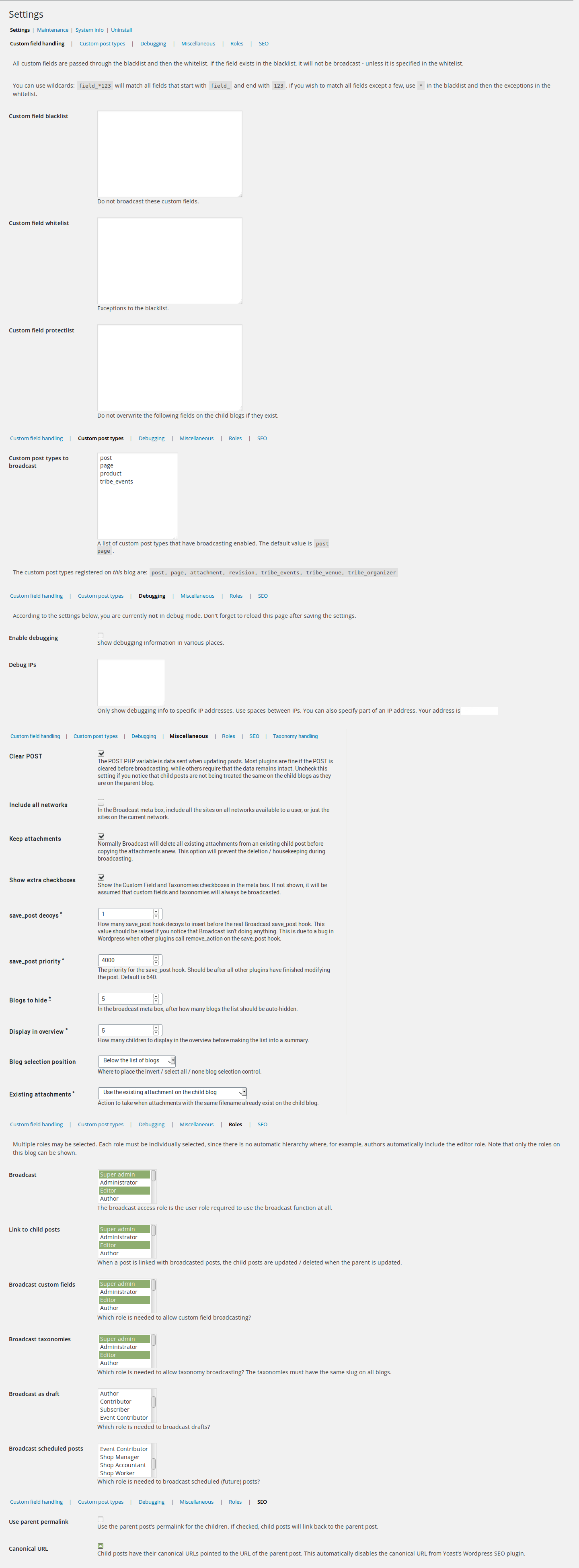
Admin settings tab

Maintenance tab
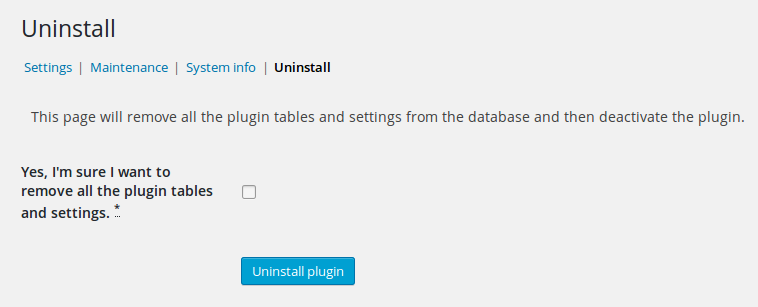
Uninstall tab
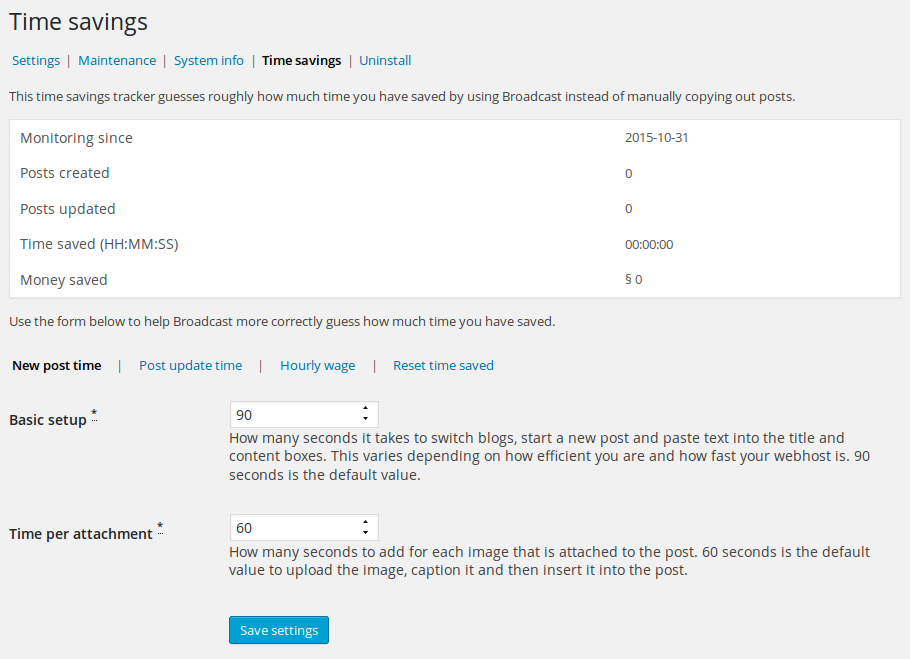
Time savings tab showing how much time Broadcast has saved you
Faq
Broadcast is supported in the forum. For users of the add-on packs, support is available via e-mail.
A debug dump is the long text that is displayed when broadcasting a post with debug mode on. This dump can then be read to see what Broadcast is or isn’t doing.
To switch on debug mode, see the admin settings. If your site is live it would be wise to input your IP in the associated textarea, so that only you see the debug dump.
Yes, works as normal with one exception: the meta box does not update after publishing, so you’ll have to reload the page after publishing changes to see the new blogs list.
Broadcasting to specific blogs, hiding blogs and forcing blogs can be acheived with the User & Blog Settings add-on.
To broadcast many posts at once, see the Send To Many add-on.
How broadcast handles attachments:
- Attachments directly attached are stored.
- Attachments found in shortcodes are stored.
- On the child blog, the existing attachments to the post, if any, are automatically deleted to keep attachments clean. This behavior can be configured using custom code or add-ons: Duplicate Attachments, Update Attachments.
- The stored attachments are copied.
- The thumbnail ID is replaced.
- The image URLs in the post content are replaced.
- The image IDs in shortcodes are replaced.
Do you have a lot of attachments that you don’t want duplicated to hundreds of child blogs, in order to save space? You’ll have to find a way to refer to the images statically instead of using their media IDs. The reason for this is that when WordPress is referred to an attachment, it can only read the media IDs from the current blog. It cannot switch blogs in order to load the image.
The broadcast meta box, menu and columns in the post view can be hidden from users / roles / blogs using the User & Blog Settings add-on.
Below is a list of plugins that just will not work properly with Broadcast and / or its addons:
- Cloudflare Image Resizing – Creates 404 errors for images.
- Post Type Switcher – Turns post types into attachments and vice versa.
- Query Monitor causes the queue data to increase exponentially.
- Theia Smart Thumbnails Premium
- Tracking Code Manager – prevents User & Blog Settings from working by inserting data into the _POST variable during a normal page GET. Very non-standard behavior.
- WP Activity Log – kills WordPress when taxonomies are about to be synced.
If you have already created posts on other blogs that are supposed to be children of a specific post, you can use the “find unlinked” bulk action to find and link them.
If the existing posts are not linked, broadcasting a post can result in duplicates.
To be considered an orphan the orphaned posts must have the exact same title (name) as the soon-to-be parent and be of the same post type.
You can also use the Delete Before Broadcast add-on to delete any similar posts on the child blog before broadcasting.
If you have many attachments in your post, and are broadcasting the post to many blogs, you might encounter a PHP timeout. This means that broadcasting exceeded the PHP time limit and had to be aborted.
There are several solutions to this problem:
- Increase the PHP timeout in your PHP.ini settings. This will not speed up broadcasting, only increase your chances of completely broadcasting the post.
- Use the Duplicate Attachments add-on. This will duplicate any attachments + thumbnails instead of regenerating them on each child blog.
- Use the Queue add-on to put each child broadcast into a queue that is emptied by javascript.
You will not need solution #1 if you use solutions #2 and #3. 🙂
Make sure that:
- Your user level has broadcast access (Broadcast access role)
- Your user has write access to more than this blog (see Admin settings > Maintenenace > View blog access). You can also use the All Blogs add-on to give yourself access to all blogs.
- The correct post type(s) have been selected in the Broadcast settings
- The User & Blog Settings add-on is not set to hide the meta box from the user / role / blog
Broadcast is capable of handling simple WooCommerce products.
- In the Broadcast custom post type settings: Add “product”.
- Save the product normally first.
- Then broadcast, selecting the custom fields and taxonomies checkboxes.
This will broadcast all normal product settings: SKU, price, etc.
If your products have variations, a product image gallery, you want to sync stock, you want to sync orders, need the attribute taxonomies to be synced, you’ll be wanting the WooCommerce add-on.
Reviews
High level of support!
By 
This plugin solved our problem of running multiple sites with the same content. It has many great add-ons, so you can basically sync everything. And if there isn’t an add-on for something you need, the developer of Broadcast will help you in a friendly and passionate way. Highly recommended.
High standard support remains consistent
By 
Support for the Broadcast plugin does not stop after the first installation of the plugin in your website. Even after a number of months, the developer responded very quickly and worked together with us to get to the bottom of a problem. After analysis it turned out that the problem was in fact not caused by the Broadcast plugin itself, but because of wrong settings in our own WordPress environment. Excellent support, excellent knowledge of WordPress in relation to the Broadcast plugin. Our problem was solved within a day.
Great App, Great Support
By 
Broadcast has been a flexible and reliable workhorse for our client's site. They have a complex setup of 13 network sites, with all content being controlled using Broadcast and the Premium Pack Add-ons.
In the rare circumstance where we've had an issue the support has been top tier and incredibly fast.
Keep up the good work Ed!
extreme value
By 
thank you for this lifesaving plugin
Pretty good
By 
Awesome plugin, the support team is quick to respond and straight to the point
Wish I found this years ago
By 
With the purchase of the control pack this plugin is perfect and gives very granular control (for example can give the post different categories assigned on child v parent sites to fit different site setups). Fantastic support who helped me troubleshoot set up with a 3rd party plugin and has taken all the stress out of maintining multiple websites that have some overlap in content.
Simply Excellent
By 
Broadcast is one of those plugins that simply does what it was designed to do. The Broadcast plugin does not come with a lot of settings or configurations, but that is in fact the strength of this plugin. The interface is clear and easy to understand, Broadcast works flawlessly if you want to cross-post between sites in a WordPress multi-site setup. Unlike other comparable but lesser plugins, Broadcast does an great job in publishing metadata and attachments to the destination site, and is intelligent in using existing media files in the receiving site. The support for Broadcast if first class, they will run that extra mile to answer any implementation questions that you may have. A highly recommended plugin, stable, easy, what more is there to say.
Must-Have Multisite Plugin with Incredible Support
By 
This is a must-have plugin for WordPress Multisites. It’s one of the rare plugins where every feature feels fully thought out and solid.
Edward has truly been a lifesaver! His support is outstanding, and his response time is unbelievably fast. He’s helped us out more times than I can count.
I can’t recommend this plugin enough. Huge thanks again, Edward!
One of THE best plugins and developer...
By 
This is an incredibly unique plugin for WordPress Multisite and we've been pushing it to the limit. Edward has been FANTASTIC at adding extra functionality where we've needed it. He's fast, incredibly helpful and open to new features at every level. Thanks Edward for this awesome plugin - myself and my clients are very happy.
fatal error.
By 
"plugin could not be activated because it triggered a fatal error". I am trying multiple sites, but the error is the same. Please help me.
Changelog
51.11 20250928
- New add-on: CM Tooltip Glossary: Adds support for the Code Snippets Pro plugin.
- New add-on: Icegram Engage adds support for the Icegram Engage plugin.
- Added broadcast_add_post_row_actions_and_hooks filter to allow for access to post actions and bulk post actions via code snippet. In case your editor, that normally is not allowed to broadcast, needs access to the bulk post actions.
51.09 20250907
- Dev: To aid in debugging, non-recommended settings are marked as “Unusual!” in the debug output.
51.08 20250713
- Dev: Add self option to the add_blog_list_input() function.
- Dev: Add maintenance option to view the _options.
51.07 20250621
- Fix: When searching for unlinked children, take the linked parent into account. This solves the problem of two pages on the child blog with the same name but different linked parents not being found correctly.
51.06 20250519
- New add-on: Dear Flipbook adds support for the Dear Flipbook PDF book plugin.
- Dev: Do not show the current blog when using the add_blog_list_input() function.
51.05 20250419
- Dev: Convert the ThreeWP_Broadcast()->broadcasting array to a static, so that it is the same everywhere.
- Dev: Add the API call broadcast_children_with_post().
51.04 20250408
- New: If Broadcast is not keeping attachments during broadcasting, it will specifically delete the child’s featured image, whether it is attached or not.
- Fix: Attachments are now deleted when not keeping attachments. Fix from 51.03
- Dev: Added attachment GUID debug code
- Dev: Use an array on wp_insert_post. Fixes error for users of The Events Calendar.
- Dev: Do not try and sync a non-existent taxonomy.
51.03 20250216
- More PHP 8.2 warning fixes.
- Dev: broadcasting_data assuming nothing to be done with deleting attachments. This affects broadcasting using manually-created broadcasting_data.
- Dev: Added ThreeWP_Broadcast()->get_nested_broadcasting() and is_nested_broadcasting() functions.
- Dev: Add post info maintenance for attachments. This helps diagnose attachments with unexpected post names.
51.02 20241201
- Fix: Allow dynamic handling of custom field blacklist.
- Fix: Better display of missing maintenance check.
51.01 20241116
- Dev: Improve taxonomies()->also_sync() function.
- More PHP 8.2 warning fixes.
50.15 20241012
- Fix: Remove warning from Equivalent_Posts debug code that warns of an equivalent post not existing.
- Tweak: Workaround define BROADCAST_PP_SSL_WORKAROUND removed since WordPress no longer allows https transport workarounds.
50.14 20240824
- New add-on:Bricks Builder: Adds support for the Bricks Builder page editor.
- Fix: In the “Database table cleanup” maintenance tool, ignore base tables that contain numbers in their names.
- Dev: Add get_attachment_id_from_url() function to help find image IDs based on URL.
50.13 20240711
- Fix error when using the finding unlinked children bulk post action. Also effected the Link Before Broadcast add-on.
50.12 20240706
- Fix error 500 when broadcasting. The error was a variable in the broadcasting data that was not being set.
50.11 20240706
- Fix looping when broadcasting a related post that has just been broadcasted.
- Fix: Added WP Activity Log to the list of incompatible plugins.
- Dev: Fixed lots of PHP 8.2 warnings.
- Dev: Add option in Gutenberg parse_blocks code to dump block content once. Prevents several add-ons from all dumping the same blocks.
50.09 20240506
- New: Add database table cleanup maintenance tool, to remove orphaned tables from deleted sites.
- Dev: Add $bcd->taxonomies()->forget_term_id() function to remove all traces of a term in the broadcasting_data.
50.08 20240403
- Output more debug information regarding attachments.
- Update Tested with version
50.07 20240210
- Update SDK
- Update Tested with
50.06 20231108
- Fix: Added Cloudflare Image Resizing plugin to the list of incompatible plugins.
- Tweak: Don’t show “Preparsing” debug text if there are more than 5 terms in the taxonomy.
- Dev: Add get_user_writable_blogs::remove_access() method.
50.05 20230918
- Fix: Fix error message when clicking on things in the broadcasted column. The problem was a double nonce – one form nonce is enough.
50.04 20230913
- Fix: Remove “attachment” as a broadcastable post type in the settings. Attachments can only really be broadcasted by being used in posts.
- Tweak: Tested with 6.3
- Tweak: Added hook priority info in info table.
50.01 20230407
New add-on: Same post ID: Create a new post on several blogs with the same post ID.
* Code: SDK update for PHP 8.2 compatibility.
50 20230407
New add-on: Skip If Unlinked: Do not broadcast to blogs that have an existing, unlinked post.
* Code: Add API support for finding equivalent image IDs on blogs. See the api() get_equivalent_image_id() and get_equivalent_image_ids() functions./
49.07 20230325
- Code: SDK update for PHP 8.1 compatibility. No other changes.
49.06 20230303
- New: Custom post type inclusion and exclusion lists added. Thanks to @jblifestyles from @hivedigital.
- Code: Add Gutenberg helper functions.
49.05 20230210
- Code: find_unlinked_children post action now accepts a list of blogs to link to. Affects the API and the Bulk CLoner and Find Some Unlinked Children add-ons.
49.04 20230127
- New add-on: Search Exclude: Adds support for the Search Exclude plugin.
- Fix: Featured image (_thumbnail_id) handler now obeys custom field protect list, allowing the featured image to be protected.
- Fix: Fix javascript path for Windows installs.
49.02 20230104
- Fix: Fix javascript for post actions.
- Code: Mark parent terms as used also, so that they get synced (and allow add-ons to handle the terms also).
- Code: More php 8.1 fixed
49.01 20221225
- Code: Add broadcast_menu_target filter to allow the displayed menu override: all settings, broadcast info or no menu at all.
48.15 20221031
- Code: Broadcast now requires at least php 7.4
- Code: Increase compatibility with php 8.1.
48.15 20221031
- Version bump for WP 6.1
- Fix: Allow for PHP 7.2 again. I just needed to remove a comma in the code.
48.14 20221008
- Fix: During maybe_sync_taxonomy(), mark the taxonomy as synced as soon as possible. This is to prevent looping in add-ons such as ACF, where taxonomies can be referred to by other taxonomies.
- Fix: When trashing parent and child posts, avoid doing the work double.
- New add-on: Blog Search: Search and filter the blog list in the editor meta box.
- New add-on: JetEngine: Adds support for JetEngine custom post types.
- New add-on: <a href="https://broadcast.plainviewplugins.com/addon/rebroadcast-parent-here/"Rebroadcast Parent Here: Rebroadcast the parent to this linked child.
- New add-on: Relink To Parent: Relink an unlinked child to the parent.
- Code: Add trash_untrash_delete_post action.
- Code: Link the post directly after creating it, instead of waiting until all attachments and taxonomies are synced.
48.12 20220727
- Dev: Add helper methods to prepare_meta_box action.
48.11 20220525
- Version bump for WP 6.0
48.09 20220418
- Fix: Exception when being activated on single installs.
48.07 20220226
- Fix: Prevent WordPress from removing iframe tags in the post content.
- Fix: Prevent Broadcast from being activated on single installs. Fixed the activate() on null error.
48.06 20220129
- Tweak: Compatible with WP 5.9
- Fix: Increase compatibility with PHP 8.1 by renaming the SDK’s form class “readonly” trait.
48.05 20220106
Happy new year!
- Fix: Mark taxonomies as synced earlier, preventing an infinite loop when a taxonomy has ACF fields that refer back to itself.
- Fix: Execute the each_linked_post action on the parent post itself when called from the parent post.
48.04 20211118
- Fix: Correctly detect true/false term meta values when trying to protect them.
- Fix: Remove warning about the Term Index get() function not matching.
- Code: Add canonical_url action to allow for more flexible canonical URL handling.
48.03 20211112
- Fix: Selected taxonomy terms lost their parents if the parents weren’t also selected.
48.02 20211110
- Fix: Add extra compatibility with PHP 7.2 (which has not been supported for a year, btw). Please upgrade!
48.01 20211105
- New add-on: Code Snippets: Run code snippets on specific blogs.
- New add-on: Cron Everywhere: Runs WordPress cron periodically on all sites of the network.
- New add-on: Rebroadcaster: Periodically and automatically rebroadcast specific posts.
- Tweak: Only used taxonomies are synced now. This prevents the child from receiving all of the taxonomies of the parent when extra taxonomies are synced via the Custom field / Gutenberg / Shortcode Terms add-ons, for example. Anything that uses taxonomies()->also_sync().
- Code: Add equivalent_posts() sharing, so that subbroadcasts have access to the same equivalent_posts().
- Code: Add broadcasting_data->equivalent_posts()->broadcast_once() method to broadcast a post once and then use the existing child ID.