TibaCheck — Site Audit

TibaCheck — Site Audit
Description
TibaCheck runs a read-only audit of your site’s configuration and shows you, in plain language, what needs attention. Every report leads with two scores — a Site Health Score and a Security Score built from checks mapped to the OWASP Top 10 (2025) — with a full OWASP coverage table showing what was assessed and what needs an external deep scan:
- Software updates — pending WordPress core, plugin, and theme updates (outdated software is the #1 way sites get hacked)
- PHP version — whether your PHP is supported, outdated, or end-of-life
- PHP critical security update — whether the PHP version actually running the site is affected by the October 2026 PHP security advisory (CVE-2026-109618 and CVE-2026-109619, critical unauthenticated remote code execution vulnerabilities with active exploitation reported), naming the patched release for your PHP branch (8.2.35, 8.3.36, 8.4.27 or 8.5.12)
- Inactive plugins & themes — unused code sitting on your site is a favorite hiding spot for malware
- Backup status — whether we can confirm this site is backed up at all
- User accounts — every administrator listed by name after each scan, plus a hidden-account test that catches backdoor users invisible to WordPress
- Registration safety — open registration paired with a powerful default role is an open door; we flag it
- File editor — whether the wp-admin theme/plugin editor (one stolen password away from code execution) is disabled
- Debug display — whether PHP errors are being shown to visitors, leaking server internals
- Search visibility — whether the site is accidentally telling Google to stay away
- SSL / HTTPS — whether both site URLs are actually configured for encrypted traffic
- Permalinks — whether links are readable and search-friendly, or the plain
?p=123default - Autoload size — how much data loads on every page view, with the biggest offenders named; bloat here is the #1 silent slowdown
- Cron health — whether scheduled tasks (updates, backups, posts) are actually firing, or silently stalled
- Comment queues — spam and unmoderated comments piling up in the database
- PHP extensions — whether the extensions WordPress relies on for updates, images, and encryption are present
Plus the Persistence Pack — the backdoor hunt most audits skip entirely:
- Privilege audit — accounts whose real power exceeds their role label (a “Subscriber” who can actually run the site)
- Must-use plugins & drop-ins — code that runs on every request but never appears in your plugin list, listed by name; files matching names commonly installed by WordPress, hosts, or caching tools are called out separately from names we cannot recognize
- Database triggers — triggers on account tables can silently recreate a deleted backdoor; we inspect the schema
- Cron job origins — scheduled tasks that trace to neither core nor any installed plugin or theme are how cleaned infections return
- Code in uploads — executable files inside the media folder, where only images and documents belong
- Server prepend directives — auto_prepend_file / auto_append_file run code before WordPress even loads; we show you if they’re set
- File permissions — wp-config.php and the code folders (site root, wp-includes, wp-content, plugins, themes) fail the check if any account on the server can rewrite them; a world-writable uploads folder warns. Only the world-writable setting is graded — owner and group permissions differ legitimately between hosts, so they are not judged
- Application passwords — an inventory of the standing credentials that bypass your login screen, with the oldest one’s age
Plus the WooCommerce store pack — four more checks that appear only when WooCommerce is active, so they never clutter a non-store report. A store that cannot take payment is down in the only way that matters, and these are what a care plan watches on a store every month:
- Store pages — the Checkout page must be assigned and published or customers cannot buy at all (the check fails when it is not); the Cart, Shop, and My Account pages are checked too and warn when broken
- Payment gateways — at least one gateway must be switched on, read from WooCommerce’s own gateway registry so extension gateways count exactly like built-in ones; up to four enabled ones are named
- Store details — store currency, base country, and street address, the details taxes, shipping, and invoices are calculated from (a currency or country that was never set is flagged with the default WooCommerce silently uses instead)
- Checkout posture — the silent sales leak: guest checkout off, no account creation during checkout, and registration closed on the My Account page too, so only existing account holders can buy. Checkout encryption itself is graded once, by the SSL / HTTPS check, and cross-referenced here — never double-counted
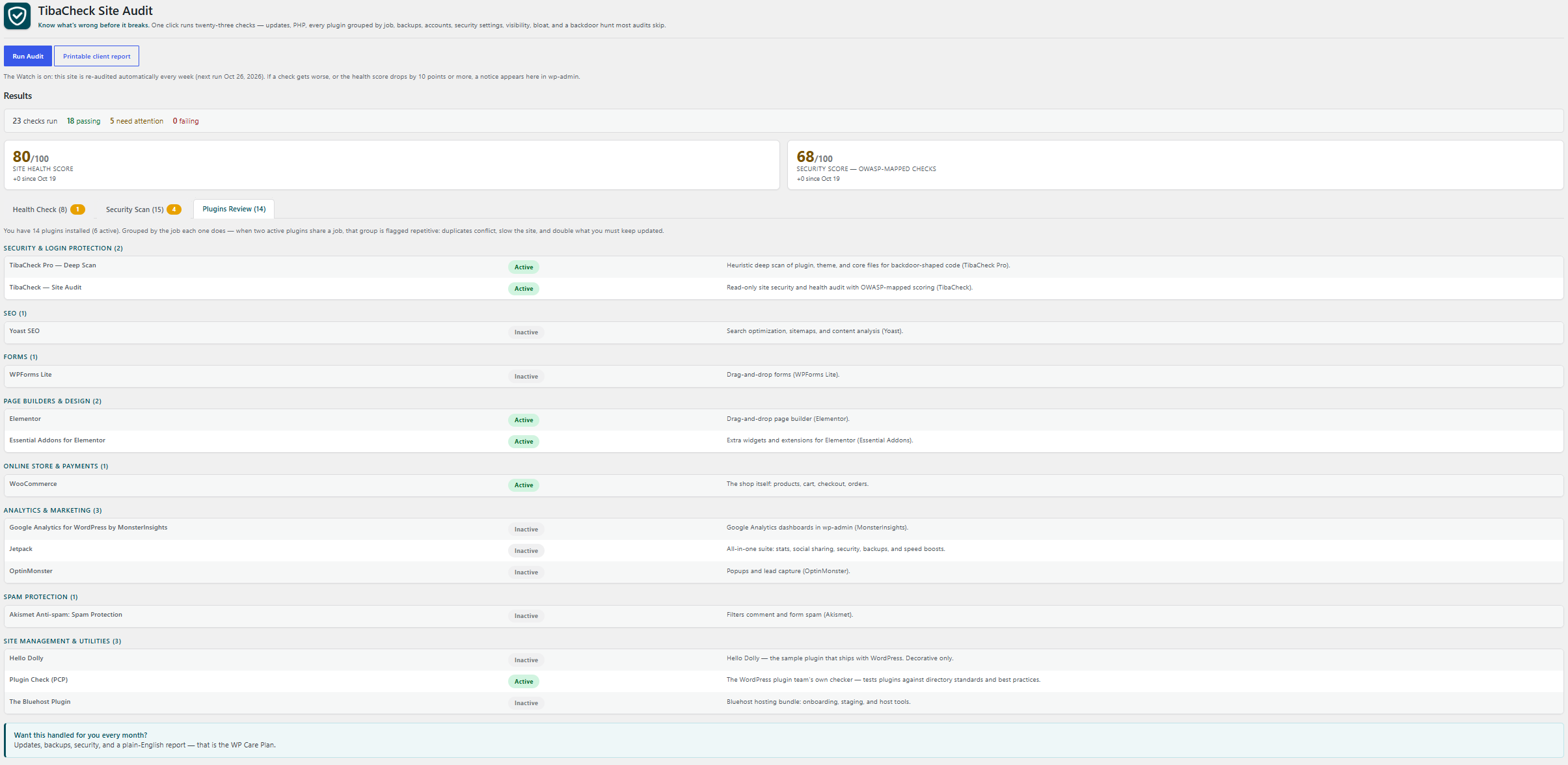
Every report also carries a Plugins Review section: every installed plugin grouped by the job it does — backups, security, SEO, speed, forms, builders, store, analytics, spam, media, email, languages, utilities — each with a one-line purpose and its active/inactive state. When two or more active plugins share a job, the group is flagged repetitive and a Plugin Overlap check warns: duplicates conflict, slow the site, and double what you must keep updated. Plugins we don’t recognize are listed honestly as “not yet categorized” — we never guess what a plugin does.
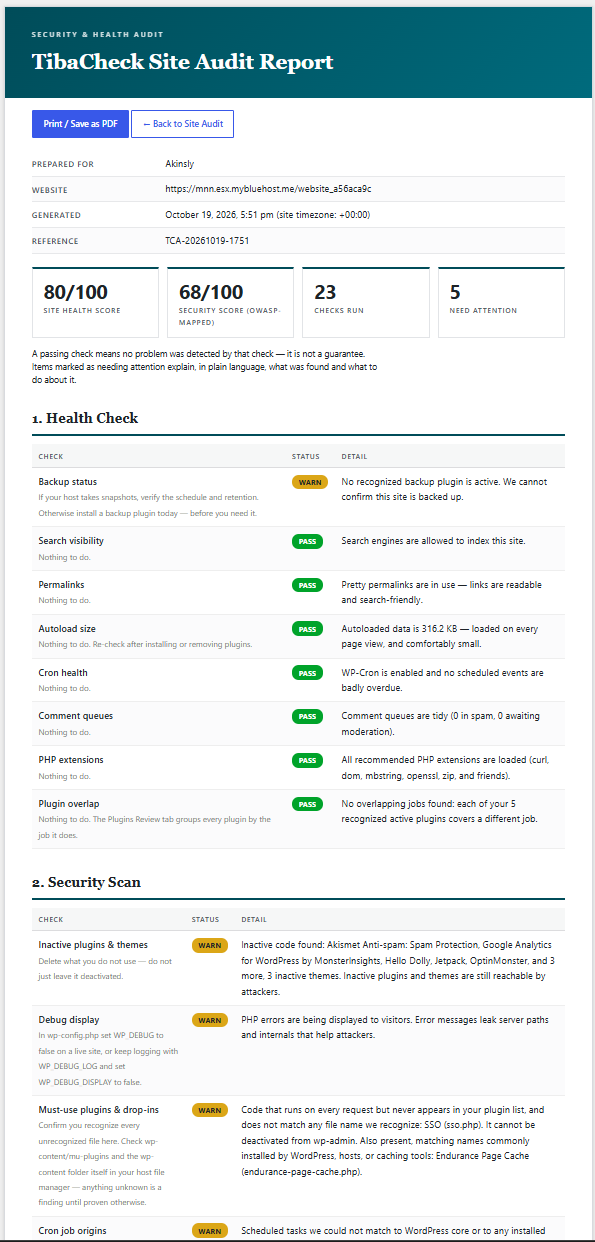
Every report can also be opened as a printable client report: a branded document with the score cards, every check and its detail, and the plugin and OWASP coverage summaries — ready to print or save as a PDF for a client. It is generated fresh when opened; the plugin stores no full report (only scores, statuses, and time).
The Watch keeps an eye on the site between visits: once a week, TibaCheck quietly re-runs the same read-only audit on its own (using WordPress’s built-in scheduler — no external calls, nothing phones home). If a check gets worse than the last audit, or the health score drops by 10 points or more, a notice appears in wp-admin naming what changed. A manual audit run answers the notice; improving checks never raise one, and each weekly run reconciles an unanswered notice — problems that recovered drop off it, problems still active stay on it. Deactivating the plugin stops the Watch and discards any pending notice (on a multisite network, deactivate on the site itself to clear that site’s Watch).
A note on honesty: TibaCheck does not claim to “scan for malware” the way signature scanners do — signatures miss modern, per-site malware, and a scanner runs inside the very environment an infection can hide from. What it does is audit the places malware must live, persist, and act: its hiding spots, its survival tricks, and the accounts it needs. Those it finds, it names.
More checks are on the roadmap: deeper performance profiling.
TibaCheck never changes your site’s content or settings — it reports. The only thing it saves is its own last report (scores and statuses, in its own settings), any pending Watch change alert, and the time of the last automatic Watch run, so your next scan can show whether your scores are rising or falling. Fixing is up to you, or the care-plan team that handles it every month.
Installation
- Upload the plugin files to
/wp-content/plugins/tibacheck-site-audit, or install through the WordPress plugins screen. - Activate the plugin.
- Go to Tools Site Audit and click Run Audit.
Screenshots
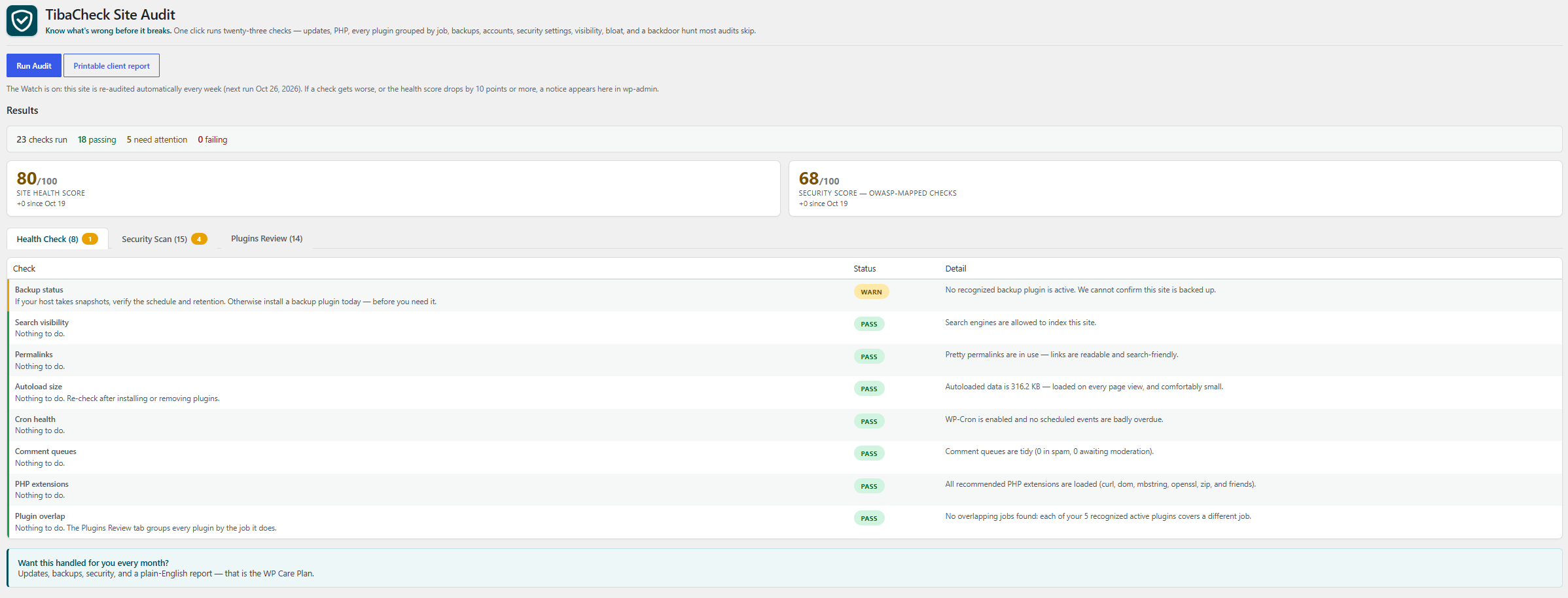
One-click audit results with color-coded status pills and a summary bar — passing, needs attention, and failing at a glance.
Faq
No. Every check is read-only — TibaCheck never updates, deletes, or modifies your site. It stores only its own last report (scores and check statuses), any pending Watch change alert, and the time of the last automatic Watch run, so it can show your trend on the next run.
No. The Security check score maps this plugin’s checks to the OWASP Top 10 (2025) categories they assess, and the coverage table labels every mapped category as partial. A passing check does not establish category-wide security. Injection, insecure design and logging/alerting remain unassessed. The score is a TibaCheck heuristic, not an OWASP certification, and is withheld when mapped evidence is incomplete. Separate code, architecture or dynamic assessment is required.
Pass — healthy. Warn — should be fixed soon. Fail — fix now; this is how sites get hacked or break.
Reviews
Changelog
0.15.3
- The PHP critical security update check now gives the threat its name — php2shell (CVE-2026-109618 / CVE-2026-109619) — in both its passing and failing results, and spells out what staying unpatched means: an unauthenticated attacker executing code as the web-server user before WordPress loads, leading to webshell installation, full site takeover, and theft of database credentials and site data, with attack attempts already observed in the wild. PHP 8.1 and older results add CISA’s guidance (patch immediately, or take the system offline / move to a supported branch); results on Apache mod_php carry a highest-risk note, because the demonstrated exploit path runs pre-authentication on that setup; and the fix text lists interim mitigations — disable session upload progress, apply WAF rules — labelled honestly as exposure reduction, not a fix, plus a reminder to check for existing compromise after patching. Detection and grading are unchanged.
0.15.2
- Fixed: the File permissions check could lose part of its message — when a code-folder failure coincided with a wp-config.php that could not be located and paths that could not be read, only one of the two cautions was reported. Both cautions are now always shown; grading and evidence-completeness behaviour are unchanged.
- The File permissions check is now covered by a committed test harness that runs both the free and bundled copies of the check against real filesystem fixtures, including the combined-caution case above.
0.15.1
- Fixed: the Code in uploads check could create the uploads folder on a site that did not have one yet (or the current year/month subfolder inside an existing one) — resolving the uploads path used WordPress’s default, which creates the directory as a side effect. The check is read-only; it now resolves the path without creating anything, exactly as the File permissions check already did. No results change on sites that already have an uploads folder. (This closes the deferral recorded in the 0.14.0 review.)
- Fixed: the audit page header and the printable client report’s scope paragraph said the audit runs twenty-four checks; since 0.15.0 it runs twenty-five (twenty-nine on a WooCommerce store). Both texts now agree with the readme and the check registry.
0.15.0
- NEW: PHP critical security update check (Security Scan, OWASP A03) — grades the PHP version actually running the site against the October 2026 PHP security advisory: CVE-2026-109618 and CVE-2026-109619, two critical (CVSS v4.0 9.2) unauthenticated remote code execution vulnerabilities with active exploitation reported. It fails below the patched release for the site’s branch (PHP 8.5.12, 8.4.27, 8.3.36, 8.2.35) and on PHP 8.1 and older, which receive no fixes from the PHP project (the check explains how to confirm a host/distribution backport, and that a version string alone cannot prove one). The PHP 8.2 pass carries the branch’s 31 Dec 2026 end-of-life note, and every outcome reminds the owner that updating PHP packages without restarting PHP-FPM/Apache leaves the old version serving requests.
- NEW: File permissions check — wp-config.php and the
code folders (site root, wp-includes, wp-content, plugins,
themes) FAIL when they are world-writable (any account on
the server can rewrite them, including the file holding the
database password); a world-writable uploads folder warns.
Only the world-writable setting is graded: owner and group
permissions are not judged, because legitimate hosting
models differ. A wp-config.php that cannot be located in
either place WordPress looks reports “could not confirm”
instead of passing. The audit now runs twenty-five checks,
twenty-nine on a WooCommerce store.
0.13.2
- Coverage correction: the debug display check now maps to OWASP A10:2025 — Mishandling of Exceptional Conditions (error output shown to visitors is an error-handling failure). Assessed coverage is now 7 of 10 categories; A02 keeps the file editor, uploads code and prepend directive checks.
- Fixed the wordpress.org short description being truncated (now within the 150-character limit).
0.13.1
- Reports use OWASP Top 10:2025 with partial coverage labels, explicit unassessed risks and evidence-completeness safeguards.
- Missing or unavailable mapped evidence withholds the security check score; model-versioned snapshots avoid incompatible historical score comparisons.
- The printable client report now shares the dashboard coverage table.
0.13.0
- NEW: the WooCommerce store pack — four checks that run
only when WooCommerce is active (on any other site they do
not appear at all): Store pages (Cart/Checkout assigned
and published, or the store cannot sell — plus Shop and
My Account), Payment gateways (at least one gateway
switched on, read from WooCommerce’s own registry so
extension gateways count; up to four enabled gateways are
named, and an unreadable registry reports “could not
confirm” instead of guessing), Store details (currency,
base country, and street address — what taxes, shipping,
and invoices are calculated from), and Checkout posture
(the guest-checkout/account-creation/registration
combination that silently locks out new customers;
checkout encryption stays graded once, by the SSL check).
The
audit now runs twenty-three checks, twenty-seven on a
WooCommerce store. - Hidden client reports now set their WordPress admin page titles before the header renders, avoiding blank titles and PHP deprecations.
- Missing or malformed update data for any component now remains unknown rather than producing an all-current result; known pending updates remain visible.
0.12.1
- Fixed (verification re-review of 0.12.0): the Watch notice’s
score arrow could understate a fresh drop. If the score rose
while a notice was open and then dropped 10+ from that higher
point, the arrow still started from the notice’s original
score (an 11-point drop rendered as “85 84”). The arrow now
starts from the score the current drop is measured against.
0.12.0
- NEW: The Watch — TibaCheck now re-runs its read-only audit
automatically once a week (WordPress’s built-in scheduler; no
external requests). When a check gets worse than the previous
audit (manual or automatic), or the health score drops by 10
points or more, an admin notice names what changed. With no
previous audit, the first run just sets the baseline. Manual
runs clear the notice; deactivation stops the Watch. - Fixed: the plugin version constant had drifted from the
release version (it still read 0.9.3 at 0.11.1). Header,
constant, and Stable tag are back in agreement.
0.11.1
- Plugins Review catalog: TibaCheck Pro is now categorized
(security, scanner role) instead of Not yet categorized,
and TibaCheck itself moves from Utilities to Security
(audit role). Catalog: 169 entries. - Fixed a role-model defect the catalog review exposed: the
security category default role reused the bundle exemption
token, so two firewall suites could never be flagged as
overlapping. They now can; layered sub-jobs (firewall +
two-factor + audit + scanner) still do not flag.
0.11.0
- Client report restyled as a formal audit document: serif
display type, document-control meta table, numbered
sections, attestation footer. Same design family as the
paid report; content and claims unchanged.
0.10.3
- Client report design refresh: typography scale, grid summary
cards, styled tables. Same design language as the paid report.
0.10.2
- The client report gains a Back to Site Audit button.
0.10.1
- Author name aligned to Geoffrey Juma across both plugins.
0.10.0
- NEW: printable client report. A branded document (score
cards, every check with its detail, plugin and OWASP coverage
summaries) opens from the audit page and prints or saves to
PDF cleanly. It runs the same read-only audit fresh when
opened — consistent with the plugin’s storage disclosure,
no full report is stored.
0.9.3
- Fixed (from a real Plugin Check run on a live site): the Plugin overlap message used unordered translation placeholders (numbered now), and the Application passwords lookup no longer uses a meta_query — it reads the indexed usermeta table directly, with a “cannot confirm” state if the database does not answer. That run’s only other outcome was the proof we wanted: zero findings on every direct database query in the plugin, Persistence Pack included.
0.9.2
- Catalog accuracy audit (independent review, per the rule that we classify only what we can verify): TibaCheck now knows itself — it, Plugin Check, and Essential Addons for Elementor (plus its sibling add-on packs) are cataloged, so they no longer land in “Not yet categorized.” Corrections from the audit: a dead Asset CleanUp key fixed to its real folder name; a phantom Solid Security key replaced with the real Pro/current folders; the Matomo connector is no longer misdescribed as self-hosted analytics, and Matomo Analytics itself was added; backup tools and one-shot migration tools no longer count as the same job; media library/slider and membership/profile pairings split so deliberate combinations do not false-flag; block libraries are exempt from overlap (additive by design); two purposes reworded to drop stale or marketing claims — including our own (“saves nothing but its own last report,” matching the readme disclosure).
0.9.1
- Fixed (independent review of 0.9.0): Plugin overlap now judges by job = category + role, so layered stacks and components no longer false-flag: a firewall plus two-factor plus a login limiter is one security posture; a store plus its payment gateways is one store; add-ons (Elementor Pro) and suites (Jetpack) never count as duplicates; the utilities drawer is no longer judged at all. The PASS message now claims only what was actually judged (recognized active plugins), and if no active plugin is recognized the check says “could not be judged” instead of passing. Must-use plugins: the name-only caveat moved into the result message itself, the generic
mu-plugin.phpname no longer counts as recognized, and recognized files are listed with their on-disk filenames.
0.9.0
- New: a Plugins Review section in every report — every installed plugin grouped by the job it does (backups, security, SEO, speed, forms, builders, store, analytics, spam, media, email, languages, utilities) with a one-line purpose and active/inactive state, from a curated local catalog of 150+ well-known plugins. A new Plugin overlap check (the audit now runs twenty-three checks) flags repetitive plugins: two or more ACTIVE plugins doing the same job, named. Plugins we do not recognize are listed as “not yet categorized” — never guessed at.
- Improved: Must-use plugins & drop-ins no longer warns on every managed-hosting site. Files are now matched by name against the drop-ins WordPress core itself defines plus the loader files major managed hosts install (Bluehost/Endurance, GoDaddy, Kinsta, Pantheon, WP Engine’s loader): when everything present is recognized, the check passes and lists the names — with the plain caveat that matching is by file name, not contents, so a familiar name is not proof a file is genuine. Anything unrecognized still warns and is named separately, so nothing is hidden. (The refinement recorded by the 0.8.0 independent review.)
0.8.1
- Fixed (independent review of the Persistence Pack): Cron job origins now recognizes major plugins whose hook prefixes differ from their folder names (Yoast, MonsterInsights, Bluehost, UpdraftPlus, and dozens more) and words its findings as “could not match” instead of overclaiming; Database triggers can no longer report a silent all-clear when the database user lacks trigger visibility (privilege probe + Plugin Check annotations added); Code in uploads now stops at its safety cap and reports partial scans honestly instead of passing; Privilege audit fetches and caches users in bulk (no per-account query storm on large sites).
0.8.0
- New: the Persistence Pack — seven checks that hunt how malware survives, not just how it gets in: Privilege audit (power vs. role labels), Must-use plugins & drop-ins census, Database triggers inspection, Cron job origins, Code in uploads, Server prepend directives, and Application passwords inventory. The audit now runs twenty-two checks, and the OWASP coverage grows to six of ten categories (A07 Authentication and A08 Integrity now assessed). Includes an honesty note on what in-plugin detection can and cannot prove.
0.7.3
- Internal: code-comment precision and an explicit date-parse guard in the User accounts check (independent review). No behavior change.
0.7.2
- Smarter User accounts check: on a site whose oldest admin account is itself under 30 days old, new admin accounts are the founders — the check now passes with a note to eyeball the names instead of raising a false alarm. On older sites a fresh admin account still warns, exactly as before.
0.7.1
- Fixed (independent review): printing the report now includes both tabs — the hidden tab no longer vanishes from printouts; keyboard focus is visible on the tab controls.
0.7.0
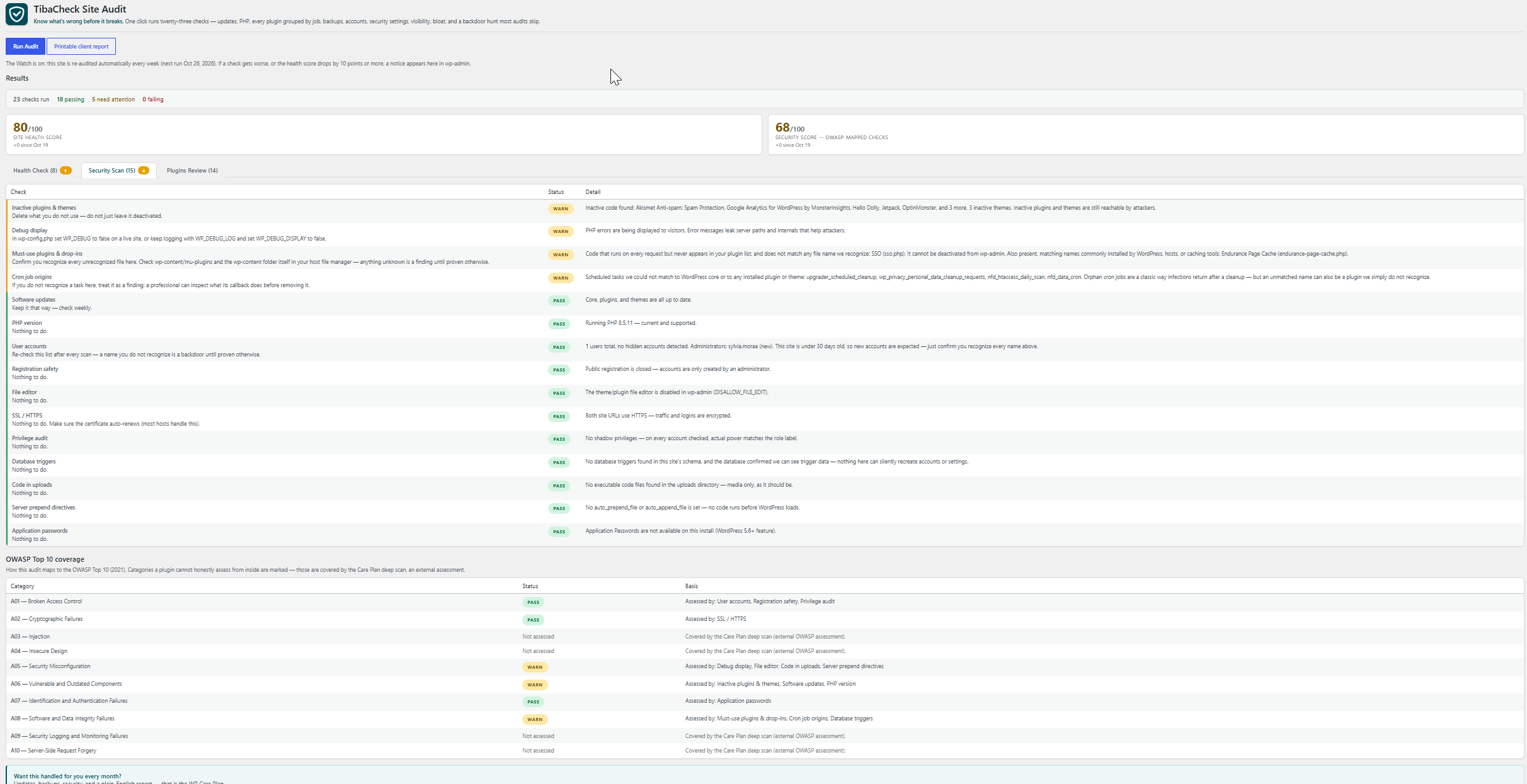
- Improved: the report is now tabbed — Health Check and Security Scan (OWASP-mapped checks plus the Top 10 coverage table) — so a fifteen-check report reads in two short views, with attention badges on each tab.
0.6.1
- Robustness: malformed check results now surface as a visible warning instead of vanishing; score engine hardened against unexpected statuses. (Independent review polish — no behavior change.)
0.6.0
- New: Site Health Score and OWASP Security Score headline every report, with score trends versus your previous run.
- New: OWASP Top 10 (2021) coverage table — each category shows its assessed status and basis, or is honestly marked “not assessed” (those need an external deep scan).
- Fixed (independent review): the hidden-account test no longer false-alarms on multisite; audit queries are deliberately uncached so a re-run always shows the current truth; the runner now survives PHP Errors, not just Exceptions; the updates check reports “unknown” instead of a false PASS when WordPress has never checked; registration grading follows the network setting on multisite; PHP grades now treat 7.4–8.0 as end-of-life; several accuracy and translation fixes.
0.5.2
- Fixed: the three read-only aggregate queries (user count, autoload size) are now wrapped in a short-lived object cache, per WordPress coding standards — Plugin Check runs fully clean again.
0.5.1
- Improved: results are now ordered by severity — failures first, then warnings, then passes — so the report reads in fix-it order.
- Fixed: autoload size now counts the newer WordPress autoload values (‘on’/’auto’, WP 6.6+) as well as the classic ‘yes’, so the total is no longer understated.
0.5.0
- Four new checks: Autoload size (names the biggest offenders), Cron health (catches silently stalled scheduled tasks), Comment queues (spam pile-up), and PHP extensions. The audit now runs fifteen checks.
0.4.0
- Six new checks, each chosen because it is something a care plan watches monthly: Registration safety (FAILs on open registration with an Administrator default role), File editor, Debug display, Search visibility, SSL / HTTPS, and Permalafety (FAILs on open registration with an Administrator default role), File editor, Debug display, Search visibility, SSL / HTTPS, and Permalinks. The audit now runs eleven checks.
0.3.0
- New check: User accounts — lists every administrator by name after each scan, flags admins named “admin”, brand-new admin accounts, and long admin lists, and fails loudly if the database holds users that WordPress queries cannot see (the hidden-backdoor pattern).
0.2.3
- Improved: header polish — the brand line “Know what’s wrong before it breaks” now leads the page, with a larger title, bigger logo, and a cleaner divider.
0.2.2
- Improved: branded report header with the TibaCheck logo, the results table in a rounded card, and the care-plan message presented as a proper callout panel.
0.2.1
- Improved: color-coded results — green/amber/red status pills, colored summary bar (passing / needs attention / failing), and bold statuses so the report reads at a glance.
0.2.0
- New: inactive plugins & themes check (unused code is attacker territory).
- New: backup status check (honest heuristic — warns when no backup tool is detected).
- Fixed: child-theme parents no longer miscounted as inactive themes.
0.1.0
- Initial release: software-updates check and PHP-version check, Tools Site Audit page.