TNC Toolbox: Web Performance

TNC Toolbox: Web Performance
Description
TNC Toolbox aims to enhance your WordPress experience with NGINX-on-cPanel (ea-nginx).
Built for our Managed Server clients, we’ve open-sourced it so others can enjoy it too!
With a heavy focus on the Apache + NGINX as Reverse Caching Proxy web stack, the plugin aims to help with Website Management, Performance and Security.
❤️ FOSS by The Network Crew Pty Ltd (TNC) for Merlot Digital & the world. ❤️
Functionality
At the moment, TNC Toolbox:
- Allows you to enable, disable and purge the NGINX User Cache
- Purges the NGINX Cache magically on post/page publish/update!
- Also purges the Cache when the WP Core is successfully updated
- Lets you know if the plugin is activated but not yet configured
- Only allows Admins to enable/disable caching & edit configs
- Shows you the status of cP UAPI via disk usage info
- Purge when any ACF config options are saved
Eager for even more capabilities?
We plan to add further features as clients & the community request it.
Please let us know your ideas on GitHub – we’d love to hear from you!
Caching Deployments
Caching ideals:
– Don’t forget, ea-NGINX (reverse proxy caching) is meant to be 2nd-level
– ie. Make sure your WP site also has on-site caching, like WP Super Cache
– You can go further with caching, and should: like browser-caching assets!
3-layer Cache:
1. NGINX Caching Proxy (ahead of Apache)
2. WP Super Cache, WP Rocket, etc on-site
3. htaccess/etc rules for Browser Caching
This way, you can ensure maximum efficiency!
The key is to purge when stale, so properly configuring your WP Plugin Cache is critical to ensuring that you don’t end up with cache misses due to stale data that could’ve/should’ve been purged by garbage collection, preloading, etc, rule-sets.
Updating from v1 to v2.x.x
On every website running the plugin, check that:
- Website is reporting v2.x.x plugin version.
- Plugin has been activated post-update. *
- Config exists in the plugin settings.
- API status checker reports OK.
- /wp-content/tnc-toolbox-config/ folder is gone.
(* Change to main plugin file name may result in deactivation)
Verifying cP+WHM Logs
If you’d like to ensure actions are firing properly at a deeper level:
- WHM > Tweak Settings > Logging > Enable cPanel API Log > On
- WHM > Terminal >
tail -f /usr/local/cpanel/logs/api_log - WordPress > Update a Post/Page, or explicitly Purge
- WHM > Terminal > You should see the action fire!
- WHM > Terminal > Ctrl+C to close the tail
Note: To do this, you require root access to the Server.
Installation
Pre-reqs:
- To use ea-NGINX features, your Hosting needs to be on cPanel
- Acquire a cPanel API Token (cPanel > Manage API Tokens)
- Configure the TNC Toolbox plugin inside WordPress
How to install:
- Go to
Pluginsin WP-Admin - Click on the button
Add New - Search for
TNC Toolboxthen clickInstall Now - Click on
Activate pluginthenSettings - Enter your API Token, User & Hostname
- Save the config & use WP as-normal!
Updating from v1 to v2:
On every website running the plugin, check that:
1. Website is reporting v2.x.x plugin version.
2. Plugin has been activated post-update. *
3. Config exists in the plugin settings.
4. API status checker reports OK.
5. /wp-content/tnc-toolbox-config/ folder is gone.
(* Change to main plugin file name may result in deactivation)
Screenshots
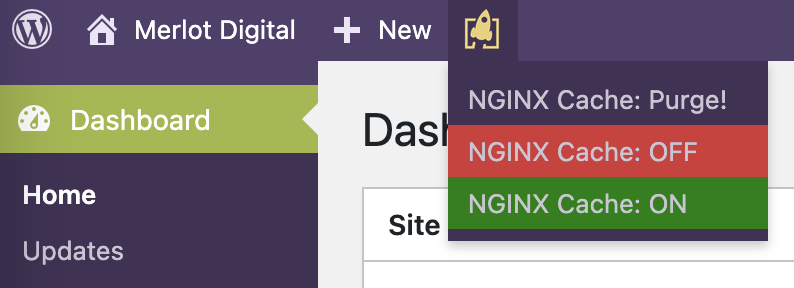
Top Menu Bar options for NGINX Caching.
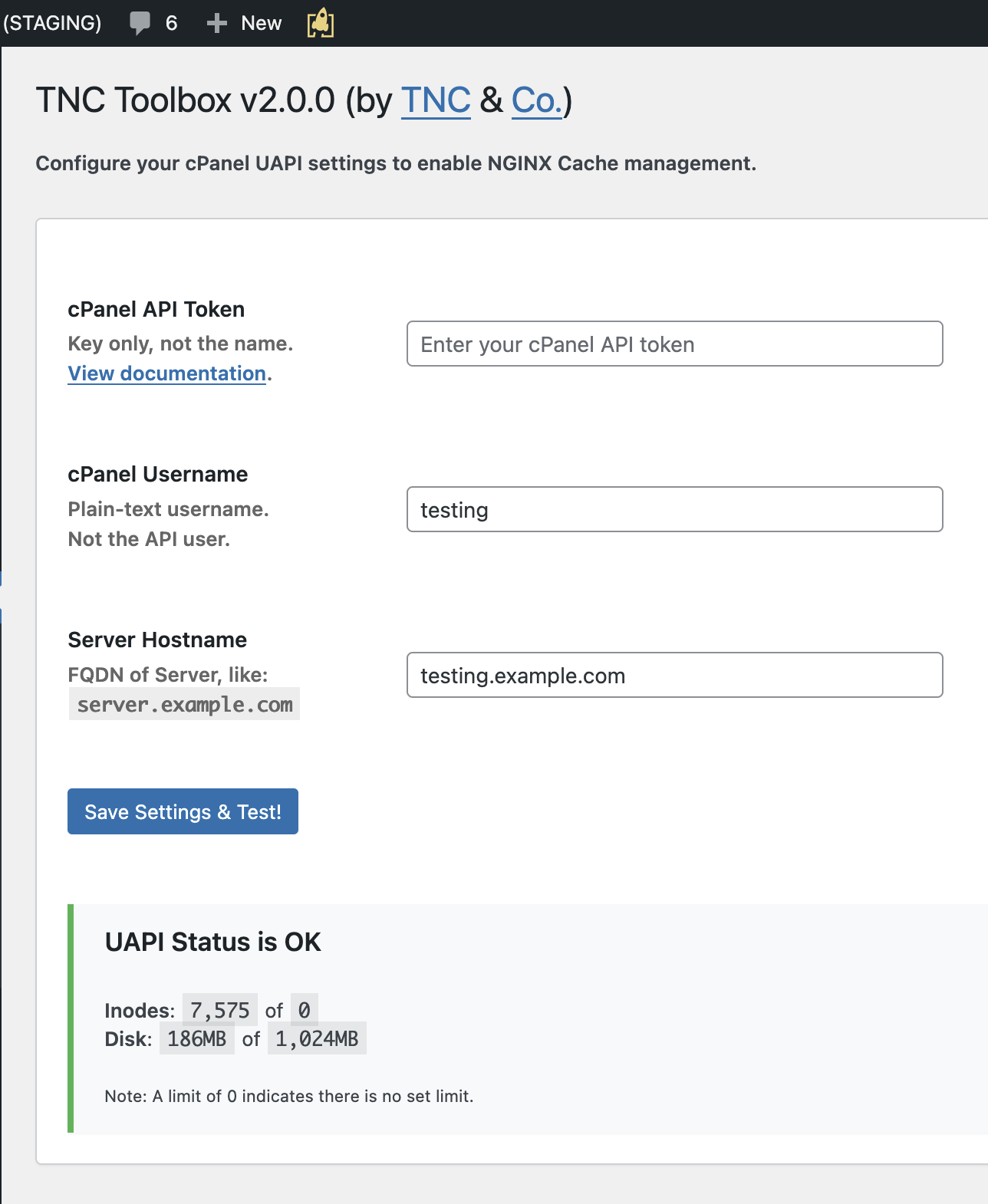
Configuration in the WP Admin GUI.
Faq
Yes, it does! All Users can do this easily via the button in the Admin top menu bar.
Yes! Admins can disable or enable the cache from the Admin top menu bar.
This is only visible if you are logged in as a WP Administrator.
Yes! Simply raise an Issue/PR on the GitHub repository and we’ll take a look.
Yes! You can use WP-CLI to install tnc-toolbox for all users!
Reviews
Simplicity at its finest
By 
This is a fantastic tool that works as it should and gets out of the way - always keeping the cache clean when needed. Thank you!!!
Getting cPanel and NGINX cache talking
By 
cPanel dropped the ball not having a good tried and true away to clear the NGINX cache via WordPress. Many cPanel accounts primary run a wordpress site or more. Thanks for this developer stepping up and getting an in WordPress NGINX clear cache option enabled in WordPress dashboard. Would be great to get some intellegnet cache control to clear the cache for when pages/posts or products are updated. Not sure the nginx cache allows for the fine grain purging though.
NGINX Caching Solved
By 
This plugin saves me time logging into my server to clear NGINX Caching. Great solution TNC.
Changelog
2.0.7: Nov 18, 2025
- Global Script: Update tool now purges artifact configs.
- Off/On: Fix conditional display only in Admin Area (#33)
2.0.6: Nov 14, 2025
- Cache Purge: Loosen required permission (to: edit_posts)
2.0.5: Nov 13, 2025
- Security: Restrict actions to Cron/Hook & via Permissions
2.0.4: Nov 11, 2025
- Remove minimum requirements: Ensure v2 adoption growth
- Folder Renames: languages to locale; vendors to vendor
2.0.3: Nov 6, 2025
- Auto-purge (ACF): When you save ACF config, purge! (#24)
2.0.2: Nov 6, 2025
- Fix: Settings save no longer errors (relocated func.) (#32)
2.0.1: Nov 6, 2025
- Fix: Auto-purge now calls directly (re: nonce failure) (#31)
2.0.0: Nov 6, 2025
- MAJOR REBUILD: You may need to RE-ACTIVATE POST-UPDATE
- Feature: Add direct quota info re: API connected OK (#5)
- Security: Move config from files to WordPress database (#6)
- Security: Secure deletion of old config after migration
- License: Properly apply GPLv3 to all code in the repo
- Improvement: Better API response handling and errors (#28)
- Architecture: Complete codebase re-build for maintainability
- Architecture: Move cPanel API functionality to vendor module
- Architecture: Automatic config migration from old versions
- Legacy: Requires WP 6.0 & PHP 8.0 to set easy baselines
- Auto-update: Revert flag from v1.4.2 – was global (#29)
1.4.2: Nov 4, 2025
- Config Checker: Add function to iterate over
- On-update Check: When core updates, also check
1.4.1: Aug 16, 2025
- Update WordPress supported version to 6.8.x (#26)
- Add screenshots to the WP.org plugin listing (#27)
- Slight improvements to the WP.org Plugin Readme (#27)
1.4.0: Feb 21, 2025
- Truncate max-length of relayed API error to GUI (#22)
- Auto-purge when WP Core is successfully upgraded (#23)