Traffic Monitor
Traffic Monitor
Description
Traffic Monitor gives you full visibility into how people and bots are hitting your site.
Unlike bloated analytics and security plugins, Traffic Monitor focuses on logging raw request data that you control. You’ll know which pages are cached, which bots are visiting, where users are coming from, and how many requests are tied to each IP/browser combination.
Perfect for developers, marketers, and site owners who want fast insights—without handing over their traffic data.
What Makes It Different
- ✅ Logs requests for both cached and non-cached pages
- ✅ Lets you export raw traffic logs as raw CSV for your own analysis
- ✅ Identifies repeat ad clicks for spotting potential click fraud
- ✅ Reveals which bots are hitting your site, so you can block them elsewhere (example: Cloudflare)
- ✅ Tracks IP address, fingerprint, device type, cache status, response code, and more
- ✅ Displays referrer URLs and query strings
- ✅ Records the original source of requests by the same visitor as they surf your website
- ✅ Doesn’t auto-block or inject junk—just clean, useful data
- ✅ Works great with Cloudflare, caching plugins, and reverse proxies
Key Features
- Logs every page request, including IP address, referrer, user-agent, browser, device, method, and more.
- Detects cached traffic even if served by Cloudflare, your web host, or a plugin.
- Identifies bot traffic by bot name and category.
- View click IDs like gclid and fbclid from ad platforms like Google and Meta.
- Records repeat ad clicks to detect potential click fraud.
- Bulk delete or export logs with one click.
- Search, sort, and drill into data from your dashboard.
- Built-in help tabs with definitions, setup help, and troubleshooting.
Use Cases
- Debug integrations instantly: Know exactly what URLs are being hit, by which devices, and with what parameters. No guesswork.
- Spot caching gaps: See which pages are served from cache and which aren’t, even with Cloudflare or plugin-level caching.
- Understand real-world traffic: Track entry pages, referrers, devices, and browsers—whether human or bot.
- Catch click fraud signals: Identify repeat ad clicks tied to the same IP/user agent fingerprint or session, even if served from cache.
- Audit referrers: View exactly which websites or campaigns are driving traffic (including query strings).
- Filter out noise: Use bot labels and device types to focus only on human traffic when analyzing patterns.
Installation
Automatic installation
- Log into your WordPress admin
- Go to Plugins > Add New
- Search for Traffic Monitor
- Click Install Now and then Activate
Manual installation
- Download the plugin
- Unzip the contents
- Upload to
wp-content/plugins/ - Activate from your WordPress dashboard
Screenshots
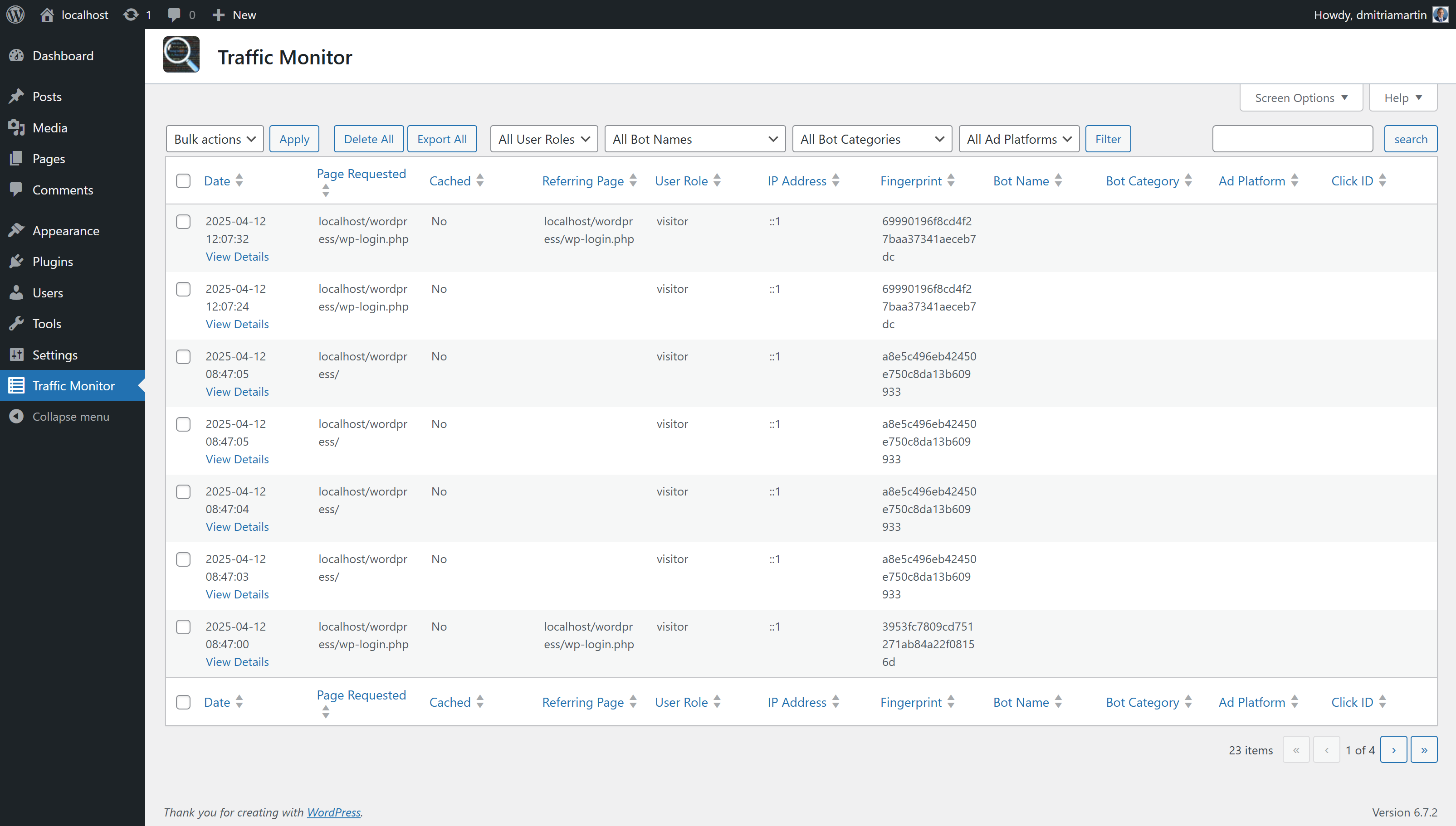
Admin log view – Track all visits with sortable data.
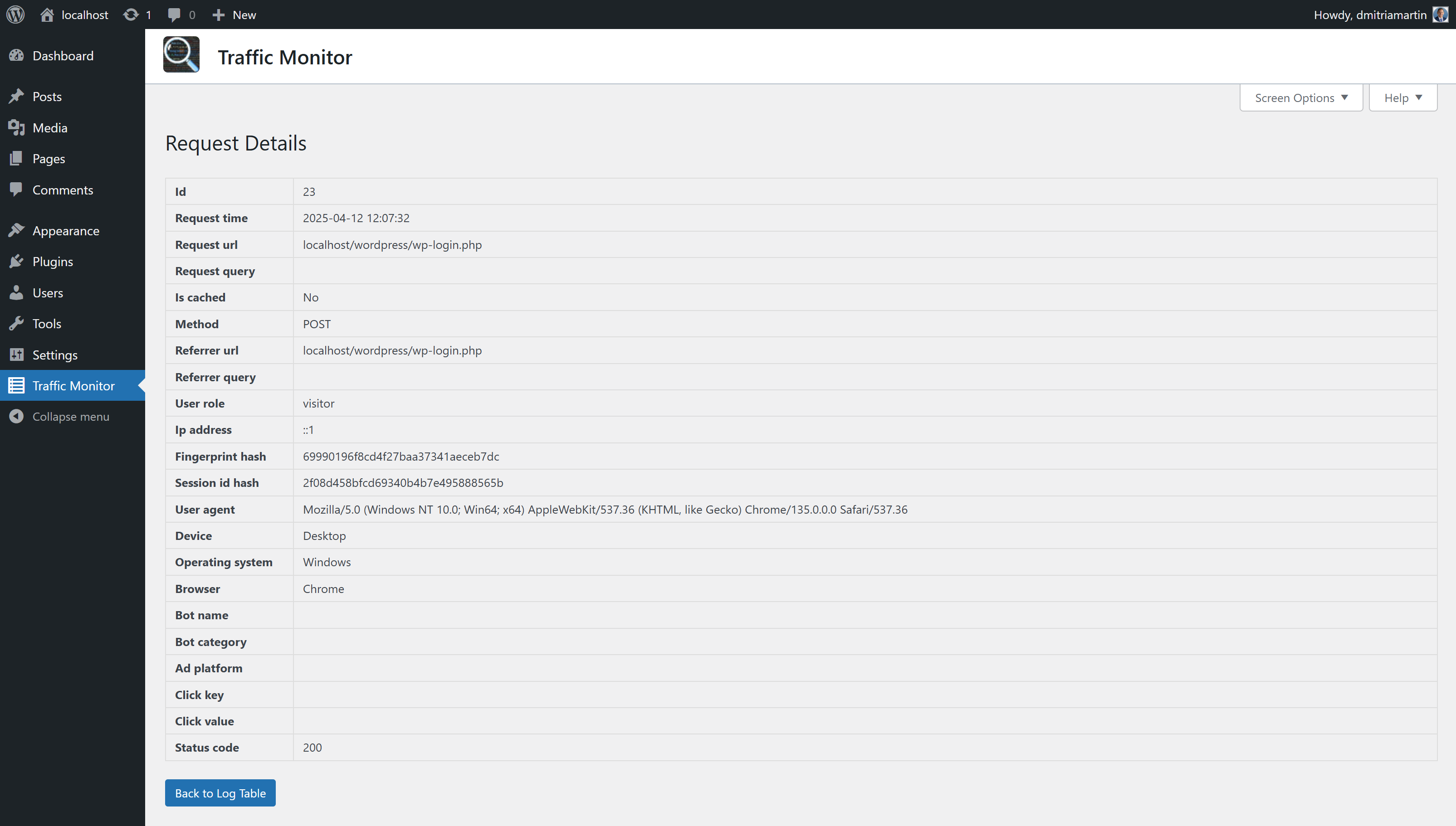
Request details – See full information about a specific visit.
Faq
No. Traffic Monitor logs each request separately, so you’ll see every page load, but it doesn’t track full visitor journeys.
In custom database tables within your WordPress site—nothing is sent to third parties.
Yes, as CSV files. Export selected rows or the entire log.
Until you delete them. Use the bulk delete option if you need to manage storage.
No. The plugin is optimized to skip static assets and unnecessary requests.
Reviews
Excellent!
By 
I tried many plugins to log the hits on my sites that were experiencing high server loads, and this one is just what I was looking for. It is light weight, shows the data in sortable columns, has a lot of possible column views that you can choose to hide or show in the Screen Options. I like that I can see the IPs and the pages they hit and how often, such as the login, and other backend attempts. Blocking these in my .htaccess has cut my server load quite a bit. I also find the layout easier than my host server logs.
Version 3 is Awesome
By 
I had no idea how many bots were visiting my website until Traffic Monitor updated to version 3. Not only that, but I can actually track when people visit my site after clicking on a Google search ad. Pretty sweet for a free plugin!
Just a traffic log - as I needed
By 
Around many plugins called "traffic logs, traffic monitor" - this one really logs traffic on website in a clear and simple way. And is free. Is simple as i was expected to be - a traffic log. Just like a access.log in apache - nothing more, nothing less.
Changelog
3.2.7 (2025-10-21)
- Guard session bootstrap to front-end only (no sessions on admin, REST, AJAX, cron, or WP-CLI) to resolve Site Health “Active PHP session” warning.
- Immediately release PHP session lock after hashing the session ID to prevent REST/loopback cURL 28 timeouts and late cron notices.
3.2.6 (2025-07-03)
- Added source as a search field
3.2.4 (2025-06-16)
- Removed prompt when hitting enter instead of Search button
3.2.3 (2025-06-11)
- Fixed pagination when searching or filtering log
3.2.2 (2025-06-10)
- Fixed issue where referrer was incorrect for cached pages
- Fixed issue where source was not inherited when session matches
3.2.1 (2025-06-09)
- Added logging of original source of requests when known
- Included other fields in search feature
3.1.12 (2025-06-06)
- Fixed PHP warning concerning session
- Fixed issue regarding matching bot names to user agents
3.1.8 (2025-06-05)
- Fixed PHP warning concerning fingerprint
3.1.7 (2025-06-03)
- Added detection of bots that switch sessions to avoid detection
- Fixed issue where response code was logged too early
3.1.6 (2025-05-21)
- Fixed bug where AJAX cache detection could run scripts triggered by query strings
- Improved database schema resilience by ensuring
bots.namecolumn supports longer strings
3.1.4 (2025-05-19)
- Fixed nonce check issue
- Added bots to detection list
3.1.0 (2025-05-07)
- Replaced external call to ipfiy with internal API
- Added bots to detection list
3.0.0 (2025-03-18)
- Normalized database into multiple tables with added fields
- Added bot detection with category tracking
- Added advertising click tracking (example: gclid, fbclid)
- Added fingerprint hash and session hash for tracking repeat visitors
- Added filters to log table
- Added ability to combine filtering, searching, and sorting to drill into data
2.3.0 (2025-02-21)
- Removed user agent parsing dependency
2.2.1 (2025-02-19)
- Minor layout updates.
- Added field for whether page requested was cached.
2.1.1 (2025-02-15)
- Improved comments and code organization.
2.1.0 (2025-02-14)
- Improved branding, cache busting, and updating.
2.0.0 (2025-02-12)
- Added logging of cached pages.
1.4.0 (2025-02-11)
- Added Request Type field.
- Refactored code from proceedural to OOP with MVC design.
1.3.2 (2025-02-05)
- Fixed version error.
- Removed cache detection.
1.2.0 (2025-01-29)
- Added sorting for each column and increased number of search fields.
- Removed forwarded, x_real_ip, x_forwarded_for, and x_forwarded_host fields
- Improved help file and code comments
1.1.3 (2025-01-28)
- Fixed bugs and improved help.
- Security enhancements.
- Fixed bugs.
1.1.0 (2025-01-27)
- Added cache detection and bug fixes.
1.0.4 (2025-01-22)
- Improved readme.txt and fixed bugs.
- Fixed bugs.
1.0.2 (2025-01-21)
- Security enhancements.
1.0.1 (2025-01-20)
- Security enhancements.
1.0.0 (2025-01-16)
- Initial release.