TranslatePress – Translate Multilingual sites with AI Translation

TranslatePress – Translate Multilingual sites with AI Translation
Description
Experience a better way to translate your WordPress site and go multilingual, directly from the front-end using a visual translation interface. The built-in AI translation lets you translate automatically, then refine anything visually.
TranslatePress is a WordPress translation plugin that anyone can use.
The interface allows you to easily translate the entire page at once, including output from shortcodes, forms and page builders. It also works out of the box with WooCommerce.
Built the WordPress way, TranslatePress – Multilingual is a GPL and self hosted translation plugin, meaning you’ll own all your translations, forever. It’s the fastest way to create a bilingual or multilingual site.
Multilingual & Translation Features
- Translate all your website content directly from the front-end, in a friendly user interface (translations are displayed in real-time).
- Fully compatible with all themes and plugins
- Live preview of your translated pages, as you edit them.
- Automatic AI translation support through TranslatePress AI Free, with a 2,000 AI words limit. Use our free Website Word Count to find how many words your website contains.
- Integrates with Google Translate, allowing you to set up unlimited automatic translations using your own Google API key.
- Fully customizable language switcher that you can display as a menu item, a floating dropdown, or place anywhere else using the Language Switcher block, or the [language-switcher] shortcode.
- Image translation support, for translating images, sliders and other media.
- Support for both manual and automatic translation
- Ability to translate dynamic strings (gettext) added by WordPress, plugins and themes.
- Translate larger html blocks by merging strings into translation blocks.
- Editorial control allowing you to publish your language only when all your translations are done
- Conditional display content shortcode based on language [trp_language language=”en_US”] English content only [/trp_language]
- Possibility to edit gettext strings from themes and plugins from English to English, without adding another language. Basically a string-replace functionality.
- Translate only certain paths and exclude content from being translated
- Translation Block feature in which you can translate multiple html elements together
- Native Gutenberg support, so you can easily translate Gutenberg blocks
- Out of the box WooCommerce compatibility
- Use our FREE Website Translation tool/widget to browse any website into your own language.
Note: this plugin uses the Google Translation API to translate the strings on your site. This feature can be enabled or disabled according to your preferences.
Users with administrator rights have access to the following settings:
- select default language of the website and one translation language, for bilingual sites
- choose whether language switcher should display languages in their native names or English name
- force custom links to open in current language
- enable or disable url subdirectory for the default language
- enable automatic translation via Google Translate
Powerful Translation Add-ons
TranslatePress – Multilingual has a range of premium Add-ons that allow you to extend the power of this WordPress translation plugin:
Pro Add-ons (available in the premium versions only)
- Full TranslatePress AI access – automatically translate your entire website without extra platforms to sign up for, API keys, and additional translation costs. Each premium version includes a set number of AI translated words you can use to instantly translate your site, saving you both time and money.
- Extra Languages – allows you to add an unlimited number of translation languages, with the possibility to publish languages later after you complete the translation
- SEO Pack – lets you translate meta information (like page title, description, url slug, image alt tag, Twitter and Facebook Social Graph tags & more) for boosting your multilingual SEO and increase traffic. Works with all popular SEO plugins.
- Different Domain per Language – assign a different domain to each language you add (e.g. domain.de, domain.es) and improve international SEO by creating a fully local experience for your visitors
- Translator Accounts – create or allow existing users to translate the site without admin rights
- Browse as User Role – view and translate content that is visible only to a particular user role
- Navigation Based on Language – configure and display different menu items for different languages
- Automatic User Language Detection – redirect first time visitors to their preferred language based on their browser settings or IP address
- DeepL Automatic Translation – The DeepL Automatic Translation add-on lets you automatically translate your website through the DeepL API
Keyboard Shortcuts
- CTRL ( ⌘ ) + S – Save translation for the currently editing strings
- CTRL ( ⌘ ) + ALT + Z – Discard all changes for the currently editing strings
- CTRL ( ⌘ ) + ALT + (Right Arrow) – Navigate to next string
- CTRL ( ⌘ ) + ALT + (Left Arrow) – Navigate to previous string
Website
Documentation
Visit TranslatePress WordPress Translation plugin documentation page
Add-ons
Demo Site
You can test out TranslatePress – Multilingual plugin by visiting our demo site
External Services
This plugin connects to the TranslatePress AI translation service to perform automatic translations. Data sent includes page text, license key, site URL, and language settings. This may be triggered by front-end page visits, not just admin actions.
If you opt in, the plugin sends limited diagnostic and configuration data to Cozmoslabs.com to help improve the product.
Terms & Conditions: https://translatepress.com/terms-conditions/
Privacy Policy: https://translatepress.com/privacy-policy/
If you choose to use Google Translate or DeepL as your translation engine and provide your own API key, content from your site will be sent to those services for translation. This may also be triggered by front-end page visits.
Google Translate Terms of Service: https://cloud.google.com/terms/
Google Privacy Policy: https://policies.google.com/privacy
DeepL Terms of Service: https://www.deepl.com/en/pro-license
DeepL Privacy Policy: https://www.deepl.com/en/privacy
The plugin requests translation files of other plugins hosted on WordPress.org.
Select2: https://github.com/select2/select2
Installation
- Upload the translatepress folder to the ‘/wp-content/plugins/’ directory
- Activate the plugin through the ‘Plugins’ menu in WordPress
- Go to Settings -> TranslatePress and choose a translation language.
- Open the front-end translation editor from the admin bar to translate your site.
Screenshots

TranslatePress front-end visual translation editor in action
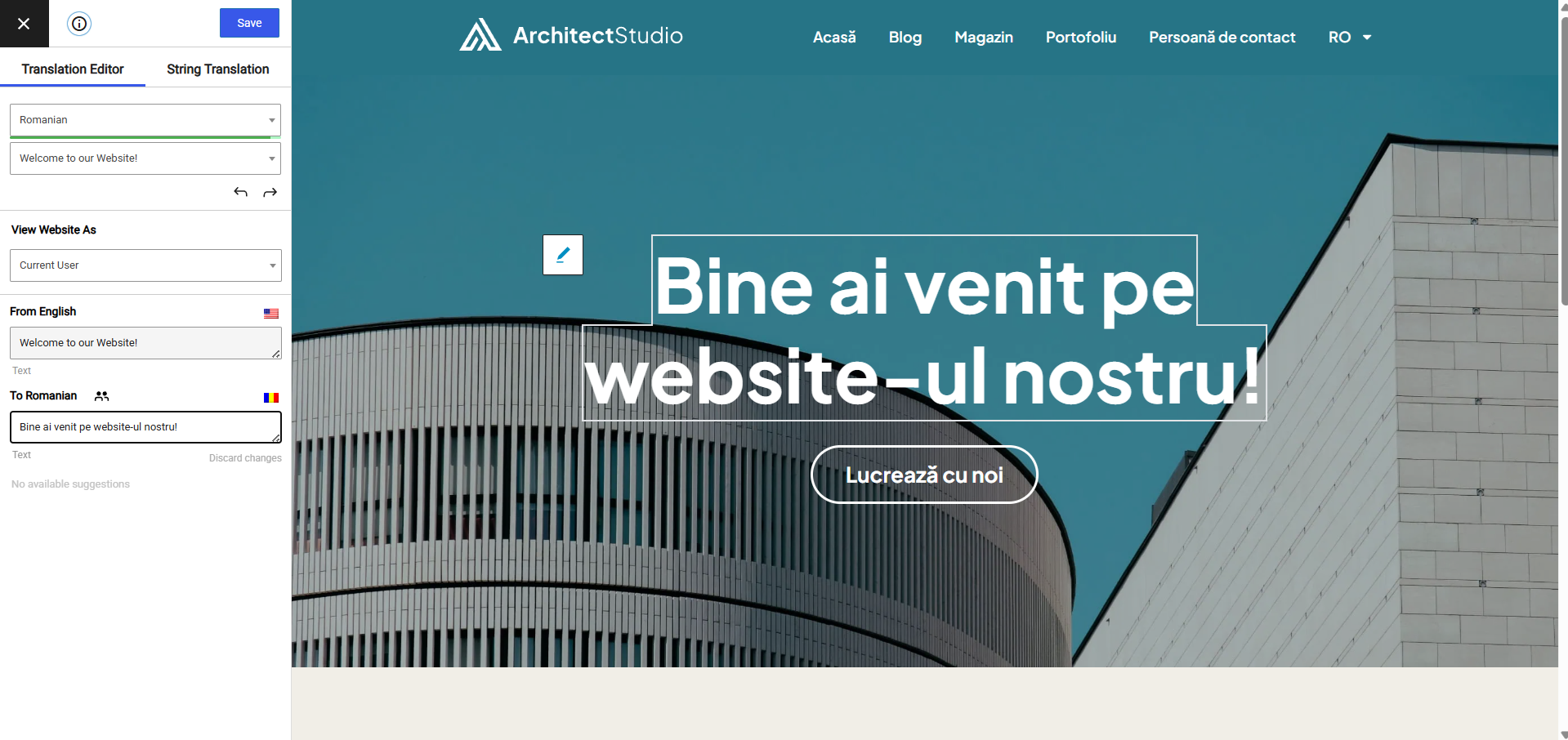
Front-end translation editor used to translate the entire page content
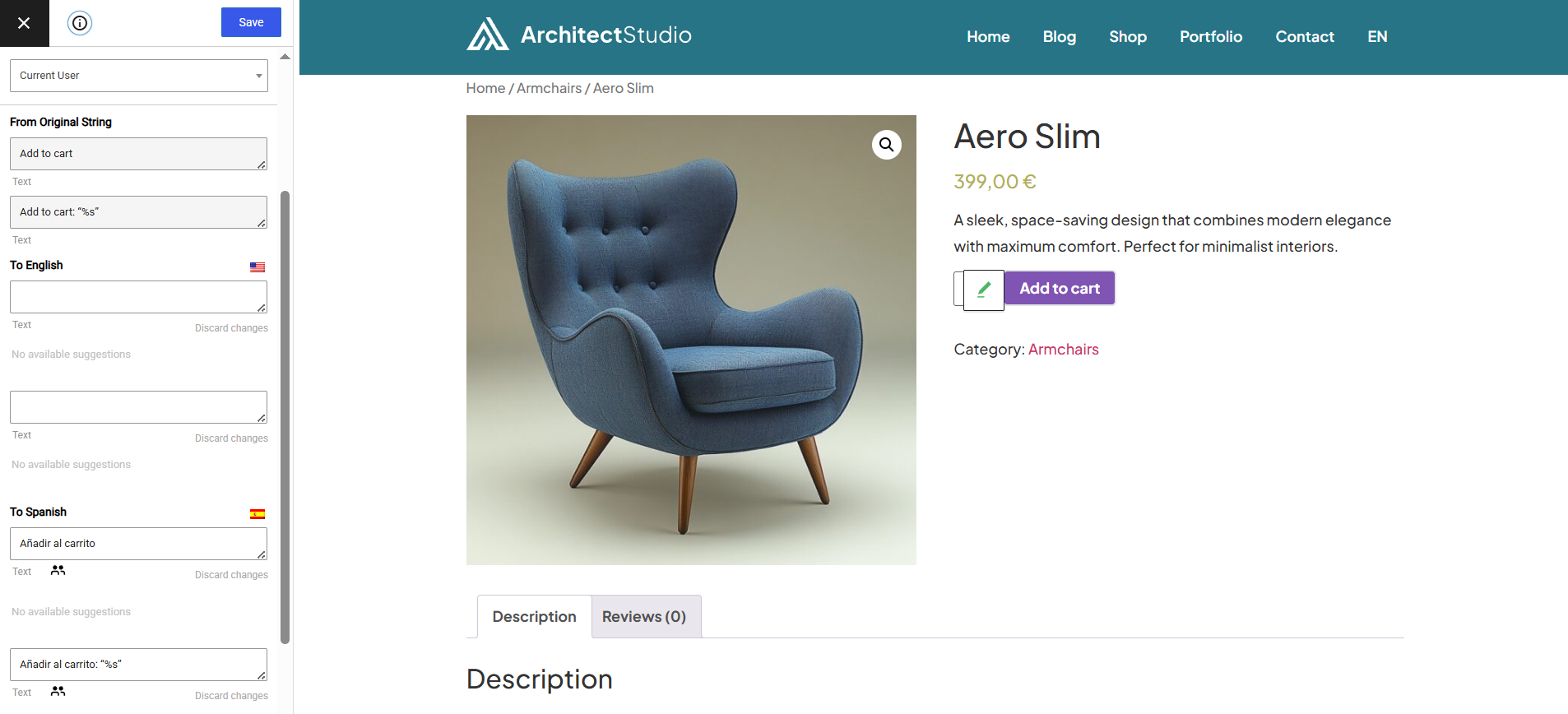
How to translate a dynamic string (gettext)
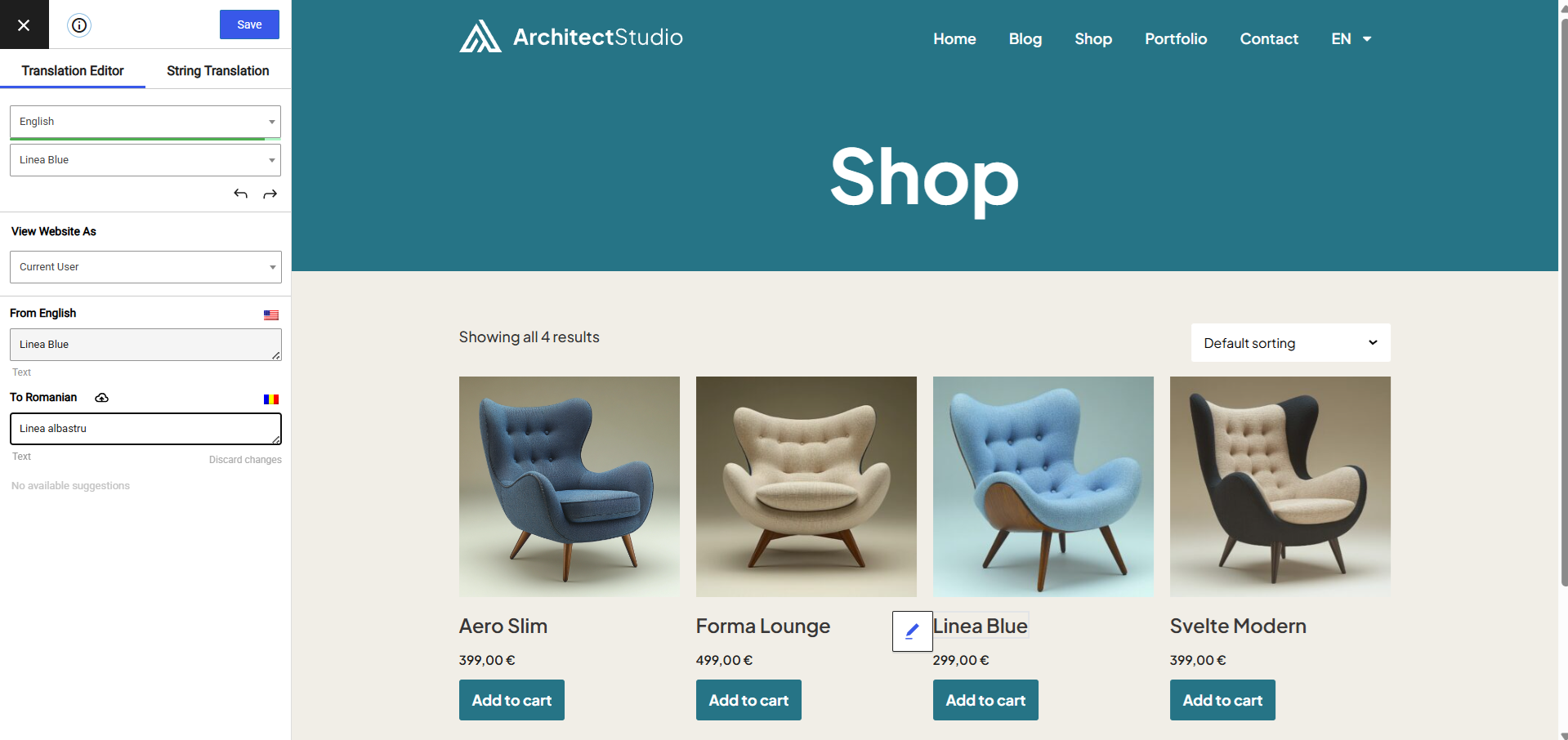
Translating WooCommerce Products for your multilingual store
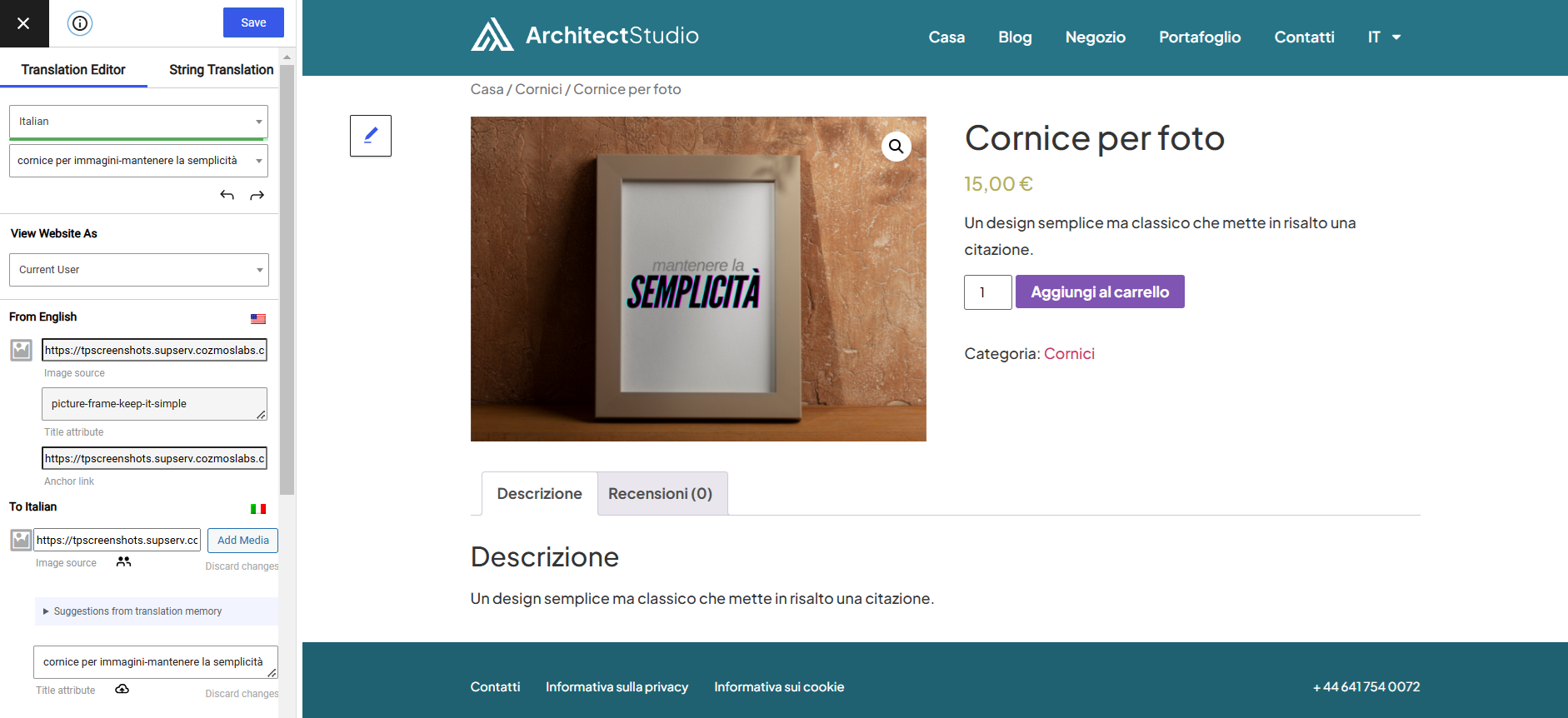
Translate Images and Image Sliders
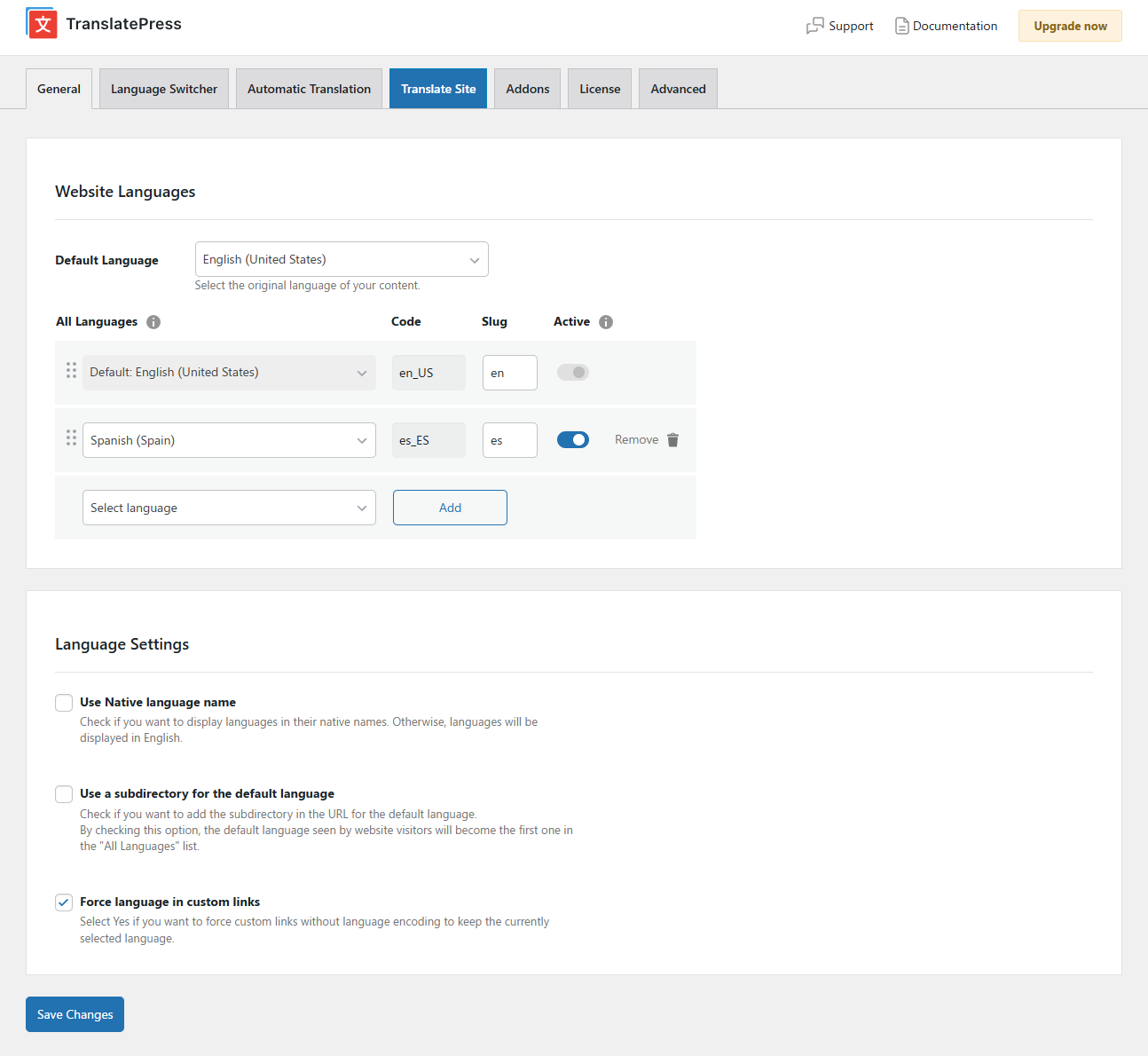
Settings Page
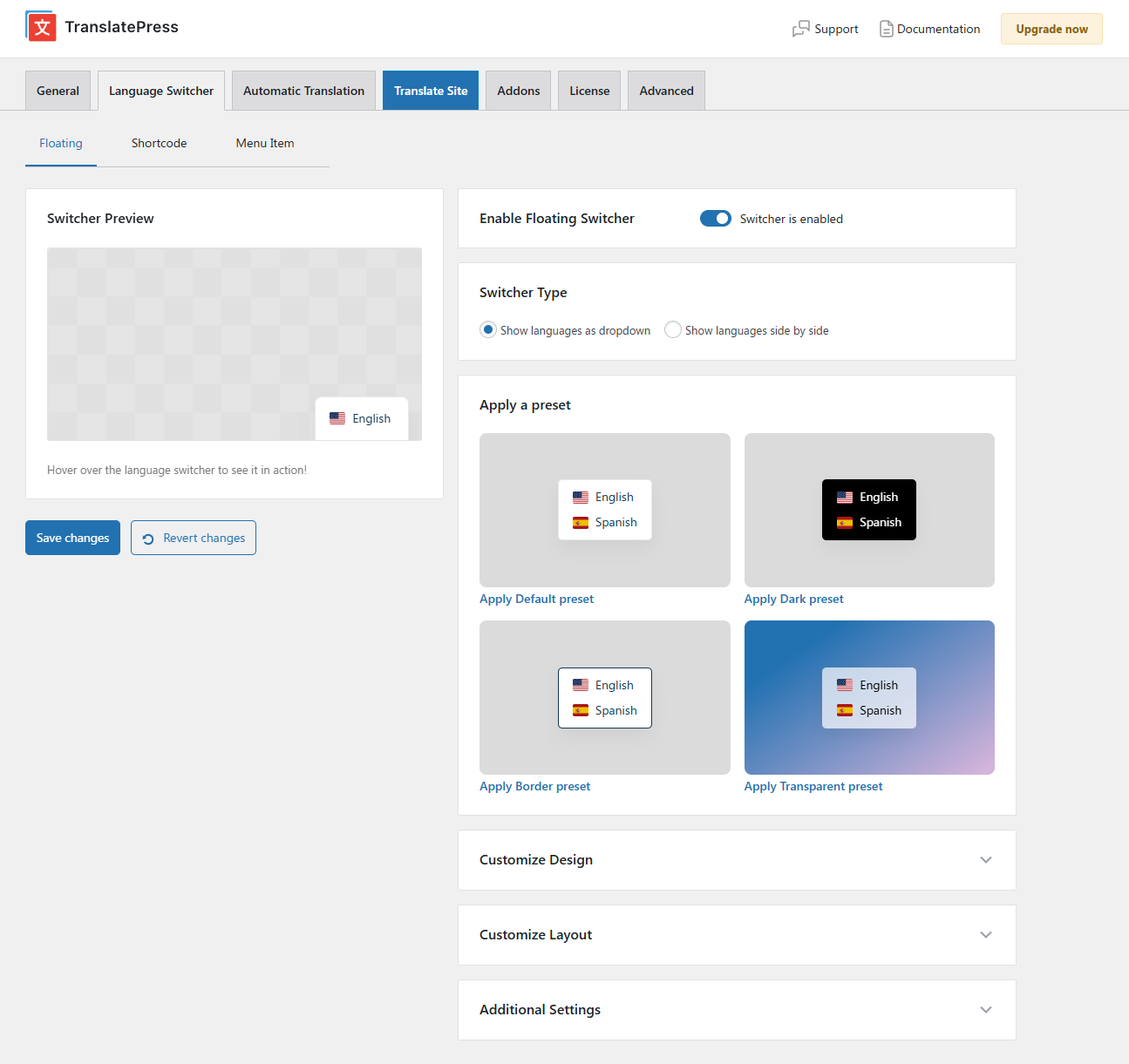
Floating Language Switcher

Menu Language Switcher

Faq
All the translation are stored locally in your server’s database.
TranslatePress – Multilingual plugin works out of the box with WooCommerce, custom post types, complex themes and site builders, so you’ll be able to translate any type of content.
TranslatePress is easier to use and more intuitive altogether. No more switching between the editor, string translation interfaces or badly translated plugins. You can now translate the full page content directly from the front-end. This makes TranslatePress a great alternative to plugins like Polylang and WPML. For more details check out this WordPress Translation Plugin Comparison: TranslatePress vs WPML vs Polylang vs Gtranslate.
After installing the plugin, select your secondary language and click “Translate Site” to start translating your entire site exactly as it looks in the front-end. To speed things up, use TranslatePress AI for automatic AI translation.
TranslatePress AI combines the best LLMs (like Gemini and GPT) and Neural Machine Translation (NMT) engines (like DeepL and Google Translate) into one integrated solution, to automatically translate your website. The system intelligently selects the most suitable engine for any given language pair and context, to ensure maximum accuracy.
TranslatePress will have little impact on your site speed. For more details see Top WordPress Translation Plugins Compared Based on Page Load Time
Yes, TranslatePress works out of the box with WooCommerce. You can use to build a multilingual WooCommerce store.
For more information please check out our documentation.
Please report security bugs found in the source code of the TranslatePress plugin through the Patchstack Vulnerability Disclosure Program. The Patchstack team will assist you with verification, CVE assignment, and notify the developers of this plugin.
Reviews
Fantastic and easy-to-use translation plugin!
By 
I am extremely satisfied with how this plugin works. It is very intuitive, easy to set up, and makes managing a multilingual website completely hassle-free.
Great plugin!
By 
Simple and effective to translate my website, thanks to the devs.
El Mejor
By 
Creo que es el mejor plugin de traducción, muy sencillo y rápido de configurar.
Fácil de usar y muy completo !
By 
Un plugin ligero, veloz. Es fácil de usar y tiene muchas opciones sus versión gratuita. La traducción manual es fácil, sino se puede automatizar, usar IA , DeepL. Es GOD,
Felicitaciones!
Great support
By 
I experienced some lag on the WooCommerce checkout page, so I contacted support and they helped me really well. They did extensive testing and kept me updated on the status. Eventually, the issue was resolved in a plugin update.
Excelente
By 
Muy buen proucto.
Good product, even greater support
By 
I've been using Translatepress for translating my website to Dutch and German and it has done a good job so far. By accident had my subscription renewed while I halted the website and they were kind enough to come up with a fair solution.
Keep it up!
Great plugin with outstanding support
By 
We used TranslatePress to build our multilingual website, which is available in English, French and Italian. We’re very happy with the plugin.
However, what really stands out is the support. The team was extremely helpful, responsive, and accommodating whenever we needed assistance. They took the time to properly investigate our case and provide a fair, customer-friendly solution.
Excellent plugin and truly top-notch customer service! Highly recommended!
Honestly horrible
By 
Charging a monthly subscription of 8$ just to be able to change your slug depending on the language its honestly diabolical. Horrible plugin, would never recommend it in any website.
Magnifique
By 
Facile à paramétrer et pour faire les traductions
Changelog
3.3.8
- Fixed unauthenticated stored XSS via #TRPLINKPROCESSED. Thanks to daroo and the Wordfence team
- Fixed missing translations in WooCommerce emails sent from the admin, including strings added by WooCommerce extensions
- Fixed a bug where trailing punctuation was doubled after automatic translation
- Improved performance of database upgrade process regarding duplicate removal
- Improvements to machine translation deadlocks caused by concurrent requests
- Fixed html lang attribute for languages with _informal and _ao90 suffixes
- Fixed edge case where junk database entries where added when all new strings on a page were skipped by automatic translation
- Keep the selected language on Slider Revolution layer links
- Make “Do not translate certain paths” work with non-latin slugs
Older versions
Click Here to view the full changelog, or you can find it in the changelog.txt file in the plugin folder.