Truemed – Pay with HSA/FSA

Truemed – Pay with HSA/FSA
Description
This plugin provides seamless integration between WooCommerce and the Truemed payment platform.
Locally tested with WordPress 7.1.3, WooCommerce 11.2.1, and PHP 8.5.11 through browser checkout and the Truemed development API.
– Supports both classic and block-based WooCommerce checkout flows
– Secure, API-based payment sessions with Truemed
– Supports both legacy unsigned webhooks and newer HMAC-signed webhook deliveries
– Optional manual payment capture and void functionality (authorize now, capture later)
– Real-time payment/order reconciliation and logging
– Full admin integration: capture/void from WooCommerce order admin
– Optional post-purchase reimbursement links for paid subscription orders
Developer Features:
– Complete PHP API for integration/extension
– Compatible with WooCommerce HPOS/High Performance Order Storage
– Built and fully maintained by experienced e-commerce developers
For support , visit Truemed.com.
External Services
This plugin connects to the TrueMed payment processing API to handle HSA/FSA payment transactions for WooCommerce orders.
Truemed – Pay with HSA/FSA
What the service is:
TrueMed is a Health Savings Account (HSA) and Flexible Spending Account (FSA) payment processing service that enables customers to pay for eligible health and wellness products using their tax-advantaged accounts.
What data is sent:
– Order total amount
– Customer email address
– Customer name
– Order line items (product names and prices)
– Merchant information
– Transaction IDs
When data is sent:
– When a customer selects TrueMed as their payment method during checkout
– When user wants to refund their order
– When processing payment captures after order placement
– When processing refunds or voids for cancelled/refunded orders
– When a customer follows an enabled post-purchase reimbursement link. The link includes subscription product SKUs, the WooCommerce order ID as the merchant-side user ID, and a source identifying the thank-you page or customer email.
Service endpoints used:
– Payment session creation: https://api.truemed.com/payment_session/
– Payment refund: https://api.truemed.com/payment_session/refund
– Payment capture: https://api.truemed.com/payment_session/{transaction_id}/capture
– Payment void: https://api.truemed.com/payment_session/{transaction_id}/void
– Reimbursement qualification: https://app.truemed.com/qualify/{qualification_id}
Privacy and Terms:
– TrueMed Privacy Policy: https://www.truemed.com/legal/privacy
– TrueMed Terms of Service: https://truemed.com/terms
– TrueMed API Documentation: https://developers.truemed.com/
User consent:
Customers explicitly choose to use TrueMed during checkout by selecting it as their payment method. By selecting TrueMed, customers consent to sharing their payment and order information with TrueMed for transaction processing.
Privacy Policy
TrueMed’s Privacy Policy:
https://www.truemed.com/legal/privacy
TrueMed’s Terms of Service:
https://truemed.com/terms
By using this plugin, site owners agree to TrueMed’s terms and are responsible for informing their customers about data sharing.
Third Party Services
This plugin connects to TrueMed’s API:
– API Documentation: https://developers.truemed.com
– Privacy Policy: https://truemed.com/privacy
– Terms of Service: https://truemed.com/terms
Installation
- Install the plugin from the store.
- Activate the plugin through the ‘Plugins’ menu in WordPress.
- Go to WooCommerce > Settings > Payments and configure your Truemed API credentials.
- If Truemed provides a webhook signing secret for a newly created signed webhook, add it to the “Webhook Signing Secret” field in the gateway settings.
- (Optional) Configure manual capture/void settings if you want to use delayed payments.
- (Optional) Enable Subscription Reimbursement, enter the Qualification ID supplied by Truemed, and ensure subscription products have SKUs.
Screenshots
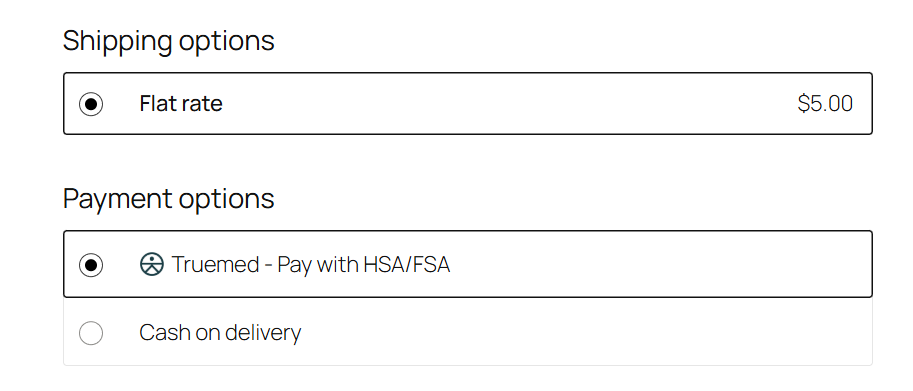
Payment gateway on WooCommerce checkout with logo
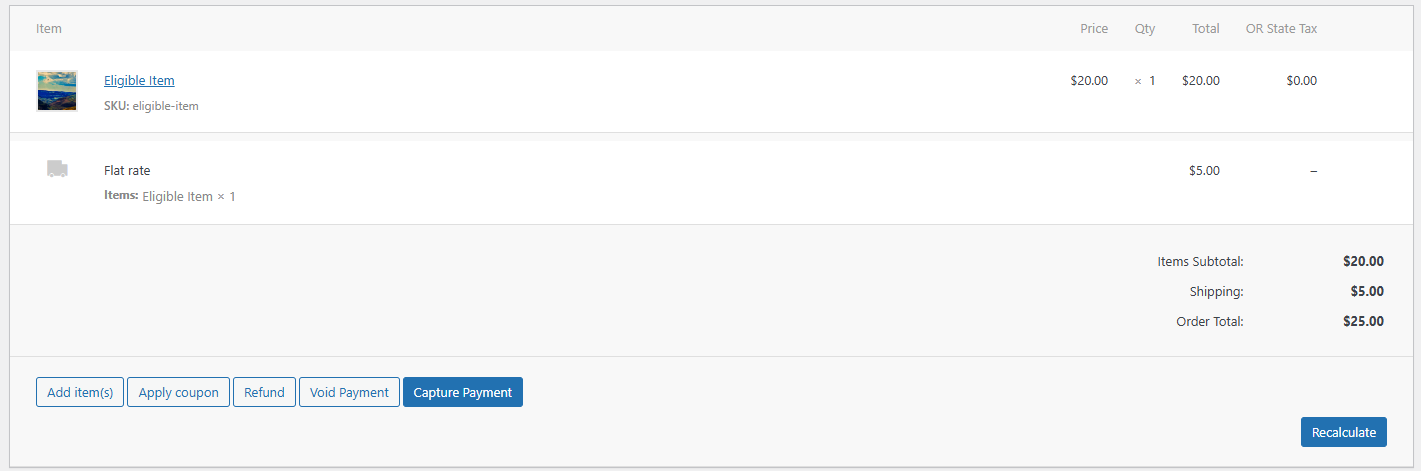
Manual capture/void buttons in WooCommerce order admin
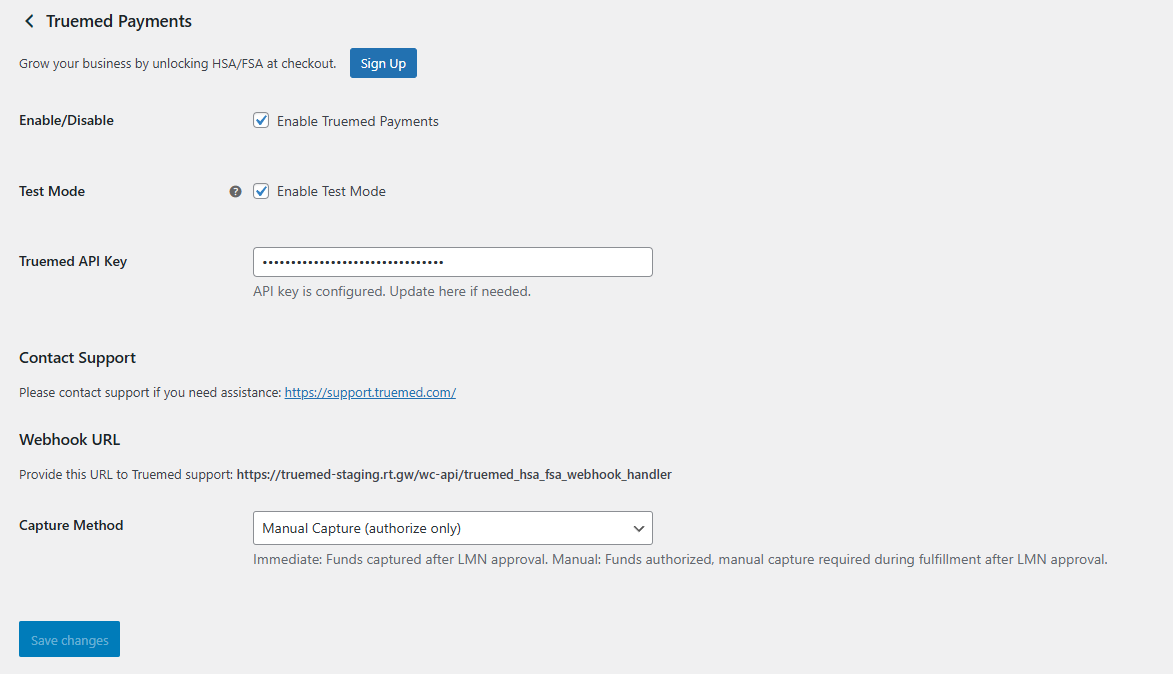
Gateway configuration screen
Faq
Yes. Truemed Payment Gateway includes native support for WooCommerce Cart & Checkout blocks.
Yes. WooCommerce Subscriptions and Subscriptions for WooCommerce by WP Swings are supported. Enable Subscription Reimbursement in the Truemed payment settings and enter the Qualification ID supplied by Truemed. The link appears only after a paid initial subscription order and does not enable Truemed for recurring subscription payments.
Yes, all code is released under the GPLv2 or later license.
Support and documentation are available via truemed.com.
Reviews
Changelog
1.0.0
- Initial public release
1.0.1
- Fix: Minor CSS adjustment for logo alignment.
1.0.2
- Feat: Generate idempotency key if item details changes.
1.0.3
- Fix: Tax calculation error.
1.0.4
- Feat: Support HMAC-signed Truemed webhooks without breaking legacy unsigned integrations.
1.0.5
- Fix: Hide Pay and Cancel actions for Truemed orders while preserving the View action in WooCommerce customer order screens.
1.0.6
- Fix: Normalize WooCommerce refund reasons to Truemed-compatible refund reason values.
1.0.7
- Fix: Include non-coupon order-level discounts in Truemed payment session details.
1.1.0
- Feat: Add attributed post-purchase reimbursement links for paid initial subscription orders.