TSO Swiss Knife – Advanced Maintenance & Developer Toolkit

TSO Swiss Knife – Advanced Maintenance & Developer Toolkit
Description
TSO Swiss Knife gives WordPress developers and site administrators a single, well-organised panel (under Tools › TSO Swiss Knife) to inspect and control the internal systems that affect performance, stability, and security.
Included modules
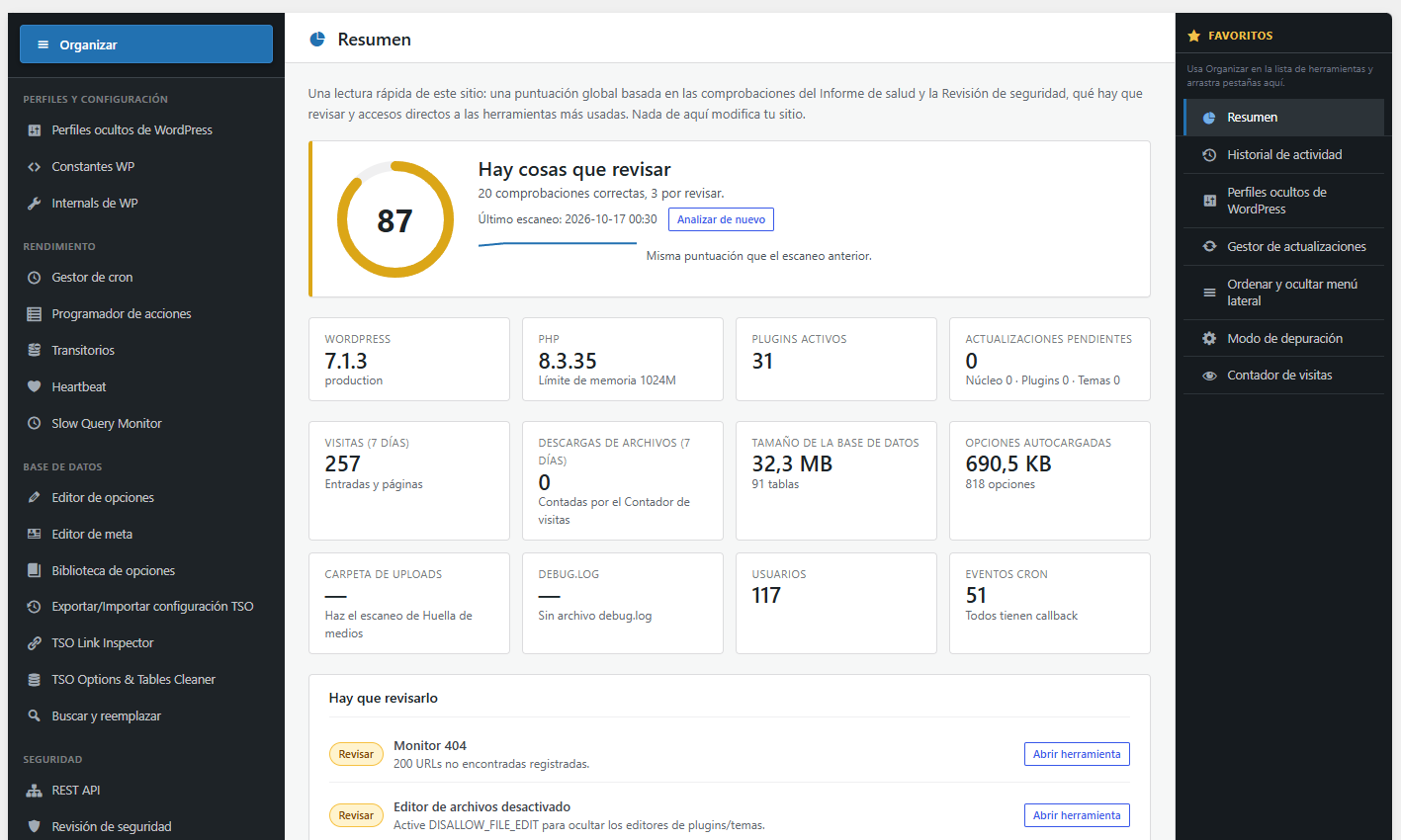
- Overview — Landing dashboard with a 0–100 site score built from the Health Report and Security Review checks, the items that need attention (each linked to the right tool), quick vitals, shortcuts and recent activity. Read-only; nothing is sent off-site.
- Activity History — Central log of changes across all plugin tools (options edited, database replacements, maintenance mode, admin menu, and more). Pinned as the default favorite for quick access.
- Hidden WordPress Profiles — Apply quick presets and toggle safe performance, content, and privacy constants via JSON under the plugin uploads folder (no wp-config.php editing). Runtime filters apply on the next request.
- Cron Manager — List scheduled WP-Cron events, run or delete non-core hooks, and keep WordPress core cron events read-only (no manual Run / Edit / Delete).
- Action Scheduler — Inspect WooCommerce Action Scheduler tables, pending actions, and queue health when the library is present.
- Debug Mode — One-click Developer mode for staging that turns on
SAVEQUERIESfor the Slow Query Monitor, saved as JSON underwp-content/uploads/tso-swiss-knife-advanced-maintenance-developer-toolkit/config/.WP_DEBUG,WP_DEBUG_LOG,WP_DEBUG_DISPLAYandSCRIPT_DEBUGare set by WordPress before plugins load, so the tab shows their current value and source (read-only) plus copy-pastewp-config.phpsnippets to change them. - Options Editor — Search, inspect, edit, and safely delete
wp_optionsrows with core options protected. - Meta Editor — Browse and edit post and user meta. Without an object ID, search matches meta keys only (not values).
- Option Library — Save named option presets and re-apply them across environments.
- Export/Import TSO Configuration — Back up and restore selected plugin
wp_optionssettings as JSON (Redirects, Staging Mode switches, Login Protect, Slow Query settings, and more). Does not include Debug/Security JSON under uploads, the Staging mail log, sandbox sessions, or the Slow Query log. - Transients — Filter by status and purge expired or all transients in bulk (site transients on multisite require a network/super admin).
- WP Constants — Read-only overview of relevant constants grouped by category.
- WP Internals — Inspect post types, taxonomies, roles, query vars, rewrite tags, and shortcodes.
- REST API Controls — Disable anonymous REST API access or block individual namespaces.
- Heartbeat Controls — Set Heartbeat mode (default / disable frontend / disable editor / disable all) and interval.
- Update Manager — Review pending core, plugin, and theme updates, optionally block update checks (staging), and control update email notifications.
- Slow Query Monitor — Log slow database queries when SAVEQUERIES is enabled, inspect live queries for the current request, export CSV/JSON, and open a summary from the admin bar.
- Search & Replace — Run dry-run or live serialized-safe search and replace across database tables.
- Hooks Inspector — Browse the live
$wp_filterglobal, with callback details and a real-time search filter. - Rewrite Rules Flush — Soft or hard flush with a single click; search within the current rules table.
- Server Files Review — Scan for unexpected PHP files in uploads and other writable directories; optionally save
robots.txt/.htaccesswhen you confirm. - Redirects — Manage safe redirect rules stored in the database with import and export support.
- Custom 404 Page — Assign a WordPress page as the site 404 response while keeping the original URL and a real HTTP 404 status (no redirect).
- Slug Manager — Bulk-edit post and term slugs with conflict detection.
- Health Report — Compact checks for risky settings, logs, 404 noise, and related issues; download HTML/JSON in the plugin UI language.
- Reorder & Hide Sidebar — Drag to reorder WordPress admin menu items, rename labels, nest items under another section, or hide items for all admins.
- Users & Sessions — Summary cards (totals and users per role), per-account session cards with single or full session close, a searchable and sortable All users list with bulk role change (including “select all matching users” and Undo), inactive accounts, and login history.
- Roles & Capabilities — Step-by-step screen: choose a role, review what each capability allows, add or remove capabilities, apply templates, clone a role or compare two roles. Dangerous capabilities are blocked or flagged.
- Media Cleaner — Review unattached media, missing attachment files, and unreferenced uploads.
- Uploads Disk Footprint — Scan the uploads folder for size and file-type footprint statistics.
- Image Sizes Audit — Review registered image sizes and disable unused sizes where appropriate.
- Security Review — Highlight common hardening and update issues.
- Core File Integrity — Verify WordPress core files against official checksums and flag unexpected changes.
- Login Protection — Custom login URL, brute-force limits, and related hardening controls.
- Comment Anti-Spam — Local honeypot/rate-limit rules plus optional reputation or cloud checks (off until you enable them and add keys where required).
- Email Diagnostics — Inspect wp_mail settings and send a test email.
- Staging Mode — For test copies only (all off by default): red STAGING admin-bar label, ask search engines not to list this copy (without changing Settings Reading), hold outbound email, pause WP-Cron execution, and keep a short administrator-only mail log in the database (CSV export). Turn everything off before copying the database back to production.
- URL & HTTPS Doctor — Explain whether the saved Home and Site addresses still match https, www, and how you opened the admin. Optional one-click loopback check of this site’s own home URL (redirects are not followed), and an optional count of leftover http:// copies of that address. Does not change the database.
- Server & Runtime — Read-only view of PHP limits, object-cache drop-in, other wp-content drop-ins, must-use plugins, and optional OPcache reset when the host allows it.
- Content Audit — Find hidden content issues such as empty titles, missing thumbnails, duplicate titles, and broken shortcodes. Long slugs are reviewed and fixed in the Slug Manager.
- Maintenance Mode — Toggle a 503 maintenance page with a custom message and IP whitelist.
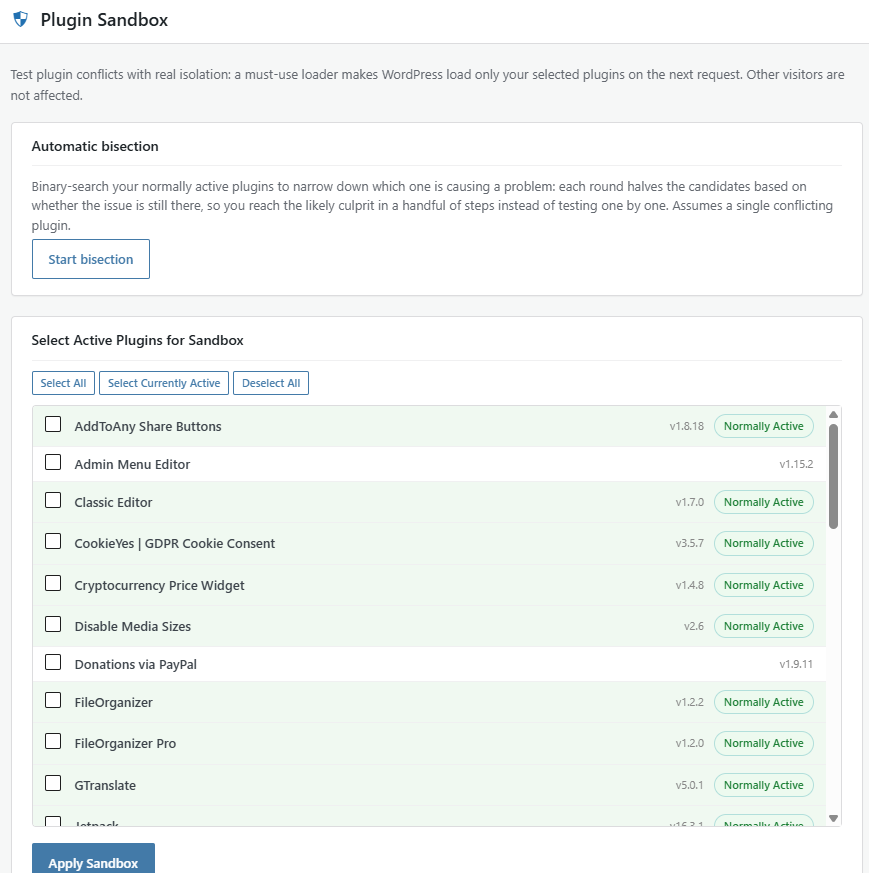
- Plugin Sandbox — Isolate plugin conflicts via a must-use loader: only your selected plugins load for your admin session.
Translations
- On Tools › TSO Swiss Knife, administrators can switch the plugin UI to Catalan (CAT), Spanish (ES), or English (ENG) without changing the site-wide language.
- The same choice applies to this plugin’s AJAX responses and admin downloads (for example Health Report HTML/JSON and URL Doctor messages). It does not change the rest of wp-admin.
- Further locales can be contributed via Translate WordPress once the plugin is published.
External services
This plugin can optionally contact third-party services. None of these calls run unless a site administrator enables the related feature and, where required, provides an API key.
Comment Antispam (optional)
When Comment Antispam reputation or cloud checks are enabled, visitor data from comments or protected contact forms may be sent as follows:
- Stop Forum Spam (
https://api.stopforumspam.org/api) — Used to look up whether an IP address or an email address has been reported as spam. Read-only anonymous lookups: no account or API key is needed. Sends the visitor public IP and an MD5 hash of the email (never the plain email or the username), only when the option is enabled, once per IP/email every 6 hours. Failed lookups pause for a few minutes and the submission is then allowed. Service: Stop Forum Spam. Terms of use · Privacy policy. - AbuseIPDB (
https://api.abuseipdb.com/api/v2/check) — Used to check IP reputation. Sends the visitor IP and your AbuseIPDB API key (request header). Service: AbuseIPDB. Terms of use · Privacy policy. - CleanTalk (
https://moderate.cleantalk.org/api2.0) — Used for cloud spam filtering when CleanTalk mode is selected. Sends your CleanTalk access key plus sender email, IP, nickname, URL, message content, and post/page context. Service: CleanTalk. Terms of use and privacy policy. - Project Honey Pot (HTTP:BL) — Optional DNS-based IP reputation lookup using your HTTP:BL access key and the visitor IPv4 address. Service: Project Honey Pot. Terms of use · Privacy policy.
- Akismet — When cloud mode is set to Akismet and the Akismet plugin is active, spam checks are handled by Akismet according to its own settings and policies. Service: Akismet. Terms of service · Privacy policy.
Core File Integrity (optional)
When you run a core integrity scan, the plugin requests official WordPress core checksums from https://api.wordpress.org/core/checksums/1.0/. Only the WordPress version and locale are sent (no personal data). Service: WordPress.org. Privacy policy.
Update Manager language packs (optional)
When an administrator clicks Install pending translations on the Update Manager tab, WordPress downloads language packs from https://api.wordpress.org/translations/ (via core Language_Pack_Upgrader). Locale and package metadata for pending translations are sent; no personal visitor data. This does not run automatically. Service: WordPress.org. Privacy policy.
URL & HTTPS Doctor (optional)
When you click Check this site, the plugin requests this site’s own home URL through the WordPress HTTP API (a loopback, similar to Site Health). Redirects are not followed. No third-party host is contacted and no personal data is sent. The request only runs after an administrator clicks the button.
Health Report security headers (optional)
Opening Health Report (or downloading its HTML/JSON) may request this site’s own home URL with a HEAD request to list common security response headers. Results are cached briefly. No third-party host is contacted and no personal data is sent.
Installation
- Upload the
tso-swiss-knife-advanced-maintenance-developer-toolkitfolder to/wp-content/plugins/, or use Plugins › Add New › Upload Plugin with the ZIP. - Activate the plugin via Plugins › Installed Plugins.
- Navigate to Tools › TSO Swiss Knife.
Screenshots

Hidden WordPress Profiles — apply quick presets and toggle performance, content, and privacy constants via the plugin config under uploads (no wp-config.php editing).

Custom 404 Page — assign any WordPress page as the site 404 response while keeping the original URL and a real HTTP 404 status (no redirect).

Reorder & Hide Sidebar — drag to reorder WordPress admin menu items, rename labels, nest items under another section, or hide items for all admins.
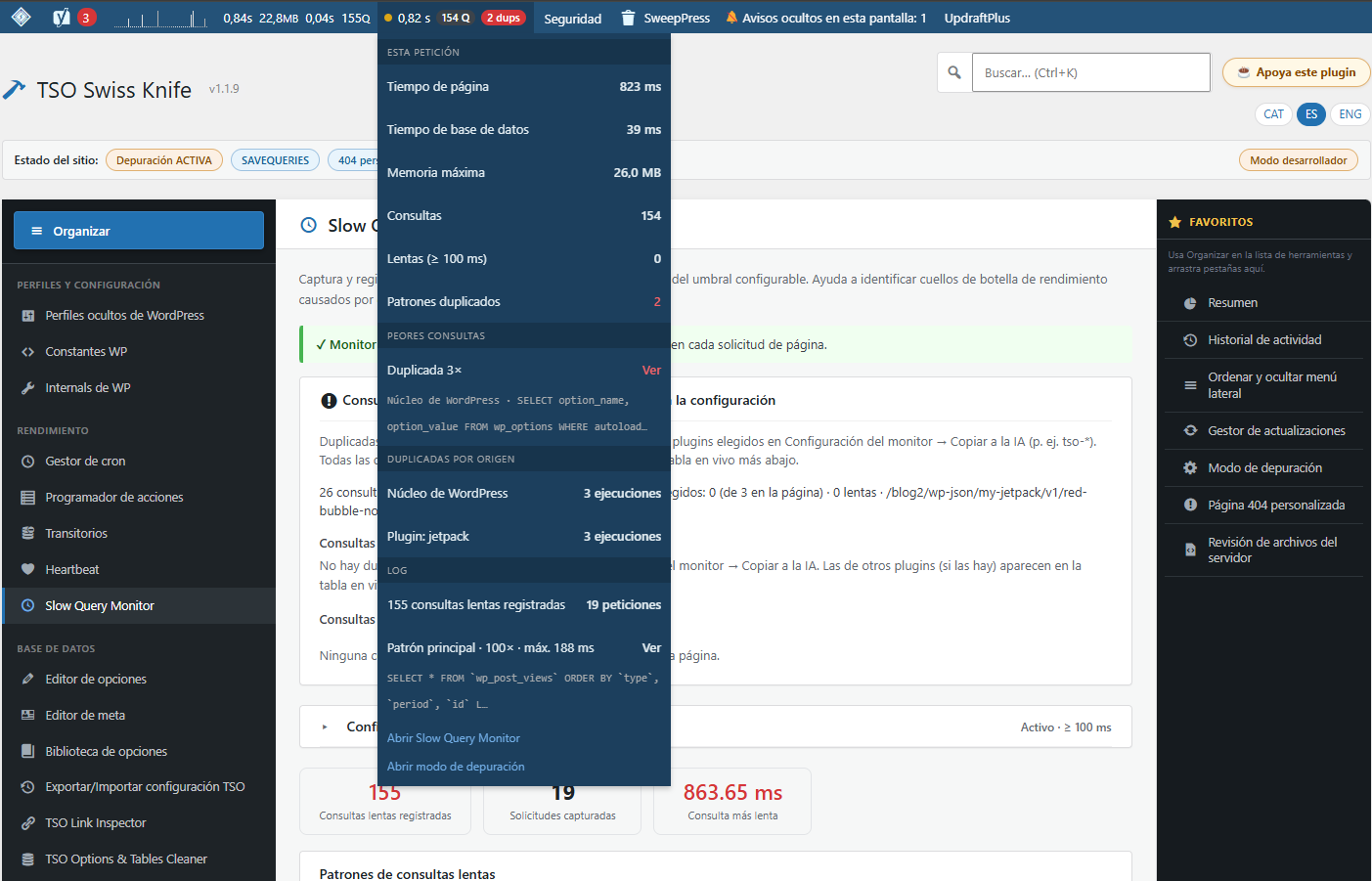
Slow Query Monitor — inspect slow and live database queries when SAVEQUERIES is enabled, export the log, and open a summary from the admin bar.
Faq
Yes. Features that use WordPress cache APIs (for example flushing related caches after cleanup tools) call core functions such as wp_cache_flush() / wp_cache_delete(), which delegate to whatever persistent object-cache drop-in is active (Redis, Memcached, etc.).
The module protects a list of known WordPress core options. For third-party options, verify in your code or database that they are truly unused before deleting.
No. Logged-in administrators are always bypassed, regardless of IP whitelist settings.
Use only the Plugin Sandbox in this plugin. Combining it with other per-user plugin override tools may produce unpredictable results.
No. Automatic updates are managed only by WordPress core (Dashboard Updates). Update Manager can block update checks on staging sites, hide specific plugin updates, and control update email notifications — it does not write auto_update_* site options or hook auto_update_* filters.
Use it on a cloned / staging / local copy, right after you copy the live site, and before you place test orders or browse as a customer. Enable only the switches you need (badge, noindex, hold email, pause cron, mail log). Turn them all off before you copy that database back to production. Do not leave Staging Mode options enabled on the live site.
No. It adds noindex headers, pauses XML sitemaps, and adjusts robots.txt while the option is on. It does not filter or save blog_public, so opening Settings Reading will not permanently lock “Discourage search engines” after you turn Staging Mode off.
Not if you enable Do not send real emails. WordPress still thinks the mail was accepted, but it never leaves the server. A short copy (recipient, subject, excerpt) is stored in the WordPress database for administrators only (not as a public file under uploads). All Staging Mode switches are off until you turn them on.
No. Due events stay in Cron Manager but are not executed while that Staging Mode option is on. Turn it off on the live site so reminders and queues run again.
No. It only explains mismatches (http vs https, www, folder, and constants locked in wp-config.php). The leftover-http count is also read-only. Use Search & Replace if you decide to rewrite stored URLs, after a backup — always run preview first.
No. Core hooks (for example wp_version_check or wp_maybe_auto_update) are read-only in Cron Manager: Run, Edit, and Delete are blocked in the UI and in AJAX.
Selected plugin settings stored in wp_options (Redirects, Staging Mode switches, Login Protect, Comment Anti-Spam, Slow Query settings, Health alerts, and similar). It does not include Debug/Security/Hidden Profiles JSON under uploads, sandbox sessions, the Staging mail log, or the Slow Query log. Import overwrites the sections you choose; always export a backup first. Login Protect never imports an enabled custom login URL (to avoid lockouts). If Staging switches arrive enabled, confirm you are on a test site.
Yes for this plugin. Health Report HTML/JSON, URL Doctor messages, and other TSO AJAX/admin-post responses follow the language selected on Tools › TSO Swiss Knife. The rest of WordPress admin keeps the site language.
Runtime config and other managed files go under wp-content/uploads/tso-swiss-knife-advanced-maintenance-developer-toolkit/. The Staging Mode mail log is stored in the database (not under uploads). The Plugin Sandbox may install a must-use loader under mu-plugins (via the WordPress Filesystem API) so early plugin filtering can run; that loader is removed when no sandbox sessions remain. The plugin does not write wp-content/debug.log or edit wp-config.php.
No. Debug flags, security constants, and hidden-profile toggles are saved as JSON under wp-content/uploads/tso-swiss-knife-advanced-maintenance-developer-toolkit/config/ and applied at runtime. Constants already defined in wp-config.php always take precedence and cannot be overridden from the plugin.
No. Debug Mode does not create, truncate, or rotate wp-content/debug.log. Enabling Developer mode only turns on SAVEQUERIES (stored as JSON in the plugin uploads config folder); WP_DEBUG and WP_DEBUG_LOG must be set in wp-config.php, and WordPress then writes debug.log as usual. The Debug tab can list and preview common log paths when they already exist. Empty and shrink actions apply only to logs the plugin owns under wp-content/uploads/tso-swiss-knife-advanced-maintenance-developer-toolkit/ — never to wp-content/debug.log.
Not by default. With WP_DEBUG_LOG set to true, WordPress writes wp-content/debug.log, which is inside the web root under a predictable name. Depending on your server it may be downloadable by URL, and it can contain absolute server paths, SQL queries and, occasionally, credentials or tokens printed by other plugins. This plugin cannot move the log outside the web root: it only saves WP_DEBUG_LOG as true/false, and a log path must be defined in wp-config.php before plugins load. Recommended: use Developer mode only on staging, block direct access to debug.log at the server level (Apache/nginx rule), or set define( 'WP_DEBUG_LOG', '/path/outside/webroot/debug.log' ); in wp-config.php. Delete or empty the file when you finish debugging. The plugin’s own protected folder under uploads (.htaccess deny rules) does not cover wp-content/debug.log.
Yes, but only when you explicitly save from the Server Files Review module. It can write robots.txt and .htaccess at the site or WordPress root — not under wp-content/uploads/. Always review the generated content before saving on production.
These tools are intended for experienced administrators and developers. Always run Search & Replace as a dry-run first and keep a database backup. In Options Editor, core options are protected, but deleting or editing third-party options can break plugins or themes. When in doubt, export a snapshot or test on staging.
Only when you enable reputation or cloud checks and, where required, provide API keys. See the External services section above for each provider, what data is sent, and links to their terms and privacy policies. With all cloud features off, checks run locally (honeypot, rate limits, keyword rules, and similar).
By default the plugin uses the server’s REMOTE_ADDR, because headers such as X-Forwarded-For can be forged when the origin is reachable directly. Behind a CDN or reverse proxy you can opt in by adding define( 'TSOSK_TRUSTED_PROXY_HEADER', 'HTTP_CF_CONNECTING_IP' ); (or HTTP_X_FORWARDED_FOR) to wp-config.php, or by returning the header name from the tsosk_trusted_proxy_header filter. Visitor IPs are used only for rate limiting, lockouts, whitelists and short-lived duplicate-hit detection (hashed, never stored in clear for the View Counter); they are not sent to any third party unless you enable a cloud antispam provider listed under External services.
That usually means the ZIP folder name was wrong (for example …-main from a GitHub download instead of tso-swiss-knife-advanced-maintenance-developer-toolkit). Remove the duplicate folder under wp-content/plugins/, keep only the folder whose name matches the plugin slug, and reactivate.
Reviews
Changelog
1.2.3
- Improved: Users & Sessions redesigned (summary cards, session cards, searchable All users list with bulk role change and Undo); permission checks, pagination and counters fixed.
- Improved: Roles & Capabilities reorganised into numbered steps with explanations and examples; fixes to templates, role comparison and input validation.
- Fixed: Reorder & Hide Sidebar — dragging a top-level item (for example Settings above Tools) no longer nests it inside another section.
- Fixed: Redirects, Debug Mode, Image Sizes Audit, Rewrite Rules, Server & Runtime and Content Audit — wrong results, false warnings and stale data corrected.
- Fixed: Overview, Update Manager, Core File Integrity and Health Report — consistent update counts, ignored files and debug.log checks; responsive tables.
1.2.2
- Fixes to: Login Protection (login page cached at the custom URL, lockout bypass for unknown usernames, role IP rules that could lock out the admin, IPv6 matching), REST API (user-listing and namespace blocks bypassed by URL letter case), Heartbeat (blank post editor with “disable everywhere”, interval clamping), Users & Sessions (closing a single session), Export/Import (Slow Query settings lost), Options Editor, Options Library, Meta Editor and Slow Query Monitor (huge values, wrong origin, memory), Cron Manager, Hidden Profiles, Slug Manager (bulk limits, encoded characters), Media Cleaner, Content Audit, Rewrite Rules, Server & Runtime, Image Sizes Audit, Debug Mode and CSV exports.
- Fixes to Comment Anti-Spam: blocked comments published despite “spam/trash”, Jetpack Comments rejected, proxy/CDN addresses banned, Akismet cloud mode never querying, Learning mode ignored by form integrations, Stop Forum Spam privacy.
- Fixes to Update Manager: overdue cron and incomplete counts flagged, “Update now” critical error, status table on phones, install button limited to users who can update plugins and themes. Redirects: “Create redirect” from the 404 Monitor; hourly 404 alert double counting.
- Improved: Comment Anti-Spam (temporary bans, CIDR whitelist, WooCommerce reviews and registration, four tabs, own logs table, provider status, email alerts); Update Manager (“Install pending updates” button, version offered per plugin); Health Report (hide Site Health notices); Redirects (sub-tabs, 404 alerts with test email).
- Improved: TSO branded HTML emails (login code, lockout, security alerts, View Counter); Debug Mode finds more error logs; Server & Runtime warns about an unused object-cache drop-in; Content Audit points to the Slug Manager instead of its removed “Long Slugs” card.
- Added: Meta Editor and Options Editor protections for very large values; Options Library tables with uniform columns; Slow Query Monitor stores capped SQL and a log under 2 MB.
1.2.1
- Improved: Search & Replace screen reorganised — the preview now appears right under the Preview button, and the table list is collapsed by default with a selected-tables summary.
- Improved: Search & Replace now warns when the replacement is empty (matches get deleted) and when all matches are in internal tables rather than post content.
- Improved: Search & Replace result summary now reads as a proper sentence in every language.
- Fixed: Search & Replace no longer scans or rewrites its own automatic backup, activity log and slow-query log, and the preview now shows the part of the cell where the match is instead of its first characters.