Turbo Cookie – GDPR Cookie Consent

Turbo Cookie – GDPR Cookie Consent
Description
Turbo Cookie is a lightweight, privacy-first cookie consent plugin for WordPress. It helps you comply with GDPR, CCPA, and other privacy regulations by showing a customizable cookie consent banner, blocking non-essential scripts until visitors give consent, and logging consent records locally in your WordPress database.
Built by Turbo Addons — the same team behind popular WordPress tools used by thousands of sites.
Cookie Consent Banner
- Customizable position: bottom bar, top bar, floating (bottom-left/right), or center modal
- Layout styles: bar, box, or cloud
- Smooth animations: slide, fade, or none
- Full color customization for background, text, and buttons
- Custom banner message and title
- Cookie policy page link
- Show/hide decline button
Preferences Modal
- Four consent categories: Essential, Functional, Analytics, Marketing
- Toggle switches for each category
- Essential cookies always active (cannot be disabled)
- Editable category names and descriptions
- Accessible — ARIA roles, keyboard navigation, focus trap
Script Blocking
- Automatically detects and blocks known tracking scripts until consent is given
- Blocks Google Analytics, Tag Manager, Facebook Pixel, and 40+ services
- Blocks iframes (YouTube, Vimeo, Google Maps) until consent
- Scripts activate instantly after visitor consents
- Works with both inline scripts and enqueued WordPress scripts
- No manual script tagging required for common services
- Extend via the
turbo_cookie_script_patternsfilter
Google Consent Mode v2
- Outputs consent default signals before any Google tags load
- Updates consent signals when visitors make their choice
- Supports all GCM v2 parameters: ad_storage, ad_user_data, ad_personalization, analytics_storage, functionality_storage, personalization_storage, security_storage
- Extend category-to-signal mapping via
turbo_cookie_gcm_mappingfilter
Consent Logging
- Stores consent records in your WordPress database — no data sent externally
- Logs session ID, action, categories, masked IP, and timestamp
- IP addresses masked for privacy (last octet zeroed for IPv4; first 48 bits kept for IPv6)
- Filterable log viewer in admin with date range and action filters
- CSV export for compliance documentation
- Configurable retention period with automatic cleanup
- Bulk delete and clear all options
Admin Dashboard
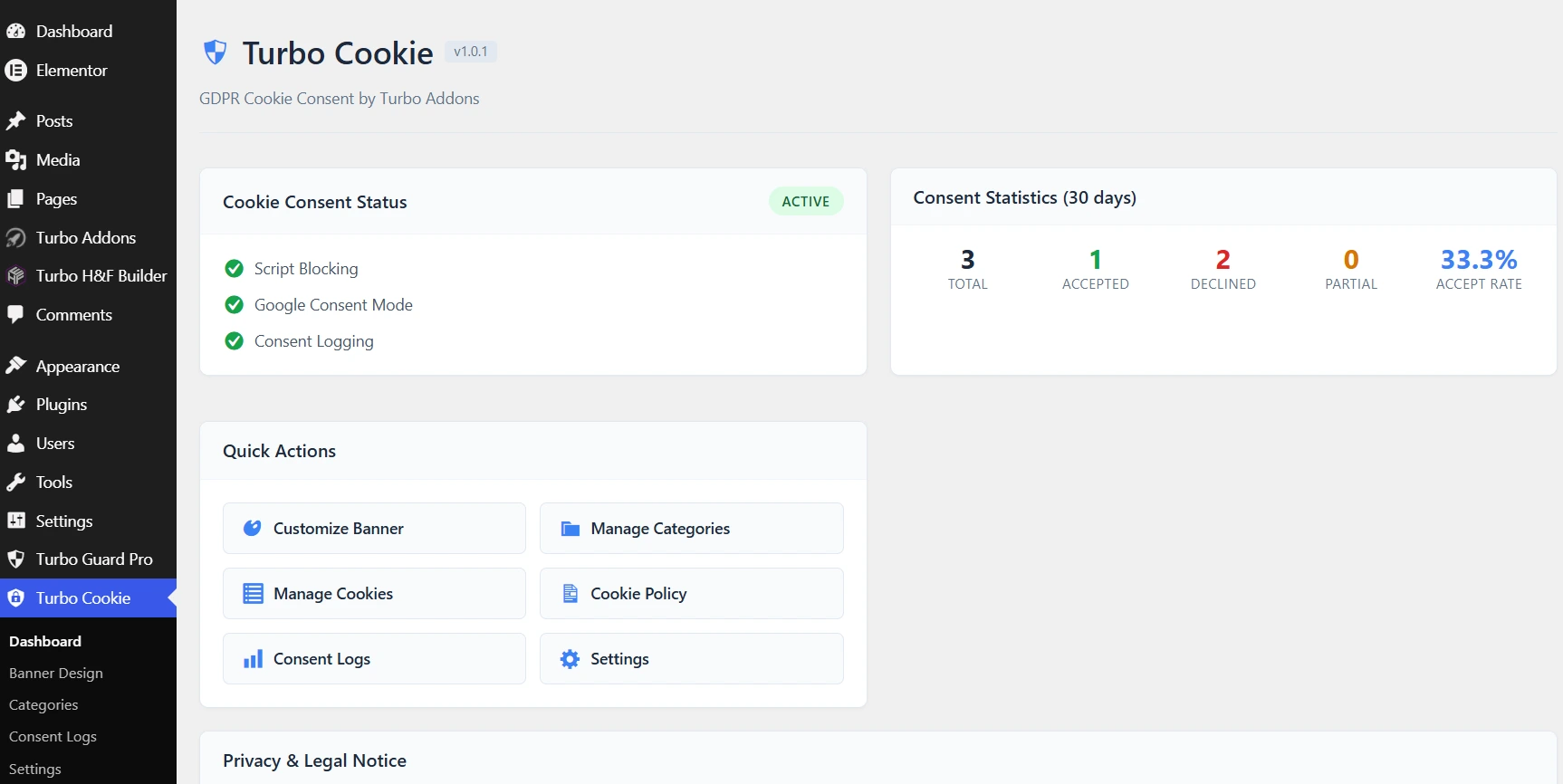
- At-a-glance consent statistics: accepted, declined, partial, acceptance rate (30-day window)
- Feature status overview
- Quick action links to all settings pages
- Privacy notice reminding site owners of their legal obligations
Onboarding Wizard
- 3-step setup wizard runs on first activation
- Choose banner position, enable features, set cookie policy URL
- Ready in under 2 minutes
Developer Friendly
- WordPress coding standards throughout
- Shortcode:
[turbo_cookie_preferences]— lets visitors re-open preferences modal - JavaScript API:
window.TurboCookie.openPreferences() - Filterable script blocking patterns:
turbo_cookie_script_patterns - Filterable GCM mapping:
turbo_cookie_gcm_mapping - REST API endpoint for consent logging:
POST /wp-json/turbo-cookie/v1/consent
Privacy
Turbo Cookie does not send any visitor or site data to external servers. All consent records are stored in your own WordPress database. IP addresses are masked before storage. No telemetry. No tracking. No account required.
Legal Notice
Turbo Cookie provides technical tools for cookie consent management. Whether your site meets applicable privacy laws depends on your specific site, policies, and data practices. For legal advice about your compliance obligations, consult a qualified legal professional.
External Services
Turbo Cookie stores all consent logs, settings, and cookie state in your own WordPress database. No visitor data, site data, or analytics are sent to any external server by this plugin.
The one exception is optional geo targeting: if you enable it, the visitor’s IP is used to detect their country so the banner can be shown only where required. Detection first checks the Cloudflare CF-IPCountry header and other CDN headers (no external call). Only when no such header is present does it make a single lookup to the free ip-api.com API; the result is cached locally for 24 hours. Disable geo targeting to keep the plugin fully offline.
Installation
- Upload the
turbo-cookiefolder to/wp-content/plugins/or install via the WordPress Plugins screen. - Activate Turbo Cookie.
- Follow the onboarding wizard to configure your banner.
After Installation
- Customize banner: Turbo Cookie > Banner Design
- Edit cookie categories: Turbo Cookie > Categories
- View consent records: Turbo Cookie > Consent Logs
- Adjust settings: Turbo Cookie > Settings
Re-open Preferences
Add this shortcode anywhere on your site to let visitors change their cookie preferences:
[turbo_cookie_preferences text="Cookie Settings"]
Or use the JavaScript API:
window.TurboCookie.openPreferences();
Screenshots

Cookie consent banner — bottom bar position

Preferences modal with category toggles

Admin dashboard with consent statistics

Banner design customizer

Cookie categories management
Consent logs viewer with CSV export
Faq
Yes. The full consent banner, script blocking, Google Consent Mode v2, geo targeting, CCPA/CPRA controls, consent records, and homepage cookie scanner are all free — no visitor limits, no account, no cloud, no branding. Pro (optional, sold separately) adds multi-page scanning, auto-scan, cookie inventory, privacy score, and the services library.
Yes. Turbo Cookie intercepts and blocks known tracking scripts and iframes until the visitor consents to the relevant category. This is real blocking, not just a cosmetic banner.
Yes. Consent default signals are output before any Google tags load, then updated when visitors make their choice. Works with Google Analytics 4, Google Ads, and Google Tag Manager.
In your WordPress database in a dedicated table. No data is sent to external services.
For IPv4, the last octet is replaced with 0 (e.g., 192.168.1.0). For IPv6, only the first 48 bits are kept.
Yes. Use the [turbo_cookie_preferences] shortcode or window.TurboCookie.openPreferences() anywhere on your site.
Yes. The banner and script blocking run client-side via JavaScript, so they work correctly with page caching.
No. Frontend assets are under 15KB combined and load asynchronously.
Yes. Use the turbo_cookie_script_patterns filter to add your own patterns or remove existing ones.
Non-essential scripts remain blocked, Google Consent Mode signals stay denied, and a consent record is logged locally. Only essential cookies remain active.
Reviews
Changelog
1.0.3
- NEW: Cookie scanner (browser-based) — auto-detect cookies and third-party scripts on your homepage, unlimited scans.
- NEW: Known services catalog (50 services) shared by the scanner and script blocker.
- NEW: Geo targeting — show the banner only in GDPR/CCPA regions (Cloudflare header first, free ip-api fallback).
- NEW: CCPA/CPRA “Do Not Sell or Share My Personal Information” link and opt-out.
- NEW: Global Privacy Control (GPC) browser opt-out signal support.
- NEW: Compliance page — regional profiles (GDPR/CCPA/LGPD/PIPEDA), status report, and law changelog.
- NEW: WP Consent API integration (syncs consent for other privacy plugins).
- NEW: Region-aware cookie policy generator intro.
- NEW: Revisit consent floating button.
- NEW: Cache-plugin purge integration (major caching plugins).
- NEW: Multilingual banner — 8 languages, auto-detected from the browser.
- Improved: consent logs now record visitor country.
1.0.0
- Initial release.
- Cookie consent banner with 5 position options.
- Preferences modal with 4 cookie categories.
- Script blocking for 40+ known tracking services.
- Google Consent Mode v2 — all 7 parameters supported.
- Consent logging with IP masking stored in local WordPress database.
- Admin dashboard with 30-day consent statistics.
- Banner customizer with full color control.
- Cookie categories manager.
- Onboarding wizard.
- CSV export for consent logs.
- Shortcode [turbo_cookie_preferences] and JavaScript API.
- REST endpoint for frontend consent logging.