Ultimate Comment Cleaner

Ultimate Comment Cleaner
Description
Ultimate Comment Cleaner is a comprehensive WordPress comment management plugin that allows you to efficiently delete comments in bulk with advanced filtering options. Whether you need to clean up spam, remove old comments, or manage comments by specific criteria, this plugin provides all the tools you need.
Key Features
- Creative Dashboard – Beautiful, modern dashboard with real-time statistics and visual cards
- Bulk Delete – Delete comments by status, date range, post type, author, and more
- Advanced Filters – Filter by URL presence, word count, and custom criteria
- Auto Triggers – Set up automatic deletion rules that run on schedule
- Export Functionality – Export comments to CSV before deletion
- Preview Count – See how many comments match your criteria before deleting
- Activity Log – Track all deletion activities
- Real-time Stats – Live statistics that update automatically
- WordPress Standards – Follows WordPress coding standards and best practices
Dashboard Features
- Visual stat cards showing comment counts by status
- Total comments, approved, pending, spam, and trash counts
- Active triggers counter
- Recent activity log
- Quick action buttons
Bulk Delete Options
- Filter by status (All, Approved, Pending, Spam, Trash)
- Date range filtering
- Post type filtering
- Author filtering
- Comments with/without URLs
- Short comments (less than 10 words)
- Custom word count range (min/max words)
- Preview count before deletion
- Export to CSV
Auto Triggers
- Create automatic deletion rules
- Schedule: hourly, daily, or weekly
- Filter by status and age (older than X days)
- Enable/disable individually
- View execution history
Installation
- Upload the
ultimate-comment-cleanerfolder to the/wp-content/plugins/directory - Activate the plugin through the ‘Plugins’ menu in WordPress
- Navigate to Tools Ultimate Comment Cleaner to access the dashboard
Screenshots
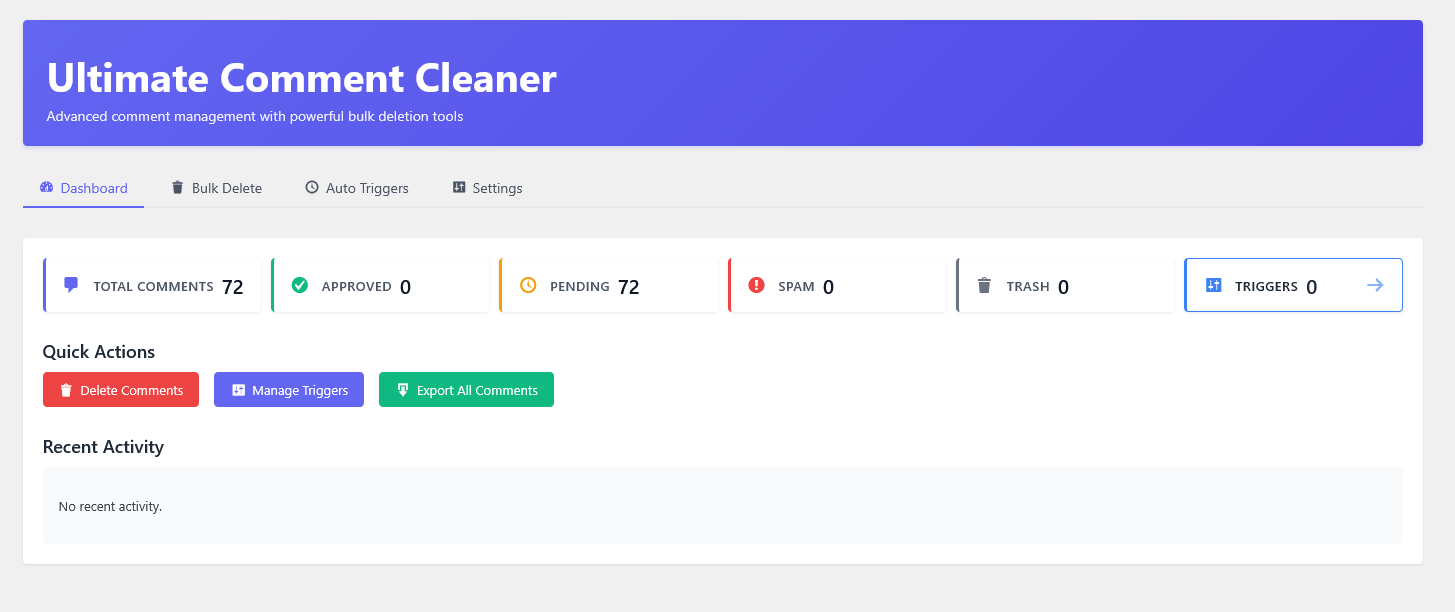
Dashboard with statistics and quick actions

Bulk delete interface with advanced filters

Auto triggers management
Faq
Go to Tools Ultimate Comment Cleaner Bulk Delete, select “Spam” in the status filter, and click “Delete Comments”.
Yes! Use the “Preview Count” button to see how many comments match your criteria before deleting.
Go to Tools Ultimate Comment Cleaner Auto Triggers, click “Add New Trigger”, set the status to “Spam”, choose a schedule, and enable it.
Yes! Use the “Export Selected” or “Export All Comments” buttons to download comments as a CSV file.
You need the manage_options capability (typically Administrator role) to use this plugin.
This has been fixed in version 1.0.0. The plugin now uses WordPress’s wp_delete_comment() function which properly cleans up all comment data including meta and post counts.
Reviews
Changelog
1.0.0
- Initial release
- Dashboard with real-time statistics
- Bulk delete with multiple filter options
- Auto triggers system
- Export to CSV functionality
- Activity logging
- Modern, creative UI design
- Follows WordPress coding standards
- Proper comment cleanup using wp_delete_comment()
- Fixed issue where some comments were left behind after deletion