Ultimate Downloadable Products for WooCommerce

Ultimate Downloadable Products for WooCommerce
Description
Ultimate Downloadable Products for WooCommerce plugin allows to display downloadable files on a product page.
This plugin is ideal to sell digital products to show customers what they will get after a purchase.
It can be a valuable addition to your NFT selling store with the NFT WordPress Plugin Kit!
FREE Features
- Option to show a
Downloadstab with downloads list on the product page - Shortcode [ultimate-downloadable-list] to display downloadable files on a product page (with no ability to download)
- Option to show image thumbnails for downloads of type image
- File type icon, file size and file count in the list
PRO Features
The PRO version includes all FREE features, plus:
- Option to specify the thumbnail width for downloads of type image
- Option to show blurred thumbnails for downloads of type image
- Option to specify the thumbnails blur strength for downloads of type image
- Variable Downloadable products support
- Archive file contents display
- RAR and ISO archive type upload support
Roadmap
The functionality planned in next versions:
- Option to listen audio file sample
- Option to see video file sample (blurred and minified)
- Option to show mime type icons for documents
- Per product Downloads tab show setting
- Per product blurred images preview setting
- Per download blurred images preview setting
- Allows file download only after a period of time specified after a purchase date
- Allows file download only after a period of time specified after a date specified
- WCFM frontend feature compatibility
- Dokan frontend feature compatibility
- WCVendors PRO frontend feature compatibility
l10n
This plugin is localization ready.
Languages this plugin is available now:
- English
- Arabic (عرب)
- Czech (čeština)
- Danish (Dansk)
- German (Deutsche)
- Greek (Ελληνικά)
- Spanish (Español)
- Persian (فارسی)
- French (Français)
- Hebrew (עִברִית)
- Hindi (हिन्दी)
- Indonesian (Bahasa Indonesia)
- Italian (Italiano)
- Japanese (日本)
- Korean (한국인)
- Malay (Melayu)
- Norwegian (Norsk)
- Netherlandish (Nederlands)
- Polish (Polski)
- Portuguese (Português)
- Russian (Русский)
- Slovak (Slovenský)
- Finnish (Suomalainen)
- Swedish (Svenska)
- Thai (ไทย)
- Philippine (Pilipinas)
- Turkish (Türk)
- Vietnamese (Tiếng Việt)
- Chinese (中国人)
Feel free to translate this plugin to your language.
Installation
- Install and activate it as you would any other plugin.
- Make a new WooCommerce downloadable product.
Screenshots

The
Downloadstab on a product page, with image thumbnails
Settings: thumbnails, blur strength, archive formats and the server capability report

Blurred image thumbnails (Professional)

Variable downloadable product: the A2 variation lists its own files (Professional)

Variable downloadable product: the A5 variation lists its own files (Professional)
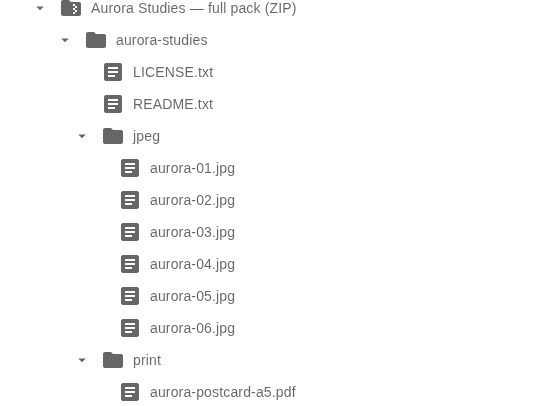
ZIP archive contents, expanded folder by folder (Professional)

ISO disc image contents, expanded in place (Professional)

The
[ultimate-downloadable-list]shortcode inside a product description
Faq
[ultimate-downloadable-list] prints the download list of the product being displayed. The Downloads tab renders the same list, so the tab and the shortcode never disagree.
Yes, in the PRO version: each downloadable variation is listed under its own name.
The GD PHP module is required to generate them. The settings screen ends with a Server capabilities report, and wp udp status prints the same matrix from WP-CLI — both are the first thing to check.
PHP 8.1 or newer, WordPress 6.0 or newer, WooCommerce 7.0 or newer. Thumbnails need the GD module, the RAR and ISO formats need the matching PHP modules (see below).
Follow recommendations from this guide please.
Contact the PRO version support for help.
Reviews
great plugin
By 
thanks for a such a plugin
looking forward to work with new features:
- WCFM frontend feature compatibility
- Dokan frontend feature compatibility
- WCVendors PRO frontend feature compatibility
Great product!
By 
Awesome product
By 
Changelog
2.1.0
- New: file type icons, file sizes and a file count in the downloads list
- Thumbnails are generated when a product is saved and served as files from the uploads directory, instead of being generated on the first visit and inlined as base64 in the product meta
- New:
wp udp previews regeneratefills the previews of an existing catalogue - The thumbnail cache now includes the download id, so two downloads of one product can point at the same file
2.0.0
- Restructured into layered modules (the plugin behaves exactly as 1.3.5; this release moves code)
- Requires PHP 8.1, WordPress 6.0 and WooCommerce 7.0
- New:
wp udp statusprints the plugin version, the settings and the server capabilities - New: the settings screen ends with a server capability report (GD, ZipArchive, RAR, ISO, ffmpeg)
1.3.5
- freemius library version update
- tested up to WordPress 7.1 and WooCommerce 11.2
= 1.3.4
- freemius library version update
= 1.3.3
- freemius library version update
= 1.3.2
- freemius library version update
= 1.3.1
- freemius library version update
= 1.3.0
- Option to show image thumbnails for downloads of type image released in a free plugin version
= 1.2.0
- Zip and other archive types content display added
- RAR and ISO archive type upload support
= 1.1.0
- Variable Downloadable products support
1.0.0
- Initial release.