Unit Price for WooCommerce

Unit Price for WooCommerce
Description
WooCommerce plugin for configuring products which are sold by units but priced by weight.
For example: fish, watermelon, cabbage.
How To define products which are sold by units but priced by weight
- In the plugin settings enable the ‘Quantity Units’ option
- Go to the edit product screen
- Set the price of 1 unit of the product in the price field (General tab)
- Set the weight of 1 unit of the product in the weight field (Shipping tab)
- Select ‘Weight’ in the ‘Quantity Units’ option (Unit Price tab)
How It Works
- The customer choose how many items he needs from the product
- On order creation the item quantity is recalculated based on its weight
- The shop owner will be able to update the quantity of it from the edit order screen after he weighs the item
For example:
1. The customer purchased 1 Salmon fish
2. The configured weight of Salmon fish is 3kg, when order is created the quantity of the fish will be modified automatically from 1 to 3
3. The shop owner will weight the actual fish, find out it’s 3.2kg, so he will change the quantity in the order from 3 to 3.2, the total price of the item will be updated automatically
Note: It’s recommended to use with Authorized / Delayed Payment method so the shop owner will be able to charge the exact amount after he weights the products, the order status should be ‘Pending payment’ / ‘delayed payment’.
Features
- Quantity Units: Config products which are sold by units but priced by weight (suitable for fish store and butcher).
- Quantity Step: Set decimal quantity step per product/variation- for products which are sold by weight (per kg/gram, suitable for supermarket, deli and bakery, selling fruits, vegetables, nuts).
- Quantity Suffix: Set quantity suffix per product/variation.
- Price Quantity: Display the price per specific quantity per product/variation.
- Subtotal: Display the product price by the selected quantity in real-time.
- Shop Page Quantity: Allow to choose product quantity on archive pages.
Installation
Minimum Requirements
WordPress 5.2 or greater
PHP 7.0 or greater
WooCommerce 3.4 or greater
Automatic installation
- Go to your Dashboard => Plugins => Add new
- In the search form write: Condless
- When the search return the result, click on the Install Now button
Manual Installation
- Download the plugin from this page clicking on the Download button
- Go to your Dashboard => Plugins => Add new
- Now select Upload Plugin button
- Click on Select file button and select the file you just download
- Click on Install Now button and the Activate Plugin
Screenshots
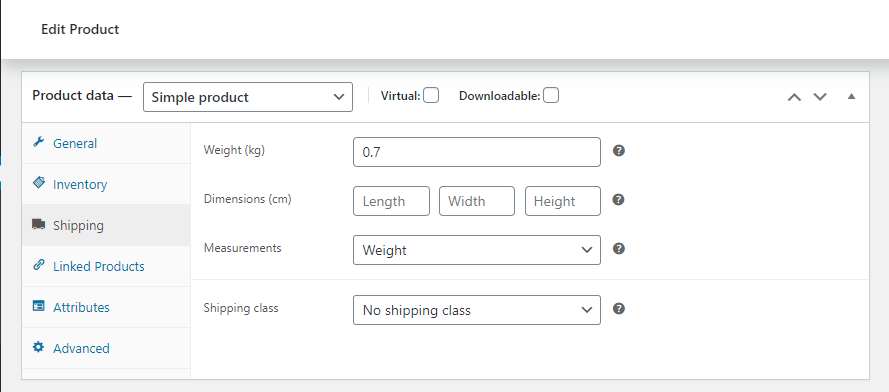
Product Shipping Settings
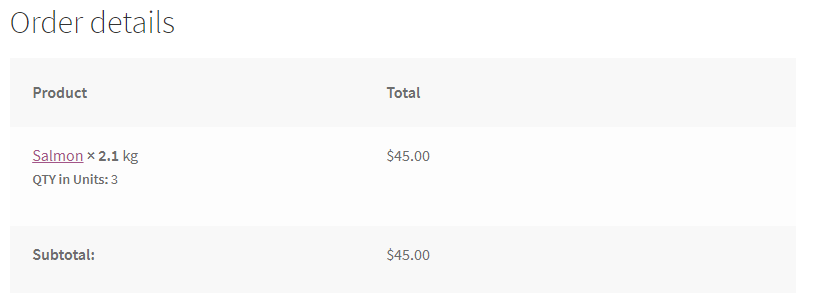
Purchased item as displayed to customer

Purchased item as displayed to admin
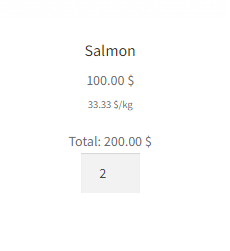
Product as displayed to customer
Faq
Use the ‘Quantity Step’ option, the ‘Quantity Units’ option should not be used.
Create variable product and config each variation seperately.
Salmon (sold by units but priced by weight): Price (General tab)- 45 (per unit), Weight (Shipping tab)- 3 (per unit), Quantity Units (Unit Price tab)- ‘weight’.
Tomatoes (sold by weight- kg): Price (General tab)- 2 (per kg), Quantity Step (Unit Price tab)- 0.1, Quantity Suffix (Unit Price tab)- kg.
Nuts (sold by weight- gram): Price (General tab)- 0.03 (per gram), Quantity Step (Unit Price tab)- 100, Quantity Suffix (Unit Price tab)- gram, Price Quantity (Unit Price tab)- 100, Price Suffix (Unit Price tab)- /100g.
By the units that the product is configured (kg/gram).
Try using the WooCommerce built-in quantity buttons template or change to another quantity step.
Tax: mostly the ‘Prices entered with tax’ and ‘Round tax at subtotal level’ options should be enabled.
Line Items: maybe prevent sending the line items to the payment gateway.
product price * product weight of products which are sold by units but priced by weight should not exceed 2 dp.
subtotal (include tax, exclude discount) of order line items should not exceed 2 dp (modify its quantities to fix it).
A tool which notify about exceeding prices is available.
The plugin is not compatible with the new product editor, and the new product block.
Reviews
Excelente!
By 
Muy buen plugin! Lo recomiendo para vender por peso
Works great
By 
For my works perfect.
Good but needs a bulk editor
By 
Plugin does the job however it needs a better documentation.
It would also would be great if we could just set Quantity Unit to "Weight" by Default instead of nothing or bulk edit all products or categories. For example set Quantity unit and suffix in bulk.
The best plugin of this kind that I met!
By 
Solid for years now, they thought of everything.
Excellent plugin
By 
Perfect work.
We work as a “FoodCoop” in Austria and therefore we need a shop software which help us to sell foods. Some foods can be sell per unit (salad, milk bottle…) and for some foods (pumpkin, sausages…) we need the possibility to order per unit but to change the weight after delivery. Your plugin is the ideal extension to our woocommerce shop.
Thank you so much for your excellent plugin.
Best regards
Siegfried
Excellent plugin and support
By 
The Best Plugin
By 
Excellent plugin and support
By 
Awesome
By 
פשוט ועובד טוב, תודה!
By 
Changelog
1.2.4 – August 24, 2025
- Enhancement – WooCommerce version compatibility
1.2.3 – May 8, 2025
- Enhancement – WordPress version compatibility
1.2.2 – November 12, 2024
- Enhancement – WordPress version compatibility
1.2.1 – May 22, 2024
- Enhancement – WooCommerce version compatibility
1.2 – March 1, 2024
- Enhancement – WordPress version compatibility
1.1.9 – December 15, 2023
- Enhancement – WooCommerce version compatibility
1.1.8 – October 12, 2023
- Enhancement – WooCommerce version compatibility
1.1.7 – June 30, 2023
- Enhancement – WooCommerce version compatibility
1.1.6 – March 18, 2023
- Enhancement – WooCommerce version compatibility
1.1.5 – December 22, 2022
- Enhancement – WooCommerce version compatibility
1.1.4 – August 19, 2022
- Enhancement – WooCommerce version compatibility
1.1.3 – June 1, 2022
- Enhancement – Quantity Units option for Length, width and height were removed.
1.1.2 – April 10, 2022
- Dev – Cart Items Count fix for items sold by weight
- Fix – typo in hook filters: upw_qauntity_base_selector, upw_qauntity_base_trigger, upw_qauntity_on_trigger
1.1.1 – February 27, 2022
- Enhancement – WooCommerce version compatibility
1.1 – December 25, 2021
- Enhancement – OceanWP compatibility
1.0.9 – October 20, 2021
- Enhancement – WooCommerce version compatibility
1.0.8 – July 28, 2021
- Dev – WP Compatibility
1.0.7 – June 29, 2021
- Feature – Archive quantity filter
1.0.6 – May 20, 2021
- Feature – Price format
1.0.5 – April 7, 2021
- Feature – Price for display
1.0.4 – March 12, 2021
- Feature – Quantity suffix
1.0.3 – February 03, 2021
- Fix – Edit order with decimal quantity error
1.0.2 – January 27, 2020
- Feature – Auto update quantities
1.0.1 – December 23, 2020
- Feature – Price suffix
1.0 – November 18, 2020
- Initial release