UPI QR Code Payment Gateway

UPI QR Code Payment Gateway
Description
This Plugin enables WooCommerce shopowners to get direct and instant payments through UPI apps like Google Pay, Whatsapp, Amazon Pay Paytm, BHIM, PhonePe or any banking UPI app to save payment gateway charges in India.
UPI QR Code Payment Gateway
UPI (Unified Payments Interface) is a payment standard owned by National Payment Corporation of India, a government owned instant payment solution. UPI works 24×7 and is free subject to prevalent government guidelines.
When this plugin is installed, a customer will see UPI as a payment option. When customer chooses it, it will open a page which shows the UPI QR Code containing the payment details and in mobile it will also show a button which takes customer to the list of installed UPI mobile applications. Customer can choose an app and pay the required amount.
Like UPI QR Code Payment Gateway plugin? Consider leaving a 5 star review.
Benefits
- Simple & Easy to Setup.
- Avoid Payment Gateway Fees.
- Instant Money Settlement.
- Direct Payment.
- 100% Success Rate.
- Send QR Code link to Customer.
- 24×7 Availability.
- Multisite Network Supported.
- No KYC, No GST number Required.
- No Hidden or Additional Charges.
Detailed Steps
- Customer will see UPI as a payment option in WooCommerce Checkout page.
- When customer chooses it, it will open a page which shows the UPI QR Code containing the payment details and in mobile it will also show a button which takes customer to the list of installed UPI mobile applications.
- Customer can scan the QR Code using any UPI app or choose an app from mobile to pay the required order amount.
- After successful payment, a 12-digits Transaction/UTR ID will appear in the Customer’s UPI app from which he/she made the payment.
- After that, customer needs to enter that 12 digit transaction number to the “Enter the Transaction ID” textbox and click submit.
- After successful submission of the ID, the order will be marked as on hold (customizable).
- Now, Merchant gets a notification on the mobile on his/her UPI app (Google Pay/PhonePe/BHIM/Paytm etc.)
- Merchant opens notification, sees a payment made. Sees the “Order ID”.
- Merchant opens the WooCommerce Dashboard, checks the “pending orders” for this Order ID.
- Checks the order details and processes it (shipping etc) and makes the orders as “processing” or “completed”.
Compatibility
- This plugin is fully compatible with WordPress Version 4.6 and beyond and also compatible with any WordPress theme.
Support
- Community support via the support forums at WordPress.org.
Installation
- Visit ‘Plugins > Add New’.
- Search for ‘UPI QR Code Payment Gateway’ and install it.
- Or you can upload the
woo-upi-qr-code-paymentfolder to the/wp-content/plugins/directory manually. - Activate UPI QR Code Payment Gateway from your Plugins page.
- After activation go to ‘WooCommerce > Settings > Payments > UPI QR Code’.
- Enable options and save changes.
Screenshots

Admin Dashboard
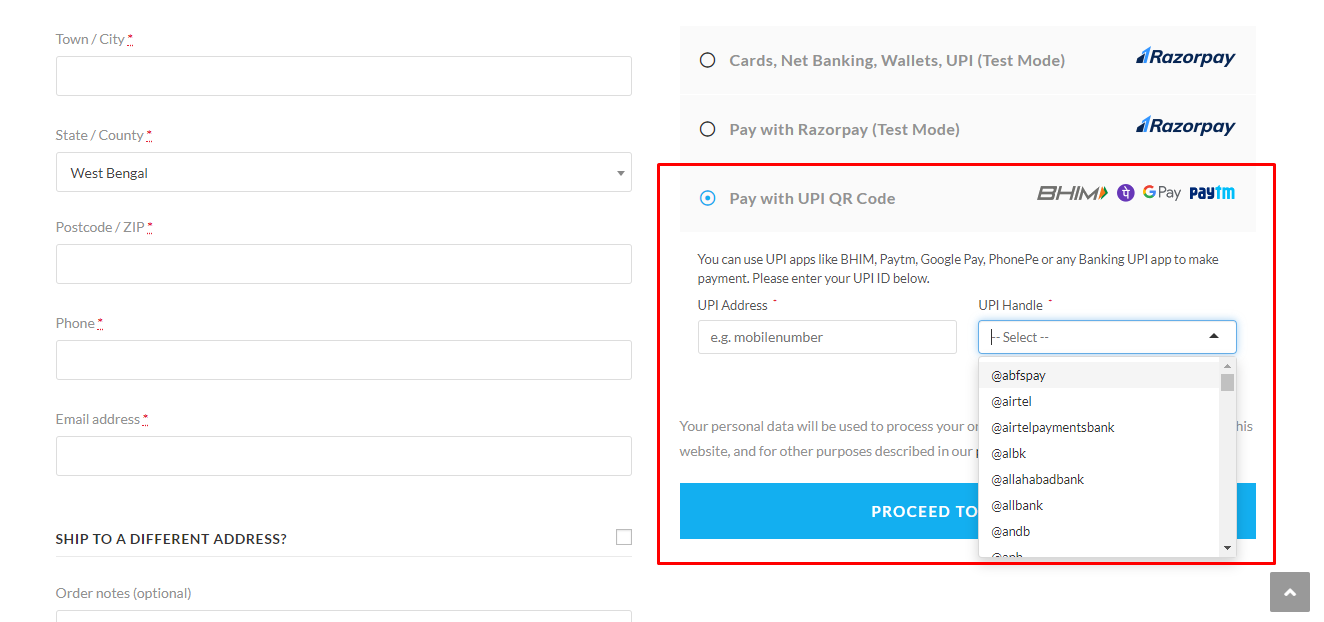
Checkout page

QR Code Page

Qr Code Verification Message

Order Received/thank you page.

Order Details
Faq
Yes. You can access this from ‘WooCommerce > Settings > Payments > UPI QR Code’.
Go to ‘WooCommerce > Settings > Payments > UPI QR Code’, enable/disable options as per your need and save your changes.
Yes, this plugin is compatible with any theme. Also, compatible with Divi, Astra themes.
Unfortunately no, automatic payment verification is not possible as NPCI does not allow to use their API and verify the traansaction of any website.
Post detailed information about the issue in the support forum and we will work to fix it.
Reviews
Best Free UPI Plugin in the Market
By 
Best Free UPI Plugin in the Market.
best plugin wver i appricite it thanks for helping me through this pluging best
By 
best plugin
Great plugin
By 
Payment button needed
By 
Great plugin
By 
Changelog
If you like UPI QR Code Payment Gateway, please take a moment to give a 5-star rating. It helps to keep development and support going strong. Thank you!
1.4.2
Release Date: January 04, 2025
- Fixed: Setting Page.
1.4.1
Release Date: December 28, 2024
- Tested with WordPress v6.7.1 and WooCommerce v9.5.1
1.4.0
Release Date: March 7, 2024
- Tweak: PHP 8.3 Support.
- Added: Support for WooCommerce Block-based checkout.
- Added: Security check on submission.
- Added: Screenshot upload field.
1.3.0
Release Date: May 31, 2022
- Added: Merchant Category Code input option.
- Tested with WordPress v6.0 and WooCommerce v6.8.2.
1.2.0
Release Date: March 18, 2021
- Added: Option to add Merchant Codes according to the latest UPI Specification. Please use a valid Merchant UPI VPA ID (not user UPI ID), otherwise all payments will be failed.
- Added: A button to download the QR Codes on Mobile Devices easily.
- Tweak: Hide Copy UPI ID button by default. It can enabled via this filter:
add_filter( 'dwu_show_upi_id_copy_button', '__return_true' );.
1.0.0
Release Date: March 14, 2020
- Initial release.