Urdu Keyboard

Urdu Keyboard
Description
This is the First Urdu writing keyboard Plugin for WordPress. Now you can easily write Urdu posts and pages directly in WordPress without installing Urdu keyboard on your system.
This Urdu Keyoboard (Phonetic) for WordPress, enables you to easily type Urdu in WordPress without installing Urduphonetic keyboard in your system.
Note
The plugin works with the WordPress Classic editor.
Compatible Browsers
Chrome, Firefox, IE10, IE11, Safari and Opera.
Installation
- Unzip the download package
- Upload
urdu-keyboardto the/wp-content/plugins/directory - Activate the plugin through the ‘Plugins’ menu in WordPress
Manual Plugin Installation
- Download Urdu Keyboard Plugin to your desktop.
- If downloaded as a zip archive, extract the Plugin folder to your desktop.
- With your FTP program, upload the Plugin folder to the
wp-content/pluginsfolder in your WordPress directory online. - Go to Plugins screen and find Urdu Keyboard Plugin in the list.
- Click Activate Plugin to activate it.
Screenshots

Urdu Writing in WordPress posts / pages
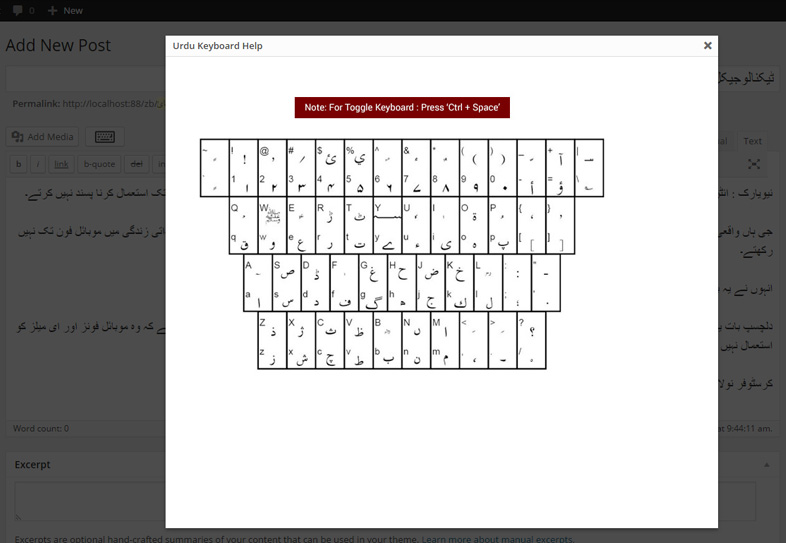
Keyboard layout

Tags
Faq
Simple and easy same as writing the posts or pages in WordPress. When plugin is enabled you can write Urdu text in post/page title and content using your system keyboard.
Keyboard layout help available in posts screen and as well as option page.
Pressing Ctrl + Space to change keyboard writing from English to Urdu or Urdu to English.
Reviews
Not working with PhP 8
By 
This plugin dose not work with php 8 and higher. Kindly update your plugin.
Very helpful plugin
By 
I really enjoy by installing this plugin
Amazing Work, Keep it up.
By 
Not Working, Just wastage of time
By 
Useless!
By 
Awesome Plugin
By 
You guys save my work time
Perfect Effort
By 
Congratulation for this great effort
Changelog
1.3
- Bug fixes.
1.1
- Fixed Urdu Keyboard writing in Post and Pages.
1.0
- First Release