UTM Event Tracker and Analytics, UTM Grabber

UTM Event Tracker and Analytics, UTM Grabber
Description
This powerful plugin enables you to seamlessly track events and analyze user interactions using UTM parameters, fbclid, gclid, button clicks, or custom element interactions. Whether you need to monitor click-through rates, measure the effectiveness of marketing campaigns, or gain insights into user behavior, this plugin provides a comprehensive solution. With its intuitive tracking capabilities, you can capture valuable data to optimize your strategies and make data-driven decisions with ease.
Custom Parameter Support (Pro):
Create and track sessions using your own custom URL parameters. This feature helps you capture more accurate attribution data from sources that don’t use standard UTM values. Perfect for affiliate tracking, internal links, influencer campaigns, and custom marketing tags.
Send Google Analytics Events with Ease
The UTM Event Tracker and Analytics plugin supports sending Google Analytics events for better user interaction tracking. Capture events such as button clicks, hyperlink clicks, and form submissions, and send them directly to Google Analytics. Gain valuable insights, improve engagement tracking, and optimize your marketing performance effortlessly—all without any coding!
Warning
- If you are using a caching plugin, please exclude the
wordpress_utm_event_tracker_sessioncookie. - For websites hosted on WP Engine, you must request support to allow the
wordpress_utm_event_tracker_sessioncookie. - If you are using the NitroPack caching plugin, be sure to exclude this cookie in the app settings. Refer to this guidelines for more details.
Getting Started
Once the plugin is installed and activated, you can start tracking events and analyzing data using UTM parameters. Here’s how to get started:
Define Your UTM Parameters: Determine the UTM parameters you want to track. Common parameters include source, medium, campaign, term, and content.
Generate UTM Links: Create UTM-tagged URLs for your marketing campaigns using tools like Google’s Campaign URL Builder.
Insert UTM Parameters: Insert the UTM parameters into your links wherever you want to track events. This could be in emails, social media posts, advertisements, etc.
Analyze Data: Visit the plugin dashboard to analyze the data collected through UTM tracking. Gain insights into user behavior, campaign performance, and more.
Features
The UTM Event Tracker and Analytics plugin offers a comprehensive set of features designed to enhance your ability to track events and analyze data using UTM parameters. Here are the key features of the plugin:
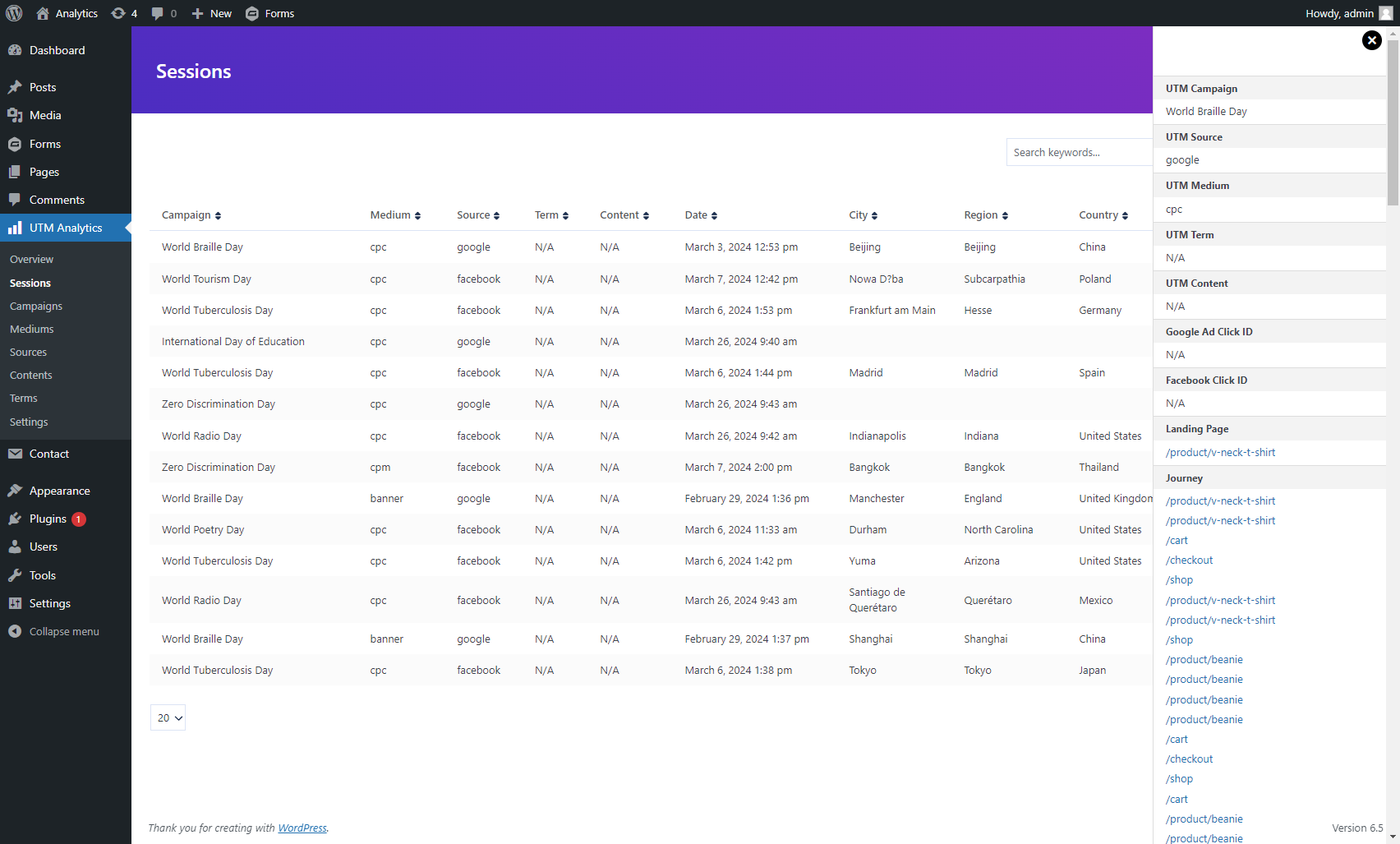
UTM Event Tracking: Track various events on your website using UTM parameters. Whether it’s clicks, conversions, or form submissions, you can accurately monitor user interactions.
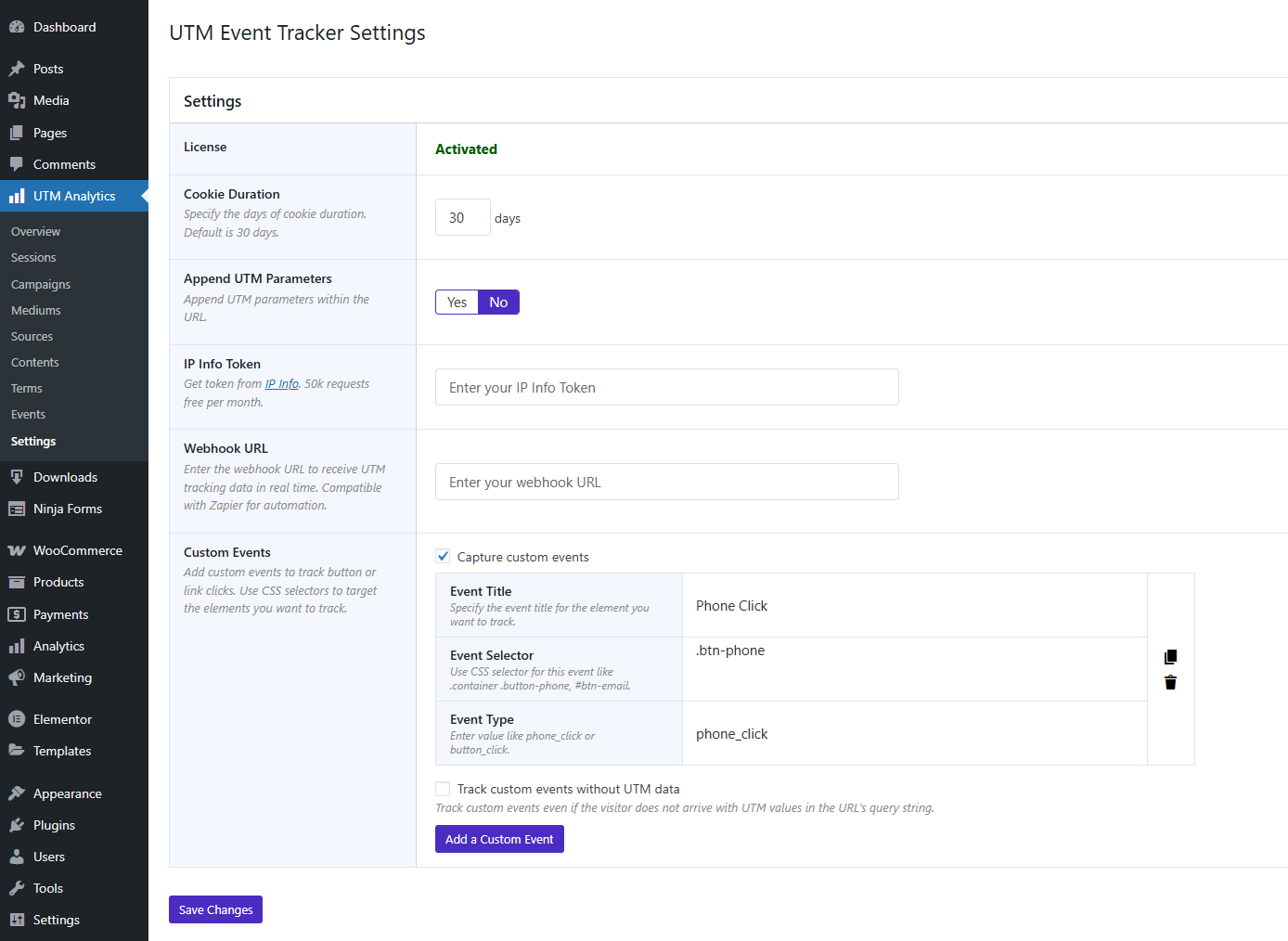
Track Button & Link Clicks: Gain deeper insights into user interactions by capturing button clicks and hyperlink engagements on your website. This feature helps you track user behavior, measure click performance, and optimize your marketing campaigns based on real-time data. Whether it’s a call-to-action button or an outbound link, you’ll have the analytics needed to improve conversions and refine your strategies.
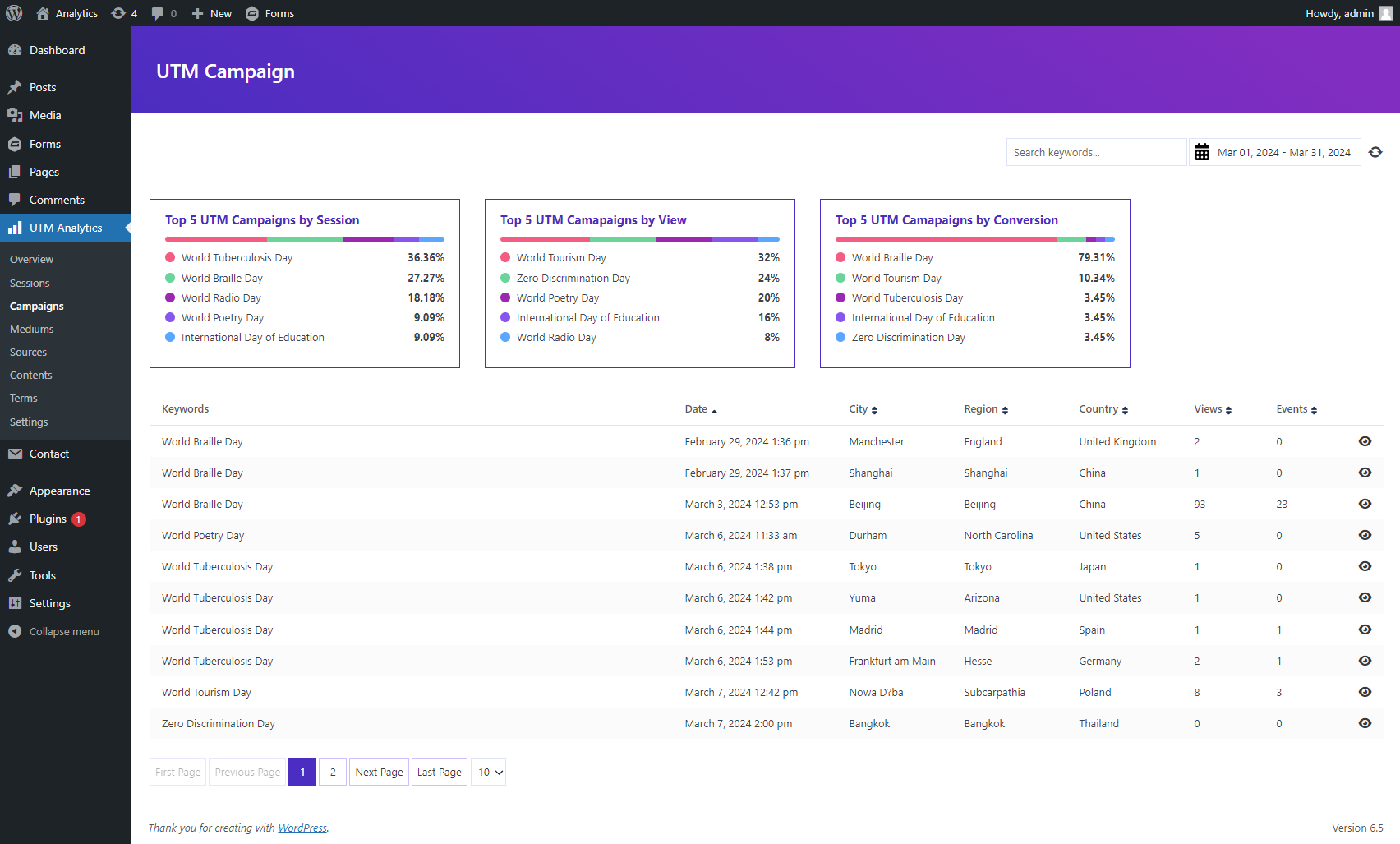
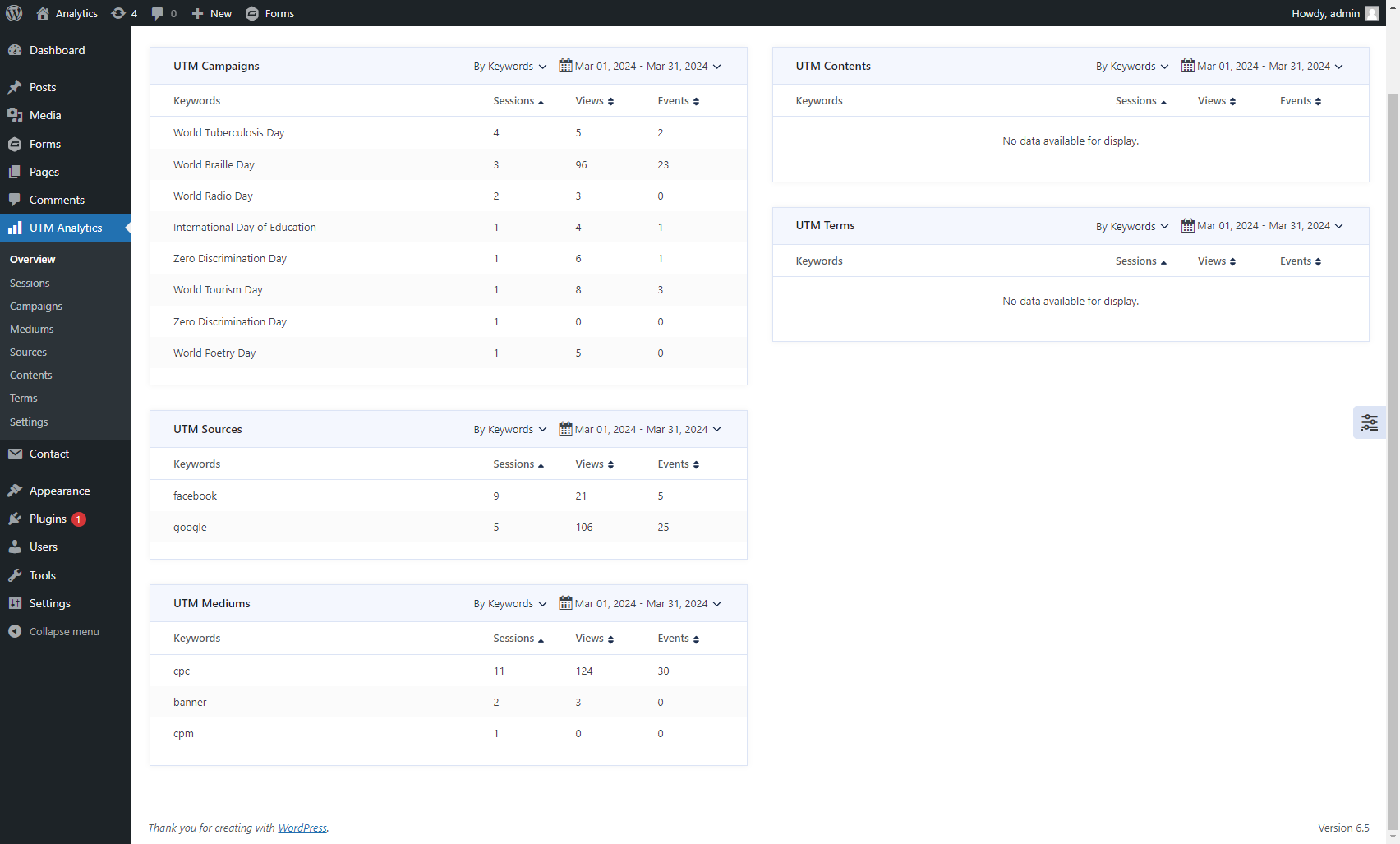
UTM Analytics: Gain valuable insights into the effectiveness of your marketing campaigns through UTM tracking. Analyze traffic sources, campaign performance, conversion rates, and more to optimize your marketing strategies.
Customizable Reports: Generate customizable reports to visualize your data effectively. Customize reports based on specific UTM parameters, date ranges, and metrics to meet your unique reporting needs.
User-friendly Interface: Enjoy an intuitive and user-friendly interface for seamless navigation and data analysis. Easily access and interpret your UTM tracking data with built-in tools and visualizations.
Campaign Performance Monitoring: Monitor the performance of your marketing campaigns in real-time. Track the success of each campaign by analyzing UTM parameters and adjusting your strategies accordingly.
Event Attribution: Attribute events to specific marketing campaigns or channels using UTM parameters. Understand the impact of each campaign on user engagement and conversion metrics.
Advanced Filtering: Apply advanced filters to analyze specific segments of your audience. Filter data based on UTM parameters, user characteristics, or behavior to uncover actionable insights.
Real-time Reporting: View real-time reports and analytics to stay up-to-date with the performance of your marketing efforts. Monitor events and conversions as they happen to make timely adjustments to your campaigns.
Custom Parameter Support (Pro): Add and track your own custom URL parameters alongside standard UTM parameters. Useful for tracking affiliates, campaigns, internal promotions, or any custom source identifiers you need.
These features collectively empower you to track events accurately, analyze data effectively, and optimize your marketing campaigns for maximum impact. Whether you’re a marketer, business owner, or website administrator, the UTM Event Tracker and Analytics plugin is a valuable tool for improving your marketing ROI and driving business growth.
Use Cases
- Track marketing campaigns: Capture UTM parameters to understand which campaigns drive traffic.
- Identify top-performing traffic sources: Easily compare visits from ads, social media, email, and other channels.
- Analyze user behavior: Follow user actions across pages to understand how visitors interact with your site.
- Measure conversion paths: See which sources and pages users come from before converting.
- Track direct and organic visits: Get session data even when users arrive without UTM parameters (optional setting).
- Advanced tracking with custom parameters (Pro): Use your own custom URL parameters to track affiliates, influencers, internal promotions, or unique campaign identifiers.
- Better analytics for UI interactions: Log events and user clicks to understand which buttons or links users engage with the most. (Pro for unlimited events)
- Maintain clean and consistent session data: Append UTM parameters to internal links to prevent losing tracking information. (Pro)
We are tracking the events for the plugins listed below
- WooCommerce: We capture woocommerce add to cart and place order event. see guideline
- Easy Digital Downloads: We capture add to cart and purchase event of Easy Digital Downloads.
- Custom Events: You can capture a wide range of custom events on your webpage, including button clicks, hyperlink clicks, and other user interactions. This allows you to track and analyze user behavior effectively..
- Form Submission: Contact Form 7, Elementor Form, Formidable Form, Forminator Form, Gravity Form, Ninja Form, WPForms.
If your plugin is not listed here, please feel free to open a ticket here.
We support most WordPress form plugins, with some of them listed below
- Contact Form 7 – see guideline
- Gravity Forms – see guideline
- Ninja Forms – see guideline
- Elementor Forms – see guideline
- Formidable Forms – see guideline
- Forminator Forms
- WPForms – see guideline
You can use {utm_event_tracker:utm_source} as the default value to retrieve the UTM Source for any kind of forms. To capture a different UTM parameter, simply replace utm_source with the desired parameter name. Below is a list of available UTM parameters for reference:
Supported parameters
- utm_campaign
- utm_medium
- utm_source
- utm_term
- utm_content
- fbclid
- gclid
- ip_address
- landing_page
- tracking_time
- Custom Parameters (Pro)
To implement UTM data, you can utilize either the ID or Class of the input element. For example, you can use the following syntax to track UTM parameters:
<input id="utm-event-tracker-utm_source" name="utm-source-field-name" />
<input class="utm-event-tracker-utm_campaign" name="utm-campaign-field-name" />

<div class="utm-event-tracker-utm_campaign">
<input name="your-field-name" />
</div>
This approach allows you to efficiently integrate UTM data tracking into your form elements.
JavaScript Implementation
To implement UTM tracking using JavaScript, follow these steps:
var utmSource = utm_event_tracker.utm_parameters.utm_source;
var utmMedium = utm_event_tracker.utm_parameters.utm_medium;
var utmCampaign = utm_event_tracker.utm_parameters.utm_campaign;

console.log('UTM Source:', utmSource);
console.log('UTM Medium:', utmMedium);
console.log('UTM Campaign:', utmCampaign);
This implementation will allow you to capture and utilize UTM parameters for tracking and analytics effectively.
Support
For any questions, issues, or feedback regarding the UTM Event Tracker and Analytics plugin, feel free to post here.
Thank you for using the UTM Event Tracker and Analytics plugin! We hope it helps you optimize your marketing efforts and gain valuable insights into your website’s performance. If you find this plugin useful, don’t forget to leave a review and share it with others!
Screenshots


Reviews
Good Integration with Gravity Forms and WP Forms
By 
This plugin is so useful and has saved me a huge amount of time. It's integration with GF and WP forms is rock solid too! I can't recommend it enough!
Thank you!
I love this plugin. I also like the UI and it is working well! thanks
By 
I love this plugin, I also like the UI and it is working well! thanks
Great plugin!
By 
It is a very easy to use plugin. The support has been very fast and has resolved questions without problems. Its integrations with Woocommerce, Elementor Forms, etc. make UTM tracking complete and effective.
Excellent support
By 
I've recently tried the UTM Event Tracker and Analytics plugin, and it truly delivers on its promises. It integrates seamlessly with WooCommerce orders right out of the box, making it incredibly convenient. I also had an issue and reached out to their support. They were quick to respond, highly communicative, and took the issue seriously, resolving it swiftly. Overall, an excellent experience—I can only recommend using this plugin!
Awesome plugin!
By 
Simple and straightforward functionality! Easy to monitor UTM parameters and pass them across pages via the URL.
Repon, thank you for your great work!
Good and easy to use
By 
Very easy to setup and use. Nice clean interface. Also very fast support.
Changelog
1.1.9
- Added support for Custom Parameters (Pro feature) to allow tracking with user-defined URL parameters.
- Added new setting to manage Custom Parameters with a clear upgrade prompt for Pro users.
- Improved settings UI and updated descriptions for better clarity.
- Minor enhancements and stability improvements.
1.1.8
- Fixed a minor issue
1.1.7
- Fixed add to cart issue for woocommerce
1.1.6
- Fixed minor issue
1.1.5
- Fixed SQL query for alter type of session_id
1.1.4
- Added a new tracking_time parameter
- Fixed an issue with duplicate view capture
1.1.3
- Fixed the view count issue in the events table.
- Added a new feature to capture Google Analytics 4 events.
- Introduced a new setting for admins to clear the current session for testing purposes.
1.1.2
- Added a new feature to track button and link clicks.
- Introduced a new dashboard for analyzing custom event clicks.
1.1.1
- Added a placeholder for the UTM parameter value in the Elementor Form.
- Fixed multiple form submission of Contact Form 7
1.1.0
- Added smart value for Formidable Forms
1.0.9
- Fixed add view count
1.0.8
- Fixed order meta box of UTM Event Tracker
1.0.7
- Updated version number of frontend js for ignore cache
1.0.6
- Added: Capture referrer
1.0.5
- Add option for adding UTM parameter in the URL on frontend
1.0.4
- Fix sort issue
- Update cookie key
- Assure compliance with WordPress 6.7.1
1.0.3
- Added: Piotnet Forms
- Assure compliance with WordPress 6.5.5
- Optimized code
1.0.2
- Assure compliance with WordPress 6.5.3
- Added a function for adding events from theme or third-party plugins
1.0.1
- Added feature to use UTM parameters of other form using class or ID selector
1.0.0
- First release