VDot Crypto Payment Gateway — NOW Payments

VDot Crypto Payment Gateway — NOW Payments
Description
The VDot Crypto Payment Gateway for NOWPayments plugin seamlessly integrates the NOWPayments payment gateway with your WooCommerce store, allowing you to accept cryptocurrency payments from customers worldwide.
Features
- Accept 300+ cryptocurrencies including Bitcoin (BTC), Ethereum (ETH), USDT, USDC, and more.
- Automatic conversion to stablecoins to avoid crypto volatility.
- Live exchange rates updated in real-time.
- Customizable payment page with QR code generation for easy payments.
- Email notifications for payment created, received, confirmed, failed, and expired.
- IPN (Instant Payment Notification) processing for reliable payment verification.
- Configurable confirmation thresholds for transaction security.
- Detailed payment logs for troubleshooting and auditing.
- Responsive, mobile-friendly payment page.
- Countdown timer for payment window.
- Multi-network support (ERC-20, BEP-20, TRC-20, etc.).
- Exchange rate caching for improved performance.
- Multi-wallet management with smart payment routing.
- Setup wizard for first-time configuration.
- Settings import/export with integrity verification.
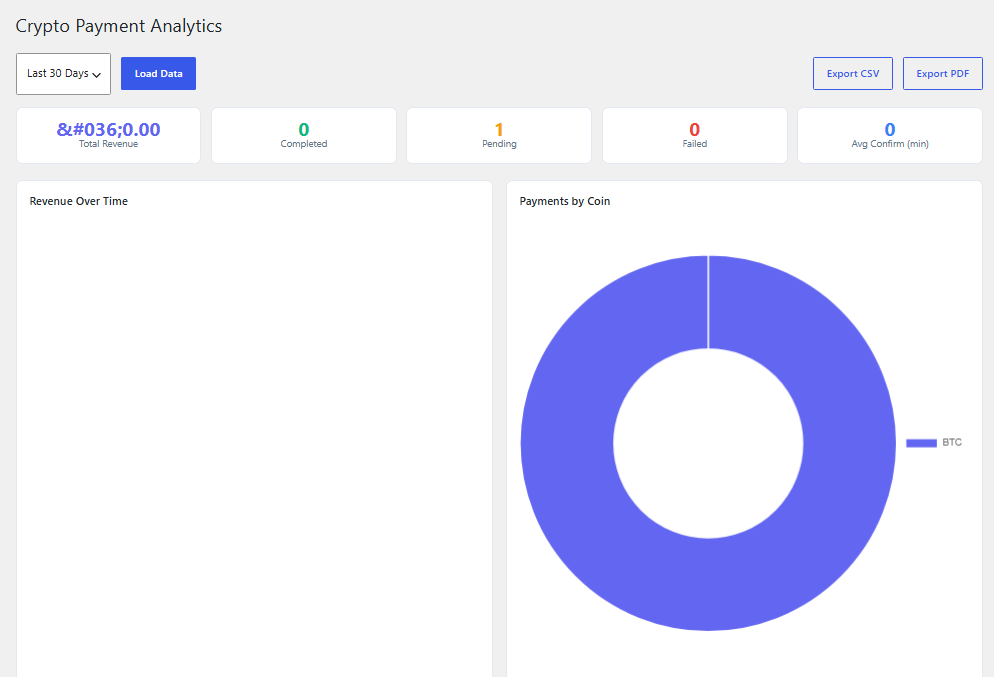
- Admin dashboard with payment analytics and system health.
- WooCommerce HPOS (Custom Order Tables) compatible.
- WooCommerce Blocks Checkout compatible.
- Full translation ready (.pot file included).
- Secure with nonce verification and capability checks.
How it Works
- Customer selects cryptocurrency payment at checkout.
- Customer is redirected to the payment page showing the exact amount to send, wallet address, and QR code.
- Customer sends the exact amount from their wallet.
- The plugin monitors the transaction status via NOWPayments API and webhooks.
- Once confirmed, the order status is automatically updated.
- Email notifications keep the customer informed at every step.
External Services
This plugin connects to the NOWPayments API to create cryptocurrency payments and retrieve payment statuses.
Service: NOWPayments
Purpose:
Create cryptocurrency invoices, check payment status, and process payment notifications.
Data sent:
- Order amount
- Currency
- Selected cryptocurrency
- Order ID
- Callback URL
Data is only transmitted when a customer places an order.
Hooks
Actions
vdot_npg_before_payment_created( $order_id, $payment_data )
Triggered before a payment is created via the NOWPayments API.
vdot_npg_after_payment_created( $order_id, $payment_data )
Triggered after a payment is successfully created.
vdot_npg_before_payment_status_check( $order_id, $payment_id )
Triggered before checking payment status.
vdot_npg_after_payment_status_check( $order_id, $payment_data )
Triggered after checking payment status.
vdot_npg_payment_confirmed( $order_id, $payment_data )
Triggered when a payment is fully confirmed.
vdot_npg_payment_failed( $order_id, $payment_data )
Triggered when a payment fails.
vdot_npg_payment_expired( $order_id, $payment_data )
Triggered when a payment expires.
vdot_npg_before_send_email( $email_type, $order_id, $payment_data )
Triggered before sending a payment notification email.
Filters
vdot_npg_payment_page_vars( $vars, $order_id )
Filter the variables passed to the payment page template.
vdot_npg_payment_data( $payment_data, $order_id )
Filter the payment data before saving to order meta.
vdot_npg_api_request_args( $args, $endpoint )
Filter the arguments sent to the NOWPayments API.
vdot_npg_api_response( $response, $endpoint )
Filter the response received from the NOWPayments API.
vdot_npg_confirmation_threshold( $threshold, $currency )
Filter the required confirmation count for a cryptocurrency.
vdot_npg_cache_duration( $duration, $key )
Filter the exchange rate cache duration.
vdot_npg_email_heading( $heading, $email_type, $order_id )
Filter the email heading for payment notifications.
vdot_npg_payment_page_template( $template_path, $order_id )
Filter the payment page template path.
vdot_npg_ipn_log_capability( $capability )
Filter the capability required to view IPN log entries.
vdot_npg_allowed_payment_states( $states )
Filter the list of allowed payment states for status transitions.
vdot_npg_blockchain_explorers( $explorers )
Filter the blockchain explorer URL registry.
Installation
Automatic Installation
- Go to Plugins > Add New in your WordPress admin.
- Search for “VDot Crypto Payment Gateway for NOWPayments”.
- Click Install Now and then Activate.
Manual Installation
- Download the plugin zip file.
- Go to Plugins > Add New > Upload Plugin.
- Select the zip file and click Install Now.
- Click Activate Plugin.
After Activation
- Complete the setup wizard that appears on first activation.
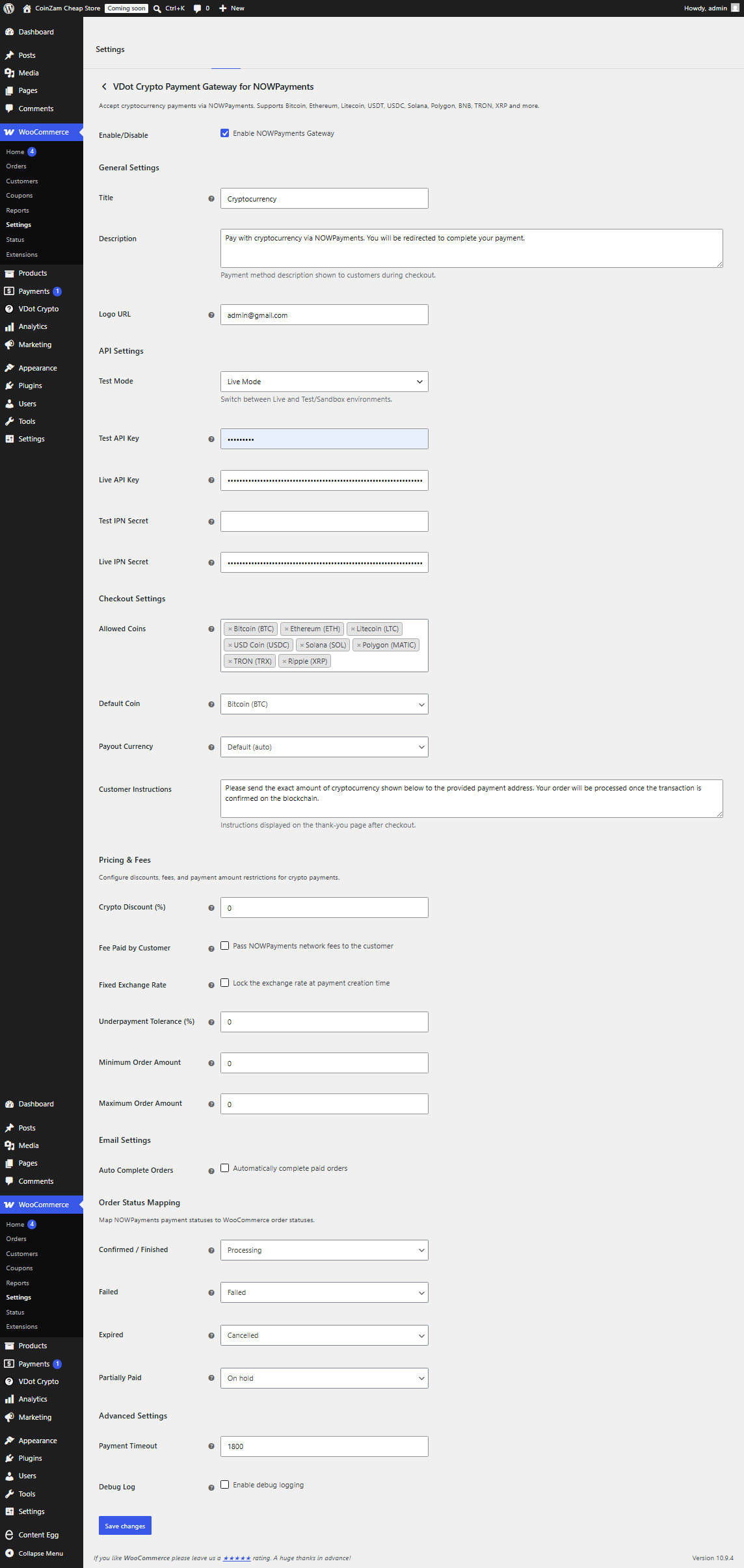
- Or go to WooCommerce > Settings > Payments.
- Find “NOWPayments Gateway” and click Set up or Manage.
- Enter your NOWPayments API key and IPN secret key.
- Configure payment settings (allowed coins, exchange rate mode, timeout, etc.).
- Click Save Changes.
Obtaining API Keys
- Register or log in at NOWPayments.
- Navigate to Settings > API Keys.
- Generate a new API key.
- Copy the API key and IPN secret key into the plugin settings.
- Set the IPN callback URL to:
https://your-site.com/wp-json/vdot-nowpayments/v1/webhook
Screenshots
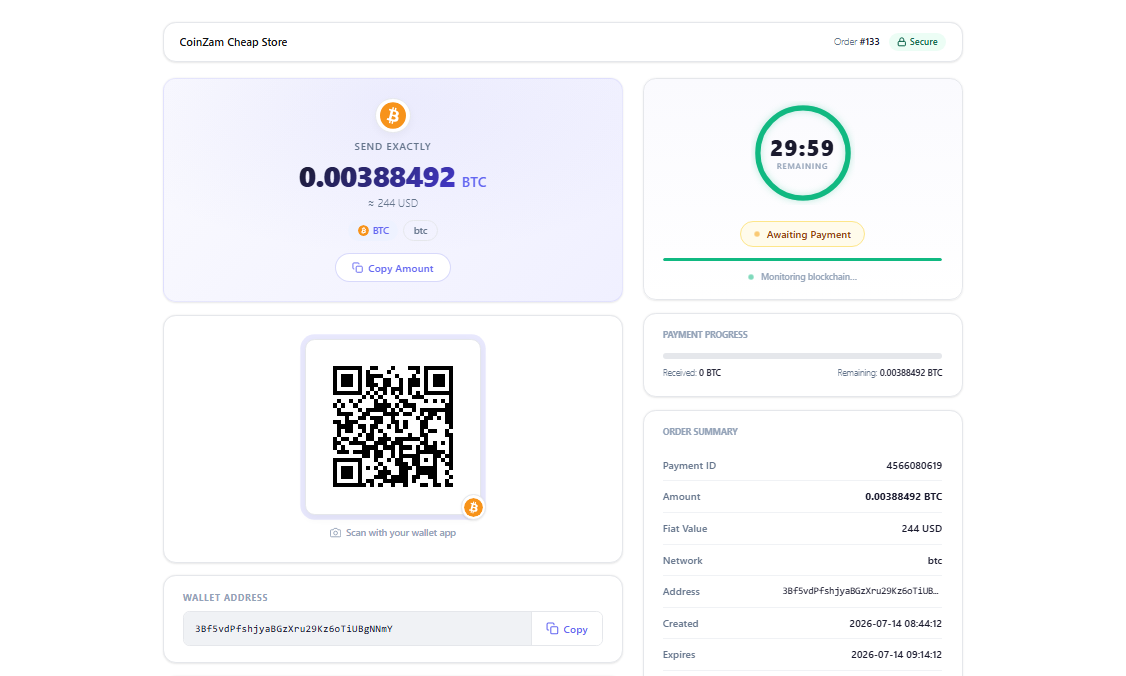
Payment page showing QR code, amount, and wallet address
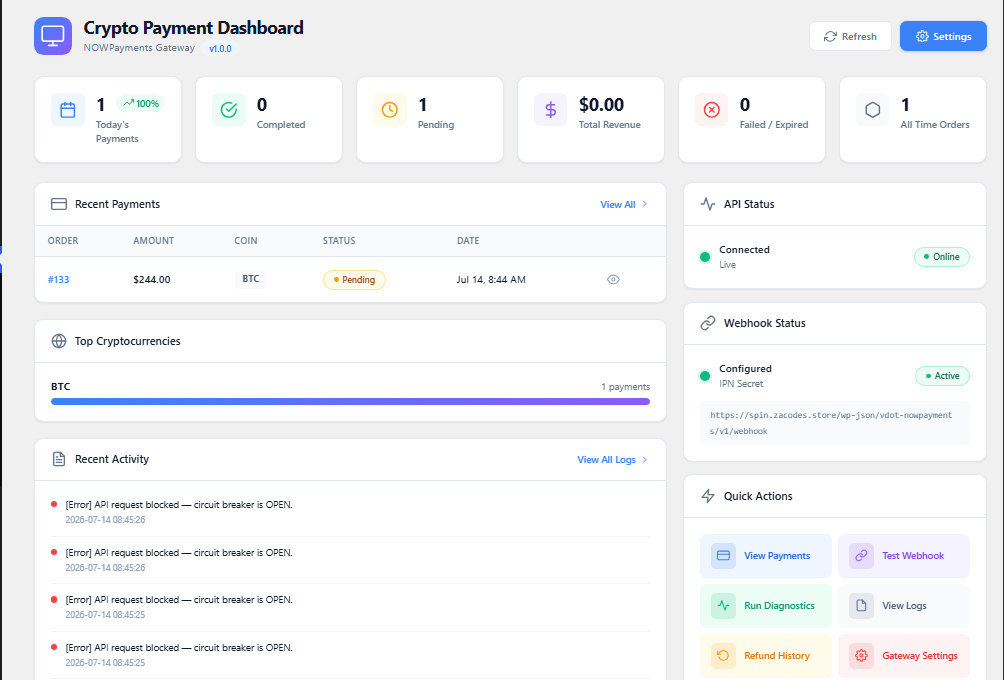
Admin dashboard with transaction overview
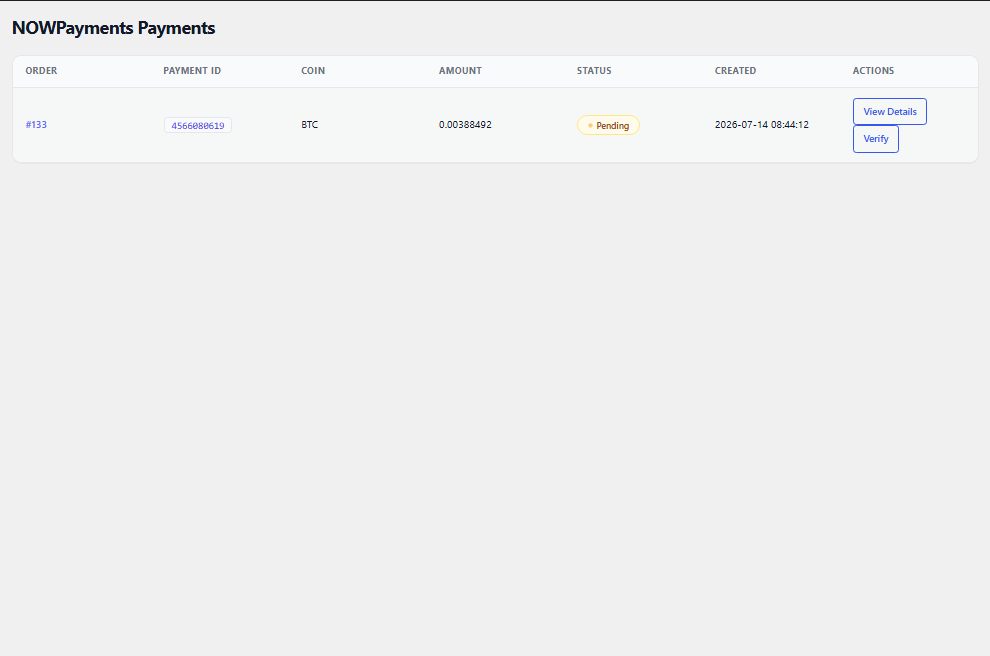
Payment page
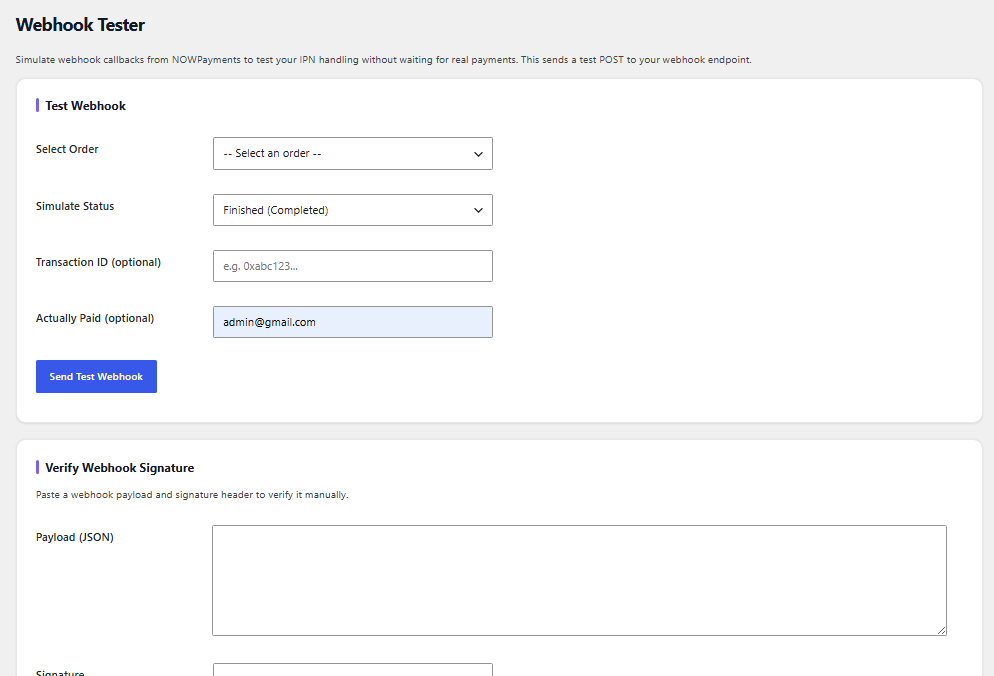
Webhook Tester
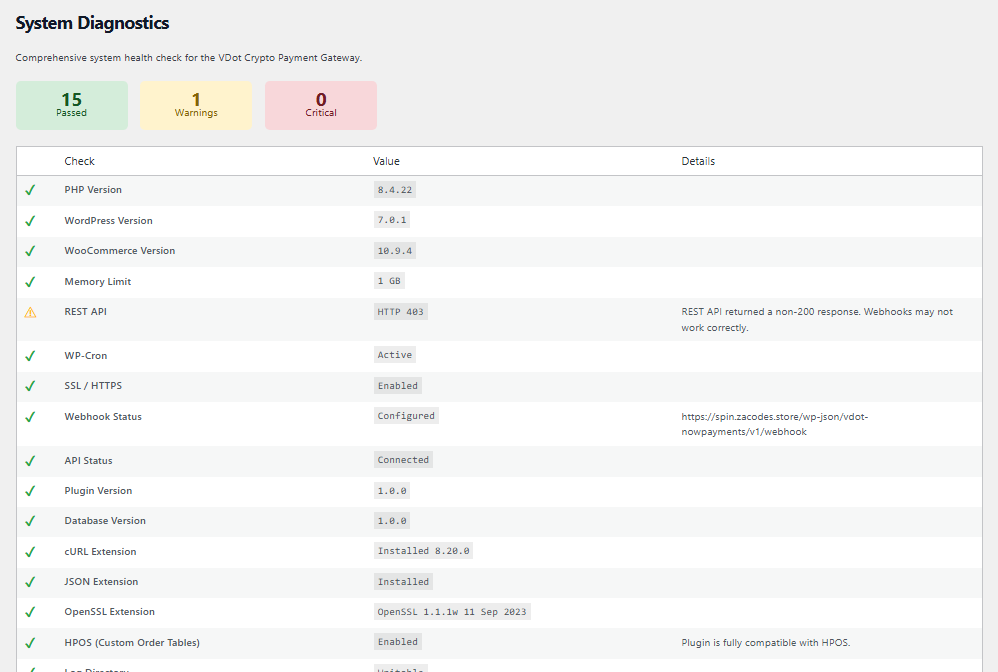
Settings
Payment Analytics
WordPress 6.4 or higher.
Faq
Over 300 cryptocurrencies are supported including Bitcoin (BTC), Ethereum (ETH), Litecoin (LTC), Bitcoin Cash (BCH), Binance Coin (BNB), Ripple (XRP), Cardano (ADA), Solana (SOL), Polygon (MATIC), USD Coin (USDC), Tether (USDT), and many more.
Support depends on the cryptocurrency. Common networks include BTC, ETH (ERC-20), BSC (BEP-20), TRX (TRC-20), MATIC, SOL, and XRP Ledger.
NOWPayments charges a 0.5% fee per transaction. Additional blockchain network fees may apply.
Yes. You can enable stablecoin conversion to accept volatile cryptocurrencies while being paid in stablecoins like USDT, USDC, or DAI.
The payment window is configurable in the plugin settings. The default is 30 minutes.
This is configurable per cryptocurrency. Default values are provided by NOWPayments based on security best practices.
The order will be marked as “Failed” and the customer will receive an email notification to try again.
Yes, the payment page is fully responsive and works on all devices.
The payment page template is located in the plugin’s templates directory. You can override it by copying the template to your theme’s vdot-crypto-gateway-nowpayments/ directory.
Enable Sandbox Mode in the plugin settings. Use the NOWPayments sandbox API endpoints. No real transactions will be processed.
Yes. The plugin fully supports WooCommerce High-Performance Order Storage (Custom Order Tables).
Yes. The plugin is compatible with both the classic shortcode checkout and the new WooCommerce Blocks-based checkout.
Reviews
Changelog
1.0.2
2026-08-24
* Fix: Countdown timer now counts in real time (UTC-based expiry, deferred-script DOM cache, inline fallback) — previously only changed on page refresh.
* Fix: Check Status button now works via forced pollNow(true) with visual feedback, delegation, and inline XHR fallback when monitor is blocked.
* Fix: Payment and checkout coin icons now show reliably — normalized currency codes (usdttrc20 usdt), default.svg fallback, onerror handlers, Blocks checkout icon grid.
* Fix: QR codes now always show — local GD fallback to api.qrserver.com, directory protection, and address fallback text.
* Fix: Prevented double-enqueue of legacy payment.js on modern payment page template (conflicting jQuery dependency).
* Fix: Payment content no longer hidden if JS fails (<noscript> fallback); all action buttons now type="button".
* Upgrade: One-time 1.0.2 migration backfills _vdot_npg_expires_at_utc for existing orders and ensures QR protection files; DB version 1.0.2 with vdot_npg_102_migrated lock.
* Tested up to WordPress 7.1, WooCommerce 10.9, PHP 8.1-8.3.
1.0.1
2026-08-21
* Updated author from Sipho213 to Nhlapo Sipho.
* Full WordPress 7.1 compatibility.
* Full PHP 8.1, 8.2, and 8.3 compatibility.
* Full WooCommerce HPOS (High-Performance Order Storage) compatibility.
* Full WooCommerce Blocks Checkout compatibility.
* Added Site Health integration: API connection test, webhook test, PHP requirements, WooCommerce requirements.
* Added payment recovery email system with automated retry notifications.
* Added invoice regeneration feature for customers and admins.
* Added admin analytics dashboard with Revenue Today, Revenue This Week, Revenue This Month, Success Rate, and Expired Payments.
* Added comprehensive error logging throughout all components.
* Added audit trail logging for all payment state changes.
* Added nonce verification to all AJAX endpoints.
* Added capability checks to all admin actions.
* Sanitized all GET, POST, and REQUEST values.
* Escaped all output using esc_html, esc_attr, wp_kses_post, and appropriate escaping functions.
* Verified ABSPATH protection in all PHP files.
* Improved uninstall cleanup for options, transients, cron jobs, and log files.
* Added keyboard navigation support across all interactive elements.
* Added ARIA labels and WCAG 2.1 Level AA compliance improvements.
* Reduced database queries with optimized order lookups.
* Added exchange rate caching for improved performance.
* Lazy loaded admin assets for faster page loads.
* Verified all text strings are translation-ready with proper text domain.
* Verified all REST endpoints use permission callbacks.
* Verified all webhooks use signature validation.
* Removed deprecated functions and improved code standards.
* Full PHPCS WordPress Coding Standards compliance.
* Plugin Check and Plugin Review ready.
* Maintained backward compatibility with existing installations.
* Production-ready for WordPress.org and commercial deployment.
1.0.0
2026-07-08
* Initial release.
* NOWPayments API integration for payment creation and status checking.
* Customizable payment page with QR code, wallet address, and countdown timer.
* WooCommerce email notifications for all payment states.
* IPN/webhook handler for automatic payment verification.
* Admin order page with detailed payment information and IPN log.
* Configurable confirmation thresholds per cryptocurrency.
* Exchange rate caching for improved performance.
* Multi-network support (ERC-20, BEP-20, TRC-20).
* Multi-wallet management with smart payment routing.
* Setup wizard for guided first-time configuration.
* Admin dashboard with payment analytics.
* Settings import/export with integrity verification.
* WooCommerce HPOS (Custom Order Tables) compatible.
* WooCommerce Blocks Checkout compatible.
* Full translation ready.