Vibe Testimonial Shoutouts
Vibe Testimonial Shoutouts
Description
Transform your website’s social proof with Vibe Testimonial Shoutouts, the ultimate WordPress plugin designed to collect and showcase authentic user reviews. Whether you are looking for a sleek Testimonial Slider, a dynamic Grid Layout, or an engaging Marquee, this plugin offers a “Wall of Love” design that seamlessly integrates with any theme. It stands out among competitors as the most customizable reviews widget and social proof tool available for WordPress.
Elevate your brand’s credibility by displaying Customer Feedback and Client Testimonials in a visually stunning interface. Our user-friendly Shortcode system and dedicated Gutenberg Blocks make it effortless to publish reviews anywhere on your site. Unlike other testimonial plugins, Vibe Testimonial Shoutouts is the perfect tool to harness the power of Social Proof and drive conversions with a beautiful, modern Wall of Love.
Key Features:
* Wall of Love: A beautiful masonry-style layout to showcase all your best testimonials and reviews.
* Marquee Mode: An infinite scrolling loop of reviews, perfect for headers, footers, or catching attention.
* Front-end Submission Form: Allow users to submit their shoutouts directly from your website.
* Fully Responsive: Looks great across all desktops, tablets, and mobile devices.
* Highly Customizable: Easily adjust colors, fonts, and layouts to match your brand identity.
* Social Avatars: Automatically fetch Twitter/X avatars or upload custom images to provide authentic social proof.
* Review Management: Effortlessly approve, edit, and categorize testimonials from an intuitive admin dashboard.
* Gutenberg Ready: Dedicated blocks for a seamless and native editing experience in WordPress.
* Interactive Admin Dashboard: A helpful settings sidebar and smart admin notifications to assist you while setting up your Wall of Love.
Shortcodes
Use the following shortcodes to display testimonials or the submission form anywhere on your site.
1. Testimonial Wall
Display your testimonials in a responsive masonry grid.
[vibetesh_shoutout_wall]
Attributes:
* limit (optional): The number of testimonials to display. Default is -1 (all).
* cols (optional): The number of columns in the grid. Default is 3.
* enable_title (optional): Show or hide the testimonial title. Values: yes, no. Default is based on settings.
* categories (optional): Filter by category IDs or slugs (comma-separated). Default is empty (all).
2. Testimonial Marquee
Display your testimonials in a smooth, infinite scrolling loop.
[vibetesh_shoutout_marquee]
Attributes:
* limit (optional): The number of testimonials to display. Default is -1 (all).
* rows (optional): The number of rows in the marquee. Default is 2.
* speed (optional): The duration of the animation in seconds. Lower number = faster speed. Default is 60.
* bg_color (optional): Custom background color (Hex code).
* text_color (optional): Custom text color (Hex code).
* highlight_color (optional): Custom border/accent color (Hex code).
* categories (optional): Filter by category IDs or slugs (comma-separated). Default is empty (all).
3. Submission Form
Display the front-end testimonial submission form.
[vibetesh_shoutout_submit]
Examples
Marquee with Custom Styles:
To create a marquee with 1 row, 60-second speed, dark background, and white text:
[vibetesh_shoutout_marquee rows="1" speed="60" bg_color="#000000" text_color="#ffffff" highlight_color="#ffcc00"]
Wall with Limit:
To display the latest 9 testimonials in a 3-column grid:
[vibetesh_shoutout_wall limit="9" cols="3"]
Wall with Category Filter:
To display testimonials from the “Design” category:
[vibetesh_shoutout_wall categories="Design"]<h3>Blocks</h3>
Vibe Testimonial Shoutouts comes with dedicated Gutenberg blocks for easier integration.
- Vibe Testimonial Wall: Displays your testimonials in a masonry grid.
- Vibe Testimonial Marquee: Displays a scrolling marquee of testimonials.
- Vibe Submission Form: Displays the front-end submission form.
How to use:
1. Go to the page or post where you want to add the testimonials.
2. Click the “+” button to add a new block.
3. Search for “Vibe Testimonial Shoutouts”.
4. Select the desired block (Wall, Marquee, or Form).
5. Configure settings (like Limit, Columns, Speed, Colors) directly from the block settings sidebar.
External Services
This plugin relies on third-party services to display user avatars only when specific options are selected. If you upload a reviewer image directly via the settings or submission form, these services are NOT used.
-
unavatar.io
- Service: unavatar.io (by microlink.io)
- Usage: Used to fetch profile images for Twitter/X handles. Only used if “Use X (Twitter) Avatar” is explicitly selected for a testimonial.
- Data Sent: The Twitter handle is sent to the unavatar.io API to retrieve the corresponding profile image.
- Privacy Policy: unavatar.io Privacy
-
Gravatar
- Service: Gravatar (by Automattic)
- Usage: Used as a fallback to display a default avatar. Only used if no custom image is uploaded AND no Twitter avatar is selected.
- Data Sent: A hash of the user’s email address (if available) or a default request is sent to Gravatar servers to generate a placeholder image.
- Privacy Policy: Automattic Privacy Policy
Screenshots

Marquee running style testimonial on the frontend

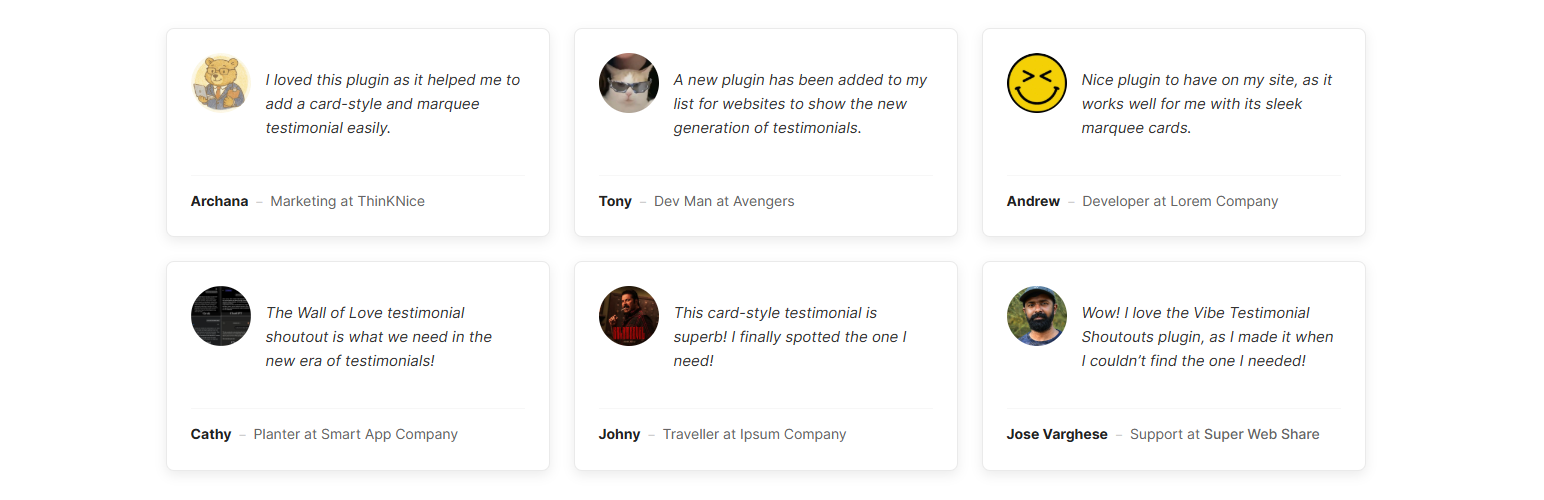
Card style testimonial on the frontend

Testimonial Shoutout form to collect the testimonial from users (frontend)

Settings page of the Testimonial review page

Metabox to enter the details of the Reviews name, Company, Position, link for the testimonial, website and image

Settings page with mentioning the shortcodes and options to change the color.
Faq
You can add testimonials via the “Vibe Testimonials” menu in your WordPress dashboard or let users submit them via the frontend form using the [vibetesh_shoutout_submit] shortcode.
Yes! You can customize colors in the plugin settings page or use the shortcode attributes for the Marquee layout specifically.
Absolutely. The “Wall of Love” and Marquee layouts are fully responsive and look great on all devices.
Reviews
Great plugin for modern wall of love testimonial display
By 
The plugin makes it easy to display customer feedback in a visually engaging format. Setup is simple, the layouts look modern, and customization is flexible enough to match branding.
It’s lightweight, does what it promises, and helps highlight social proof effectively. Great option if you want impactful testimonials without complexity.
Changelog
1.0.1
Release Date: March 1, 2026
* Improved Admin Experience: Added a supportive settings sidebar with quick links to FAQs and documentation.
1.0.0
Release Date: February 25, 2026
* Review Management: Easily approve, edit, and organize client testimonials.
* Wall of Love Layout: A masonry grid to showcase all your reviews at once.
* Marquee Layout: Infinite scrolling loop for a dynamic and engaging display.
* Frontend Submission Form: Let users submit testimonials directly from your site.
* Image Support: Upload custom photos or automatically fetch Twitter/X avatars.
* Gutenberg Blocks: Seamless integration with the WordPress block editor.
* Category Filtering: Organize and display testimonials by specific categories.
* Mobile Responsive: Optimized designs that look perfect on any device.
* Customization Options: Control colors, speed, columns, and more.